lock GMC ENVOY 2003 Workshop Manual
[x] Cancel search | Manufacturer: GMC, Model Year: 2003, Model line: ENVOY, Model: GMC ENVOY 2003Pages: 442, PDF Size: 3.1 MB
Page 173 of 442

Always reset the engine oil life after an oil change. To
reset the Oil Life System press and hold the select
button while ENGINE OIL LIFE is displayed.
The oil change reminder does not measure how much
oil you have in your engine. So, be sure to check your oil
level often. For more information, see
Engine Oil on
page 5-15.
Personalization
You can program certain features to a preferred setting
for up to two people. Press the personalization button
to scroll through the following personalization features.
All of the personalization options may not be available
on your vehicle. Only the options available will be
displayed on your DIC.
·ALARM WARNING TYPE
·AUTOMATIC LOCKING
·AUTOMATIC UNLOCKING
·SEAT POSITION RECALL
·PERIMETER LIGHTING
·REMOTE LOCK FEEDBACK
·REMOTE UNLOCK FEEDBACK
·HEADLAMPS ON AT EXIT
·MIRROR CURB VIEW ASSIST
·EASY EXIT DRIVER SEAT
·DISPLAY UNITS (E/M)
·DISPLAY LANGUAGE
The driver's preferences are recalled by pressing the
unlock button on the remote keyless entry transmitter or
by pressing the appropriate memory button 1 or 2
located on the driver's door.
Alarm Warning Type
Press the personalization button until ALARM
WARNING TYPE appears in the display. To select your
personalization for alarm warning type, press the
select button while ALARM WARNING TYPE is
displayed on the DIC. Pressing the select button will
scroll through the following choices:
·ALARM WARNING: BOTH (default)
·ALARM WARNING: OFF
·ALARM WARNING: HORN
·ALARM WARNING: LAMPS
If you choose BOTH, the headlamps will ¯ash and the
horn will chirp when the alarm is active.
If you choose OFF, there will be no alarm warning on
activation.
If you choose HORN, the horn will chirp when the alarm
is active.
3-53
Page 174 of 442

If you choose LAMPS, the headlamps will ¯ash when
the alarm is active.
Choose one of the four options and press the
personalization button while it is displayed on the DIC to
select it and move on to the next feature. For more
information on alarm warning type, see
Content
Theft-Deterrent on page 2-17.
Automatic Locking
Press the select button while AUTOMATIC LOCKING is
displayed on the DIC to scroll through the following
choices:
·LOCK DOORS OUT OF PARK (default)
·LOCK DOORS MANUALLY
·LOCK DOORS WITH SPEED
If you choose for the doors to lock out of park, the
doors will lock when the vehicle is shifted out of
PARK (P).
If you choose for the doors to lock manually, the doors
will not be locked automatically.
If you choose for the doors to lock with speed, the
doors will lock when the vehicle speed is above 8 mph
(13 km/h) for three seconds.Press the personalization button while your choice is
displayed on the DIC to select it and move on to the next
feature. For more information on automatic door locks
see
Programmable Automatic Door Locks on page 2-10.
Automatic Unlocking
Press the personalization button until AUTOMATIC
UNLOCKING appears in the display. To select
your personalization for automatic unlocking, press the
select button while AUTOMATIC UNLOCKING is
displayed on the DIC. Pressing the select button will
scroll through the following choices:
·UNLOCK ALL IN PARK (default)
·UNLOCK ALL AT KEY OUT
·UNLOCK DOORS MANUALLY
·UNLOCK DRIVER IN PARK
If you choose for all the doors to unlock in park, all of
the doors will unlock when the vehicle is shifted
into PARK (P).
If you choose for all the doors to unlock at key out, all
of the doors will unlock when the key is taken out of the
ignition.
If you choose for the doors to unlock manually, the
doors will not be unlocked automatically.
3-54
Page 175 of 442

If you choose for the driver's door to unlock in park, the
driver's door will be unlocked when the vehicle is
shifted into PARK (P).
Choose one of the four options and press the
personalization button while it is displayed on the DIC to
select it and move on to the next feature. For more
information on automatic door locks see
Programmable
Automatic Door Locks on page 2-10.
Seat Position Recall
Press the personalization button until SEAT POSITION
RECALL appears in the display. To select your
personalization for seat position recall, press the select
button while SEAT POSITION RECALL is displayed
on the DIC. Pressing the select button will scroll through
the following choices:
·SEAT POSITION RECALL OFF (default)
·SEAT POSITION RECALL AT KEY IN
·SEAT POSITION RECALL ON REMOTE
If you choose seat recall off, the memory seat position
you saved will only be recalled when the memory
button 1 or 2 is pressed.
If you choose seat recall at key in, the memory seat
position you saved will be recalled when you put the key
in the ignition.If you choose seat recall on remote, the memory seat
position you saved will be recalled when you unlock the
vehicle with the remote keyless entry transmitter.
Choose one of the three options and press the
personalization button while it is displayed on the DIC to
select it and move on to the next feature.
Perimeter Lighting
Press the personalization button until PERIMETER
LIGHTING appears in the display. To select your
personalization for perimeter lighting, press the select
button while PERIMETER LIGHTING is displayed on the
DIC. Pressing the select button will scroll through the
following choices:
·PERIMETER LIGHTING ON (default)
·PERIMETER LIGHTING OFF
If you choose for perimeter lighting to be on, the
headlamps and back-up lamps will come on for
40 seconds, if it is dark enough outside, when you
unlock the vehicle with the remote keyless entry
transmitter.
Choose one of the two options and press the
personalization button while it is displayed on the DIC to
select it and move on to the next feature.
3-55
Page 176 of 442

Remote Lock Feedback
Press the personalization button until REMOTE LOCK
FEEDBACK appears in the display. To select your
personalization for the feedback you will receive when
locking the vehicle with the remote keyless entry
transmitter, press the select button while REMOTE
LOCK FEEDBACK is displayed on the DIC. Pressing
the select button will scroll through the following choices:
·LOCK FEEDBACK: BOTH (default)
·LOCK FEEDBACK: OFF
·LOCK FEEDBACK: HORN
·LOCK FEEDBACK: LAMPS
If you choose both, the parking lamps will ¯ash each
time you press the button with the lock symbol on
the remote keyless entry transmitter and the horn will
chirp the second time you press the lock button.
If you choose off, there will be no feedback when locking
the vehicle.
If you choose horn, the horn will chirp the second time
you press the button with the lock symbol on the
remote keyless entry transmitter.
If you choose lamps, the parking lamps will ¯ash each
time you press the button with the lock symbol on
the remote keyless entry transmitter.
Choose one of the four options and press the
personalization button while it is displayed on the DIC to
select it and move on to the next feature.
Remote Unlock Feedback
Press the personalization button until REMOTE
UNLOCK FEEDBACK appears in the display. To select
your personalization for the feedback you will receive
when unlocking the vehicle with the remote keyless entry
transmitter, press the select button while REMOTE
UNLOCK FEEDBACK is displayed on the DIC. Pressing
the select button will scroll through the following choices:
·UNLOCK FEEDBACK: LAMPS (default)
·UNLOCK FEEDBACK: BOTH
·UNLOCK FEEDBACK: OFF
·UNLOCK FEEDBACK: HORN
If you choose lamps, the parking lamps will ¯ash each
time you press the button with the unlock symbol on the
remote keyless entry transmitter.
If you choose both, the parking lamps will ¯ash each
time you press the button with the unlock symbol on the
remote keyless entry transmitter. The horn will chirp
the second time you press the unlock button.
If you choose off, there will be no feedback when
unlocking the vehicle.
If you choose horn, the horn will chirp the second time
you press the button with the unlock symbol on the
remote keyless entry transmitter.
Choose one of the four options and press the
personalization button while it is displayed on the DIC to
select it and move on to the next feature.
3-56
Page 183 of 442
Audio System(s)
Notice:Before you add any sound equipment to
your vehicle ± like a tape player, CB radio, mobile
telephone or two-way radio ± be sure you can
add what you want. If you can, it's very important to
do it properly. Added sound equipment may
interfere with the operation of your vehicle's engine,
radio or other systems, and even damage them.
Your vehicle's systems may interfere with the
operation of sound equipment that has been added
improperly.
So, before adding sound equipment, check with
your dealer and be sure to check federal rules
covering mobile radio and telephone units.
Your audio system has been designed to operate easily
and to give years of listening pleasure. You will get
the most enjoyment out of it if you acquaint yourself with
it ®rst. Figure out which radio you have in your vehicle,
®nd out what your audio system can do and how to
operate all of its controls to be sure you're getting the
most out of the advanced engineering that went into it.
Your vehicle has a feature called Retained Accessory
Power (RAP). With RAP, you can play your audio
system even after the ignition is turned off. See
ªRetained Accessory Power (RAP)º under
Ignition
Positions on page 2-19.
Setting the Time
Your radio may have a button marked with an H or HR
to represent hours and an M or MIN to represent
minutes.
Press and hold the hour button until the correct hour
appears on the display. AM or PM will also appear
on the display. Press and hold the minute button until
the correct minute appears on the display. The time may
be set with the ignition on or off.
To synchronize the time with an FM station broadcasting
Radio Data System (RDS) information, press and
hold the hour and minute buttons at the same time for
two seconds until UPDATED and the clock symbol
appear on the display. If the time is not available from
the station, NO UPDAT will appear on the display
instead.
RDS time is broadcast once a minute. Once you have
tuned to an RDS broadcast station, it may take a
few minutes for your time to update.
3-63
Page 189 of 442
Radio Messages
CAL ERR (Calibration Error):This message is
displayed when the radio has not been calibrated
properly for the vehicle. You must return to the
dealership for service.
LOCKED:This message is displayed when the
THEFTLOCK
žsystem has locked up. You must return
to the dealership for service.
Playing a Compact Disc
Insert a disc partway into the slot, label side up. The
player will pull it in and the disc should begin playing.
The display will show the CD symbol. If you want
to insert a compact disc with the ignition off, ®rst press
TUNE or EJT.
The integral CD player can play the smaller 8 cm single
discs with an adapter ring. Full-size compact discs
and the smaller discs are loaded in the same manner.
If playing a CD-R the sound quality may be reduced due
to CD-R quality, the method of recording, the quality
of the music that has been recorded and the way
the CD-R has been handled. You may experience an
increase in skipping, difficulty in ®nding tracks and/or
difficulty in loading and ejecting. If these problems occur
try a known good CD.Do not add paper labels to discs, they could get caught
in the CD player.
Do not play 3 inch discs without a standard adapter
disc.
If an error appears on the display, see ªCompact Disc
Messagesº later in this section.
1 PREV (Previous):Press this pushbutton to go to the
previous track if the current track has been playing
for less than eight seconds. If pressed when the current
track has been playing for more than eight seconds,
it will go to the beginning of the current track. TRACK
and the track number will appear on the display. If
you hold this pushbutton or press it more than once, the
player will continue moving back through the disc.
2 NEXT:Press this pushbutton to go to the next track.
TRACK and the track number will appear on the
display. If you hold this pushbutton or press it more than
once, the player will continue moving forward through
the disc.
3 REV (Reverse):Press and hold this pushbutton to
reverse quickly within a track. Press and hold this
pushbutton for less than two seconds to reverse at six
times the normal playing speed. Press and hold it
for more than two seconds to reverse at 17 times the
normal playing speed. Release it to play the passage.
The display will show ET and the elapsed time.
3-69
Page 196 of 442

INFO (Information):If the current station has a
message, the information symbol will appear on the
display. Press this button to see the message. The
message may display the artist and song title, call in
phone numbers, etc.
If the whole message is not displayed, parts of it will
appear every three seconds. To scroll through the
message at your own speed, press the INFO button
repeatedly. A new group of words will appear on
the display with each press. Once the complete
message has been displayed, the information symbol
will disappear from the display until another new
message is received. The old message can be displayed
by pressing the INFO button until a new message is
received or a different station is tuned to.
When a message is not available from a station, NO
INFO will be displayed.
TRAF (Traffic):If TRAF appears on the display, the
tuned station broadcasts traffic announcements
and when a traffic announcement comes on the tuned
radio station you will hear it.If the current tuned station does not broadcast traffic
announcements, press this button and the radio
will seek to a station that does. When the radio ®nds a
station that broadcasts tra®ic announcements, it will
stop and TRAF will be displayed. When a traffic
announcement comes on the tuned radio station you
will hear it. If no station is found, NO TRAF will appear
on the display.
If TRAF is on the display you can press the TRAF
button to turn of the traffic announcements.
Your radio will play the traffic announcement even if the
volume is muted or interrupt the play of a cassette
tape or CD if the last tuned station broadcasts traffic
announcements.
Radio Messages
CAL ERR (Calibration Error):This message is
displayed when the radio has not been calibrated
properly for the vehicle. You must return to the
dealership for service.
LOCKED:This message is displayed when the
THEFTLOCK
žsystem has locked up. You must return
to the dealership for service.
3-76
Page 198 of 442
4 FWD (Forward):Press this pushbutton to advance
quickly to another part of the tape. Press this pushbutton
again to return to playing speed. The radio will play while
the tape advances. The station frequency and FWD will
appear on the display. You may select stations during
forward operation by using TUNE and SEEK.
5 SIDE:Press this pushbutton to play the other side of
the tape.
qSEEKr:The right arrow is the same as the
NEXT pushbutton, and the left arrow is the same as the
PREV pushbutton. If the arrow is held or pressed
more than once, the player will continue moving forward
or backward through the tape. SEEK and a positive
or negative number will appear on the display.
AM FM:Press this button to listen to the radio when a
tape is playing. The tape will stop but remain in the
player.
TAPE CD:Press this button to play a tape when
listening to the radio. Press this button to switch
between the tape and compact disc if both are loaded.
The inactive tape or CD will remain safely inside the
radio for future listening.
ZEJT (Eject):Press this button to stop a tape when
it is playing or to eject a tape when it is not playing. Eject
may be activated with the radio off. Cassette tapes may
be loaded with the radio off if this button is pressed ®rst.
Cassette Tape Messages
CHK TAPE (Check Tape):If CHK TAPE appears on
the radio display, the tape won't play because of one of
the following errors.
·The tape is tight and the player can't turn the tape
hubs. Remove the tape. Hold the tape with the
open end down and try to turn the right hub
counterclockwise with a pencil. Turn the tape over
and repeat. If the hubs do not turn easily, your
tape may be damaged and should not be used in
the player. Try a new tape to make sure your player
is working properly.
·The tape is broken. Try a new tape.
·The tape is wrapped around the tape head. Attempt
to get the cassette out. Try a new tape.
CLEAN:If this message appears on the display, the
cassette tape player needs to be cleaned. It will still play
tapes, but you should clean it as soon as possible to
prevent damage to the tapes and player. See
Care
of Your Cassette Tape Player on page 3-106.
If any error occurs repeatedly or if an error can't be
corrected, contact your dealer.
3-78
Page 214 of 442
Audio Speakers
Audio from the DVD player can only be heard either
through the IR headphones or wired headphones
(not included). The sound will not come through the
vehicle's speakers.
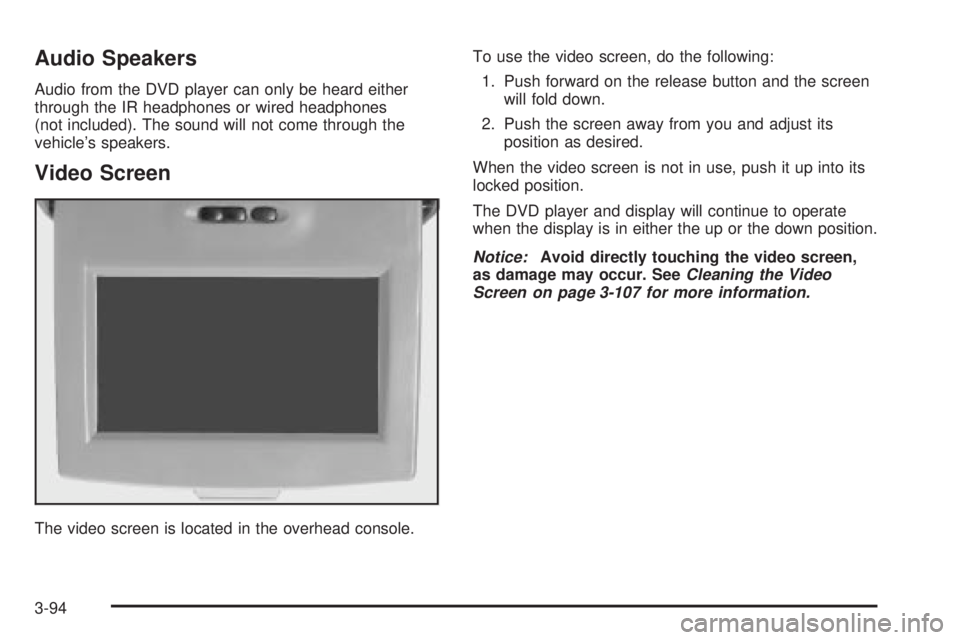
Video Screen
The video screen is located in the overhead console.To use the video screen, do the following:
1. Push forward on the release button and the screen
will fold down.
2. Push the screen away from you and adjust its
position as desired.
When the video screen is not in use, push it up into its
locked position.
The DVD player and display will continue to operate
when the display is in either the up or the down position.
Notice:Avoid directly touching the video screen,
as damage may occur. SeeCleaning the Video
Screen on page 3-107 for more information.
3-94
Page 217 of 442
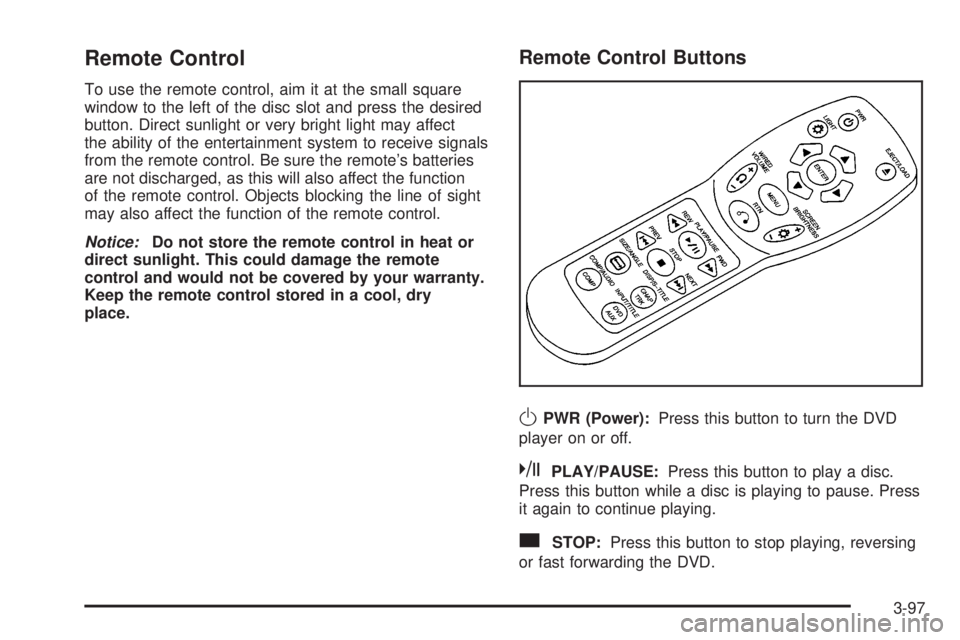
Remote Control
To use the remote control, aim it at the small square
window to the left of the disc slot and press the desired
button. Direct sunlight or very bright light may affect
the ability of the entertainment system to receive signals
from the remote control. Be sure the remote's batteries
are not discharged, as this will also affect the function
of the remote control. Objects blocking the line of sight
may also affect the function of the remote control.
Notice:Do not store the remote control in heat or
direct sunlight. This could damage the remote
control and would not be covered by your warranty.
Keep the remote control stored in a cool, dry
place.
Remote Control Buttons
OPWR (Power):Press this button to turn the DVD
player on or off.
kPLAY/PAUSE:Press this button to play a disc.
Press this button while a disc is playing to pause. Press
it again to continue playing.
cSTOP:Press this button to stop playing, reversing
or fast forwarding the DVD.
3-97