roof GMC ENVOY 2005 User Guide
[x] Cancel search | Manufacturer: GMC, Model Year: 2005, Model line: ENVOY, Model: GMC ENVOY 2005Pages: 502, PDF Size: 2.77 MB
Page 126 of 502
Storage Areas
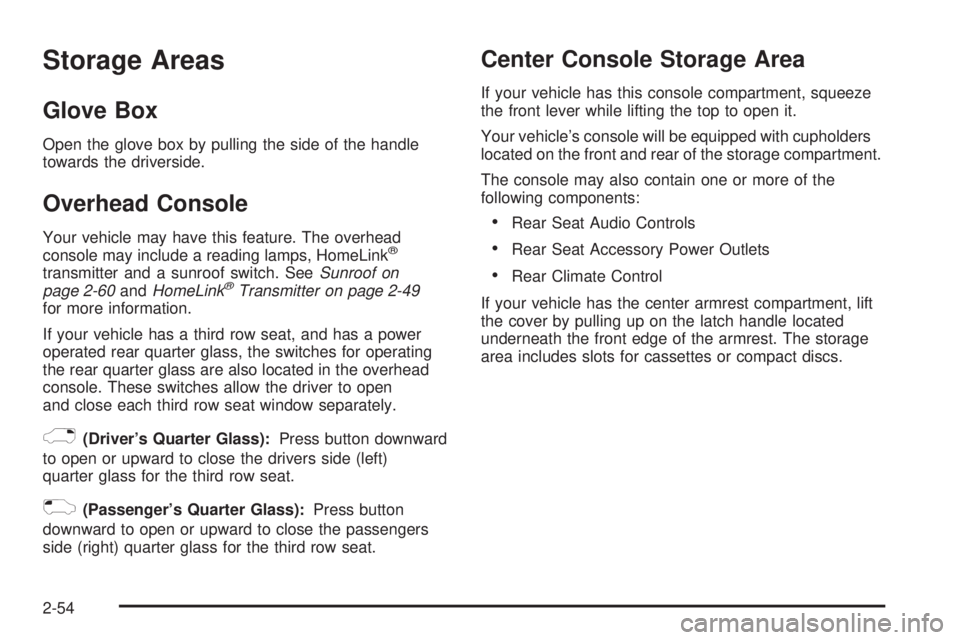
Glove Box
Open the glove box by pulling the side of the handle
towards the driverside.
Overhead Console
Your vehicle may have this feature. The overhead
console may include a reading lamps, HomeLink®
transmitter and a sunroof switch. SeeSunroof on
page 2-60andHomeLink®Transmitter on page 2-49
for more information.
If your vehicle has a third row seat, and has a power
operated rear quarter glass, the switches for operating
the rear quarter glass are also located in the overhead
console. These switches allow the driver to open
and close each third row seat window separately.
)(Driver’s Quarter Glass):Press button downward
to open or upward to close the drivers side (left)
quarter glass for the third row seat.
((Passenger’s Quarter Glass):Press button
downward to open or upward to close the passengers
side (right) quarter glass for the third row seat.
Center Console Storage Area
If your vehicle has this console compartment, squeeze
the front lever while lifting the top to open it.
Your vehicle’s console will be equipped with cupholders
located on the front and rear of the storage compartment.
The console may also contain one or more of the
following components:
Rear Seat Audio Controls
Rear Seat Accessory Power Outlets
Rear Climate Control
If your vehicle has the center armrest compartment, lift
the cover by pulling up on the latch handle located
underneath the front edge of the armrest. The storage
area includes slots for cassettes or compact discs.
2-54
Page 127 of 502

Assist Handles
A handle above each door can be used when getting
out of your vehicle.
Luggage Carrier
{CAUTION:
If you try to carry something on top of your
vehicle that is longer or wider than the luggage
carrier — like paneling, plywood, a mattress
and so forth — the wind can catch it as you
drive along. This can cause you to lose
control. What you are carrying could be
violently torn off, and this could cause you or
other drivers to have a collision, and of course
damage your vehicle. You may be able to carry
something like this inside. But, never carry
something longer or wider than the luggage
carrier on top of your vehicle.
A luggage carrier allows you to load things on top of
your vehicle. The luggage carrier has side rails attached
to the roof, sliding crossrails (if equipped) and placesto use for tying things down. These let you load some
other things on top of your vehicle, as long as they
are not wider or longer than the luggage carrier.
To slide the crossrails to where you want them, pull up
on the lever on each side of the crossrail. This will
release the crossrail and allow you to slide it. When the
crossrail is where you want it, press down on the
levers to lock it into place.
Notice:Loading cargo on the luggage carrier that
weighs more than 220 lbs (100 kg) or hangs over the
rear or sides of the vehicle may damage your
vehicle. Load cargo so that it rests on the slats as
far forward as possible and against the side
rails, making sure to fasten it securely.
Don’t exceed the maximum vehicle capacity when
loading your vehicle. For more information on vehicle
capacity and loading, seeLoading Your Vehicle on
page 4-44.
To prevent damage or loss of cargo as you’re driving,
check now and then to make sure the luggage carrier is
locked and cargo is still securely fastened.
When the luggage carrier is not in use, place the
crossrails at the following positions for wind noise
reduction. Place one crossrail at the rear most point of
the vehicle and the other crossrail above the opening
of the rear door.
2-55
Page 132 of 502

Sunroof
The vehicle may be equipped with a power sliding
sunroof. To open or close the sunroof, the ignition must
be on or Retained Accessory Power (RAP) must be
active. SeeRetained Accessory Power (RAP) on
page 2-19.
Press and release the
back of the control in the
overhead console to
open the sunroof. Press
the front of the control
to close the sunroof.
Once the sunroof is closed, press the forward side of
the control to open the sunroof to the vent position.
The sunroof has a sunshade which can be pulled
forward to block sun rays. If it is in the closed position, it
will open when the sunroof is opened.
Vehicle Personalization
Memory Seat
If your vehicle has this
feature, the controls for the
memory function are
located on the driver’s door.
These buttons are used to program and recall memory
settings for the driver’s seating position, both outside
mirror positions and the adjustable pedals, if equipped.
The settings for these features can be saved for up
to two drivers.
To store the memory settings, do the following:
1. Adjust the driver’s seat, including the seatback
recliner and lumbar, both of the outside mirrors
and the adjustable pedals, if equipped, to the
desired position.
2-60
Page 273 of 502

Care of Your CD and DVD Player
The use of CD lens cleaners for CDs is not advised, due
to the risk of contaminating the lens of the CD optics
with lubricants internal to the CD mechanism.
Fixed Mast Antenna
The xed mast antenna can withstand most car washes
without being damaged. If the mast should ever
become slightly bent, straighten it out by hand. If the
mast is badly bent, replace it.
Check occasionally to make sure the mast is still
tightened to the fender. If tightening is required,
tighten by hand, then with a wrench one quarter turn.
XM™ Satellite Radio Antenna
System
The XM™ Satellite Radio antenna is located on the roof
of your vehicle. Keep this antenna clear of snow and
ice build up for clear radio reception.The performance of the XM™ system may be affected if
the sunroof is open.
Loading items onto the roof of your vehicle can interfere
with the performance of the XM™ system. Make sure
that the XM™ satellite antenna is not obstructed.
Chime Level Adjustment
The radio is the vehicle’s chime producer. To change
the volume level, press and hold pushbutton 6 with
the ignition on and the radio power off. The chime
volume level will change from the normal level to loud,
and LOUD will appear on the radio display. To
change back to the default or normal setting, press and
hold pushbutton 6 again. The chime level will change
from the loud level to normal, and NORMAL will appear
on the radio display. Removing the radio and not
replacing it with a factory radio or chime will disable
vehicle chimes.
3-139
Page 291 of 502
Before You Go Off-Roading
There are some things to do before you go out. For
example, be sure to have all necessary maintenance
and service work done. Check to make sure all
underbody shields (if equipped) are properly attached.
Be sure you read all the information about your
four-wheel-drive vehicle in this manual.
Is there enough fuel? Is the spare tire fully inated? Are
the uid levels up where they should be? What are
the local laws that apply to off-roading where you will be
driving? If you do not know, you should check with
law enforcement people in the area. Will you be
on someone’s private land? If so, be sure to get the
necessary permission.
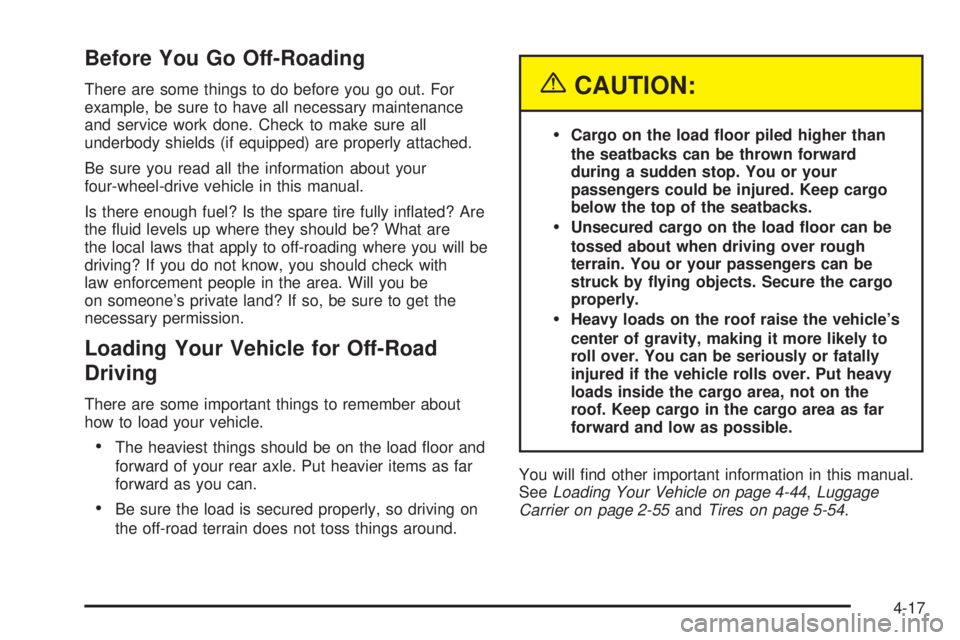
Loading Your Vehicle for Off-Road
Driving
There are some important things to remember about
how to load your vehicle.
The heaviest things should be on the load oor and
forward of your rear axle. Put heavier items as far
forward as you can.
Be sure the load is secured properly, so driving on
the off-road terrain does not toss things around.
{CAUTION:
Cargo on the load oor piled higher than
the seatbacks can be thrown forward
during a sudden stop. You or your
passengers could be injured. Keep cargo
below the top of the seatbacks.
Unsecured cargo on the load oor can be
tossed about when driving over rough
terrain. You or your passengers can be
struck by ying objects. Secure the cargo
properly.
Heavy loads on the roof raise the vehicle’s
center of gravity, making it more likely to
roll over. You can be seriously or fatally
injured if the vehicle rolls over. Put heavy
loads inside the cargo area, not on the
roof. Keep cargo in the cargo area as far
forward and low as possible.
You will nd other important information in this manual.
SeeLoading Your Vehicle on page 4-44,Luggage
Carrier on page 2-55andTires on page 5-54.
4-17
Page 450 of 502
Fuses Usage
18 Locks
19Liftgate Module/Driver Seat
Module
20 Blank
21 Lock
23 Blank
24 Unlock
25 Blank
26 Blank
27OnStar
®Overhead
Battery/OnStar®System
Fuses Usage
28 Sunroof
29 Rainsense™ Wipers
30 Parking Lamps
31 Truck Body Controller Accessory
32 Truck Body Controller 5
33 Front Wipers
34 Vehicle Stop
35 Transmission Control Module
36Heat Ventilation Air
Conditioning B
5-108
Page 453 of 502
Fuses Usage
01 Right Door Control Module
02 Left Door Control Module
03 Liftgate Module 2
04 Truck Body Controller 3
05 Rear Fog Lamps
06 Blank
07 Truck Body Controller 2
08 Power Seats
09 Rear Wiper
10 Driver Door Module
11 Amplier
12 Passenger Door Module
13 Rear Climate Controls
14 Left Rear Parking Lamps
15 BlankFuses Usage
16Vehicle Center High-Mounted
Stop Lamp
17 Right Rear Parking Lamps
18 Locks
19Liftgate Module/Driver Seat
Module
20 Vent Window
21 Lock
22 Retained Accessory Power
23 Blank
24 Unlock
25 Blank
26 Blank
27OnStar
®Overhead
Battery/OnStar®System
28 Sunroof
5-111
Page 500 of 502

Servicing Your Airbag-Equipped Vehicle..............1-62
Setting the Time.............................................3-65
Sheet Metal Damage.......................................5-92
Shifting Into Park (P).......................................2-31
Shifting Out of Park (P)...................................2-33
Signals, Turn and Lane-Change.......................... 3-7
Spare Tire.....................................................5-85
Installing....................................................5-75
Removing...................................................5-72
Storing.......................................................5-82
Specications, Capacities...............................5-113
Speedometer..................................................3-34
Starting Your Engine.......................................2-20
Steering........................................................4-11
Steering Wheel Controls, Audio.......................3-136
Steering Wheel, Tilt Wheel................................. 3-6
Storage Areas
Center Console Storage Area........................2-54
Convenience Net.........................................2-58
Glove Box..................................................2-54
Luggage Carrier..........................................2-55
Overhead Console.......................................2-54
Rear Compartment Storage Panel/Cover.........2-56
Rear Floor Storage Lid.................................2-58
Stuck in Sand, Mud, Ice or Snow......................4-43
Sun Visors.....................................................2-16
Sunroof.........................................................2-60T
Tachometer....................................................3-34
Taillamps
Turn Signal, and Stoplamps..........................5-50
Theft-Deterrent, Radio....................................3-135
Theft-Deterrent Systems...................................2-16
Content Theft-Deterrent................................2-16
Passlock
®...................................................2-18
Throttle, Adjustable..........................................2-21
Tilt Wheel........................................................ 3-6
Tires.............................................................5-54
Aluminum Wheels, Cleaning..........................5-91
Buying New Tires........................................5-64
Chains.......................................................5-68
Changing a Flat Tire....................................5-71
Cleaning....................................................5-92
If a Tire Goes Flat.......................................5-70
Ination -- Tire Pressure...............................5-61
Inspection and Rotation................................5-62
Installing the Spare Tire................................5-75
Removing the Flat Tire.................................5-75
Removing the Spare Tire and Tools...............5-72
Secondary Latch System..............................5-80
Spare Tire..................................................5-85
Storing a Flat or Spare Tire and Tools............5-82
Tire Sidewall Labelling..................................5-55
12