change time GMC ENVOY 2005 Owner's Manual
[x] Cancel search | Manufacturer: GMC, Model Year: 2005, Model line: ENVOY, Model: GMC ENVOY 2005Pages: 502, PDF Size: 2.77 MB
Page 2 of 502
GENERAL MOTORS, GM, the GM Emblem, GMC, the
GMC Truck Emblem and the names ENVOY, and
DENALI are registered trademarks of General Motors
Corporation.
This manual includes the latest information at the time
it was printed. We reserve the right to make
changes after that time without further notice. For
vehicles rst sold in Canada, substitute the
name “General Motors of Canada Limited” for GMC
whenever it appears in this manual.
Keep this manual in the vehicle, so it will be there if it is
needed while you are on the road. If the vehicle is
sold, leave this manual the vehicle.
Canadian Owners
A French language copy of this manual can be obtained
from your dealer or from:
Helm, Incorporated
P.O. Box 07130
Detroit, MI 48207
How to Use This Manual
Many people read the owner manual from beginning to
end when they rst receive their new vehicle. If this
is done, it can help you learn about the features
and controls for the vehicle. Pictures and words work
together in the owner manual to explain things.
Index
A good place to quickly locate information about the
vehicle is the Index in the back of the manual. It is an
alphabetical list of what is in the manual and the
page number where it can be found.
Litho in U.S.A.
Part No. 05ENVOY A First Edition
©2004 General Motors Corporation. All Rights Reserved.
ii
Page 35 of 502
Wherever the child sits, the lap portion of the belt
should be worn low and snug on the hips, just touching
the child’s thighs. This applies belt force to the child’s
pelvic bones in a crash.
Infants and Young Children
Everyone in a vehicle needs protection! This includes
infants and all other children. Neither the distance
traveled nor the age and size of the traveler changes
the need, for everyone, to use safety restraints. In fact,
the law in every state in the United States and in
every Canadian province says children up to some age
must be restrained while in a vehicle.
Every time infants and young children ride in vehicles,
they should have the protection provided by appropriate
restraints. Young children should not use the vehicle’s
adult safety belts alone, unless there is no other choice.
Instead, they need to use a child restraint.
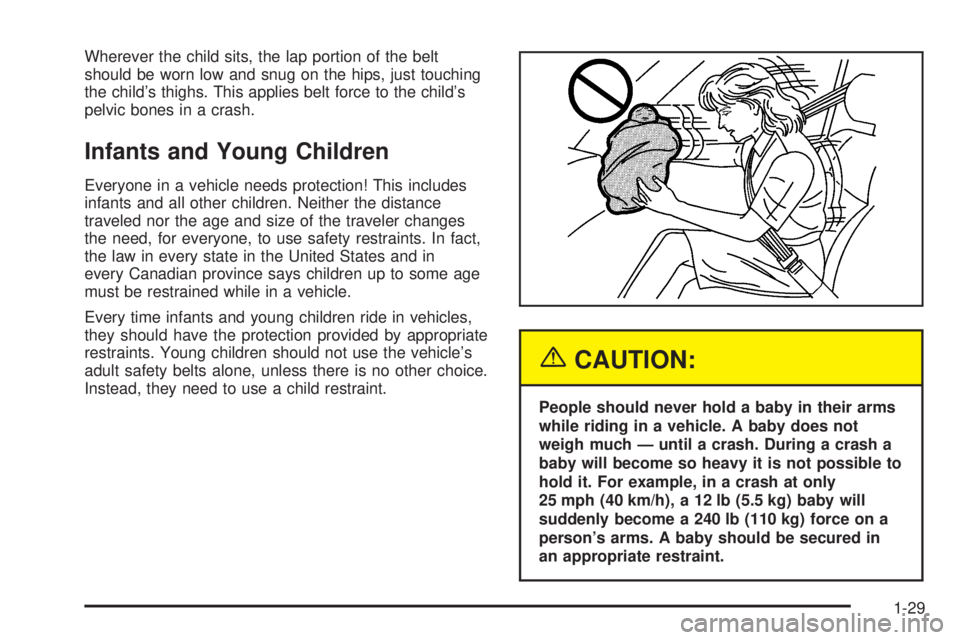
{CAUTION:
People should never hold a baby in their arms
while riding in a vehicle. A baby does not
weigh much — until a crash. During a crash a
baby will become so heavy it is not possible to
hold it. For example, in a crash at only
25 mph (40 km/h), a 12 lb (5.5 kg) baby will
suddenly become a 240 lb (110 kg) force on a
person’s arms. A baby should be secured in
an appropriate restraint.
1-29
Page 77 of 502
Remote Keyless Entry System
Your keyless entry system operates on a radio
frequency subject to Federal Communications
Commission (FCC) Rules and with Industry Canada.
This device complies with Part 15 of the FCC Rules.
Operation is subject to the following two conditions:
1. This device may not cause interference, and
2. This device must accept any interference received,
including interference that may cause undesired
operation of the device.
This device complies with RSS-210 of Industry Canada.
Operation is subject to the following two conditions:
1. This device may not cause interference, and
2. This device must accept any interference received,
including interference that may cause undesired
operation of the device.
Changes or modications to this system by other than
an authorized service facility could void authorization to
use this equipment.At times you may notice a decrease in range. This is
normal for any remote keyless entry system. If the
transmitter does not work or if you have to stand closer
to your vehicle for the transmitter to work, try this:
Check the distance. You may be too far from your
vehicle. You may need to stand closer during
rainy or snowy weather.
Check the location. Other vehicles or objects may
be blocking the signal. Take a few steps to the
left or right, hold the transmitter higher, and
try again.
Check to determine if battery replacement is
necessary. See “Battery Replacement” under
Remote Keyless Entry System Operation on
page 2-6.
If you are still having trouble, see your dealer or a
qualied technician for service.
2-5
Page 79 of 502
Battery Replacement
Under normal use, the battery in your remote keyless
entry transmitter should last about two years.
You can tell the battery is weak if the transmitter will not
work at the normal range in any location. If you have
to get close to your vehicle before the transmitter works,
it’s probably time to change the battery.
The Driver Information Center (DIC) will display a KEY
FOB # BATTERY LOW message when the transmitter
battery is low.
Notice:When replacing the battery, use care not to
touch any of the circuitry. Static from your body
transferred to these surfaces may damage
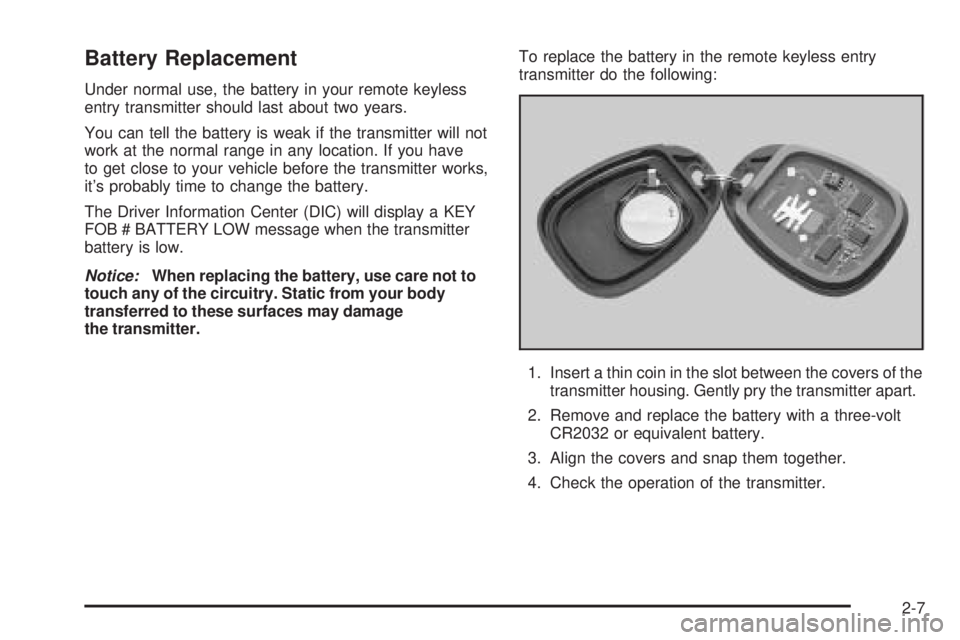
the transmitter.To replace the battery in the remote keyless entry
transmitter do the following:
1. Insert a thin coin in the slot between the covers of the
transmitter housing. Gently pry the transmitter apart.
2. Remove and replace the battery with a three-volt
CR2032 or equivalent battery.
3. Align the covers and snap them together.
4. Check the operation of the transmitter.
2-7
Page 92 of 502

Starting Your Engine
Move your shift lever to PARK (P) or NEUTRAL (N).
Your engine will not start in any other position — that is
a safety feature. To restart when you are already
moving, use NEUTRAL (N) only.
Notice:Do not try to shift to PARK (P) if your
vehicle is moving. If you do, you could damage the
transmission. Shift to PARK (P) only when your
vehicle is stopped.
1. With your foot off the accelerator pedal, turn the
ignition key to START. When the engine starts,
let go of the key. The idle speed will go down as
your engine gets warm.
Notice:Holding your key in START for longer than
15 seconds at a time will cause your battery to
be drained much sooner. And the excessive heat
can damage your starter motor. Wait about
15 seconds between each try to help avoid draining
your battery or damaging your starter.
2. If it does not start within 10 seconds, push the
accelerator pedal all the way to the oor, while you
hold the ignition key in START. When the engine
starts, let go of the key and let up on the accelerator
pedal. Wait about 15 seconds between each try.When starting your engine in very cold weather
(below 0°F or−18°C), do this:
1. With your foot off the accelerator pedal, turn the
ignition key to START and hold it there up to
15 seconds. When the engine starts, let go of
the key.
2. If your engine still will not start, or starts but then
stops, it could be ooded with too much gasoline.
Try pushing your accelerator pedal all the way to the
oor and holding it there as you hold the key in
START for about three seconds. When the engine
starts, let go of the key and accelerator. If the
vehicle starts briey but then stops again, do the
same thing, but this time keep the pedal down
for ve or six seconds. This clears the extra
gasoline from the engine.
Notice:Your engine is designed to work with the
electronics in your vehicle. If you add electrical
parts or accessories, you could change the way the
engine operates. Before adding electrical equipment,
check with your dealer. If you do not, your engine
might not perform properly.
2-20
Page 113 of 502
Manual Rearview Mirror with
Compass and Temperature
The vehicle may have a manual rearview mirror with an
eight-point compass and temperature display located
in the upper right.
When cleaning the mirror, use a paper towel or similar
material dampened with glass cleaner. Do not spray
glass cleaner directly on the mirror as that may cause
the liquid cleaner to enter the mirror housing.
Mirror Operation
While sitting in a comfortable position, adjust the rearview
mirror so you can see clearly behind your vehicle. Grip it
in the center and move it up or down and side to side.
The day/night control, located at the bottom of the mirror,
adjusts the mirror to reduce headlamp glare from behind
during evening or dark conditions. Push the control for
daytime use; pull it for night use.
Temperature and Compass Display
O
(On/Off):Press this button to turn the compass and
temperature display on or off. The compass display,
can show a maximum of two characters. For example,
NE is displayed for north-east.
When the ignition and the compass/temperature feature
are on, character boxes will appear for about two
seconds. After two seconds, the mirror will display the
direction the vehicle is facing and the outside
temperature.
To set the temperature in Fahrenheit or Celsius,
do the following:
1. Press and hold the on/off button until either a
ashing F or C appears.
2. Press the button again to change the display to the
desired unit of measurement. After about four
seconds of inactivity, the new unit will be locked in
and the compass/temperature display will return.
2-41
Page 115 of 502

Manual Rearview Mirror with
OnStar
®, Compass, and
Temperature Display
The vehicle may have a manual rearview mirror with
OnStar®and an eight-point compass and temperature
display located in the upper right.
Control buttons for the OnStar
®system are at the
bottom of the mirror. See your GM dealer for more
information about the OnStar
®system. Also, see
OnStar®System on page 2-47for more information
about the services OnStar®provides.
When cleaning the mirror, use a paper towel or similar
material dampened with glass cleaner. Do not spray
glass cleaner directly on the mirror as that may cause
the liquid cleaner to enter the mirror housing.
Mirror Operation
While sitting in a comfortable position, adjust the rearview
mirror so you can see clearly behind your vehicle. Grip it
in the center and move it up or down and side to side.
The day/night control, located at the bottom of the mirror,
adjusts the mirror to reduce headlamp glare from behind
during evening or dark conditions. Push the control for
daytime use; pull it for night use.
Temperature and Compass Display
O
(On/Off):Press this button to turn the compass and
temperature display on or off. The compass display,
can show a maximum of two characters. For example,
NE is displayed for north-east.
When the ignition and the compass/temperature feature
are on, character boxes will appear for about
two seconds. After two seconds, the mirror will display
the direction the vehicle is facing and the outside
temperature.
To set the temperature in Fahrenheit or Celsius,
do the following:
1. Press and hold the on/off button until either a
ashing F or C appears.
2. Press the button again to change the display to the
desired unit of measurement. After about
four seconds of inactivity, the new unit will be
locked in and the compass/temperature display
will return.
2-43
Page 135 of 502
Instrument Panel Overview...............................3-4
Hazard Warning Flashers................................3-6
Other Warning Devices...................................3-6
Horn.............................................................3-6
Tilt Wheel.....................................................3-6
Turn Signal/Multifunction Lever.........................3-7
Turn and Lane-Change Signals........................3-7
Headlamp High/Low-Beam Changer..................3-8
Flash-to-Pass.................................................3-8
Windshield Wipers..........................................3-9
Rainsense™ Wipers.......................................3-9
Windshield Washer.......................................3-10
Headlamp Washer........................................3-11
Cruise Control..............................................3-11
Headlamps..................................................3-15
Headlamps on Reminder................................3-16
Daytime Running Lamps (DRL).......................3-16
Automatic Headlamp System..........................3-16
Fog Lamps..................................................3-17
Instrument Panel Brightness...........................3-18
Dome Lamps...............................................3-18
Dome Lamp Override....................................3-18
Entry Lighting...............................................3-19
Exit Lighting.................................................3-19
Reading Lamps............................................3-19
Battery Run-Down Protection..........................3-19Accessory Power Outlets...............................3-19
Ashtrays and Cigarette Lighter........................3-20
Climate Controls............................................3-21
Dual Climate Control System..........................3-21
Dual Automatic Climate Control System...........3-23
Outlet Adjustment.........................................3-28
Rear Climate Control System.........................3-28
Climate Controls Personalization.....................3-31
Warning Lights, Gages, and Indicators............3-32
Instrument Panel Cluster................................3-33
Speedometer and Odometer...........................3-34
Trip Odometer..............................................3-34
Tachometer.................................................3-34
Safety Belt Reminder Light.............................3-35
Passenger Safety Belt Reminder Light...............3-35
Airbag Readiness Light..................................3-36
Passenger Airbag Status Indicator...................3-37
Charging System Light..................................3-38
Voltmeter Gage............................................3-39
Brake System Warning Light..........................3-40
Anti-Lock Brake System Warning Light.............3-41
Engine Coolant Temperature Gage..................3-41
Malfunction Indicator Lamp.............................3-42
Section 3 Instrument Panel
3-1
Page 136 of 502

Oil Pressure Gage........................................3-45
Change Engine Oil Light................................3-46
Security Light...............................................3-46
Cruise Control Light......................................3-47
Reduced Engine Power Light.........................3-47
Highbeam On Light.......................................3-48
Service Four-Wheel Drive Warning Light..........3-48
Check Gages Warning Light...........................3-49
Gate Ajar Light.............................................3-49
Fuel Gage...................................................3-50
Low Fuel Warning Light.................................3-51
Check Gas Cap Light....................................3-51
Driver Information Center (DIC).......................3-51
DIC Operation and Displays...........................3-52
DIC Warnings and Messages.........................3-55
DIC Vehicle Customization.............................3-59Audio System(s).............................................3-65
Setting the Time...........................................3-65
Radio with CD (Base Level)...........................3-66
Radio with CD (MP3)....................................3-77
Radio with Cassette and CD..........................3-93
Radio with Six-Disc CD................................3-107
Rear Seat Entertainment System...................3-121
Navigation/Radio System..............................3-134
Rear Seat Audio (RSA)................................3-134
Theft-Deterrent Feature................................3-135
Audio Steering Wheel Controls......................3-136
Radio Reception.........................................3-137
Care of Your Cassette Tape Player...............3-137
Care of Your CDs and DVDs........................3-138
Care of Your CD and DVD Player.................3-139
Fixed Mast Antenna....................................3-139
XM™ Satellite Radio Antenna System............3-139
Chime Level Adjustment...............................3-139
Section 3 Instrument Panel
3-2
Page 151 of 502

There is a delay in the transition between the daytime
and nighttime operation of the Daytime Running
Lamps (DRL) and the automatic headlamp systems, so
that driving under bridges or bright overhead street
lights does not affect the system. The DRL and
automatic headlamp system will only be affected when
the light sensor sees a change in lighting lasting
longer than the delay.
If you start your vehicle in a dark garage, the automatic
headlamp system will come on immediately. Once
you leave the garage, it will take about one minute for
the automatic headlamp system to change to DRL if it is
light outside. During that delay, your instrument panel
cluster may not be as bright as usual. Make sure
your instrument panel brightness control is in the full
bright position.
To idle your vehicle with the automatic headlamp system
off, set the parking brake while the ignition is off. Then
start your vehicle. The automatic headlamp system will
stay off until you release the parking brake, shift out of
park or turn the exterior lamp control to the off position as
described in “Exterior Lamps” listed previously.Fog Lamps
Your vehicle may have this feature. Use your fog lamps
for better vision in foggy or misty conditions. Your
ignition must be in RUN for your fog lamps to work.
The fog lamp button is
located on the instrument
panel to the right of
the exterior lamps knob.
Press the button to turn the fog lamps on. Press the
button again to turn them off. A light will glow near the
button while the fog lamps are on. Fog lamps will
turn off whenever your high-beam headlamps are on.
3-17