tire GMC ENVOY 2005 Owner's Manual
[x] Cancel search | Manufacturer: GMC, Model Year: 2005, Model line: ENVOY, Model: GMC ENVOY 2005Pages: 502, PDF Size: 2.77 MB
Page 1 of 502
Seats and Restraint Systems........................... 1-1
Front Seats
............................................... 1-2
Rear Seats
............................................... 1-5
Safety Belts
.............................................. 1-8
Child Restraints
.......................................1-26
Airbag System
.........................................1-48
Restraint System Check
............................1-64
Features and Controls..................................... 2-1
Keys
........................................................ 2-3
Doors and Locks
....................................... 2-8
Windows
.................................................2-14
Theft-Deterrent Systems
............................2-16
Starting and Operating Your Vehicle
...........2-18
Mirrors
....................................................2-36
OnStar
®System
......................................2-47
HomeLink®Transmitter
.............................2-49
Storage Areas
.........................................2-54
Sunroof
..................................................2-60
Vehicle Personalization
.............................2-60
Instrument Panel............................................. 3-1
Instrument Panel Overview
.......................... 3-4
Climate Controls
......................................3-21
Warning Lights, Gages, and Indicators
........3-32
Driver Information Center (DIC)
..................3-51
Audio System(s)
.......................................3-65Driving Your Vehicle....................................... 4-1
Your Driving, the Road, and Your Vehicle
..... 4-2
Towing
...................................................4-51
Service and Appearance Care.......................... 5-1
Service
..................................................... 5-3
Fuel
......................................................... 5-5
Checking Things Under the Hood
...............5-10
Rear Axle
...............................................5-47
Four-Wheel Drive
.....................................5-48
Front Axle
...............................................5-48
Bulb Replacement
....................................5-49
Windshield Wiper Blade Replacement
.........5-52
Tires
......................................................5-54
Appearance Care
.....................................5-86
Vehicle Identication
.................................5-95
Electrical System
......................................5-96
Capacities and Specications
...................5-113
Maintenance Schedule..................................... 6-1
Maintenance Schedule
................................ 6-2
Customer Assistance and Information.............. 7-1
Customer Assistance and Information
........... 7-2
Reporting Safety Defects
...........................7-12
Index................................................................ 1
2005 GMC Envoy/Envoy XL/Envoy Denali Owner ManualM
Page 8 of 502
Front Seats
Power Seats
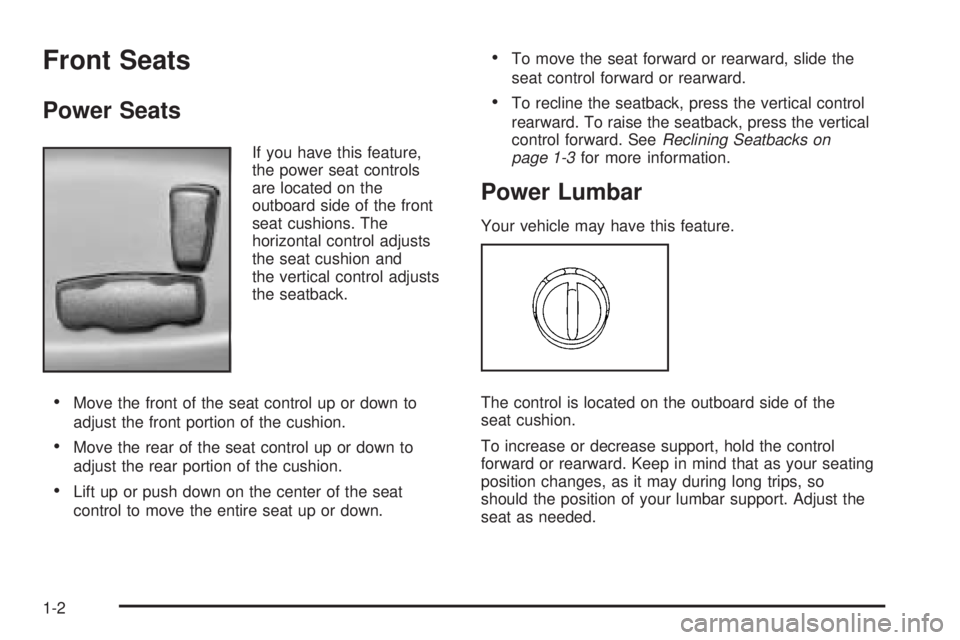
If you have this feature,
the power seat controls
are located on the
outboard side of the front
seat cushions. The
horizontal control adjusts
the seat cushion and
the vertical control adjusts
the seatback.
Move the front of the seat control up or down to
adjust the front portion of the cushion.
Move the rear of the seat control up or down to
adjust the rear portion of the cushion.
Lift up or push down on the center of the seat
control to move the entire seat up or down.
To move the seat forward or rearward, slide the
seat control forward or rearward.
To recline the seatback, press the vertical control
rearward. To raise the seatback, press the vertical
control forward. SeeReclining Seatbacks on
page 1-3for more information.
Power Lumbar
Your vehicle may have this feature.
The control is located on the outboard side of the
seat cushion.
To increase or decrease support, hold the control
forward or rearward. Keep in mind that as your seating
position changes, as it may during long trips, so
should the position of your lumbar support. Adjust the
seat as needed.
1-2
Page 9 of 502
Heated Seats
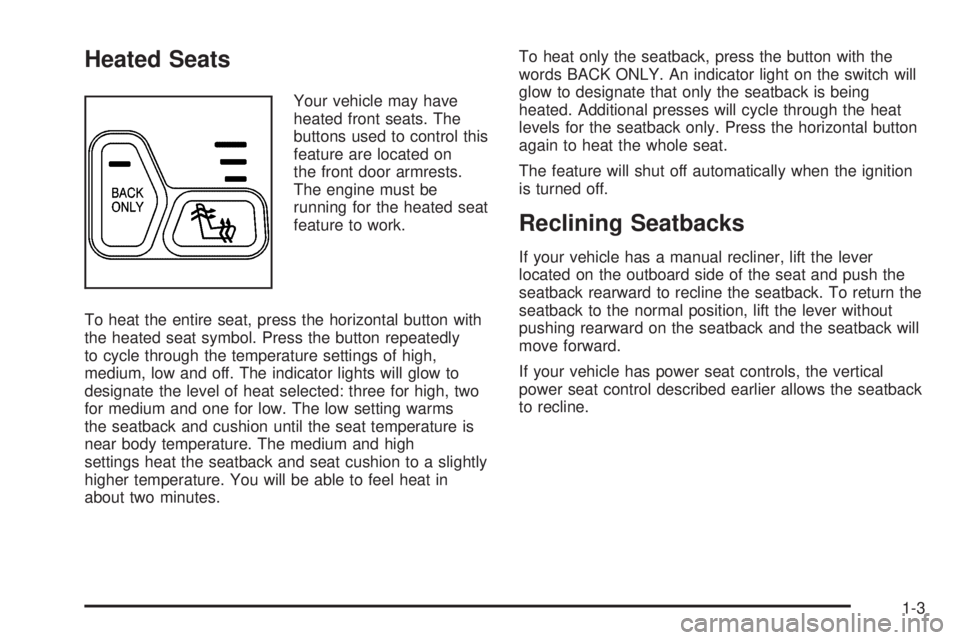
Your vehicle may have
heated front seats. The
buttons used to control this
feature are located on
the front door armrests.
The engine must be
running for the heated seat
feature to work.
To heat the entire seat, press the horizontal button with
the heated seat symbol. Press the button repeatedly
to cycle through the temperature settings of high,
medium, low and off. The indicator lights will glow to
designate the level of heat selected: three for high, two
for medium and one for low. The low setting warms
the seatback and cushion until the seat temperature is
near body temperature. The medium and high
settings heat the seatback and seat cushion to a slightly
higher temperature. You will be able to feel heat in
about two minutes.To heat only the seatback, press the button with the
words BACK ONLY. An indicator light on the switch will
glow to designate that only the seatback is being
heated. Additional presses will cycle through the heat
levels for the seatback only. Press the horizontal button
again to heat the whole seat.
The feature will shut off automatically when the ignition
is turned off.
Reclining Seatbacks
If your vehicle has a manual recliner, lift the lever
located on the outboard side of the seat and push the
seatback rearward to recline the seatback. To return the
seatback to the normal position, lift the lever without
pushing rearward on the seatback and the seatback will
move forward.
If your vehicle has power seat controls, the vertical
power seat control described earlier allows the seatback
to recline.
1-3
Page 13 of 502
Envoy XL and Envoy XL Denali
The second row seat is a 65/35 split seat which may be
folded and tumbled. Use this feature for gaining
access to the third row seats.
To fold and tumble the second row seat(s), do the
following:
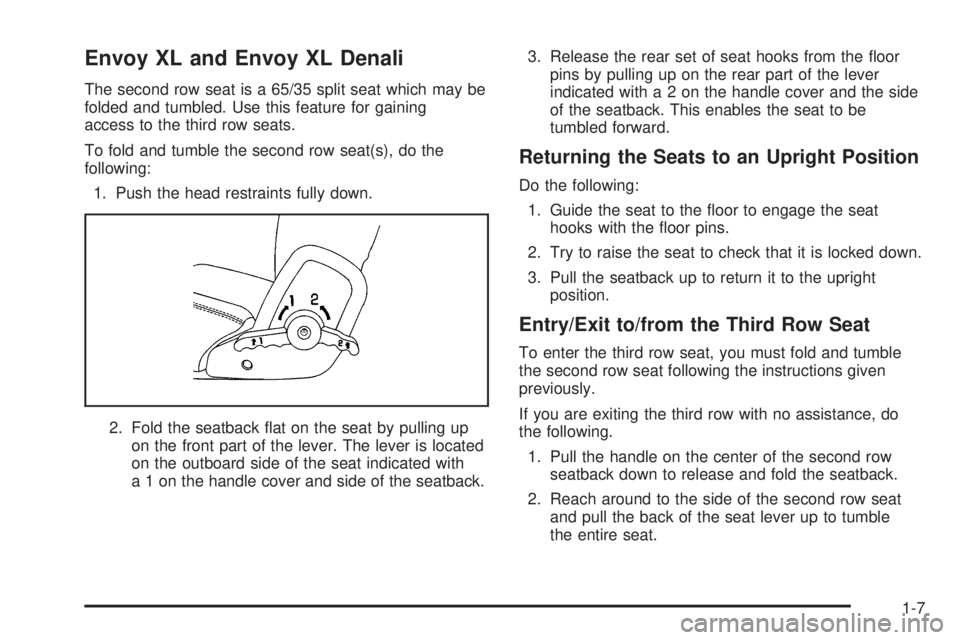
1. Push the head restraints fully down.
2. Fold the seatback at on the seat by pulling up
on the front part of the lever. The lever is located
on the outboard side of the seat indicated with
a 1 on the handle cover and side of the seatback.3. Release the rear set of seat hooks from the oor
pins by pulling up on the rear part of the lever
indicated witha2onthehandle cover and the side
of the seatback. This enables the seat to be
tumbled forward.
Returning the Seats to an Upright Position
Do the following:
1. Guide the seat to the oor to engage the seat
hooks with the oor pins.
2. Try to raise the seat to check that it is locked down.
3. Pull the seatback up to return it to the upright
position.
Entry/Exit to/from the Third Row Seat
To enter the third row seat, you must fold and tumble
the second row seat following the instructions given
previously.
If you are exiting the third row with no assistance, do
the following.
1. Pull the handle on the center of the second row
seatback down to release and fold the seatback.
2. Reach around to the side of the second row seat
and pull the back of the seat lever up to tumble
the entire seat.
1-7
Page 85 of 502
Liftgate/Liftglass
{CAUTION:
It can be dangerous to drive with the liftgate or
liftglass open because carbon monoxide (CO)
gas can come into your vehicle. You cannot
see or smell CO. It can cause
unconsciousness and even death. If you must
drive with the liftgate open or if electrical
wiring or other cable connections must pass
through the seal between the body and the
liftgate or liftglass:
Make sure all other windows are shut.
Turn the fan on your heating or cooling
system to its highest speed and select the
control setting that will force outside air
into your vehicle. See Climate Control
System in the Index.
If you have air outlets on or under the
instrument panel, open them all the way.
SeeEngine Exhaust on page 2-34.
Liftgate Release
To unlock the liftgate, you may use the power door
locks or the keyless entry system described earlier.
On some vehicles the liftglass will also unlock when the
liftgate is unlocked. Press the pushbutton on the
liftglass to open it.
To open the entire liftgate, lift the handle located in the
center of the liftgate. If you open the liftgate, the
liftgate module will lock the liftglass after a one to
two second delay.
Emergency Release for
Opening Liftgate
1. Remove the trim plug to expose the access hole in
the trim panel. The access hole is located on the
inside of the liftgate in the center.
2. Use a tool to reach through the access hole in the
trim panel.
3. Pry the left release lever up to the unlock position.
Pry the right release lever up to unlatch the liftgate.
4. Reattach the trim plug.
2-13
Page 98 of 502
THIRD (3):This position is also used for normal driving.
However, it offers more power and lower fuel economy
than DRIVE (D).
SECOND (2):This position gives you more power but
lower fuel economy than THIRD (3). You can use
SECOND (2) on hills. It can help control your speed as
you go down steep mountain roads, but then you
would also want to use the brakes off and on.
You can also use SECOND (2) for starting the vehicle
from a stop on slippery road surfaces.
FIRST (1):This position gives you even more power
but lower fuel economy than SECOND (2). You can use
it on very steep hills, or in deep snow or mud. If the
selector lever is put in FIRST (1) while the vehicle
is moving forward, the transmission will not shift into
rst gear until the vehicle is going slowly enough.
Notice:Spinning the tires or holding the vehicle in
one place on a hill using only the accelerator
pedal may damage the transmission. If you are
stuck, do not spin the tires. When stopping on a hill,
use the brakes to hold the vehicle in place.Four-Wheel Drive
If your vehicle has four-wheel drive, you can send your
engine’s driving power to all four wheels for extra
traction. To get the most satisfaction out of four-wheel
drive, you must be familiar with its operation. Read
the part that follows before using four-wheel drive. You
should use two-wheel drive high (2HI) for most
normal driving conditions.
Notice:Driving on clean, dry pavement in
four-wheel drive for an extended period of time may
cause premature wear on your vehicle’s powertrain.
Do not drive on clean, dry pavement in four-wheel
drive for extended periods of time.
2-26
Page 146 of 502
S(Resume/Accelerate):Move the switch to this
position to resume a set speed or to accelerate.
T(Set):Press this button, located at the end of the
lever, to set a speed.
9(Off):This position turns the cruise control system
off and cancels memory of a set speed.
With cruise control, you can maintain a speed of about
25 mph (40 km/h) or more without keeping your foot
on the accelerator. This can really help on long
trips. Cruise control does not work at speeds below
about 25 mph (40 km/h).
If you apply your brakes, the cruise control will shut off.
{CAUTION:
Cruise control can be dangerous where you
cannot drive safely at a steady speed. So, do
not use your cruise control on winding roads
or in heavy traffic.
Cruise control can be dangerous on slippery
roads. On such roads, fast changes in tire
traction can cause needless wheel spinning,
and you could lose control. Do not use cruise
control on slippery roads.
{CAUTION:
If you leave your cruise control on when you
are not using cruise, you might hit a button
and go into cruise when you do not want to.
You could be startled and even lose control.
Keep the cruise control switch off until you
want to use cruise control.
3-12
Page 158 of 502
Outside Air Temperature Display
A new outside temperature reading will be displayed if
the vehicle has been off for more than three hours. If the
vehicle has been off for less than three hours, the old
temperature reading may be displayed because
underhood heat is affecting the true outside temperature.
Since underhood heat can also affect the outside
temperature while the engine is running, it may take
several minutes of driving before the display updates to
the actual outside temperature.
9(Off):Press this button to turn off the entire climate
control system. Outside air will still enter the vehicle,
and will be directed to the oor. Press the AUTO button,
the mode button, the fan arrows, or either temperature
knob to turn the system on.
C(Mode):Press this button to manually select the air
delivery mode to the oor, instrument panel, or
windshield outlets. The system will stay in the selected
mode until the mode button is pressed again or the
AUTO button is pressed.Driver’s Side Temperature Knob:Turn this knob
clockwise or counterclockwise to manually raise or lower
the temperature on the driver’s side of the vehicle. The
display will show the temperature setting decreasing or
increasing and an arrow pointing toward the driver. This
knob can also adjust the passenger’s side temperature
setting simultaneously if the two zones are linked.
Passenger’s Side Temperature Knob:Turn this knob
clockwise or counterclockwise to manually raise or
lower the temperature on the passenger’s side of the
vehicle. The display will show the temperature
setting decreasing or increasing and an arrow pointing
toward the passenger. The passenger’s temperature
setting can be set to match and link to the driver’s
temperature setting by pressing and holding the AUTO
button for three seconds. Now, by adjusting the
driver’s side temperature setting, the passenger’s side
temperature setting will follow and both arrows will
appear on the display. The passenger’s side
temperature setting also resets and relinks to the
driver’s side temperature setting if the vehicle has been
off for more than three hours.
3-24
Page 159 of 502

Automatic Operation
AUTO (Automatic):When automatic operation is
active, the system will control the inside temperature,
the air delivery mode, and the fan speed.
Use the steps below to place the entire system in
automatic mode:
1. Press the AUTO button.
When AUTO is selected, the air conditioning
operation and air inlet mode will be automatically
controlled. The air conditioning compressor will run
when the outside temperature is over approximately
40°F (4°C). The air inlet will normally be set to
outside air. If it’s hot outside, the air inlet will
automatically switch to recirculate inside air to help
quickly cool down your vehicle.
2. Set the driver’s and passenger’s temperature.
To nd your comfort setting, start with a 72°F (22°C)
temperature setting and allow about 20 minutes
for the system to regulate. Turn the driver’s or
passenger’s side temperature knob to adjust the
temperature setting as necessary. If you choose the
temperature setting of 60°F (15°C), the system
will remain at the maximum cooling setting. If you
choose the temperature setting of 90°F (32°C),
the system will remain at the maximum heat setting.
Choosing either maximum setting may not cause
the vehicle to heat or cool any faster.
Manual Operation
To change the current setting, select one of the following:
w9x(Fan):This button allows you to manually
adjust the fan speed. Press the up arrow to increase fan
speed and the down arrow to decrease fan speed. The
display will change to show you the selected fan speed
and the driver’s side temperature setting for ve seconds.
C(Mode):Press this button to manually change the
direction of the airow in your vehicle. Keep pressing the
button until the desired mode appears on the display.
The display will change to show you the selected
air delivery mode and the driver’s temperature setting
for ve seconds.
H(Vent):This mode directs air to the instrument
panel outlets.
)(Bi-Level):This mode directs approximately half of
the air to the instrument panel outlets, then directs
the remaining air to the oor outlets. A little air is
directed toward the windshield and the side window
outlets. Cooler air is directed to the upper outlets and
warmer air to the oor outlets.
3-25
Page 176 of 502

Malfunction Indicator Lamp
Check Engine Light
Your vehicle is equipped
with a computer which
monitors operation of the
fuel, ignition, and emission
control systems.
This system is called OBD II (On-Board
Diagnostics-Second Generation) and is intended to
assure that emissions are at acceptable levels for the life
of the vehicle, helping to produce a cleaner environment.
The check engine light comes on to indicate that there is
a problem and service is required. Malfunctions often will
be indicated by the system before any problem is
apparent. This may prevent more serious damage to your
vehicle. This system is also designed to assist your
service technician in correctly diagnosing any
malfunction.
Notice:If you keep driving your vehicle with this
light on, after awhile, your emission controls may not
work as well, your fuel economy may not be as good,
and your engine may not run as smoothly. This could
lead to costly repairs that may not be covered by
your warranty.Notice:Modications made to the engine,
transmission, exhaust, intake, or fuel system of
your vehicle or the replacement of the original tires
with other than those of the same Tire Performance
Criteria (TPC) can affect your vehicle’s emission
controls and may cause this light to come on.
Modications to these systems could lead to costly
repairs not covered by your warranty. This may
also result in a failure to pass a required Emission
Inspection/Maintenance test.
This light should come on, as a check to show you it is
working, when the ignition is on and the engine is
not running. If the light does not come on, have it
repaired. This light will also come on during a
malfunction in one of two ways:
Light Flashing— A misre condition has been
detected. A misre increases vehicle emissions
and may damage the emission control system on
your vehicle. Diagnosis and service may be
required.
Light On Steady— An emission control system
malfunction has been detected on your vehicle.
Diagnosis and service may be required.
3-42