Power seat GMC ENVOY 2007 User Guide
[x] Cancel search | Manufacturer: GMC, Model Year: 2007, Model line: ENVOY, Model: GMC ENVOY 2007Pages: 562, PDF Size: 3 MB
Page 195 of 562
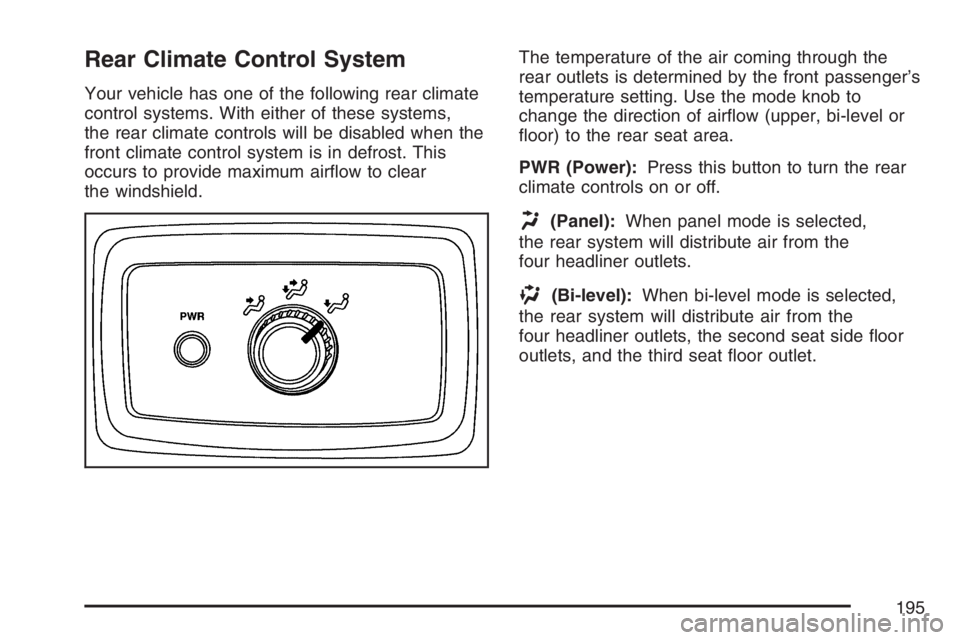
Rear Climate Control System
Your vehicle has one of the following rear climate
control systems. With either of these systems,
the rear climate controls will be disabled when the
front climate control system is in defrost. This
occurs to provide maximum airow to clear
the windshield.The temperature of the air coming through the
rear outlets is determined by the front passenger’s
temperature setting. Use the mode knob to
change the direction of airow (upper, bi-level or
oor) to the rear seat area.
PWR (Power):Press this button to turn the rear
climate controls on or off.
H(Panel):When panel mode is selected,
the rear system will distribute air from the
four headliner outlets.
)(Bi-level):When bi-level mode is selected,
the rear system will distribute air from the
four headliner outlets, the second seat side oor
outlets, and the third seat oor outlet.
195
Page 281 of 562
Parental Control
This button is located behind the video screen.
Press this button while a DVD or CD is playing to
freeze the video and mute the audio. The video
screen will display Parental Control ON and the
power indicator light on the DVD player will ash. It
will also disable all other button operations from the
remote control and the DVD player, with the
exception of the eject button. Press this button
again to restore operation of the DVD player.
This button may also be used to turn the DVD
player power on and automatically resume play if
the ignition is in RUN, ACCESSORY, or if RAP
is active.
Before You Drive
The RSE system is for rear seat passengers only.
The driver cannot safely view the video screen
while driving and should not try to do so.
Headphones
The RSE system includes two sets of wireless
headphones.
Each set of headphones has an ON/OFF control.
An indicator light will illuminate on the headphones
when they are on. If the light does not illuminate,
the batteries may need to be replaced. See
“Battery Replacement” following for more
information.
Each set of headphones has a volume knob.
To adjust the volume, adjust this knob.
The transmitters are located below the video
display screen. The headphones will shut
off automatically if they lose the signal from the
system after about four minutes to save battery
power. The signal may be lost if the system
is turned off or if the headphones are out of range
of the transmitters.
281
Page 283 of 562
Stereo RCA Jacks
The RCA jacks are located behind the video
screen. The RCA jacks allow audio and video
signals to be connected from an auxiliary device
such as a camcorder or a video game unit to
the RSE system. Standard RCA cables, not
included, are needed to connect the auxiliary
device to the RCA jacks. The yellow connector
inputs video and the red and white connectors
input right and left audio. Refer to the
manufacturer’s instructions for proper connection
of the auxiliary device.
To use the auxiliary inputs on the RSE system,
connect an external auxiliary device to the
color-coded RCA jacks and turn both the auxiliary
device and the RSE system power on. If the
RSE system had been previously in the DVD
player mode, pressing the SRCE button on
the faceplate or the remote control will switch the
RSE system between the auxiliary device and
the DVD player.
How to Change the Video Format when in
the Auxiliary Mode
The auxiliary input video format is preset to NTSC.
In some countries, the video format may be in
the PAL system. To change the video format,
perform the following:
1. Press the display menu button.
2. Press the down arrow button to highlight the
Video Format option.
3. Press the enter button to select Video Format.
4. Press the right or left arrow button to select
the desired video format.
5. Press the enter button to accept the change.
Audio Output
Audio from the DVD player or auxiliary inputs may
be heard through the following possible sources:
Wireless Headphones
Vehicle Speakers
Vehicle wired headphone jacks on the Rear
Seat Audio system (if equipped)
283
Page 284 of 562
The RSE system will always transmit the audio
signal by infrared to the wireless headphones,
if there is audio available. See “Headphones”
previously for more information.
The RSE system is capable of outputting audio to
the vehicle speakers by using the radio. The
RSE system may be selected as an audio source
on the radio if the RSE system power is on.
Once the RSE system is selected as an audio
source on the radio, adjust the speaker volume on
the radio, if necessary. If the RSE system power
is not on, the RSE system will not be an available
source on the radio. Refer to the radio information
for the radio that your vehicle has for more
information.
The RSE system is capable of outputting audio to
the wired headphone jacks on the rear seat
audio system (if equipped). The RSE system may
be selected as an audio source on the rear
seat audio system if the RSE system power is on.
Refer toRear Seat Audio (RSA) on page 295
for more information.Video Screen
The video screen is located in the overhead
console.
To use the video screen, do the following:
1. Push forward on the release button located on
the DVD display console.
2. Pull the screen down, away from you, and
adjust its position as desired.
When the video screen is not in use, push it up
into its locked position.
If a DVD is playing and the screen is raised to its
locked position, the screen will shut off, but the
DVD will continue to play through the previous
audio or video source.
The video screen contains the IR transmitters for
the wireless headphones and the IR receivers
for the remote control. If the screen is in the closed
position, the signals will not be available for the
operation of the headphones or the remote control.
Notice:Avoid directly touching the video
screen, as damage may occur. See “Cleaning
the Video Screen” later in this section for
more information.
284
Page 285 of 562
DVD Player
The DVD player is located in the overhead
console. The DVD player can be controlled by the
buttons on the DVD player and/or by the buttons
on the remote control. See “Remote Control” later
in this section for more information.
The DVD player power may be turned on when
the ignition is in RUN, ACCESSORY, or when
Retained Accessory Power (RAP) is active.
The RSE system DVD player is only compatible
with DVDs of the appropriate region code for the
country that the vehicle was sold in. The DVD
region code is printed on the jacket of most DVDs.Standard audio CDs, CD-R, CD-RW, Video CD
and Photo CD/CD-R media are fully supported by
this DVD player. DVD-R and DVD-RW media
is supported if formatted as DVD-Video. DVD+R
and DVD+RW media may or may not be supported
by the DVD player. The DVD player does not
support DVD-RAM, DVD-ROM, and DVD Audio
media. An error message will appear on the
display if this type of media is inserted into the
DVD player.
When using the wired headphones, not included, if
the front seat passengers play a CD in the
Radio with Six-Disc CD (if equipped) or use XM™
Satellite Radio Service (if equipped), you will
hear the audio for these sources, instead of the
DVD or CD that is currently playing through
the RSE.
If an error message appears on the video screen,
see “DVD Messages” later in this section.
285
Page 293 of 562

Problem Recommended Action
After stopping the player,
I push Play but
sometimes the DVD
starts where I left off and
sometimes at the
beginning.If the stop button was
pressed one time, the
DVD player will resume
playing where the DVD
was stopped. If the stop
button was pressed two
times the DVD player will
begin to play from the
beginning of the DVD.
The auxiliary source is
running but there is no
picture or sound.Check that the DVD
player is in the auxiliary
source mode.
Check the auxiliary input
connections at both
devices.
My disc is stuck in the
player. The Load/Eject
button does not work.Turn the DVD power off,
then on, then press the
load/eject button on the
DVD player.
Do not attempt to forcibly
remove the disc from the
DVD player. This could
permanently damage the
disc and DVD player.Problem Recommended Action
Sometimes the wireless
headphone audio cuts
out or buzzes.Check for obstructions,
low batteries, reception
range, and interference
from cellular telephone
towers or by using your
cellular telephone in the
vehicle.
Check that the
headphones are facing
the front of the vehicle.
I lost the remote and/or
the headphones.See your dealer for
assistance.
The DVD is playing,
but there is no picture
or sound.Check that the DVD
player is in DVD mode.
The audio/video skips
or jumps.The DVD or CD could be
dirty, scratched, or
damaged.
The audio from the radio
for the Radio with
Six-Disc CD and XM™
has taken over the audio
from the DVD or CD
when using the wired
headphones.The RSE is working
correctly.
Use the wireless
headphones or have the
front seat passengers
listen to another audio
source.
293
Page 295 of 562

Rear Seat Audio (RSA)
This feature allows rear seat passengers to listen
to any of the sources: radio, cassette tapes,
CDs, or DVDs. However, the rear seat passengers
can only control the sources that the front seat
passengers are not listening to. For example, rear
seat passengers may listen to and control
cassette tapes, CDs, or DVDs through the
headphones while the driver listens to the radio
through the front speakers. The rear seat
passengers have control of the volume for each
set of headphones.
The front seat audio controls always have priority
over the RSA controls. If the front seat
passengers switch the source for the main radio to
a remote source, the RSA will not be able to
control the source. You can operate the rear seat
audio when the main radio is off.
P(Power):Press this button to turn the system
on or off. The rear speakers will be muted
when the power is turned on.
u(Volume):Turn this knob to increase or to
decrease the volume. The left volume knob
controls the left wired headphones and the right
volume knob controls the right wired headphones.
295
Page 379 of 562
Vehicle Identication.................................. 491
Vehicle Identication Number (VIN)........... 491
Service Parts Identication Label............... 491
Electrical System........................................ 492
Add-On Electrical Equipment..................... 492
Headlamps................................................ 492
Windshield Wiper Fuses............................ 492Power Windows and Other Power
Options.................................................. 492
Fuses and Circuit Breakers....................... 493
Engine Compartment Fuse Block............... 493
Rear Underseat Fuse Block....................... 499
Capacities and Specications.................... 502
Section 5 Service and Appearance Care
379
Page 444 of 562
Tire Terminology and Denitions
Air Pressure:The amount of air inside the tire
pressing outward on each square inch of the
tire. Air pressure is expressed in pounds
per square inch (psi) or kilopascal (kPa).
Accessory Weight:This means the combined
weight of optional accessories. Some examples of
optional accessories are, automatic transmission/
transaxle, power steering, power brakes, power
windows, power seats, and air conditioning.
Aspect Ratio:The relationship of a tire’s height
to its width.
Belt:A rubber coated layer of cords that is
located between the plies and the tread. Cords
may be made from steel or other reinforcing
materials.
Bead:The tire bead contains steel wires wrapped
by steel cords that hold the tire onto the rim.
Bias Ply Tire:A pneumatic tire in which the plies
are laid at alternate angles less than 90 degrees
to the centerline of the tread.Cold Tire Pressure:The amount of air pressure
in a tire, measured in pounds per square inch
(psi) or kilopascals (kPa) before a tire has built up
heat from driving. SeeInation - Tire Pressure
on page 447.
Curb Weight:This means the weight of a motor
vehicle with standard and optional equipment
including the maximum capacity of fuel, oil, and
coolant, but without passengers and cargo.
DOT Markings:A code molded into the sidewall
of a tire signifying that the tire is in compliance
with the U.S. Department of Transportation (DOT)
motor vehicle safety standards. The DOT code
includes the Tire Identication Number (TIN),
an alphanumeric designator which can also identify
the tire manufacturer, production plant, brand,
and date of production.
GVWR:Gross Vehicle Weight Rating. See
Loading Your Vehicle on page 349.
GAWR FRT:Gross Axle Weight Rating for the
front axle. SeeLoading Your Vehicle on page 349.
GAWR RR:Gross Axle Weight Rating for the
rear axle. SeeLoading Your Vehicle on page 349.
444
Page 499 of 562

Fuses Usage
61Vehicle Stability Enhancement
System (StabiliTrak
®)
62 Regulated Voltage Control
Relays Usage
37 Headlamp Wiper
38 Rear Window Wiper/Washer
39 Fog Lamps
40 Horn
41 Fuel Pump
42 Windshield Washer
43 High-Beam Headlamp
44 Air Conditioning
45 Cooling Fan
46 Headlamp Driver Module
47 Starter
49 Electric Adjustable Pedal
60 Powertrain
Miscellaneous Usage
48 Instrument Panel Battery
Rear Underseat Fuse Block
499