instrument cluster GMC ENVOY 2007 User Guide
[x] Cancel search | Manufacturer: GMC, Model Year: 2007, Model line: ENVOY, Model: GMC ENVOY 2007Pages: 562, PDF Size: 3 MB
Page 181 of 562

Automatic Headlamp System
When it is dark enough outside, the Automatic
Headlamp System turns on the headlamps when
the vehicle is started and after the transaxle
has been shifted out of the PARK (P) position.
The headlamps, taillamps, sidemarker, and parking
lamps will come on. The instrument panel lights
and radio lights will also turn on at normal
brightness. Once on, the system remains on
during these conditions even if the vehicle
is shifted back into PARK (P).
The vehicle has a light sensor on the top of the
instrument panel. Make sure it is not covered or the
system may come on whenever the ignition is on
and the vehicle is shifted out of the PARK (P)
position.
The system could also turn on the lamps when
driving through a parking garage, heavy overcast
weather or a tunnel. This is normal.There is a delay in the transition between the
daytime and nighttime operation of the Daytime
Running Lamps (DRL) and the automatic headlamp
systems, so that driving under bridges or bright
overhead street lights does not affect the system.
The DRL and automatic headlamp system are only
affected when the light sensor sees a change in
lighting lasting longer than the delay.
If you start your vehicle in a dark garage, the
automatic headlamp system comes on after the
transmission is shifted out of PARK (P). Once you
leave the garage, it will take about one minute
for the automatic headlamp system to change to
DRL if it is light outside. During that delay, the
instrument panel cluster might not be as bright as
usual. Make sure the instrument panel brightness
control is in the full bright position.
If the vehicle is running and the automatic
headlamp system is already on, it can be turned
off by turning and releasing the headlamp
control at the off position. The automatic headlamp
system stays off until you turn and release the
headlamp control at the off position again.
SeeHeadlamps on page 179.
181
Page 198 of 562
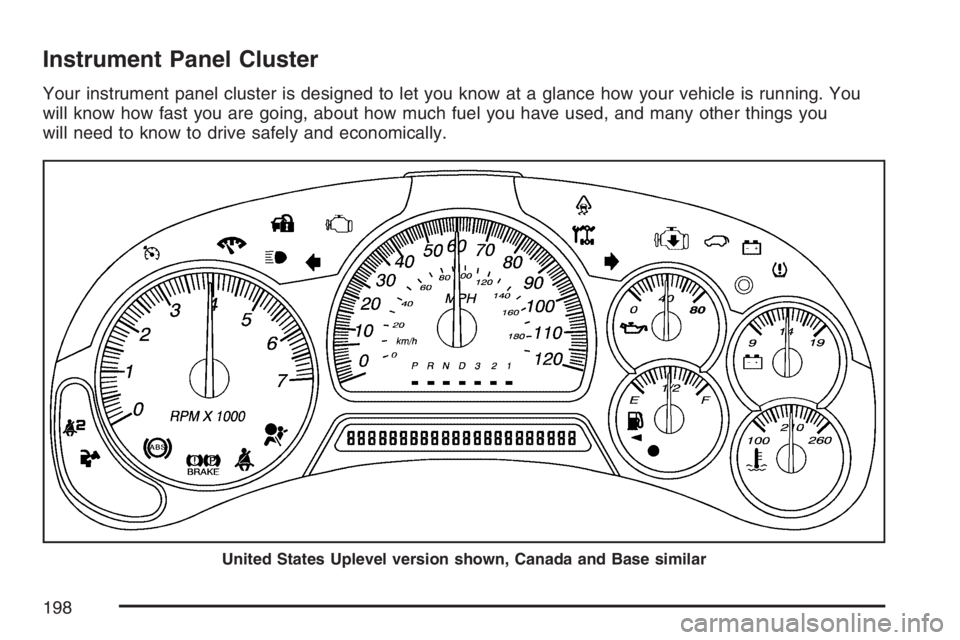
Instrument Panel Cluster
Your instrument panel cluster is designed to let you know at a glance how your vehicle is running. You
will know how fast you are going, about how much fuel you have used, and many other things you
will need to know to drive safely and economically.
United States Uplevel version shown, Canada and Base similar
198
Page 199 of 562

Speedometer and Odometer
The speedometer lets you see your speed in
both miles per hour (mph) and kilometers per
hour (km/h).
The odometer shows how far your vehicle
has been driven, in either miles (used in the
United States) or kilometers (used in Canada).
The odometer mileage can be checked without the
vehicle running. Press the trip stem located on
the instrument panel cluster.
If your vehicle needs a new odometer installed,
the new one will be set to the correct mileage total
of the old odometer.
Trip Odometer
The trip odometer can tell you how far your
vehicle has been driven since you last set the trip
odometer to zero.The odometer works together with the Driver
Information Center (DIC). You can set a Trip A and
Trip B odometer. See “Trip Information” under
DIC Operation and Displays on page 219.
The odometer mileage can be checked without the
vehicle running. Press the trip stem on the
instrument panel cluster.
Tachometer
The tachometer
displays the engine
speed in revolutions per
minute (rpm).
199
Page 218 of 562
Driver Information Center (DIC)
Your vehicle may have this feature. The Driver
Information Center (DIC) display is located on the
instrument panel cluster, below the speedometer.
If your vehicle has DIC buttons, they are
located on the steering wheel. The DIC can
display information such as the trip odometer, fuel
economy, customization features, and
warning/status messages.
If your vehicle does not have DIC steering wheel
buttons, you will not have all of the features
listed. Scroll through the odometer and trip
odometer by pressing the trip odometer reset stem
located on the instrument panel cluster. Turn
off, or acknowledge, DIC messages by pressing
the trip odometer reset stem. SeeSpeedometer
and Odometer on page 199for information
on features for vehicles without DIC buttons.
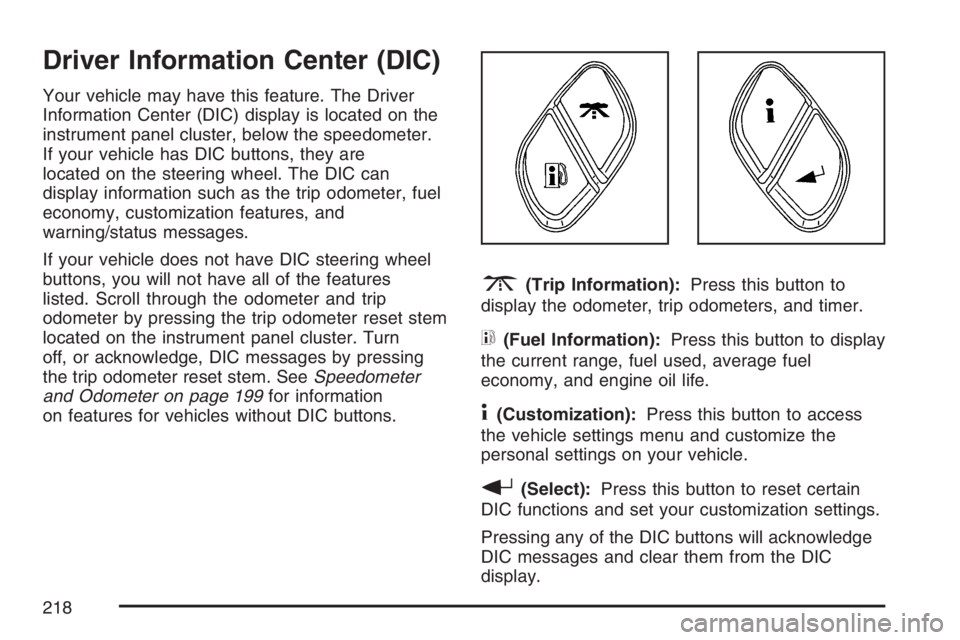
3(Trip Information):Press this button to
display the odometer, trip odometers, and timer.
t(Fuel Information):Press this button to display
the current range, fuel used, average fuel
economy, and engine oil life.
4(Customization):Press this button to access
the vehicle settings menu and customize the
personal settings on your vehicle.
r(Select):Press this button to reset certain
DIC functions and set your customization settings.
Pressing any of the DIC buttons will acknowledge
DIC messages and clear them from the DIC
display.
218
Page 219 of 562
DIC Operation and Displays
The DIC comes on when the ignition is on. After a
short delay the DIC will display the information
that was last displayed before the engine
was turned off.
If a problem is detected, a warning message will
appear on the display. Pressing the trip stem
will acknowledge any warning or service
messages. Pressing any of the DIC steering wheel
buttons — trip information, fuel information,
customization, or select button — will also
acknowledge any warnings or service messages.
You should take any message that appears on
the display seriously and remember that clearing
the message will only make the message
disappear, not correct the problem.
The DIC has different modes which can be
accessed by pressing the four DIC buttons located
on the steering wheel. These buttons are trip
information, fuel information, customization, and
select. The button functions are detailed in
the following pages.
Trip Information Button
3
(Trip Information):Press the trip
information button to scroll through the
ODOMETER, TRIP A, TRIP B, TIRE
PRESSURES, and TIMER.
Odometer:Press the trip information button until
ODOMETER appears on the display. This
mode shows the total distance the vehicle has
been driven in either miles or kilometers. Pressing
the reset stem located on the instrument cluster
with the vehicle off will also display the odometer.
Trip A:Press the trip information button until
TRIP A appears on the display. This mode shows
the current distance traveled since the last
reset for TRIP A in either miles or kilometers.
Trip B:Press the trip information button
until TRIP B appears on the display. This mode
shows the current distance traveled since the last
reset for TRIP B in either miles or kilometers.
219
Page 222 of 562
Select Button
r
(Select):Press the select button to reset
certain DIC functions, turn off or acknowledge
messages on the DIC display, and set your
customization settings. For example, this button
will allow you to reset the trip odometers, turn
off the FUEL LEVEL LOW message, and enables
you to scroll through and select the language
in which the DIC information will appear.
DIC Warnings and Messages
Messages are displayed on the DIC to notify the
driver that the status of the vehicle has changed
and that some action may be needed to correct the
condition. Multiple messages may appear one
after another.
Some messages may not require immediate
action. Press any of the DIC buttons on the
steering wheel or the trip odometer reset stem on
the instrument panel cluster to acknowledge
that you received the messages and to clear them
from the display.Some messages cannot be cleared from the
display because they are more urgent. These
messages require action before they can be
removed from the DIC display. Take any messages
that appear on the display seriously and remember
that clearing the messages will only make the
messages disappear, not correct the problem.
The following are the possible messages that can
be displayed and some information about them.
CHANGE ENGINE OIL
This message displays when the engine oil needs
to be changed and service is required for your
vehicle. SeeScheduled Maintenance on page 507
andEngine Oil on page 394for more information.
Also seeEngine Oil Life System on page 398
for information on how to reset the message. This
message clears itself after 10 seconds until the
next ignition cycle.
CHECK TIRE PRESSURE
This message displays when the tire pressure in
one of the vehicle’s tires needs to be checked.
Press any of the DIC buttons, or the trip stem, to
acknowledge this message and clear it from
the DIC display.
222
Page 224 of 562
ENGINE COOLANT HOT/ENGINE
OVERHEATED
Notice:If you drive your vehicle while the
engine is overheating, severe engine damage
may occur. If an overheat warning appears on
the instrument panel cluster and/or DIC, stop
the vehicle as soon as possible. Do not increase
the engine speed above normal idling speed.
SeeEngine Overheating on page 408for more
information.
This message displays and a chime sounds if the
cooling system temperature gets hot. See
Engine Overheating on page 408for the proper
course of action. This message clears when
the coolant temperature drops to a safe operating
temperature.
FUEL LEVEL LOW
This message displays and a chime sounds if the
fuel level is low in the vehicle’s fuel tank. Refuel as
soon as possible. Press any of the DIC buttons, or
the trip stem, to acknowledge this message and
clear it from the DIC display. SeeLow Fuel Warning
Light on page 217,Filling the Tank on page 385,
andFuel on page 382for more information.
ICE POSSIBLE
This message may display if the outside
temperature reaches a level where ice could form
on the roadway. If the temperature rises to a safe
level, the message clears. This message clears
itself after 10 seconds, or you can press any of the
DIC buttons, or the trip stem, to acknowledge this
message and clear it from the DIC display.
KEY FOB # BATTERY LOW
This message displays if a Remote Keyless Entry
(RKE) transmitter battery is low. Replace the
battery in the transmitter. See “Battery
Replacement” underRemote Keyless Entry (RKE)
System Operation on page 98. Press any of the
DIC buttons, or the trip stem, to acknowledge this
message and clear it from the DIC display.
LEFT REAR DOOR AJAR
This message displays and a chime sounds if the
driver’s side rear door is not fully closed. Stop and
turn off the vehicle, check the door for obstructions,
and close the door again. Check to see if the
message still appears on the DIC. Press any of the
DIC buttons, or the trip stem, to acknowledge this
message and clear it from the DIC display.
224
Page 226 of 562

SERVICE AIR BAG
This message displays if there is a problem with
the airbag system. Have your dealer inspect
the system for problems. SeeAirbag Readiness
Light on page 201andAirbag System on page 71
for more information. Press any of the DIC
buttons, or the trip stem, to acknowledge this
message and clear it from the DIC display.
SERVICE BRAKE SYSTEM
This message displays if a problem occurs with
the brake system. If this message appears, stop as
soon as possible and turn off the vehicle. Restart
the vehicle and check for the message on the
DIC display. If the message is still displayed, or
appears again when you begin driving, the
brake system needs service. See your dealer.
SERVICE CHARGING SYS (System)
This message displays if there is a problem with the
battery charging system. Under certain conditions,
the charging system light may also turn on in the
instrument panel cluster. SeeCharging System
Light on page 205. The battery will not be charging
at an optimal rate and the vehicle will lose the ability
to enter the fuel economy mode. The vehicle is safe
to drive, however you should have the electrical
system checked by your dealer. Press any of the
DIC buttons, or the trip stem, to acknowledge this
message and clear it from the DIC display.
SERVICE STABILITRAK
If this message displays, it means there may be a
problem with the StabiliTrak®system. If this
message appears, try to reset the system by
performing the following: stop; turn off the engine;
then start the engine again. If this message still
comes on, it means there is a problem. You should
see your dealer for service. The vehicle is safe to
drive, however, you do not have the benet of
StabiliTrak
®, so reduce your speed and drive
accordingly. Press any of the DIC buttons, or the
trip stem, to acknowledge this message and clear it
from the DIC display.
226
Page 312 of 562

The following chart describes the StabiliTrak®system events and the corresponding messages and lights
that will be displayed on the instrument panel cluster.
Vehicles with a DIC Vehicles without a DIC Event
StabiliTrak
®
Indicator LightDIC MessageStabiliTrak
®
Indicator LightStabiliTrak
®
Service Light—
Off None Off OffStabiliTrak
®On mode
(System is fully enabled, but
is not actively controlling
vehicle stability).
Solid Traction Control Off Solid OffTraction Control
Off Mode
Solid StabiliTrak
®Off Solid OffStabiliTrak
®Off Mode
(StabiliTrak®indicator light
will ash when system rst
enters this mode).
Blinking StabiliTrak
®Active Blinking OffStabiliTrak
®system activates
using engine speed
management, brake traction
control, and/or stability
control.
Solid Service StabiliTrak
®Solid SolidStabiliTrak
®system is
disabled due to a
system fault.
SolidStabiliTrak
®
Not ReadySolid OffStabiliTrak
®system is
disabled due to a failure
to initialize.
312
Page 449 of 562

When a low tire pressure condition is detected,
the TPMS will illuminate the low tire pressure
warning symbol located on the instrument panel
cluster, and at the same time a message will also
appear on the DIC display. The low tire pressure
warning symbol on the instrument panel cluster
and the CHECK TIRE PRESSURE warning
message on the DIC will appear at each ignition
cycle until the tires are inated to the correct
ination pressure. For additional information and
details about the DIC operation and displays
seeDIC Operation and Displays on page 219and
DIC Warnings and Messages on page 222.
You may notice, during cooler weather conditions,
that the tire pressure monitor light, located on
the instrument panel cluster, and the CHECK TIRE
PRESSURE message will appear when the
vehicle is rst started, and then turn off as you
start to drive the vehicle. This could be an
early indicator that the tire pressures are getting
low and need to be inated to the proper pressure.
Each tire, including the spare (if provided),
should be checked monthly when cold and inated
to the ination pressure recommended by the
vehicle manufacturer on the vehicle placard or tire
ination pressure label.(If your vehicle has tires of a different size than the
size indicated on the vehicle placard or tire ination
pressure label, you should determine the proper tire
ination pressure for those tires.)
As an added safety
feature, your vehicle
has been equipped with
a tire pressure
monitoring system
(TPMS) that illuminates
a low tire pressure
telltale when one
or more of your tires
is signicantly
under-inated.
Accordingly, when the low tire pressure telltale
illuminates, you should stop and check your tires
as soon as possible, and inate them to the
proper pressure. Driving on a signicantly
under-inated tire causes the tire to overheat and
can lead to tire failure. Under-ination also
reduces fuel efficiency and tire tread life, and may
affect the vehicle’s handling and stopping ability.
449