radio controls GMC ENVOY 2007 User Guide
[x] Cancel search | Manufacturer: GMC, Model Year: 2007, Model line: ENVOY, Model: GMC ENVOY 2007Pages: 562, PDF Size: 3 MB
Page 295 of 562

Rear Seat Audio (RSA)
This feature allows rear seat passengers to listen
to any of the sources: radio, cassette tapes,
CDs, or DVDs. However, the rear seat passengers
can only control the sources that the front seat
passengers are not listening to. For example, rear
seat passengers may listen to and control
cassette tapes, CDs, or DVDs through the
headphones while the driver listens to the radio
through the front speakers. The rear seat
passengers have control of the volume for each
set of headphones.
The front seat audio controls always have priority
over the RSA controls. If the front seat
passengers switch the source for the main radio to
a remote source, the RSA will not be able to
control the source. You can operate the rear seat
audio when the main radio is off.
P(Power):Press this button to turn the system
on or off. The rear speakers will be muted
when the power is turned on.
u(Volume):Turn this knob to increase or to
decrease the volume. The left volume knob
controls the left wired headphones and the right
volume knob controls the right wired headphones.
295
Page 297 of 562
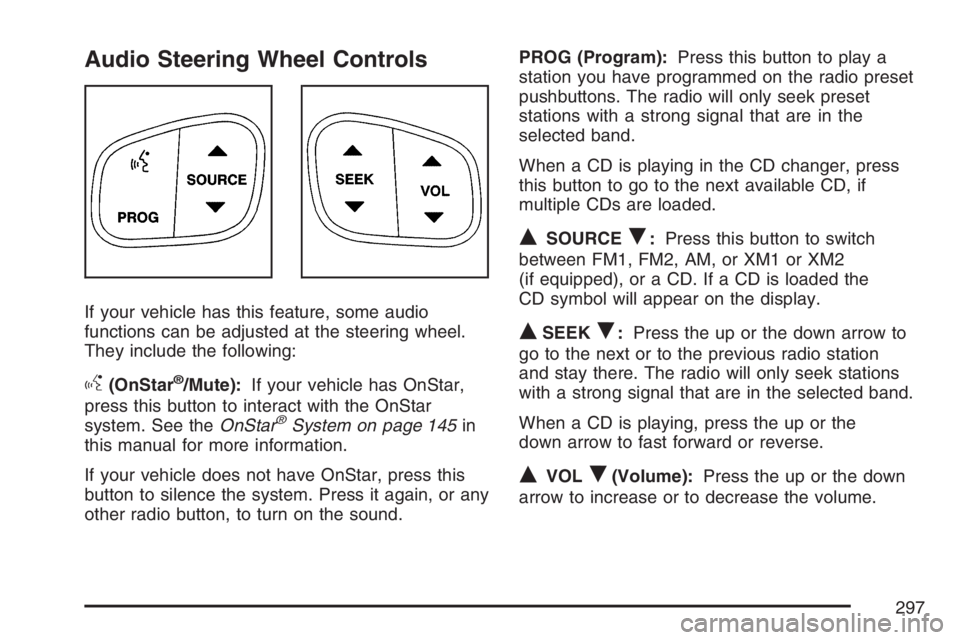
Audio Steering Wheel Controls
If your vehicle has this feature, some audio
functions can be adjusted at the steering wheel.
They include the following:
g(OnStar®/Mute):If your vehicle has OnStar,
press this button to interact with the OnStar
system. See theOnStar
®System on page 145in
this manual for more information.
If your vehicle does not have OnStar, press this
button to silence the system. Press it again, or any
other radio button, to turn on the sound.PROG (Program):Press this button to play a
station you have programmed on the radio preset
pushbuttons. The radio will only seek preset
stations with a strong signal that are in the
selected band.
When a CD is playing in the CD changer, press
this button to go to the next available CD, if
multiple CDs are loaded.
QSOURCER:Press this button to switch
between FM1, FM2, AM, or XM1 or XM2
(if equipped), or a CD. If a CD is loaded the
CD symbol will appear on the display.
QSEEKR:Press the up or the down arrow to
go to the next or to the previous radio station
and stay there. The radio will only seek stations
with a strong signal that are in the selected band.
When a CD is playing, press the up or the
down arrow to fast forward or reverse.
QVOLR(Volume):Press the up or the down
arrow to increase or to decrease the volume.
297
Page 501 of 562
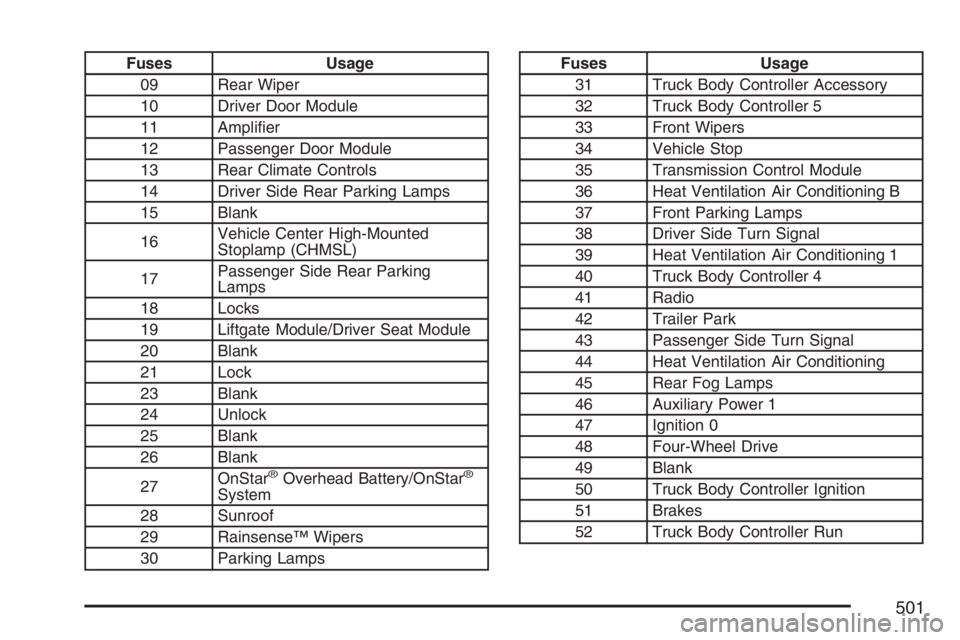
Fuses Usage
09 Rear Wiper
10 Driver Door Module
11 Amplier
12 Passenger Door Module
13 Rear Climate Controls
14 Driver Side Rear Parking Lamps
15 Blank
16Vehicle Center High-Mounted
Stoplamp (CHMSL)
17Passenger Side Rear Parking
Lamps
18 Locks
19 Liftgate Module/Driver Seat Module
20 Blank
21 Lock
23 Blank
24 Unlock
25 Blank
26 Blank
27OnStar
®Overhead Battery/OnStar®
System
28 Sunroof
29 Rainsense™ Wipers
30 Parking Lamps
Fuses Usage
31 Truck Body Controller Accessory
32 Truck Body Controller 5
33 Front Wipers
34 Vehicle Stop
35 Transmission Control Module
36 Heat Ventilation Air Conditioning B
37 Front Parking Lamps
38 Driver Side Turn Signal
39 Heat Ventilation Air Conditioning 1
40 Truck Body Controller 4
41 Radio
42 Trailer Park
43 Passenger Side Turn Signal
44 Heat Ventilation Air Conditioning
45 Rear Fog Lamps
46 Auxiliary Power 1
47 Ignition 0
48 Four-Wheel Drive
49 Blank
50 Truck Body Controller Ignition
51 Brakes
52 Truck Body Controller Run
501
Page 548 of 562
Appearance Care (cont.)
Washing Your Vehicle.............................. 486
Weatherstrips........................................... 485
Windshield, Backglass, and
Wiper Blades........................................ 487
Ashtray(s).................................................... 186
Audio System(s).......................................... 236
Audio Steering Wheel Controls................. 297
Care of Your CD and DVD Player............ 299
Care of Your CDs and DVDs................... 299
Chime Level Adjustment........................... 300
Fixed Mast Antenna................................. 299
Navigation/Radio System,
see Navigation Manual......................... 280
Radio with CD................................238, 248
Radio with Six-Disc CD............................ 258
Rear Seat Audio (RSA)............................ 295
Setting the Time...................................... 238
Theft-Deterrent Feature............................ 296
Understanding Radio Reception............... 298
XM™ Satellite Radio Antenna System...... 300
Automatic Headlamp System....................... 181
Automatic Transmission
Fluid........................................................ 401
Operation................................................. 118B
Battery........................................................ 422
Electric Power Management..................... 184
Run-Down Protection............................... 185
Before Leaving on a Long Trip.................... 340
Brake
Anti-Lock Brake System (ABS)................. 307
Emergencies............................................ 309
Parking.................................................... 126
System Warning Light.............................. 206
Brake Pedal, Throttle................................... 116
Brakes........................................................ 419
Braking....................................................... 306
Braking in Emergencies............................... 309
Break-In, New Vehicle................................. 112
Bulb Replacement....................................... 430
Back-Up Lamps....................................... 434
Front Turn Signal, Sidemarker and
Parking Lamps..................................... 432
Halogen Bulbs......................................... 430
Headlamps............................................... 431
License Plate Lamps................................ 435
Replacement Bulbs.................................. 435
Taillamps, Turn Signal, and Stoplamps..... 432
Buying New Tires........................................ 455
548
Page 557 of 562
P
Paint, Damage............................................ 489
Park (P)
Shifting Into............................................. 127
Shifting Out of......................................... 129
Parking
Brake....................................................... 126
Over Things That Burn............................ 130
Passenger Airbag Status Indicator............... 202
Passenger Sensing System........................... 82
Passing....................................................... 316
Passlock
®.................................................... 111
Power
Accessory Outlet(s).................................. 185
Door Locks.............................................. 101
Electrical System..................................... 492
Lumbar Controls........................................ 10
Reduced Engine Light.............................. 215
Retained Accessory (RAP)....................... 114
Seat............................................................ 9
Steering Fluid.......................................... 417
Windows.................................................. 108
Pretensioners, Safety Belt............................. 41
Programmable Automatic Door Locks.......... 102
Q
Questions and Answers About Safety Belts ... 25
R
Radiator Pressure Cap................................ 408
Radios........................................................ 236
Care of Your CD and DVD Player............ 299
Care of Your CDs and DVDs................... 299
Navigation/Radio System,
see Navigation Manual......................... 280
Radio with CD................................238, 248
Radio with Six-Disc CD............................ 258
Rear Seat Audio...................................... 295
Setting the Time...................................... 238
Theft-Deterrent......................................... 296
Understanding Reception......................... 298
Reading Lamps........................................... 183
Rear Axle.................................................... 428
Locking.................................................... 309
Rear Climate Control System...................... 195
Rear Door Security Locks........................... 105
Rear Floor Storage Lid................................ 162
Rear Safety Belt Comfort Guides.................. 38
Rear Seat Audio (RSA)............................... 295
557
Page 560 of 562
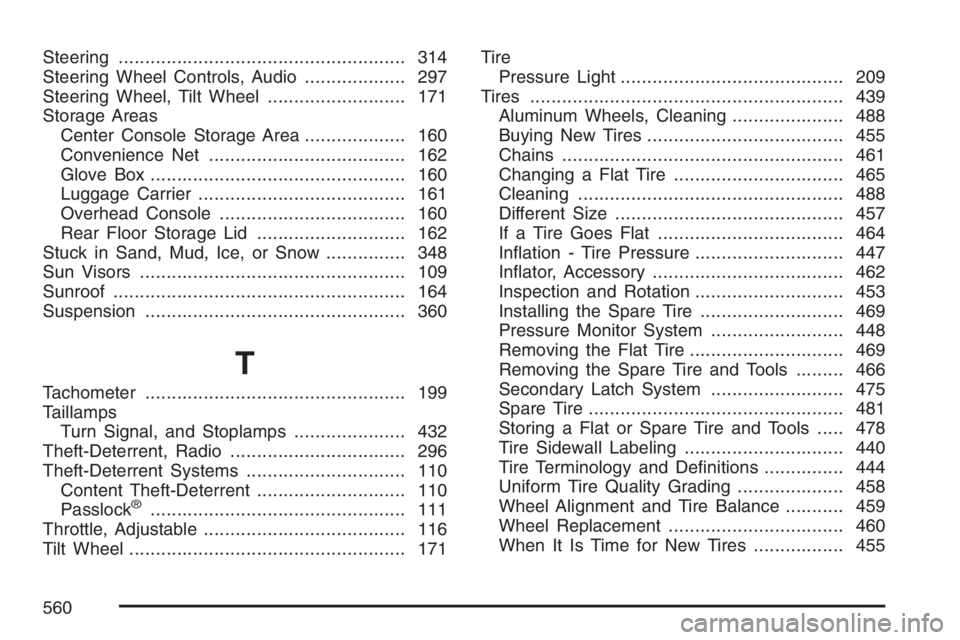
Steering...................................................... 314
Steering Wheel Controls, Audio................... 297
Steering Wheel, Tilt Wheel.......................... 171
Storage Areas
Center Console Storage Area................... 160
Convenience Net..................................... 162
Glove Box................................................ 160
Luggage Carrier....................................... 161
Overhead Console................................... 160
Rear Floor Storage Lid............................ 162
Stuck in Sand, Mud, Ice, or Snow............... 348
Sun Visors.................................................. 109
Sunroof....................................................... 164
Suspension................................................. 360
T
Tachometer................................................. 199
Taillamps
Turn Signal, and Stoplamps..................... 432
Theft-Deterrent, Radio................................. 296
Theft-Deterrent Systems.............................. 110
Content Theft-Deterrent............................ 110
Passlock
®................................................ 111
Throttle, Adjustable...................................... 116
Tilt Wheel.................................................... 171Tire
Pressure Light.......................................... 209
Tires........................................................... 439
Aluminum Wheels, Cleaning..................... 488
Buying New Tires..................................... 455
Chains..................................................... 461
Changing a Flat Tire................................ 465
Cleaning.................................................. 488
Different Size........................................... 457
If a Tire Goes Flat................................... 464
Ination - Tire Pressure............................ 447
Inator, Accessory.................................... 462
Inspection and Rotation............................ 453
Installing the Spare Tire........................... 469
Pressure Monitor System ......................... 448
Removing the Flat Tire............................. 469
Removing the Spare Tire and Tools......... 466
Secondary Latch System ......................... 475
Spare Tire................................................ 481
Storing a Flat or Spare Tire and Tools..... 478
Tire Sidewall Labeling.............................. 440
Tire Terminology and Denitions............... 444
Uniform Tire Quality Grading.................... 458
Wheel Alignment and Tire Balance........... 459
Wheel Replacement................................. 460
When It Is Time for New Tires................. 455
560