door lock GMC ENVOY 2007 Owner's Guide
[x] Cancel search | Manufacturer: GMC, Model Year: 2007, Model line: ENVOY, Model: GMC ENVOY 2007Pages: 562, PDF Size: 3 MB
Page 145 of 562

Outside Convex Mirror
{CAUTION:
A convex mirror can make things (like
other vehicles) look farther away than
they really are. If you cut too sharply into
the right or left lane, you could hit a
vehicle. Check your inside mirror or
glance over your shoulder before
changing lanes.
The passenger’s outside mirror is convex.
A convex mirror’s surface is curved so more
can be seen from the driver’s seat.
Outside Heated Mirrors
Your vehicle may have this feature. When you
operate the rear window defogger, the defogger
also warms the heated driver’s and passenger’s
outside rearview mirrors to help clear them of ice,
snow and condensation.
OnStar®System
OnStar®uses several innovative technologies and
live advisors to provide you with a wide range
of safety, security, information, and convenience
services. If your airbags deploy, the system is
designed to make an automatic call to OnStar
®
Emergency advisors who can request emergency
services be sent to your location. If you lock
your keys in the vehicle, call OnStar
®at
1-888-4-ONSTAR and they can send a signal to
unlock your doors. If you need roadside
assistance, press the OnStar
®button and they
can contact Roadside Service for you.
145
Page 146 of 562
OnStar®service is provided to you subject to the
OnStar®Terms and Conditions. You may cancel
your OnStar®service at any time by contacting
OnStar®as provided below. A complete OnStar®
Owner’s Guide and the OnStar®Terms and
Conditions are included in the vehicle’s OnStar®
Subscriber glove box literature. For more
information, visit onstar.com or onstar.ca, contact
OnStar
®at 1–888–4–ONSTAR (1–888–466–7827)
or TTY 1–877–248–2080, or press the OnStar®
button to speak with an OnStar®advisor 24 hours a
day, 7 days a week.
Not all OnStar
®features are available on all
vehicles. To check if your vehicle is equipped to
provide the services described below, or for a
full description of OnStar
®services and system
limitations, see the OnStar®Owner’s Guide in your
glove box or visit onstar.com.
OnStar®Services
For new vehicles equipped with OnStar®, the Safe
& Sound Plan, or the Directions & Connections®
Plan is included for one year from the date of
purchase. You can extend this plan beyond the
rst year, or upgrade to the Directions &
Connections
®Plan. For more information, press
the OnStar®button to speak with an advisor. Some
OnStar®services (such as Remote Door Unlock
or Stolen Vehicle Location Assistance) may not be
available until you register with OnStar
®.
Available Services with Safe & Sound®Plan
Automatic Notication of Airbag Deployment
Advanced Automatic Crash Notication (AACN)
(If equipped)
Link to Emergency Services
Roadside Assistance
146
Page 147 of 562
Stolen Vehicle Location Assistance
AccidentAssist
Remote Door Unlock/Vehicle Alert
OnStar®Vehicle Diagnostics
GM®Goodwrench®On Demand Diagnostics
OnStar®Hands-Free Calling with 30
complimentary minutes
OnStar®Virtual Advisor
Available Services included with Directions
& Connections®Plan
All Safe and Sound Plan Services
Driving Directions - Advisor delivered or
OnStar®Turn-by-Turn Navigation (If equipped)
RideAssist
Information and Convenience Services
OnStar®Hands-Free Calling
OnStar®Hands-Free Calling allows eligible
OnStar®subscribers to make and receive calls
using voice commands. Hands-Free Calling is fully
integrated into the vehicle, and can be used
with OnStar
®Pre-Paid Minute Packages.
Hands-Free Calling may also be linked to a
Verizon Wireless service plan, depending on
eligibility. To nd out more, refer to the OnStar
®
Owner’s Guide in the vehicle’s glove box, visit
www.onstar.com or www.onstar.ca, or speak with
an OnStar
®advisor by pressing the OnStar®
button or calling 1-888-4-ONSTAR
(1-888-466-7827).
OnStar®Virtual Advisor
OnStar®Virtual Advisor is a feature of OnStar®
Hands-Free Calling that uses your minutes
to access location-based weather, local traffic
reports, and stock quotes. By pressing the phone
button and giving a few simple voice commands,
you can browse through the various topics.
See the OnStar
®Owner’s Guide for more
information.
147
Page 162 of 562
To prevent damage or loss of cargo as you are
driving, check now and then to make sure
the luggage carrier is locked and cargo is still
securely fastened.
When the luggage carrier is not in use, place the
crossrails at the following positions for wind
noise reduction. Place one crossrail at the rear
most point of the vehicle and the other crossrail
above the opening of the rear door.
Rear Floor Storage Lid
{CAUTION:
If any removable convenience item is not
secured properly, it can move around in a
collision or sudden stop. People in the
vehicle could be injured. Be sure to
secure any such item properly.
Your vehicle has a rear cargo area with a
removable storage lid.To remove the rear oor storage lid, do the
following:
1. Press the latch release and lift up the latch
handle.
2. Raise the lid slightly to unhook it.
3. Pull the lid toward you to release it from the
forward mounting tabs.
To reinstall the rear oor storage lid, reverse the
previous steps. Make sure the lid is secure by
applying slight pressure to the latch until you hear
it click.
Convenience Net
Your vehicle may have this feature. A convenience
net in the rear of your vehicle helps keep small
items in place during sharp turns or quick
stops and starts. The net is not designed to retain
these items during off-road use. The net is not
for larger, heavier items.
162
Page 180 of 562

Headlamps on Reminder
A reminder tone sounds when the headlamps or
parking lamps are manually turned on, if the
driver’s door is open and the ignition is in LOCK
or ACC. To turn the tone off, turn the knob all
the way counterclockwise.
In the automatic mode, the headlamps turn off
once the ignition key is in LOCK.
Daytime Running Lamps (DRL)
Daytime Running Lamps (DRL) can make it easier
for others to see the front of your vehicle during
the day. DRL can be helpful in many different
driving conditions, but they can be especially
helpful in the short periods after dawn and before
sunset. Fully functional DRL are required on all
vehicles rst sold in Canada.The DRL system makes the headlamps come on
at reduced brightness when the following
conditions are met:
The ignition is on.
The exterior lamps knob is in automatic
headlamp mode.
The light sensor detects daytime light.
The transmission is not in PARK (P).
When the DRL are on, only the headlamps will be
on. The taillamps, sidemarker and other lamps
will not be on. The instrument panel will not be lit
up either.
When it begins to get dark, the headlamps
automatically switch from DRL to the regular
headlamps.
180
Page 183 of 562

Dome Lamp Override
The dome override
button is located
below the exterior
lamps knob.
To turn the dome lamps off, press the button.
The dome lamps will remain off when a door is
open. This will override the illuminated entry
feature unless you use the Remote Keyless
Entry (RKE) transmitter to unlock the vehicle.
To return the lamps to automatic operation, press
the button again. The dome lamps come on
when a door is opened.
Entry Lighting
The vehicle has entry lighting.
When any door is opened, the dome lamps come
on as long as the dome override lamp override
button is not pressed in. When all the doors
are closed, the lamps stay on for a short period of
time and then turn off automatically. If you use
the Remote Keyless Entry (RKE) transmitter
to unlock the vehicle, the interior lamps come on
for a short time whether or not the dome lamp
override is on.
Exit Lighting
With exit lighting, the interior lamps come on when
you remove the key from the ignition. If the
dome override is off, these lamps stay on for a
short period of time and then go out.
Reading Lamps
The reading lamps are located in the front
console.
Press the lens on the lamps to turn the reading
lamps on or off.
183
Page 229 of 562

DIC Vehicle Customization
Your vehicle may have customization capabilities
that allow you to program some features to
one setting based on your preference. All of the
customizable options listed may not be available
on your vehicle. Only the options available display
on the Driver Information Center (DIC).
The default settings for the customization features
were set when your vehicle left the factory, but
may have been changed from their default
state since then.
To change feature preferences, make sure the
ignition is on and the vehicle is in PARK (P).
To avoid excessive drain on the battery, it
is recommended that the headlamps are
turned off.
Press the customization button to scroll through
the available customizable options.
After pressing the customization button, VEHICLE
SETTINGS momentarily displays before going
to a customization option.
Lock Doors
Press the customization button until LOCK
DOORS: IN GEAR appears in the display.
To select your preference for automatic locking,
press the select button while LOCK DOORS:
IN GEAR is displayed on the DIC. Pressing the
select button will scroll through the following
choices:
LOCK DOORS: IN GEAR (default):The doors
will lock when the vehicle is shifted out of
PARK (P).
LOCK DOORS: WITH SPEED:The doors will
lock when the vehicle speed is above
8 mph (13 km/h) for three seconds.
Choose one of the available options and press the
customization button while it is displayed on the
DIC to select it and move on to the next feature.
For more information on automatic door locks, see
Programmable Automatic Door Locks on
page 102.
229
Page 230 of 562

Unlock Doors
Press the customization button until UNLOCK
DOORS: IN PARK appears in the display. To select
your preference for automatic unlocking, press the
select button while UNLOCK DOORS: IN PARK is
displayed on the DIC. Pressing the select button will
scroll through the following choices:
UNLOCK DOORS: IN PARK (default):All of the
doors will unlock when the vehicle is shifted
into PARK (P).
UNLOCK DRIVER: IN PARK:The driver’s door
will be unlocked when the vehicle is shifted
into PARK (P).
UNLOCK DOORS: KEY OUT:All of the doors
will unlock when the key is taken out of the
ignition.
UNLOCK DOORS: MANUALLY:The doors will
not be unlocked automatically.
Choose one of the available options and press the
customization button while it is displayed on the
DIC to select it and move on to the next feature.
For more information on automatic door locks, see
Programmable Automatic Door Locks on page 102.
Lock Feedback
Press the customization button until LOCK
FEEDBACK: BOTH appears in the display.
To select your preference for the feedback you
receive when locking the vehicle with the Remote
Keyless Entry (RKE) transmitter, press the
select button while LOCK FEEDBACK: BOTH is
displayed on the DIC. Pressing the select
button will scroll through the following choices:
LOCK FEEDBACK: BOTH (default):The parking
lamps will ash each time you press the button
with the lock symbol on the RKE transmitter
and the horn will chirp the second time you press
the lock button.
LOCK FEEDBACK: OFF:There will be no
feedback when locking the vehicle.
LOCK FEEDBACK: LAMPS:The parking lamps
will ash each time you press the button with
the lock symbol on the RKE transmitter.
230
Page 349 of 562
Loading Your Vehicle
It is very important to know how much weight
your vehicle can carry. This weight is called the
vehicle capacity weight and includes the weight of
all occupants, cargo, and all nonfactory-installed
options. Two labels on your vehicle show how
much weight it was designed to carry, the Tire
and Loading Information label and the
Certication/Tire label.
{CAUTION:
Do not load your vehicle any heavier than
the Gross Vehicle Weight Rating (GVWR),
or either the maximum front or rear Gross
Axle Weight Rating (GAWR). If you do,
parts on your vehicle can break, and it
can change the way your vehicle handles.
These could cause you to lose control
and crash. Also, overloading can shorten
the life of your vehicle.
Tire and Loading Information Label
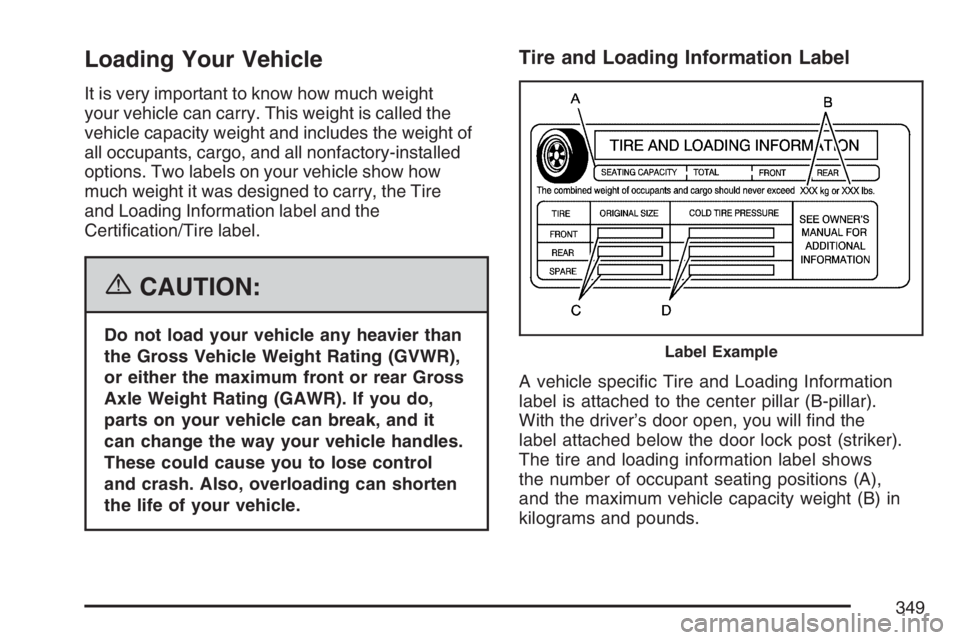
A vehicle specic Tire and Loading Information
label is attached to the center pillar (B-pillar).
With the driver’s door open, you will nd the
label attached below the door lock post (striker).
The tire and loading information label shows
the number of occupant seating positions (A),
and the maximum vehicle capacity weight (B) in
kilograms and pounds.
Label Example
349
Page 385 of 562
Filling the Tank
{CAUTION:
Fuel vapor burns violently and a fuel re
can cause bad injuries. To help avoid
injuries to you and others, read and follow
all the instructions on the pump island.
Turn off your engine when you are
refueling. Do not smoke if you are near
fuel or refueling your vehicle. Keep
sparks, ames, and smoking materials
away from fuel. Do not leave the fuel
pump unattended when refueling your
vehicle. This is against the law in some
places. Keep children away from the fuel
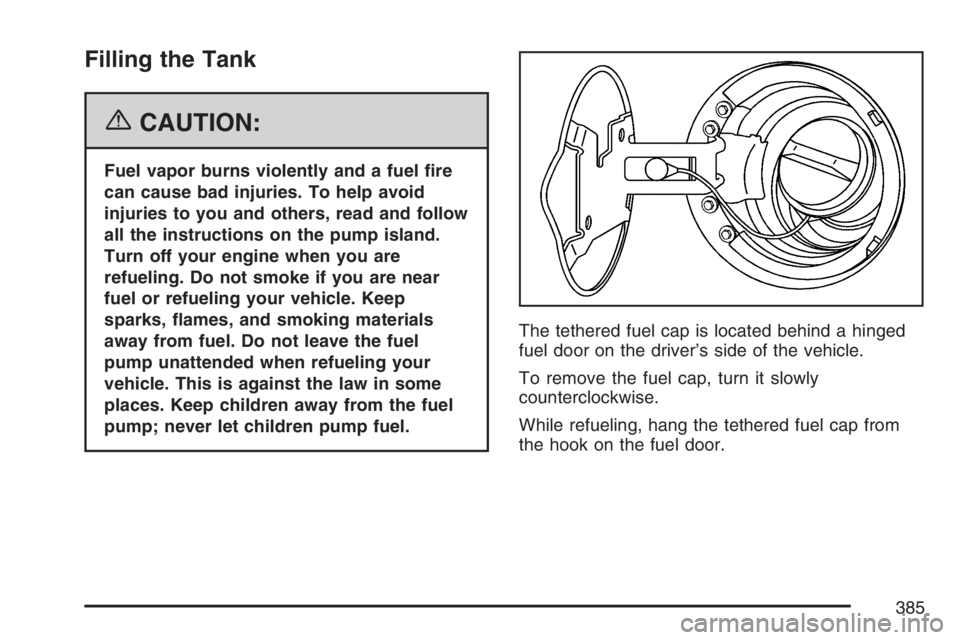
pump; never let children pump fuel.The tethered fuel cap is located behind a hinged
fuel door on the driver’s side of the vehicle.
To remove the fuel cap, turn it slowly
counterclockwise.
While refueling, hang the tethered fuel cap from
the hook on the fuel door.
385