cruise control GMC ENVOY 2007 Owner's Manual
[x] Cancel search | Manufacturer: GMC, Model Year: 2007, Model line: ENVOY, Model: GMC ENVOY 2007Pages: 562, PDF Size: 3 MB
Page 165 of 562
Instrument Panel Overview........................ 168
Hazard Warning Flashers.......................... 170
Other Warning Devices............................. 170
Horn.......................................................... 170
Tilt Wheel.................................................. 171
Turn Signal/Multifunction Lever.................. 171
Turn and Lane-Change Signals................. 172
Headlamp High/Low-Beam Changer.......... 173
Flash-to-Pass............................................ 173
Windshield Wipers..................................... 173
Windshield Washer.................................... 174
Rear Window Wiper/Washer...................... 174
Headlamp Washer..................................... 175
Cruise Control........................................... 176
Headlamps................................................ 179
Headlamps on Reminder........................... 180
Daytime Running Lamps (DRL)................. 180
Automatic Headlamp System..................... 181
Fog Lamps................................................ 182
Instrument Panel Brightness...................... 182
Dome Lamps............................................. 182
Dome Lamp Override................................ 183
Entry Lighting............................................ 183
Exit Lighting.............................................. 183Reading Lamps......................................... 183
Electric Power Management...................... 184
Battery Run-Down Protection..................... 185
Accessory Power Outlet(s)........................ 185
Ashtray(s) and Cigarette Lighter................ 186
Climate Controls......................................... 186
Dual Climate Control System..................... 186
Dual Automatic Climate Control System.... 189
Outlet Adjustment...................................... 194
Rear Climate Control System.................... 195
Warning Lights, Gages, and Indicators..... 197
Instrument Panel Cluster........................... 198
Speedometer and Odometer...................... 199
Trip Odometer........................................... 199
Tachometer............................................... 199
Safety Belt Reminder Light........................ 200
Passenger Safety Belt Reminder Light....... 200
Airbag Readiness Light............................. 201
Passenger Airbag Status Indicator............. 202
Charging System Light.............................. 205
Voltmeter Gage......................................... 205
Brake System Warning Light..................... 206
Anti-Lock Brake System Warning Light...... 207
Section 3 Instrument Panel
165
Page 166 of 562
StabiliTrak®Service Light........................... 207
StabiliTrak®Indicator Light......................... 208
Engine Coolant Temperature Gage............ 208
Tire Pressure Light.................................... 209
Malfunction Indicator Lamp........................ 210
Oil Pressure Gage..................................... 213
Change Engine Oil Light........................... 214
Security Light............................................ 214
Cruise Control Light.................................. 215
Reduced Engine Power Light.................... 215
Highbeam On Light................................... 215
Service Four-Wheel Drive Warning Light ... 216
Check Gages Warning Light...................... 216
Gate Ajar Light.......................................... 216
Fuel Gage................................................. 217
Low Fuel Warning Light............................ 217
Check Gas Cap Light................................ 217
Driver Information Center (DIC).................. 218
DIC Operation and Displays...................... 219
DIC Warnings and Messages.................... 222
DIC Vehicle Customization........................ 229Audio System(s)......................................... 236
Setting the Time........................................ 238
Radio with CD (Base)............................... 238
Radio with CD (MP3)................................ 248
Radio with Six-Disc CD............................. 258
Using an MP3........................................... 271
XM Radio Messages................................. 277
Navigation/Radio System........................... 280
Rear Seat Entertainment System............... 280
Rear Seat Audio (RSA)............................. 295
Theft-Deterrent Feature............................. 296
Audio Steering Wheel Controls.................. 297
Radio Reception........................................ 298
Care of Your CDs and DVDs.................... 299
Care of the CD and DVD Player............... 299
Fixed Mast Antenna.................................. 299
XM™ Satellite Radio Antenna System....... 300
Chime Level Adjustment............................ 300
Section 3 Instrument Panel
166
Page 171 of 562
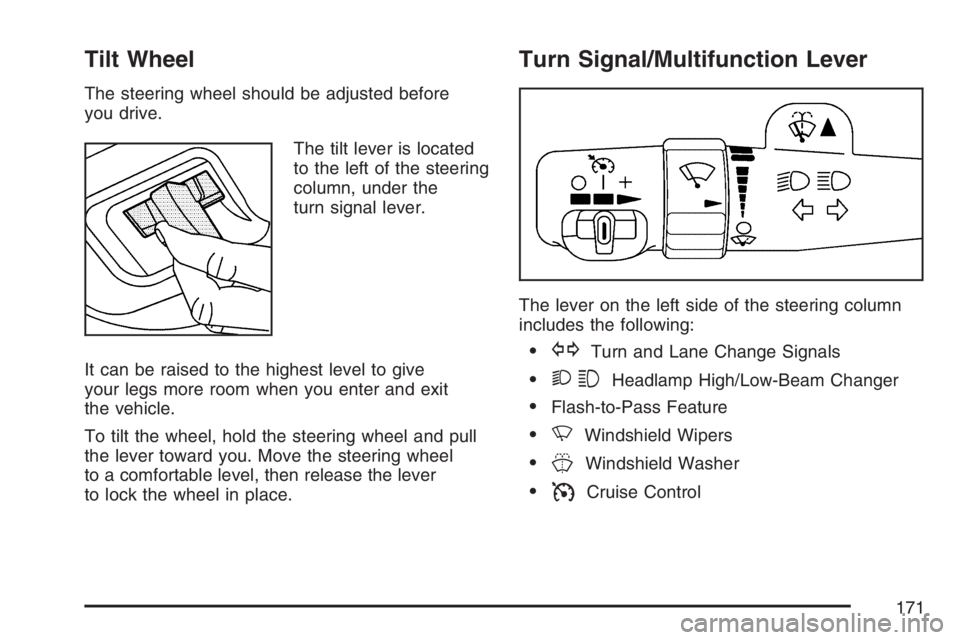
Tilt Wheel
The steering wheel should be adjusted before
you drive.
The tilt lever is located
to the left of the steering
column, under the
turn signal lever.
It can be raised to the highest level to give
your legs more room when you enter and exit
the vehicle.
To tilt the wheel, hold the steering wheel and pull
the lever toward you. Move the steering wheel
to a comfortable level, then release the lever
to lock the wheel in place.
Turn Signal/Multifunction Lever
The lever on the left side of the steering column
includes the following:
GTurn and Lane Change Signals
23Headlamp High/Low-Beam Changer
Flash-to-Pass Feature
NWindshield Wipers
JWindshield Washer
ICruise Control
171
Page 176 of 562
Cruise Control
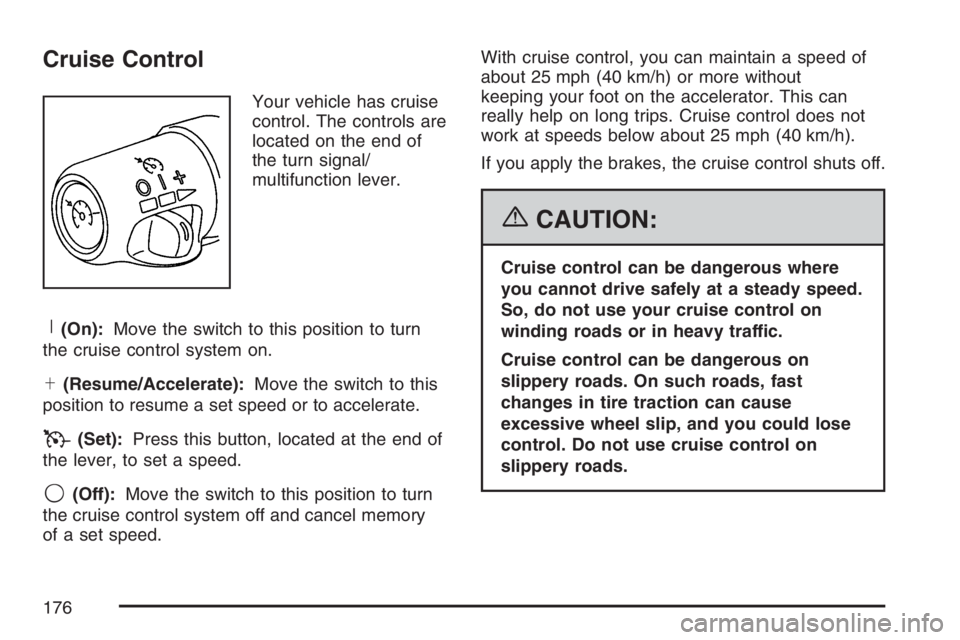
Your vehicle has cruise
control. The controls are
located on the end of
the turn signal/
multifunction lever.
R(On):Move the switch to this position to turn
the cruise control system on.
S(Resume/Accelerate):Move the switch to this
position to resume a set speed or to accelerate.
T(Set):Press this button, located at the end of
the lever, to set a speed.
9(Off):Move the switch to this position to turn
the cruise control system off and cancel memory
of a set speed.With cruise control, you can maintain a speed of
about 25 mph (40 km/h) or more without
keeping your foot on the accelerator. This can
really help on long trips. Cruise control does not
work at speeds below about 25 mph (40 km/h).
If you apply the brakes, the cruise control shuts off.
{CAUTION:
Cruise control can be dangerous where
you cannot drive safely at a steady speed.
So, do not use your cruise control on
winding roads or in heavy traffic.
Cruise control can be dangerous on
slippery roads. On such roads, fast
changes in tire traction can cause
excessive wheel slip, and you could lose
control. Do not use cruise control on
slippery roads.
176
Page 177 of 562
{CAUTION:
If you leave your cruise control on when
you are not using cruise, you might hit a
button and go into cruise when you do
not want to. You could be startled and
even lose control. Keep the cruise control
switch off until you want to use cruise
control.
Setting Cruise Control
1. Move the cruise control switch to on.
2. Get up to the speed you want.
3. Press the set button at the end of the lever
and release it.
4. Take your foot off the accelerator pedal.
The accelerator pedal will not go down.Some vehicles have a
cruise light on the
instrument panel cluster
that will come on
when the cruise control
is engaged.
Resuming a Set Speed
Suppose you set your cruise control at a desired
speed and then you apply the brake. This, of
course, shuts off the cruise control. But you do not
need to reset it.
Once you are going about 25 mph (40 km/h) or
more, you can move the cruise control switch
briey from on to resume/accelerate.
You will go right back up to the previously chosen
speed and stay there.
If you hold the switch at resume/accelerate, the
vehicle keeps going faster until you release
the switch or apply the brakes. So unless you
want to go faster, do not hold the switch at
resume/accelerate.
177
Page 178 of 562
Increasing Speed While Using
Cruise Control
There are two ways to go to a higher speed:
Use the accelerator pedal to get to the higher
speed. Press the button at the end of the
lever, then release the button and the
accelerator pedal. You will now cruise at the
higher speed.
Move the cruise switch from on to resume/
accelerate. Hold it there until you get up to the
desired speed and then release the switch. To
increase your speed in very small amounts,
move the switch briey to resume/accelerate.
Each time you do this, your vehicle will go
about 1 mph (1.6 km/h) faster.
Reducing Speed While Using
Cruise Control
Press in the set button at the end of the lever until
you reach the desired speed, then release it.
Each time you do this, you will go about
1 mph (1.6 km/h) slower.
Passing Another Vehicle While Using
Cruise Control
Use the accelerator pedal to increase your speed.
When you take your foot off the pedal, your
vehicle will slow down to the cruise control speed
set earlier.
Using Cruise Control on Hills
How well your cruise control works on hills
depends upon your speed, load and the steepness
of the hills. When going up steep hills, you may
want to step on the accelerator pedal to maintain
your speed. When going downhill, you may
have to brake or shift to a lower gear to keep your
speed down. Of course, applying the brake
takes you out of cruise control. Many drivers nd
this to be too much trouble and do not use
cruise control on steep hills.
Ending Cruise Control
There are three ways to turn off the cruise control:
Step lightly on the brake pedal.
Move the cruise switch to off, or
Shift the transmission to NEUTRAL (N).
178
Page 179 of 562

Erasing Speed Memory
When you turn off the cruise control or the
ignition, the cruise control set speed memory
is erased.
Headlamps
The exterior lamps
knob is located on
your instrument panel
to the left of the
steering wheel.
c(Off):Turn the knob to this symbol and
release it to turn off the Daytime Running Lamps
(DRL) and the Automatic Headlamps (AHS).
An indicator illuminates when the position
is selected. This position is not available for
vehicles rst sold in Canada.
i(Automatic DRL/AHS):Turn the knob to
this symbol to put the system into automatic
headlamp mode. An indicator comes on when
the position is selected.
;(Parking Lamps):Turn the knob to this
symbol to turn on the parking lamps, as well as
the following:
Sidemarker Lamps
Taillamps
License Plate Lamps
Instrument Panel Lights
2(Headlamps):Turn the knob to this symbol to
turn on the headlamps, as well as the following:
Parking Lamps
Sidemarker Lamps
Taillamps
License Plate Lamps
Instrument Panel Lights
179
Page 215 of 562
Cruise Control Light
If your vehicle has a
Driver Information
Center (DIC), this light
will come on when
the cruise control is set.
SeeCruise Control on page 176andDIC Warnings
and Messages on page 222for more information.
Reduced Engine Power Light
This light comes on
when a noticeable
reduction in the
vehicle’s performance
occurs.The vehicle can be driven at a reduced speed
when the reduced engine power light is on,
but acceleration and speed may be reduced.
The performance may be reduced until the next
time you drive your vehicle. If this light stays
on, see your dealer as soon as possible for
diagnosis and repair.
This light may also come on if there is a problem
with the Electronic Throttle Control (ETC)
system. If this happens, take the vehicle in for
service as soon as possible.
Highbeam On Light
This light comes on
when the high-beam
headlamps are in use.
SeeHeadlamp High/Low-Beam Changer on
page 173.
215
Page 313 of 562

Notice:If the StabiliTrak®light comes on
due to heavy braking and/or because the
traction control system has been continuously
active, do not allow the wheel(s) of one axle to
spin excessively. If you do, you may be causing
damage to the transfer case. This could lead to
costly repairs not covered by your warranty.
Notice:If you allow the wheel(s) of one axle
to spin excessively while the StabiliTrak
®,
ABS and brake warning lights and the
SERVICE STABILITRAK message are
displayed, you could damage the transfer
case. The repairs would not be covered by your
warranty. Reduce engine power and do not
spin the wheel(s) excessively while these lights
and this message are displayed.
StabiliTrak
®may activate on dry or rough roads or
under conditions such as heavy acceleration
while turning or abrupt upshifts/downshifts of the
transmission. When this happens, you may
notice a reduction in acceleration, or may hear a
noise or vibration. This is normal.If your vehicle is in cruise control when the system
activates, the StabiliTrak
®light will blink, and
the cruise control will automatically disengage.
When road conditions allow, you may re-engage
the cruise control. SeeCruise Control on
page 176.
StabiliTrak
®will turn off automatically if a problem
is detected in the system. The StabiliTrak®
light will come on and SERVICE STABILITRAK
will be displayed on the DIC. For vehicles without a
DIC, the StabiliTrak
®light and the StabiliTrak®
service light will both come on. If the SERVICE
STABILITRAK message (or StabiliTrak®service
light) does not clear itself after restarting the
vehicle, you should see your dealer for service.
Adding non-GM accessories can affect your
vehicle’s performance. SeeAccessories and
Modications on page 380for more information.
313
Page 550 of 562
Cleaning (cont.)
Weatherstrips........................................... 485
Windshield, Backglass, and
Wiper Blades........................................ 487
Climate Control System
Dual......................................................... 186
Dual Automatic......................................... 189
Outlet Adjustment..................................... 194
Rear........................................................ 195
Collision Damage Repair............................. 539
Comfort Guides, Rear Safety Belt................. 38
Compass..........................134, 136, 138, 140
Content Theft-Deterrent............................... 110
Control of a Vehicle..................................... 306
Convenience Net......................................... 162
Coolant
Engine Temperature Gage........................ 208
Heater, Engine......................................... 116
Cooling System........................................... 411
Cruise Control............................................. 176
Cruise Control Light.................................... 215
Customer Assistance Information
Courtesy Transportation........................... 535
Customer Assistance for Text Telephone
(TTY) Users.......................................... 530
Customer Assistance Offices.................... 530
Customer Satisfaction Procedure.............. 526Customer Assistance Information (cont.)
GM Mobility Reimbursement Program...... 531
Reporting Safety Defects to
General Motors..................................... 544
Reporting Safety Defects to the
Canadian Government.......................... 544
Reporting Safety Defects to the
United States Government.................... 544
Roadside Assistance Program.................. 532
Service Publications Ordering
Information........................................... 545
D
Daytime Running Lamps............................. 180
Defensive Driving........................................ 302
Delayed Locking.......................................... 102
Disc, MP3................................................... 271
Doing Your Own Service Work.................... 381
Dome Lamp Override.................................. 183
Dome Lamps............................................... 182
Door
Delayed Locking...................................... 102
Locks....................................................... 100
Power Door Locks................................... 101
Programmable Automatic Door Locks....... 102
Rear Door Security Locks........................ 105
550