rse GMC ENVOY 2008 User Guide
[x] Cancel search | Manufacturer: GMC, Model Year: 2008, Model line: ENVOY, Model: GMC ENVOY 2008Pages: 468, PDF Size: 2.64 MB
Page 168 of 468
If the airbag readiness light stays on after you start the
vehicle or comes on when you are driving, your airbag
system may not work properly. Have your vehicle
serviced right away.
{CAUTION:
If the airbag readiness light stays on after you
start your vehicle, it means the airbag system
may not be working properly. The airbags in
your vehicle may not inate in a crash, or they
could even inate without a crash. To help avoid
injury to yourself or others, have your vehicle
serviced right away if the airbag readiness light
stays on after you start your vehicle.
The airbag readiness light should ash for a few
seconds when you start the engine. If the light does
not come on then, have it xed immediately. If there
is a problem with the airbag system, an airbag Driver
Information Center (DIC) message may also come
on. SeeDIC Warnings and Messages on page 3-53for
more information.
Passenger Airbag Status Indicator
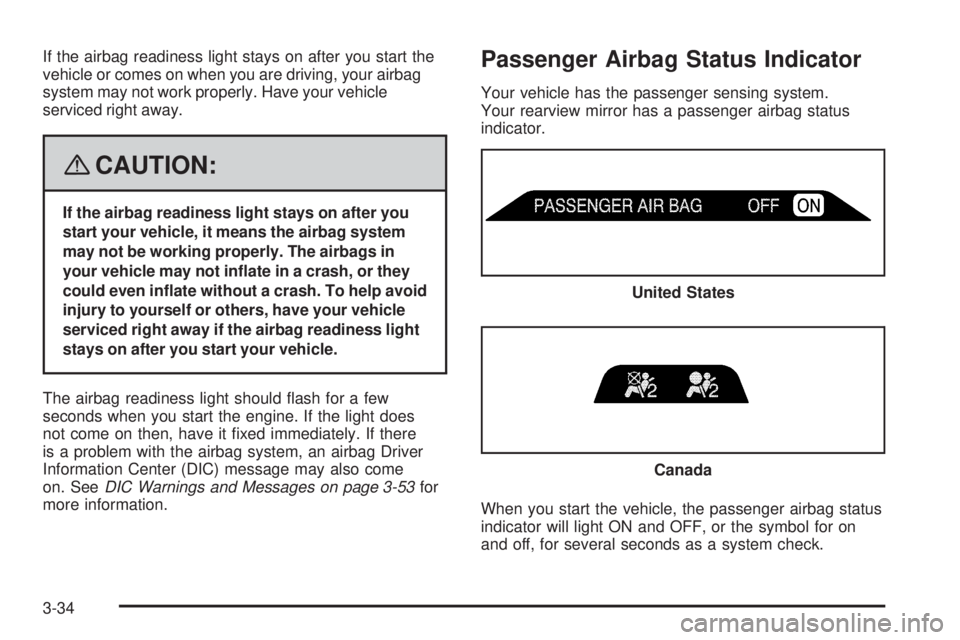
Your vehicle has the passenger sensing system.
Your rearview mirror has a passenger airbag status
indicator.
When you start the vehicle, the passenger airbag status
indicator will light ON and OFF, or the symbol for on
and off, for several seconds as a system check.United States
Canada
3-34
Page 188 of 468
CHECK TIRE PRESSURE
This message displays when the pressure in one or
more of the vehicle’s tires needs to be checked. If a tire
pressure message appears on the DIC, stop as soon
as you can. Have the tire pressures checked and set to
those shown on the Tire Loading Information label.
SeeTires on page 5-57,Loading Your Vehicle on
page 4-34, andInflation - Tire Pressure on page 5-64.
The DIC also shows the tire pressure values. See
DIC Operation and Displays on page 3-50. If the tire
pressure is low, the low tire pressure warning light
comes on. SeeTire Pressure Light on page 3-41.
CHECK WASHER FLUID
This message displays if the washer uid level is low.
Adding washer uid to the windshield washer uid
reservoir clears this message. SeeWindshield Washer
Fluid on page 5-37. This message clears itself after
10 seconds, or you can manually clear it from the
DIC display.
CURB VIEW ACTIVATED
This message displays when the passenger outside
rearview mirror moves into the curb view position.
SeeOutside Curb View Assist Mirror on page 2-47
for more information.
DRIVER DOOR AJAR
This message displays and a chime sounds if the driver
door is not fully closed. Stop and turn off the vehicle,
check the door for obstructions, and close the door again.
Check to see if the message still appears on the DIC.
ENGINE COOLANT HOT/ENGINE
OVERHEATED
Notice:If you drive your vehicle while the engine
is overheating, severe engine damage may occur.
If an overheat warning appears on the instrument
panel cluster and/or DIC, stop the vehicle as soon as
possible. Do not increase the engine speed above
normal idling speed. SeeEngine Overheating
on page 5-28for more information.
This message displays and a chime sounds if the
cooling system temperature gets hot. SeeEngine
Overheating on page 5-28for the proper course of
action. This message clears when the coolant
temperature drops to a safe operating temperature.
FUEL LEVEL LOW
This message displays and a chime sounds if the fuel
level is low. Refuel as soon as possible. SeeLow
Fuel Warning Light on page 3-49,Filling the Tank on
page 5-8, andFuel on page 5-5for more information.
3-54
Page 197 of 468
Curb View
Press the customization button until CURB VIEW: OFF
appears in the display. To select your preference for
curb view, press the select button while CURB VIEW:
OFF is displayed on the DIC. Pressing the select button
will scroll through the following settings:
CURB VIEW: OFF (default):The passenger’s outside
mirror will not be tilted down when the vehicle is shifted
into REVERSE (R).
CURB VIEW: PASSENGER:The passenger’s outside
mirror will be tilted down when the vehicle is shifted
into REVERSE (R).
When the vehicle is placed in PARK (P) or in any
forward gear, the mirror will return to the normal driving
position, following a short delay.
To select a setting and move on to the next feature,
press the customization button while the desired setting
is displayed on the DIC.
SeeOutside Curb View Assist Mirror on page 2-47for
more information.
Alarm Warning
Press the customization button until ALARM WARNING:
BOTH appears in the display. To select your preference
for alarm warning, press the select button while ALARM
WARNING: BOTH is displayed on the DIC. Pressing the
select button will scroll through the following settings:
ALARM WARNING: BOTH (default):The headlamps
will ash and the horn will chirp when the alarm is active.
ALARM WARNING: HORN:The horn will chirp when
the alarm is active.
ALARM WARNING: LAMPS:The headlamps will ash
when the alarm is active.
ALARM WARNING: OFF:There will be no alarm
warning on activation.
To select a setting and move on to the next feature,
press the customization button while the desired setting
is displayed on the DIC.
SeeContent Theft-Deterrent on page 2-16for more
information.
3-63
Page 199 of 468
Audio System(s)
Determine which radio your vehicle has and then read the
pages following to familiarize yourself with its features.
{CAUTION:
This system provides you with far greater
access to audio stations and song listings.
Giving extended attention to entertainment
tasks while driving can cause a crash and you
or others can be injured or killed. Always keep
your eyes on the road and your mind on the
drive — avoid engaging in extended searching
while driving.
Keeping your mind on the drive is important for
safe driving. SeeDefensive Driving on page 4-2.
Here are some ways in which you can help avoid
distraction while driving.
While your vehicle is parked:
Familiarize yourself with all of its controls.
Familiarize yourself with its operation.
Set up your audio system by presetting your
favorite radio stations, setting the tone, and
adjusting the speakers. Then, when driving
conditions permit, you can tune to your favorite
radio stations using the presets and steering
wheel controls if the vehicle has them.
Notice:Before adding any sound equipment to
your vehicle, such as an audio system, CD player,
CB radio, mobile telephone, or two-way radio, make
sure that it can be added by checking with your
dealer/retailer. Also, check federal rules covering
mobile radio and telephone units. If sound equipment
can be added, it is very important to do it properly.
Added sound equipment may interfere with the
operation of your vehicle’s engine, radio, or other
systems, and even damage them. Your vehicle’s
systems may interfere with the operation of sound
equipment that has been added.
Notice:The chime signals related to safety belts,
parking brake, and other functions of your vehicle
operate through the radio/entertainment system.
If that equipment is replaced or additional equipment
is added to your vehicle, the chimes may not
work. Make sure that replacement or additional
equipment is compatible with your vehicle before
installing it. SeeAccessories and Modifications
on page 5-3.
3-65
Page 211 of 468
To eject multiple CDs, do the following:
1. Press and hold the
Zbutton for two seconds.
A beep is heard and the indicator light, located to
the right of the slot, begins to ash and EJECT ALL
displays.
2. Once the light stops ashing, REMOVE CD #
displays. The CD ejects and can be removed.
Once the CD is removed, the indicator light begins
ashing again and another CD ejects.
To stop ejecting the CDs, press the
Zbutton.
If the CD is not removed, after 25 seconds, the CD
automatically pulls back into the player. If CD is pushed
back into the player, before the 25-second time period is
complete, the player senses an error and tries to eject the
CD several times before stopping.
Do not repeatedly press the
Zbutton to eject a CD
after pushing it in manually. The player’s 25-second
eject timer resets at each press of eject, causing
the player to not eject the CD until the 25-second
time period has elapsed.
1 FLD
x(Previous) (MP3 Radio):This pushbutton
does not work while using a non-MP3 CD.2 FLD
w(Next) (MP3 Radio):This pushbutton does
not work while using a non-MP3 CD.
1 PREV (Previous) (Base Radio):Press to go to the
beginning of the current track (if more than eight seconds
have played), or to the beginning of the previous track
(if less than eight seconds have played). TRACK and
the track number displays. If this pushbutton is held or
pressed more than once, the player continues moving
backward through the CD.
2 NEXT (Base Radio):Press to go to the next track.
TRACK and the track number displays. If this
pushbutton is held or pressed more than once, the
player continues moving forward through the CD.
{REV or 3 REV (Reverse):Press and hold to
reverse quickly within a track.
For the Base Radio, press and hold for less than
two seconds to reverse at six times the normal playing
speed. Press and hold it for more than two seconds
to reverse at 17 times the normal playing speed.
Sound is heard at a reduced volume. Release this
button to play the passage. ET and/or the elapsed time
of the track displays.
3-77
Page 213 of 468
©SCAN¨:To scan one CD, press and hold either
SCAN, or depending on the radio, the TYPE arrow
for more than two seconds until SCAN or TRACK SCAN
displays and a beep is heard. The radio goes to the
next track, plays for 10 seconds, then goes to the next
track. Press either SCAN or depending on the radio,
TYPE arrow again, to stop scanning.
To scan all loaded CDs, press and hold either SCAN
arrow for more than four seconds until ALL CD SCAN
displays and a beep sounds. Use this feature to listen to
10 seconds of the rst track of each loaded CD. Press
either SCAN arrow again, to stop scanning.
oTUNEp(MP3 Radio):Turning this knob fast
tracks reverse or advances through tracks. The track
number displays for each track.
DISPL (Display) or INFO (Information):Press to see
how long the current track has been playing. ET and/or
the elapsed time displays. To change the default on the
display, track, or elapsed time, press until the desired
display appears, then press and hold briey until a beep
sounds. The selected display becomes the default.
BAND:Press to listen to the radio when a CD is
playing. The inactive CD(s) remains inside the radio for
future listening.
CD AUX (Auxiliary):Press to play a CD while listening
to the radio, or to listen to an auxiliary source (such
as rear seat entertainment, if equipped).
Using Song List Mode
The six-disc CD changer has a feature called song list.
This feature is capable of saving 20 track selections.
To save tracks into the song list feature, perform
the following steps:
1. Turn the CD player on and load it with at least one
CD. See “LOAD CD” listed previously in this section
for more information.
2. Check to see that the CD changer is not in song list
mode. S-LIST should not appear on the display.
If S-LIST displays, press the SONG LIST button
to turn it off.
3. Select the desired CD by pressing the numbered
pushbutton and then use the right SEEK or TYPE
arrow to locate the track to be saved. The track
begins to play.
4. Press and hold the SONG LIST button to save the
track into memory. When SONG LIST is pressed,
one beep sounds. After two seconds of continuously
pressing the SONG LIST button, two beeps
sound to conrm the track has been saved.
5. Repeat Steps 3 and 4 for saving other selections.
S-LIST FULL displays if more than 20 selections
are saved.
3-79
Page 215 of 468
CD Messages
CHECK CD:If this message displays and/or the CD
ejects, it could be for one of the following reasons:
It is very hot. When the temperature returns
to normal, the CD should play.
You are driving on a very rough road. When the
road becomes smoother, the CD should play.
The CD is dirty, scratched, wet, or upside down.
The air is very humid. If so, wait about an hour and
try again.
There could have been a problem while burning
the CD.
The label could be caught in the CD player.
If the CD is not playing correctly, for any other reason,
try a known good CD.
If any error occurs repeatedly or if an error cannot be
corrected, contact your dealer/retailer. If the radio
displays an error message, write it down and provide
it to your dealer/retailer when reporting the problem.
Listening to a DVD
If your vehicle has the Rear Seat Entertainment (RSE)
system and a DVD is playing, the DVD symbol displays
indicating that the DVD is available and can be listened to
through your vehicle’s speakers.
To listen to the DVD, press the CD AUX button until
RSE displays. The current radio source stops and the
DVD sound comes through the speakers.
To stop listening to the DVD, press the CD AUX button,
if a CD is loaded, or press the BAND button to select
a different source.
When the RSE system is turned off, the DVD symbol
goes off of the radio display and RSE OFF displays.
The radio returns to the last radio source that you were
listening to. SeeRear Seat Entertainment (RSE)
System on page 3-87for more information.
3-81
Page 218 of 468
Playing an MP3/WMA
Insert a CD partway into the slot, label side up. The
player pulls it in, and READING displays. The CD should
begin playing and the CD symbol displays. To insert a
CD while the ignition is off, rst press the
Zbutton
or the DISPL knob.
If the ignition or radio is turned off with a CD in the
player it stays in the player. When the ignition or radio
is turned on, the CD starts to play where it stopped,
if it was the last selected audio source.
As each new track starts to play, the track number and
song title displays.
1 FLD
x(Previous Folder):Press this button to go
to the rst track in the previous folder. Press this button
while in folder random mode to go to the rst track in
the previous folder and random the tracks in that folder.
2 FLD
w(Next Folder):Press this button to go to
the rst track in the next folder. Press this button while
in folder random mode to go to the rst track in the
next folder and random the tracks in that folder.
3 REV (Reverse):Press and hold this pushbutton
to reverse quickly within a track. Press and hold
this pushbutton for less than two seconds to
reverse at 10 times the normal playing speed.Press and hold it for more than two seconds to reverse
at 20 times the normal playing speed. Release this
pushbutton to play the passage. REV and the elapsed
time of the track displays.
4 FWD (Forward):Press and hold this pushbutton
to advance quickly within a track. Press and hold this
pushbutton for less than two seconds to advance at
10 times the normal playing speed. Press and hold it
for more than two seconds to advance at 20 times the
normal playing speed. Release this pushbutton to play
the passage. FWD and the elapsed time of the track
displays.
6 RDM (Random):Press and release this pushbutton
to play the tracks of a current folder or playlist, in random
order. FLDR RDM displays. Once all of the tracks a
current folder or playlist have played the system moves
on to the next folder or playlist and play all of the tracks
in random order.
To play all tracks on the CD in random order, press and
hold this pushbutton for two seconds. A beep sounds and
DISC RDM displays. This feature does not work with
playlists.
When in random, press and release either SEEK arrow to
go to the next or previous random track.
Press and release this pushbutton again to turn off
random play. NO RDM displays.
3-84
Page 219 of 468
oSEEKp:Press the left SEEK arrow to go to the
start of the previous track. Press the right SEEK arrow
to go to the start of the next track. Press either SEEK
arrow for more than two seconds to search the previous
or next tracks at two tracks per second. Release the
button to stop searching and to play the track.
oTUNEp:Turn the knob to fast track reverse or
advance through the tracks in all folders or playlists.
The track number and le name displays for each track.
Turn this knob while in random to fast track reverse
or advance the tracks in sequential order.
DISPL (Display):Press this knob to switch between
track mode, folder/playlist mode, and time of day mode.
The display shows only eight characters, but there can
be up to four pages of text. If there are more than eight
characters in the song, folder, or playlist name, they are
displayed if the knob is not pressed again, pressing this
knob within two seconds goes to the next display mode.
Track mode displays the current track number and
the ID3 tag song name.
Folder/playlist mode displays the current folder or
playlist number and the folder/playlist name.
Time of day mode displays the time of day and the
ID3 tag song name.To change the default on the display, press the DISPL
knob until the desired display appears, then press and
hold this knob for two seconds. The radio produces one
beep and the selected display becomes the default.
INFO (Information):INFO displays when a current
track has ID3 tag information. Press this button
to display the artist name and album contained in
the tag. INFO disappears from the display when the
information in the ID3 tag has nished.
BAND:Press this button to listen to the radio when a
CD is playing. The inactive CD remains inside the radio
for future listening.
CD AUX (Auxiliary):Press this button to play a CD
when listening to the radio. The CD symbol displays
when a CD is loaded.
Z(Eject):Press this button to eject a CD. Eject can
activate while either the ignition or the radio is off. CDs
can be loaded while the ignition and the radio is off if this
button is pressed rst.
3-85
Page 221 of 468
No Signl:The system is functioning correctly, but the
vehicle is in a location that is blocking the XM™ signal.
When the vehicle is moved into an open area, the signal
should return.
Loading:The radio system is acquiring and processing
audio and text data. No action is needed. This message
should disappear shortly.
Off Air:This channel is not currently in service. Tune
to another channel.
CH Unavl:This previously assigned channel is no
longer assigned. Tune to another station. If this station
was one of the presets, choose another station for
that preset button.
No Info:No artist, song title, category, or text
information is available at this time on this channel.
The system is working properly.
NotFound:There are no channels available for the
selected category. The system is working properly.
XM Lock:The XM™ receiver in your vehicle may
have previously been in another vehicle. For security
purposes, XM™ receivers cannot be swapped between
vehicles. If this message is received after having your
vehicle serviced, check with your dealer/retailer.Radio ID:If tuned to channel 0, this message will
alternate with the XM™ Radio eight digit radio ID label.
This label is needed to activate the service.
Unknown:If this message is received when tuned to
channel 0, there could be a receiver fault. Consult
with your dealer/retailer.
Check XM:If this message does not clear within
a short period of time, the receiver could have a fault.
Consult with your dealer/retailer.
Navigation/Radio System
Your vehicle may have a navigation radio system.
The navigation system has built-in features intended to
minimize driver distraction. Technology alone, no matter
how advanced, can never replace your own judgment.
See the Navigation System manual for some tips to help
you reduce distractions while driving.
Rear Seat Entertainment (RSE)
System
Your vehicle may have the Digital Versatile Disc (DVD)
Rear Seat Entertainment (RSE) system. The RSE system
includes a DVD player, a video display screen, two sets
of wireless headphones, and a remote control.
3-87