stop light GMC ENVOY 2008 User Guide
[x] Cancel search | Manufacturer: GMC, Model Year: 2008, Model line: ENVOY, Model: GMC ENVOY 2008Pages: 468, PDF Size: 2.64 MB
Page 174 of 468
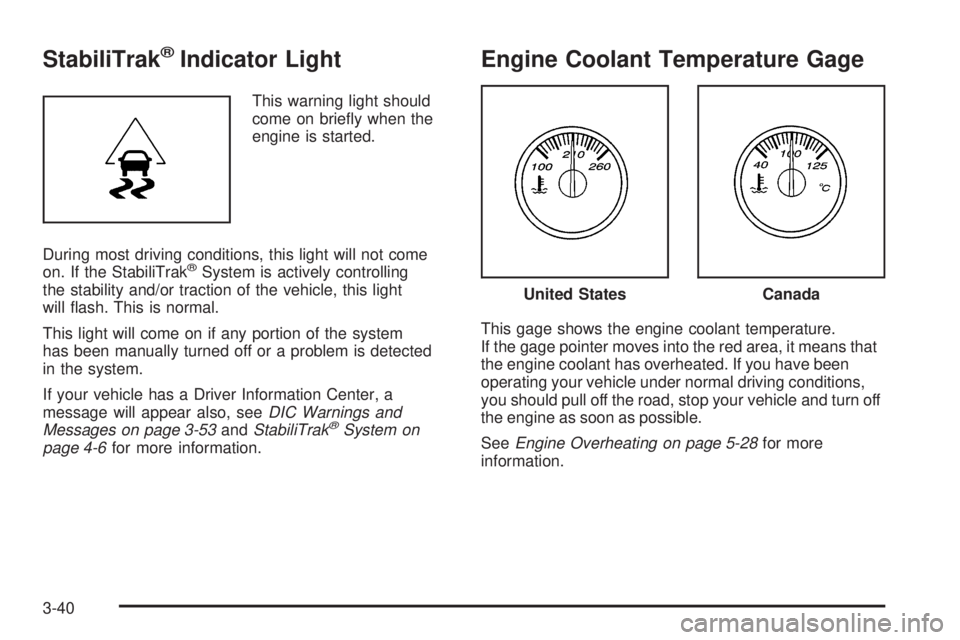
StabiliTrak®Indicator Light
This warning light should
come on briey when the
engine is started.
During most driving conditions, this light will not come
on. If the StabiliTrak
®System is actively controlling
the stability and/or traction of the vehicle, this light
will ash. This is normal.
This light will come on if any portion of the system
has been manually turned off or a problem is detected
in the system.
If your vehicle has a Driver Information Center, a
message will appear also, seeDIC Warnings and
Messages on page 3-53andStabiliTrak
®System on
page 4-6for more information.
Engine Coolant Temperature Gage
This gage shows the engine coolant temperature.
If the gage pointer moves into the red area, it means that
the engine coolant has overheated. If you have been
operating your vehicle under normal driving conditions,
you should pull off the road, stop your vehicle and turn off
the engine as soon as possible.
SeeEngine Overheating on page 5-28for more
information.
United StatesCanada
3-40
Page 175 of 468
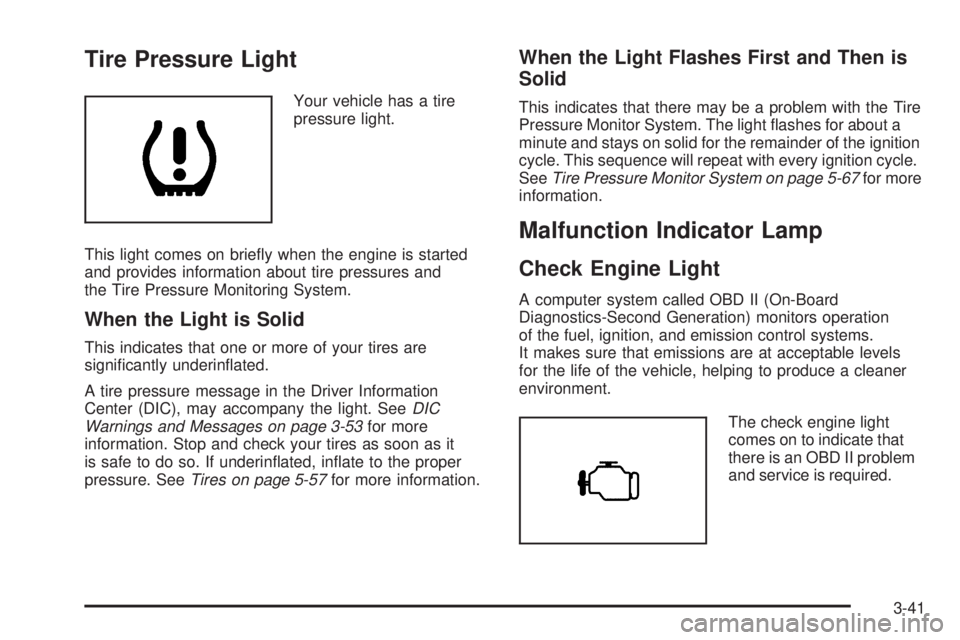
Tire Pressure Light
Your vehicle has a tire
pressure light.
This light comes on briey when the engine is started
and provides information about tire pressures and
the Tire Pressure Monitoring System.
When the Light is Solid
This indicates that one or more of your tires are
signicantly underinated.
A tire pressure message in the Driver Information
Center (DIC), may accompany the light. SeeDIC
Warnings and Messages on page 3-53for more
information. Stop and check your tires as soon as it
is safe to do so. If underinated, inate to the proper
pressure. SeeTires on page 5-57for more information.
When the Light Flashes First and Then is
Solid
This indicates that there may be a problem with the Tire
Pressure Monitor System. The light ashes for about a
minute and stays on solid for the remainder of the ignition
cycle. This sequence will repeat with every ignition cycle.
SeeTire Pressure Monitor System on page 5-67for more
information.
Malfunction Indicator Lamp
Check Engine Light
A computer system called OBD II (On-Board
Diagnostics-Second Generation) monitors operation
of the fuel, ignition, and emission control systems.
It makes sure that emissions are at acceptable levels
for the life of the vehicle, helping to produce a cleaner
environment.
The check engine light
comes on to indicate that
there is an OBD II problem
and service is required.
3-41
Page 177 of 468
If the Light is Flashing
The following can prevent more serious damage to your
vehicle:
Reduce vehicle speed.
Avoid hard accelerations.
Avoid steep uphill grades.
If you are towing a trailer, reduce the amount of
cargo being hauled as soon as it is possible.
If the light stops ashing and remains on steady,
see “If the Light Is On Steady” following.
If the light continues to ash, when it is safe to do so,
stop the vehicle. Find a safe place to park the vehicle.
Turn the ignition off, wait at least 10 seconds, and restart
the engine. If the light remains on steady, see “If the
Light Is On Steady” following. If the light is still ashing,
follow the previous steps and see your dealer/retailer
for service as soon as possible.
If the Light Is On Steady
You might be able to correct the emission system
malfunction by considering the following:
Did you recently put fuel into your vehicle?
If so, reinstall the fuel cap, making sure to fully install
the cap. SeeFilling the Tank on page 5-8. The diagnostic
system can determine if the fuel cap has been left off orimproperly installed. A loose or missing fuel cap allows
fuel to evaporate into the atmosphere. A few driving trips
with the cap properly installed should turn the light off.
Did you just drive through a deep puddle of water?
If so, your vehicle’s electrical system might be wet.
The condition is usually corrected when the electrical
system dries out. A few driving trips should turn the
light off.
Have you recently changed brands of fuel?
If so, be sure to fuel your vehicle with quality fuel. See
Gasoline Octane on page 5-6. Poor fuel quality causes
the engine not to run as efficiently as designed. You
might notice this as stalling after start-up, stalling when
you put the vehicle into gear, misring, hesitation on
acceleration, or stumbling on acceleration — these
conditions might go away once the engine is warmed up.
This will be detected by the system and cause the light to
turn on.
If you experience one or more of these conditions,
change the fuel brand you use. It will require at least
one full tank of the proper fuel to turn the light off.
If none of the above steps have made the light turn
off, your dealer/retailer can check the vehicle. Your
dealer/retailer has the proper test equipment and
diagnostic tools to x any mechanical or electrical
problems that might have developed.
3-43
Page 188 of 468
CHECK TIRE PRESSURE
This message displays when the pressure in one or
more of the vehicle’s tires needs to be checked. If a tire
pressure message appears on the DIC, stop as soon
as you can. Have the tire pressures checked and set to
those shown on the Tire Loading Information label.
SeeTires on page 5-57,Loading Your Vehicle on
page 4-34, andInflation - Tire Pressure on page 5-64.
The DIC also shows the tire pressure values. See
DIC Operation and Displays on page 3-50. If the tire
pressure is low, the low tire pressure warning light
comes on. SeeTire Pressure Light on page 3-41.
CHECK WASHER FLUID
This message displays if the washer uid level is low.
Adding washer uid to the windshield washer uid
reservoir clears this message. SeeWindshield Washer
Fluid on page 5-37. This message clears itself after
10 seconds, or you can manually clear it from the
DIC display.
CURB VIEW ACTIVATED
This message displays when the passenger outside
rearview mirror moves into the curb view position.
SeeOutside Curb View Assist Mirror on page 2-47
for more information.
DRIVER DOOR AJAR
This message displays and a chime sounds if the driver
door is not fully closed. Stop and turn off the vehicle,
check the door for obstructions, and close the door again.
Check to see if the message still appears on the DIC.
ENGINE COOLANT HOT/ENGINE
OVERHEATED
Notice:If you drive your vehicle while the engine
is overheating, severe engine damage may occur.
If an overheat warning appears on the instrument
panel cluster and/or DIC, stop the vehicle as soon as
possible. Do not increase the engine speed above
normal idling speed. SeeEngine Overheating
on page 5-28for more information.
This message displays and a chime sounds if the
cooling system temperature gets hot. SeeEngine
Overheating on page 5-28for the proper course of
action. This message clears when the coolant
temperature drops to a safe operating temperature.
FUEL LEVEL LOW
This message displays and a chime sounds if the fuel
level is low. Refuel as soon as possible. SeeLow
Fuel Warning Light on page 3-49,Filling the Tank on
page 5-8, andFuel on page 5-5for more information.
3-54
Page 190 of 468
REAR ACCESS OPEN
This message displays and a chime sounds if the
liftgate or liftglass is open while the ignition is in
ON/RUN. Turn off the vehicle and check the liftgate
and liftglass. SeeLiftgate/Liftglass on page 2-12.
Restart the vehicle and check for the message on
the DIC display.
RIGHT REAR DOOR AJAR
This message displays and a chime sounds if the
passenger side rear door is not fully closed. Stop and
turn off the vehicle, check the door for obstructions,
and close the door again. Check to see if the message
still appears on the DIC.
SERVICE AIR BAG
This message displays if there is a problem with
the airbag system. Have your dealer/retailer inspect
the system for problems. SeeAirbag Readiness Light
on page 3-33andAirbag System on page 1-53for
more information.
SERVICE BRAKE SYSTEM
This message displays if a problem occurs with the
brake system. If this message appears, stop as soon as
possible and turn off the vehicle. Restart the vehicleand check for the message on the DIC display. If the
message is still displayed, or appears again when
you begin driving, the brake system needs service.
See your dealer/retailer.
SERVICE CHARGING SYS (System)
This message displays if there is a problem with the
battery charging system. Under certain conditions, the
charging system light may also turn on in the instrument
panel cluster. SeeCharging System Light on page 3-36.
The battery will not be charging at an optimal rate and
the vehicle will lose the ability to enter the fuel economy
mode. The vehicle is safe to drive, however you should
have the electrical system checked by your
dealer/retailer.
SERVICE STABILITRAK
If this message displays, it means there may be a
problem with the StabiliTrak®system. If this message
appears, try to reset the system by performing the
following: stop; turn off the engine; then start the engine
again. If this message still comes on, it means there is a
problem. You should see your dealer/retailer for service.
The vehicle is safe to drive, however, you do not have the
benet of StabiliTrak
®, so reduce your speed and drive
accordingly.
3-56
Page 209 of 468
Playing a CD
Insert a CD partway into the slot, label side up. The
player pulls it in and the CD should begin playing.
For the Base Radio, if you want to insert a CD with the
ignition off, rst press the eject button or the INFO knob.
If the ignition or radio is turned off, with a CD in the
player, it stays in the player. When the ignition or radio
is turned on, the CD starts playing where it stopped,
if it was the last selected audio source.
When a CD is inserted, the CD symbol displays. As
each new track starts to play, the track number displays.
The CD player can play the smaller 3 inch (8 cm)
single CDs with an adapter ring. Full-size CDs and
the smaller CDs are loaded in the same manner.
Care of Your CDs
If playing a CD-R, the sound quality can be reduced due
to CD-R quality, the method of recording, the quality of
the music that has been recorded, and the way the CD-R
has been handled. Handle them carefully. Store CD-R(s)
in their original cases or other protective cases and away
from direct sunlight and dust. The CD player scans the
bottom surface of the disc. If the surface of a CD is
damaged, such as cracked, broken, or scratched, the
CD does not play properly or not at all. Do not touch the
bottom side of a CD while handling it; this could damage
the surface. Pick up CDs by grasping the outer edges or
the edge of the hole and the outer edge.If the surface of a CD is soiled, take a soft, lint free
cloth or dampen a clean, soft cloth in a mild, neutral
detergent solution mixed with water, and clean it.
Make sure the wiping process starts from the center
to the edge.
Care of Your CD and DVD Player
Do not add any label to a CD, it could get caught in the
CD player. If a CD is recorded on a personal computer
and a description label is needed, try labeling the top
of the recorded CD with a marking pen.
The use of CD lens cleaners for CDs is not advised,
due to the risk of contaminating the lens of the CD optics
with lubricants internal to the CD and DVD player
mechanism.
Notice:If a label is added to a CD, or more than
one CD is inserted into the slot at a time, or an
attempt is made to play scratched or damaged CDs,
the CD player could be damaged. While using the
CD player, use only CDs in good condition without
any label, load one CD at a time, and keep the
CD player and the loading slot free of foreign
materials, liquids, and debris.
If an error displays, see “CD Messages” later in this
section.
3-75
Page 210 of 468
For vehicles that have a radio with a Six-Disc CD
player, see the following:
LOAD:Press to load CDs into the CD player. This CD
player holds up to six CDs.
To insert one CD, do the following:
1. Turn the ignition on.
2. Press and release the LOAD button.
3. Wait for the indicator light, located to the right of the
slot, to turn green.
4. Load a CD. Insert the CD part way into the slot,
label side up. The player pulls the CD in.
To insert multiple CDs, do the following:
1. Turn the ignition on.
2. Press and hold the LOAD button for two seconds.
A beep sounds and the indicator light, located to
the right of the slot, begins to ash and MULTI
LOAD # displays.
3. Once the light stops ashing and turns green,
INSERT CD # displays, load a CD. Insert the CD part
way into the slot, label side up. The player pulls the
CD in.
Once the CD is loaded, the indicator light begins
ashing again. Once the light stops ashing and
turns green, you can load another CD. The CD player
takes up to six CDs. Do not try to load more than six.To load more than one CD but less than six, complete
Steps 1 through 3. When nished loading CDs,
press the LOAD button to cancel the loading function.
The radio begins to play the last CD loaded.
If more than one CD has been loaded, a number for
each CD displays.
Playing a Specic Loaded CD
For every CD loaded, a number displays. To play a
specic CD, rst press the CD AUX button (if not already
in CD mode), then press the numbered pushbutton
that corresponds to the CD. A small bar displays under
the CD number that is playing and the track number
displays.
Z(Eject) (Base or MP3 Radio):Press to eject a
CD. Eject can be activated with either the ignition
or radio off. CDs can be loaded with the radio and
ignition off if this button is pressed rst.
CD
Z(Eject):Press to eject CD(s).
To eject the CD that is currently playing, press and
release this button.
3-76
Page 211 of 468
To eject multiple CDs, do the following:
1. Press and hold the
Zbutton for two seconds.
A beep is heard and the indicator light, located to
the right of the slot, begins to ash and EJECT ALL
displays.
2. Once the light stops ashing, REMOVE CD #
displays. The CD ejects and can be removed.
Once the CD is removed, the indicator light begins
ashing again and another CD ejects.
To stop ejecting the CDs, press the
Zbutton.
If the CD is not removed, after 25 seconds, the CD
automatically pulls back into the player. If CD is pushed
back into the player, before the 25-second time period is
complete, the player senses an error and tries to eject the
CD several times before stopping.
Do not repeatedly press the
Zbutton to eject a CD
after pushing it in manually. The player’s 25-second
eject timer resets at each press of eject, causing
the player to not eject the CD until the 25-second
time period has elapsed.
1 FLD
x(Previous) (MP3 Radio):This pushbutton
does not work while using a non-MP3 CD.2 FLD
w(Next) (MP3 Radio):This pushbutton does
not work while using a non-MP3 CD.
1 PREV (Previous) (Base Radio):Press to go to the
beginning of the current track (if more than eight seconds
have played), or to the beginning of the previous track
(if less than eight seconds have played). TRACK and
the track number displays. If this pushbutton is held or
pressed more than once, the player continues moving
backward through the CD.
2 NEXT (Base Radio):Press to go to the next track.
TRACK and the track number displays. If this
pushbutton is held or pressed more than once, the
player continues moving forward through the CD.
{REV or 3 REV (Reverse):Press and hold to
reverse quickly within a track.
For the Base Radio, press and hold for less than
two seconds to reverse at six times the normal playing
speed. Press and hold it for more than two seconds
to reverse at 17 times the normal playing speed.
Sound is heard at a reduced volume. Release this
button to play the passage. ET and/or the elapsed time
of the track displays.
3-77
Page 225 of 468
DVD Player
The DVD player is located in the overhead console and
is controlled by the buttons on the DVD player or on
the remote control. See “Remote Control” later in
this section for more information.
The DVD player power can be turned on while the
ignition is in ON/RUN, ACC/ACCESSORY, or when
Retained Accessory Power (RAP) is active.
The RSE system DVD player is only compatible with
DVDs of the appropriate region code in the country that
the vehicle was sold. The DVD region code is printed
on the jacket of most DVDs.
Standard audio CDs, CD-R, CD-RW, Video CD and
Photo CD/CD-R media are fully supported by this DVD
player. DVD-R and DVD-RW media is supported if
formatted as DVD-Video. DVD+R and DVD+RW media
may or may not be supported by the DVD player. The
DVD player does not support DVD-RAM, DVD-ROM, and
DVD Audio media. An error message displays if this type
of media is inserted into the DVD player.
When using the wired headphones, not included, if
the front seat passengers play a CD in the Radio with
Six-Disc CD (if equipped) or use XM™ Satellite Radio
Service (if equipped), the audio for these sources will be
heard, instead of the DVD or CD that is currently playing
through the RSE.
If an error message displays on the video screen,
see “DVD Messages” later in this section.
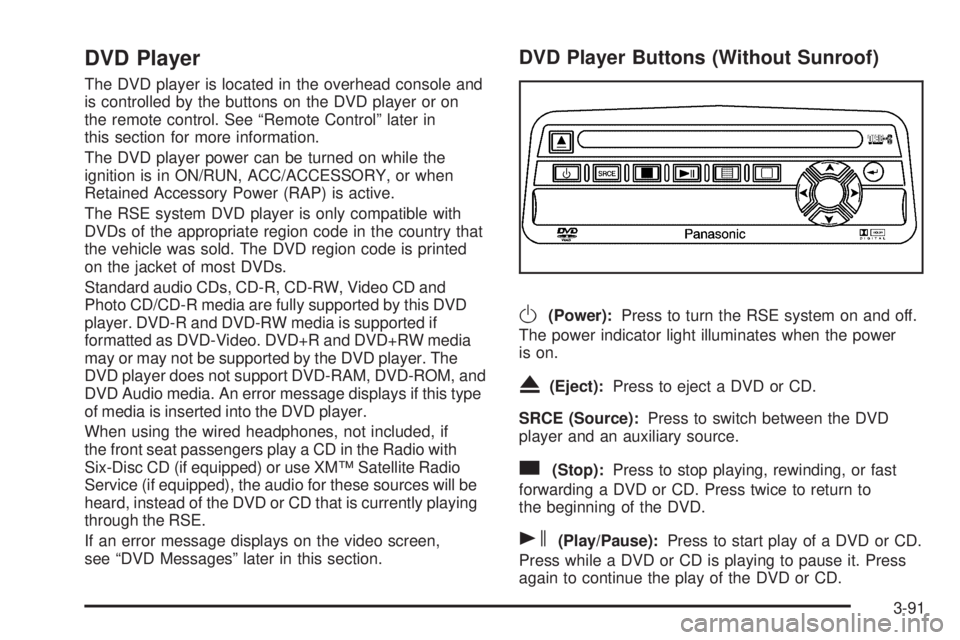
DVD Player Buttons (Without Sunroof)
O(Power):Press to turn the RSE system on and off.
The power indicator light illuminates when the power
is on.
X(Eject):Press to eject a DVD or CD.
SRCE (Source):Press to switch between the DVD
player and an auxiliary source.
c(Stop):Press to stop playing, rewinding, or fast
forwarding a DVD or CD. Press twice to return to
the beginning of the DVD.
s(Play/Pause):Press to start play of a DVD or CD.
Press while a DVD or CD is playing to pause it. Press
again to continue the play of the DVD or CD.
3-91
Page 226 of 468
y(Main DVD Menu):Press to access the DVD menu.
The DVD menu is different on every DVD. Use the
navigation arrows to move the cursor around the DVD
menu. After making a selection press the enter button.
This button only operates when playing a DVD.
z(Set-up Menu):Press to adjust the color, tint,
brightness, contrast, display mode, and dynamic range
compression. The dynamic range compression feature
can be used to reduce loud audio and increase low audio
produced by some DVDs.
To change a feature back to the factory default setting,
press this button to display the feature, then press and
hold until the default setting displays.
While playing an Audio or DVD disc, press and hold
this button to display and to remove the track and time
information.
n,q,p,o(Menu Navigation Arrows):Use the
arrows to navigate through a menu.
r(Enter):Press to select the choices that are
highlighted in any menu.
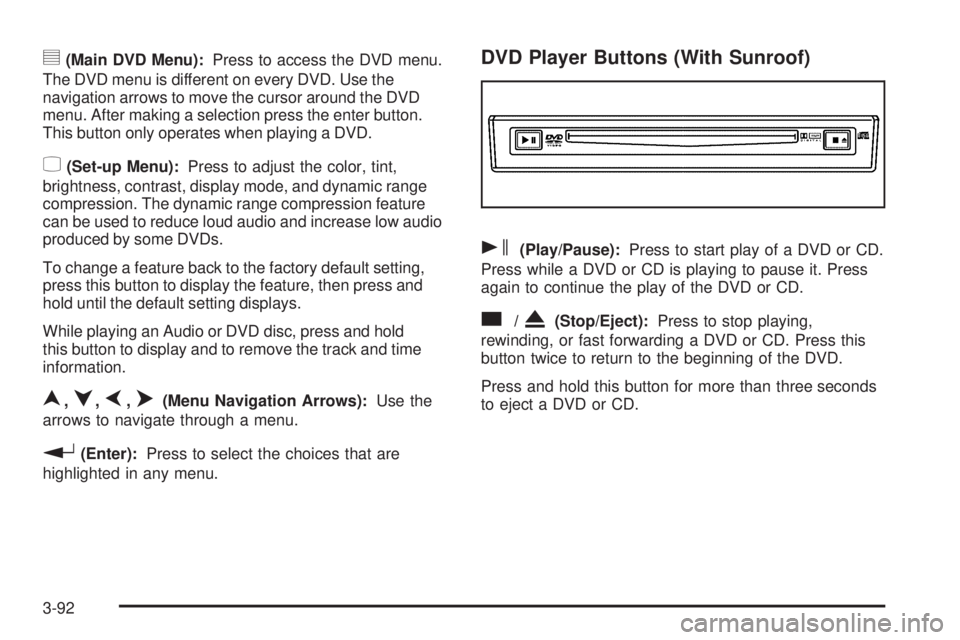
DVD Player Buttons (With Sunroof)
s(Play/Pause):Press to start play of a DVD or CD.
Press while a DVD or CD is playing to pause it. Press
again to continue the play of the DVD or CD.
c/X(Stop/Eject):Press to stop playing,
rewinding, or fast forwarding a DVD or CD. Press this
button twice to return to the beginning of the DVD.
Press and hold this button for more than three seconds
to eject a DVD or CD.
3-92