steering wheel GMC ENVOY 2009 User Guide
[x] Cancel search | Manufacturer: GMC, Model Year: 2009, Model line: ENVOY, Model: GMC ENVOY 2009Pages: 474, PDF Size: 2.56 MB
Page 134 of 474

Brake System Warning Light..........................3-35
Antilock Brake System (ABS) Warning Light.....3-36
StabiliTrak
®Service Light...............................3-36
StabiliTrak®Indicator Light.............................3-37
Engine Coolant Temperature Gage..................3-37
Tire Pressure Light.......................................3-38
Malfunction Indicator Lamp.............................3-38
Oil Pressure Gage........................................3-42
Change Engine Oil Light................................3-43
Security Light...............................................3-43
Cruise Control Light......................................3-43
Reduced Engine Power Light.........................3-44
Highbeam On Light.......................................3-44
Service Four-Wheel Drive Warning Light..........3-44
Check Gages Warning Light...........................3-45
Gate Ajar Light.............................................3-45
Fuel Gage...................................................3-46
Low Fuel Warning Light.................................3-47
Check Gas Cap Light....................................3-47Driver Information Center (DIC).......................3-47
DIC Operation and Displays...........................3-48
DIC Warnings and Messages.........................3-51
DIC Vehicle Customization.............................3-56
Audio System(s).............................................3-62
Setting the Clock..........................................3-63
Radio(s)......................................................3-64
Using an MP3..............................................3-80
XM Radio Messages.....................................3-84
Navigation/Radio System...............................3-86
Bluetooth
®...................................................3-86
Rear Seat Entertainment (RSE) System...........3-96
Rear Seat Audio (RSA)................................3-109
Theft-Deterrent Feature................................3-110
Audio Steering Wheel Controls......................3-110
Radio Reception.........................................3-111
Fixed Mast Antenna....................................3-112
XM™ Satellite Radio Antenna System............3-112
Chime Level Adjustment...............................3-112
Section 3 Instrument Panel
3-2
Page 137 of 474

The main components of the instrument panel are the following:
A.Headlamps on page 3-13.Dome Lamp Override
on page 3-16.Instrument Panel Brightness on
page 3-16.Fog Lamps on page 3-15(If Equipped).
B.Outlet Adjustment on page 3-26.
C.Turn Signal/Multifunction Lever on page 3-7.
D. OnStar
®and Audio Steering Wheel Controls.
SeeAudio Steering Wheel Controls on page 3-110.
E.Instrument Panel Cluster on page 3-28.
F.Audio Steering Wheel Controls on page 3-110.
G.Ignition Positions on page 2-21.
H.Audio System(s) on page 3-62.
I.Dual Climate Control System on page 3-19.
J.Hood Release on page 5-11.
K. Driver Information Center (DIC) Steering Wheel
Controls. SeeDriver Information Center (DIC)
on page 3-47.L. Transfer Case Controls. See “Automatic Transfer
Case” underFour-Wheel Drive on page 2-28.
M. Shift Lever and StabiliTrak
®(If Equipped) Button.
SeeShifting Into Park on page 2-34andStabiliTrak®
System on page 4-6.
N. Lighter. SeeAshtray(s) and Cigarette Lighter on
page 3-19.
O.Accessory Power Outlet(s) on page 3-18.
P.Parking Brake on page 2-33.
Q. Rear Window Washer/Wiper. SeeWindshield
Washer on page 3-9.
R. Rear Window Defogger. SeeDual Climate Control
System on page 3-19andDual Automatic Climate
Control System on page 3-22.
S.Glove Box on page 2-51.
3-5
Page 138 of 474
Hazard Warning Flashers
|(Hazard Warning Flasher):Press this button
located on top of the steering column, to make the front
and rear turn signal lamps ash on and off. This warns
others that you are having trouble. Press again to
turn the ashers off.
When the hazard warning ashers are on, the vehicle’s
turn signals will not work.
Horn
To sound the horn, press the horn symbols on the
steering wheel pad.
Tilt Wheel
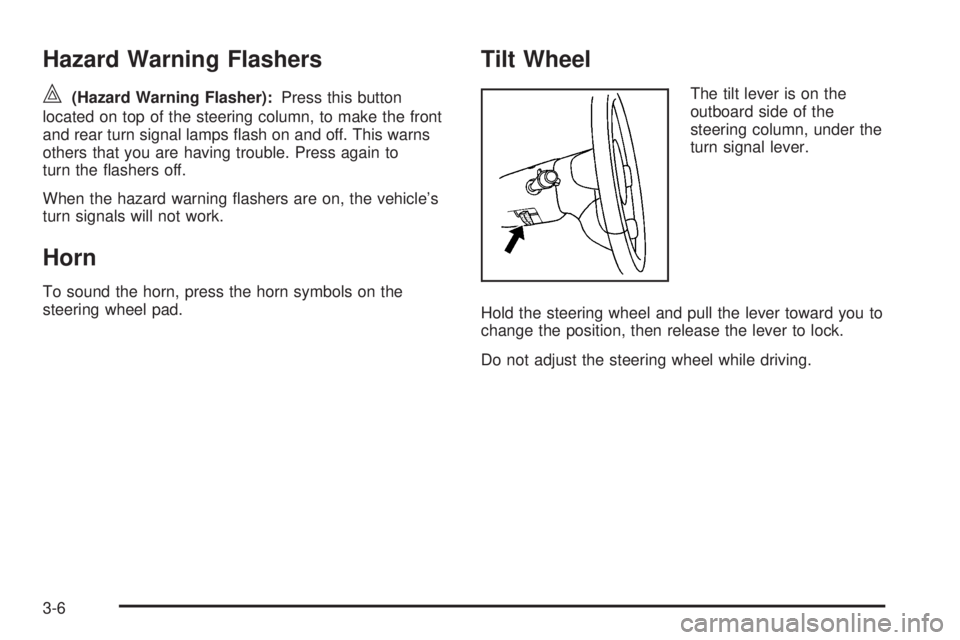
The tilt lever is on the
outboard side of the
steering column, under the
turn signal lever.
Hold the steering wheel and pull the lever toward you to
change the position, then release the lever to lock.
Do not adjust the steering wheel while driving.
3-6
Page 141 of 474
For steady wiping at low speed, turn the band away
from you to the rst solid band past the delay settings.
For high-speed wiping, turn the band further, to the
second solid band past the delay settings.
Be sure to clear ice and snow from the wiper blades
before using them. If they are frozen to the windshield,
gently loosen or thaw them. If they become worn or
damaged, get new blades or blade inserts.
Windshield Washer
L(Windshield Washer):Press the windshield
washer paddle to spray washer uid on the windshield.
The wipers will clear the window and then either stop
or return to the preset speed.
{CAUTION:
In freezing weather, do not use your washer until
the windshield is warmed. Otherwise the washer
uid can form ice on the windshield, blocking your
vision.
Rear Window Wiper/Washer
{CAUTION:
In freezing weather, do not use your washer until
the windshield is warmed. Otherwise the washer
uid can form ice on the windshield, blocking your
vision.
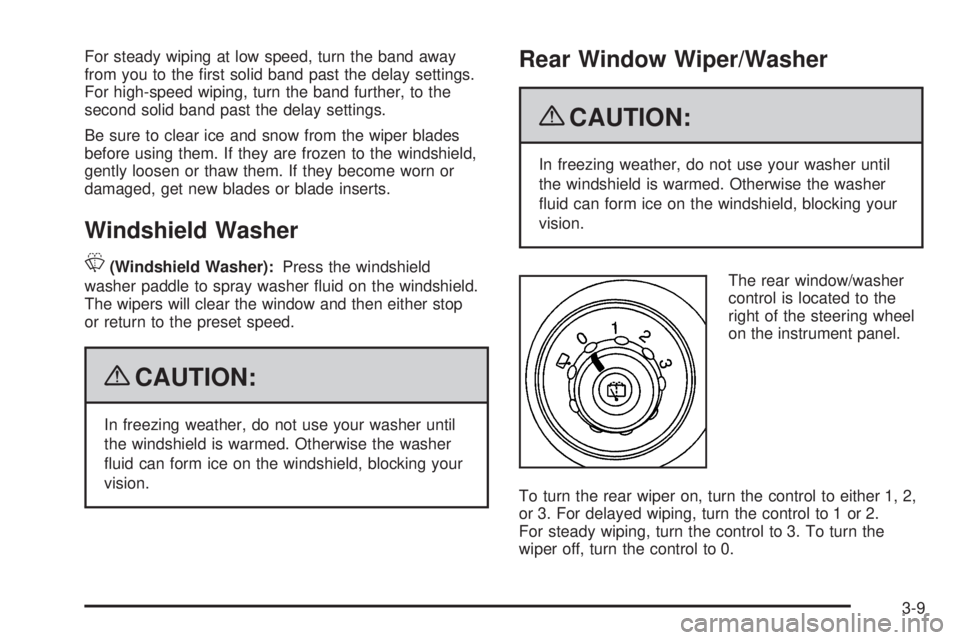
The rear window/washer
control is located to the
right of the steering wheel
on the instrument panel.
To turn the rear wiper on, turn the control to either 1, 2,
or 3. For delayed wiping, turn the control to 1 or 2.
For steady wiping, turn the control to 3. To turn the
wiper off, turn the control to 0.
3-9
Page 179 of 474

Low Fuel Warning Light
The light next to the fuel gage will come on briey when
you are starting the engine.
This light comes on when the fuel tank is low on fuel.
To turn it off, add fuel to the fuel tank. SeeFuel on
page 5-5.
Check Gas Cap Light
If your vehicle has this
light, it will come on if your
gas cap is not securely
fastened.
SeeMalfunction Indicator Lamp on page 3-38for more
information.
Driver Information Center (DIC)
Your vehicle may have this feature. The Driver
Information Center (DIC) display is located on the
instrument panel cluster, below the speedometer.
If your vehicle has DIC buttons, they are located on
the steering wheel. The DIC can display information
such as the trip odometer, fuel economy, customization
features, and warning/status messages.
If your vehicle does not have DIC steering wheel
buttons, you will not have all of the features listed.
Scroll through the odometer and trip odometer by
pressing the trip odometer reset stem located on the
instrument panel cluster. Turn off, or acknowledge, DIC
messages by pressing the trip odometer reset stem.
SeeSpeedometer and Odometer on page 3-29for
information on features for vehicles without DIC buttons.
3-47
Page 180 of 474

3(Trip Information):Press this button to display
the odometer, trip odometers, tire pressure, and timer.
t(Fuel Information):Press this button to display
the current range, fuel used, average fuel economy,
and engine oil life.
4(Customization):Press this button to access the
vehicle settings menu and customize the personal
settings on your vehicle.
r(Select):Press this button to reset certain
DIC functions and set your customization settings.
Pressing any of the DIC buttons will acknowledge DIC
messages and clear them from the DIC display.
DIC Operation and Displays
The DIC comes on when the ignition is on. After a short
delay the DIC will display the information that was
last displayed before the engine was turned off.
If a problem is detected, a warning message will appear
on the display. Pressing the trip stem will acknowledge
any warning or service messages. Pressing any of
the DIC steering wheel buttons — trip information, fuel
information, customization, or select button — will
also acknowledge any warnings or service messages.
You should take any message that appears on the
display seriously and remember that clearing the
message will only make the message disappear,
not correct the problem.
The DIC has different modes which can be accessed
by pressing the four DIC buttons located on the
steering wheel. These buttons are trip information,
fuel information, customization, and select. The button
functions are detailed in the following pages.
3-48
Page 183 of 474

Always reset the engine oil life system after an oil
change. To reset the engine oil life system, seeEngine
Oil Life System on page 5-18.
In addition to the engine oil life system monitoring the
oil life, additional maintenance is recommended in
the Maintenance Schedule in this manual. SeeEngine
Oil on page 5-15andScheduled Maintenance on
page 6-4.
Customization Button
4
(Customization):Press the customization button to
access the VEHICLE SETTINGS menu and customize
the settings to your vehicle. SeeDIC Vehicle
Customization on page 3-56for more information.
Select Button
r
(Select):Press the select button to reset certain
DIC functions, turn off or acknowledge messages
on the DIC display, and set your customization settings.
For example, this button will allow you to reset the
trip odometers, turn off the FUEL LEVEL LOW message,
and enables you to scroll through and select the
language in which the DIC information will appear.
DIC Warnings and Messages
Messages are displayed on the DIC to notify the driver
that the status of the vehicle has changed and that
some action may be needed to correct the condition.
Multiple messages may appear one after another.
Some messages may not require immediate action.
Press any of the DIC buttons on the steering wheel or
the trip odometer reset stem on the instrument panel
cluster to acknowledge that you received the messages
and to clear them from the display.
Some messages cannot be cleared from the display
because they are more urgent. These messages require
action before they can be removed from the DIC
display. Take any messages that appear on the display
seriously and remember that clearing the messages
will only make the messages disappear, not correct the
problem.
The following are the possible messages that can be
displayed and some information about them.
3-51
Page 218 of 474

Navigation/Radio System
For vehicles with a navigation radio system, see the
separate Navigation System manual.
Bluetooth®
Vehicles with a Bluetooth system can use a Bluetooth
capable cell phone with a Hands Free Prole to
make and receive phone calls. The system can be used
while the key is in ON/RUN or ACC/ACCESSORY
position. The range of the Bluetooth system can be up
to 30 ft. (9.1 m). Not all phones support all functions,
and not all phones are guaranteed to work with
the in-vehicle Bluetooth system. See gm.com/bluetooth
for more information on compatible phones.
Voice Recognition
The Bluetooth system uses voice recognition to interpret
voice commands to dial phone numbers and name tags.
Noise:Keep interior noise levels to a minimum.
The system may not recognize voice commands if there
is too much background noise.
When to Speak:A short tone sounds after the system
responds indicating when it is waiting for a voice
command. Wait until the tone and then speak.
How to Speak:Speak clearly in a calm and natural voice.
Audio System
When using the in-vehicle Bluetooth system, sound
comes through the vehicle’s front audio system speakers
and overrides the audio system. Use the audio system
volume knob, during a call, to change the volume
level. The adjusted volume level remains in memory
for later calls. To prevent missed calls, a minimum
volume level is used if the volume is turned down
too low.
Bluetooth Controls
Use thegbutton located on the steering wheel to
operate the in-vehicle Bluetooth system. SeeAudio
Steering Wheel Controls on page 3-110for more
information.
g(Push To Talk):Press to answer incoming calls,
to conrm system information, and to start speech
recognition.
3-86
Page 242 of 474

To scan preset stations, press and hold the SEEK
button for two seconds and the radio advances to the
next preset station. If the button continues to be
held down, the radio advances through the available
preset stations. The display shows the selections.
This function is inactive if the front seat passengers are
listing to the radio.
While a CD is playing, press the SEEK button to go to
the next track on the CD. This function is inactive if
the front seat passengers are listening to a CD.
While a CD is playing in the six-disc CD player, press
and hold the SEEK button for two seconds to go to
the next CD, if multiple CDs are loaded. This function
is inactive if the front seat passengers are listening
to a CD.
Theft-Deterrent Feature
THEFTLOCK®is designed to discourage theft of the
vehicle’s radio by learning a portion of the Vehicle
Identication Number (VIN). The radio does not operate
and LOCKED displays if the radio is stolen or moved
to a different vehicle.
When the when the ignition is in the off position, a
blinking red light on the upper left side of the radio
indicates that THEFTLOCK
®is armed.
Audio Steering Wheel Controls
Vehicles with audio steering wheel controls could differ
depending on the vehicle’s options. Some audio
controls can be adjusted at the steering wheel.
g(Mute/ Voice Recognition):For vehicles with
OnStar®or Bluetooth®systems pressgto interact with
those systems. SeeOnStar®System on page 2-43
andBluetooth®on page 3-86in this manual for more
information.
If the vehicle does not have OnStar, press
gto silence
the vehicle speakers only. Press
gagain, or any other
radio button, to turn on the sound.
3-110
Page 250 of 474
Using ABS
Do not pump the brakes. Just hold the brake pedal
down rmly and let antilock work. The brakes might
vibrate or some noise might be heard, but this is normal.
Braking in Emergencies
ABS allows the driver to steer and brake at the same
time. In many emergencies, steering can help more than
even the very best braking.
Brake Assist
This vehicle has a Brake Assist feature designed to
assist the driver in stopping or decreasing vehicle speed
in emergency driving conditions. This feature uses the
stability system hydraulic brake control module to
supplement the power brake system under conditions
where the driver has quickly and forcefully applied the
brake pedal in an attempt to quickly stop or slow down
the vehicle. The stability system hydraulic brake control
module increases brake pressure at each corner of the
vehicle until the ABS activates. Minor brake pedal
pulsations or pedal movement during this time is normal
and the driver should continue to apply the brake pedal
as the driving situation dictates The Brake Assist feature
will automatically disengage when the brake pedal is
released or brake pedal pressure is quickly decreased.
StabiliTrak®System
The vehicle has the StabiliTrak system which combines
antilock brake, traction and stability control systems and
helps the driver maintain directional control of the vehicle
in most driving conditions.
Traction control activates when the controller senses
wheel spin. StabiliTrak will selectively apply the brakes
and reduce engine torque to help regain traction.
Stability control activates when the controller senses a
discrepancy between the intended path and the direction
the vehicle is travelling. StabiliTrak selectively applies
braking pressure at any one of the vehicle’s brakes to
help guide the vehicle in the intended direction.
When you rst start the vehicle and begin to drive away,
the system performs several diagnostic checks to insure
there are no problems. The system may be heard or felt
while it is working. This is normal and does not mean
there is a problem with the vehicle. If driving conditions
delay system initialization, the STABILITRAK NOT
READY message may be displayed on the Driver
Information Center (DIC). If this is the case, the
vehicle does not need servicing.
For more information on the stability messages, see
DIC Warnings and Messages on page 3-51.
4-6