airbag GMC ENVOY DENALI 2005 Owner's Guide
[x] Cancel search | Manufacturer: GMC, Model Year: 2005, Model line: ENVOY DENALI, Model: GMC ENVOY DENALI 2005Pages: 502, PDF Size: 2.66 MB
Page 170 of 502
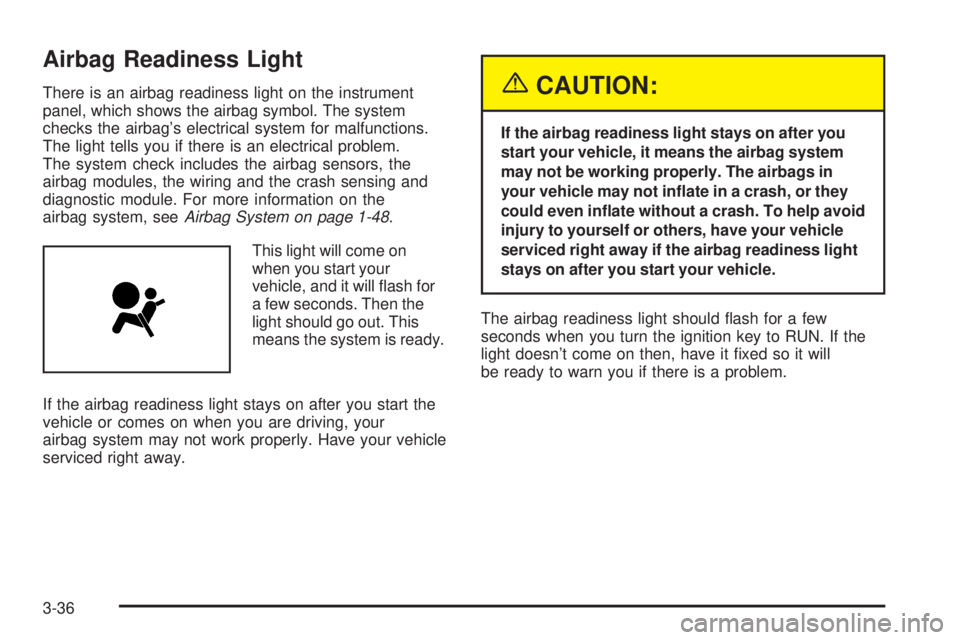
Airbag Readiness Light
There is an airbag readiness light on the instrument
panel, which shows the airbag symbol. The system
checks the airbag’s electrical system for malfunctions.
The light tells you if there is an electrical problem.
The system check includes the airbag sensors, the
airbag modules, the wiring and the crash sensing and
diagnostic module. For more information on the
airbag system, seeAirbag System on page 1-48.
This light will come on
when you start your
vehicle, and it will ash for
a few seconds. Then the
light should go out. This
means the system is ready.
If the airbag readiness light stays on after you start the
vehicle or comes on when you are driving, your
airbag system may not work properly. Have your vehicle
serviced right away.{CAUTION:
If the airbag readiness light stays on after you
start your vehicle, it means the airbag system
may not be working properly. The airbags in
your vehicle may not inate in a crash, or they
could even inate without a crash. To help avoid
injury to yourself or others, have your vehicle
serviced right away if the airbag readiness light
stays on after you start your vehicle.
The airbag readiness light should ash for a few
seconds when you turn the ignition key to RUN. If the
light doesn’t come on then, have it xed so it will
be ready to warn you if there is a problem.
3-36
Page 171 of 502
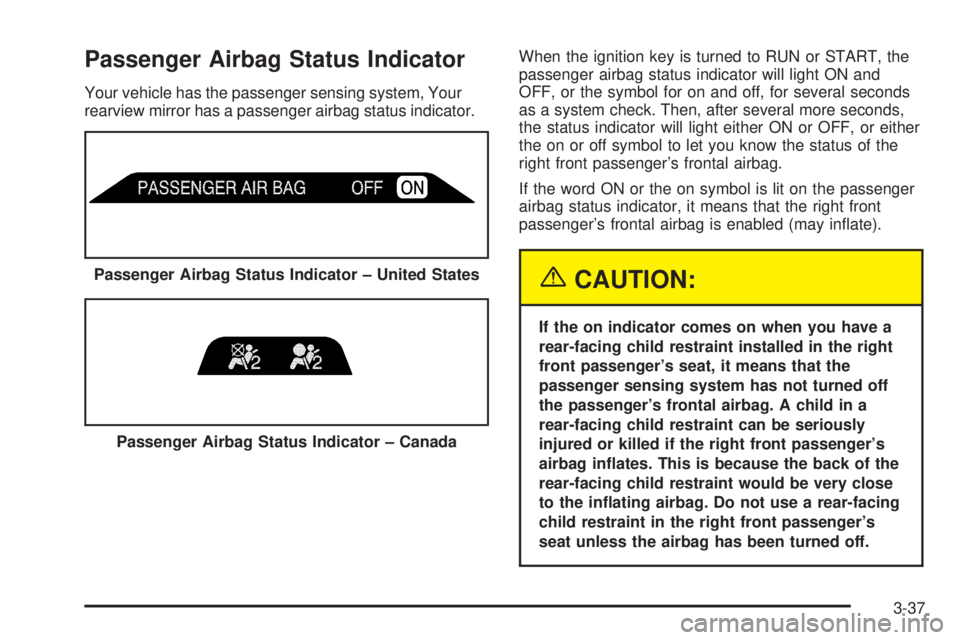
Passenger Airbag Status Indicator
Your vehicle has the passenger sensing system, Your
rearview mirror has a passenger airbag status indicator.When the ignition key is turned to RUN or START, the
passenger airbag status indicator will light ON and
OFF, or the symbol for on and off, for several seconds
as a system check. Then, after several more seconds,
the status indicator will light either ON or OFF, or either
the on or off symbol to let you know the status of the
right front passenger’s frontal airbag.
If the word ON or the on symbol is lit on the passenger
airbag status indicator, it means that the right front
passenger’s frontal airbag is enabled (may inate).
{CAUTION:
If the on indicator comes on when you have a
rear-facing child restraint installed in the right
front passenger’s seat, it means that the
passenger sensing system has not turned off
the passenger’s frontal airbag. A child in a
rear-facing child restraint can be seriously
injured or killed if the right front passenger’s
airbag inates. This is because the back of the
rear-facing child restraint would be very close
to the inating airbag. Do not use a rear-facing
child restraint in the right front passenger’s
seat unless the airbag has been turned off. Passenger Airbag Status Indicator – United States
Passenger Airbag Status Indicator – Canada
3-37
Page 172 of 502
If the word OFF or the off symbol is lit on the airbag
status indicator, it means that the passenger sensing
system has turned off the right front passenger’s frontal
airbag. SeePassenger Sensing System on page 1-58
for more on this, including important safety information.
If, after several seconds, all status indicator lights
remain on, or if there are no lights at all, there may be a
problem with the lights or the passenger sensing
system. See your dealer for service.
{CAUTION:
If the off indicator and the airbag readiness light
ever come on together, it means that something
may be wrong with the airbag system. If this
ever happens, have the vehicle serviced
promptly, because an adult-size person sitting
in the right front passenger seat may not have
the protection of the frontal airbag. SeeAirbag
Readiness Light on page 3-36.
Charging System Light
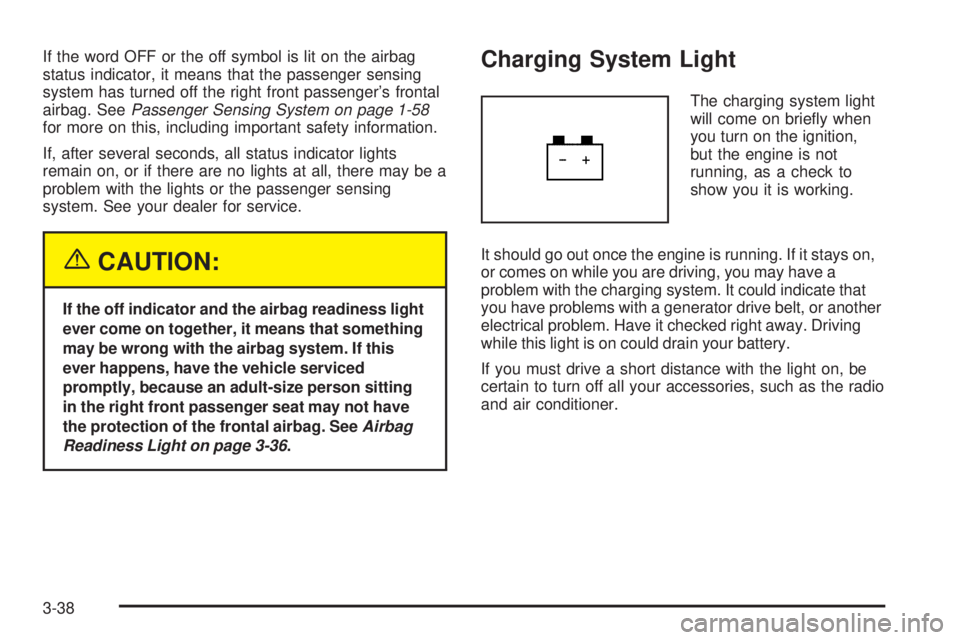
The charging system light
will come on briey when
you turn on the ignition,
but the engine is not
running, as a check to
show you it is working.
It should go out once the engine is running. If it stays on,
or comes on while you are driving, you may have a
problem with the charging system. It could indicate that
you have problems with a generator drive belt, or another
electrical problem. Have it checked right away. Driving
while this light is on could drain your battery.
If you must drive a short distance with the light on, be
certain to turn off all your accessories, such as the radio
and air conditioner.
3-38
Page 192 of 502
PASSENGER DOOR AJAR
If the passenger’s door is not fully closed, this message
will appear on the display and you will hear a chime.
Stop and turn off the vehicle, check the door for
obstacles, and close the door again. Check to see if the
message still appears on the DIC. Press the select
button to acknowledge this message and clear it from
the DIC display.
REAR ACCESS OPEN
If the liftgate or liftglass is open while the ignition is in
RUN, this message will appear on the DIC and you will
hear a chime. Turn off the vehicle and check the
liftgate and liftglass. SeeLiftgate/Liftglass on page 2-13.
Restart the vehicle and check for the message on the
DIC display. Press the select button to acknowledge this
message and clear it from the DIC display.
RIGHT REAR DOOR AJAR
If the passenger’s side rear door is not fully closed this
message will appear on the display and you will
hear a chime. Stop and turn off the vehicle, check the
door for obstacles, and close the door again. Check
to see if the message still appears on the DIC. Press the
select button to acknowledge this message and clear
it from the DIC display.
SERVICE AIR BAG
If there is a problem with the airbag system this
message will be displayed on the DIC. Have your
GM dealer inspect the system for problems. SeeAirbag
Readiness Light on page 3-36andAirbag System on
page 1-48for more information. Press the select button
to acknowledge this message and clear it from the
DIC display.
SERVICE BRAKE SYSTEM
If a problem occurs with the brake system this message
will appear on the DIC. If this message appears, stop
as soon as possible and turn off the vehicle. Restart the
vehicle and check for the message on the DIC display.
If the message is still displayed, or appears again when
you begin driving, the brake system needs service.
See your GM dealer.
3-58
Page 346 of 502
Doing Your Own Service Work
If you want to do some of your own service work, you
will want to use the proper service manual. It tells
you much more about how to service your vehicle than
this manual can. To order the proper service manual,
seeService Publications Ordering Information on
page 7-13.
Your vehicle has an airbag system. Before attempting to
do your own service work, seeServicing Your
Airbag-Equipped Vehicle on page 1-62.
You should keep a record with all parts receipts and list
the mileage and the date of any service work you
perform. SeeMaintenance Record on page 6-15.{CAUTION:
You can be injured and your vehicle could be
damaged if you try to do service work on a
vehicle without knowing enough about it.
Be sure you have sufficient knowledge,
experience, the proper replacement parts
and tools before you attempt any vehicle
maintenance task.
Be sure to use the proper nuts, bolts and
other fasteners. English and metric
fasteners can be easily confused. If you
use the wrong fasteners, parts can later
break or fall off. You could be hurt.
5-4
Page 438 of 502
Electrical System
Add-On Electrical Equipment
Notice:Don’t add anything electrical to your
vehicle unless you check with your dealer rst.
Some electrical equipment can damage your vehicle
and the damage wouldn’t be covered by your
warranty. Some add-on electrical equipment can
keep other components from working as
they should.
Your vehicle has an airbag system. Before attempting to
add anything electrical to your vehicle, seeServicing
Your Airbag-Equipped Vehicle on page 1-62.
Headlamps
The headlamp wiring is protected by four fuses.
An electrical overload will cause a lamp to go on and
off. If this happens, have your headlamp wiring checked
right away.
Windshield Wiper Fuses
The windshield wiper motor is protected by a circuit
breaker and a fuse. If the motor overheats due to heavy
snow or ice, the wiper will stop until the motor cools.
If the overload is caused by some electrical problem,
be sure to get it xed.
Power Windows and Other Power
Options
Circuit breakers protect the power windows and other
power accessories. When the current load is too heavy,
the circuit breaker opens and closes, protecting the
circuit until the problem is xed or goes away.
5-96
Page 441 of 502
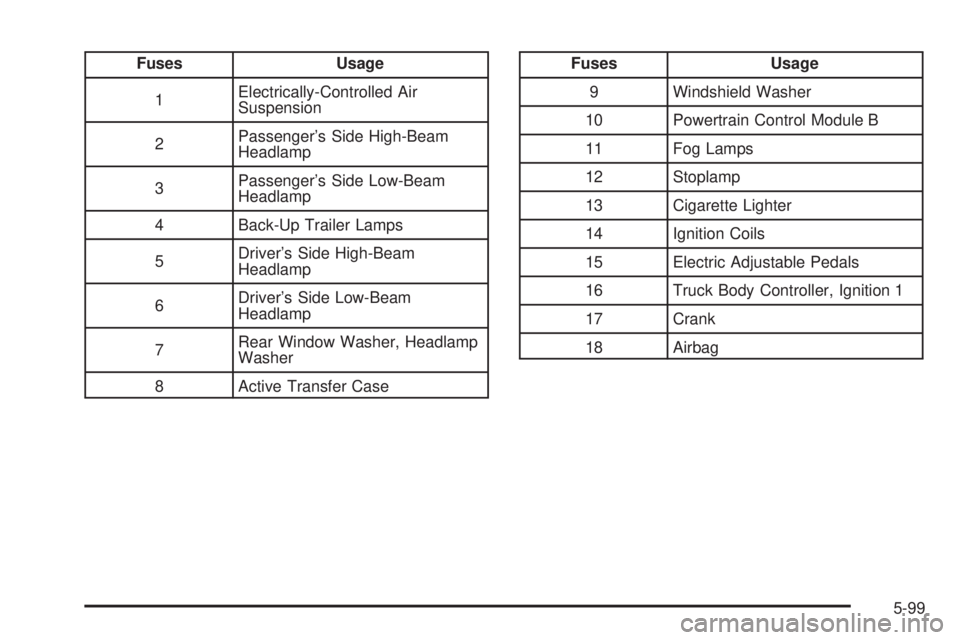
Fuses Usage
1Electrically-Controlled Air
Suspension
2Passenger’s Side High-Beam
Headlamp
3Passenger’s Side Low-Beam
Headlamp
4 Back-Up Trailer Lamps
5Driver’s Side High-Beam
Headlamp
6Driver’s Side Low-Beam
Headlamp
7Rear Window Washer, Headlamp
Washer
8 Active Transfer CaseFuses Usage
9 Windshield Washer
10 Powertrain Control Module B
11 Fog Lamps
12 Stoplamp
13 Cigarette Lighter
14 Ignition Coils
15 Electric Adjustable Pedals
16 Truck Body Controller, Ignition 1
17 Crank
18 Airbag
5-99
Page 446 of 502
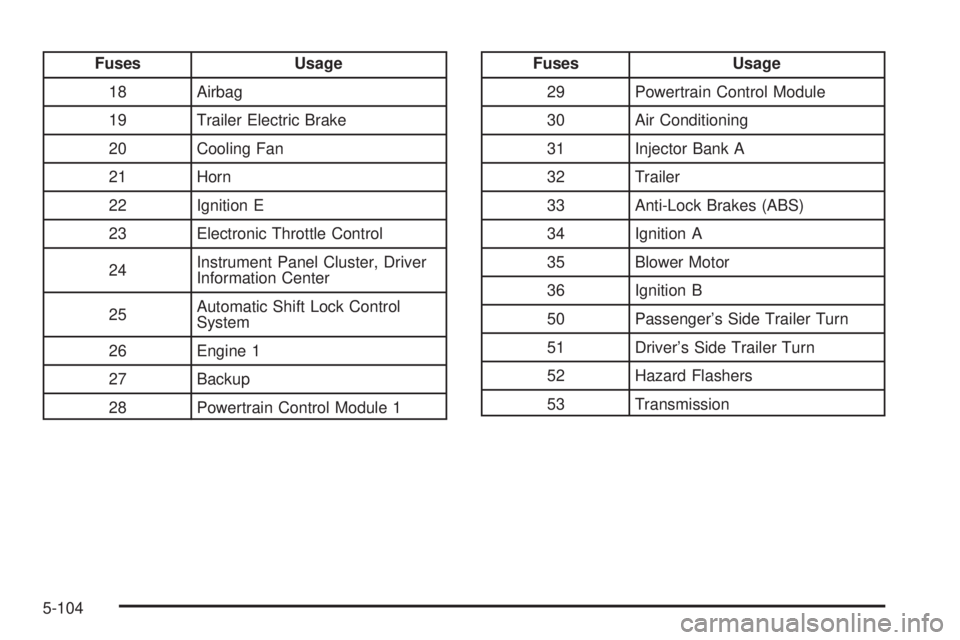
Fuses Usage
18 Airbag
19 Trailer Electric Brake
20 Cooling Fan
21 Horn
22 Ignition E
23 Electronic Throttle Control
24Instrument Panel Cluster, Driver
Information Center
25Automatic Shift Lock Control
System
26 Engine 1
27 Backup
28 Powertrain Control Module 1Fuses Usage
29 Powertrain Control Module
30 Air Conditioning
31 Injector Bank A
32 Trailer
33 Anti-Lock Brakes (ABS)
34 Ignition A
35 Blower Motor
36 Ignition B
50 Passenger’s Side Trailer Turn
51 Driver’s Side Trailer Turn
52 Hazard Flashers
53 Transmission
5-104
Page 464 of 502
(c)Visually inspect hoses and have them replaced if they
are cracked, swollen or deteriorated. Inspect all pipes,
ttings and clamps; replace with genuine GM parts as
needed. To help ensure proper operation, a pressure test
of the cooling system and pressure cap and cleaning the
outside of the radiator and air conditioning condenser is
recommended at least once a year.
(d)Visually inspect wiper blades for wear or cracking.
Replace blade inserts that appear worn or damaged
or that streak or miss areas of the windshield.
(e)Make sure the safety belt reminder light and all your
belts, buckles, latch plates, retractors and anchorages
are working properly. Look for any other loose or
damaged safety belt system parts. If you see anything
that might keep a safety belt system from doing its
job, have it repaired. Have any torn or frayed safety belts
replaced. Also look for any opened or broken airbag
coverings, and have them repaired or replaced.
(The airbag system does not need regular maintenance.)
(f)Lubricate all key lock cylinders, hood latch assembly,
secondary latch, pivots, spring anchor, release pawl,
rear compartment hinges, outer liftgate handle pivot
points, rear door detent link, roller mechanism, liftgate
handle pivot points, latch bolt, fuel door hinge, cargo
door hinge, locks and folding seat hardware. More
frequent lubrication may be required when exposed to a
corrosive environment. Applying silicone grease on
weatherstrips with a clean cloth will make them
last longer, seal better and not stick or squeak.(g)Check vent hose at transfer case for kinks and
proper installation.
(h)Change automatic transmission uid and lter if the
vehicle is mainly driven under one or more of these
conditions:
In heavy city traffic where the outside temperature
regularly reaches 90°F (32°C) or higher.
In hilly or mountainous terrain.
When doing frequent trailer towing.
Uses such as found in taxi, police or delivery
service.
(i)Drain, ush and rell cooling system. This service
can be complex; you should have your dealer perform
this service. See Engine Coolant on page 5-25 for
what to use. Inspect hoses. Clean radiator, condenser,
pressure cap and ller neck. Pressure test the cooling
system and pressure cap.
(j)A uid loss in any vehicle system could indicate a
problem. Have the system inspected and repaired and
the uid level checked. Add uid if needed.
(k)If you drive regularly under dusty conditions, inspect
the lter at each engine oil change.
6-8
Page 484 of 502
Additional Program Information
Courtesy Transportation is available during the
Bumper-to-Bumper warranty coverage period, but it is
not part of the New Vehicle Limited Warranty. A
separate booklet entitledWarranty and Owner
Assistance Informationfurnished with each new vehicle
provides detailed warranty coverage information.
Courtesy Transportation is available only at participating
dealers and all program options, such as shuttle
service, may not be available at every dealer. Please
contact your dealer for specic information about
availability. All Courtesy Transportation arrangements
will be administered by appropriate dealer personnel.
Canadian Vehicles:For warranty repairs during
the Complete Vehicle Coverage period of the General
Motors of Canada New Vehicle Limited Warranty,
alternative transportation may be available under the
Courtesy Transportation Program. Please consult
your dealer for details.
General Motors reserves the right to unilaterally modify,
change or discontinue Courtesy Transportation at
any time and to resolve all questions of claim eligibility
pursuant to the terms and conditions described
herein at its sole discretion.
Vehicle Data Collection and Event
Data Recorders
Your vehicle, like other modern motor vehicles, has a
number of sophisticated computer systems that monitor
and control several aspects of the vehicle’s performance.
Your vehicle uses on-board vehicle computers to monitor
emission control components to optimize fuel economy,
to monitor conditions for airbag deployment and, if so
equipped, to provide anti-lock braking and to help the
driver control the vehicle in difficult driving situations.
Some information may be stored during regular
operations to facilitate repair of detected malfunctions;
other information is stored only in a crash event by
computer systems, such as those commonly called event
data recorders (EDR).
7-10