power GMC ENVOY DENALI 2007 Owner's Guide
[x] Cancel search | Manufacturer: GMC, Model Year: 2007, Model line: ENVOY DENALI, Model: GMC ENVOY DENALI 2007Pages: 562, PDF Size: 2.87 MB
Page 166 of 562
StabiliTrak®Service Light........................... 207
StabiliTrak®Indicator Light......................... 208
Engine Coolant Temperature Gage............ 208
Tire Pressure Light.................................... 209
Malfunction Indicator Lamp........................ 210
Oil Pressure Gage..................................... 213
Change Engine Oil Light........................... 214
Security Light............................................ 214
Cruise Control Light.................................. 215
Reduced Engine Power Light.................... 215
Highbeam On Light................................... 215
Service Four-Wheel Drive Warning Light ... 216
Check Gages Warning Light...................... 216
Gate Ajar Light.......................................... 216
Fuel Gage................................................. 217
Low Fuel Warning Light............................ 217
Check Gas Cap Light................................ 217
Driver Information Center (DIC).................. 218
DIC Operation and Displays...................... 219
DIC Warnings and Messages.................... 222
DIC Vehicle Customization........................ 229Audio System(s)......................................... 236
Setting the Time........................................ 238
Radio with CD (Base)............................... 238
Radio with CD (MP3)................................ 248
Radio with Six-Disc CD............................. 258
Using an MP3........................................... 271
XM Radio Messages................................. 277
Navigation/Radio System........................... 280
Rear Seat Entertainment System............... 280
Rear Seat Audio (RSA)............................. 295
Theft-Deterrent Feature............................. 296
Audio Steering Wheel Controls.................. 297
Radio Reception........................................ 298
Care of Your CDs and DVDs.................... 299
Care of the CD and DVD Player............... 299
Fixed Mast Antenna.................................. 299
XM™ Satellite Radio Antenna System....... 300
Chime Level Adjustment............................ 300
Section 3 Instrument Panel
166
Page 169 of 562
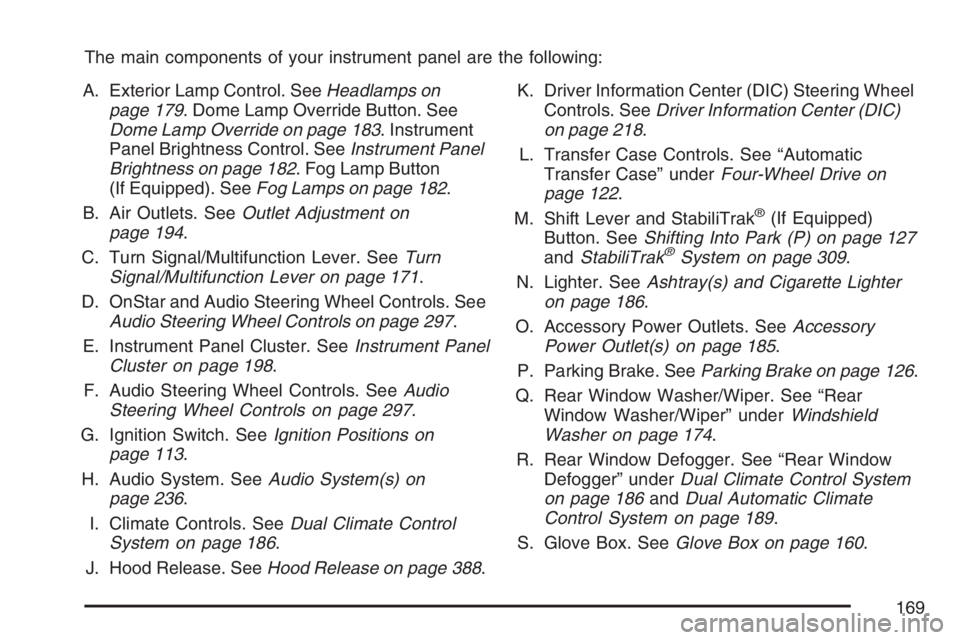
The main components of your instrument panel are the following:
A. Exterior Lamp Control. SeeHeadlamps on
page 179. Dome Lamp Override Button. See
Dome Lamp Override on page 183. Instrument
Panel Brightness Control. SeeInstrument Panel
Brightness on page 182. Fog Lamp Button
(If Equipped). SeeFog Lamps on page 182.
B. Air Outlets. SeeOutlet Adjustment on
page 194.
C. Turn Signal/Multifunction Lever. SeeTurn
Signal/Multifunction Lever on page 171.
D. OnStar and Audio Steering Wheel Controls. See
Audio Steering Wheel Controls on page 297.
E. Instrument Panel Cluster. SeeInstrument Panel
Cluster on page 198.
F. Audio Steering Wheel Controls. SeeAudio
Steering Wheel Controls on page 297.
G. Ignition Switch. SeeIgnition Positions on
page 113.
H. Audio System. SeeAudio System(s) on
page 236.
I. Climate Controls. SeeDual Climate Control
System on page 186.
J. Hood Release. SeeHood Release on page 388.K. Driver Information Center (DIC) Steering Wheel
Controls. SeeDriver Information Center (DIC)
on page 218.
L. Transfer Case Controls. See “Automatic
Transfer Case” underFour-Wheel Drive on
page 122.
M. Shift Lever and StabiliTrak
®(If Equipped)
Button. SeeShifting Into Park (P) on page 127
andStabiliTrak
®System on page 309.
N. Lighter. SeeAshtray(s) and Cigarette Lighter
on page 186.
O. Accessory Power Outlets. SeeAccessory
Power Outlet(s) on page 185.
P. Parking Brake. SeeParking Brake on page 126.
Q. Rear Window Washer/Wiper. See “Rear
Window Washer/Wiper” underWindshield
Washer on page 174.
R. Rear Window Defogger. See “Rear Window
Defogger” underDual Climate Control System
on page 186andDual Automatic Climate
Control System on page 189.
S. Glove Box. SeeGlove Box on page 160.
169
Page 184 of 562
Electric Power Management
This vehicle has Electric Power
Management (EPM), an advanced control
system. It estimates the battery’s temperature
and state of charge and then adjusts the voltage
for best performance and extended life of
the battery.
When the battery’s state of charge is low, the
voltage is raised slightly to quickly put the charge
back in. When the state of charge is high, the
voltage is lowered slightly to prevent overcharging.
If the vehicle has a voltmeter gage, you may
see the voltage move up or down. This is normal.
If there is a problem, an alert will be displayed.
The battery can be discharged at idle if the
electrical loads are very high. This is true for all
vehicles. This is because the generator (alternator)
may not be spinning fast enough at idle to
produce all the power that is needed for very high
electrical loads.A high electrical load occurs when several of the
following loads are on: headlamps, high beams,
fog lamps, rear window defogger, climate
control fan at high speed, heated seats, engine
cooling fans, trailer loads, and loads plugged into
accessory power outlets.
EPM works to prevent excessive discharge of the
battery. It does this by balancing the generator’s
output and the vehicle’s electrical needs. It
can increase engine idle speed to generate more
power, whenever needed. It can temporarily
reduce the power demands of some accessories.
Normally, these actions occur in steps or levels,
without being noticeable. In rare cases at the
highest levels of corrective action, this action may
be noticeable to the driver. If so, a Driver
Information Center (DIC) message might be
displayed, such as Battery Saver Active or Battery
Voltage Low. If this message is displayed, it is
recommended that the driver reduce the electrical
loads as much as possible. SeeDIC Warnings
and Messages on page 222.
184
Page 185 of 562
Battery Run-Down Protection
This feature shuts off the dome, courtesy, and
vanity lamps if they are left on for more than
20 minutes when the ignition is off. This will keep
the battery from running down.
If the battery run-down protection shuts off the
interior lamps, it may be necessary to do one of
the following to return to normal operation:
Shut off all lamps and close all doors.
Turn the ignition key to RUN.
This feature will also turn off the parking lamps
and headlamps under most circumstances, if they
are left on. If you would like to turn them back
on, turn the exterior lamps knob.
Accessory Power Outlet(s)
With the accessory power outlets, you can plug in
auxiliary electrical equipment such as a cellular
telephone or CB radio.
Your vehicle has three accessory power outlets.
There are two outlets located below the climate
controls and one outlet is on the rear of the center
oor console.Remove the cover from the outlet to use the
outlet. Be sure to put the cover back on when not
using the accessory power outlet.
Certain electrical accessories may not be
compatible with the accessory power outlet and
could result in blown vehicle or adaptor fuses.
If you experience a problem, see your dealer
for additional information on the accessory
power outlets.
Notice:Adding any electrical equipment to
your vehicle may damage it or keep other
components from working as they should. The
repairs would not be covered by your warranty.
Do not use equipment exceeding maximum
amperage rating of 20 amperes. Check with
your dealer before adding electrical equipment.
When adding electrical equipment, be sure to
follow the proper installation instructions included
with the equipment.
Notice:Improper use of the power outlet can
cause damage not covered by your warranty.
Do not hang any type of accessory or
accessory bracket from the plug because the
power outlets are designed for accessory
power plugs only.
185
Page 195 of 562
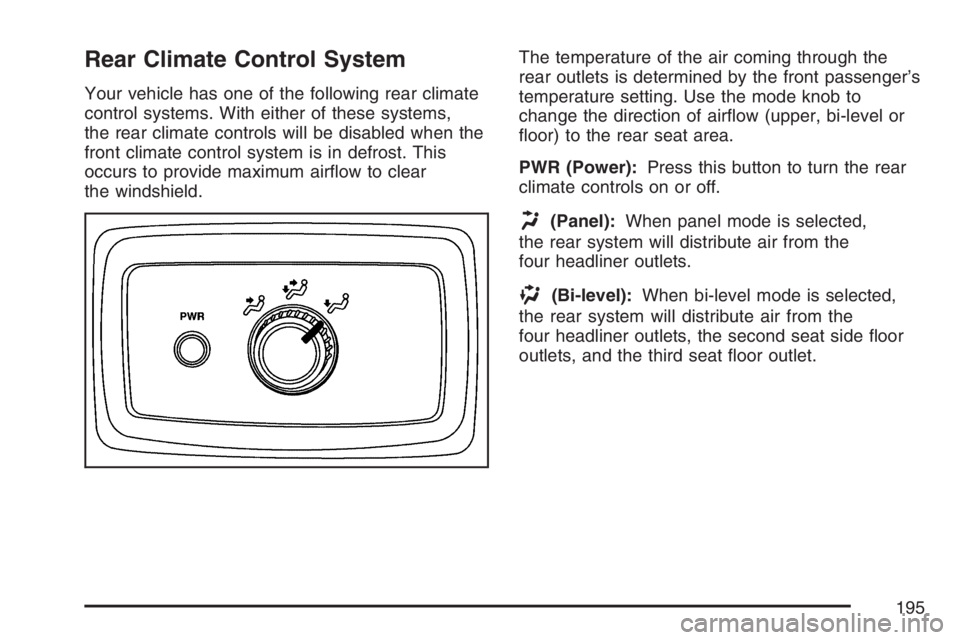
Rear Climate Control System
Your vehicle has one of the following rear climate
control systems. With either of these systems,
the rear climate controls will be disabled when the
front climate control system is in defrost. This
occurs to provide maximum airow to clear
the windshield.The temperature of the air coming through the
rear outlets is determined by the front passenger’s
temperature setting. Use the mode knob to
change the direction of airow (upper, bi-level or
oor) to the rear seat area.
PWR (Power):Press this button to turn the rear
climate controls on or off.
H(Panel):When panel mode is selected,
the rear system will distribute air from the
four headliner outlets.
)(Bi-level):When bi-level mode is selected,
the rear system will distribute air from the
four headliner outlets, the second seat side oor
outlets, and the third seat oor outlet.
195
Page 206 of 562

Readings in the low warning zone may occur
when a large number of electrical accessories are
operating in the vehicle and the engine is left
idling for an extended period. This condition
is normal since the charging system is not able to
provide full power at engine idle. As engine
speeds are increased, this condition should correct
itself as higher engine speeds allow the charging
system to create maximum power.
You can only drive for a short time with the
reading in either warning zone. If you must drive,
turn off all unnecessary accessories.
Readings in either warning zone indicate a
possible problem in the electrical system. Have
the vehicle serviced as soon as possible.
Brake System Warning Light
When the ignition is on, the brake system warning
light will come on when you set your parking
brake. The light will stay on if your parking brake
does not release fully. If it stays on after your
parking brake is fully released, it means your
vehicle has a brake problem. A chime may also
sound when the light comes on.Your vehicle’s hydraulic brake system is divided
into two parts. If one part is not working, the other
part can still work and stop you. For good
braking, though, you need both parts working well.
If the warning light comes on, there could be a
brake problem. Have your brake system inspected
right away.
This light should come on briey when you turn
the ignition key to RUN. If it does not come
on then, have it xed so it will be ready to warn
you if there is a problem.
If the light comes on while you are driving, pull off
the road and stop carefully. You may notice that the
pedal is harder to push or the pedal may go closer
to the oor. It may take longer to stop. If the light is
still on, have the vehicle towed for service. See
Towing Your Vehicle on page 354.
United StatesCanada
206
Page 215 of 562
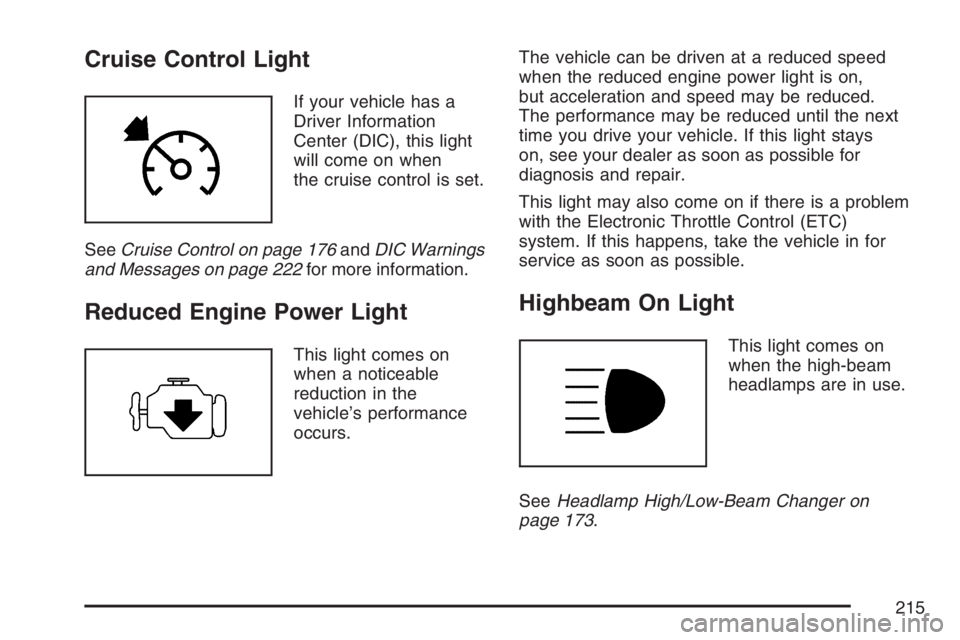
Cruise Control Light
If your vehicle has a
Driver Information
Center (DIC), this light
will come on when
the cruise control is set.
SeeCruise Control on page 176andDIC Warnings
and Messages on page 222for more information.
Reduced Engine Power Light
This light comes on
when a noticeable
reduction in the
vehicle’s performance
occurs.The vehicle can be driven at a reduced speed
when the reduced engine power light is on,
but acceleration and speed may be reduced.
The performance may be reduced until the next
time you drive your vehicle. If this light stays
on, see your dealer as soon as possible for
diagnosis and repair.
This light may also come on if there is a problem
with the Electronic Throttle Control (ETC)
system. If this happens, take the vehicle in for
service as soon as possible.
Highbeam On Light
This light comes on
when the high-beam
headlamps are in use.
SeeHeadlamp High/Low-Beam Changer on
page 173.
215
Page 238 of 562
Your vehicle has a feature called Retained
Accessory Power (RAP). With RAP, the audio
system can be played even after the ignition is
turned off. SeeRetained Accessory Power (RAP)
on page 114for more information.
Setting the Time
The radio may have a button marked with an
H or HR to represent hours and an M or MN
to represent minutes.
Press and hold the hour button until the correct
hour appears on the display. AM or PM will appear
on the display for morning or evening hours.
Press and hold the minute button until the correct
minute appears on the display. The time can
be set with the ignition on or off.
To synchronize the time with an FM station
broadcasting Radio Data System (RDS)
information, press and hold the hour and minute
buttons at the same time until UPDATED and
the clock symbol appear on the display. If the time
is not available from the station, NO UPDAT will
appear on the display.
RDS time is broadcast once a minute. After tuning
to an RDS broadcast station, it may take a few
minutes for the time to update.
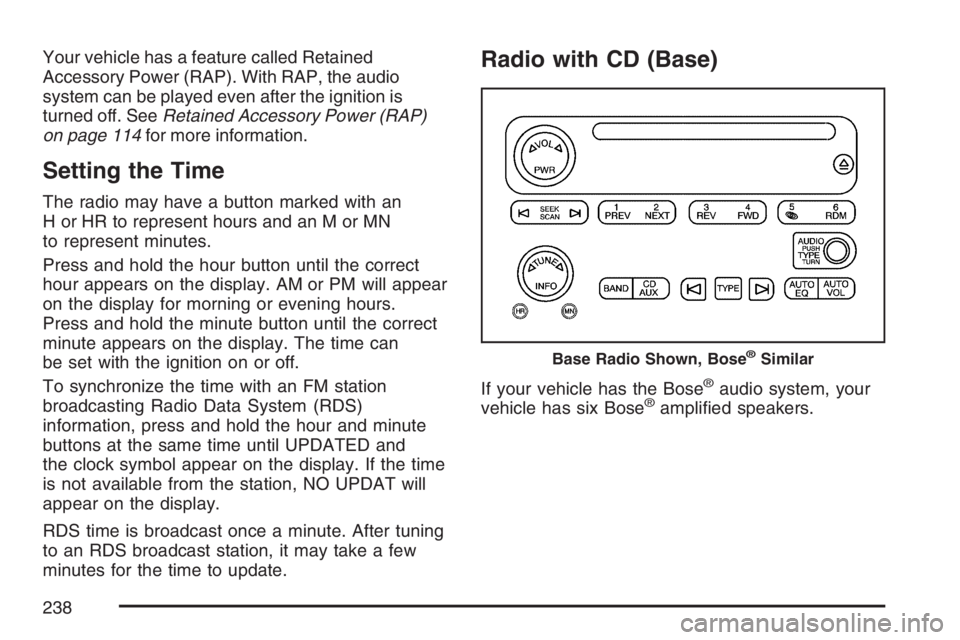
Radio with CD (Base)
If your vehicle has the Bose®audio system, your
vehicle has six Bose®amplied speakers.
Base Radio Shown, Bose®Similar
238
Page 239 of 562
Radio Data System (RDS)
The audio system has a Radio Data System (RDS).
RDS features are available for use only on FM
stations that broadcast RDS information.
With RDS, the radio can do the following:
Seek to stations broadcasting the selected
type of programming
Receive announcements concerning local and
national emergencies
Display messages from radio stations
This system relies upon receiving specic
information from these stations and only works
when the information is available. In rare cases, a
radio station can broadcast incorrect information
that causes the radio features to work improperly.
If this happens, contact the radio station.
While the radio is tuned to an RDS station, the
station name or call letters display instead of the
frequency. RDS stations can also provide the
time of day, a program type (PTY) for current
programming, and the name of the program being
broadcast.
XM™ Satellite Radio Service
XM™ is a satellite radio service that is based in
the 48 contiguous United States and Canada.
XM™ offers a large variety of coast-to-coast
channels including music, news, sports, talk,
traffic/weather (U.S. subscribers), and children’s
programming. XM™ provides digital quality
audio and text information that includes song title
and artist name. A service fee is required in
order to receive the XM™ service. For more
information, contact XM™; In the U.S. at
www.xmradio.com or call 1-800-852-XMXM (9696)
or in Canada at www.xmradio.ca or call
1-877-GET-XMSR (438-9677).
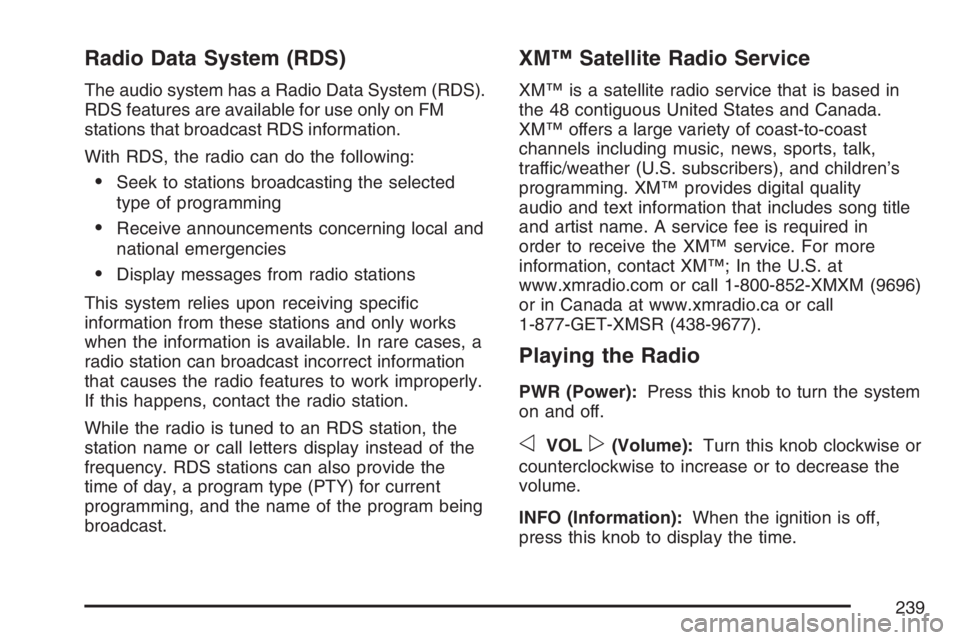
Playing the Radio
PWR (Power):Press this knob to turn the system
on and off.
oVOLp(Volume):Turn this knob clockwise or
counterclockwise to increase or to decrease the
volume.
INFO (Information):When the ignition is off,
press this knob to display the time.
239
Page 249 of 562
XM™ Satellite Radio Service
XM™ is a satellite radio service that is based in
the 48 contiguous United States and Canada.
XM™ offers a large variety of coast-to-coast
channels including music, news, sports, talk,
traffic/weather (U.S. subscribers), and children’s
programming. XM™ provides digital quality
audio and text information that includes song title
and artist name. A service fee is required in
order to receive the XM™ service. For more
information, contact XM™; In the U.S. at
www.xmradio.com or call 1-800-852-XMXM (9696)
or in Canada at www.xmradio.ca or call
1-877-GET-XMSR (438-9677).
Playing the Radio
PWR (Power):Press this knob to turn the system
on and off.
oVOLp(Volume):Turn this knob clockwise
or counterclockwise to increase or to decrease the
volume.DISPL (Display):When the ignition is turned off,
press this knob to display the time.
For RDS, press the DISPL knob to change the
display while using RDS. The display options are
station name, RDS station frequency, PTY,
and the name of the program (if available).
For XM™ (if equipped), press the DISPL knob
while in XM™ mode to retrieve four different
categories of information related to the current
song or channel: Artist, Song Title, Category
or PTY, Channel Number/Channel Name.
To change the default on the display, press the
DISPL knob until you see the desired display, then
press and hold this knob for two seconds. The
radio produces one beep and the selected display
becomes the default.
AUTO VOL (Automatic Volume):With automatic
volume, the audio system adjusts automatically
to make up for road and wind noise as you drive.
249