tow GMC ENVOY DENALI 2007 Owner's Guide
[x] Cancel search | Manufacturer: GMC, Model Year: 2007, Model line: ENVOY DENALI, Model: GMC ENVOY DENALI 2007Pages: 562, PDF Size: 2.87 MB
Page 207 of 562
{CAUTION:
Your brake system may not be working
properly if the brake system warning light
is on. Driving with the brake system
warning light on can lead to an accident.
If the light is still on after you have pulled
off the road and stopped carefully, have
the vehicle towed for service.
Anti-Lock Brake System
Warning Light
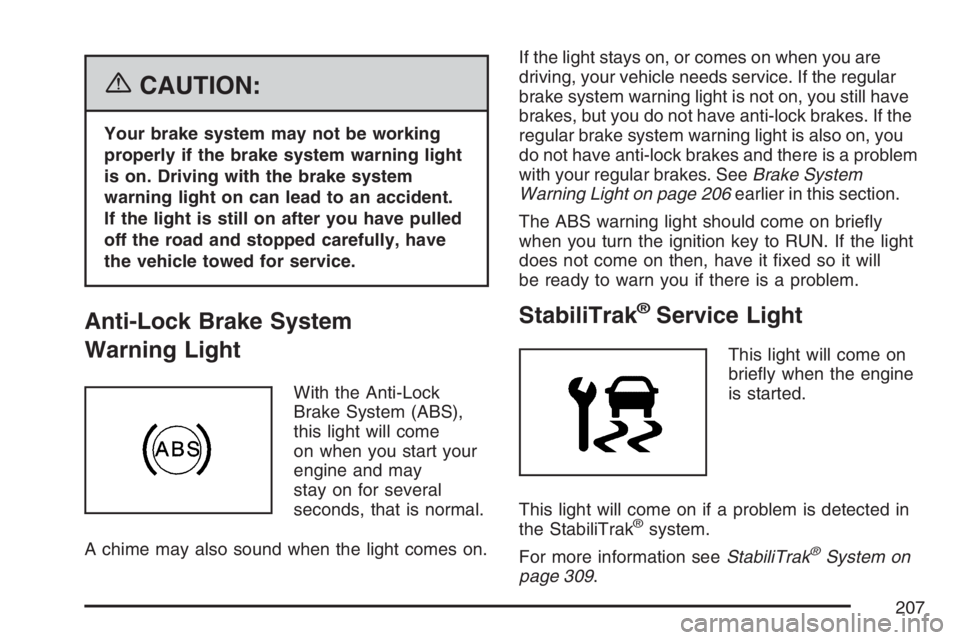
With the Anti-Lock
Brake System (ABS),
this light will come
on when you start your
engine and may
stay on for several
seconds, that is normal.
A chime may also sound when the light comes on.If the light stays on, or comes on when you are
driving, your vehicle needs service. If the regular
brake system warning light is not on, you still have
brakes, but you do not have anti-lock brakes. If the
regular brake system warning light is also on, you
do not have anti-lock brakes and there is a problem
with your regular brakes. SeeBrake System
Warning Light on page 206earlier in this section.
The ABS warning light should come on briey
when you turn the ignition key to RUN. If the light
does not come on then, have it xed so it will
be ready to warn you if there is a problem.
StabiliTrak®Service Light
This light will come on
briey when the engine
is started.
This light will come on if a problem is detected in
the StabiliTrak
®system.
For more information seeStabiliTrak
®System on
page 309.
207
Page 211 of 562
This light should come on, as a check to show
you it is working, when the ignition is on and the
engine is not running. If the light does not
come on, have it repaired. This light will also
come on during a malfunction in one of two ways:
Light Flashing— A misre condition has
been detected. A misre increases vehicle
emissions and may damage the emission
control system on your vehicle. Diagnosis and
service may be required.
Light On Steady— An emission control
system malfunction has been detected on
your vehicle. Diagnosis and service may
be required.
If the Light is Flashing
The following may prevent more serious damage
to your vehicle:
Reducing vehicle speed
Avoiding hard accelerations
Avoiding steep uphill grades
If you are towing a trailer, reduce the amount of
cargo being hauled as soon as it is possibleIf the light stops ashing and remains on steady,
see “If the Light Is On Steady” following.
If the light continues to ash, when it is safe to do
so, stop the vehicle. Find a safe place to park
your vehicle. Turn the key off, wait at least
10 seconds and restart the engine. If the light
remains on steady, see “If the Light Is On Steady”
following. If the light is still ashing, follow the
previous steps, and see your dealer for service as
soon as possible.
If the Light Is On Steady
You may be able to correct the emission system
malfunction by considering the following:
Did you recently put fuel into your vehicle?
If so, reinstall the fuel cap, making sure to fully
install the cap. SeeFilling the Tank on page 385.
The diagnostic system can determine if the
fuel cap has been left off or improperly installed.
A loose or missing fuel cap will allow fuel to
evaporate into the atmosphere. A few driving trips
with the cap properly installed should turn the
light off.
211
Page 214 of 562
Change Engine Oil Light
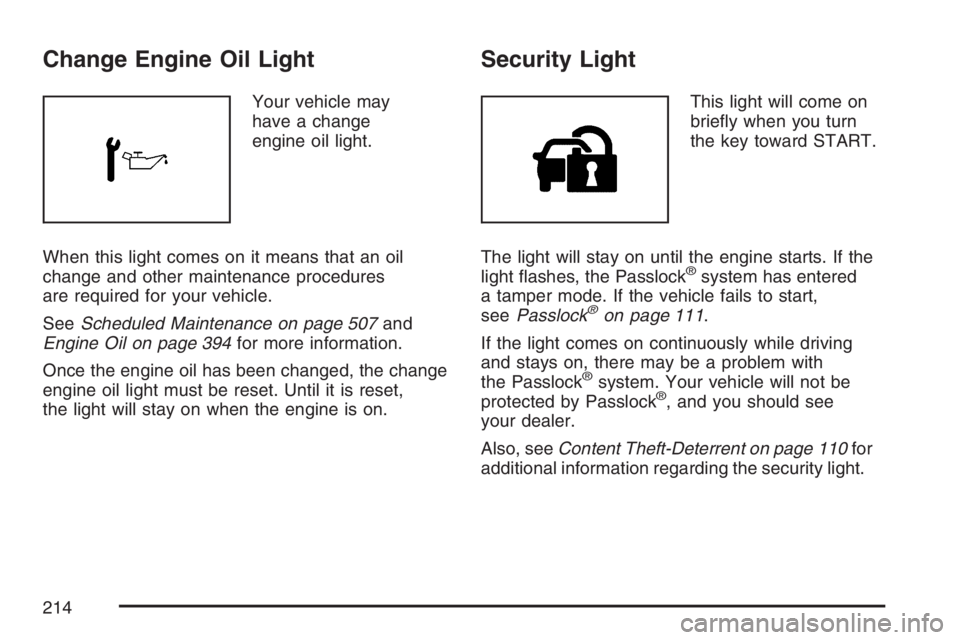
Your vehicle may
have a change
engine oil light.
When this light comes on it means that an oil
change and other maintenance procedures
are required for your vehicle.
SeeScheduled Maintenance on page 507and
Engine Oil on page 394for more information.
Once the engine oil has been changed, the change
engine oil light must be reset. Until it is reset,
the light will stay on when the engine is on.
Security Light
This light will come on
briey when you turn
the key toward START.
The light will stay on until the engine starts. If the
light ashes, the Passlock
®system has entered
a tamper mode. If the vehicle fails to start,
seePasslock
®on page 111.
If the light comes on continuously while driving
and stays on, there may be a problem with
the Passlock
®system. Your vehicle will not be
protected by Passlock®, and you should see
your dealer.
Also, seeContent Theft-Deterrent on page 110for
additional information regarding the security light.
214
Page 242 of 562
The radio saves separate AUTO EQ settings for
each preset and source.
If the radio has the Bose
®audio system, the AUTO
EQ settings are either CUSTOM or TALK.
Adjusting the Speakers (Balance/Fade)
AUDIO:To adjust the balance between the
right and the left speakers, push and release the
AUDIO knob until BAL (balance) displays.
Turn the knob to move the sound toward the right
or the left speakers.
To adjust the fade between the front and the rear
speakers, push and release the AUDIO knob
until FADE displays. Turn the knob to move the
sound toward the front or the rear speakers.
To adjust the balance or fade to the middle position
while it is displayed, push the AUDIO knob and hold
it until the radio produces one beep. The balance or
fade adjusts to the middle position.
To adjust all tone and speaker controls to the
middle position, push and hold the AUDIO knob
when no tone or speaker control displays. ALL
CENTERED displays, a beep sounds, and the
display level adjusts to the middle position.
Finding a Program Type (PTY) Station
(RDS and XM™)
To select and nd a desired PTY perform the
following:
1. Press the TYPE button to activate program
type select mode. TYPE and a PTY displays.
2. Turn the TYPE knob or press and release the
TYPE button to select a PTY.
3. Once the desired PTY is displayed, press and
release either the TYPE or the SEEK arrows
to select and to take you to the PTY’s rst
station.
4. To go to another station within that PTY,
press the TYPE button then, press either
the TYPE or the SEEK arrows once.
5. Press either the TYPE or the SEEK arrows
twice to exit program type select mode.
If the radio cannot nd the desired program type,
NONE displays and the radio returns to the
last station you were listening to.
242
Page 252 of 562
AUTO EQ (Automatic Equalization):Press this
button to select customized equalization settings
designed for country/western, jazz, talk, pop, rock,
and classical.
To return the bass and treble to the manual mode,
push and release the AUTO EQ button until
CUSTOM displays.
If the radio has the Bose audio system, the
equalization settings are either CUSTOM or TALK.
Adjusting the Speakers (Balance/Fade)
AUDIO:To adjust the balance between the
right and the left speakers, push and release the
AUDIO knob until BAL (balance) displays.
Turn the knob to move the sound toward the right
or the left speakers.
To adjust the fade between the front and the rear
speakers, push and release the AUDIO knob
until FADE displays. Turn the knob to move the
sound toward the front or the rear speakers.
To adjust the balance or the fade to the middle
position while it is displayed, push the AUDIO
knob, then push it again and hold it until you hear
one beep.To adjust all tone and speaker controls to the
middle position, push and hold the AUDIO knob
when no tone or speaker control displays.
ALL CENTERED displays and a beep sounds.
Finding a Program Type (PTY) Station
(RDS and XM™)
To select and nd a desired PTY perform the
following:
1. Turn the P-TYPE knob to select a PTY.
2. Once the desired PTY displays, press the
SEEK TYPE button to select and go to the
PTY’s rst station.
3. To go to another station within that PTY,
press the SEEK TYPE button twice to
display the PTY and then to go to another
station.
4. Press the P-TYPE knob to exit program type
select mode.
IF PTY times out and no longer displays, go
back to Step 1.
If both PTY and TRAF are on, the radio searches
for stations with the selected PTY and traffic
announcements.
252
Page 262 of 562
AUTO EQ (Automatic Equalization):Press this
button to select customized equalization settings
designed for country/western, jazz, talk, pop, rock,
and classical.
The radio saves separate AUTO EQ settings for
each preset and source.
If the radio has the Bose
®audio system, the
equalization settings are either CUSTOM or TALK.
Adjusting the Speakers (Balance/Fade)
AUDIO:To adjust the balance between the
right and the left speakers, push and release the
AUDIO knob until BAL (balance) displays.
Turn the knob to move the sound toward the right
or the left speakers.
To adjust the fade between the front and rear
speakers, push and release the AUDIO knob until
FAD (fade) displays. Turn the knob to move
the sound toward the front or the rear speakers.
To adjust the balance or fade to the middle
position while it is displayed, push and hold the
AUDIO knob. The radio produces one beep
and adjusts the display level to the middle position.To adjust all tone and speaker controls to the
middle position, push and hold the AUDIO knob
when no tone or speaker controls display.
ALL CENTERED displays and a beep sounds.
Finding a Program Type (PTY) Station
(RDS and XM™)
To select and nd a desired PTY perform the
following:
1. Press the TYPE button to activate program
type select mode. P-TYPE and the last
selected PTY displays.
2. Turn the TYPE knob or press and release the
TYPE button to select a PTY.
3. Once the desired PTY displays, press either
the TYPE or the SEEK arrows to select and
to go to the PTY’s rst station.
4. To go to another station within that PTY,
press the TYPE button, then press either
the TYPE or the SEEK arrows once.
5. Press either the TYPE or the SEEK arrows
twice to exit the program type select mode.
262
Page 293 of 562
Problem Recommended Action
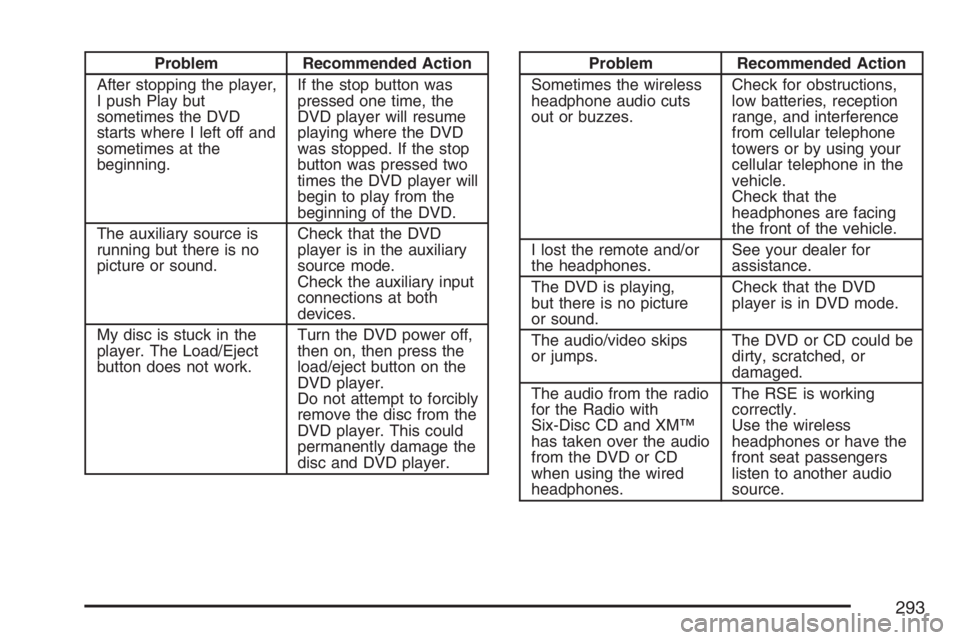
After stopping the player,
I push Play but
sometimes the DVD
starts where I left off and
sometimes at the
beginning.If the stop button was
pressed one time, the
DVD player will resume
playing where the DVD
was stopped. If the stop
button was pressed two
times the DVD player will
begin to play from the
beginning of the DVD.
The auxiliary source is
running but there is no
picture or sound.Check that the DVD
player is in the auxiliary
source mode.
Check the auxiliary input
connections at both
devices.
My disc is stuck in the
player. The Load/Eject
button does not work.Turn the DVD power off,
then on, then press the
load/eject button on the
DVD player.
Do not attempt to forcibly
remove the disc from the
DVD player. This could
permanently damage the
disc and DVD player.Problem Recommended Action
Sometimes the wireless
headphone audio cuts
out or buzzes.Check for obstructions,
low batteries, reception
range, and interference
from cellular telephone
towers or by using your
cellular telephone in the
vehicle.
Check that the
headphones are facing
the front of the vehicle.
I lost the remote and/or
the headphones.See your dealer for
assistance.
The DVD is playing,
but there is no picture
or sound.Check that the DVD
player is in DVD mode.
The audio/video skips
or jumps.The DVD or CD could be
dirty, scratched, or
damaged.
The audio from the radio
for the Radio with
Six-Disc CD and XM™
has taken over the audio
from the DVD or CD
when using the wired
headphones.The RSE is working
correctly.
Use the wireless
headphones or have the
front seat passengers
listen to another audio
source.
293
Page 301 of 562
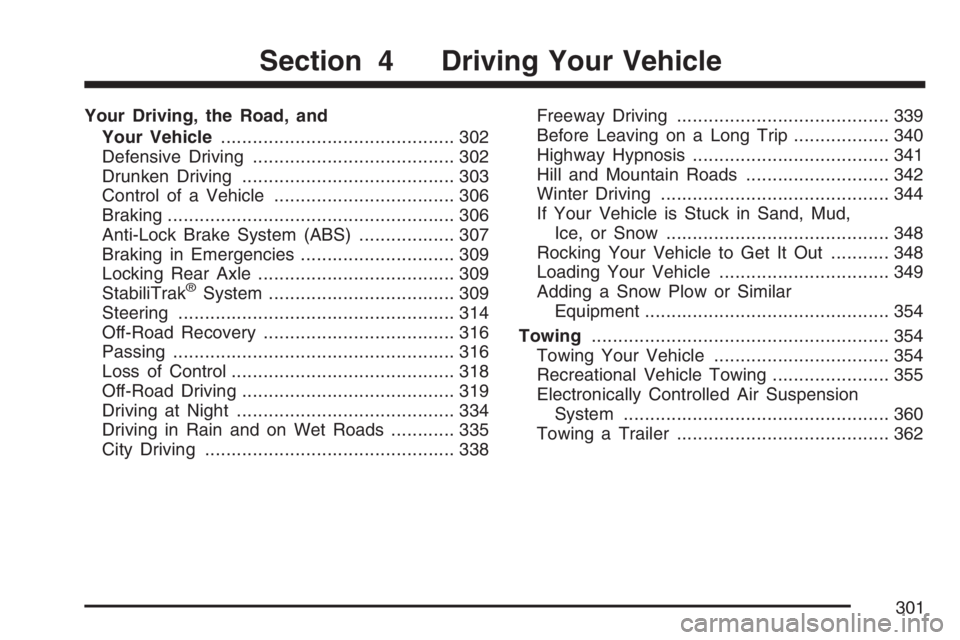
Your Driving, the Road, and
Your Vehicle............................................ 302
Defensive Driving...................................... 302
Drunken Driving........................................ 303
Control of a Vehicle.................................. 306
Braking...................................................... 306
Anti-Lock Brake System (ABS).................. 307
Braking in Emergencies............................. 309
Locking Rear Axle..................................... 309
StabiliTrak
®System................................... 309
Steering.................................................... 314
Off-Road Recovery.................................... 316
Passing..................................................... 316
Loss of Control.......................................... 318
Off-Road Driving........................................ 319
Driving at Night......................................... 334
Driving in Rain and on Wet Roads............ 335
City Driving............................................... 338Freeway Driving........................................ 339
Before Leaving on a Long Trip.................. 340
Highway Hypnosis..................................... 341
Hill and Mountain Roads........................... 342
Winter Driving........................................... 344
If Your Vehicle is Stuck in Sand, Mud,
Ice, or Snow.......................................... 348
Rocking Your Vehicle to Get It Out........... 348
Loading Your Vehicle................................ 349
Adding a Snow Plow or Similar
Equipment.............................................. 354
Towing........................................................ 354
Towing Your Vehicle ................................. 354
Recreational Vehicle Towing...................... 355
Electronically Controlled Air Suspension
System.................................................. 360
Towing a Trailer........................................ 362
Section 4 Driving Your Vehicle
301
Page 348 of 562
If Your Vehicle is Stuck in Sand,
Mud, Ice, or Snow
In order to free your vehicle when it is stuck,
you will need to spin the wheels, but you do not
want to spin your wheels too fast. The method
known as rocking can help you get out when you
are stuck, but you must use caution.
{CAUTION:
If you let your vehicle’s tires spin at high
speed, they can explode, and you or others
could be injured. And, the transmission or
other parts of the vehicle can overheat.
That could cause an engine compartment
re or other damage. When you are stuck,
spin the wheels as little as possible. Do not
spin the wheels above 35 mph (55 km/h) as
shown on the speedometer.Notice:Spinning the wheels can destroy
parts of your vehicle as well as the tires. If you
spin the wheels too fast while shifting the
transmission back and forth, you can destroy
the transmission.
For information about using tire chains on your
vehicle, seeTire Chains on page 461.
Rocking Your Vehicle to Get It Out
First, turn the steering wheel left and right. That will
clear the area around the front wheels. If you have
a four-wheel-drive vehicle, shift into Four-Wheel
High. Then shift back and forth between
REVERSE (R) and a forward gear, spinning the
wheels as little as possible. Release the accelerator
pedal while you shift, and press lightly on the
accelerator pedal when the transmission is in gear.
By slowly spinning the wheels in the forward and
reverse directions, you will cause a rocking motion
that may free your vehicle. If that does not get your
vehicle out after a few tries, it may need to be towed
out. If your vehicle does need to be towed out, see
Towing Your Vehicle on page 354.
348
Page 350 of 562
The Tire and Loading Information label also shows
the size of the original equipment tires (C) and
the recommended cold tire ination pressures (D).
For more information on tires and ination see
Tires on page 439andInation - Tire Pressure on
page 447.
There is also important loading information on the
vehicle Certication/Tire label. It tells you the
Gross Vehicle Weight Rating (GVWR) and
the Gross Axle Weight Rating (GAWR) for the
front and rear axle. See “Certication/Tire Label”
later in this section.
Steps for Determining Correct Load Limit
1. Locate the statement “The combined weight of
occupants and cargo should never exceed
XXX kg or XXX lbs” on your vehicle’s placard.
2. Determine the combined weight of the driver
and passengers that will be riding in your
vehicle.
3. Subtract the combined weight of the driver
and passengers from XXX kg or XXX lbs.4. The resulting gure equals the available
amount of cargo and luggage load capacity.
For example, if the “XXX” amount equals
1400 lbs and there will be ve 150 lb
passengers in your vehicle, the amount of
available cargo and luggage load capacity is
650 lbs (1400−750 (5 x 150) = 650 lbs).
5. Determine the combined weight of luggage
and cargo being loaded on the vehicle.
That weight may not safely exceed the
available cargo and luggage load capacity
calculated in Step 4.
6. If your vehicle will be towing a trailer, the load
from your trailer will be transferred to your
vehicle. Consult this manual to determine how
this reduces the available cargo and luggage
load capacity of your vehicle. SeeTowing
a Trailer on page 362for important information
on towing a trailer, towing safety rules and
trailering tips.
350