ignition GMC ENVOY DENALI 2007 Workshop Manual
[x] Cancel search | Manufacturer: GMC, Model Year: 2007, Model line: ENVOY DENALI, Model: GMC ENVOY DENALI 2007Pages: 562, PDF Size: 2.87 MB
Page 222 of 562
Select Button
r
(Select):Press the select button to reset
certain DIC functions, turn off or acknowledge
messages on the DIC display, and set your
customization settings. For example, this button
will allow you to reset the trip odometers, turn
off the FUEL LEVEL LOW message, and enables
you to scroll through and select the language
in which the DIC information will appear.
DIC Warnings and Messages
Messages are displayed on the DIC to notify the
driver that the status of the vehicle has changed
and that some action may be needed to correct the
condition. Multiple messages may appear one
after another.
Some messages may not require immediate
action. Press any of the DIC buttons on the
steering wheel or the trip odometer reset stem on
the instrument panel cluster to acknowledge
that you received the messages and to clear them
from the display.Some messages cannot be cleared from the
display because they are more urgent. These
messages require action before they can be
removed from the DIC display. Take any messages
that appear on the display seriously and remember
that clearing the messages will only make the
messages disappear, not correct the problem.
The following are the possible messages that can
be displayed and some information about them.
CHANGE ENGINE OIL
This message displays when the engine oil needs
to be changed and service is required for your
vehicle. SeeScheduled Maintenance on page 507
andEngine Oil on page 394for more information.
Also seeEngine Oil Life System on page 398
for information on how to reset the message. This
message clears itself after 10 seconds until the
next ignition cycle.
CHECK TIRE PRESSURE
This message displays when the tire pressure in
one of the vehicle’s tires needs to be checked.
Press any of the DIC buttons, or the trip stem, to
acknowledge this message and clear it from
the DIC display.
222
Page 225 of 562
OIL PRESSURE LOW/STOP ENGINE
Notice:If you drive your vehicle while
the engine oil pressure is low, severe engine
damage may occur. If a low oil pressure
warning appears on the Driver Information
Center (DIC), stop the vehicle as soon as
possible. Do not drive the vehicle until the
cause of the low oil pressure is corrected. See
Engine Oil on page 394for more information.
This message displays if low oil pressure
levels occur. Stop the vehicle as soon as safely
possible and do not operate it until the cause
of the low oil pressure has been corrected. Check
the oil as soon as possible and have your
vehicle serviced by your dealer. SeeEngine Oil on
page 394.
PASSENGER DOOR AJAR
This message displays and a chime sounds if the
passenger’s door is not fully closed. Stop and
turn off the vehicle, check the door for
obstructions, and close the door again. Check to
see if the message still appears on the DIC. Press
any of the DIC buttons, or the trip stem, to
acknowledge this message and clear it from the
DIC display.
REAR ACCESS OPEN
This message displays and a chime sounds if the
liftgate or liftglass is open while the ignition is
in RUN. Turn off the vehicle and check the liftgate
and liftglass. SeeLiftgate/Liftglass on page 106.
Restart the vehicle and check for the message on
the DIC display. Press any of the DIC buttons,
or the trip stem, to acknowledge this message and
clear it from the DIC display.
RIGHT REAR DOOR AJAR
This message displays and a chime sounds if the
passenger’s side rear door is not fully closed.
Stop and turn off the vehicle, check the door for
obstructions, and close the door again. Check
to see if the message still appears on the
DIC. Press any of the DIC buttons, or the trip
stem, to acknowledge this message and clear it
from the DIC display.
225
Page 228 of 562

There are several conditions that can cause this
message to appear.
The message may display if the brake system
warning light is on. SeeBrake System
Warning Light on page 206.
The message displays if the vehicle is shifted
into 4LO.
The message turns off as soon as the conditions
that caused the message to be displayed are
no longer present.
TIGHTEN FUEL CAP
This message may display and a chime may sound
if the vehicle’s fuel cap is not tightened properly.
Fully reinstall the fuel cap. SeeFilling the Tank on
page 385. The diagnostic system can determine if
the fuel cap has been left off or improperly installed.
A loose or missing fuel cap allows fuel to evaporate
into the atmosphere. This message remains on until
it is acknowledged and cleared from the DIC display
by pressing any of the DIC buttons or the trip stem.
The DIC message is also cancelled if the ignition is
turned off.The DIC message and the Service Engine Soon
light may come on again during a second trip if the
fuel cap is still not tightened properly. See
Malfunction Indicator Lamp on page 210for
more information.
TRACTION CONTROL OFF
This message displays when you momentarily
press the StabiliTrak®button located on the
transmission shift handle. In this mode, stability
control and the brake-traction control are
functional. Engine speed management will be
modied and the driven wheels can spin more
freely. For more details on this mode, see
StabiliTrak
®System on page 309.
TURN SIGNAL ON
This message displays and a chime sounds if a
turn signal is left on for 3/4 of a mile (1.2 km).
Move the turn signal/multifunction lever to the off
position. Press any of the DIC buttons, or the
trip stem, to acknowledge this message and clear
it from the DIC display.
228
Page 229 of 562
DIC Vehicle Customization
Your vehicle may have customization capabilities
that allow you to program some features to
one setting based on your preference. All of the
customizable options listed may not be available
on your vehicle. Only the options available display
on the Driver Information Center (DIC).
The default settings for the customization features
were set when your vehicle left the factory, but
may have been changed from their default
state since then.
To change feature preferences, make sure the
ignition is on and the vehicle is in PARK (P).
To avoid excessive drain on the battery, it
is recommended that the headlamps are
turned off.
Press the customization button to scroll through
the available customizable options.
After pressing the customization button, VEHICLE
SETTINGS momentarily displays before going
to a customization option.
Lock Doors
Press the customization button until LOCK
DOORS: IN GEAR appears in the display.
To select your preference for automatic locking,
press the select button while LOCK DOORS:
IN GEAR is displayed on the DIC. Pressing the
select button will scroll through the following
choices:
LOCK DOORS: IN GEAR (default):The doors
will lock when the vehicle is shifted out of
PARK (P).
LOCK DOORS: WITH SPEED:The doors will
lock when the vehicle speed is above
8 mph (13 km/h) for three seconds.
Choose one of the available options and press the
customization button while it is displayed on the
DIC to select it and move on to the next feature.
For more information on automatic door locks, see
Programmable Automatic Door Locks on
page 102.
229
Page 230 of 562
Unlock Doors
Press the customization button until UNLOCK
DOORS: IN PARK appears in the display. To select
your preference for automatic unlocking, press the
select button while UNLOCK DOORS: IN PARK is
displayed on the DIC. Pressing the select button will
scroll through the following choices:
UNLOCK DOORS: IN PARK (default):All of the
doors will unlock when the vehicle is shifted
into PARK (P).
UNLOCK DRIVER: IN PARK:The driver’s door
will be unlocked when the vehicle is shifted
into PARK (P).
UNLOCK DOORS: KEY OUT:All of the doors
will unlock when the key is taken out of the
ignition.
UNLOCK DOORS: MANUALLY:The doors will
not be unlocked automatically.
Choose one of the available options and press the
customization button while it is displayed on the
DIC to select it and move on to the next feature.
For more information on automatic door locks, see
Programmable Automatic Door Locks on page 102.
Lock Feedback
Press the customization button until LOCK
FEEDBACK: BOTH appears in the display.
To select your preference for the feedback you
receive when locking the vehicle with the Remote
Keyless Entry (RKE) transmitter, press the
select button while LOCK FEEDBACK: BOTH is
displayed on the DIC. Pressing the select
button will scroll through the following choices:
LOCK FEEDBACK: BOTH (default):The parking
lamps will ash each time you press the button
with the lock symbol on the RKE transmitter
and the horn will chirp the second time you press
the lock button.
LOCK FEEDBACK: OFF:There will be no
feedback when locking the vehicle.
LOCK FEEDBACK: LAMPS:The parking lamps
will ash each time you press the button with
the lock symbol on the RKE transmitter.
230
Page 233 of 562
Easy Exit Seat
Press the customization button until EASY EXIT
SEAT: OFF appears in the display. To select your
preference for seat position exit, press the
select button while EASY EXIT SEAT: OFF is
displayed on the DIC. Pressing the select button
will scroll through the following choices:
EASY EXIT SEAT: OFF (default):No seat exit
recall will occur.
EASY EXIT SEAT: ON:The driver’s seat will
move to the exit position when the key is removed
from the ignition.
Choose one of the available options and press the
customization button while it is displayed on the
DIC to select it and move on to the next feature.
For more information on seat position exit,
see “Easy Exit Seat” underMemory Seat, Mirrors,
and Pedals on page 12.
Seat Recall
Press the customization button until SEAT
RECALL: OFF appears in the display. To select
your preference for recall of the driver’s memory
seat, mirrors, and adjustable pedals, if your vehicle
has this feature, press the select button while
SEAT RECALL: OFF is displayed on the
DIC. Pressing the select button will scroll through
the following choices:
SEAT RECALL: OFF (default):The driver’s
memory seat, mirrors, and adjustable pedals
position you saved will only be recalled when the
memory button 1 or 2 is pressed.
SEAT RECALL: AT KEY IN:The driver’s
memory seat, mirrors, and adjustable pedals
position you saved will be recalled when you put
the key in the ignition.
SEAT RECALL: ON REMOTE:The driver’s
memory seat, mirrors, and adjustable pedals
position you saved will be recalled when
you unlock the vehicle with the Remote Keyless
Entry (RKE) transmitter.
233
Page 238 of 562
Your vehicle has a feature called Retained
Accessory Power (RAP). With RAP, the audio
system can be played even after the ignition is
turned off. SeeRetained Accessory Power (RAP)
on page 114for more information.
Setting the Time
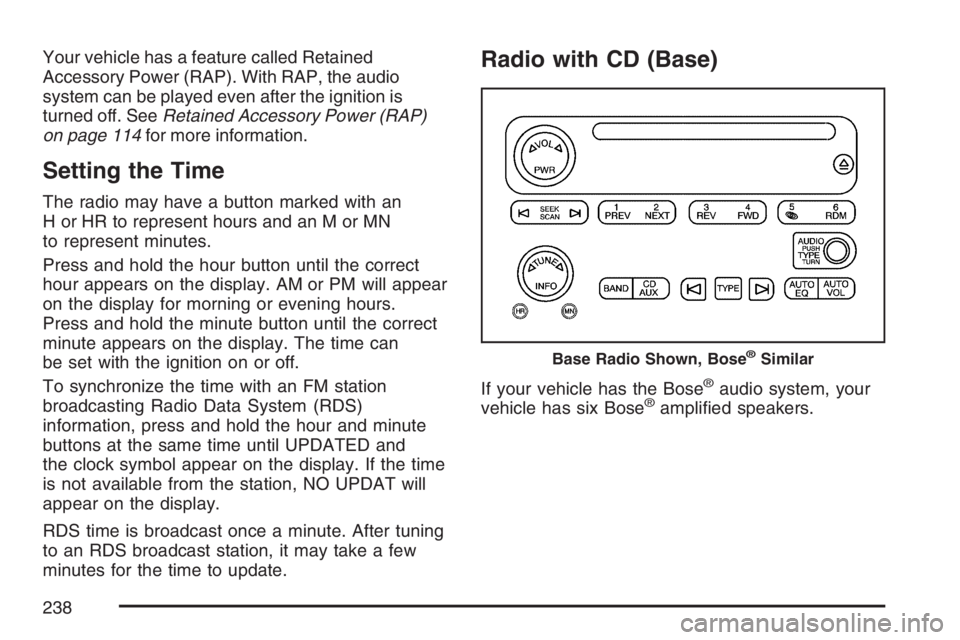
The radio may have a button marked with an
H or HR to represent hours and an M or MN
to represent minutes.
Press and hold the hour button until the correct
hour appears on the display. AM or PM will appear
on the display for morning or evening hours.
Press and hold the minute button until the correct
minute appears on the display. The time can
be set with the ignition on or off.
To synchronize the time with an FM station
broadcasting Radio Data System (RDS)
information, press and hold the hour and minute
buttons at the same time until UPDATED and
the clock symbol appear on the display. If the time
is not available from the station, NO UPDAT will
appear on the display.
RDS time is broadcast once a minute. After tuning
to an RDS broadcast station, it may take a few
minutes for the time to update.
Radio with CD (Base)
If your vehicle has the Bose®audio system, your
vehicle has six Bose®amplied speakers.
Base Radio Shown, Bose®Similar
238
Page 239 of 562
Radio Data System (RDS)
The audio system has a Radio Data System (RDS).
RDS features are available for use only on FM
stations that broadcast RDS information.
With RDS, the radio can do the following:
Seek to stations broadcasting the selected
type of programming
Receive announcements concerning local and
national emergencies
Display messages from radio stations
This system relies upon receiving specic
information from these stations and only works
when the information is available. In rare cases, a
radio station can broadcast incorrect information
that causes the radio features to work improperly.
If this happens, contact the radio station.
While the radio is tuned to an RDS station, the
station name or call letters display instead of the
frequency. RDS stations can also provide the
time of day, a program type (PTY) for current
programming, and the name of the program being
broadcast.
XM™ Satellite Radio Service
XM™ is a satellite radio service that is based in
the 48 contiguous United States and Canada.
XM™ offers a large variety of coast-to-coast
channels including music, news, sports, talk,
traffic/weather (U.S. subscribers), and children’s
programming. XM™ provides digital quality
audio and text information that includes song title
and artist name. A service fee is required in
order to receive the XM™ service. For more
information, contact XM™; In the U.S. at
www.xmradio.com or call 1-800-852-XMXM (9696)
or in Canada at www.xmradio.ca or call
1-877-GET-XMSR (438-9677).
Playing the Radio
PWR (Power):Press this knob to turn the system
on and off.
oVOLp(Volume):Turn this knob clockwise or
counterclockwise to increase or to decrease the
volume.
INFO (Information):When the ignition is off,
press this knob to display the time.
239
Page 244 of 562
RDS Messages
INFO (Information):If the current station has a
message, the information symbol displays.
Press this button to see the message. The
message can display the artist, song title, call in
phone numbers, etc.
If the entire message is not displayed, parts of the
message appears every three seconds. To
scroll through the message, press and release the
INFO button. A new group of words displays
after every press of the button. Once the complete
message displays, the information symbol
disappears from the display until another new
message is received. The last message can be
displayed by pressing the INFO button. The
last message can be viewed until a new message
is received or you can tune to a different station.
Radio Messages
CAL ERR (Calibration Error):The audio system
has been calibrated for your vehicle from the
factory. If CAL ERR displays, it means that the
radio has not been congured properly for
the vehicle and must be returned to your dealer
for service.LOCKED:This message is displayed when the
THEFTLOCK
®system has locked up. Take
the vehicle to your dealer for service.
If any error occurs repeatedly, or if an error cannot
be corrected, contact your dealer.
Radio Messages for XM™ Only
SeeXM Radio Messages on page 277later in this
section for further detail.
Playing a CD
Insert a CD partway into the slot, label side up.
The player pulls it in and the CD should begin
playing. If you want to insert a CD with the ignition
off, rst press the eject button or the INFO knob.
If the ignition or radio is turned off with the CD in
the player, it stays in the player. When the
ignition or radio is turned on, the CD starts playing
where it stopped, if it was the last selected
audio source.
When a CD is inserted, the CD symbol displays.
As each new track starts to play, the track number
displays.
244
Page 247 of 562
CD AUX (Auxiliary):Press this button to play a
CD while listening to the radio, or to listen to
an auxiliary source (such as rear seat
entertainment, if equipped).
Z(Eject):Press this button to eject a CD. Eject
can be activated with either the ignition or radio
off. CDs can be loaded with the radio and ignition
off if this button is pressed rst.
CD Messages
If the CD comes out, it could be for one of the
following reasons:
It is very hot. When the temperature returns to
normal, the CD should play.
You are driving on a very rough road.
When the road becomes smoother, the CD
should play.
The CD is dirty, scratched, wet, or
upside down.
The air is very humid. If so, wait about an
hour and try again.
There could have been a problem while
burning the CD.
The label could be caught in the CD player.
If the CD is not playing correctly, for any
other reason, try a known good CD.
If any error occurs repeatedly or if an error cannot
be corrected, contact your dealer. If the radio
displays an error message, write it down
and provide it to your dealer when reporting
the problem.
247