door lock GMC ENVOY DENALI 2008 Owner's Manual
[x] Cancel search | Manufacturer: GMC, Model Year: 2008, Model line: ENVOY DENALI, Model: GMC ENVOY DENALI 2008Pages: 468, PDF Size: 2.51 MB
Page 132 of 468
Luggage Carrier
{CAUTION:
If you try to carry something on top of your
vehicle that is longer or wider than the luggage
carrier — like paneling, plywood, a mattress
and so forth — the wind can catch it as you
drive along. This can cause you to lose
control. What you are carrying could be
violently torn off, and this could cause you or
other drivers to have a collision, and of course
damage your vehicle. You may be able to carry
something like this inside. But, never carry
something longer or wider than the luggage
carrier on top of your vehicle.
If your vehicle has a luggage carrier, it will allow you to
load things on top of your vehicle. The luggage carrier
has side rails attached to the roof, places to use for tying
things down and may have sliding crossrails. These let
you load some other things on top of your vehicle, as long
as they are not wider or longer than the luggage carrier.To slide the crossrails to where you want them,
pull up on the lever on each side of the crossrail.
This releases the crossrail and allows you to slide it.
When the crossrail is where you want it, press down
on the levers to lock it into place.
Notice:Loading cargo on the luggage carrier that
weighs more than 220 lbs (100 kg) or hangs over
the rear or sides of the vehicle may damage
your vehicle. Load cargo so that it rests on the
slats as far forward as possible and against the
side rails, making sure to fasten it securely.
Do not exceed the maximum vehicle capacity when
loading your vehicle. For more information on vehicle
capacity and loading, seeLoading Your Vehicle on
page 4-34.
To prevent damage or loss of cargo as you are driving,
check now and then to make sure the luggage carrier
is locked and cargo is still securely fastened.
When the luggage carrier is not in use, place the
crossrails at the following positions for wind noise
reduction. Place one crossrail at the rear most point of
the vehicle and the other crossrail above the opening
of the rear door.
2-58
Page 149 of 468
Headlamps on Reminder
A reminder tone sounds when the headlamps or parking
lamps are manually turned on, if the driver’s door is
open and the ignition is in LOCK or ACC. To turn the
tone off, turn the knob all the way counterclockwise.
In the automatic mode, the headlamps turn off once the
ignition key is in LOCK.
Daytime Running Lamps (DRL)
Daytime Running Lamps (DRL) can make it easier
for others to see the front of your vehicle during the day.
DRL can be helpful in many different driving conditions,
but they can be especially helpful in the short periods
after dawn and before sunset. Fully functional DRL
are required on all vehicles rst sold in Canada.
The DRL system makes the headlamps come on at
reduced brightness when the following conditions
are met:
The ignition is on.
The exterior lamps knob is in automatic
headlamp mode.
The light sensor detects daytime light.
The transmission is not in PARK (P).When the DRL are on, only the headlamps will be on.
The taillamps, sidemarker and other lamps will not
be on. The instrument panel will not be lit up either.
When it begins to get dark, the headlamps automatically
switch from DRL to the regular headlamps.
Automatic Headlamp System
When it is dark enough outside, the Automatic
Headlamp System turns on the headlamps when the
vehicle is started and after the transaxle has been
shifted out of the PARK (P) position. The headlamps,
taillamps, sidemarker, and parking lamps will come
on. The instrument panel lights and radio lights will
also turn on at normal brightness. Once on, the system
remains on during these conditions even if the vehicle
is shifted back into PARK (P).
The vehicle has a light sensor on the top of the
instrument panel. Make sure it is not covered or the
system may come on whenever the ignition is on and
the vehicle is shifted out of the PARK (P) position.
The system could also turn on the lamps when driving
through a parking garage, heavy overcast weather
or a tunnel. This is normal.
3-15
Page 151 of 468
Instrument Panel Brightness
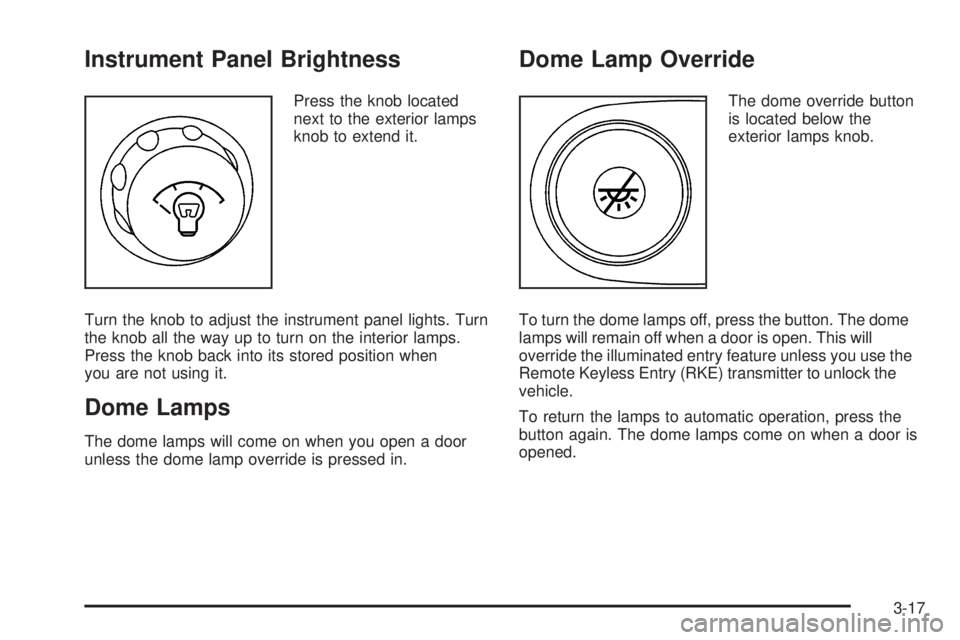
Press the knob located
next to the exterior lamps
knob to extend it.
Turn the knob to adjust the instrument panel lights. Turn
the knob all the way up to turn on the interior lamps.
Press the knob back into its stored position when
you are not using it.
Dome Lamps
The dome lamps will come on when you open a door
unless the dome lamp override is pressed in.
Dome Lamp Override
The dome override button
is located below the
exterior lamps knob.
To turn the dome lamps off, press the button. The dome
lamps will remain off when a door is open. This will
override the illuminated entry feature unless you use the
Remote Keyless Entry (RKE) transmitter to unlock the
vehicle.
To return the lamps to automatic operation, press the
button again. The dome lamps come on when a door is
opened.
3-17
Page 152 of 468
Entry Lighting
The vehicle has entry lighting.
When any door is opened, the dome lamps come on as
long as the dome override lamp override button is not
pressed in. When all the doors are closed, the lamps
stay on for a short period of time and then turn off
automatically. If you use the Remote Keyless Entry (RKE)
transmitter to unlock the vehicle, the interior lamps come
on for a short time whether or not the dome lamp override
is on.
Exit Lighting
With exit lighting, the interior lamps come on when you
remove the key from the ignition. If the dome override
is off, these lamps stay on for a short period of time
and then go out.
Reading Lamps
The reading lamps are located in the front console.
Press the lens on the lamps to turn the reading lamps
on or off.
Electric Power Management
The vehicle has Electric Power Management (EPM)
that estimates the battery’s temperature and state
of charge. It then adjusts the voltage for best
performance and extended life of the battery.
When the battery’s state of charge is low, the voltage is
raised slightly to quickly put the charge back in. When
the state of charge is high, the voltage is lowered slightly
to prevent overcharging. If the vehicle has a voltmeter
gage or a voltage display on the Driver Information
Center (DIC), you may see the voltage move up
or down. This is normal. If there is a problem, an
alert will be displayed.
The battery can be discharged at idle if the electrical
loads are very high. This is true for all vehicles. This is
because the generator (alternator) may not be spinning
fast enough at idle to produce all the power that is
needed for very high electrical loads.
A high electrical load occurs when several of the
following loads are on: headlamps, high beams, fog
lamps, rear window defogger, climate control fan at
high speed, heated seats, engine cooling fans, trailer
loads, and loads plugged into accessory power outlets.
3-18
Page 193 of 468
Lock Doors
Press the customization button until LOCK DOORS: IN
GEAR appears in the display. To select your preference
for automatic locking, press the select button while LOCK
DOORS: IN GEAR is displayed on the DIC. Pressing the
select button will scroll through the following settings:
LOCK DOORS: IN GEAR (default):The doors will lock
when the vehicle is shifted out of PARK (P).
LOCK DOORS: WITH SPEED:The doors will lock
when the vehicle speed is above 8 mph (13 km/h) for
three seconds.
To select a setting and move on to the next feature,
press the customization button while the desired setting
is displayed on the DIC.
SeeProgrammable Automatic Door Locks on page 2-9
for more information.
Unlock Doors
Press the customization button until UNLOCK DOORS:
IN PARK appears in the display. To select your
preference for automatic unlocking, press the select
button while UNLOCK DOORS: IN PARK is displayed
on the DIC. Pressing the select button will scroll through
the following settings:
UNLOCK DOORS: IN PARK (default):All of the doors
will unlock when the vehicle is shifted into PARK (P).
UNLOCK DRIVER: IN PARK:The driver’s door will be
unlocked when the vehicle is shifted into PARK (P).
UNLOCK DOORS: KEY OUT:All of the doors
will unlock when the key is taken out of the ignition.
UNLOCK DOORS: MANUALLY:The doors will not be
unlocked automatically.
To select a setting and move on to the next feature,
press the customization button while the desired setting
is displayed on the DIC.
SeeProgrammable Automatic Door Locks on page 2-9
for more information.
3-59
Page 273 of 468
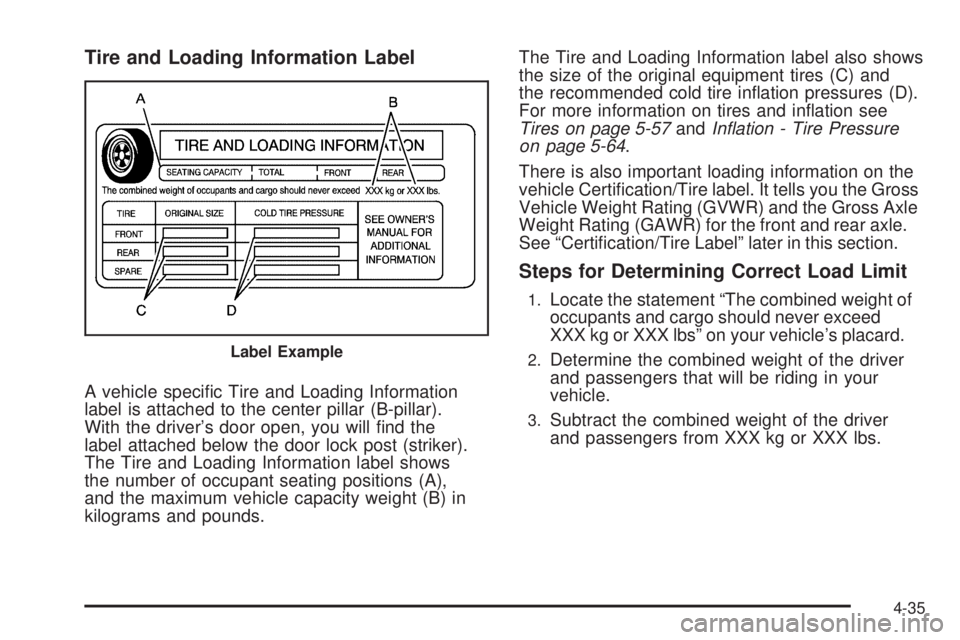
Tire and Loading Information Label
A vehicle specic Tire and Loading Information
label is attached to the center pillar (B-pillar).
With the driver’s door open, you will nd the
label attached below the door lock post (striker).
The Tire and Loading Information label shows
the number of occupant seating positions (A),
and the maximum vehicle capacity weight (B) in
kilograms and pounds.The Tire and Loading Information label also shows
the size of the original equipment tires (C) and
the recommended cold tire ination pressures (D).
For more information on tires and ination see
Tires on page 5-57andInflation - Tire Pressure
on page 5-64.
There is also important loading information on the
vehicle Certication/Tire label. It tells you the Gross
Vehicle Weight Rating (GVWR) and the Gross Axle
Weight Rating (GAWR) for the front and rear axle.
See “Certication/Tire Label” later in this section.
Steps for Determining Correct Load Limit
1.Locate the statement “The combined weight of
occupants and cargo should never exceed
XXX kg or XXX lbs” on your vehicle’s placard.
2.Determine the combined weight of the driver
and passengers that will be riding in your
vehicle.
3.Subtract the combined weight of the driver
and passengers from XXX kg or XXX lbs.
Label Example
4-35
Page 302 of 468
Filling the Tank
{CAUTION:
Fuel vapor burns violently and a fuel re can
cause bad injuries. To help avoid injuries to
you and others, read and follow all the
instructions on the pump island. Turn off your
engine when you are refueling. Do not smoke
if you are near fuel or refueling your vehicle.
Do not use cellular phones. Keep sparks,
ames, and smoking materials away from fuel.
Do not leave the fuel pump unattended when
refueling your vehicle. This is against the law
in some places. Do not re-enter the vehicle
while pumping fuel. Keep children away from
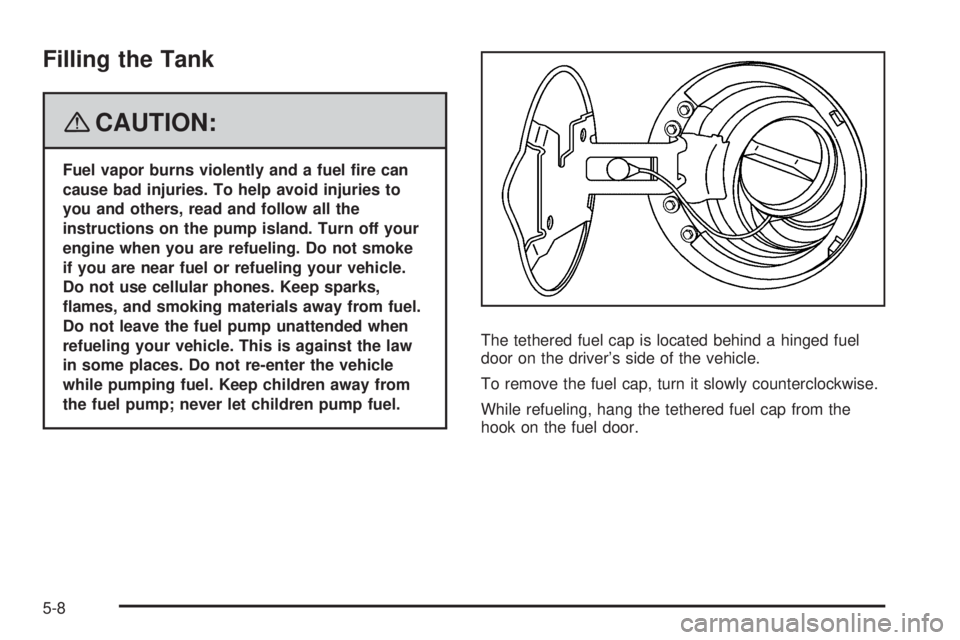
the fuel pump; never let children pump fuel.The tethered fuel cap is located behind a hinged fuel
door on the driver’s side of the vehicle.
To remove the fuel cap, turn it slowly counterclockwise.
While refueling, hang the tethered fuel cap from the
hook on the fuel door.
5-8
Page 412 of 468
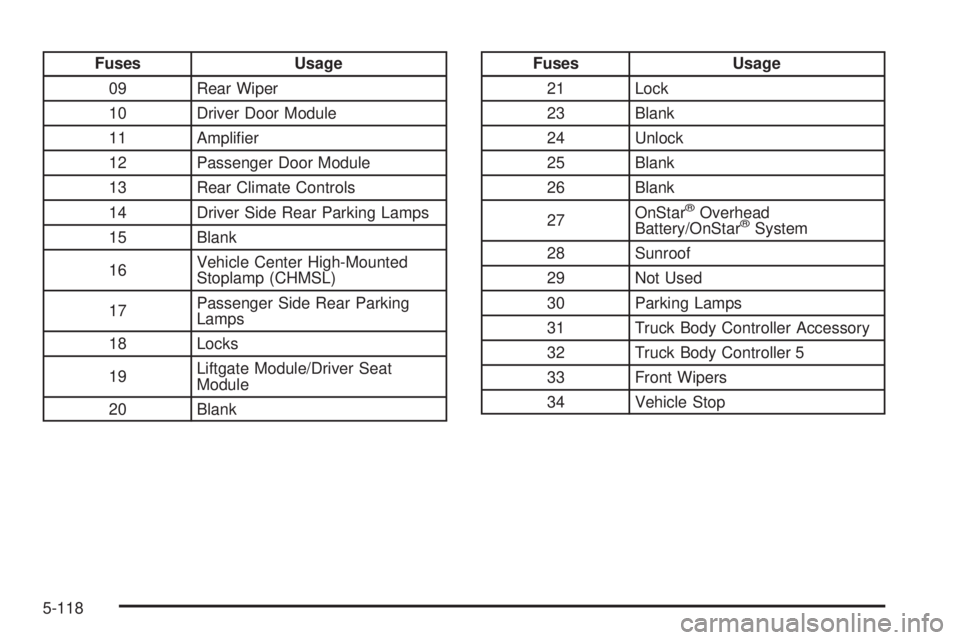
Fuses Usage
09 Rear Wiper
10 Driver Door Module
11 Amplier
12 Passenger Door Module
13 Rear Climate Controls
14 Driver Side Rear Parking Lamps
15 Blank
16Vehicle Center High-Mounted
Stoplamp (CHMSL)
17Passenger Side Rear Parking
Lamps
18 Locks
19Liftgate Module/Driver Seat
Module
20 BlankFuses Usage
21 Lock
23 Blank
24 Unlock
25 Blank
26 Blank
27OnStar
®Overhead
Battery/OnStar®System
28 Sunroof
29 Not Used
30 Parking Lamps
31 Truck Body Controller Accessory
32 Truck Body Controller 5
33 Front Wipers
34 Vehicle Stop
5-118
Page 424 of 468
(e)Make sure the safety belt reminder light and safety
belt assemblies are working properly. Look for any
other loose or damaged safety belt system parts. If you
see anything that might keep a safety belt system
from doing its job, have it repaired. Have any torn or
frayed safety belts replaced. Also see Checking
the Restraint Systems on page 1-68.
(f)Lubricate all key lock cylinders, hood latch assembly,
secondary latch, pivots, spring anchor, release pawl,
rear compartment hinges, outer liftgate handle pivot
points, rear door detent link, roller mechanism, liftgate
handle pivot points, latch bolt, fuel door hinge, cargo
door hinge, locks, and folding seat hardware. More
frequent lubrication may be required when exposed to a
corrosive environment. Applying silicone grease on
weatherstrips with a clean cloth will make them
last longer, seal better, and not stick or squeak.
(g)Inspect hoses for cracks, chafing, leaks, kinks, and
proper installation.(h)Change automatic transmission fluid and filter if the
vehicle is mainly driven under one or more of these
conditions:
In heavy city traffic where the outside temperature
regularly reaches 90°F (32°C) or higher.
In hilly or mountainous terrain.
When doing frequent trailer towing.
Uses such as found in taxi, police, or delivery
service.
(i)Drain, flush, and refill cooling system. This service
can be complex; you should have your dealer/retailer
perform this service. See Engine Coolant on page 5-26
for what to use. Inspect hoses. Clean radiator,
condenser, pressure cap, and filler neck. Pressure test
the cooling system and pressure cap.
(j)A fluid loss in any vehicle system could indicate a
problem. Have the system inspected and repaired and
the fluid level checked. Add fluid if needed.
(k)If you drive regularly under dusty conditions, inspect
the filter at each engine oil change.
(l)Visually inspect belt for fraying, excessive cracks, or
obvious damage. Replace belt if necessary.
6-8
Page 453 of 468
To read data recorded by an EDR, special equipment is
required, and access to the vehicle or the EDR is
needed. In addition to the vehicle manufacturer, other
parties, such as law enforcement, that have the special
equipment, can read the information if they have
access to the vehicle or the EDR.
GM will not access this data or share it with others
except: with the consent of the vehicle owner or, if the
vehicle is leased, with the consent of the lessee; in
response to an official request of police or similar
government office; as part of GM’s defense of litigation
through the discovery process; or, as required by
law. Data that GM collects or receives may also be used
for GM research needs or may be made available to
others for research purposes, where a need is shown
and the data is not tied to a specic vehicle or
vehicle owner.
OnStar®
If your vehicle has OnStar and you subscribe to the
OnStar services, please refer to the OnStar Terms and
Conditions for information on data collection and
use. See alsoOnStar
®System on page 2-48in this
manual for more information.
Navigation System
If your vehicle has a navigation system, use of the
system may result in the storage of destinations,
addresses, telephone numbers, and other trip
information. Refer to the navigation system operating
manual for information on stored data and for deletion
instructions.
Radio Frequency
Identication (RFID)
RFID technology is used in some vehicles for functions
such as tire pressure monitoring and ignition system
security, as well as in connection with conveniences
such as key fobs for remote door locking/unlocking and
starting, and in-vehicle transmitters for garage door
openers. RFID technology in GM vehicles does not use
or record personal information or link with any other
GM system containing personal information.
7-19