instrument panel GMC ENVOY DENALI 2008 Service Manual
[x] Cancel search | Manufacturer: GMC, Model Year: 2008, Model line: ENVOY DENALI, Model: GMC ENVOY DENALI 2008Pages: 468, PDF Size: 2.51 MB
Page 294 of 468
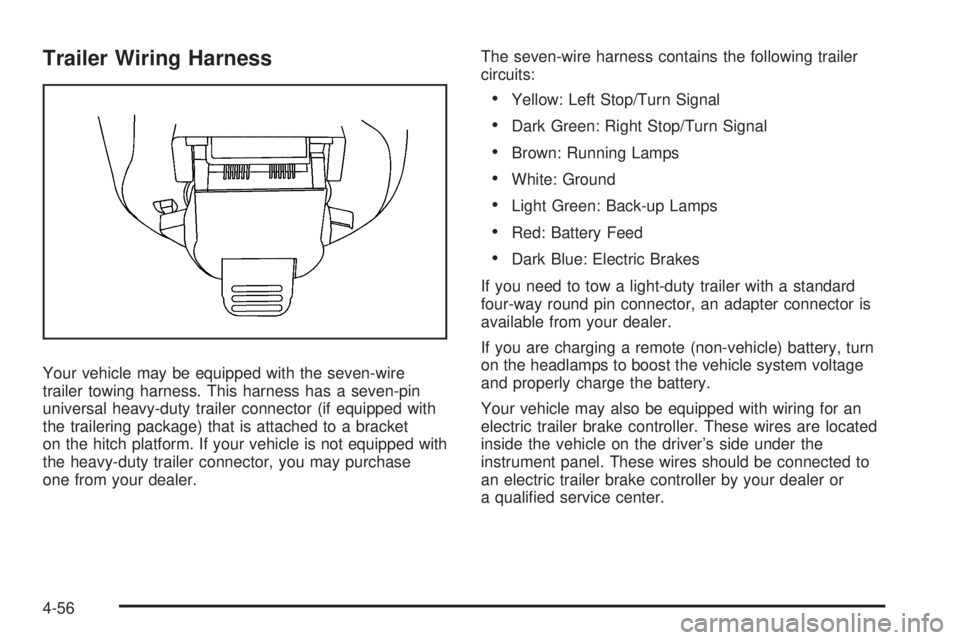
Trailer Wiring Harness
Your vehicle may be equipped with the seven-wire
trailer towing harness. This harness has a seven-pin
universal heavy-duty trailer connector (if equipped with
the trailering package) that is attached to a bracket
on the hitch platform. If your vehicle is not equipped with
the heavy-duty trailer connector, you may purchase
one from your dealer.The seven-wire harness contains the following trailer
circuits:
Yellow: Left Stop/Turn Signal
Dark Green: Right Stop/Turn Signal
Brown: Running Lamps
White: Ground
Light Green: Back-up Lamps
Red: Battery Feed
Dark Blue: Electric Brakes
If you need to tow a light-duty trailer with a standard
four-way round pin connector, an adapter connector is
available from your dealer.
If you are charging a remote (non-vehicle) battery, turn
on the headlamps to boost the vehicle system voltage
and properly charge the battery.
Your vehicle may also be equipped with wiring for an
electric trailer brake controller. These wires are located
inside the vehicle on the driver’s side under the
instrument panel. These wires should be connected to
an electric trailer brake controller by your dealer or
a qualied service center.
4-56
Page 296 of 468
High-Speed Operation...................................5-66
Tire Pressure Monitor System.........................5-67
Tire Pressure Monitor Operation.....................5-69
Tire Inspection and Rotation...........................5-72
When It Is Time for New Tires.......................5-73
Buying New Tires.........................................5-74
Different Size Tires and Wheels......................5-76
Uniform Tire Quality Grading..........................5-77
Wheel Alignment and Tire Balance..................5-78
Wheel Replacement......................................5-78
Tire Chains..................................................5-80
Accessory Inator.........................................5-80
If a Tire Goes Flat........................................5-81
Changing a Flat Tire.....................................5-82
Removing the Spare Tire and Tools................5-84
Removing the Flat Tire and Installing the
Spare Tire................................................5-87
Secondary Latch System...............................5-92
Storing a Flat or Spare Tire and Tools............5-96
Spare Tire...................................................5-99
Appearance Care..........................................5-100
Interior Cleaning.........................................5-100
Fabric/Carpet..............................................5-101
Leather......................................................5-102
Instrument Panel, Vinyl, and Other
Plastic Surfaces.......................................5-102Care of Safety Belts....................................5-103
Weatherstrips.............................................5-103
Washing Your Vehicle..................................5-103
Cleaning Exterior Lamps/Lenses....................5-104
Finish Care................................................5-104
Windshield, Backglass, and Wiper Blades.......5-105
Aluminum Wheels.......................................5-105
Tires.........................................................5-106
Sheet Metal Damage...................................5-106
Finish Damage...........................................5-106
Underbody Maintenance...............................5-106
Chemical Paint Spotting...............................5-106
Vehicle Care/Appearance Materials................5-107
Vehicle Identication.....................................5-108
Vehicle Identication Number (VIN)................5-108
Service Parts Identication Label...................5-108
Electrical System..........................................5-109
Add-On Electrical Equipment.........................5-109
Headlamps.................................................5-109
Windshield Wiper Fuses...............................5-109
Power Windows and Other Power Options......5-109
Fuses and Circuit Breakers..........................5-110
Engine Compartment Fuse Block...................5-110
Rear Underseat Fuse Block..........................5-116
Capacities and Specications........................5-120
Section 5 Service and Appearance Care
5-2
Page 303 of 468
{CAUTION:
Fuel can spray out on you if you open the fuel
cap too quickly. If you spill fuel and then
something ignites it, you could be badly
burned. This spray can happen if your tank is
nearly full, and is more likely in hot weather.
Open the fuel cap slowly and wait for any hiss
noise to stop. Then unscrew the cap all the way.
Be careful not to spill fuel. Do not top off or overll the
tank and wait a few seconds after you have nished
pumping before removing the nozzle. Clean fuel from
painted surfaces as soon as possible. SeeWashing Your
Vehicle on page 5-103.
When replacing the fuel cap, turn it clockwise until it
clicks. Make sure the cap is fully installed. The
diagnostic system can determine if the fuel cap has been
left off or improperly installed. This would allow fuel to
evaporate into the atmosphere. SeeMalfunction Indicator
Lamp on page 3-41.There may also be a light that comes on in the
instrument panel to let you know if your gas cap is not
properly installed. SeeCheck Gas Cap Light on
page 3-49for more information.
{CAUTION:
If a re starts while you are refueling, do not
remove the nozzle. Shut off the ow of fuel by
shutting off the pump or by notifying the
station attendant. Leave the area immediately.
Notice:If you need a new fuel cap, be sure to get
the right type. Your dealer/retailer can get one
for you. If you get the wrong type, it may not t
properly. This may cause your malfunction indicator
lamp to light and may damage your fuel tank and
emissions system. SeeMalfunction Indicator Lamp
on page 3-41.
5-9
Page 305 of 468
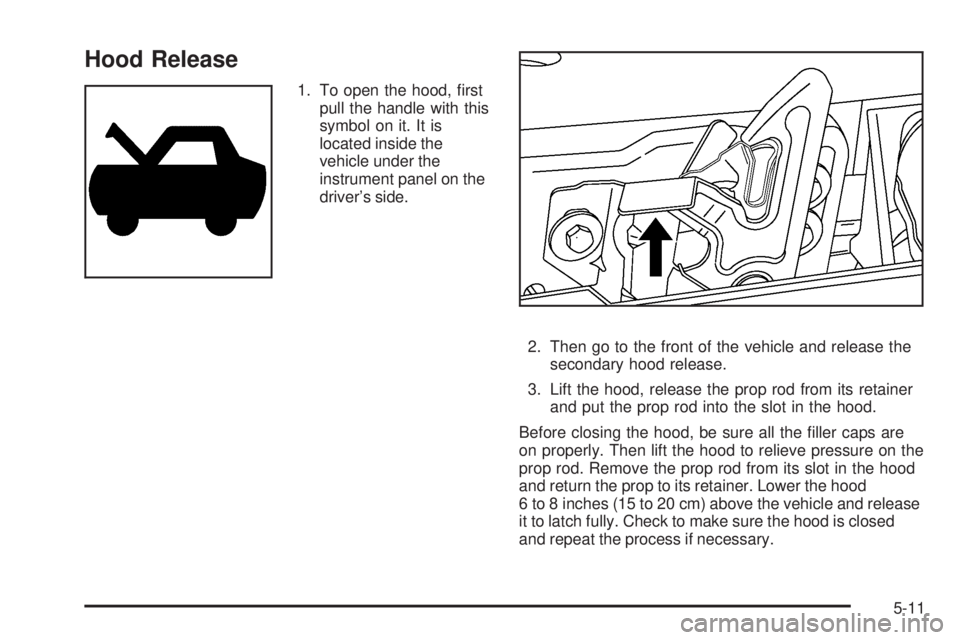
Hood Release
1. To open the hood, rst
pull the handle with this
symbol on it. It is
located inside the
vehicle under the
instrument panel on the
driver’s side.
2. Then go to the front of the vehicle and release the
secondary hood release.
3. Lift the hood, release the prop rod from its retainer
and put the prop rod into the slot in the hood.
Before closing the hood, be sure all the ller caps are
on properly. Then lift the hood to relieve pressure on the
prop rod. Remove the prop rod from its slot in the hood
and return the prop to its retainer. Lower the hood
6 to 8 inches (15 to 20 cm) above the vehicle and release
it to latch fully. Check to make sure the hood is closed
and repeat the process if necessary.
5-11
Page 322 of 468
Adding Coolant
If you need more coolant, add the proper DEX-COOL®
coolant mixture at the coolant recovery tank.
{CAUTION:
Turning the radiator pressure cap when the
engine and radiator are hot can allow steam
and scalding liquids to blow out and burn you
badly. With the coolant recovery tank, you will
almost never have to add coolant at the
radiator. Never turn the radiator pressure
cap — even a little — when the engine and
radiator are hot.
Add coolant mixture at the recovery tank, but be careful
not to spill it.
{CAUTION:
You can be burned if you spill coolant on hot
engine parts. Coolant contains ethylene glycol,
and it will burn if the engine parts are hot
enough. Do not spill coolant on a hot engine.Occasionally check the coolant level in the radiator.
For information on how to add coolant to the radiator,
seeCooling System on page 5-30.
Radiator Pressure Cap
Notice:If the pressure cap is not tightly installed,
coolant loss and possible engine damage may
occur. Be sure the cap is properly and tightly
secured.
SeeEngine Compartment Overview on page 5-12for
information on location.
Engine Overheating
You will nd a coolant temperature gage on your
vehicle’s instrument panel. SeeEngine Coolant
Temperature Gage on page 3-40for more information.
If your vehicle has a Driver Information Center (DIC),
the display will show an Engine Coolant Hot/Engine
Overheated message. SeeDIC Warnings and Messages
on page 3-53for more information.
5-28
Page 363 of 468
Tire Pressure Monitor Operation
The Tire Pressure Monitor System (TPMS) is designed
to warn the driver when a low tire pressure condition
exists. TPMS sensors are mounted onto each tire
and wheel assembly, excluding the spare tire and wheel
assembly. The TPMS sensors monitor the air pressure
in the vehicle’s tires and transmit the tire pressure
readings to a receiver located in the vehicle.
The TPMS is designed to alert the driver if a low tire
pressure condition exists. If your vehicle has the Driver
Information Center (DIC) steering wheel control
buttons, tire pressure levels may also be checked
through the DIC. See “Tire Pressures” underDIC
Operation and Displays on page 3-50.
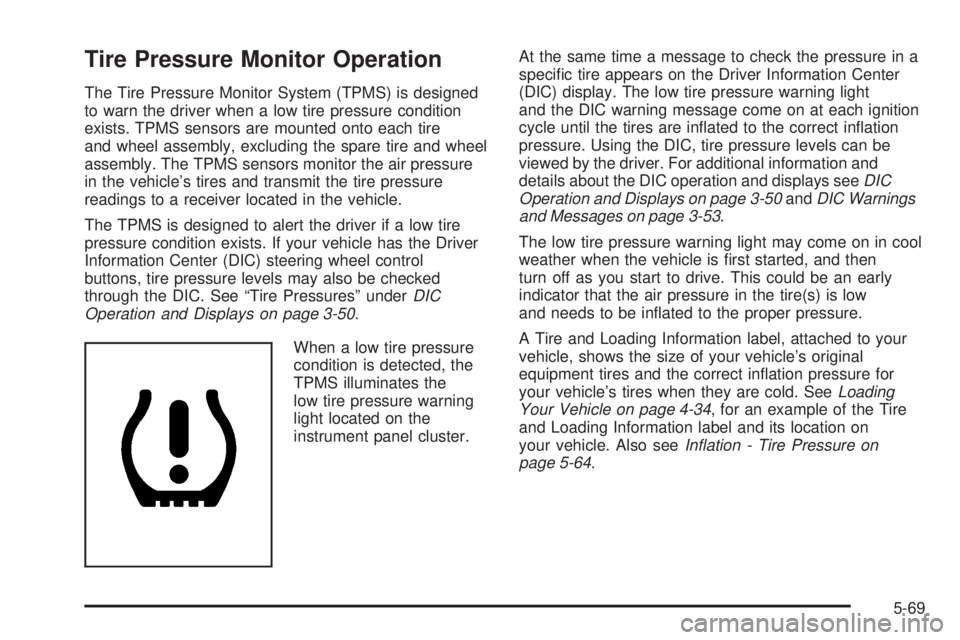
When a low tire pressure
condition is detected, the
TPMS illuminates the
low tire pressure warning
light located on the
instrument panel cluster.At the same time a message to check the pressure in a
specic tire appears on the Driver Information Center
(DIC) display. The low tire pressure warning light
and the DIC warning message come on at each ignition
cycle until the tires are inated to the correct ination
pressure. Using the DIC, tire pressure levels can be
viewed by the driver. For additional information and
details about the DIC operation and displays seeDIC
Operation and Displays on page 3-50andDIC Warnings
and Messages on page 3-53.
The low tire pressure warning light may come on in cool
weather when the vehicle is rst started, and then
turn off as you start to drive. This could be an early
indicator that the air pressure in the tire(s) is low
and needs to be inated to the proper pressure.
A Tire and Loading Information label, attached to your
vehicle, shows the size of your vehicle’s original
equipment tires and the correct ination pressure for
your vehicle’s tires when they are cold. SeeLoading
Your Vehicle on page 4-34, for an example of the Tire
and Loading Information label and its location on
your vehicle. Also seeInflation - Tire Pressure on
page 5-64.
5-69
Page 396 of 468
If any of the soil remains, a commercial fabric cleaner or
spot lifter may be necessary. When a commercial
upholstery cleaner or spot lifter is to be used, test a small
hidden area for colorfastness rst. If the locally cleaned
area gives any impression that a ring formation may
result, clean the entire surface.
After the cleaning process has been completed, a paper
towel can be used to blot excess moisture from the
fabric or carpet.
Leather
A soft cloth dampened with water can be used to
remove dust. If a more thorough cleaning is necessary,
a soft cloth dampened with a mild soap solution can
be used. Allow the leather to dry naturally. Do not use
heat to dry. Never use steam to clean leather. Never
use spot lifters or spot removers on leather. Many
commercial leather cleaners and coatings that are sold
to preserve and protect leather may permanently
change the appearance and feel of your leather and are
not recommended. Do not use silicone or wax-based
products, or those containing organic solvents to clean
your vehicle’s interior because they can alter the
appearance by increasing the gloss in a non-uniform
manner. Never use shoe polish on leather.
Instrument Panel, Vinyl, and Other
Plastic Surfaces
A soft cloth dampened with water may be used to
remove dust. If a more thorough cleaning is necessary,
a clean soft cloth dampened with a mild soap solution
can be used to gently remove dust and dirt. Never use
spot lifters or removers on plastic surfaces. Many
commercial cleaners and coatings that are sold to
preserve and protect soft plastic surfaces may
permanently change the appearance and feel of your
interior and are not recommended. Do not use silicone or
wax-based products, or those containing organic solvents
to clean your vehicle’s interior because they can alter the
appearance by increasing the gloss in a non-uniform
manner.
Some commercial products may increase gloss on your
instrument panel. The increase in gloss may cause
annoying reections in the windshield and even make it
difficult to see through the windshield under certain
conditions.
5-102
Page 402 of 468
Vehicle Identication
Vehicle Identication Number (VIN)
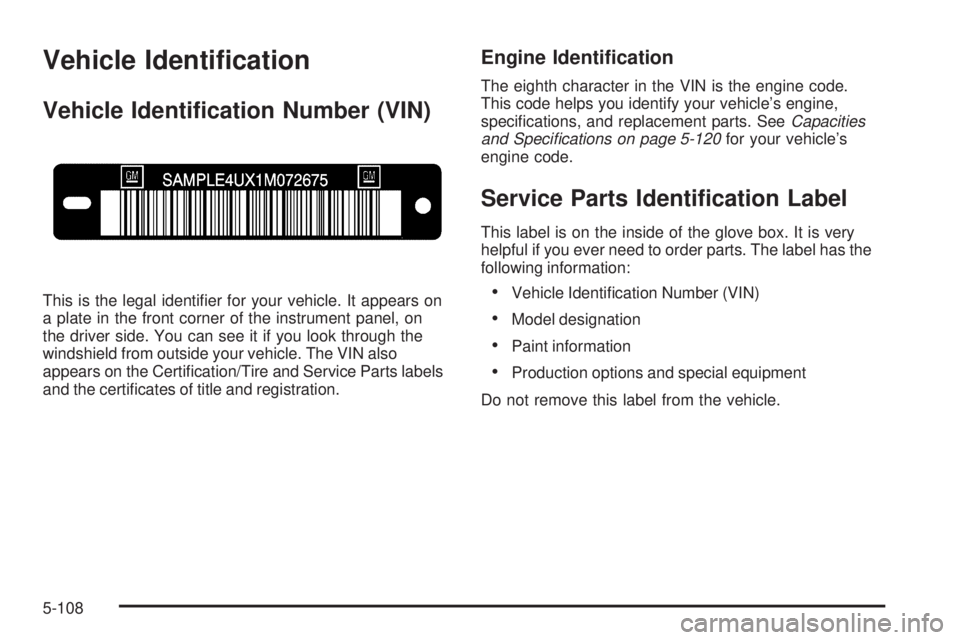
This is the legal identier for your vehicle. It appears on
a plate in the front corner of the instrument panel, on
the driver side. You can see it if you look through the
windshield from outside your vehicle. The VIN also
appears on the Certication/Tire and Service Parts labels
and the certicates of title and registration.
Engine Identication
The eighth character in the VIN is the engine code.
This code helps you identify your vehicle’s engine,
specications, and replacement parts. SeeCapacities
and Specifications on page 5-120for your vehicle’s
engine code.
Service Parts Identication Label
This label is on the inside of the glove box. It is very
helpful if you ever need to order parts. The label has the
following information:
Vehicle Identication Number (VIN)
Model designation
Paint information
Production options and special equipment
Do not remove this label from the vehicle.
5-108
Page 406 of 468
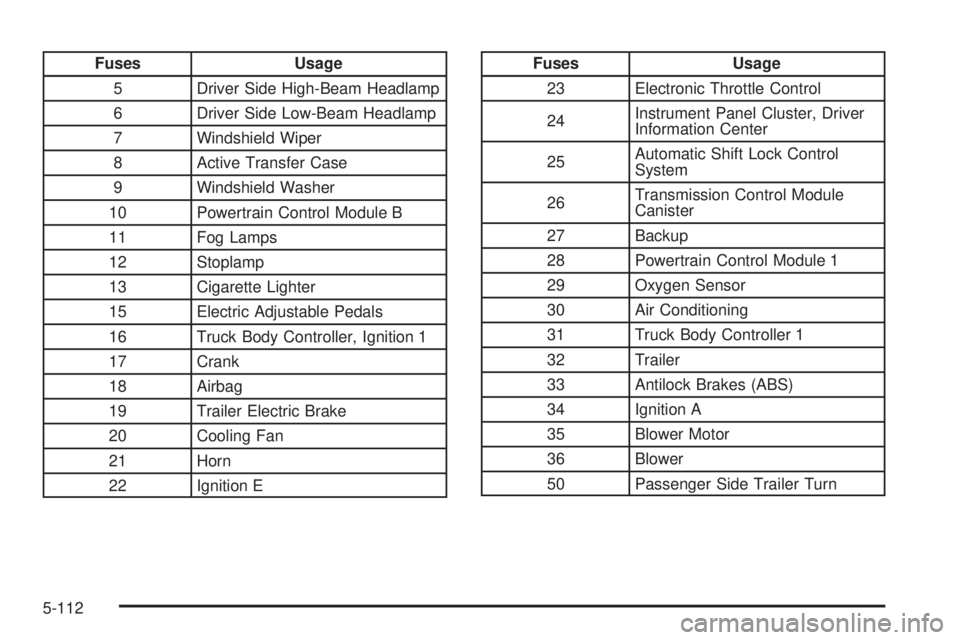
Fuses Usage
5 Driver Side High-Beam Headlamp
6 Driver Side Low-Beam Headlamp
7 Windshield Wiper
8 Active Transfer Case
9 Windshield Washer
10 Powertrain Control Module B
11 Fog Lamps
12 Stoplamp
13 Cigarette Lighter
15 Electric Adjustable Pedals
16 Truck Body Controller, Ignition 1
17 Crank
18 Airbag
19 Trailer Electric Brake
20 Cooling Fan
21 Horn
22 Ignition EFuses Usage
23 Electronic Throttle Control
24Instrument Panel Cluster, Driver
Information Center
25Automatic Shift Lock Control
System
26Transmission Control Module
Canister
27 Backup
28 Powertrain Control Module 1
29 Oxygen Sensor
30 Air Conditioning
31 Truck Body Controller 1
32 Trailer
33 Antilock Brakes (ABS)
34 Ignition A
35 Blower Motor
36 Blower
50 Passenger Side Trailer Turn
5-112
Page 407 of 468
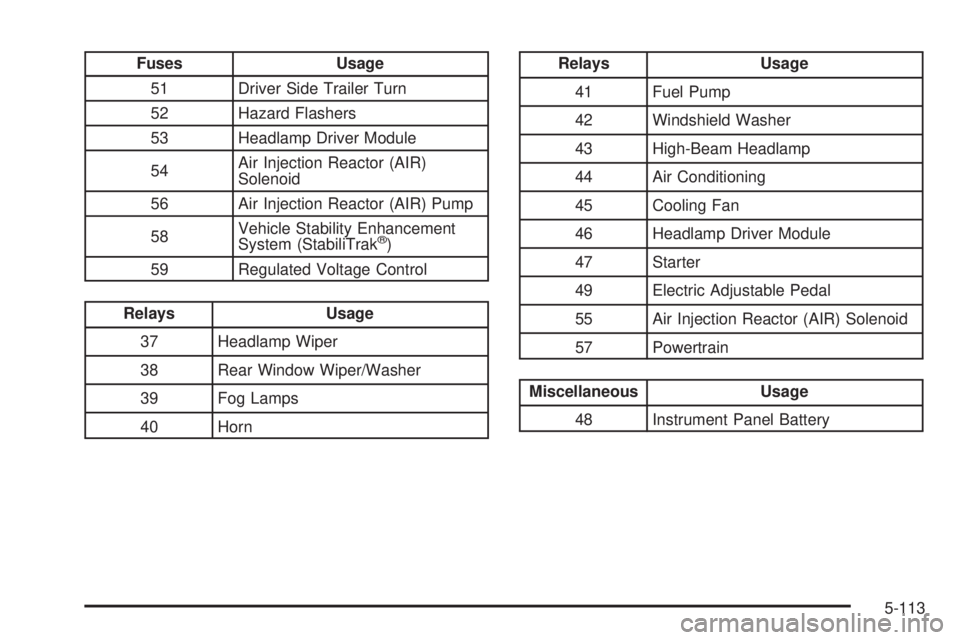
Fuses Usage
51 Driver Side Trailer Turn
52 Hazard Flashers
53 Headlamp Driver Module
54Air Injection Reactor (AIR)
Solenoid
56 Air Injection Reactor (AIR) Pump
58Vehicle Stability Enhancement
System (StabiliTrak
®)
59 Regulated Voltage Control
Relays Usage
37 Headlamp Wiper
38 Rear Window Wiper/Washer
39 Fog Lamps
40 Horn
Relays Usage
41 Fuel Pump
42 Windshield Washer
43 High-Beam Headlamp
44 Air Conditioning
45 Cooling Fan
46 Headlamp Driver Module
47 Starter
49 Electric Adjustable Pedal
55 Air Injection Reactor (AIR) Solenoid
57 Powertrain
Miscellaneous Usage
48 Instrument Panel Battery
5-113