tow GMC ENVOY XL 2005 User Guide
[x] Cancel search | Manufacturer: GMC, Model Year: 2005, Model line: ENVOY XL, Model: GMC ENVOY XL 2005Pages: 480, PDF Size: 11.77 MB
Page 100 of 480
REVERSE (R):Use this gear to back up.
Notice:Shifting to REVERSE (R) while your vehicle
is moving forward could damage the transmission.
The repairs would not be covered by your warranty.
Shift to REVERSE (R) only after your vehicle is
stopped.
To rock your vehicle back and forth to get out of
snow, ice or sand without damaging your transmission,
seeIf Your Vehicle is Stuck in Sand, Mud, Ice or
Snow on page 4-42.
NEUTRAL (N):In this position, the engine does
not connect with the wheels. To restart when you
are already moving, use NEUTRAL (N) only.
{CAUTION:
Shifting into a drive gear while your engine is
running at high speed is dangerous. Unless
your foot is rmly on the brake pedal, your
vehicle could move very rapidly. You could
lose control and hit people or objects. Do not
shift into a drive gear while your engine is
running at high speed.Notice:Shifting out of PARK (P) or NEUTRAL (N)
with the engine running at high speed may damage
the transmission. The repairs would not be
covered by your warranty. Be sure the engine is not
running at high speed when shifting your vehicle.
DRIVE (D):This position is for normal driving.
If you need more power for passing, and you are:
Going less than about 35 mph (55 km/h), push
the accelerator pedal about halfway down.
Going about 35 mph (55 km/h) or more, push
the accelerator all the way down.
You will shift down to the next gear and have
more power.
DRIVE (D) can be used when towing a trailer, carrying
a heavy load, driving on steep hills or for off-road
driving. You may want to shift the transmission to
THIRD (3) or, if necessary, a lower gear selection if
the transmission shifts too often.
THIRD (3):This position is also used for normal driving.
However, it offers more power and lower fuel economy
than DRIVE (D).
2-26
Page 102 of 480
Automatic Transfer Case
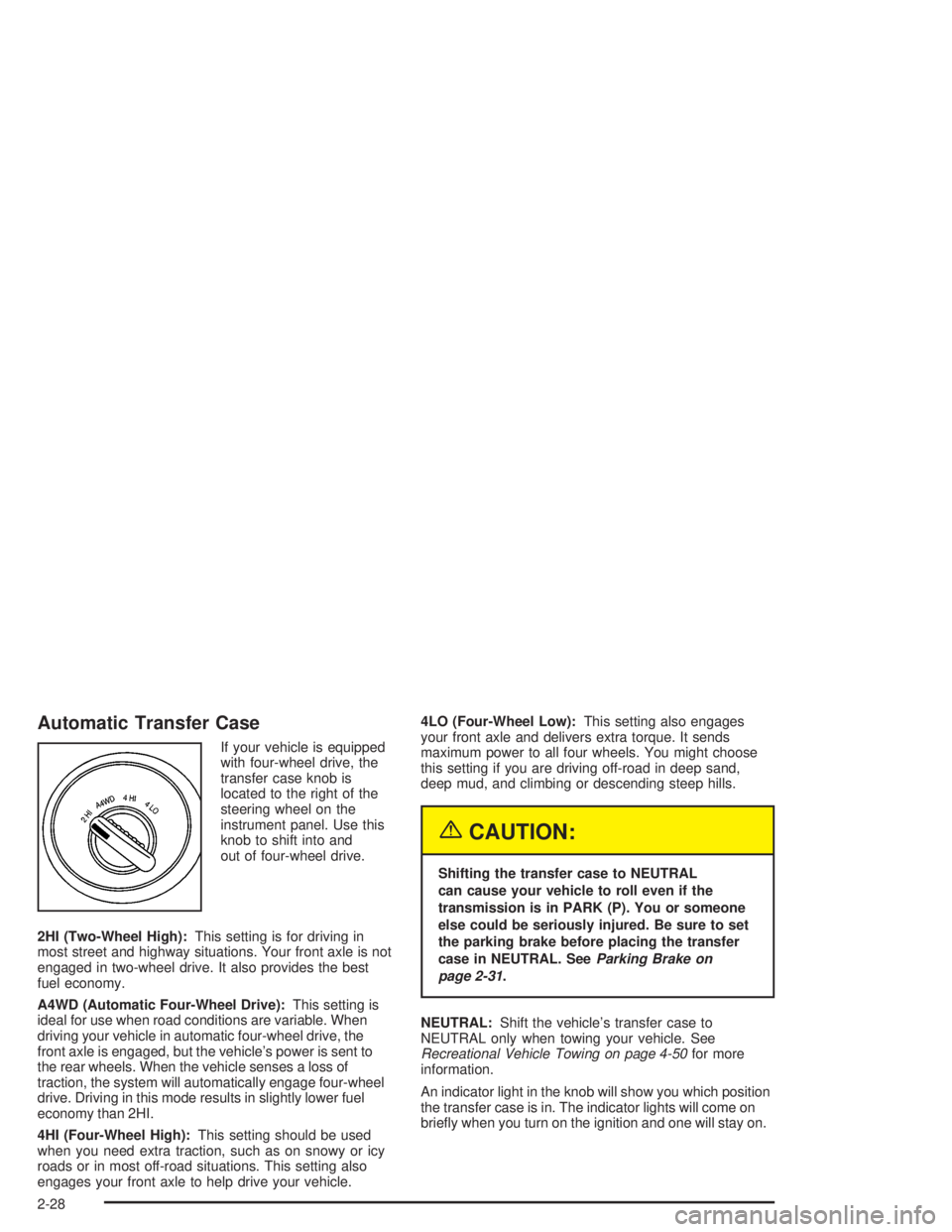
If your vehicle is equipped
with four-wheel drive, the
transfer case knob is
located to the right of the
steering wheel on the
instrument panel. Use this
knob to shift into and
out of four-wheel drive.
2HI (Two-Wheel High):This setting is for driving in
most street and highway situations. Your front axle is not
engaged in two-wheel drive. It also provides the best
fuel economy.
A4WD (Automatic Four-Wheel Drive):This setting is
ideal for use when road conditions are variable. When
driving your vehicle in automatic four-wheel drive, the
front axle is engaged, but the vehicle’s power is sent to
the rear wheels. When the vehicle senses a loss of
traction, the system will automatically engage four-wheel
drive. Driving in this mode results in slightly lower fuel
economy than 2HI.
4HI (Four-Wheel High):This setting should be used
when you need extra traction, such as on snowy or icy
roads or in most off-road situations. This setting also
engages your front axle to help drive your vehicle.4LO (Four-Wheel Low):This setting also engages
your front axle and delivers extra torque. It sends
maximum power to all four wheels. You might choose
this setting if you are driving off-road in deep sand,
deep mud, and climbing or descending steep hills.
{CAUTION:
Shifting the transfer case to NEUTRAL
can cause your vehicle to roll even if the
transmission is in PARK (P). You or someone
else could be seriously injured. Be sure to set
the parking brake before placing the transfer
case in NEUTRAL. SeeParking Brake on
page 2-31.
NEUTRAL:Shift the vehicle’s transfer case to
NEUTRAL only when towing your vehicle. See
Recreational Vehicle Towing on page 4-50for more
information.
An indicator light in the knob will show you which position
the transfer case is in. The indicator lights will come on
briey when you turn on the ignition and one will stay on.
2-28
Page 105 of 480
Parking Brake
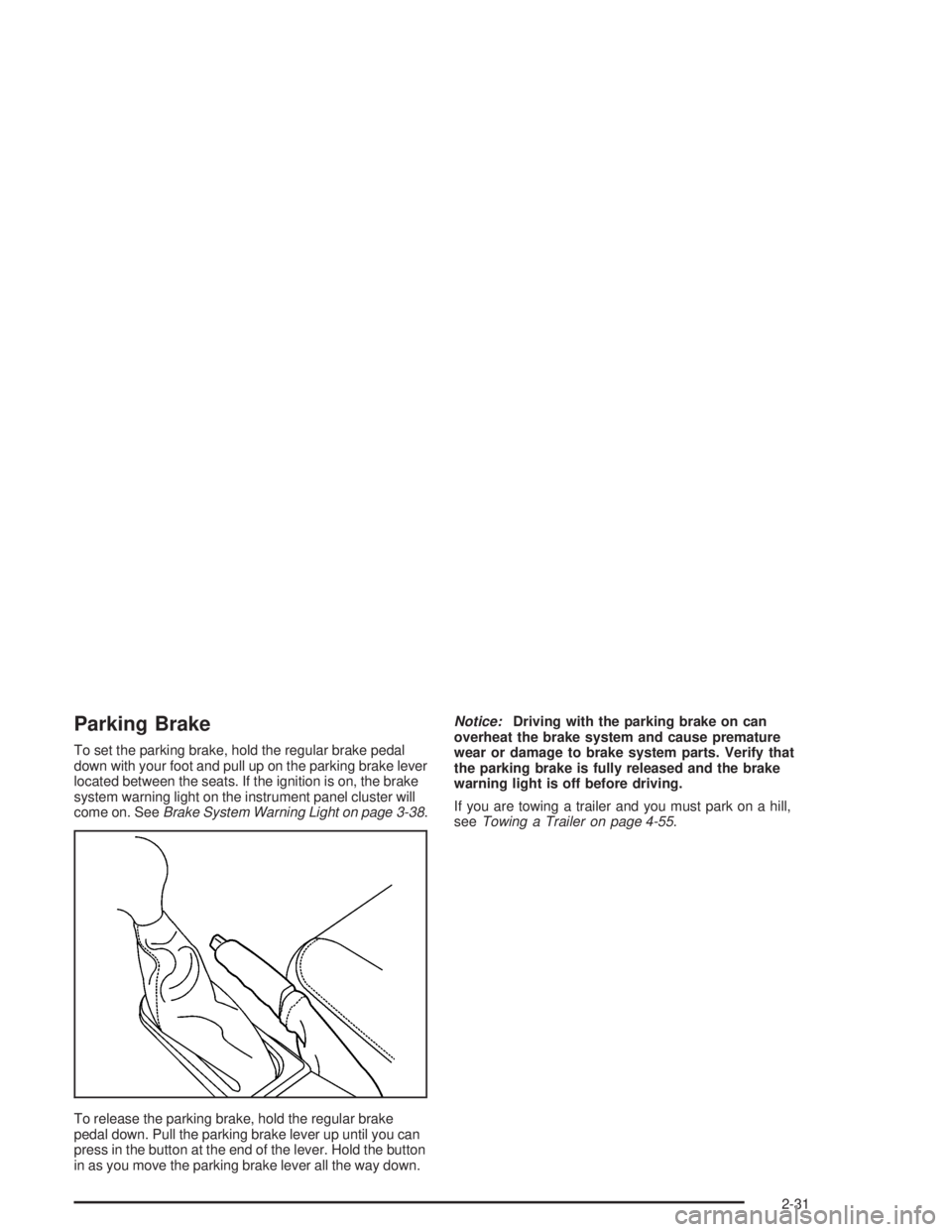
To set the parking brake, hold the regular brake pedal
down with your foot and pull up on the parking brake lever
located between the seats. If the ignition is on, the brake
system warning light on the instrument panel cluster will
come on. SeeBrake System Warning Light on page 3-38.
To release the parking brake, hold the regular brake
pedal down. Pull the parking brake lever up until you can
press in the button at the end of the lever. Hold the button
in as you move the parking brake lever all the way down.Notice:Driving with the parking brake on can
overheat the brake system and cause premature
wear or damage to brake system parts. Verify that
the parking brake is fully released and the brake
warning light is off before driving.
If you are towing a trailer and you must park on a hill,
seeTowing a Trailer on page 4-55.
2-31
Page 106 of 480
Shifting Into Park (P)
{CAUTION:
It can be dangerous to get out of your vehicle if
the shift lever is not fully in PARK (P) with the
parking brake rmly set. Your vehicle can roll.
If you have left the engine running, the vehicle
can move suddenly. You or others could be
injured. To be sure your vehicle will not move,
even when you are on fairly level ground, use
the steps that follow. With four-wheel drive,
your vehicle will be free to roll — even if your
shift lever is in PARK (P) — if your transfer
case is in NEUTRAL. So, be sure the transfer
case is in a drive gear — not in NEUTRAL.
SeeFour-Wheel Drive on page 2-27. Always
put the shift lever fully in PARK (P) with the
parking brake rmly set. If you are pulling a
trailer, seeTowing a Trailer on page 4-55.To shift into PARK (P), do the following:
1. Hold the brake pedal down with your foot and set
the parking brake.
2. Move the shift lever into PARK (P) by pressing the
button on the side of the shift lever and pushing the
lever all the way toward the front of the vehicle.
3. Turn the ignition key to LOCK.
4. Remove the key and take it with you. You know
your vehicle is in PARK (P) if the key can be
removed from the ignition.
2-32
Page 111 of 480

{CAUTION:
If your vehicle has four-wheel drive, it
will be free to roll — even if the shift lever
is in PARK (P) — if the transfer case is in
NEUTRAL. So be sure the transfer case is in a
drive gear — not in NEUTRAL. SeeFour-Wheel
Drive on page 2-27.
Follow the proper steps to be sure your vehicle will
not move. SeeShifting Into Park (P) on page 2-32.
If you are pulling a trailer, seeTowing a Trailer
on page 4-55.
Mirrors
Manual Rearview Mirror
While sitting in a comfortable driving position, adjust
the rearview mirror so you can see clearly behind your
vehicle. Grip the mirror in the center to move it up
or down and side to side. The day/night control, located
at the bottom of the mirror, adjusts the mirror to
reduce headlamp glare from behind during evening or
dark conditions. Turn the control clockwise for night use;
return it to the center for daytime use.
Manual Rearview Mirror with
OnStar
®
The vehicle may have a rearview mirror with the
OnStar®system.
Control buttons for the OnStar
®system are at the
bottom of the mirror. See your GM dealer for more
information on the OnStar
®system and how to
subscribe to OnStar®. Also, seeOnStar®System on
page 2-47for more information about the services
OnStar
®provides.
2-37
Page 116 of 480

Manual Rearview Mirror with
Compass and Temperature
The vehicle may have a manual rearview mirror with an
eight-point compass and temperature display located
in the upper right.
When cleaning the mirror, use a paper towel or similar
material dampened with glass cleaner. Do not spray
glass cleaner directly on the mirror as that may cause
the liquid cleaner to enter the mirror housing.
Mirror Operation
While sitting in a comfortable position, adjust the
rearview mirror so you can see clearly behind your
vehicle. Grip it in the center and move it up or down
and side to side. The day/night control, located at
the bottom of the mirror, adjusts the mirror to reduce
headlamp glare from behind during evening or dark
conditions. Push the control for daytime use; pull it for
night use.
Temperature and Compass Display
O
(On/Off):Press this button to turn the compass and
temperature display on or off. The compass display,
can show a maximum of two characters. For example,
NE is displayed for north-east.When the ignition and the compass/temperature
feature are on, character boxes will appear for about
two seconds. After two seconds, the mirror will display
the direction the vehicle is facing and the outside
temperature.
To set the temperature in Fahrenheit or Celsius, do the
following:
1. Press and hold the on/off button until either a
ashing F or C appears.
2. Press the button again to change the display to
the desired unit of measurement. After about
four seconds of inactivity, the new unit will be
locked in and the compass/temperature display
will return.
Compass Calibration
When on, the compass automatically calibrates as
the vehicle is driven. If, after two seconds, the display
does not show a compass direction, (N for North,
for example), there may be a strong magnetic eld
interfering with the compass. Such interference may
be caused by a magnetic antenna mount, magnetic
note pad holder, or a similar magnetic item. If the
letter C should ever appear in the compass window,
the compass may need calibration.
Press and hold the on/off button for nine seconds to
activate the compass calibration mode. CAL will
be displayed in the compass window on the mirror.
2-42
Page 118 of 480

Manual Rearview Mirror with
OnStar
®, Compass, and
Temperature Display
The vehicle may have a manual rearview mirror with
OnStar®and an eight-point compass and temperature
display located in the upper right.
Control buttons for the OnStar
®system are at the
bottom of the mirror. See your GM dealer for more
information about the OnStar
®system. Also, see
OnStar®System on page 2-47for more information
about the services OnStar®provides.
When cleaning the mirror, use a paper towel or similar
material dampened with glass cleaner. Do not spray
glass cleaner directly on the mirror as that may cause
the liquid cleaner to enter the mirror housing.
Mirror Operation
While sitting in a comfortable position, adjust the
rearview mirror so you can see clearly behind your
vehicle. Grip it in the center and move it up or down
and side to side. The day/night control, located at
the bottom of the mirror, adjusts the mirror to reduce
headlamp glare from behind during evening or dark
conditions. Push the control for daytime use; pull it
for night use.
Temperature and Compass Display
O
(On/Off):Press this button to turn the compass and
temperature display on or off. The compass display,
can show a maximum of two characters. For example,
NE is displayed for north-east.
When the ignition and the compass/temperature
feature are on, character boxes will appear for about
two seconds. After two seconds, the mirror will display
the direction the vehicle is facing and the outside
temperature.
To set the temperature in Fahrenheit or Celsius, do the
following:
1. Press and hold the on/off button until either a
ashing F or C appears.
2. Press the button again to change the display
to the desired unit of measurement. After about
four seconds of inactivity, the new unit will be
locked in and the compass/temperature display
will return.
Compass Calibration
When on, the compass automatically calibrates
as the vehicle is driven. If, after two seconds,
the display does not show a compass direction,
N for North, for example, there may be a strong
magnetic eld interfering with the compass.
2-44
Page 120 of 480

Outside Manual Mirrors
If the vehicle has the manual outside mirrors, adjust
each outside mirror so that a little of the vehicle and the
area behind it can be seen while sitting in a comfortable,
driving position.
Both mirrors can be manually folded inward by pulling
them towards the vehicle. Push the mirrors away
from the vehicle, to the normal position, before driving.
Outside Power Mirrors
The vehicle may have this feature.
The control is located
on the driver’s door.Turn the knob counterclockwise or clockwise to adjust
the driver’s or passenger’s mirror so that you can see
a little of the side of your vehicle. After adjusting
the position of the mirrors, turn the knob to the center
position so that the mirrors cannot move.
If the travel position in any direction of the mirror is
reached, it will enter a ratcheting mode. This action is
harmless. It is a warning that the mirror can go no
further. To stop this action, back the mirror up by
moving the knob in the opposite direction.
Outside Curb View Assist Mirror
If the vehicle has this feature, the passenger’s outside
mirror will adjust to a preset tilt position while the vehicle
is in REVERSE (R) gear. Curb view assist may be
useful when you are parallel parking. The mirror
will return to normal position when the vehicle is shifted
out of REVERSE (R) gear. Automatic mirror movement
in either direction will follow a short delay.
You may be able to turn this feature on or off through
the Driver Information Center (DIC). SeeDIC Vehicle
Customization on page 3-56.
2-46
Page 127 of 480
Reprogramming a Single HomeLink®
Button
To program a device to HomeLink®using a HomeLink®
button previously trained, follow these steps:
1. Press and hold the desired HomeLink
®button.
Do not release the button.
2. The indicator light will begin to ash after
20 seconds. While still holding the HomeLink
®
button, proceed with Step 2 under “Programming
HomeLink®” shown earlier in this section.
Resetting Defaults
To reset HomeLink®to default settings do the following:
1. Hold down the two outside buttons for about
20 seconds until the indicator light begins to ash.
2. Continue to hold both buttons until the HomeLink
®
indicator light turns off.
3. Release both buttons.
For questions or comments, contact HomeLink
®
at 1-800-355-3515, or on the Internet at
www.homelink.com.
Storage Areas
Glove Box
Open the glove box by pulling the side of the handle
towards the driver side.
Overhead Console
Your vehicle may have this feature. The overhead
console may include a reading lamps, HomeLink®
transmitter and a sunroof switch. SeeSunroof on
page 2-60andHomeLink®Wireless Control System
on page 2-49for more information.
If your vehicle has a third row seat, and has a power
operated rear quarter glass, the switches for operating
the rear quarter glass are also located in the overhead
console. These switches allow the driver to open
and close each third row seat window separately.
)(Driver’s Quarter Glass):Press button downward
to open or upward to close the drivers side (left)
quarter glass for the third row seat.
((Passenger’s Quarter Glass):Press button
downward to open or upward to close the passengers
side (right) quarter glass for the third row seat.
2-53
Page 132 of 480
Rear Floor Storage Lid
{CAUTION:
If any removable convenience item is not
secured properly, it can move around in a
collision or sudden stop. People in the vehicle
could be injured. Be sure to secure any such
item properly.
Your vehicle has a rear cargo area with a removable
storage lid.
To remove the rear oor storage lid, do the following:
1. Press the latch release and lift up the latch handle.
2. Raise the lid slightly to unhook it.
3. Pull the lid toward you to release it from the forward
mounting tabs.
To reinstall the rear oor storage lid, reverse the
previous steps. Make sure the lid is secure by applying
slight pressure to the latch until you hear it click.
Convenience Net
Your vehicle may have this feature. A convenience
net in the rear of your vehicle helps keep small items in
place during sharp turns or quick stops and starts.
The net is not designed to retain these items during
off-road use. The net is not for larger, heavier items.
To use the convenience net, do the following:
1. Attach the upper loops to the retainers on both
sides of the liftgate opening. The label should be
in the upper passenger’s side corner, visible
from the rear of the vehicle.
2. Attach the lower hooks to the rear cargo tie downs
on the oor.
Cargo Cover
If your vehicle has a cargo cover, you can use it to
cover items in the cargo area of your vehicle.
To install the cargo cover, do the following:
1. Align the endcap with the pocket in the trim panel
located behind the rear seat.
2. Squeeze the opposite endcap, align it with the
pocket located on the opposite side of the trim
panel and release.
3. Grasp the handle and unroll the cover. Latch the
posts into the sockets on the inside of the vehicle
to secure it.
2-58