climate control GMC ENVOY XL 2006 User Guide
[x] Cancel search | Manufacturer: GMC, Model Year: 2006, Model line: ENVOY XL, Model: GMC ENVOY XL 2006Pages: 524, PDF Size: 2.88 MB
Page 167 of 524
Dual Automatic Climate Control
System
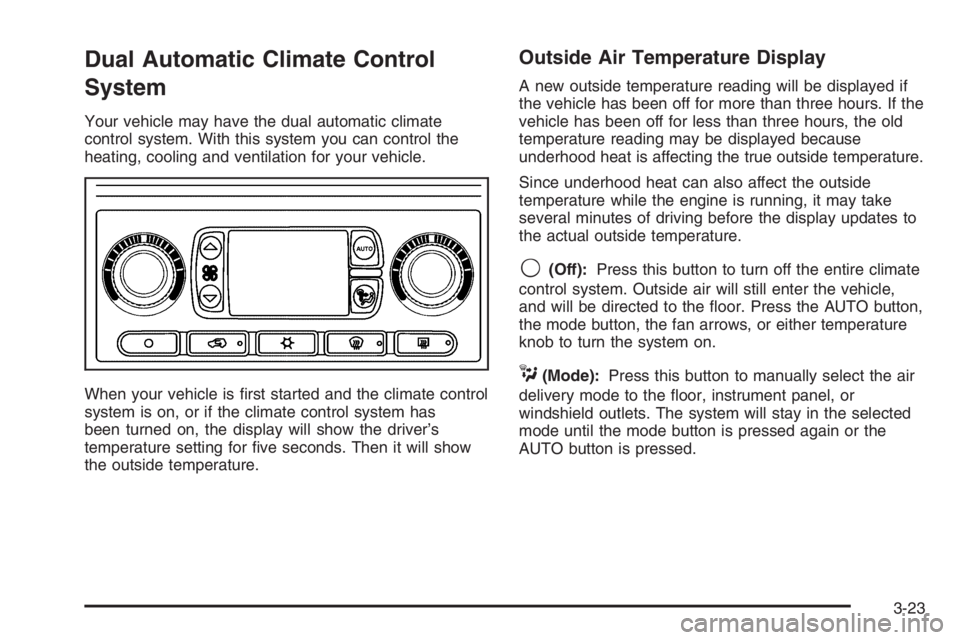
Your vehicle may have the dual automatic climate
control system. With this system you can control the
heating, cooling and ventilation for your vehicle.
When your vehicle is rst started and the climate control
system is on, or if the climate control system has
been turned on, the display will show the driver’s
temperature setting for ve seconds. Then it will show
the outside temperature.
Outside Air Temperature Display
A new outside temperature reading will be displayed if
the vehicle has been off for more than three hours. If the
vehicle has been off for less than three hours, the old
temperature reading may be displayed because
underhood heat is affecting the true outside temperature.
Since underhood heat can also affect the outside
temperature while the engine is running, it may take
several minutes of driving before the display updates to
the actual outside temperature.
9(Off):Press this button to turn off the entire climate
control system. Outside air will still enter the vehicle,
and will be directed to the oor. Press the AUTO button,
the mode button, the fan arrows, or either temperature
knob to turn the system on.
C(Mode):Press this button to manually select the air
delivery mode to the oor, instrument panel, or
windshield outlets. The system will stay in the selected
mode until the mode button is pressed again or the
AUTO button is pressed.
3-23
Page 170 of 524
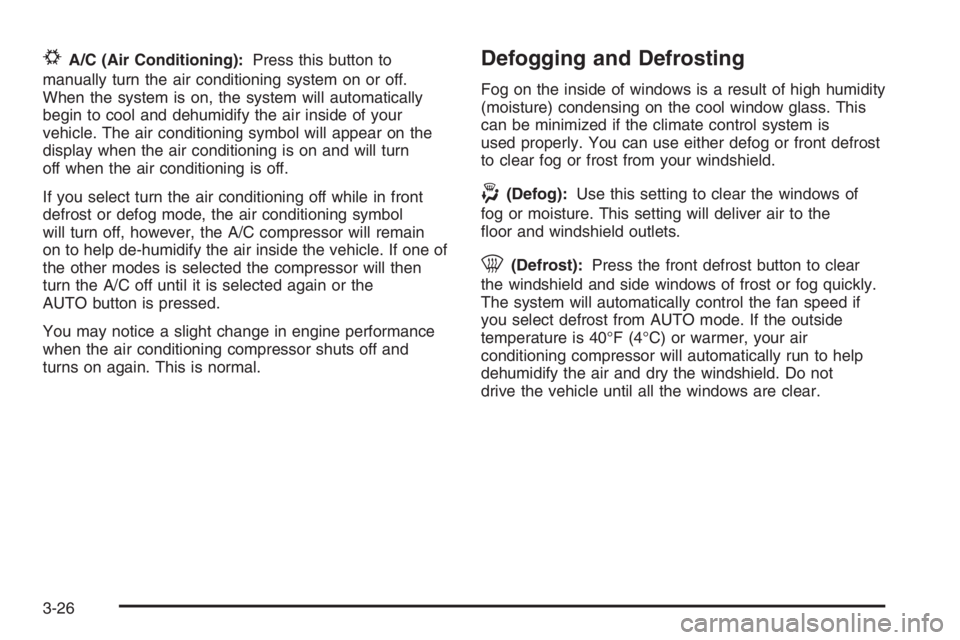
#A/C (Air Conditioning):Press this button to
manually turn the air conditioning system on or off.
When the system is on, the system will automatically
begin to cool and dehumidify the air inside of your
vehicle. The air conditioning symbol will appear on the
display when the air conditioning is on and will turn
off when the air conditioning is off.
If you select turn the air conditioning off while in front
defrost or defog mode, the air conditioning symbol
will turn off, however, the A/C compressor will remain
on to help de-humidify the air inside the vehicle. If one of
the other modes is selected the compressor will then
turn the A/C off until it is selected again or the
AUTO button is pressed.
You may notice a slight change in engine performance
when the air conditioning compressor shuts off and
turns on again. This is normal.Defogging and Defrosting
Fog on the inside of windows is a result of high humidity
(moisture) condensing on the cool window glass. This
can be minimized if the climate control system is
used properly. You can use either defog or front defrost
to clear fog or frost from your windshield.
-(Defog):Use this setting to clear the windows of
fog or moisture. This setting will deliver air to the
oor and windshield outlets.
0(Defrost):Press the front defrost button to clear
the windshield and side windows of frost or fog quickly.
The system will automatically control the fan speed if
you select defrost from AUTO mode. If the outside
temperature is 40°F (4°C) or warmer, your air
conditioning compressor will automatically run to help
dehumidify the air and dry the windshield. Do not
drive the vehicle until all the windows are clear.
3-26
Page 172 of 524
Rear Climate Control System
Regular Wheelbase
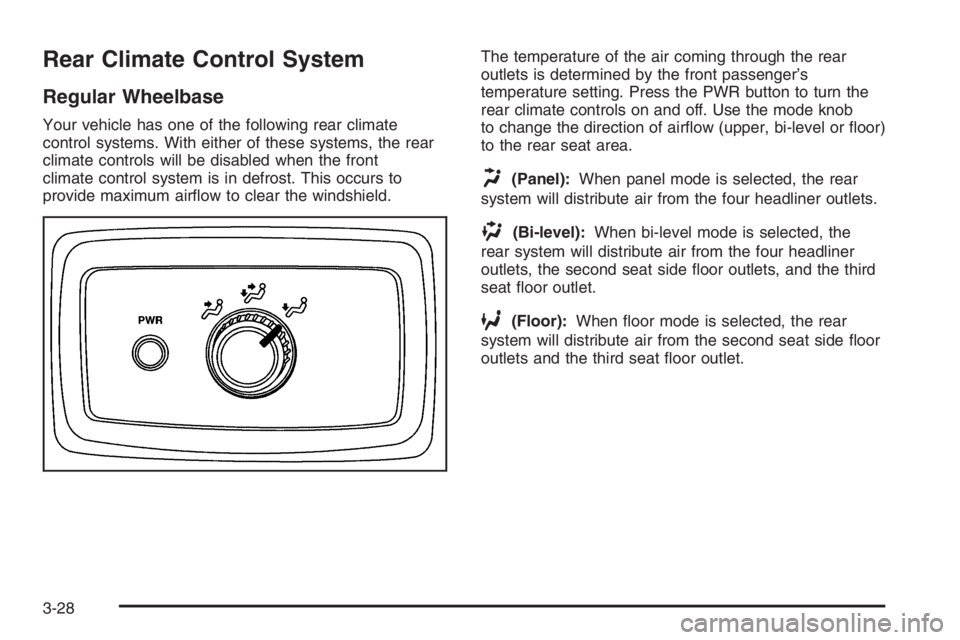
Your vehicle has one of the following rear climate
control systems. With either of these systems, the rear
climate controls will be disabled when the front
climate control system is in defrost. This occurs to
provide maximum airow to clear the windshield.The temperature of the air coming through the rear
outlets is determined by the front passenger’s
temperature setting. Press the PWR button to turn the
rear climate controls on and off. Use the mode knob
to change the direction of airow (upper, bi-level or oor)
to the rear seat area.
H(Panel):When panel mode is selected, the rear
system will distribute air from the four headliner outlets.
)(Bi-level):When bi-level mode is selected, the
rear system will distribute air from the four headliner
outlets, the second seat side oor outlets, and the third
seat oor outlet.
6(Floor):When oor mode is selected, the rear
system will distribute air from the second seat side oor
outlets and the third seat oor outlet.
3-28
Page 173 of 524
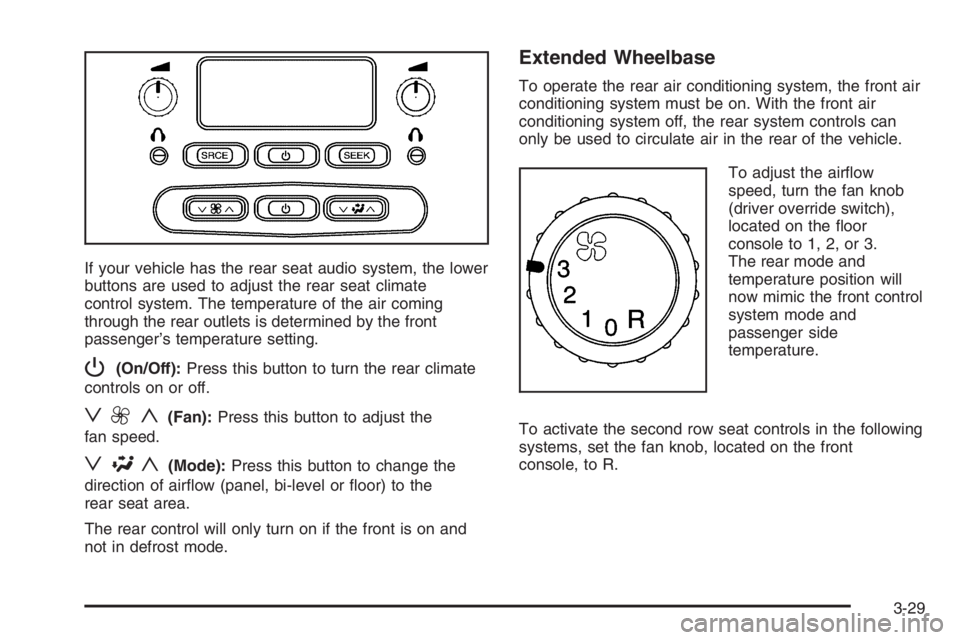
If your vehicle has the rear seat audio system, the lower
buttons are used to adjust the rear seat climate
control system. The temperature of the air coming
through the rear outlets is determined by the front
passenger’s temperature setting.
P(On/Off):Press this button to turn the rear climate
controls on or off.
z9y(Fan):Press this button to adjust the
fan speed.
z\y(Mode):Press this button to change the
direction of airow (panel, bi-level or oor) to the
rear seat area.
The rear control will only turn on if the front is on and
not in defrost mode.
Extended Wheelbase
To operate the rear air conditioning system, the front air
conditioning system must be on. With the front air
conditioning system off, the rear system controls can
only be used to circulate air in the rear of the vehicle.
To adjust the airow
speed, turn the fan knob
(driver override switch),
located on the oor
console to 1, 2, or 3.
The rear mode and
temperature position will
now mimic the front control
system mode and
passenger side
temperature.
To activate the second row seat controls in the following
systems, set the fan knob, located on the front
console, to R.
3-29
Page 174 of 524
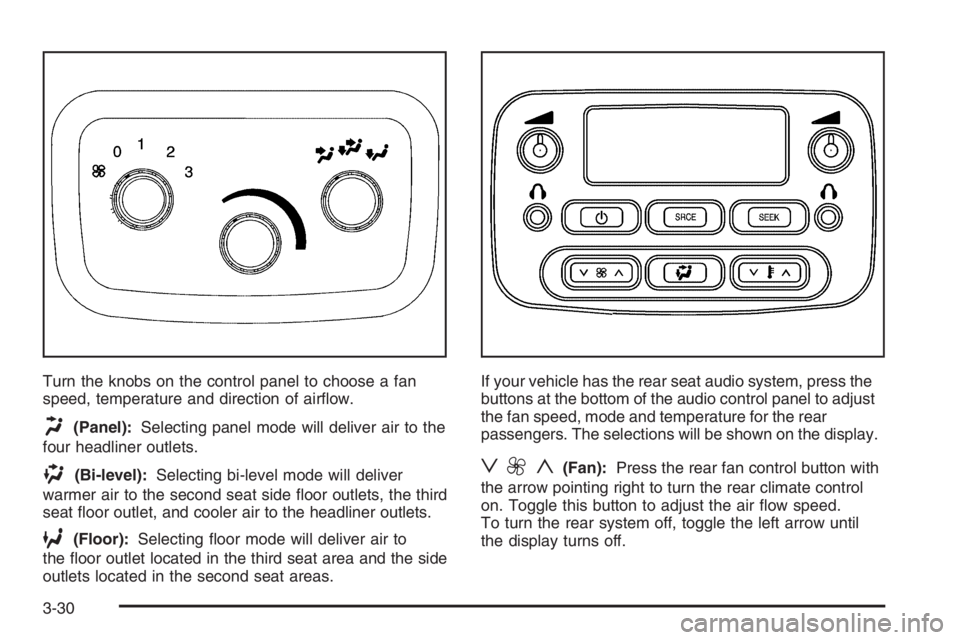
Turn the knobs on the control panel to choose a fan
speed, temperature and direction of airow.
H(Panel):Selecting panel mode will deliver air to the
four headliner outlets.
)(Bi-level):Selecting bi-level mode will deliver
warmer air to the second seat side oor outlets, the third
seat oor outlet, and cooler air to the headliner outlets.
6(Floor):Selecting oor mode will deliver air to
the oor outlet located in the third seat area and the side
outlets located in the second seat areas.If your vehicle has the rear seat audio system, press the
buttons at the bottom of the audio control panel to adjust
the fan speed, mode and temperature for the rear
passengers. The selections will be shown on the display.
z9y(Fan):Press the rear fan control button with
the arrow pointing right to turn the rear climate control
on. Toggle this button to adjust the air ow speed.
To turn the rear system off, toggle the left arrow until
the display turns off.
3-30
Page 352 of 524

Driving with a Trailer
{CAUTION:
If you have a rear-most window open and you
pull a trailer with your vehicle, carbon
monoxide (CO) could come into your vehicle.
You can not see or smell CO. It can cause
unconsciousness or death. SeeEngine
Exhaust on page 2-34. To maximize your safety
when towing a trailer:
Have your exhaust system inspected for
leaks, and make necessary repairs before
starting on your trip.
Keep the rear-most windows closed.
If exhaust does come into your vehicle
through a window in the rear or another
opening, drive with your front, main
heating or cooling system on and with the
fan on any speed. This will bring fresh,
outside air into your vehicle. Do not use
the climate control setting for maximum air
because it only recirculates the air inside
your vehicle. SeeDual Climate Control
System on page 3-20.Towing a trailer requires a certain amount of experience.
Before setting out for the open road, you’ll want to get
to know your rig. Acquaint yourself with the feel of
handling and braking with the added weight of the trailer.
And always keep in mind that the vehicle you are
driving is now a good deal longer and not nearly as
responsive as your vehicle is by itself.
Before you start, check all trailer hitch parts and
attachments, safety chains, electrical connection, lamps,
tires and mirror adjustment. If the trailer has electric
brakes, start your vehicle and trailer moving and then
apply the trailer brake controller by hand to be sure
the brakes are working. This lets you check your
electrical connection at the same time.
During your trip, check occasionally to be sure that the
load is secure, and that the lamps and any trailer
brakes are still working.
4-64
Page 424 of 524

Uniform Tire Quality Grading
Quality grades can be found where applicable on the
tire sidewall between tread shoulder and maximum
section width. For example:
Treadwear 200 Traction AA Temperature A
The following information relates to the system
developed by the United States National Highway
Traffic Safety Administration (NHTSA), which grades
tires by treadwear, traction, and temperature
performance. This applies only to vehicles sold in the
United States. The grades are molded on the sidewalls
of most passenger car tires. The Uniform Tire Quality
Grading (UTQG) system does not apply to deep
tread, winter-type snow tires, space-saver, or temporary
use spare tires, tires with nominal rim diameters of
10 to 12 inches (25 to 30 cm), or to some
limited-production tires.
While the tires available on General Motors passenger
cars and light trucks may vary with respect to these
grades, they must also conform to federal safety
requirements and additional General Motors Tire
Performance Criteria (TPC) standards.
Treadwear
The treadwear grade is a comparative rating based on
the wear rate of the tire when tested under controlled
conditions on a specied government test course.
For example, a tire graded 150 would wear one and
a half (1.5) times as well on the government course as
a tire graded 100. The relative performance of tires
depends upon the actual conditions of their use,
however, and may depart signicantly from the norm
due to variations in driving habits, service practices, and
differences in road characteristics and climate.
Traction – AA, A, B, C
The traction grades, from highest to lowest, are AA, A,
B, and C. Those grades represent the tire’s ability
to stop on wet pavement as measured under controlled
conditions on specied government test surfaces of
asphalt and concrete. A tire marked C may have poor
traction performance.
Warning:The traction grade assigned to this tire is
based on straight-ahead braking traction tests, and does
not include acceleration, cornering, hydroplaning, or
peak traction characteristics.
5-68
Page 469 of 524
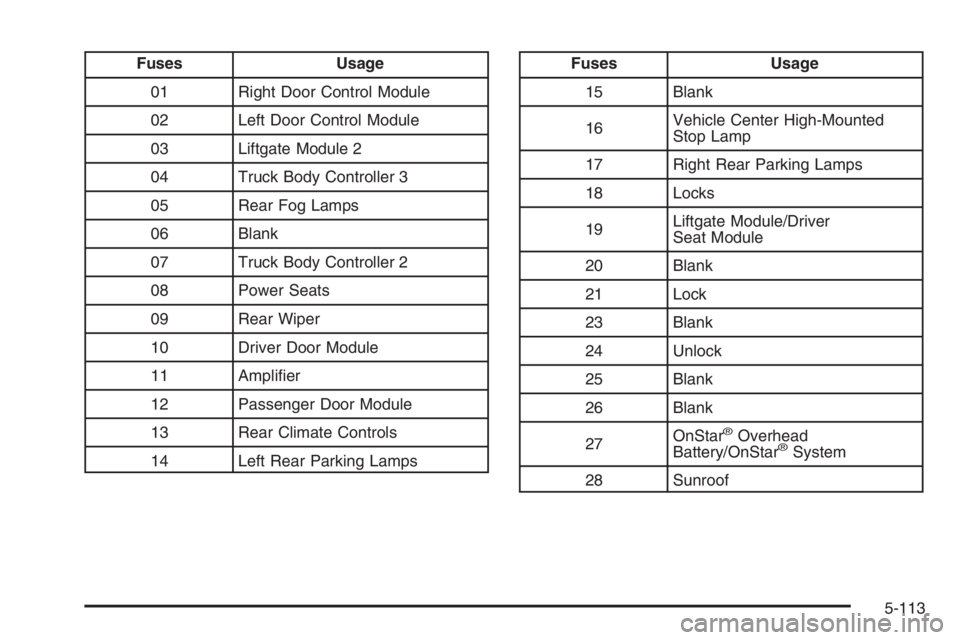
Fuses Usage
01 Right Door Control Module
02 Left Door Control Module
03 Liftgate Module 2
04 Truck Body Controller 3
05 Rear Fog Lamps
06 Blank
07 Truck Body Controller 2
08 Power Seats
09 Rear Wiper
10 Driver Door Module
11 Amplier
12 Passenger Door Module
13 Rear Climate Controls
14 Left Rear Parking LampsFuses Usage
15 Blank
16Vehicle Center High-Mounted
Stop Lamp
17 Right Rear Parking Lamps
18 Locks
19Liftgate Module/Driver
Seat Module
20 Blank
21 Lock
23 Blank
24 Unlock
25 Blank
26 Blank
27OnStar
®Overhead
Battery/OnStar®System
28 Sunroof
5-113
Page 473 of 524
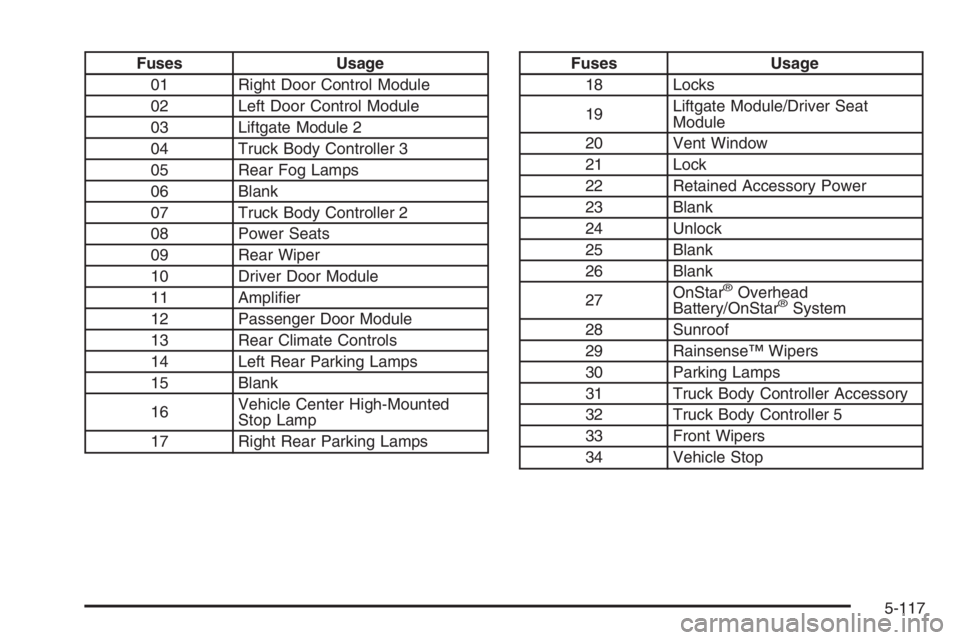
Fuses Usage
01 Right Door Control Module
02 Left Door Control Module
03 Liftgate Module 2
04 Truck Body Controller 3
05 Rear Fog Lamps
06 Blank
07 Truck Body Controller 2
08 Power Seats
09 Rear Wiper
10 Driver Door Module
11 Amplier
12 Passenger Door Module
13 Rear Climate Controls
14 Left Rear Parking Lamps
15 Blank
16Vehicle Center High-Mounted
Stop Lamp
17 Right Rear Parking LampsFuses Usage
18 Locks
19Liftgate Module/Driver Seat
Module
20 Vent Window
21 Lock
22 Retained Accessory Power
23 Blank
24 Unlock
25 Blank
26 Blank
27OnStar
®Overhead
Battery/OnStar®System
28 Sunroof
29 Rainsense™ Wipers
30 Parking Lamps
31 Truck Body Controller Accessory
32 Truck Body Controller 5
33 Front Wipers
34 Vehicle Stop
5-117
Page 513 of 524
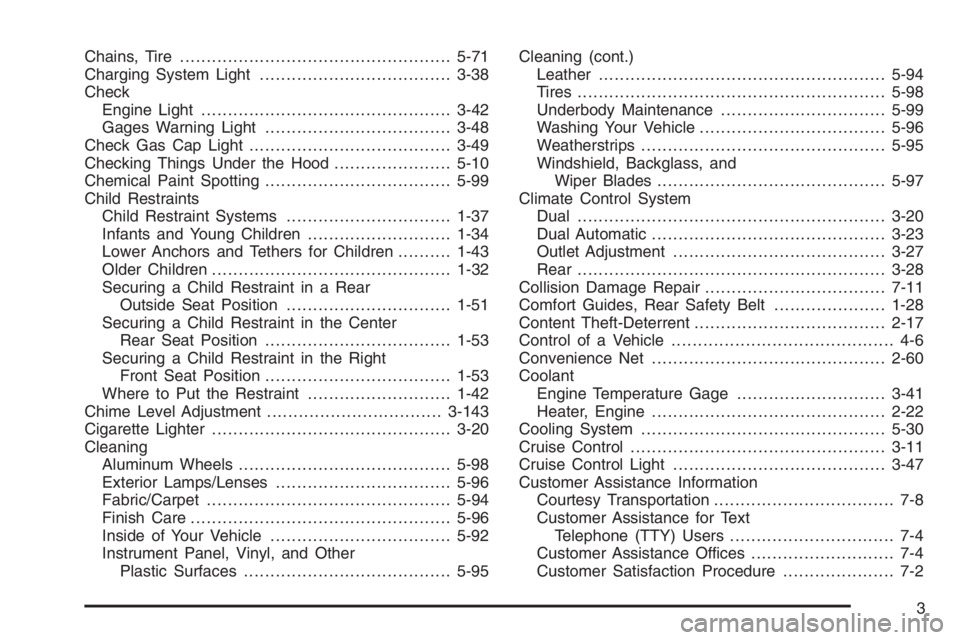
Chains, Tire...................................................5-71
Charging System Light....................................3-38
Check
Engine Light...............................................3-42
Gages Warning Light...................................3-48
Check Gas Cap Light......................................3-49
Checking Things Under the Hood......................5-10
Chemical Paint Spotting...................................5-99
Child Restraints
Child Restraint Systems...............................1-37
Infants and Young Children...........................1-34
Lower Anchors and Tethers for Children..........1-43
Older Children.............................................1-32
Securing a Child Restraint in a Rear
Outside Seat Position...............................1-51
Securing a Child Restraint in the Center
Rear Seat Position...................................1-53
Securing a Child Restraint in the Right
Front Seat Position...................................1-53
Where to Put the Restraint...........................1-42
Chime Level Adjustment.................................3-143
Cigarette Lighter.............................................3-20
Cleaning
Aluminum Wheels........................................5-98
Exterior Lamps/Lenses.................................5-96
Fabric/Carpet..............................................5-94
Finish Care.................................................5-96
Inside of Your Vehicle..................................5-92
Instrument Panel, Vinyl, and Other
Plastic Surfaces.......................................5-95Cleaning (cont.)
Leather......................................................5-94
Tires..........................................................5-98
Underbody Maintenance...............................5-99
Washing Your Vehicle...................................5-96
Weatherstrips..............................................5-95
Windshield, Backglass, and
Wiper Blades...........................................5-97
Climate Control System
Dual ..........................................................3-20
Dual Automatic............................................3-23
Outlet Adjustment........................................3-27
Rear ..........................................................3-28
Collision Damage Repair..................................7-11
Comfort Guides, Rear Safety Belt.....................1-28
Content Theft-Deterrent....................................2-17
Control of a Vehicle.......................................... 4-6
Convenience Net............................................2-60
Coolant
Engine Temperature Gage............................3-41
Heater, Engine............................................2-22
Cooling System..............................................5-30
Cruise Control................................................3-11
Cruise Control Light........................................3-47
Customer Assistance Information
Courtesy Transportation.................................. 7-8
Customer Assistance for Text
Telephone (TTY) Users............................... 7-4
Customer Assistance Offices........................... 7-4
Customer Satisfaction Procedure..................... 7-2
3