instrument panel GMC ENVOY XL 2006 User Guide
[x] Cancel search | Manufacturer: GMC, Model Year: 2006, Model line: ENVOY XL, Model: GMC ENVOY XL 2006Pages: 524, PDF Size: 2.88 MB
Page 97 of 524

Theft-Deterrent Systems
Vehicle theft is big business, especially in some cities.
Although your vehicle has a number of theft-deterrent
features, we know that nothing we put on it can make it
impossible to steal.
Content Theft-Deterrent
Your vehicle may be equipped with a content
theft-deterrent alarm system.
The security light is
located on the instrument
panel cluster.
Here’s how to operate the system:
1. Open the door.
2. Lock the door with the power door lock switch or
the remote keyless entry transmitter. The security
light should ash.
3. Close all doors. The security light should turn off
after approximately 30 seconds. The alarm is not
armed until the security light turns off.If a locked door is opened without the key or the remote
keyless entry transmitter, the alarm will go off. The
headlamps and parking lamps will ash for two minutes,
and the horn will sound for 30 seconds, then will turn
off to save the battery power.
Remember, the theft-deterrent system won’t activate if
you lock the doors with a key or use the manual
door lock. It activates only if you use a power door lock
switch with the door open, or with the remote keyless
entry transmitter. You should also remember that
you can start your vehicle with the correct ignition key if
the alarm has been set off.
Here’s how to avoid setting off the alarm by accident:
If you don’t want to activate the theft-deterrent
system, the vehicle should be locked with the door
keyafterthe doors are closed.
Always unlock a door with a key, or use the remote
keyless entry transmitter. Unlocking a door any
other way will set off the alarm.
If you set off the alarm by accident, unlock any door with
the key. You can also turn off the alarm by pressing
unlock on the remote keyless entry transmitter. The alarm
won’t stop if you try to unlock a door any other way.
2-17
Page 107 of 524
Four-Wheel Drive
If your vehicle has four-wheel drive, the engine’s driving
power can be sent to all four wheels for extra traction.
To get the most satisfaction out of four-wheel drive, you
must be familiar with its operation. Read the part that
follows before using four-wheel drive. You should
use Two-Wheel High for most normal driving conditions.
Notice:Driving on clean, dry pavement in
Four-Wheel-Drive High or Four-Wheel-Drive Low for
an extended period of time may cause premature
wear on your vehicle’s powertrain. Do not drive on
clean, dry pavement in Four-Wheel-Drive High or
Four-Wheel-Drive Low for extended periods of time.
Automatic Transfer Case
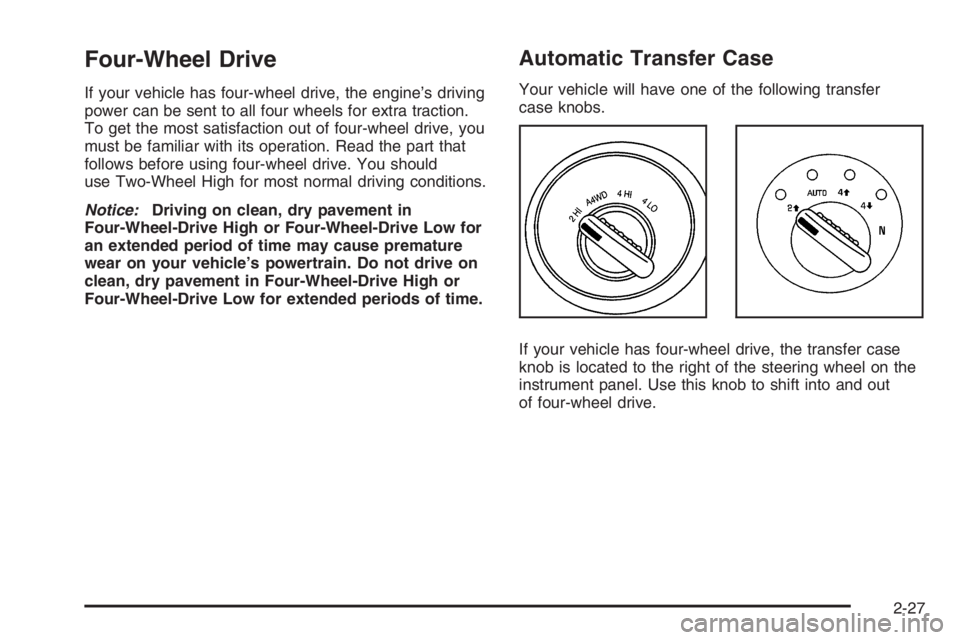
Your vehicle will have one of the following transfer
case knobs.
If your vehicle has four-wheel drive, the transfer case
knob is located to the right of the steering wheel on the
instrument panel. Use this knob to shift into and out
of four-wheel drive.
2-27
Page 109 of 524
If the service Four-Wheel Drive Warning Light on the
instrument panel cluster stays on, you should take your
vehicle to your dealer for service. SeeService
Four-Wheel Drive Warning Light on page 3-48for
further information.
Shifting Into Four-Wheel High or Automatic
Four-Wheel Drive
Turn the knob to Four-Wheel High or Automatic
Four-Wheel Drive. This can be done at any speed
unless you are shifting out of Four-Wheel Low. The
indicator light will ash while shifting. It will remain on
when the shift is complete.
Shifting Into Two-Wheel High
Turn the knob to Two-Wheel High. This can be done at
any speed unless you are shifting out of Four-Wheel Low.
Shifting Into Four-Wheel Low
To shift to Four-Wheel Low, the vehicle’s engine must
be running and the vehicle must be stopped or
moving less than 2 mph (3.2 km/h) with the transmission
in NEUTRAL (N). The preferred method for shifting
into Four-Wheel Low is to have your vehicle moving 1 or
2 mph (1.6 to 3.2 km/h). Turn the knob to Four-Wheel
Low. You must wait for the Four-Wheel Low indicator
light to stop ashing and stay on before shifting
the transmission into gear.If you turn the knob to Four-Wheel Low when your
vehicle is in gear and/or moving, the Four-Wheel Low
indicator light will ash for 30 seconds and not complete
the shift unless your vehicle is moving less than
2 mph (3.2 km/h) and the transmission is in
NEUTRAL (N). After 30 seconds, the transfer case will
return to the setting last chosen.
Shifting Out of Four-Wheel Low
To shift from Four-Wheel Low to Four-Wheel High, Auto
Four-Wheel Drive, or Two-Wheel High, your vehicle
must be stopped or moving less than 2 mph (3.2 km/h)
with the transmission in NEUTRAL (N) and the
engine running. The preferred method for shifting out of
Four-Wheel Low is to have your vehicle moving
1 or 2 mph (1.6 to 3.2 km/h). Turn the knob to
Four-Wheel High, Auto Four-Wheel Drive, or Two-Wheel
High. You must wait for the Four-Wheel High, Auto
Four-Wheel Drive, or Two-Wheel High indicator light to
stop ashing and stay off before shifting your
transmission into gear.
If the knob is turned to Four Wheel-High, Auto
Four-Wheel Drive, or Two-Wheel High when your
vehicle is in gear and/or moving, the Four-Wheel High,
Auto Four-Wheel Drive, or Two-Wheel High indicator
light will ash for 30 seconds. It will not complete
the shift unless your vehicle is moving less than 2 mph
(3.2 km/h) with the transmission in NEUTRAL (N).
2-29
Page 111 of 524
Parking Brake
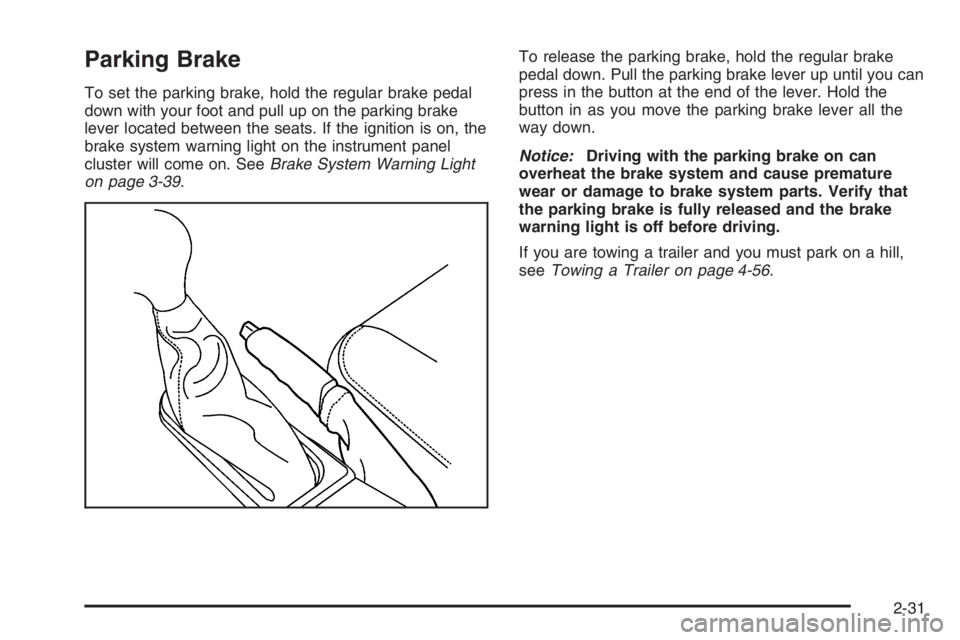
To set the parking brake, hold the regular brake pedal
down with your foot and pull up on the parking brake
lever located between the seats. If the ignition is on, the
brake system warning light on the instrument panel
cluster will come on. SeeBrake System Warning Light
on page 3-39.To release the parking brake, hold the regular brake
pedal down. Pull the parking brake lever up until you can
press in the button at the end of the lever. Hold the
button in as you move the parking brake lever all the
way down.
Notice:Driving with the parking brake on can
overheat the brake system and cause premature
wear or damage to brake system parts. Verify that
the parking brake is fully released and the brake
warning light is off before driving.
If you are towing a trailer and you must park on a hill,
seeTowing a Trailer on page 4-56.
2-31
Page 145 of 524
Instrument Panel Overview...............................3-4
Hazard Warning Flashers................................3-6
Other Warning Devices...................................3-6
Horn .............................................................3-6
Tilt Wheel.....................................................3-6
Turn Signal/Multifunction Lever.........................3-7
Turn and Lane-Change Signals........................3-7
Headlamp High/Low-Beam Changer..................3-8
Flash-to-Pass.................................................3-8
Windshield Wipers..........................................3-9
Rainsense™ Wipers.......................................3-9
Windshield Washer.......................................3-10
Rear Window Wiper/Washer...........................3-10
Headlamp Washer........................................3-11
Cruise Control..............................................3-11
Headlamps..................................................3-14
Headlamps on Reminder................................3-15
Daytime Running Lamps (DRL).......................3-15
Automatic Headlamp System..........................3-16
Fog Lamps ..................................................3-17
Instrument Panel Brightness...........................3-17
Dome Lamps ...............................................3-17
Dome Lamp Override....................................3-18
Entry Lighting...............................................3-18
Exit Lighting.................................................3-18Reading Lamps............................................3-18
Battery Run-Down Protection..........................3-19
Accessory Power Outlet(s).............................3-19
Ashtray(s) and Cigarette Lighter......................3-20
Climate Controls............................................3-20
Dual Climate Control System..........................3-20
Dual Automatic Climate Control System...........3-23
Outlet Adjustment.........................................3-27
Rear Climate Control System.........................3-28
Warning Lights, Gages, and Indicators............3-31
Instrument Panel Cluster................................3-32
Speedometer and Odometer...........................3-33
Trip Odometer..............................................3-33
Tachometer.................................................3-33
Safety Belt Reminder Light.............................3-34
Passenger Safety Belt Reminder Light.............3-34
Airbag Readiness Light..................................3-35
Passenger Airbag Status Indicator...................3-36
Charging System Light..................................3-38
Voltmeter Gage............................................3-38
Brake System Warning Light..........................3-39
Anti-Lock Brake System Warning Light.............3-40
StabiliTrak
®Service Light...............................3-40
StabiliTrak®Indicator Light..............................3-41
Section 3 Instrument Panel
3-1
Page 146 of 524

Engine Coolant Temperature Gage..................3-41
Malfunction Indicator Lamp.............................3-42
Oil Pressure Gage........................................3-45
Change Engine Oil Light................................3-46
Security Light...............................................3-46
Cruise Control Light......................................3-47
Reduced Engine Power Light.........................3-47
Highbeam On Light.......................................3-47
Service Four-Wheel Drive Warning Light..........3-48
Check Gages Warning Light...........................3-48
Gate Ajar Light.............................................3-48
Fuel Gage...................................................3-49
Low Fuel Warning Light.................................3-49
Check Gas Cap Light....................................3-49
Driver Information Center (DIC).......................3-50
DIC Operation and Displays...........................3-51
DIC Warnings and Messages.........................3-54
DIC Vehicle Customization.............................3-60Audio System(s).............................................3-66
Setting the Time...........................................3-68
Radio with CD (Base)...................................3-68
Radio with CD (MP3)....................................3-80
Radio with Cassette and CD..........................3-96
Radio with Six-Disc CD................................3-110
Navigation/Radio System..............................3-124
Rear Seat Entertainment System...................3-124
Rear Seat Audio (RSA)................................3-137
Theft-Deterrent Feature................................3-139
Audio Steering Wheel Controls......................3-139
Radio Reception.........................................3-140
Care of the Cassette Tape Player.................3-141
Care of Your CDs and DVDs........................3-142
Care of the CD and DVD Player...................3-142
Fixed Mast Antenna....................................3-143
XM™ Satellite Radio Antenna System............3-143
Chime Level Adjustment...............................3-143
Section 3 Instrument Panel
3-2
Page 148 of 524
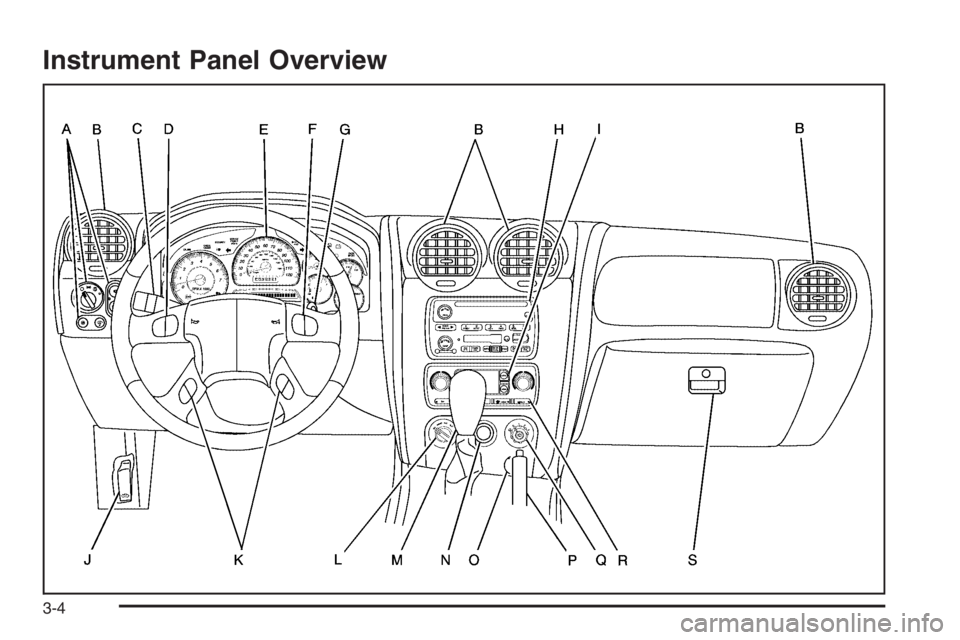
Instrument Panel Overview
3-4
Page 149 of 524
The main components of your instrument panel are the following:
A. Exterior Lamp Control. SeeHeadlamps on
page 3-14. Dome Lamp Override Button. SeeDome
Lamp Override on page 3-18. Instrument Panel
Brightness Control. SeeInstrument Panel Brightness
on page 3-17. Fog Lamp Button (If Equipped).
SeeFog Lamps on page 3-17.
B. Air Outlets. SeeOutlet Adjustment on page 3-27.
C. Turn Signal/Multifunction Lever. SeeTurn
Signal/Multifunction Lever on page 3-7.
D. OnStar and Audio Steering Wheel Controls. See
Audio Steering Wheel Controls on page 3-139.
E. Instrument Panel Cluster. SeeInstrument Panel
Cluster on page 3-32.
F. Audio Steering Wheel Controls. SeeAudio Steering
Wheel Controls on page 3-139.
G. Ignition Switch. SeeIgnition Positions on page 2-19.
H. Audio System. SeeAudio System(s) on page 3-66.
I. Climate Controls. SeeDual Climate Control
System on page 3-20.
J. Hood Release. SeeHood Release on page 5-11.K. Driver Information Center (DIC) Steering Wheel
Controls. SeeDriver Information Center (DIC)
on page 3-50.
L. Transfer Case Controls. See “Automatic Transfer
Case” underFour-Wheel Drive on page 2-27.
M. Shift Lever and StabiliTrak
®(If Equipped) Button.
SeeShifting Into Park (P) on page 2-32and
StabiliTrak
®System on page 4-9.
N. Lighter. SeeAshtray(s) and Cigarette Lighter on
page 3-20.
O. Accessory Power Outlets. SeeAccessory Power
Outlet(s) on page 3-19.
P. Parking Brake. SeeParking Brake on page 2-31.
Q. Rear Window Washer/Wiper. See “Rear Window
Washer/Wiper” underWindshield Washer on
page 3-10.
R. Rear Window Defogger. See “Rear Window
Defogger” underDual Climate Control System on
page 3-20andDual Automatic Climate Control
System on page 3-23.
S. Glove Box. SeeGlove Box on page 2-56.
3-5
Page 151 of 524
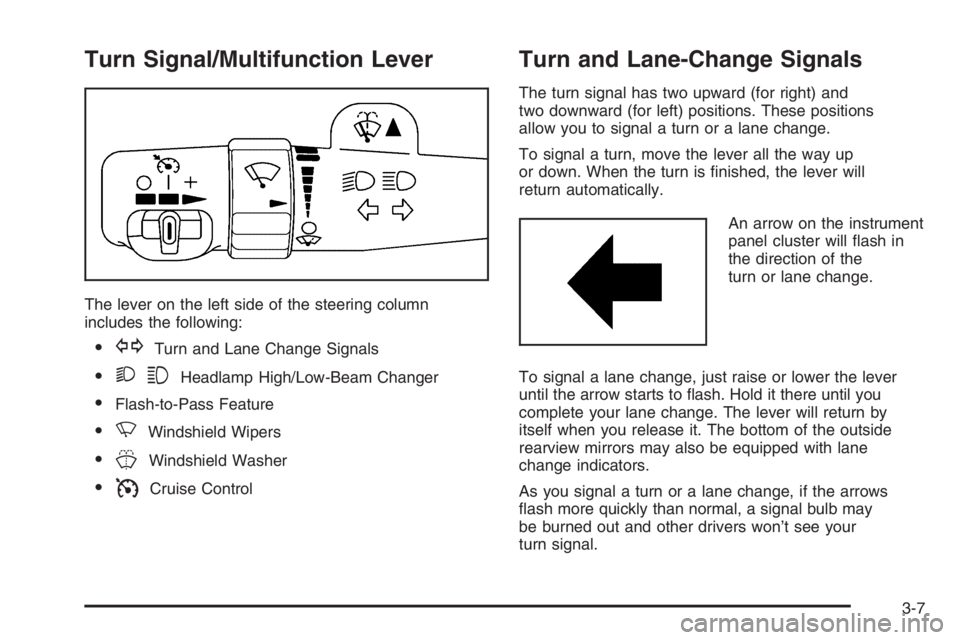
Turn Signal/Multifunction Lever
The lever on the left side of the steering column
includes the following:
GTurn and Lane Change Signals
23Headlamp High/Low-Beam Changer
Flash-to-Pass Feature
NWindshield Wipers
JWindshield Washer
ICruise Control
Turn and Lane-Change Signals
The turn signal has two upward (for right) and
two downward (for left) positions. These positions
allow you to signal a turn or a lane change.
To signal a turn, move the lever all the way up
or down. When the turn is nished, the lever will
return automatically.
An arrow on the instrument
panel cluster will ash in
the direction of the
turn or lane change.
To signal a lane change, just raise or lower the lever
until the arrow starts to ash. Hold it there until you
complete your lane change. The lever will return by
itself when you release it. The bottom of the outside
rearview mirrors may also be equipped with lane
change indicators.
As you signal a turn or a lane change, if the arrows
ash more quickly than normal, a signal bulb may
be burned out and other drivers won’t see your
turn signal.
3-7
Page 152 of 524
If a bulb is burned out, replace it to help avoid an
accident. If the arrows don’t go on at all when you signal
a turn, check the fuse. SeeFuses and Circuit Breakers
on page 5-103and check for burned-out bulbs.
If you have a trailer towing option with added wiring for
the trailer lamps, a turn signal asher is used. With
this asher installed, the signal indicator will ash even
if a turn signal bulb is burned out. Check the front
and rear turn signal lamps regularly to make sure they
are working.
Turn Signal On Chime
If your turn signal is left on for more than 3/4 of a mile
(1.2 km), a chime will sound at each ash of the
turn signal. To turn off the chime, move the turn signal
lever to the off position.
Headlamp High/Low-Beam Changer
To change the headlamps from low to high beam,
push the lever toward the instrument panel. To return to
low-beam headlamps, pull the multifunction lever
toward you. Then release it.When the high beams are
on, this indicator light on
the instrument panel
cluster will also be on.
Flash-to-Pass
This feature lets you use your high-beam headlamps to
signal a driver in front of you that you want to pass.
It works even if your headlamps are in the automatic
position.
To use it, pull the turn signal lever toward you, then
release it.
If your headlamps are in the automatic position or on
low beam, your high-beam headlamps will turn on.
They’ll stay on as long as you hold the lever toward you.
The high-beam indicator on the instrument panel
cluster will come on. Release the lever to return to
normal operation.
3-8