radio controls GMC ENVOY XL 2006 User Guide
[x] Cancel search | Manufacturer: GMC, Model Year: 2006, Model line: ENVOY XL, Model: GMC ENVOY XL 2006Pages: 524, PDF Size: 2.88 MB
Page 282 of 524
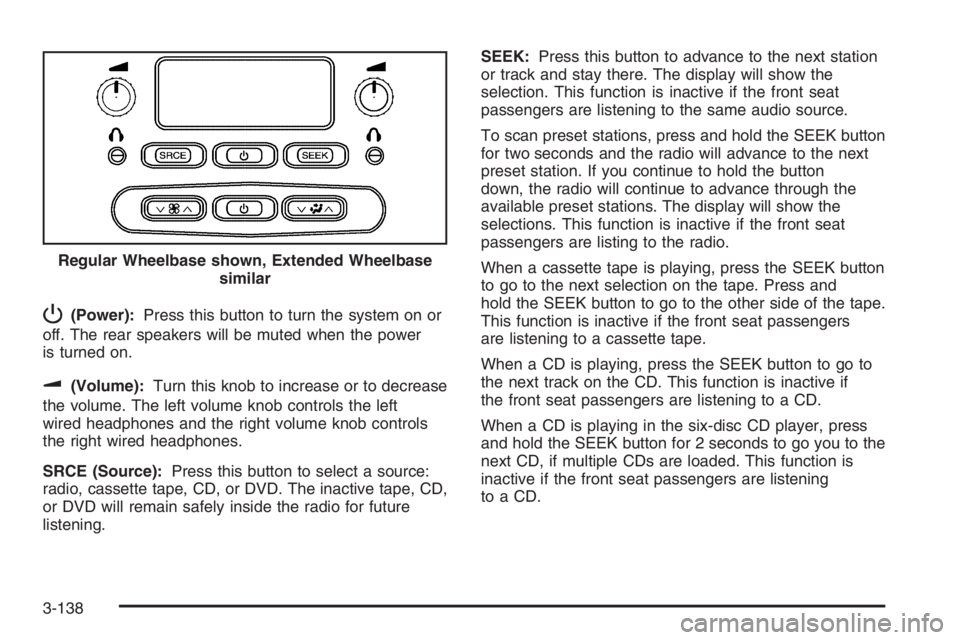
P(Power):Press this button to turn the system on or
off. The rear speakers will be muted when the power
is turned on.
u(Volume):Turn this knob to increase or to decrease
the volume. The left volume knob controls the left
wired headphones and the right volume knob controls
the right wired headphones.
SRCE (Source):Press this button to select a source:
radio, cassette tape, CD, or DVD. The inactive tape, CD,
or DVD will remain safely inside the radio for future
listening.SEEK:Press this button to advance to the next station
or track and stay there. The display will show the
selection. This function is inactive if the front seat
passengers are listening to the same audio source.
To scan preset stations, press and hold the SEEK button
for two seconds and the radio will advance to the next
preset station. If you continue to hold the button
down, the radio will continue to advance through the
available preset stations. The display will show the
selections. This function is inactive if the front seat
passengers are listing to the radio.
When a cassette tape is playing, press the SEEK button
to go to the next selection on the tape. Press and
hold the SEEK button to go to the other side of the tape.
This function is inactive if the front seat passengers
are listening to a cassette tape.
When a CD is playing, press the SEEK button to go to
the next track on the CD. This function is inactive if
the front seat passengers are listening to a CD.
When a CD is playing in the six-disc CD player, press
and hold the SEEK button for 2 seconds to go you to the
next CD, if multiple CDs are loaded. This function is
inactive if the front seat passengers are listening
toaCD. Regular Wheelbase shown, Extended Wheelbase
similar
3-138
Page 283 of 524
Theft-Deterrent Feature
THEFTLOCK®is designed to discourage theft of your
vehicle’s radio. The feature works automatically by
learning a portion of the Vehicle Identication Number
(VIN). If the radio is moved to a different vehicle, it
will not operate and LOCKED will appear on the display.
When the radio and vehicle are turned off, the blinking
red light indicates that THEFTLOCK
®is armed.
With THEFTLOCK
®activated, the radio will not operate
if stolen.
Audio Steering Wheel Controls
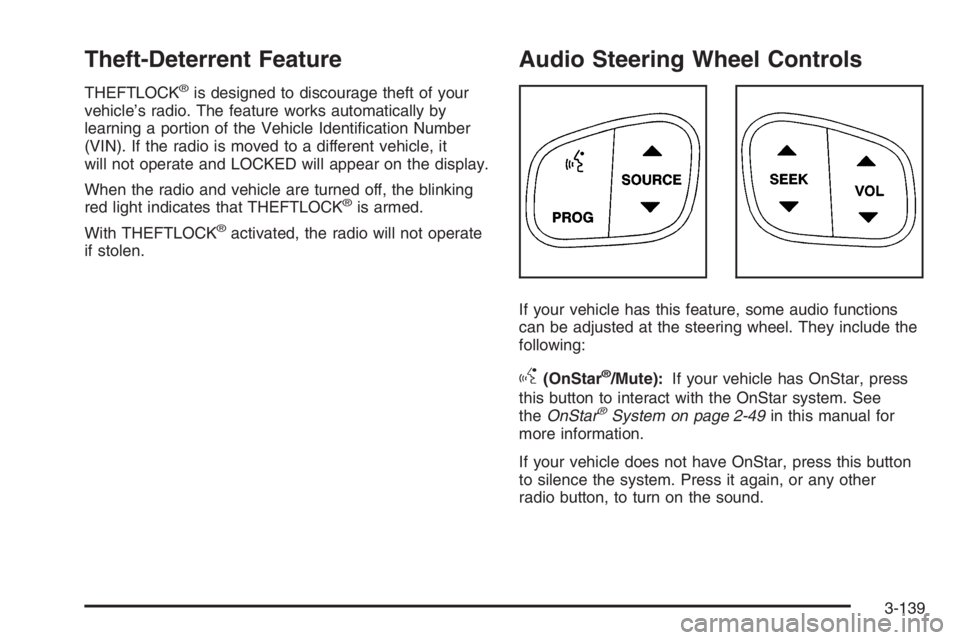
If your vehicle has this feature, some audio functions
can be adjusted at the steering wheel. They include the
following:
g(OnStar®/Mute):If your vehicle has OnStar, press
this button to interact with the OnStar system. See
theOnStar
®System on page 2-49in this manual for
more information.
If your vehicle does not have OnStar, press this button
to silence the system. Press it again, or any other
radio button, to turn on the sound.
3-139
Page 511 of 524
A
Accessories and Modications............................ 5-3
Accessory Inator...........................................5-71
Accessory Power Outlet(s)...............................3-19
Adding a Snow Plow or Similar Equipment.........4-50
Adding Equipment to Your Airbag-Equipped
Vehicle.......................................................1-72
Additives, Fuel................................................. 5-6
Add-On Electrical Equipment...........................5-102
Adjustable Throttle and Brake Pedal..................2-22
Air Cleaner/Filter, Engine.................................5-21
Air Conditioning......................................3-20, 3-23
Air Suspension...............................................4-55
Airbag
Passenger Status Indicator...........................3-36
Readiness Light..........................................3-35
Airbag Sensing and Diagnostic Module (SDM).......7-10
Airbag System................................................1-58
Adding Equipment to Your Airbag-Equipped
Vehicle...................................................1-72
How Does an Airbag Restrain?......................1-65
Passenger Sensing System...........................1-67
Servicing Your Airbag-Equipped Vehicle..........1-71
What Makes an Airbag Inate?......................1-65
What Will You See After an Airbag Inates?....1-66
When Should an Airbag Inate?....................1-63
Where Are the Airbags?...............................1-61
Antenna, Fixed Mast......................................3-143Antenna, XM™ Satellite Radio Antenna
System.....................................................3-143
Anti-Lock Brake System (ABS)........................... 4-7
Anti-Lock Brake, System Warning Light..............3-40
Appearance Care
Aluminum Wheels........................................5-98
Care of Safety Belts....................................5-95
Chemical Paint Spotting...............................5-99
Cleaning Exterior Lamps/Lenses....................5-96
Cleaning the Inside of Your Vehicle................5-92
Fabric/Carpet..............................................5-94
Finish Care.................................................5-96
Finish Damage............................................5-99
Instrument Panel, Vinyl, and Other
Plastic Surfaces.......................................5-95
Leather......................................................5-94
Sheet Metal Damage...................................5-99
Tires..........................................................5-98
Underbody Maintenance...............................5-99
Vehicle Care/Appearance Materials...............5-100
Washing Your Vehicle...................................5-96
Weatherstrips..............................................5-95
Windshield, Backglass, and Wiper Blades.......5-97
Ashtray(s)......................................................3-20
Audio System(s).............................................3-66
Audio Steering Wheel Controls....................3-139
Care of Your Cassette Tape Player...............3-141
Care of Your CD and DVD Player................3-142
Care of Your CDs and DVDs .......................3-142
1
Page 519 of 524
N
Navigation/Radio System, see
Navigation Manual.....................................3-124
New Vehicle Break-In......................................2-19
Normal Maintenance Replacement Parts............6-14
O
Odometer......................................................3-33
Odometer, Trip...............................................3-33
Off-Road Driving.............................................4-19
Off-Road Recovery..........................................4-16
Oil
Change Engine Oil Light...............................3-46
Engine.......................................................5-16
Pressure Gage............................................3-45
Oil, Engine Oil Life System..............................5-20
Older Children, Restraints................................1-32
Online Owner Center........................................ 7-3
OnStar
®System, see OnStar®Manual...............2-49
Other Warning Devices...................................... 3-6
Outlet Adjustment............................................3-27
Outlet(s), Accessory Power...............................3-19
Outside
Convex Mirror.............................................2-48
Curb View Assist Mirror................................2-48
Heated Mirrors............................................2-48Outside (cont.)
Manual Mirrors............................................2-47
Power Mirrors.............................................2-47
Overhead Console..........................................2-56
Owner Checks and Services.............................. 6-9
Owners, Canadian............................................... ii
P
Paint, Damage...............................................5-99
Park (P)
Shifting Into................................................2-32
Shifting Out of............................................2-33
Parking
Brake........................................................2-31
Over Things That Burn.................................2-34
Passenger Airbag Status Indicator.....................3-36
Passenger Sensing System..............................1-67
Passing.........................................................4-16
Passlock
®......................................................2-18
Power
Accessory Outlet(s)......................................3-19
Door Locks.................................................. 2-9
Electrical System.......................................5-102
Lumbar Controls........................................... 1-4
Rear Quarter Windows.................................2-16
Reduced Engine Light..................................3-47
Retained Accessory (RAP)............................2-20
9
Page 522 of 524

Service (cont.)
Doing Your Own Work................................... 5-4
Engine Soon Light.......................................3-42
Four-Wheel-Drive Warning Light.....................3-48
Publications Ordering Information...................7-15
Servicing Your Airbag-Equipped Vehicle..............1-71
Setting the Time.............................................3-68
Sheet Metal Damage.......................................5-99
Shifting Into Park (P).......................................2-32
Shifting Out of Park (P)...................................2-33
Signals, Turn and Lane-Change.......................... 3-7
Snow Plow....................................................4-50
Spare Tire.....................................................5-92
Accessory Inator........................................5-71
Installing....................................................5-78
Removing...................................................5-75
Storing.......................................................5-88
Specications, Capacities...............................5-119
Speedometer..................................................3-33
StabiliTrak
®System.......................................... 4-9
StabiliTrak®Indicator Light................................3-41
StabiliTrak®Service Light.................................3-40
Starting Your Engine.......................................2-20
Steering........................................................4-14
Steering Wheel Controls, Audio.......................3-139
Steering Wheel, Tilt Wheel................................. 3-6
Storage Areas
Center Console Storage Area........................2-56
Convenience Net.........................................2-60
Glove Box..................................................2-56Storage Areas (cont.)
Luggage Carrier..........................................2-57
Overhead Console.......................................2-56
Rear Compartment Storage Panel/Cover.........2-58
Rear Floor Storage Lid.................................2-60
Stuck in Sand, Mud, Ice, or Snow.....................4-44
Sun Visors.....................................................2-16
Sunroof.........................................................2-62
Suspension....................................................4-55
TTachometer....................................................3-33
Taillamps
Turn Signal, and Stoplamps..........................5-51
Theft-Deterrent, Radio....................................3-139
Theft-Deterrent Systems...................................2-17
Content Theft-Deterrent................................2-17
Passlock
®...................................................2-18
Throttle, Adjustable..........................................2-22
Tilt Wheel........................................................ 3-6
Tires.............................................................5-55
Aluminum Wheels, Cleaning..........................5-98
Buying New Tires........................................5-66
Chains.......................................................5-71
Changing a Flat Tire....................................5-74
Cleaning....................................................5-98
Different Size..............................................5-67
If a Tire Goes Flat.......................................5-73
Ination - Tire Pressure................................5-62
12