transmission GMC ENVOY XUV 2004 Owner's Manual
[x] Cancel search | Manufacturer: GMC, Model Year: 2004, Model line: ENVOY XUV, Model: GMC ENVOY XUV 2004Pages: 460, PDF Size: 2.99 MB
Page 69 of 460
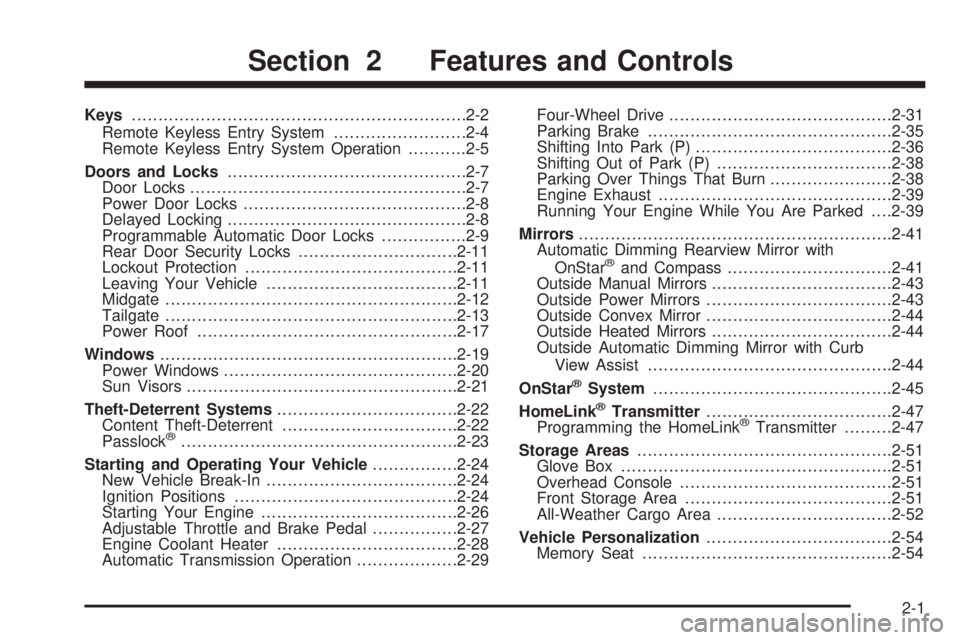
Keys...............................................................2-2
Remote Keyless Entry System.........................2-4
Remote Keyless Entry System Operation...........2-5
Doors and Locks.............................................2-7
Door Locks....................................................2-7
Power Door Locks..........................................2-8
Delayed Locking.............................................2-8
Programmable Automatic Door Locks................2-9
Rear Door Security Locks..............................2-11
Lockout Protection........................................2-11
Leaving Your Vehicle....................................2-11
Midgate.......................................................2-12
Tailgate.......................................................2-13
Power Roof.................................................2-17
Windows........................................................2-19
Power Windows............................................2-20
Sun Visors...................................................2-21
Theft-Deterrent Systems..................................2-22
Content Theft-Deterrent.................................2-22
Passlock
ž....................................................2-23
Starting and Operating Your Vehicle................2-24
New Vehicle Break-In....................................2-24
Ignition Positions..........................................2-24
Starting Your Engine.....................................2-26
Adjustable Throttle and Brake Pedal................2-27
Engine Coolant Heater..................................2-28
Automatic Transmission Operation...................2-29Four-Wheel Drive..........................................2-31
Parking Brake..............................................2-35
Shifting Into Park (P).....................................2-36
Shifting Out of Park (P).................................2-38
Parking Over Things That Burn.......................2-38
Engine Exhaust............................................2-39
Running Your Engine While You Are Parked. . . .2-39
Mirrors...........................................................2-41
Automatic Dimming Rearview Mirror with
OnStar
žand Compass...............................2-41
Outside Manual Mirrors..................................2-43
Outside Power Mirrors...................................2-43
Outside Convex Mirror...................................2-44
Outside Heated Mirrors..................................2-44
Outside Automatic Dimming Mirror with Curb
View Assist..............................................2-44
OnStar
žSystem.............................................2-45
HomeLinkžTransmitter...................................2-47
Programming the HomeLinkžTransmitter.........2-47
Storage Areas................................................2-51
Glove Box...................................................2-51
Overhead Console........................................2-51
Front Storage Area.......................................2-51
All-Weather Cargo Area.................................2-52
Vehicle Personalization...................................2-54
Memory Seat...............................................2-54
Section 2 Features and Controls
2-1
Page 77 of 460
Programmable Automatic Door
Locks
Your vehicle is equipped with an automatic lock/unlock
feature which enables you to program your vehicle's
power door locks. You can program this feature through
the Driver Information Center (DIC), or by the following
method.
Programmable Locking Feature
The following is the list of available programming
options:
Mode 1:All doors lock when the transmission is shifted
into gear.
Mode 2:All doors lock when the vehicle speed is
greater than 8 mph (13 km/h).
Mode 3:No automatic door locking.
The automatic door locks were pre-programmed at the
factory to lock all the doors when the transmission
is shifted into gear. The following instructions detail how
to program your door locks differently than the factory
setting. Choose one of the three programming
options listed above before entering the program mode.To enter the program mode, do the following:
1. Begin with the ignition off. Then pull the turn
signal/multifunction lever toward you and hold
it there while you perform the next step.
2. Turn the key to RUN and LOCK twice. Then, with the
key in LOCK, release the turn signal/multifunction
lever. Once you do this, you will hear the lock switch
lock and unlock, the horn will chirp twice, and a
30 second program timer will begin.
3. You are now ready to program the automatic door
locks. Select one of the three programming options
listed above, and press the lock side of the power
door lock switch to cycle through the lock options.
You will have 30 seconds to begin programming.
If you exceed the 30 second limit, the locks will
automatically lock and unlock and the horn will chirp
twice to indicate that you have left the program
mode. If this occurs, repeat the procedure beginning
with Step 1 to re-enter the programming mode.
You can exit the program mode any time by turning the
ignition to RUN. The locks will automatically lock and
unlock and the horn will chirp twice to indicate that you
are leaving the program mode. If the lock/unlock switches
are not pressed while in the programming mode, the
current auto lock/unlock setting will not be modi®ed.
See your dealer for more information.
2-9
Page 78 of 460
Programmable Unlocking Feature
The following is the list of available programming
options:
Mode 1:Driver's door unlocks when the transmission is
shifted into PARK (P).
Mode 2:All doors unlock when the transmission is
shifted into PARK (P).
Mode 3:All doors unlock when the key is removed
from the ignition.
Mode 4:No automatic door unlock.
The automatic door locks were pre-programmed at the
factory to unlock the driver's door once the transmission
is shifted to PARK (P). The following instructions detail
how to program your door locks differently than the
factory setting. Choose one of the four programming
options listed above before entering the program mode.
To enter the program mode you need to do the
following:
1. Begin with the ignition off. Then pull the turn
signal/multifunction lever toward you and hold
it there while you perform the next step.2. Turn the key to RUN and LOCK twice. Then, with the
key in LOCK, release the turn signal/multifunction
lever. Once you do this, you will hear the lock switch
lock and unlock, the horn will chirp twice, and a
30 second program timer will begin.
3. You are now ready to program the automatic door
locks. Select one of the four programming options
listed above, and press the unlock side of the power
door lock switch to cycle through the unlocking
options. You will have 30 seconds to begin
programming. If you exceed the 30 second limit,
the locks will automatically lock and unlock and the
horn will chirp twice to indicate that you have left
the program mode. If this occurs, repeat the
procedure beginning with Step 1 to re-enter the
programming mode.
You can exit the program mode any time by turning the
ignition to RUN. The locks will automatically lock and
unlock and the horn will chirp twice to indicate that you
are leaving the program mode. If the lock/unlock
switches are not pressed while in the programming
mode, the current auto lock/unlock setting will not be
modi®ed.
See your dealer for more information.
2-10
Page 92 of 460

Starting and Operating Your
Vehicle
New Vehicle Break-In
Notice:Your vehicle does not need an elaborate
ªbreak-in.º But it will perform better in the long run
if you follow these guidelines:
·Keep your speed at 55 mph (88 km/h) or less for
the ®rst 500 miles (805 km).
·Do not drive at any one speed Ð fast or
slow Ð for the ®rst 500 miles (805 km). Do not
make full-throttle starts.
·Avoid making hard stops for the ®rst 200 miles
(322 km) or so. During this time your new
brake linings are not yet broken in. Hard stops
with new linings can mean premature wear
and earlier replacement. Follow this breaking-in
guideline every time you get new brake
linings.
·Do not tow a trailer during break-in. SeeTowing
a Trailer on page 4-56
for more information.
Ignition Positions
Use the key to turn the ignition switch to four different
positions.
A (LOCK):This position locks the ignition and
transmission. It's a theft-deterrent feature. You will only
be able to remove the key when the ignition is turned
to LOCK.
2-24
Page 94 of 460

Starting Your Engine
Move your shift lever to PARK (P) or NEUTRAL (N).
Your engine won't start in any other position±that's a
safety feature. To restart when you're already moving,
use NEUTRAL (N) only.
Notice:Do not try to shift to PARK (P) if your
vehicle is moving. If you do, you could damage the
transmission. Shift to PARK (P) only when your
vehicle is stopped.
1. With your foot off the accelerator pedal, turn the
ignition key to START. When the engine starts,
let go of the key. The idle speed will go down as
your engine gets warm.
Holding your key in START for longer than
15 seconds at a time will cause your battery to be
drained much sooner. And the excessive heat
can damage your starter motor. Wait about
15 seconds between each try to help avoid draining
your battery or damaging your starter.
2. If it doesn't start within 10 seconds, push the
accelerator pedal all the way to the ¯oor, while you
hold the ignition key in START. When the engine
starts, let go of the key and let up on the accelerator
pedal. Wait about 15 seconds between each try.When starting your engine in very cold weather
(below 0ÉF or-18ÉC), do this:
1. With your foot off the accelerator pedal, turn the
ignition key to START and hold it there up to
15 seconds. When the engine starts, let go of
the key.
2. If your engine still won't start (or starts but then
stops), it could be ¯ooded with too much gasoline.
Try pushing your accelerator pedal all the way to the
¯oor and holding it there as you hold the key in
START for about three seconds. When the engine
starts, let go of the key and accelerator. If the
vehicle starts brie¯y but then stops again, do the
same thing, but this time keep the pedal down
for ®ve or six seconds. This clears the extra
gasoline from the engine.
Notice:Your engine is designed to work with the
electronics in your vehicle. If you add electrical
parts or accessories, you could change the way the
engine operates. Before adding electrical equipment,
check with your dealer. If you do not, your engine
might not perform properly.
2-26
Page 97 of 460
Automatic Transmission Operation
There are several different positions for your gear
shift lever.
PARK (P):This position locks the rear wheels. It's the
best position to use when you start the engine
because your vehicle can't move easily.
{CAUTION:
It is dangerous to get out of your vehicle if the
shift lever is not fully in PARK (P) with the
parking brake ®rmly set. Your vehicle can roll.
Do not leave your vehicle when the engine is
running unless you have to. If you have left the
engine running, the vehicle can move
suddenly. You or others could be injured.
To be sure your vehicle will not move, even
when you are on fairly level ground, always set
your parking brake and move the shift lever to
PARK (P). See
Shifting Into Park (P) on
page 2-36
. If you are pulling a trailer, see
Towing a Trailer on page 4-56.
{CAUTION:
If you have four-wheel drive, your vehicle will
be free to roll Ð even if your shift lever is in
PARK (P) Ð if your transfer case is in
NEUTRAL. So, be sure the transfer case is in a
drive gear Ð not in NEUTRAL. See
Four-Wheel
Drive on page 2-31
. SeeShifting Into Park (P)
on page 2-36
.
Ensure the shift lever is fully in PARK (P) before starting
the engine. Your vehicle has an automatic transmission
shift lock control system. You have to fully apply the
regular brakes before you can shift from PARK (P) when
the ignition key is in RUN. If you cannot shift out of
PARK (P), ease pressure on the shift lever, press the
button on the shift lever and push the shift lever all
the way into PARK (P) as you maintain brake
application. Move the shift lever into the gear you wish.
See
Shifting Out of Park (P) on page 2-38.
2-29
Page 98 of 460
REVERSE (R):Use this gear to back up.
Notice:Shifting to REVERSE (R) while your vehicle
is moving forward could damage the transmission.
The repairs would not be covered by your warranty.
Shift to REVERSE (R) only after your vehicle is
stopped.
To rock your vehicle back and forth to get out of snow,
ice or sand without damaging your transmission,
see If You Are Stuck: In Sand, Mud, Ice or Snow on
page 4-44.
NEUTRAL (N):In this position, the engine doesn't
connect with the wheels. To restart when you're already
moving, use NEUTRAL (N) only.
{CAUTION:
Shifting into a drive gear while your engine is
running at high speed is dangerous. Unless
your foot is ®rmly on the brake pedal, your
vehicle could move very rapidly. You could
lose control and hit people or objects. Do not
shift into a drive gear while your engine is
running at high speed.
Notice:Shifting out of PARK (P) or NEUTRAL (N)
with the engine running at high speed may damage
the transmission. The repairs would not be
covered by your warranty. Be sure the engine is not
running at high speed when shifting your vehicle.
DRIVE (D):This position is for normal driving.
If you need more power for passing, and you're:
·Going less than about 35 mph (55 km/h), push the
accelerator pedal about halfway down.
·Going about 35 mph (55 km/h) or more, push the
accelerator all the way down.
You'll shift down to the next gear and have more power.
DRIVE (D) can be used when towing a trailer, carrying
a heavy load, driving on steep hills or for off-road driving.
You may want to shift the transmission to THIRD (3)
or, if necessary, a lower gear selection if the
transmission shifts too often.
THIRD (3):This position is also used for normal driving.
However, it offers more power and lower fuel economy
than DRIVE (D).
2-30
Page 99 of 460
SECOND (2):This position gives you more power but
lower fuel economy than THIRD (3). You can use
SECOND (2) on hills. It can help control your speed as
you go down steep mountain roads, but then you
would also want to use the brakes off and on.
You can also use SECOND (2) for starting the vehicle
from a stop on slippery road surfaces.
FIRST (1):This position gives you even more power
but lower fuel economy than SECOND (2). You can use
it on very steep hills, or in deep snow or mud. If the
selector lever is put in FIRST (1) while the vehicle
is moving forward, the transmission won't shift into ®rst
gear until the vehicle is going slowly enough.
Notice:Spinning the tires or holding the vehicle in
one place on a hill using only the accelerator
pedal may damage the transmission. If you are
stuck, do not spin the tires. When stopping on a hill,
use the brakes to hold the vehicle in place.
Four-Wheel Drive
If your vehicle has four-wheel drive, you can send your
engine's driving power to all four wheels for extra
traction. To get the most satisfaction out of four-wheel
drive, you must be familiar with its operation. Read
the part that follows before using four-wheel drive.
You should use two-wheel drive high (2HI) for most
normal driving conditions.
Notice:Driving on pavement in four-wheel drive for
an extended period of time may cause premature
wear on your vehicle's powertrain. Do not drive
in four-wheel drive on pavement for extended
periods of time.
2-31
Page 101 of 460
{CAUTION:
Shifting the transfer case to NEUTRAL can
cause your vehicle to roll even if the
transmission is in PARK (P). You or someone
else could be seriously injured. Be sure to set
the parking brake before placing the transfer
case in NEUTRAL. See
Parking Brake on
page 2-35
.
NEUTRAL:Shift the vehicle's transfer case to
NEUTRAL only when towing your vehicle. See
Recreational Vehicle Towing on page 4-45for more
information.
An indicator light in the knob will show you which
position the transfer case is in. The indicator lights will
come on brie¯y when you turn on the ignition and
one will stay on. If the lights do not come on, you should
take your vehicle to your dealer for service. An
indicator light will ¯ash while shifting the transfer case.
It will remain illuminated when the shift is complete.
If for some reason the transfer case cannot make
a requested shift, it will return to the last chosen setting.If the service four-wheel drive light on the instrument
panel cluster stays on, you should take your vehicle to
your dealer for service. See
Service Four-Wheel
Drive Warning Light on page 3-44for further information.
Shifting into 4HI or A4WD
Turn the knob to 4HI or A4WD. This can be done at any
speed unless you are shifting out of 4LO. The indicator
light will ¯ash while shifting. It will remain illuminated
when the shift is complete.
Shifting into 2HI
Turn the knob to 2HI. This can be done at any speed
unless you are shifting out of 4LO.
Shifting into 4LO
To shift to 4LO, the vehicle's engine must be running
and the vehicle must be stopped or moving less
than 2 mph (3.2 km/h) with the transmission in
NEUTRAL (N). The preferred method for shifting into
4LO is to have your vehicle moving 1 or 2 mph (1.6 to
3.2 km/h). Turn the knob to 4LO. You must wait for
the 4LO indicator light to stop ¯ashing and remain
illuminated before shifting your transmission into gear.
If you turn the knob to 4LO when your vehicle is in gear
and/or moving, the 4LO indicator light will ¯ash for
30 seconds and not complete the shift unless your
vehicle is moving less than 2 mph (3.2 km/h) and the
transmission is in NEUTRAL (N). After 30 seconds, the
transfer case will return to the setting last chosen.
2-33
Page 102 of 460
Shifting Out of 4LO
To shift from 4LO to 4HI, A4WD or 2HI your vehicle
must be stopped or moving less than 2 mph (3.2 km/h)
with the transmission in NEUTRAL (N) and the
engine running. The preferred method for shifting out of
4LO is to have your vehicle moving 1 or 2 mph (1.6
to 3.2 km/h). Turn the knob to 4HI, A4WD or 2HI. You
must wait for the 4HI, A4WD or 2HI indicator light to stop
¯ashing and remain illuminated before shifting your
transmission into gear.
If the knob is turned to 4HI, A4WD or 2HI when your
vehicle is in gear and/or moving, the 4HI, A4WD or 2HI
indicator light will ¯ash for 30 seconds. It will not complete
the shift unless your vehicle is moving less than 2 mph
(3.2 km/h) with the transmission in NEUTRAL (N).
Shifting into NEUTRAL
Before shifting the transfer case to NEUTRAL, ®rst
make sure the vehicle is parked so that it will not roll.
1. Set the parking brake.
2. Start the vehicle.
3. Put the transmission in NEUTRAL (N).
4. Shift the transfer case to 2HI.
5. Turn the transfer case knob all of the way past 4LO
and hold it there for a minimum of 10 seconds.
The neutral indicator light will come on.6. Shift the transmission to REVERSE (R) for one
second, then shift the transmission to DRIVE (D)
for one second.
7. Place the transmission shift lever in PARK (P).
8. Turn the ignition to LOCK.
9. Release the parking brake prior to towing.
Shifting Out of NEUTRAL
To shift the transfer case out of NEUTRAL, do the
following:
1. Set the parking brake and apply the regular brake
pedal.
2. Start the vehicle with the transmission in PARK (P).
3. Turn the transfer case knob to the desired shift
position (2HI, 4HI or A4WD).
4. Put the transmission in NEUTRAL (N).
5. Release the parking brake.
6. After the transfer case has shifted out of NEUTRAL,
the indicator light will go out. Shift the transmission
lever to the desired position.
A re-engagement sound is normal when shifting out of
NEUTRAL.
2-34