radio controls GMC SAVANA 1998 Owners Manual
[x] Cancel search | Manufacturer: GMC, Model Year: 1998, Model line: SAVANA, Model: GMC SAVANA 1998Pages: 388, PDF Size: 20.04 MB
Page 137 of 388
Sectici 3 Comfort Controls and Audio Systems
In this section, you’ll find out how to operate the comfort control and audio systems offered with your vehicle. Be
sure to read about the particular systems supplied with your vehicle.
3-2 3-2
3-3
3-4 3-5
3-6
3-6
3
-6
3-7
3-7
3-7
3 -7
Comfort Controls
Heater Controls
Heater/Air Conditioning Controls
Rear Heater (Without Air Conditioning)
Rear Air Conditioning and Rear Heater
Air Conditioning
Heating
Ventilation Tips
Audio Systems
Setting the Clock for Systems without
Automatic Tone Control
Setting the Clock for Systems with
Automatic Tone Control
AM-FM Stereo 3-9
3-11
3- 16
3-20
3-2 1
3-23 3-24
3 -25
3-26
3-26 3-27 AM-FM
Stereo with Cassette Tape Player
(If Equipped)
AM-FM Stereo with Cassette Tape and
Automatic Tone Control (If Equipped)
AM-FM Stereo with Compact Disc Player
and Automatic Tone Control (If Equipped)
Remote Compact Disc Player (If Equipped)
Theft-Deterrent Feature (If Equipped)
Understanding Radio Reception
Tips About Your Audio System
Care of Your Cassette Tape Player
Care
of Your Compact Discs
Care
of Your Compact Disc Player
Power Antenna Mast Care
3-1
ProCarManuals.com
Page 143 of 388
You can move the vents from side to side or up and
down to direct the flow
of air, or close the vents
altogether. When you close
a vent, it will increase the
flow of air coming out
of any vents that are open.
Audio Systems
Your Delco Electronics audio system has been designed
to operate easily and give years of listening pleasure.
You will get the most enjoyment out of it if you acquaint
yourself with it first. Find out what your Delco
Electronics system can do and how to operate all its
controls, to be sure you’re getting the most out of the
advanced engineering that went into
it.
Setting the Clock for Systems without
Automatic Tone Control
Press SET. Within five seconds, press and hold the
SEEK right arrow until the correct minute appears on
the display. Press and hold the
SEEK left arrow until the
correct hour appears on the display.
Setting the Clock for Systems with
Automatic Tone Control
Press and hold HR until the correct hour appears on the
display. Press and hold
MN until the correct minute
appears on the display. To display the clock with the ignition
off, press RECALL or HR/MN and the time
will be displayed for a few seconds. There is an initial
two-second delay before the clock goes into the
time-set mode.
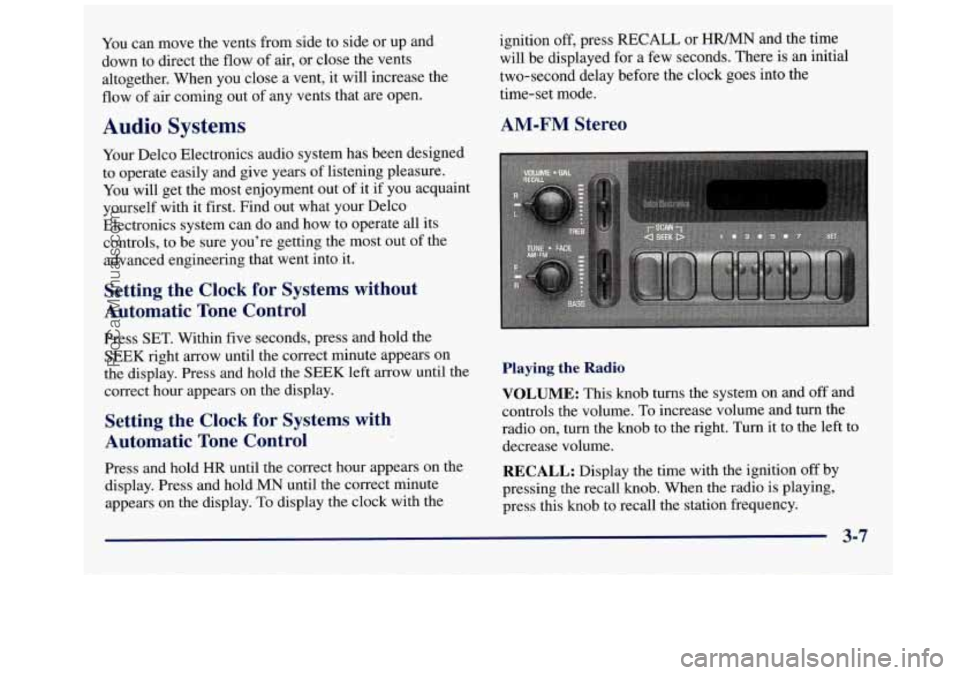
AM-FM Stereo
Playing the Radio
VOLUME: This knob turns the system on and off and
controls the volume.
To increase volume and turn the
radio
on, turn the knob to the right. Turn it to the left to
decrease volume.
RECALL: Display the time with the ignition off by
pressing the recall knob. When the radio
is playing,
press this knob to recall the station frequency.
3-7
ProCarManuals.com
Page 145 of 388
AM-FM Stereo with Cassette Tape Player
(If Equipped)
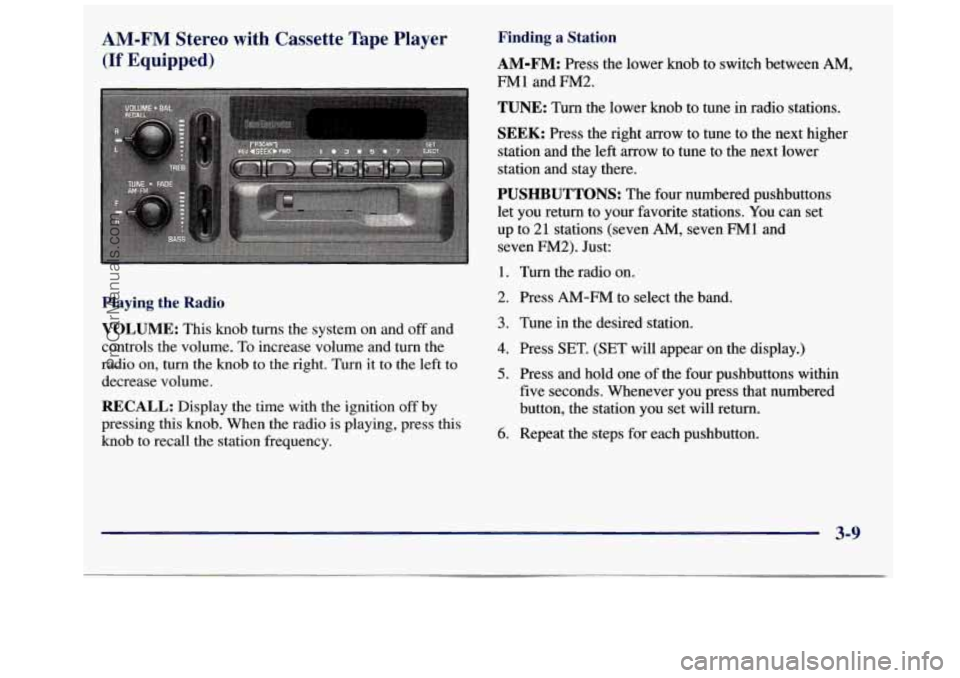
Playing the Radio
VOLUME:
This knob turns the system on and off and
controls the volume. To increase volume and turn the
radio on, turn the knob
to the right. Turn it to the left to
decrease volume.
RECALL: Display the time with the ignition off by
pressing this knob. When the radio
is playing, press this
knob to recall the station frequency.
Finding a Station
AM-FM: Press the lower knob to switch between AM,
FMl and FM2.
TUNE: Turn the lower knob to tune in radio stations.
SEEK: Press the right arrow to tune to the next higher
station and the left arrow to tune to the next lower
station and stay there.
PUSHBUTTONS: The four numbered pushbuttons
let you return to your favorite stations.
You can set
up to
21 stations (seven AM, seven FM1 and
seven
FM2). Just:
1. Turn the radio on.
2. Press
AM-FM to select the band.
3. Tune in the desired station.
4. Press SET. (SET will appear on the display.)
5. Press and hold one of the four pushbuttons within
five seconds. Whenever you press that numbered
button,
the station you set will return.
6. Repeat the steps for each pushbutton.
3-9
ProCarManuals.com
Page 149 of 388
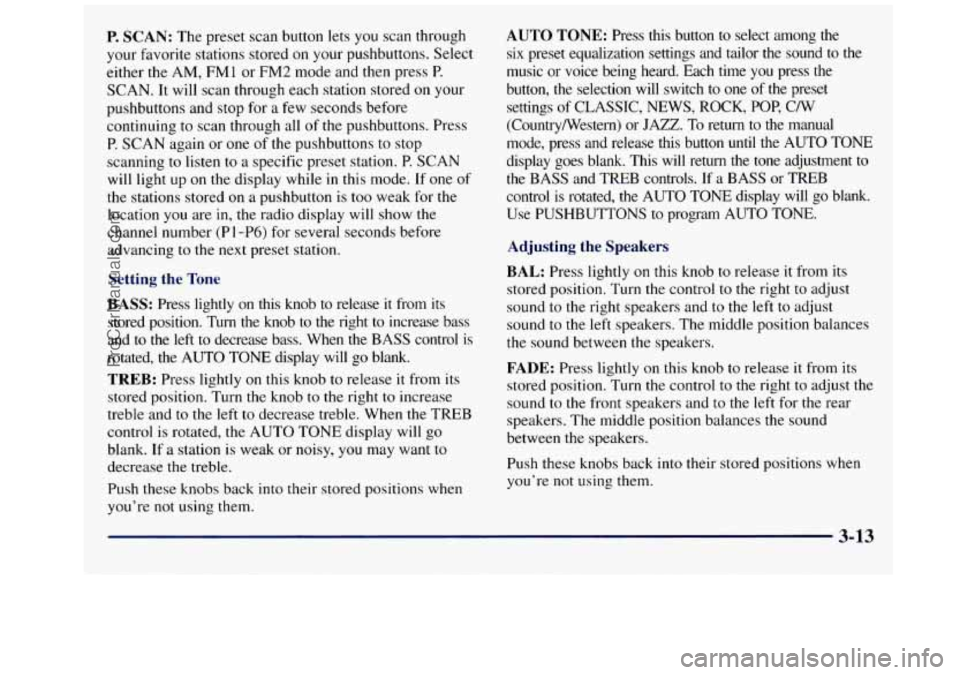
P. SCAN: The preset scan button lets you scan through
your favorite stations stored
on your pushbuttons. Select
either
the AM, FMl or FM2 mode and then press P.
SCAN. It will scan through each station stored on your
pushbuttons and stop for a few seconds before
continuing to scan through all
of the pushbuttons. Press
P. SCAN again or one of the pushbuttons to stop
scanning to listen to a specific preset station. P. SCAN
will light up on the display while in this mode. If one
of
the stations stored on a pushbutton is too weak for the
location you
are in, the radio display will show the
channel number
(P 1 -P6) for several seconds before
advancing
to the next preset station.
Setting the Tone
BASS:
Press lightly on this knob to release it from its
stored position. Turn the knob
to the right to increase bass
and to the
left to decrease bass. When the BASS control is
rotated, the AUTO TONE display will go blank.
TREB: Press lightly on this knob to release it from its
stored position. Turn the knob to the right to increase
treble and to the left
to decrease treble. When the TREB
control is rotated, the AUTO
TONE display will go
blank. If a station is weak or noisy, you may want to
decrease the treble.
Push these knobs back into their
stored positions when
you’re not using them.
AUTO TONE: Press this button to select among the
six preset equalization settings and tailor the sound
to the
music or voice being heard. Each time you press the
button, the selection will switch
to one of the preset
settings
of CLASSIC, NEWS, ROCK, POP, C/W
(CountryNestern) or
JAZZ. To return to the manual
mode, press and release this button until the AUTO TONE
display goes blank. This will return the
tone adjustment to
the BASS and TREB controls. If a BASS or TREB
control is rotated,
the AUTO TONE display will go blank.
Use PUSHBUTTONS
to program AUTO TONE.
Adjusting the Speakers
BAL:
Press lightly on this knob to release it from its
stored position. Turn the control to
the right to adjust
sound
to the right speakers and to the left to adjust
sound to the left speakers. The middle position balances
the sound between the speakers.
FADE: Press lightly on this knob to release it from its
stored position. Turn the control
to the right to adjust the
sound
to the front speakers and to the left for the rear
speakers. The middle position balances
the sound
between the speakers.
Push these knobs back into their stored positions when
you’re not using them.
3-13
ProCarManuals.com
Page 150 of 388
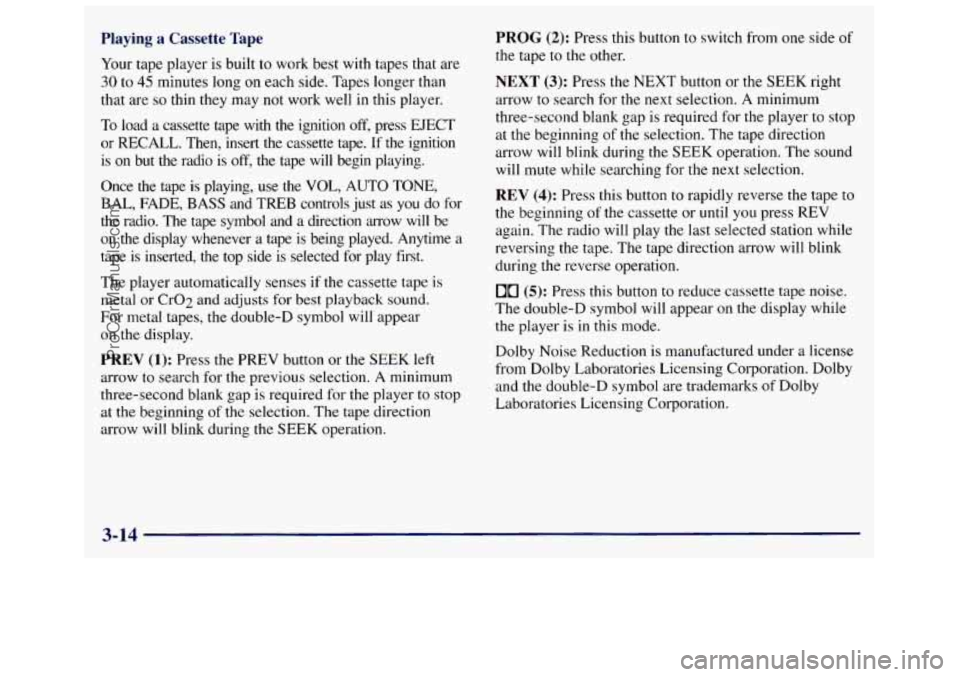
Playing a Cassette Tape
Your tape player is built to work best with tapes that are
30 to 45 minutes long on each side. Tapes longer than
that are
so thin they may not work well in this player.
To load a cassette tape with the ignition off, press EJECT
or
RECALL. Then, insert the cassette tape. If the ignition
is on but the radio is
off, the tape will begin playing.
Once the tape is playing, use
the VOL, AUTO TONE,
BAL, FADE, BASS and TREB controls just as you do for
the radio. The tape symbol and a direction arrow will be
on the display whenever a tape is being played. Anytime a
tape is inserted, the top side is selected for play first.
The player automatically senses if the cassette tape
is
metal or CrO2 and adjusts for best playback sound.
For metal tapes,
the double-D symbol will appear
on the display.
PREV (1): Press the PREV button or the SEEK left
arrow to search for the previous selection. A minimum
three-second blank gap is required for the player
to stop
at the beginning
of the selection. The tape direction
arrow will blink during
the SEEK operation.
PROG (2): Press this button to switch from one side of
the tape to the other.
NEXT (3): Press the NEXT button or the SEEK right
arrow to search for the next selection. A minimum
three-second blank gap is required for the player to stop
at the beginning
of the selection. The tape direction
arrow will blink during
the SEEK operation. The sound
will mute while searching for the
next selection.
REV (4): Press this button to rapidly reverse the tape to
the beginning of the cassette or until you press REV
again. The radio will play
the last selected station while
reversing the tape. The tape direction arrow will blink
during the reverse operation.
00 (5): Press this button to reduce cassette tape noise.
The double-D symbol will appear on the display while
the player is in this mode.
Dolby Noise Reduction is manufactured under a license
from Dol by Laboratories Licensing Corporation. Dolby
and the double-D symbol are trademarks of Dolby
Laboratories Licensing Corporation.
3-14
ProCarManuals.com
Page 303 of 388
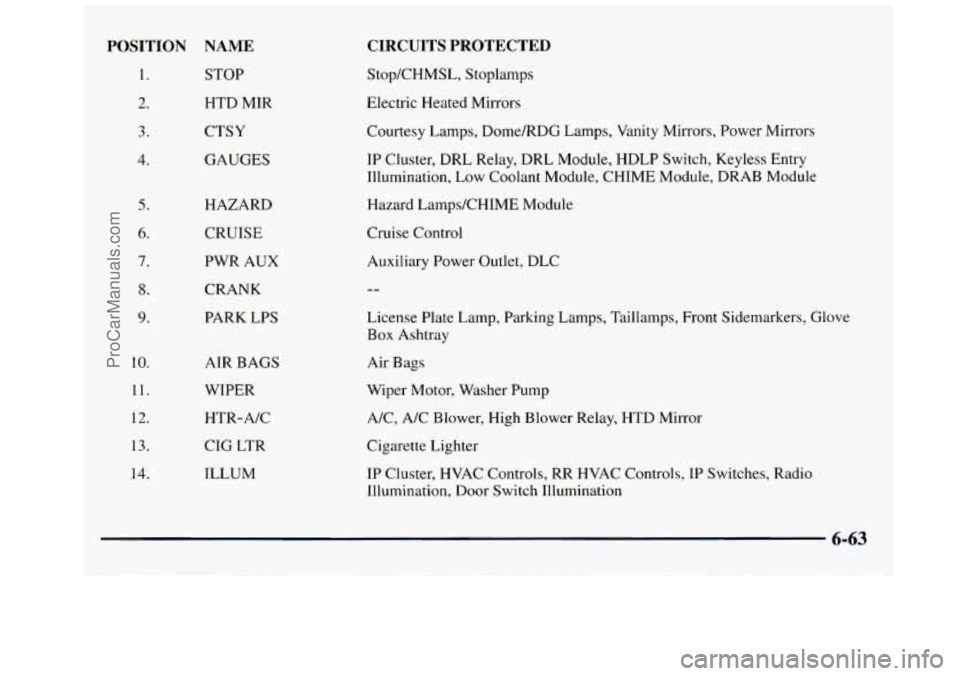
POSITION NAME
1. STOP
2. HTD MIR
3. CTSY
4. GAUGES
5.
6.
7.
8.
9.
10.
11.
12.
13.
14.
HAZARD
CRUISE
PWR AUX
CRANK
PARK LPS
AIR BAGS
WIPER
HTR-A/C
CIG LTR
ILLUM
CIRCUITS PROTECTED
StopKHMSL, Stoplamps
Electric Heated Mirrors
Courtesy Lamps, Dome/RDG Lamps, Vanity Mirrors, Power Mirrors
IP Cluster, DRL Relay, DRL Module, HDLP Switch, Keyless Entry
Illumination, Low Coolant Module, CHIME Module, DRAB Module
Hazard LampdCHIME Module
Cruise Control
Auxiliary Power Outlet, DLC
License Plate Lamp, Parking Lamps, Taillamps, Front Sidemarkers, Glove
Box Ashtray
Air Bags
Wiper Motor, Washer Pump
A/C, A/C Blower, High Blower Relay, HTD Mirror
Cigarette Lighter
IP Cluster, HVAC Controls, RR HVAC Controls, IP Switches, Radio
Illumination, Door Switch Illumination
6-63
ProCarManuals.com
Page 304 of 388
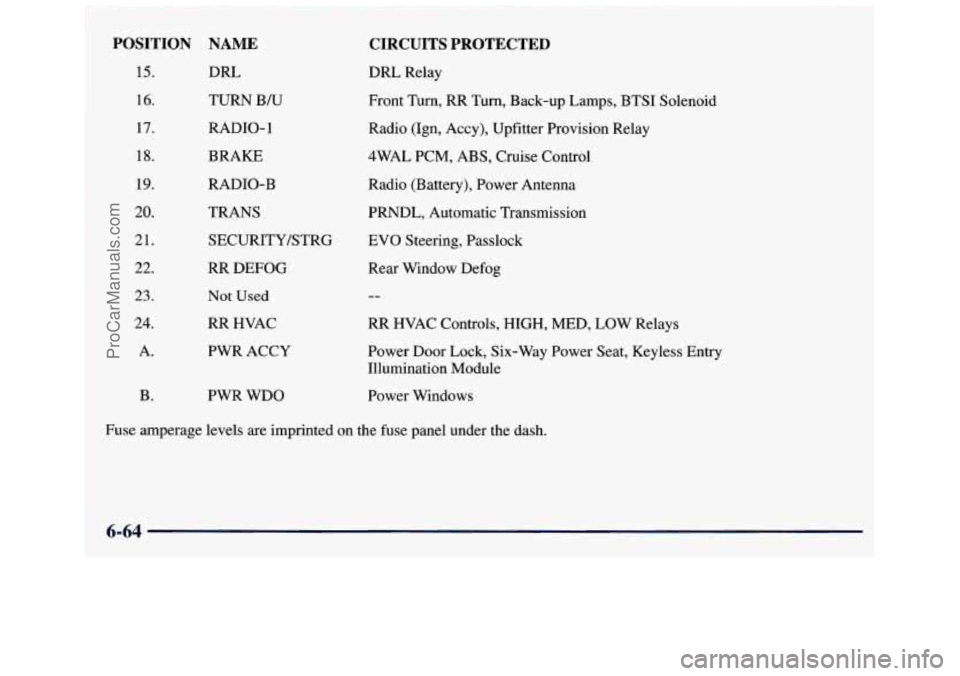
POSITION
15.
16.
17.
18.
19.
20.
21.
22.
23.
24.
A. B.
NAME
DRL TURN
B/U
RADIO- 1
BRAKE
RADIO-B
TRANS SECURITY/STRG
RR DEFOG
Not Used
RR HVAC
PWR ACCY
CIRCUITS PROTECTED
DRL Relay
Front Turn,
RR Turn, Back-up Lamps, BTSI Solenoid
Radio (Ign, Accy), Upfitter Provision Relay
4WAL PCM, ABS, Cruise Control
Radio (Battery), Power Antenna
PRNDL, Automatic Transmission
EVO Steering, Passlock
Rear Window Defog
--
RR HVAC Controls, HIGH, MED, LOW Relays
Power Door Lock, Six-Way Power Seat, Keyless Entry
Illumination Module
PWR WDO Power Windows
~ Fuse amperage levels are imprinted on the fuse panel under the dash.
' 6-64
ProCarManuals.com
Page 381 of 388
OH-Road Recovery ............................. 4- 1 1
Oil. Engine .................................... 6-12
Overheating Engine
............................. 5- 1 1
Owner Checks and Services ....................... 7-38
Owner Publications. Ordering
................ 8- 1 1. 8- I2
Paint Spotting. Chemical
........................ 6-58
Park
Automatic Transmission
....................... 2-21
Shifting Into
................................. 2-25
Shifting Out of
............................... 2-28
AtNight
.................................... 2-15
Brake
...................................... 2-24
Brake Mechanism Check
....................... 7-41
Over Things That Burn
........................ 2-29
With
a Trailer ................................ 4-36
Passenger Position
.............................. 1-26
Passing
.................................. 4-11
Passlock
..................................... 2-16
Periodic Maintenance Inspections
.................. 7-42
Power Antenna Mast Care
............................ 3-27
DoorLocks
................................... 2-5
Remote Control Mirror
........................ 2-45
Seat
......................................... 1-3
Steering
..................................... 4-8
Steering Fluid
................................ 6-25
Windows
................................... 2-31
Pregnancy. Use of Safety Belts
.................... 1-25
Parking
Lots
....................................... 2-16 Problems
on the Road
............................ 5-1
Publications. Service and Owner .............. 8- 1 1. 8- 12
Radiator
..................................... 5-18
Radiator Pressure Cap
........................... 6-24
Radio Reception
................................ 3-23
Radios
.......................... 3.7.3.9.3.11. 3.16
Rain. Driving In
................................ 4-15
Reading Lamps
................................ 2-43
Rear
Axle
....................................... 6-21
Door Security Locks
........................... 2-5
Outside Seat Position
.......................... 1-34
Towing
..................................... 5-11
Rear Air Conditioning and Rear Heater
............... 3-5
Rear Heater Controls (without Air Conditioning)
....... 3-4
Rear Passenger Temperature Control
................. 3-5
Rear Safety Belt Comfort Guides .................. 1-37
Rearview Mirror
................................ 2-45
Reclining Front Seatbacks
......................... 1-3
Recommended
Fluids and Lubricants ............... 7-44
Recovery Tank. Coolant
.......................... 5-16
Refrigerants. Air Conditioning
.................... 6-70
Remote Compact Disc Player
..................... 3-20
Replacement SeatPassengers
.............................. 1-34
Bulbs
...................................... 6-66
Parts
....................................... 6-69
Wheel
...................................... 6-49
Replacing Safety Belts
........................... 1-62
Reporting Safety Defects .................... 8- 10. 8-11
9-7
. ~ ...
ProCarManuals.com