instrument panel GMC SAVANA 2008 Workshop Manual
[x] Cancel search | Manufacturer: GMC, Model Year: 2008, Model line: SAVANA, Model: GMC SAVANA 2008Pages: 402, PDF Size: 2.45 MB
Page 304 of 402
Tire Pressure Monitor Operation
The Tire Pressure Monitor System (TPMS), if your
vehicle has this feature, is designed to warn the driver
when a low tire pressure condition exists. TPMS sensors
are mounted onto each tire and wheel assembly,
excluding the spare tire and wheel assembly. The TPMS
sensors monitor the air pressure in the vehicle’s tires
and transmits the tire pressure readings to a receiver
located in the vehicle.
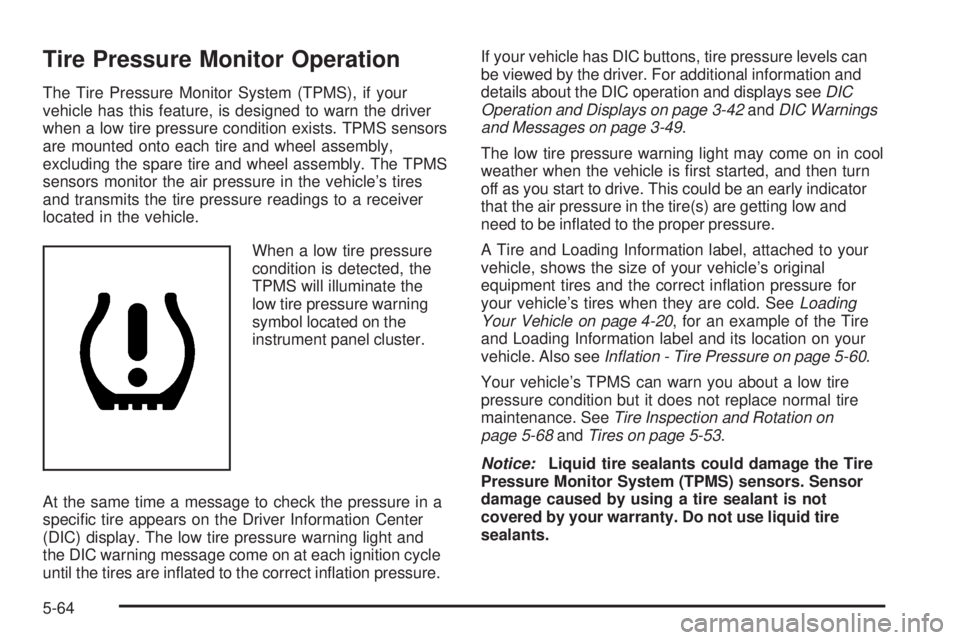
When a low tire pressure
condition is detected, the
TPMS will illuminate the
low tire pressure warning
symbol located on the
instrument panel cluster.
At the same time a message to check the pressure in a
specific tire appears on the Driver Information Center
(DIC) display. The low tire pressure warning light and
the DIC warning message come on at each ignition cycle
until the tires are inflated to the correct inflation pressure.If your vehicle has DIC buttons, tire pressure levels can
be viewed by the driver. For additional information and
details about the DIC operation and displays seeDIC
Operation and Displays on page 3-42andDIC Warnings
and Messages on page 3-49.
The low tire pressure warning light may come on in cool
weather when the vehicle is first started, and then turn
off as you start to drive. This could be an early indicator
that the air pressure in the tire(s) are getting low and
need to be inflated to the proper pressure.
A Tire and Loading Information label, attached to your
vehicle, shows the size of your vehicle’s original
equipment tires and the correct inflation pressure for
your vehicle’s tires when they are cold. SeeLoading
Your Vehicle on page 4-20, for an example of the Tire
and Loading Information label and its location on your
vehicle. Also seeInflation - Tire Pressure on page 5-60.
Your vehicle’s TPMS can warn you about a low tire
pressure condition but it does not replace normal tire
maintenance. SeeTire Inspection and Rotation on
page 5-68andTires on page 5-53.
Notice:Liquid tire sealants could damage the Tire
Pressure Monitor System (TPMS) sensors. Sensor
damage caused by using a tire sealant is not
covered by your warranty. Do not use liquid tire
sealants.
5-64
Page 307 of 402
If your vehicle does not have RKE, press the Driver
Information Center (DIC) vehicle information button
until the PRESS
VTO RELEARN TIRE POSITIONS
message displays. The horn sounds twice to signal
the receiver is in relearn mode and TIRE LEARNING
ACTIVE message displays on the DIC screen.
If your vehicle does not have RKE or DIC buttons,
press the trip odometer reset stem located on the
instrument panel cluster until the PRESS
VTO
RELEARN TIRE POSITIONS message displays.
The horn sounds twice to signal the receiver is in
relearn mode and TIRE LEARNING ACTIVE
message displays on the DIC screen.
4. Start with the driver side front tire.
5. Remove the valve cap from the valve cap stem.
Activate the TPMS sensor by increasing or
decreasing the tire’s air pressure for five seconds,
or until a horn chirp sounds. The horn chirp, which
may take up to 30 seconds to sound, confirms that
the sensor identification code has been matched to
this tire and wheel position.6. Proceed to the passenger side front tire, and repeat
the procedure in Step 5.
7. Proceed to the passenger side rear tire, and repeat
the procedure in Step 5.
8. Proceed to the driver side rear tire, and repeat the
procedure in Step 5. The horn sounds two times to
indicate the sensor identification code has been
matched to the driver side rear tire, and that the
TPMS sensor matching process is no longer active.
The TIRE LEARNING ACTIVE message on the DIC
display screen goes off.
9. Turn the ignition switch to LOCK/OFF.
10. Set all four tires to the recommended air pressure
level as indicated on the Tire and Loading
Information label.
11. Put the valve caps back on the valve stems.
5-67
Page 337 of 402
If any of the soil remains, a commercial fabric cleaner
or spot lifter may be necessary. When a commercial
upholstery cleaner or spot lifter is to be used, test
a small hidden area for colorfastness first. If the
locally cleaned area gives any impression that a
ring formation may result, clean the entire surface.
After the cleaning process has been completed, a paper
towel can be used to blot excess moisture from the
fabric or carpet.
Instrument Panel, Vinyl, and Other
Plastic Surfaces
A soft cloth dampened with water may be used to
remove dust. If a more thorough cleaning is necessary,
a clean soft cloth dampened with a mild soap solution
can be used to gently remove dust and dirt. Never use
spot lifters or removers on plastic surfaces. Many
commercial cleaners and coatings that are sold to
preserve and protect soft plastic surfaces may
permanently change the appearance and feel of your
interior and are not recommended. Do not use silicone
or wax-based products, or those containing organic
solvents to clean your vehicle’s interior because they
can alter the appearance by increasing the gloss in a
non-uniform manner.Some commercial products may increase gloss on your
instrument panel. The increase in gloss may cause
annoying reflections in the windshield and even make it
difficult to see through the windshield under certain
conditions.
Care of Safety Belts
Keep belts clean and dry.
{CAUTION:
Do not bleach or dye safety belts. If you do, it
may severely weaken them. In a crash, they
might not be able to provide adequate
protection. Clean safety belts only with mild
soap and lukewarm water.
Weatherstrips
Silicone grease on weatherstrips will make them last
longer, seal better, and not stick or squeak. Apply
silicone grease with a clean cloth. During very cold,
damp weather frequent application may be required. See
Recommended Fluids and Lubricants on page 6-14.
5-97
Page 343 of 402
Vehicle Identication
Vehicle Identication Number (VIN)
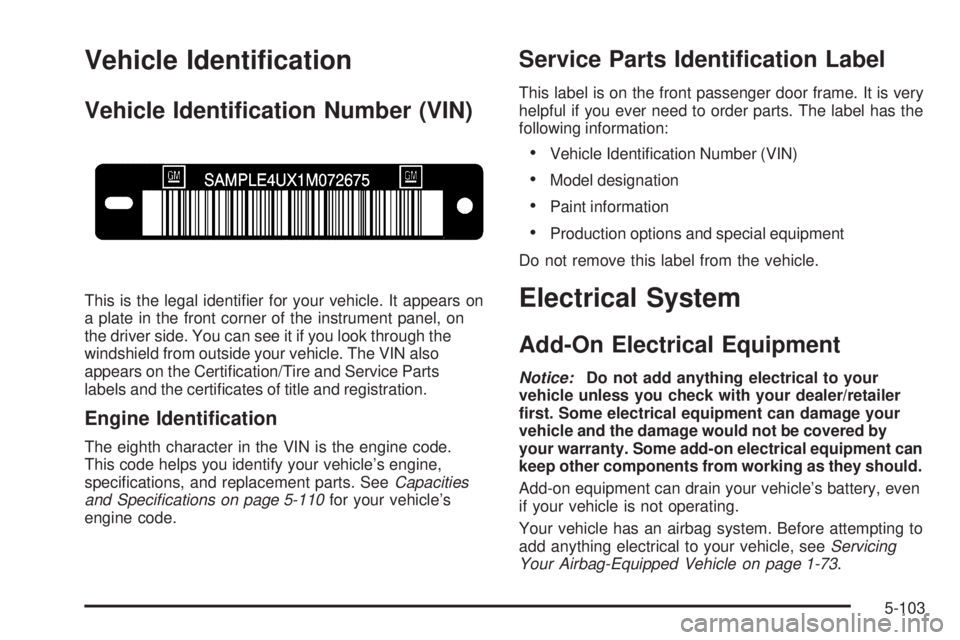
This is the legal identifier for your vehicle. It appears on
a plate in the front corner of the instrument panel, on
the driver side. You can see it if you look through the
windshield from outside your vehicle. The VIN also
appears on the Certification/Tire and Service Parts
labels and the certificates of title and registration.
Engine Identication
The eighth character in the VIN is the engine code.
This code helps you identify your vehicle’s engine,
specifications, and replacement parts. SeeCapacities
and Specifications on page 5-110for your vehicle’s
engine code.
Service Parts Identication Label
This label is on the front passenger door frame. It is very
helpful if you ever need to order parts. The label has the
following information:
•Vehicle Identification Number (VIN)
•Model designation
•Paint information
•Production options and special equipment
Do not remove this label from the vehicle.
Electrical System
Add-On Electrical Equipment
Notice:Do not add anything electrical to your
vehicle unless you check with your dealer/retailer
rst. Some electrical equipment can damage your
vehicle and the damage would not be covered by
your warranty. Some add-on electrical equipment can
keep other components from working as they should.
Add-on equipment can drain your vehicle’s battery, even
if your vehicle is not operating.
Your vehicle has an airbag system. Before attempting to
add anything electrical to your vehicle, seeServicing
Your Airbag-Equipped Vehicle on page 1-73.
5-103
Page 345 of 402
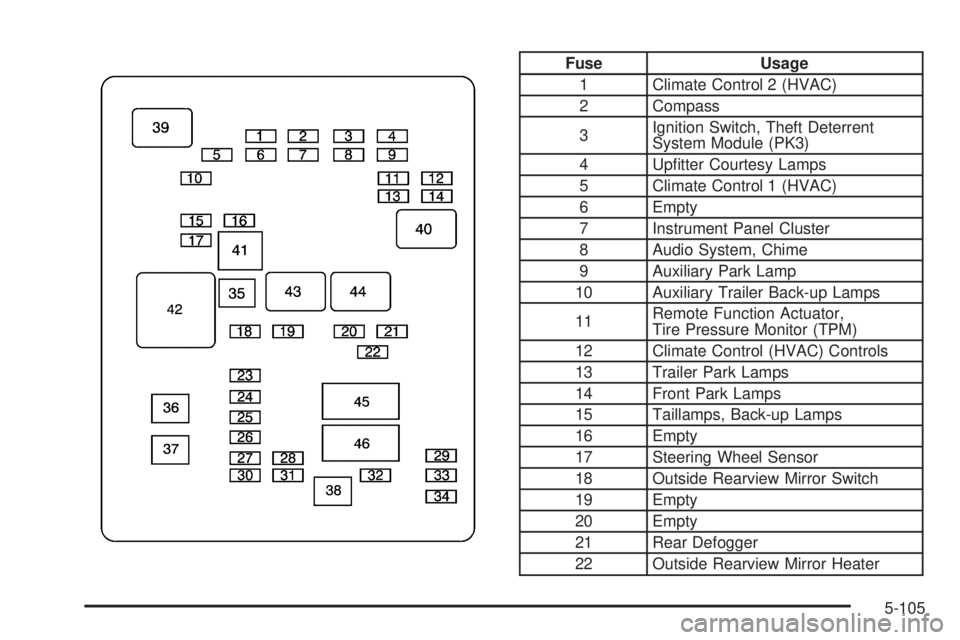
Fuse Usage
1 Climate Control 2 (HVAC)
2 Compass
3Ignition Switch, Theft Deterrent
System Module (PK3)
4 Upfitter Courtesy Lamps
5 Climate Control 1 (HVAC)
6 Empty
7 Instrument Panel Cluster
8 Audio System, Chime
9 Auxiliary Park Lamp
10 Auxiliary Trailer Back-up Lamps
11Remote Function Actuator,
Tire Pressure Monitor (TPM)
12 Climate Control (HVAC) Controls
13 Trailer Park Lamps
14 Front Park Lamps
15 Taillamps, Back-up Lamps
16 Empty
17 Steering Wheel Sensor
18 Outside Rearview Mirror Switch
19 Empty
20 Empty
21 Rear Defogger
22 Outside Rearview Mirror Heater
5-105
Page 348 of 402
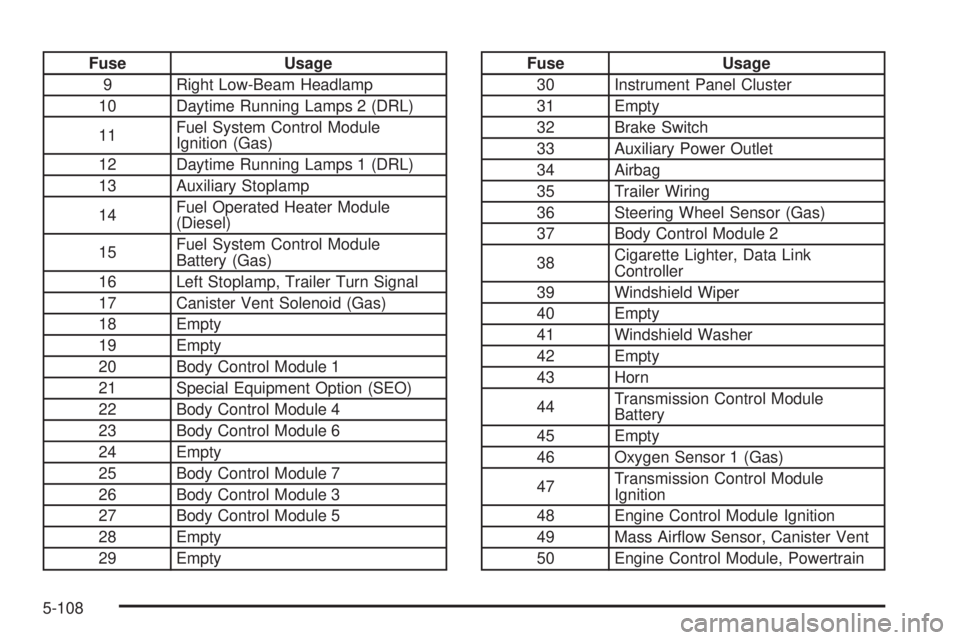
Fuse Usage
9 Right Low-Beam Headlamp
10 Daytime Running Lamps 2 (DRL)
11Fuel System Control Module
Ignition (Gas)
12 Daytime Running Lamps 1 (DRL)
13 Auxiliary Stoplamp
14Fuel Operated Heater Module
(Diesel)
15Fuel System Control Module
Battery (Gas)
16 Left Stoplamp, Trailer Turn Signal
17 Canister Vent Solenoid (Gas)
18 Empty
19 Empty
20 Body Control Module 1
21 Special Equipment Option (SEO)
22 Body Control Module 4
23 Body Control Module 6
24 Empty
25 Body Control Module 7
26 Body Control Module 3
27 Body Control Module 5
28 Empty
29 EmptyFuse Usage
30 Instrument Panel Cluster
31 Empty
32 Brake Switch
33 Auxiliary Power Outlet
34 Airbag
35 Trailer Wiring
36 Steering Wheel Sensor (Gas)
37 Body Control Module 2
38Cigarette Lighter, Data Link
Controller
39 Windshield Wiper
40 Empty
41 Windshield Washer
42 Empty
43 Horn
44Transmission Control Module
Battery
45 Empty
46 Oxygen Sensor 1 (Gas)
47Transmission Control Module
Ignition
48 Engine Control Module Ignition
49 Mass Airflow Sensor, Canister Vent
50 Engine Control Module, Powertrain
5-108
Page 374 of 402
Customer Assistance and
Information
Customer Satisfaction Procedure
Your satisfaction and goodwill are important to
your dealer and to GMC. Normally, any concerns with
the sales transaction or the operation of the vehicle
will be resolved by your dealer’s sales or service
departments. Sometimes, however, despite the best
intentions of all concerned, misunderstandings can
occur. If your concern has not been resolved to your
satisfaction, the following steps should be taken:
STEP ONE:Discuss your concern with a member of
dealership management. Normally, concerns can
be quickly resolved at that level. If the matter has
already been reviewed with the sales, service or parts
manager, contact the owner of the dealership or
the general manager.
STEP TWO:If after contacting a member of dealership
management, it appears your concern cannot be
resolved by the dealership without further help, in the
U.S., contact the GMC Consumer Relations Manager by
calling 1-800-GMC-8782 (1-800-462-8782, Customer
Assistance prompt). In Canada, contact General Motors
of Canada Customer Communication by calling
1-800-263-3777 (English) or 1-800-263-7854 (French).We encourage you to call the toll-free number in order
to give your inquiry prompt attention. Please have the
following information available to give the Customer
Assistance Representative:
•Vehicle Identification Number (VIN). This is available
from the vehicle registration or title, or the plate at the
top left of the instrument panel and visible through
the windshield.
•Dealership name and location.
•Vehicle delivery date and present mileage.
When contacting GMC, please remember that your
concern will likely be resolved at a dealer’s facility.
That is why we suggest you follow Step One first if
you have a concern.
STEP THREE — U.S. Owners:Both General Motors
and your dealer are committed to making sure you are
completely satisfied with your new vehicle. However, if
you continue to remain unsatisfied after following the
procedure outlined in Steps One and Two, you should
file with the Better Business Bureau (BBB) Auto Line
Program to enforce your rights.
The BBB Auto Line Program is an out of court program
administered by the Council of Better Business Bureaus
to settle automotive disputes regarding vehicle repairs or
the interpretation of the New Vehicle Limited Warranty.
7-2
Page 391 of 402
A
Accessories and Modifications............................ 5-3
Adding Equipment to Your Airbag-Equipped
Vehicle.......................................................1-74
Additives, Fuel................................................. 5-7
Add-On Electrical Equipment...........................5-103
Air Cleaner/Filter, Engine.................................5-19
Air Conditioning..............................................3-19
Airbag
Off Light.....................................................3-28
Passenger Status Indicator...........................3-30
Readiness Light..........................................3-27
Airbag System................................................1-57
What Will You See After an Airbag Inflates?....1-64
When Should an Airbag Inflate?....................1-62
Where Are the Airbags?...............................1-60
Airbag Systems
Adding Equipment to Your
Airbag-Equipped Vehicle............................1-74
Airbag Off Switch........................................1-66
How Does an Airbag Restrain?......................1-64
Passenger Sensing System...........................1-69
Servicing Your Airbag-Equipped Vehicle..........1-73
What Makes an Airbag Inflate?......................1-64
All-Wheel Drive...............................................5-44
All-Wheel-Drive (AWD) System........................... 4-7
Antenna, Fixed Mast.......................................3-83
Antilock Brake System (ABS)............................. 4-4
Antilock Brake, System Warning Light................3-34Appearance Care
Aluminum Wheels......................................5-100
Care of Safety Belts....................................5-97
Chemical Paint Spotting..............................5-101
Cleaning Exterior Lamps/Lenses....................5-98
Fabric/Carpet..............................................5-96
Finish Care.................................................5-98
Finish Damage..........................................5-101
Instrument Panel, Vinyl, and Other
Plastic Surfaces.......................................5-97
Interior Cleaning..........................................5-95
Sheet Metal Damage..................................5-101
Tires........................................................5-101
Underbody Maintenance.............................5-101
Vehicle Care/Appearance Materials...............5-102
Washing Your Vehicle...................................5-98
Weatherstrips..............................................5-97
Windshield and Wiper Blades........................5-99
Appointments, Scheduling Service....................... 7-9
Ashtray.........................................................3-18
Audio System.................................................3-63
Audio Steering Wheel Controls......................3-82
Fixed Mast Antenna.....................................3-83
Radio Reception..........................................3-83
Setting the Clock.........................................3-65
Theft-Deterrent Feature................................3-82
Audio System(s).............................................3-67
Automatic Door Lock......................................... 2-8
Automatic Door Unlock...................................... 2-8
Automatic Headlamp System............................3-15
1
Page 393 of 402
Child Restraints (cont.)
Securing a Child Restraint in a
Rear Seat Position...................................1-46
Securing a Child Restraint in the
Right Front Seat Position..................1-48, 1-52
Where to Put the Restraint...........................1-38
Cigarette Lighter.............................................3-18
Cleaning
Aluminum Wheels......................................5-100
Exterior Lamps/Lenses.................................5-98
Fabric/Carpet..............................................5-96
Finish Care.................................................5-98
Instrument Panel, Vinyl, and
Other Plastic Surfaces..............................5-97
Interior.......................................................5-95
Tires........................................................5-101
Underbody Maintenance.............................5-101
Washing Your Vehicle...................................5-98
Weatherstrips..............................................5-97
Windshield and Wiper Blades........................5-99
Climate Control System...................................3-19
Outlet Adjustment........................................3-21
Rear Air Conditioning and Heating System......3-23
Rear Heating System...................................3-22
Clock, Setting.................................................3-65
Collision Damage Repair..................................7-11
Compass.......................................................3-47
Control of a Vehicle.......................................... 4-3Coolant
Engine Temperature Gage............................3-35
Heater, Engine............................................2-21
Cooling System..............................................5-28
Cruise Control................................................3-10
Cruise Control Light........................................3-40
Customer Assistance Information
Courtesy Transportation.................................. 7-9
Customer Assistance for
Text Telephone (TTY) Users........................ 7-4
Customer Assistance Offices........................... 7-5
Customer Satisfaction Procedure..................... 7-2
GM Mobility Reimbursement Program............... 7-6
Reporting Safety Defects to General Motors.....7-15
Reporting Safety Defects to the
Canadian Government..............................7-15
Reporting Safety Defects to the
United States Government.........................7-14
Roadside Assistance Program......................... 7-6
Service Publications Ordering Information........7-15
D
Daytime Running Lamps..................................3-15
Defensive Driving............................................. 4-2
Delayed Locking............................................... 2-7
DIC Compass.................................................3-47
Disc, MP3......................................................3-77
3
Page 396 of 402
Highbeam On Light.........................................3-40
Highway Hypnosis...........................................4-14
Hill and Mountain Roads..................................4-15
Hood
Checking Things Under................................5-12
Release.....................................................5-13
Horn............................................................... 3-6
How to Wear Safety Belts Properly...................1-15
I
Ignition Positions.............................................2-19
Infants and Young Children, Restraints...............1-32
Inflation - Tire Pressure...................................5-60
Instrument Panel
Overview..................................................... 3-4
Instrument Panel (I/P)
Brightness..................................................3-16
Cluster.......................................................3-25
J
Jump Starting.................................................5-40
K
Keyless Entry System....................................... 2-3
Keys............................................................... 2-2
L
Labeling, Tire Sidewall.....................................5-54
Lamps
Dome........................................................3-16
Dome Lamp Override...................................3-16
Reading.....................................................3-17
Lap-Shoulder Belt...........................................1-22
LATCH System
Child Restraints...........................................1-39
Light
Airbag Off..................................................3-28
Airbag Readiness........................................3-27
Antilock Brake System Warning.....................3-34
Brake System Warning.................................3-33
Charging System.........................................3-32
Cruise Control.............................................3-40
Highbeam On.............................................3-40
Malfunction Indicator....................................3-36
Oil Pressure...............................................3-39
Passenger Airbag Status Indicator..................3-30
Safety Belt Reminders..................................3-26
Security.....................................................3-40
StabiliTrak
®Indicator....................................3-34
Tire Pressure..............................................3-35
Tow/Haul Mode...........................................3-40
Lighting
Entry/Exit...................................................3-17
6