key GMC SAVANA 2009 User Guide
[x] Cancel search | Manufacturer: GMC, Model Year: 2009, Model line: SAVANA, Model: GMC SAVANA 2009Pages: 404, PDF Size: 2.35 MB
Page 90 of 404
Doors and Locks
Door Locks
{CAUTION:
Unlocked doors can be dangerous.
•Passengers, especially children, can easily
open the doors and fall out of a moving vehicle.
When a door is locked, the handle will not open
it. You increase the chance of being thrown out
of the vehicle in a crash if the doors are not
locked. So, wear safety belts properly and lock
the doors whenever you drive.
•Young children who get into unlocked vehicles
may be unable to get out. A child can be
overcome by extreme heat and can suffer
permanent injuries or even death from heat
stroke. Always lock your vehicle whenever you
leave it.
•Outsiders can easily enter through an unlocked
door when you slow down or stop your vehicle.
Locking your doors can help prevent this from
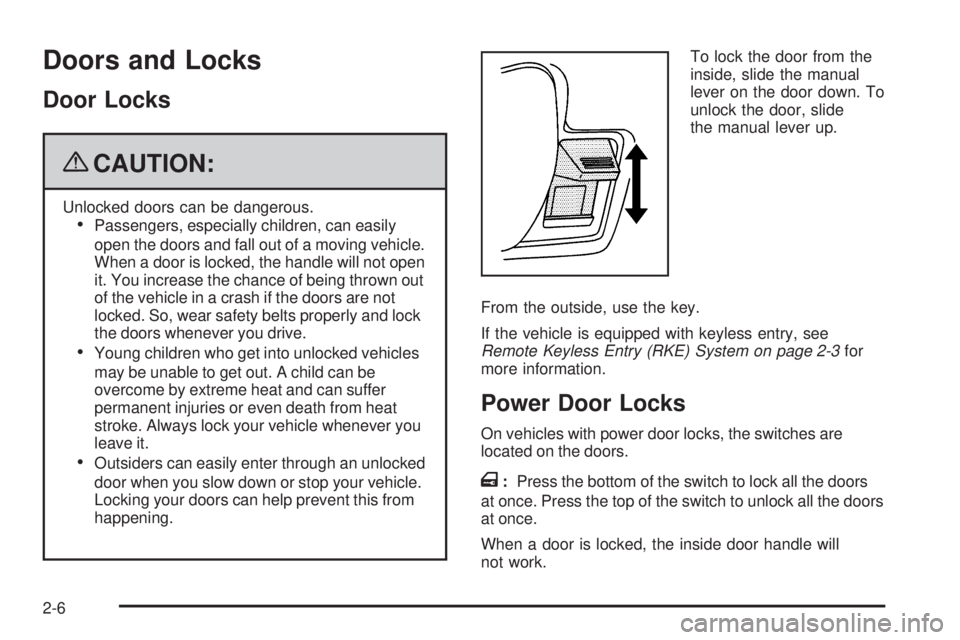
happening.To lock the door from the
inside, slide the manual
lever on the door down. To
unlock the door, slide
the manual lever up.
From the outside, use the key.
If the vehicle is equipped with keyless entry, see
Remote Keyless Entry (RKE) System on page 2-3for
more information.
Power Door Locks
On vehicles with power door locks, the switches are
located on the doors.
T:Press the bottom of the switch to lock all the doors
at once. Press the top of the switch to unlock all the doors
at once.
When a door is locked, the inside door handle will
not work.
2-6
Page 91 of 404
Cargo Door Relocking
If the cargo door is open when the lock button is
pressed on the door or the remote keyless entry
transmitter, all doors will lock except the cargo door.
The cargo door will only lock when they are closed or
when the delayed locking feature functions.
Delayed Locking
When locking the doors with the power lock switch and
a door open, the doors will lock five seconds after
the last door is closed. You will hear three chimes to
signal that the delayed locking feature is in use.
Pressing the power lock switch twice or the lock button
on the RKE transmitter twice will override the delayed
locking feature and immediately lock all the doors.
This feature will not operate if the key is in the ignition.
This feature can be programmed using the Driver
Information Center (DIC). See DELAY DOOR LOCK
underDIC Vehicle Customization on page 3-59.
Programmable Automatic Door
Locks
The vehicle is programmed so that when the doors are
closed, the ignition is on and the shift lever is moved out
of P (Park), all the doors will lock. The front doors will
remain unlocked from inside the vehicle. The doors will
unlock every time you stop the vehicle and move the shift
lever back into P (Park).
If someone needs to exit the vehicle once the doors are
locked, have that person use the manual lever or power
door lock switch for the rear doors. When the door is
closed again, it will not lock automatically. Use the
manual lever or the power door lock switch to lock
the door.
The power door locks can be programmed through the
Driver Information Center (DIC). For more information
on programming, seeDIC Vehicle Customization
on page 3-59.
2-7
Page 93 of 404
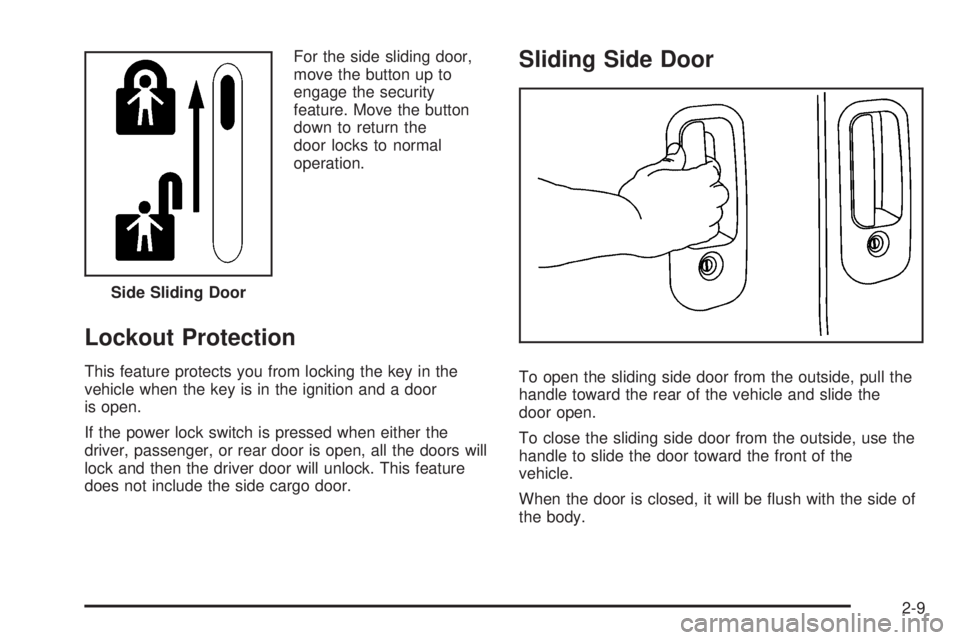
For the side sliding door,
move the button up to
engage the security
feature. Move the button
down to return the
door locks to normal
operation.
Lockout Protection
This feature protects you from locking the key in the
vehicle when the key is in the ignition and a door
is open.
If the power lock switch is pressed when either the
driver, passenger, or rear door is open, all the doors will
lock and then the driver door will unlock. This feature
does not include the side cargo door.
Sliding Side Door
To open the sliding side door from the outside, pull the
handle toward the rear of the vehicle and slide the
door open.
To close the sliding side door from the outside, use the
handle to slide the door toward the front of the
vehicle.
When the door is closed, it will be flush with the side of
the body. Side Sliding Door
2-9
Page 98 of 404
Power Windows
{CAUTION:
Leaving children in a vehicle with the keys is
dangerous for many reasons, children or others
could be badly injured or even killed. They could
operate the power windows or other controls or
even make the vehicle move. The windows will
function and they could be seriously injured or
killed if caught in the path of a closing window. Do
not leave keys in a vehicle with children.
When there are children in the rear seat use the
window lockout button to prevent unintentional
operation of the windows.If the vehicle has power
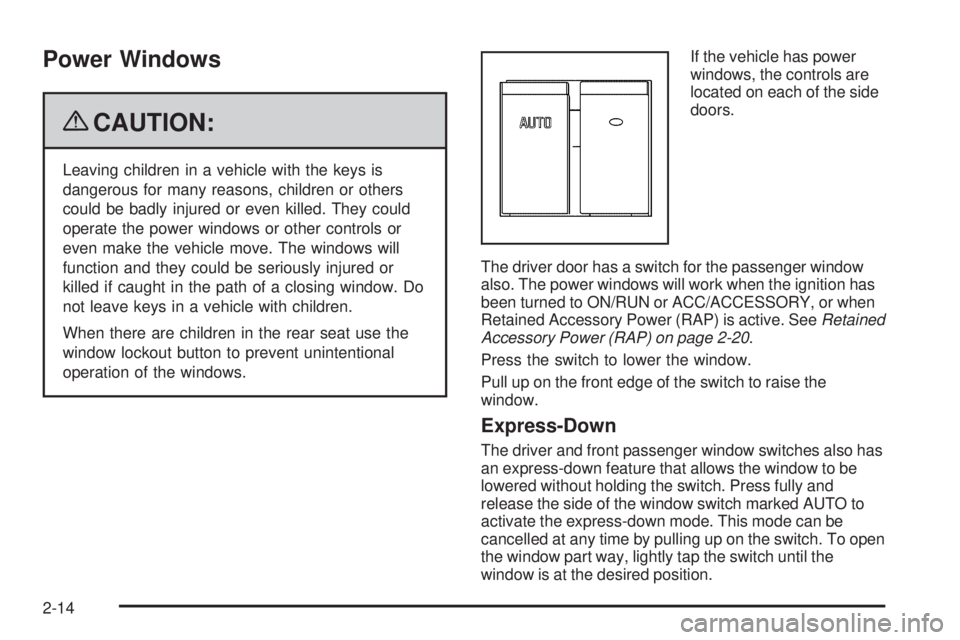
windows, the controls are
located on each of the side
doors.
The driver door has a switch for the passenger window
also. The power windows will work when the ignition has
been turned to ON/RUN or ACC/ACCESSORY, or when
Retained Accessory Power (RAP) is active. SeeRetained
Accessory Power (RAP) on page 2-20.
Press the switch to lower the window.
Pull up on the front edge of the switch to raise the
window.
Express-Down
The driver and front passenger window switches also has
an express-down feature that allows the window to be
lowered without holding the switch. Press fully and
release the side of the window switch marked AUTO to
activate the express-down mode. This mode can be
cancelled at any time by pulling up on the switch. To open
the window part way, lightly tap the switch until the
window is at the desired position.
2-14
Page 101 of 404
PASS-Key®III+ Electronic
Immobilizer
The PASS-Key III+ system operates on a radio
frequency subject to Federal Communications
Commission (FCC) Rules and with Industry Canada.
This device complies with Part 15 of the FCC Rules.
Operation is subject to the following two conditions:
1. This device may not cause harmful interference.
2. This device must accept any interference received,
including interference that may cause undesired
operation.
This device complies with RSS-210 of Industry Canada.
Operation is subject to the following two conditions:
1. This device may not cause interference.
2. This device must accept any interference received,
including interference that may cause undesired
operation of the device.
Changes or modifications to this system by other than
an authorized service facility could void authorization to
use this equipment.
PASS-Key III+ uses a radio frequency transponder in
the key that matches a decoder in the vehicle.
PASS-Key®III+ Electronic
Immobilizer Operation
Your vehicle is equipped with the PASS-Key®III+
(Personalized Automotive Security System)
theft-deterrent system. PASS-Key
®III+ is a passive
theft deterrent system.
The system is automatically armed when the key is
removed from the ignition.
You do not have to manually arm or disarm the system.
The security light will come on if there is a problem
with arming or disarming the theft-deterrent system.
When the PASS-Key
®III+ system senses that someone
is using the wrong key, it shuts down the vehicle’s
starter and fuel systems. The starter will not work and
fuel will stop being delivered to the engine. Anyone
using a trial-and-error method to start the vehicle will be
discouraged because of the high number of electrical
key codes.
If the engine does not start and the security message
comes on, the key may have a damaged transponder.
Turn the ignition off and try again.
2-17
Page 102 of 404
If the engine still does not start, and the key appears to
be undamaged, try another ignition key. At this time,
you may also want to check the instrument panel PASS
KEY fuse. If the engine still does not start with the
other key, your vehicle needs service. If your vehicle
does start, the first key may be faulty. See your
dealer/retailer or a locksmith who can service the
PASS-Key
®III+ to have a new key made. SeeFuses
and Circuit Breakers on page 5-104.
It is possible for the PASS-Key
®III+ decoder to learn
the transponder value of a new or replacement key. Up
to 10 keys may be programmed for the vehicle. This
procedure is for learning additional keys only. If all the
currently programmed keys are lost or do not operate,
you must see your dealer/retailer or a locksmith who can
service PASS-Key
®III+ to have keys made and
programmed to the system.
See your dealer/retailer or a locksmith who can service
PASS-Key
®III+ to get a new key blank that is cut
exactly as the ignition key that operates the system.To program the new key:
1. Verify the new key has
1stamped on it.
2. Insert the original, already programmed key into the
ignition lock cylinder and start the engine. If the
engine will not start, see your dealer/retailer
for service.
3. After the engine has started, turn the key to
LOCK/OFF and remove the key.
4. Insert the key to be programmed and turn it to
ON/RUN within 10 seconds of removing the
previous key.
The security message will turn off once the key has
been programmed. It may not be apparent that
the security message went on due to how quickly
the key is programmed.
5. Repeat Steps 1 through 4 if additional keys are to
be programmed.
If you lose or damage a PASS-Key
®III+ key, see your
dealer/retailer or a locksmith who can service
PASS-Key
®III+ to have a new key made.
Do not leave the key or device that disarms or
deactivates the theft deterrent system in the vehicle.
2-18
Page 103 of 404
Starting and Operating Your
Vehicle
New Vehicle Break-In
Notice:The vehicle does not need an elaborate
break-in. But it will perform better in the long run if
you follow these guidelines:
Keep your speed at 55 mph (88 km/h) or less for
the rst 500 miles (805 km).
Do not drive at any one constant speed, fast or
slow, for the rst 500 miles (805 km). Do not
make full-throttle starts. Avoid downshifting to
brake or slow the vehicle.
Avoid making hard stops for the rst 200 miles
(322 km) or so. During this time the new brake
linings are not yet broken in. Hard stops
with new linings can mean premature wear and
earlier replacement. Follow this breaking-in
guideline every time you get new brake linings.
Do not tow a trailer during break-in. SeeTowing
a Trailer on page 4-26for the trailer towing
capabilities of the vehicle and more information.
Following break-in, engine speed and load can
be gradually increased.
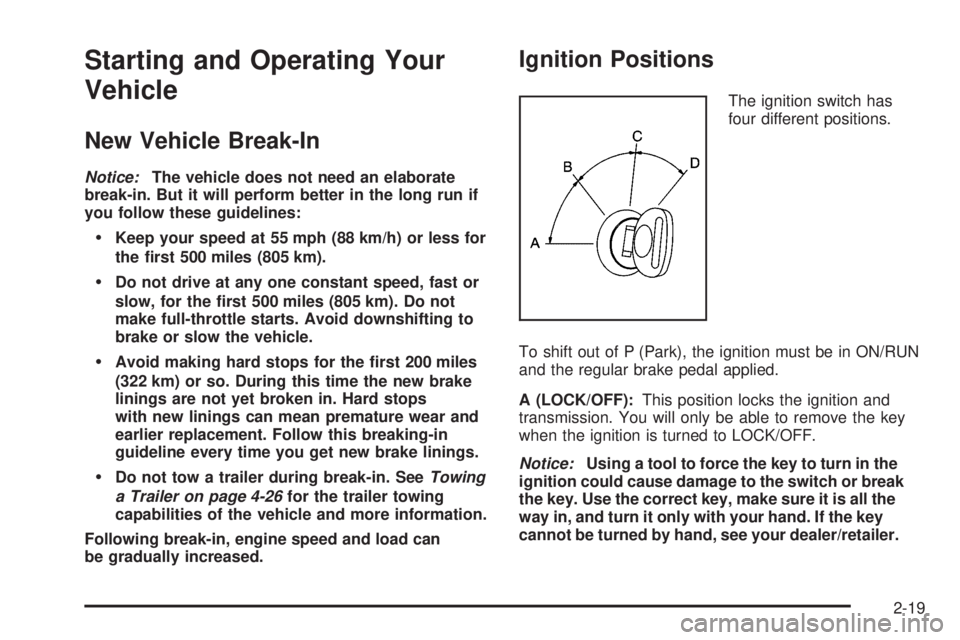
Ignition Positions
The ignition switch has
four different positions.
To shift out of P (Park), the ignition must be in ON/RUN
and the regular brake pedal applied.
A (LOCK/OFF):This position locks the ignition and
transmission. You will only be able to remove the key
when the ignition is turned to LOCK/OFF.
Notice:Using a tool to force the key to turn in the
ignition could cause damage to the switch or break
the key. Use the correct key, make sure it is all the
way in, and turn it only with your hand. If the key
cannot be turned by hand, see your dealer/retailer.
2-19
Page 104 of 404
B (ACC/ACCESSORY):This is the position in which
you can operate things like the radio and the windshield
wipers when the engine is off.
C (ON/RUN):This position can be used to operate the
electrical accessories and to display some instrument
panel cluster warning and indicator lights. The switch
stays in this position when the engine is running.
If you leave the key in the ACC/ACCESSORY or ON/
RUN position with the engine off, the battery could be
drained. You may not be able to start the vehicle if the
battery is allowed to drain for an extended period of time.
D (START):This is the position that starts the engine.
When the engine starts, release the key. The ignition
switch returns to ON/RUN for driving.
A warning tone will sound when the driver door is
opened, the ignition is in ACC/ACCESSORY or
LOCK/OFF and the key is in the ignition.Retained Accessory Power (RAP)
These vehicle accessories can be used for up to
10 minutes after the engine is turned off:
•Audio System
•Power Windows (if equipped)
These features will work when the ignition key is in
ON/RUN or ACC/ACCESSORY. Once the key is turned
from ON/RUN to LOCK/OFF, power to the radio will
continue to work 10 minutes or until the driver door is
opened. The power windows will continue to work for up
to 10 minutes or until any door is opened.
Starting the Engine
If the vehicle has the DURAMAX®Diesel engine, see
the DURAMAX®Diesel manual for more information.
To place the transmission in the proper gear:
Move the shift lever to P (Park) or N (Neutral). The
engine will not start in any other position. To restart the
engine when the vehicle is already moving, use
N (Neutral) only.
2-20
Page 105 of 404
Starting Procedure
1. With your foot off the accelerator pedal, turn the
ignition key to START. When the engine starts,
let go of the key. The idle speed will go down as
your engine gets warm. Do not race the engine
immediately after starting it. Operate the engine and
transmission gently to allow the oil to warm up
and lubricate all moving parts.
The vehicle has a Computer-Controlled Cranking
System. This feature assists in starting the engine
and protects components. If the ignition key is turned
to the START position, and then released when the
engine begins cranking, the engine will continue
cranking for a few seconds or until the vehicle starts.
If the engine does not start and the key is held in
START for many seconds, cranking will be stopped
after 15 seconds to prevent cranking motor damage.
To prevent gear damage, this system also prevents
cranking if the engine is already running. Engine
cranking can be stopped by turning the ignition
switch to the ACC/ACCESSORY or LOCK/OFF
position.
Notice:Cranking the engine for long periods of
time, by returning the key to the START position
immediately after cranking has ended, can overheat
and damage the cranking motor, and drain the
battery. Wait at least 15 seconds between each try,
to let the cranking motor cool down.2. If the engine does not start after 5-10 seconds,
especially in very cold weather (below 0°F or
−18°C), it could be flooded with too much gasoline.
Try pushing the accelerator pedal all the way to
the floor and holding it there as you hold the key in
START for up to 15 seconds. Wait at least
15 seconds between each try, to allow the cranking
motor to cool down. When the engine starts, let
go of the key and accelerator. If the vehicle starts
briefly but then stops again, do the same thing. This
clears the extra gasoline from the engine. Do not
race the engine immediately after starting it.
Operate the engine and transmission gently until
the oil warms up and lubricates all moving parts.
Notice:The engine is designed to work with the
electronics in the vehicle. If you add electrical parts
or accessories, you could change the way the
engine operates. Before adding electrical equipment,
check with your dealer/retailer. If you do not, the
engine might not perform properly. Any resulting
damage would not be covered by the vehicle
warranty.
2-21
Page 111 of 404
To release the parking brake, hold the regular brake
pedal down. Pull the handle, located just above the
parking brake pedal, with the parking brake symbol, to
release the parking brake.
If the ignition is on when the parking brake is released,
the brake system warning light will go off.
Notice:Driving with the parking brake on can
overheat the brake system and cause premature
wear or damage to brake system parts. Verify that
the parking brake is fully released and the brake
warning light is off before driving.
If you are towing a trailer and are parking on a hill, see
Towing a Trailer on page 4-26.Shifting Into Park
{CAUTION:
It can be dangerous to get out of the vehicle if the
shift lever is not fully in P (Park) with the parking
brake firmly set. The vehicle can roll. If you have
left the engine running, the vehicle can move
suddenly. You or others could be injured. To be
sure the vehicle will not move, even when you are
on fairly level ground, use the steps that follow. If
you are pulling a trailer, seeTowing a Trailer on
page 4-26.
1. Hold the brake pedal down and set the parking
brake. SeeParking Brake on page 2-26.
2. Move the shift lever into P (Park) by pulling the
shift lever toward you and moving it up as far as
it will go.
3. Turn the ignition key to LOCK/OFF.
4. Remove the key and take it with you. If you can
leave the vehicle with the ignition key in your
hand, the vehicle is in P (Park).
2-27