wheel GMC SAVANA 2009 Manual PDF
[x] Cancel search | Manufacturer: GMC, Model Year: 2009, Model line: SAVANA, Model: GMC SAVANA 2009Pages: 404, PDF Size: 2.35 MB
Page 329 of 404
{CAUTION:
Getting under a vehicle when it is jacked up is
dangerous. If the vehicle slips off the jack you
could be badly injured or killed. Never get under
a vehicle when it is supported only by a jack.
{CAUTION:
Raising your vehicle with the jack improperly
positioned can damage the vehicle and even
make the vehicle fall. To help avoid personal injury
and vehicle damage, be sure to fit the jack lift
head into the proper location before raising the
vehicle.5. Raise the vehicle by turning the wheel wrench
clockwise. Raise the vehicle far enough off the
ground so there is enough room for the spare
tire to fit.
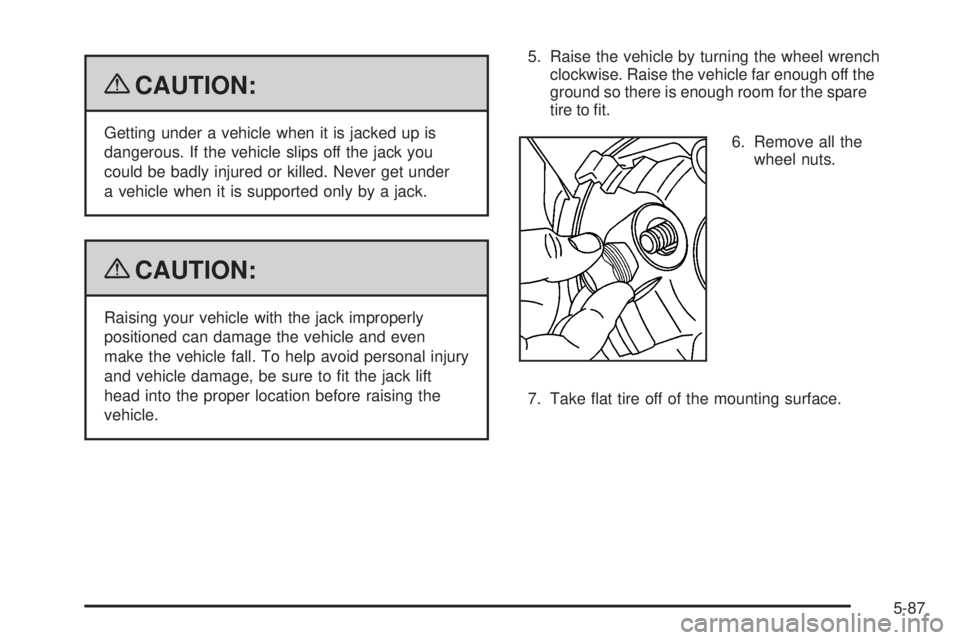
6. Remove all the
wheel nuts.
7. Take flat tire off of the mounting surface.
5-87
Page 330 of 404
{CAUTION:
Rust or dirt on a wheel, or on the parts to which it
is fastened, can make wheel nuts become loose
after time. The wheel could come off and cause an
accident. When changing a wheel, remove any rust
or dirt from places where the wheel attaches to the
vehicle. In an emergency, use a cloth or a paper
towel to do this; but be sure to use a scraper or wire
brush later, if needed, to get all the rust or dirt off.
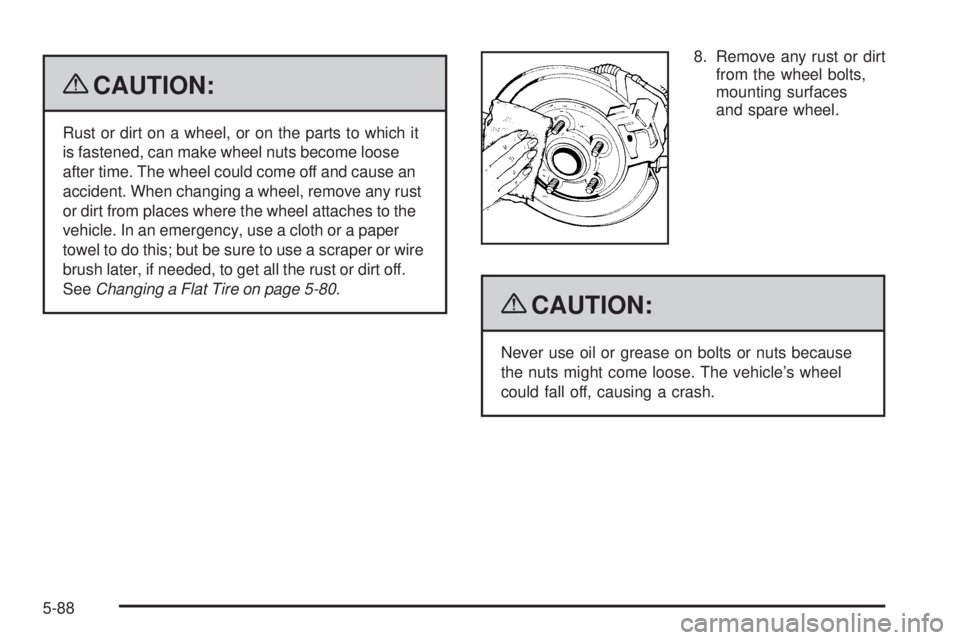
SeeChanging a Flat Tire on page 5-80.8. Remove any rust or dirt
from the wheel bolts,
mounting surfaces
and spare wheel.
{CAUTION:
Never use oil or grease on bolts or nuts because
the nuts might come loose. The vehicle’s wheel
could fall off, causing a crash.
5-88
Page 331 of 404
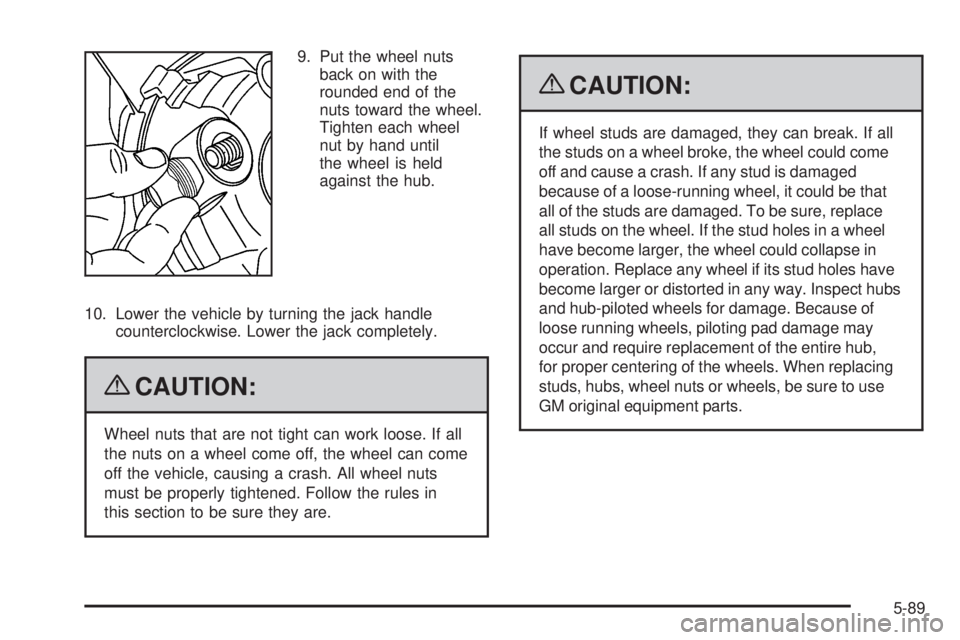
9. Put the wheel nuts
back on with the
rounded end of the
nuts toward the wheel.
Tighten each wheel
nut by hand until
the wheel is held
against the hub.
10. Lower the vehicle by turning the jack handle
counterclockwise. Lower the jack completely.
{CAUTION:
Wheel nuts that are not tight can work loose. If all
the nuts on a wheel come off, the wheel can come
off the vehicle, causing a crash. All wheel nuts
must be properly tightened. Follow the rules in
this section to be sure they are.
{CAUTION:
If wheel studs are damaged, they can break. If all
the studs on a wheel broke, the wheel could come
off and cause a crash. If any stud is damaged
because of a loose-running wheel, it could be that
all of the studs are damaged. To be sure, replace
all studs on the wheel. If the stud holes in a wheel
have become larger, the wheel could collapse in
operation. Replace any wheel if its stud holes have
become larger or distorted in any way. Inspect hubs
and hub-piloted wheels for damage. Because of
loose running wheels, piloting pad damage may
occur and require replacement of the entire hub,
for proper centering of the wheels. When replacing
studs, hubs, wheel nuts or wheels, be sure to use
GM original equipment parts.
5-89
Page 332 of 404
{CAUTION:
Incorrect or improperly tightened wheel nuts can
cause the wheel to come loose and even come off.
This could lead to a crash. If you have to replace
them, be sure to get new original equipment wheel
nuts. Stop somewhere as soon as you can and
have the nuts tightened with a torque wrench to the
proper torque specification. SeeCapacities and
Specifications on page 5-110for wheel nut torque
specification.
Notice:Improperly tightened wheel nuts can
lead to brake pulsation and rotor damage. To avoid
expensive brake repairs, evenly tighten the wheel
nuts in the proper sequence and to the proper torque
specication. SeeCapacities and Specifications on
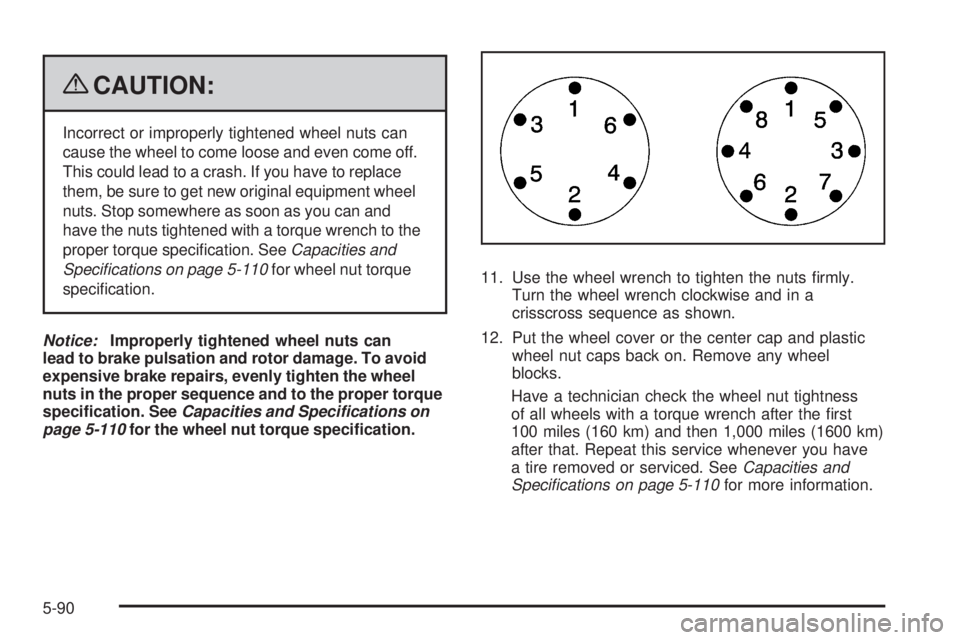
page 5-110for the wheel nut torque specication.11. Use the wheel wrench to tighten the nuts firmly.
Turn the wheel wrench clockwise and in a
crisscross sequence as shown.
12. Put the wheel cover or the center cap and plastic
wheel nut caps back on. Remove any wheel
blocks.
Have a technician check the wheel nut tightness
of all wheels with a torque wrench after the first
100 miles (160 km) and then 1,000 miles (1600 km)
after that. Repeat this service whenever you have
a tire removed or serviced. SeeCapacities and
Specifications on page 5-110for more information.
5-90
Page 334 of 404
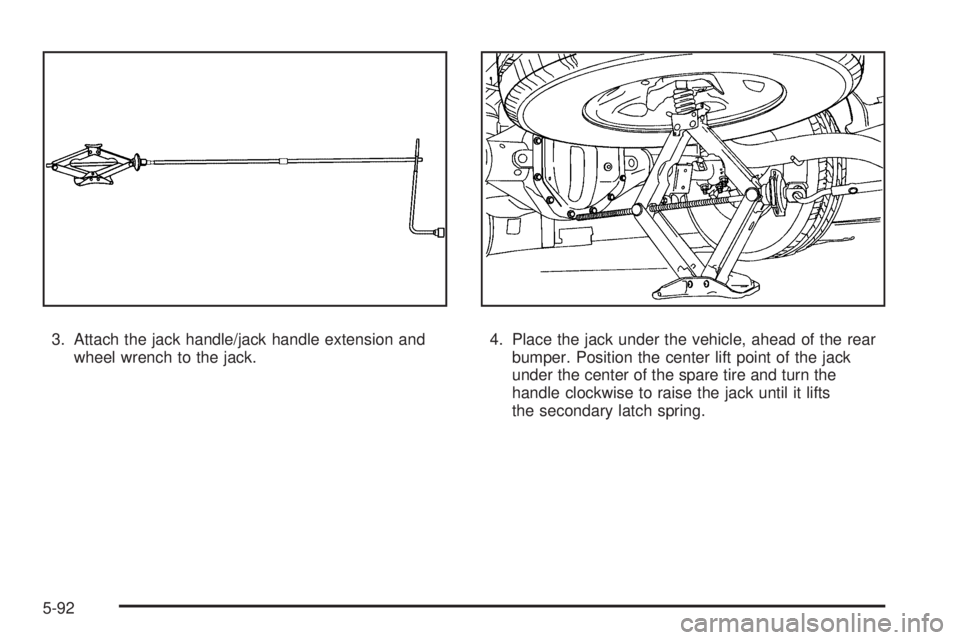
3. Attach the jack handle/jack handle extension and
wheel wrench to the jack.4. Place the jack under the vehicle, ahead of the rear
bumper. Position the center lift point of the jack
under the center of the spare tire and turn the
handle clockwise to raise the jack until it lifts
the secondary latch spring.
5-92
Page 335 of 404
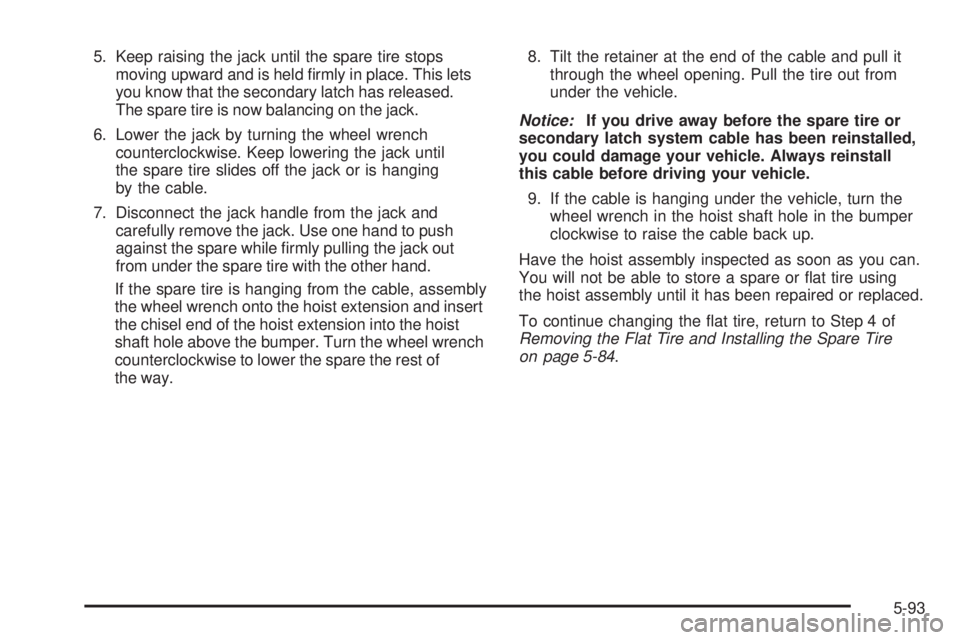
5. Keep raising the jack until the spare tire stops
moving upward and is held firmly in place. This lets
you know that the secondary latch has released.
The spare tire is now balancing on the jack.
6. Lower the jack by turning the wheel wrench
counterclockwise. Keep lowering the jack until
the spare tire slides off the jack or is hanging
by the cable.
7. Disconnect the jack handle from the jack and
carefully remove the jack. Use one hand to push
against the spare while firmly pulling the jack out
from under the spare tire with the other hand.
If the spare tire is hanging from the cable, assembly
the wheel wrench onto the hoist extension and insert
the chisel end of the hoist extension into the hoist
shaft hole above the bumper. Turn the wheel wrench
counterclockwise to lower the spare the rest of
the way.8. Tilt the retainer at the end of the cable and pull it
through the wheel opening. Pull the tire out from
under the vehicle.
Notice:If you drive away before the spare tire or
secondary latch system cable has been reinstalled,
you could damage your vehicle. Always reinstall
this cable before driving your vehicle.
9. If the cable is hanging under the vehicle, turn the
wheel wrench in the hoist shaft hole in the bumper
clockwise to raise the cable back up.
Have the hoist assembly inspected as soon as you can.
You will not be able to store a spare or flat tire using
the hoist assembly until it has been repaired or replaced.
To continue changing the flat tire, return to Step 4 of
Removing the Flat Tire and Installing the Spare Tire
on page 5-84.
5-93
Page 336 of 404
Storing a Flat or Spare Tire and
Tools
{CAUTION:
Storing a jack, a tire, or other equipment in the
passenger compartment of the vehicle could
cause injury. In a sudden stop or collision, loose
equipment could strike someone. Store all these
in the proper place.
1. Put the tire on the ground at the rear of the vehicle
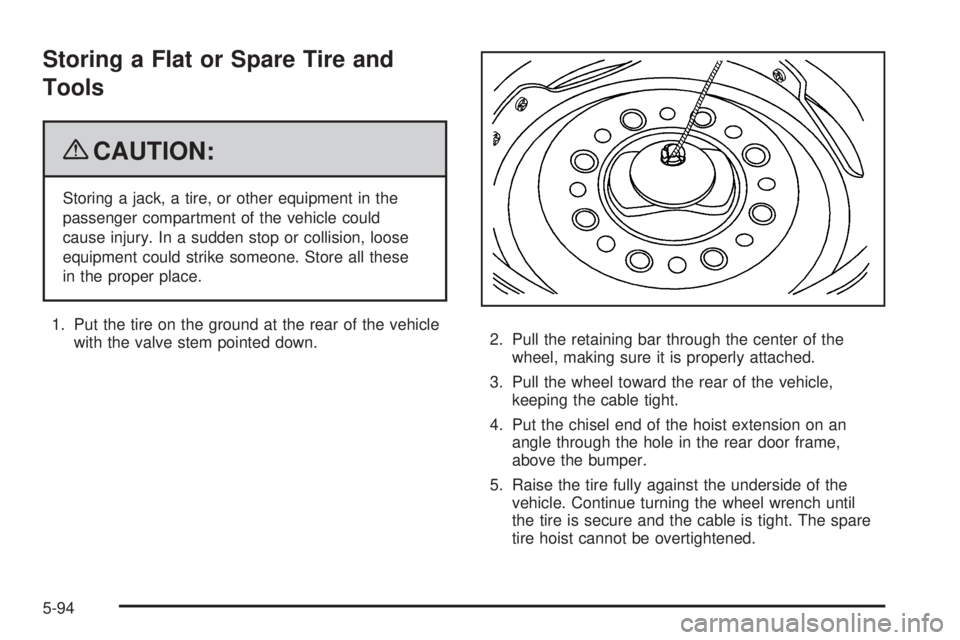
with the valve stem pointed down.2. Pull the retaining bar through the center of the
wheel, making sure it is properly attached.
3. Pull the wheel toward the rear of the vehicle,
keeping the cable tight.
4. Put the chisel end of the hoist extension on an
angle through the hole in the rear door frame,
above the bumper.
5. Raise the tire fully against the underside of the
vehicle. Continue turning the wheel wrench until
the tire is secure and the cable is tight. The spare
tire hoist cannot be overtightened.
5-94
Page 337 of 404
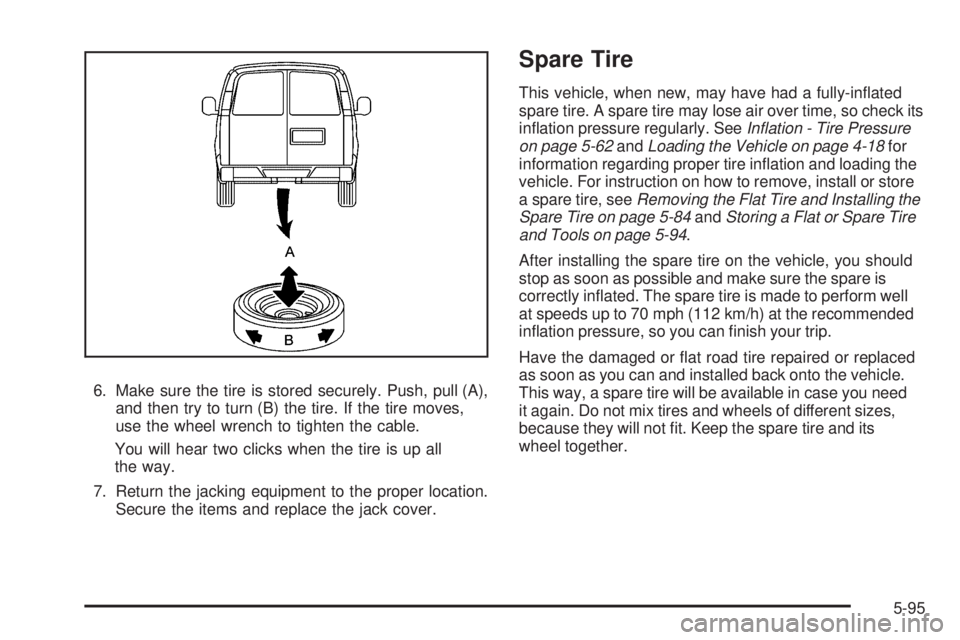
6. Make sure the tire is stored securely. Push, pull (A),
and then try to turn (B) the tire. If the tire moves,
use the wheel wrench to tighten the cable.
You will hear two clicks when the tire is up all
the way.
7. Return the jacking equipment to the proper location.
Secure the items and replace the jack cover.
Spare Tire
This vehicle, when new, may have had a fully-inflated
spare tire. A spare tire may lose air over time, so check its
inflation pressure regularly. SeeInflation - Tire Pressure
on page 5-62andLoading the Vehicle on page 4-18for
information regarding proper tire inflation and loading the
vehicle. For instruction on how to remove, install or store
a spare tire, seeRemoving the Flat Tire and Installing the
Spare Tire on page 5-84andStoring a Flat or Spare Tire
and Tools on page 5-94.
After installing the spare tire on the vehicle, you should
stop as soon as possible and make sure the spare is
correctly inflated. The spare tire is made to perform well
at speeds up to 70 mph (112 km/h) at the recommended
inflation pressure, so you can finish your trip.
Have the damaged or flat road tire repaired or replaced
as soon as you can and installed back onto the vehicle.
This way, a spare tire will be available in case you need
it again. Do not mix tires and wheels of different sizes,
because they will not fit. Keep the spare tire and its
wheel together.
5-95
Page 343 of 404
Aluminum Wheels
Notice:Using strong soaps, chemicals, abrasive
polishes, cleaners, brushes, or cleaners that contain
acid on aluminum or chrome-plated wheels, could
damage the surface of the wheel(s). The repairs
would not be covered by the warranty. Use only
approved cleaners on aluminum or chrome-plated
wheels.
Keep the wheels clean using a soft clean cloth with mild
soap and water. Rinse with clean water. After rinsing
thoroughly, dry with a soft clean towel. A wax may then
be applied.
Notice:Using chrome polish on aluminum wheels
could damage the wheels. The repairs would not
be covered by the warranty. Use chrome polish
on chrome wheels only.
The surface of these wheels is similar to the painted
surface of the vehicle. Do not use strong soaps,
chemicals, abrasive polishes, abrasive cleaners,
cleaners with acid, or abrasive cleaning brushes
on them because the surface could be damaged.
Do not use chrome polish on aluminum wheels.Notice:Driving the vehicle through an automatic
car wash that has silicone carbide tire cleaning
brushes, could damage the aluminum or
chrome-plated wheels. The repairs would not be
covered by the warranty. Never drive a vehicle
equipped with aluminum or chrome-plated wheels
through an automatic car wash that uses silicone
carbide tire cleaning brushes.
Tires
To clean the tires, use a stiff brush with tire cleaner.
Notice:Using petroleum-based tire dressing
products on the vehicle may damage the paint nish
and/or tires. When applying a tire dressing, always
wipe off any overspray from all painted surfaces
on the vehicle.
Sheet Metal Damage
If the vehicle is damaged and requires sheet metal
repair or replacement, make sure the body repair shop
applies anti-corrosion material to parts repaired or
replaced to restore corrosion protection.
Original manufacturer replacement parts will provide
the corrosion protection while maintaining the vehicle
warranty.
5-101
Page 347 of 404
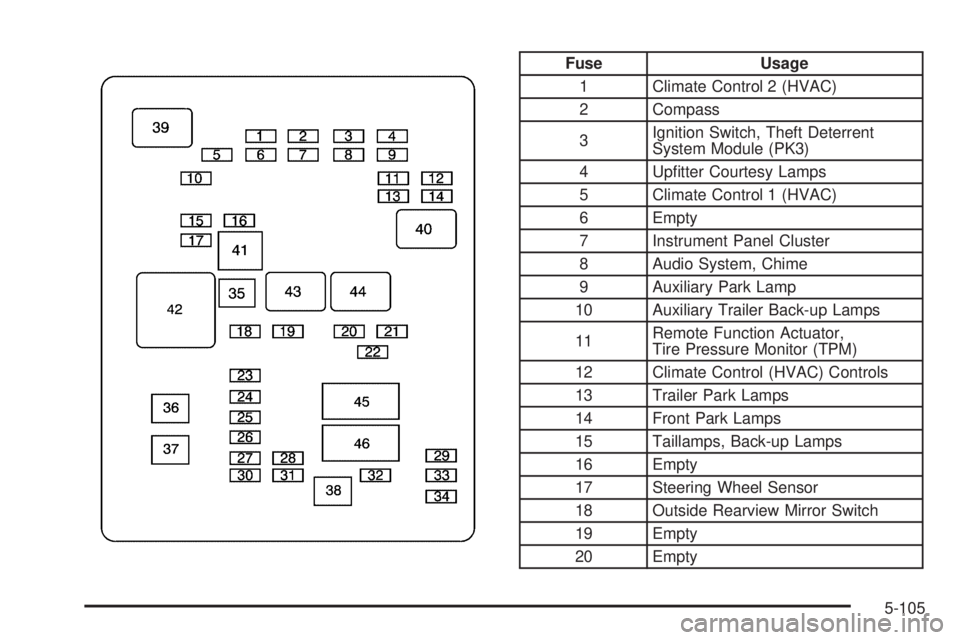
Fuse Usage
1 Climate Control 2 (HVAC)
2 Compass
3Ignition Switch, Theft Deterrent
System Module (PK3)
4 Upfitter Courtesy Lamps
5 Climate Control 1 (HVAC)
6 Empty
7 Instrument Panel Cluster
8 Audio System, Chime
9 Auxiliary Park Lamp
10 Auxiliary Trailer Back-up Lamps
11Remote Function Actuator,
Tire Pressure Monitor (TPM)
12 Climate Control (HVAC) Controls
13 Trailer Park Lamps
14 Front Park Lamps
15 Taillamps, Back-up Lamps
16 Empty
17 Steering Wheel Sensor
18 Outside Rearview Mirror Switch
19 Empty
20 Empty
5-105