turn signal GMC SAVANA 2009 Owner's Manual
[x] Cancel search | Manufacturer: GMC, Model Year: 2009, Model line: SAVANA, Model: GMC SAVANA 2009Pages: 404, PDF Size: 2.35 MB
Page 88 of 404
Remote Keyless Entry (RKE)
System Operation
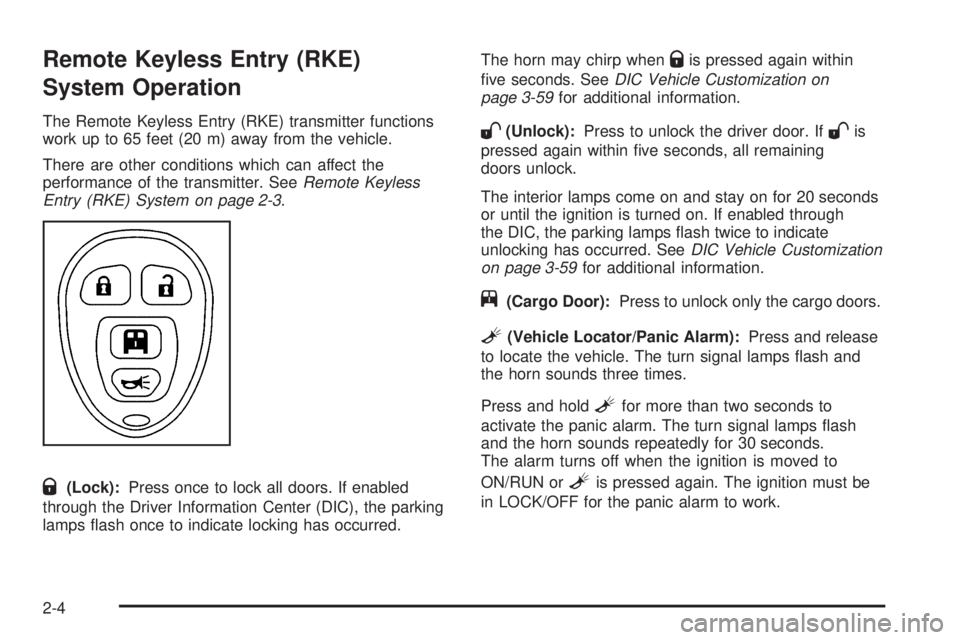
The Remote Keyless Entry (RKE) transmitter functions
work up to 65 feet (20 m) away from the vehicle.
There are other conditions which can affect the
performance of the transmitter. SeeRemote Keyless
Entry (RKE) System on page 2-3.
Q(Lock):Press once to lock all doors. If enabled
through the Driver Information Center (DIC), the parking
lamps flash once to indicate locking has occurred.The horn may chirp when
Qis pressed again within
five seconds. SeeDIC Vehicle Customization on
page 3-59for additional information.
W(Unlock):Press to unlock the driver door. IfWis
pressed again within five seconds, all remaining
doors unlock.
The interior lamps come on and stay on for 20 seconds
or until the ignition is turned on. If enabled through
the DIC, the parking lamps flash twice to indicate
unlocking has occurred. SeeDIC Vehicle Customization
on page 3-59for additional information.
j(Cargo Door):Press to unlock only the cargo doors.
L(Vehicle Locator/Panic Alarm):Press and release
to locate the vehicle. The turn signal lamps flash and
the horn sounds three times.
Press and hold
Lfor more than two seconds to
activate the panic alarm. The turn signal lamps flash
and the horn sounds repeatedly for 30 seconds.
The alarm turns off when the ignition is moved to
ON/RUN or
Lis pressed again. The ignition must be
in LOCK/OFF for the panic alarm to work.
2-4
Page 119 of 404
Instrument Panel Overview...............................3-4
Hazard Warning Flashers................................3-6
Horn .............................................................3-6
Tilt Wheel.....................................................3-6
Turn Signal/Multifunction Lever.........................3-7
Turn and Lane-Change Signals........................3-7
Headlamp High/Low-Beam Changer..................3-8
Flash-to-Pass.................................................3-8
Windshield Wipers..........................................3-8
Windshield Washer.........................................3-9
Cruise Control..............................................3-10
Exterior Lamps.............................................3-13
Headlamps on Reminder................................3-14
Daytime Running Lamps (DRL).......................3-15
Automatic Headlamp System..........................3-15
Instrument Panel Brightness...........................3-16
Dome Lamps ...............................................3-16
Dome Lamp Override....................................3-16
Entry/Exit Lighting.........................................3-17
Reading Lamps............................................3-17
Electric Power Management...........................3-17
Battery Run-Down Protection..........................3-18
Accessory Power Outlet(s).............................3-18
Ashtray(s) and Cigarette Lighter......................3-19Climate Controls............................................3-19
Climate Control System.................................3-19
Outlet Adjustment.........................................3-21
Rear Heating System....................................3-22
Rear Air Conditioning and Heating
System....................................................3-23
Warning Lights, Gages, and Indicators............3-24
Instrument Panel Cluster................................3-25
Speedometer and Odometer...........................3-26
Trip Odometer..............................................3-26
Safety Belt Reminders...................................3-27
Airbag Readiness Light..................................3-27
Airbag Off Light............................................3-28
Passenger Airbag Status Indicator...................3-30
Charging System Light..................................3-31
Voltmeter Gage............................................3-32
Brake System Warning Light..........................3-33
Antilock Brake System (ABS) Warning
Light........................................................3-34
StabiliTrak
®Indicator Light.............................3-34
Engine Coolant Temperature Gage..................3-35
Tire Pressure Light.......................................3-35
Malfunction Indicator Lamp.............................3-36
Oil Pressure Gage........................................3-39
Section 3 Instrument Panel
3-1
Page 123 of 404
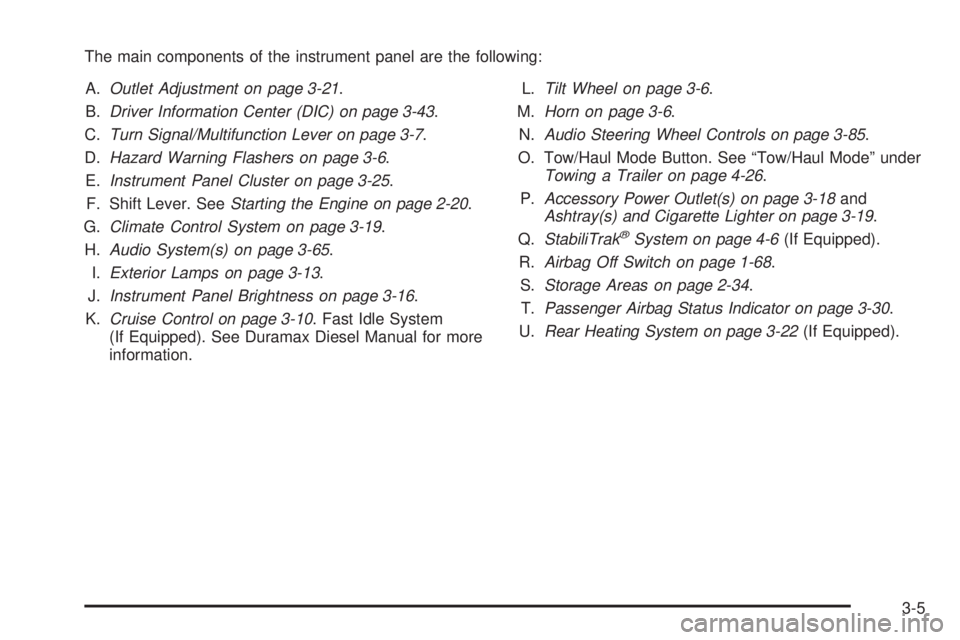
The main components of the instrument panel are the following:
A.Outlet Adjustment on page 3-21.
B.Driver Information Center (DIC) on page 3-43.
C.Turn Signal/Multifunction Lever on page 3-7.
D.Hazard Warning Flashers on page 3-6.
E.Instrument Panel Cluster on page 3-25.
F. Shift Lever. SeeStarting the Engine on page 2-20.
G.Climate Control System on page 3-19.
H.Audio System(s) on page 3-65.
I.Exterior Lamps on page 3-13.
J.Instrument Panel Brightness on page 3-16.
K.Cruise Control on page 3-10. Fast Idle System
(If Equipped). See Duramax Diesel Manual for more
information.L.Tilt Wheel on page 3-6.
M.Horn on page 3-6.
N.Audio Steering Wheel Controls on page 3-85.
O. Tow/Haul Mode Button. See “Tow/Haul Mode” under
Towing a Trailer on page 4-26.
P.Accessory Power Outlet(s) on page 3-18and
Ashtray(s) and Cigarette Lighter on page 3-19.
Q.StabiliTrak
®System on page 4-6(If Equipped).
R.Airbag Off Switch on page 1-68.
S.Storage Areas on page 2-34.
T.Passenger Airbag Status Indicator on page 3-30.
U.Rear Heating System on page 3-22(If Equipped).
3-5
Page 124 of 404
Hazard Warning Flashers
|(Hazard Warning Flasher):Press this button
located on top of the steering column, to make the front
and rear turn signal lamps flash on and off. This warns
others that you are having trouble. Press again to turn the
flashers off.
When the hazard warning flashers are on, the vehicle’s
turn signals will not work.
Horn
Press the horn symbol in the middle of the steering
wheel to sound the horn.
Tilt Wheel
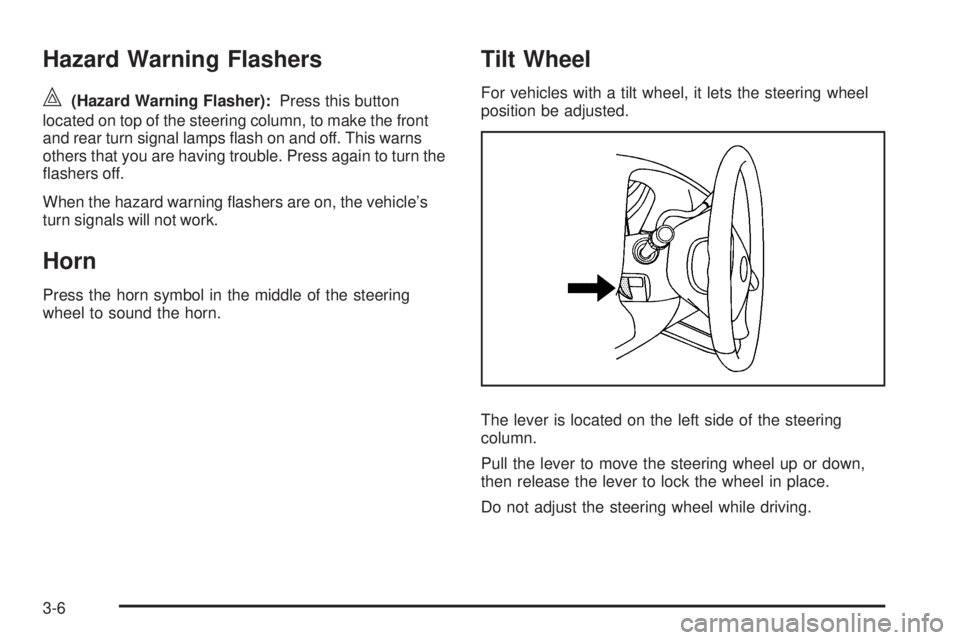
For vehicles with a tilt wheel, it lets the steering wheel
position be adjusted.
The lever is located on the left side of the steering
column.
Pull the lever to move the steering wheel up or down,
then release the lever to lock the wheel in place.
Do not adjust the steering wheel while driving.
3-6
Page 125 of 404
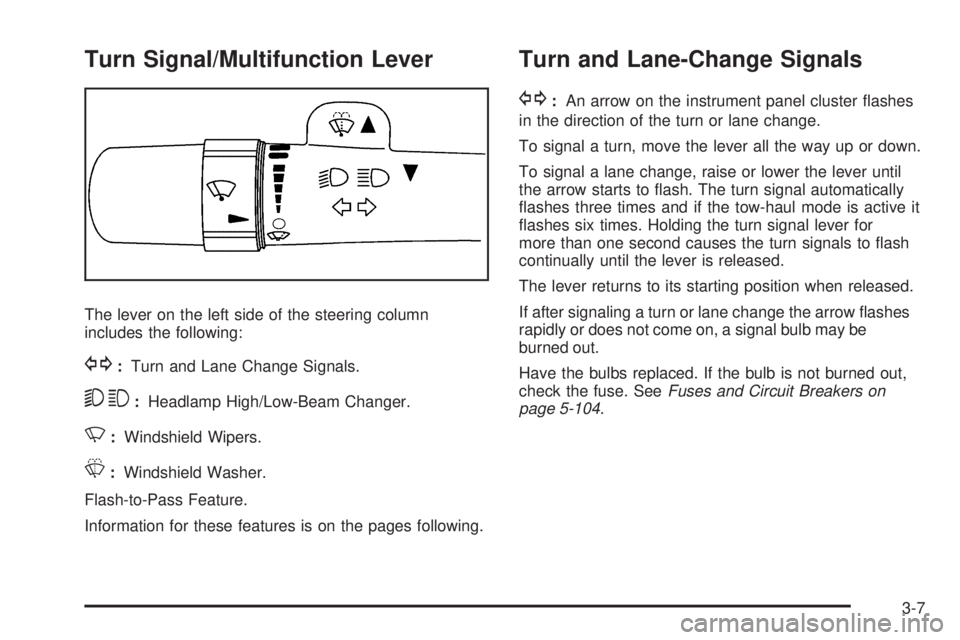
Turn Signal/Multifunction Lever
The lever on the left side of the steering column
includes the following:
G:Turn and Lane Change Signals.
53:Headlamp High/Low-Beam Changer.
N:Windshield Wipers.
L:Windshield Washer.
Flash-to-Pass Feature.
Information for these features is on the pages following.
Turn and Lane-Change Signals
G:An arrow on the instrument panel cluster flashes
in the direction of the turn or lane change.
To signal a turn, move the lever all the way up or down.
To signal a lane change, raise or lower the lever until
the arrow starts to flash. The turn signal automatically
flashes three times and if the tow-haul mode is active it
flashes six times. Holding the turn signal lever for
more than one second causes the turn signals to flash
continually until the lever is released.
The lever returns to its starting position when released.
If after signaling a turn or lane change the arrow flashes
rapidly or does not come on, a signal bulb may be
burned out.
Have the bulbs replaced. If the bulb is not burned out,
check the fuse. SeeFuses and Circuit Breakers on
page 5-104.
3-7
Page 126 of 404
Turn Signal On Chime
If the turn signal is left on for more than 3/4 of a mile
(1.2 km), a chime sounds at each flash of the turn signal
and the message TURN SIGNAL ON also appears in the
Driver Information Center (DIC). SeeDIC Warnings and
Messages on page 3-50. To turn off the chime and
message, move the turn signal lever to the off position.
Headlamp High/Low-Beam Changer
23(Headlamp High/Low-Beam Changer):Pull the
turn signal lever all the way toward you to change the
headlamps from low to high beam. Then release it.
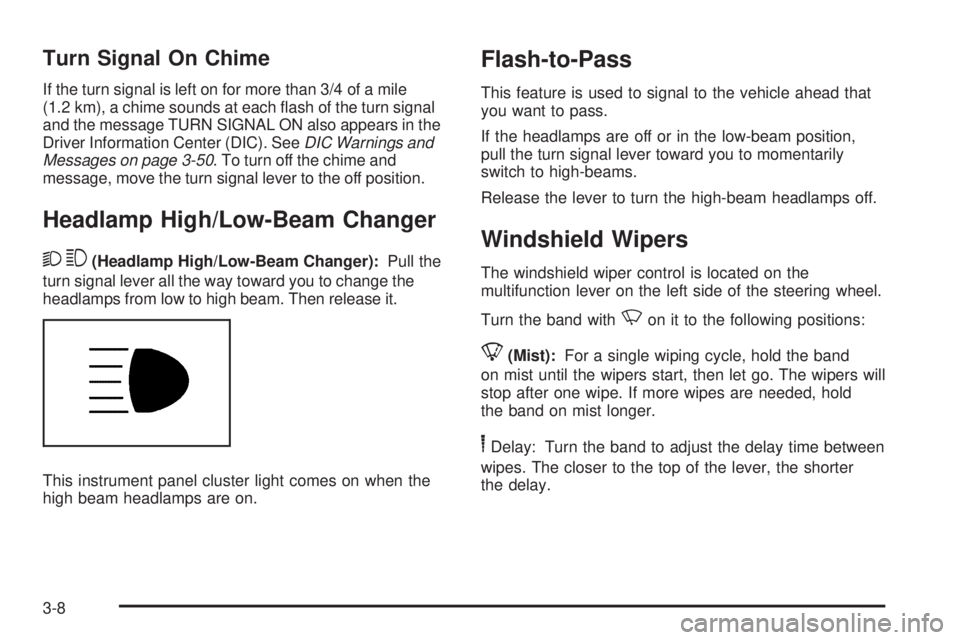
This instrument panel cluster light comes on when the
high beam headlamps are on.
Flash-to-Pass
This feature is used to signal to the vehicle ahead that
you want to pass.
If the headlamps are off or in the low-beam position,
pull the turn signal lever toward you to momentarily
switch to high-beams.
Release the lever to turn the high-beam headlamps off.
Windshield Wipers
The windshield wiper control is located on the
multifunction lever on the left side of the steering wheel.
Turn the band with
Non it to the following positions:
8(Mist):For a single wiping cycle, hold the band
on mist until the wipers start, then let go. The wipers will
stop after one wipe. If more wipes are needed, hold
the band on mist longer.
6Delay: Turn the band to adjust the delay time between
wipes. The closer to the top of the lever, the shorter
the delay.
3-8
Page 132 of 404
;(Parking Lamps):Turns on the parking lamps
together with the following:
•Instrument Panel Lights
•Taillamps
•License Plate Lamps
2(Headlamps):Turns on the headlamps together
with the following lamps listed below.
•Parking Lamps
•Instrument Panel Lights
•Taillamps
•License Plate Lamps
If the headlamps are turned on while the vehicle is on,
the headlamps turn off automatically 10 minutes
after the ignition is turned off. If the headlamps are
turned on while the vehicle is off, the headlamps will
continue to stay on. To prevent the battery from
being drained, turn the control to the
Oposition.A warning chime sounds if the driver door is opened
while the ignition switch is off and the headlamps are on.
To change the headlamps from low beam to high
beam, push the turn signal/multifunction lever toward
the instrument panel.
Headlamps on Reminder
If a door is open, a reminder chime sounds when the
headlamps or parking lamps are manually turned on and
the key is out of the ignition. To turn off the chime, turn
the headlamp switch to off or auto and then back on, or
close and re-open the door. In the auto mode, the
headlamps turn off once the ignition is in LOCK/OFF or
may remain on until the headlamp delay ends, if enabled
in the Driver Information Center (DIC). See “Exit Lighting”
underDIC Vehicle Customization on page 3-59.
3-14
Page 142 of 404
9:Turns the system off.
9(Fan Control):Turn clockwise or counterclockwise
to increase or decrease the fan speed in the
rear-seating area.
Temperature Control:Turn clockwise or
counterclockwise to increase or decrease the
temperature in the rear-seating area.
The air-conditioning system on the main climate control
panel must be turned on to direct cooled air to the
rear of the vehicle. If it is not on, then the temperature
in the rear of the vehicle remains at cabin temperature.
Air Delivery Mode Control:Turn clockwise or
counterclockwise to change the direction of the airflow
in the rear seating area.
To change the current mode, select one of the following:
H(Vent):Air is directed to the upper outlets, with
some directed to the floor outlets.
2(Floor):Air is directed to the floor outlets.
Be sure to keep the area under the front seats clear of
any objects so that the air inside of the vehicle can
circulate effectively.For information on how to use the main climate control
system, seeClimate Control System on page 3-19.
For information on ventilation, seeOutlet Adjustment on
page 3-21.
Warning Lights, Gages, and
Indicators
Warning lights and gages can signal that something is
wrong before it becomes serious enough to cause
an expensive repair or replacement. Paying attention to
the warning lights and gages could prevent injury.
Warning lights come on when there may be or is a
problem with one of the vehicle’s functions. Some
warning lights come on briefly when the engine is started
to indicate they are working.
Gages can indicate when there may be or is a problem
with one of the vehicle’s functions. Often gages and
warning lights work together to indicate a problem with
the vehicle.
When one of the warning lights comes on and stays on
while driving, or when one of the gages shows there
may be a problem, check the section that explains what
to do. Follow this manual’s advice. Waiting to do
repairs can be costly and even dangerous.
3-24
Page 177 of 404
This message displays along with a chime if the
transmission fluid in the vehicle gets hot. Driving with the
transmission fluid temperature high can cause damage to
the vehicle. Stop the vehicle and let it idle to allow the
transmission to cool. This message clears and the chime
stops when the fluid temperature reaches a safe level.
TURN SIGNAL ON
This message displays and a chime sounds if a turn
signal is left on for 3/4 of a mile (1.2 km). Move the
turn signal/multifunction lever to the off position.
WAIT TO START
This message displays briefly when the theft-deterrent
system has initially found incorrect conditions within
the vehicle and is making a double check. If your vehicle
does not start soon after, try to start it again. If it still
does not start, have your vehicle serviced by your
dealer/retailer.
DIC Vehicle Customization
Your vehicle may have customization capabilities that
allow you to program certain features to one preferred
setting. Customization features can only be programmed
to one setting on the vehicle and cannot be programmed
to a preferred setting for two different drivers.All of the customization options may not be available on
your vehicle. Only the options available will be displayed
on the DIC.
The default settings for the customization features were
set when your vehicle left the factory, but may have
been changed from their default state since then.
The customization preferences are automatically
recalled.
To change customization preferences, use the following
procedure.
Entering the Feature Settings Menu
1. Turn the ignition on and place the vehicle in
P (Park).
To avoid excessive drain on the battery, it is
recommended that the headlamps are turned off.
2. Press the customization button to enter the feature
settings menu.
If the menu is not available, FEATURE SETTINGS
AVAILABLE IN PARK will display. Before entering
the menu, make sure the vehicle is in P (Park).
3-59
Page 183 of 404
Exiting the Feature Settings Menu
The feature settings menu will be exited when any of
the following occurs:
•The vehicle is no longer in ON/RUN.
•The trip/fuel or vehicle information DIC buttons are
pressed.
•The end of the feature settings menu is reached
and exited.
•A 40 second time period has elapsed with no
selection made.
Audio System(s)
If the vehicle came without a radio, the wiring provisions
for a radio and an antenna were installed at the
assembly plant, so that if you want, a radio can be
installed at the dealer/retailer.
Determine which radio the vehicle has and read the
following pages to become familiar with its features.
{CAUTION:
Taking your eyes off the road for extended periods
could cause a crash resulting in injury or death to
you or others. Do not give extended attention to
entertainment tasks while driving.This system provides access to many audio and non
audio listings.
To minimize taking your eyes off the road while driving,
do the following while the vehicle is parked:
•Become familiar with the operation and controls of
the audio system.
•Set up the tone, speaker adjustments, and preset
radio stations.
For more information, seeDefensive Driving on page 4-2.
Notice:Contact your dealer/retailer before adding
any equipment.
Adding audio or communication equipment could
interfere with the operation of the vehicle’s engine,
radio, or other systems, and could damage them.
Follow federal rules covering mobile radio and
telephone equipment.
Notice:The chime signals related to safety belts,
parking brake, and other functions of your vehicle
operate through the radio/entertainment system. If
that equipment is replaced or additional equipment is
added to your vehicle, the chimes may not work.
Make sure that replacement or additional equipment
is compatible with your vehicle before installing it.
SeeAccessories and Modifications on page 5-3.
The vehicle has Retained Accessory Power (RAP).
With RAP, the audio system can be played even after
the ignition is turned off. SeeRetained Accessory Power
(RAP) on page 2-20for more information.
3-65