lock GMC SAVANA 2010 Owners Manual
[x] Cancel search | Manufacturer: GMC, Model Year: 2010, Model line: SAVANA, Model: GMC SAVANA 2010Pages: 424, PDF Size: 2.4 MB
Page 287 of 424
3. With foot on the brake pedal, move the shift lever
through each gear range, pausing for about
three seconds in each range. When M is reached,
move the selector from M1 through M3. Then,
position the shift lever in P (Park).
4. Let the engine run at idle for two minutes or more.
Then, without shutting Off the engine:
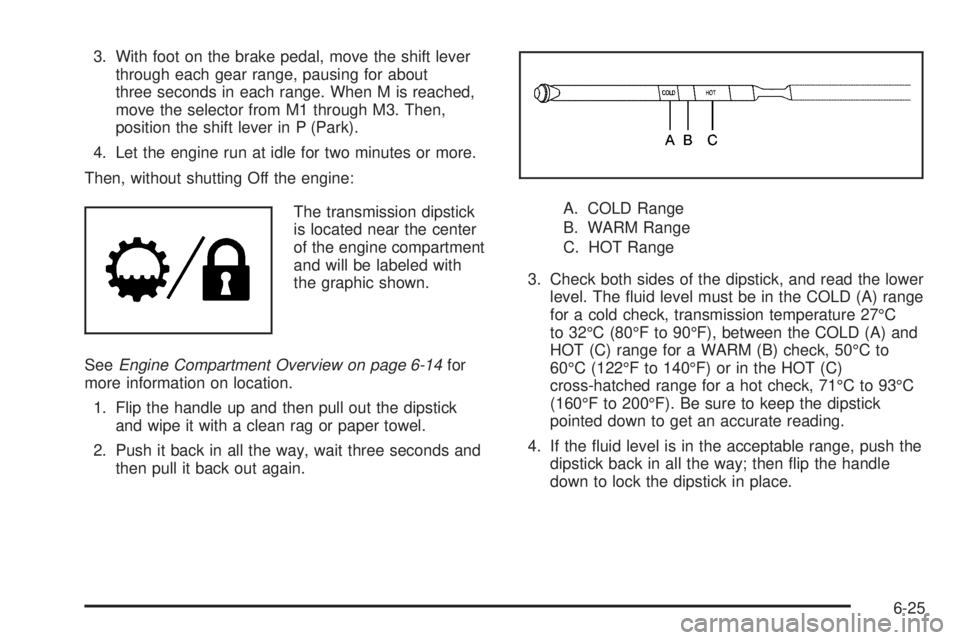
The transmission dipstick
is located near the center
of the engine compartment
and will be labeled with
the graphic shown.
SeeEngine Compartment Overview on page 6-14for
more information on location.
1. Flip the handle up and then pull out the dipstick
and wipe it with a clean rag or paper towel.
2. Push it back in all the way, wait three seconds and
then pull it back out again.A. COLD Range
B. WARM Range
C. HOT Range
3. Check both sides of the dipstick, and read the lower
level. The fluid level must be in the COLD (A) range
for a cold check, transmission temperature 27°C
to 32°C (80°F to 90°F), between the COLD (A) and
HOT (C) range for a WARM (B) check, 50°C to
60°C (122°F to 140°F) or in the HOT (C)
cross-hatched range for a hot check, 71°C to 93°C
(160°F to 200°F). Be sure to keep the dipstick
pointed down to get an accurate reading.
4. If the fluid level is in the acceptable range, push the
dipstick back in all the way; then flip the handle
down to lock the dipstick in place.
6-25
Page 288 of 424
How to Add Automatic Transmission
Fluid
Refer to the Maintenance Schedule to determine what
kind of transmission fluid to use. SeeRecommended
Fluids and Lubricants on page 7-11.
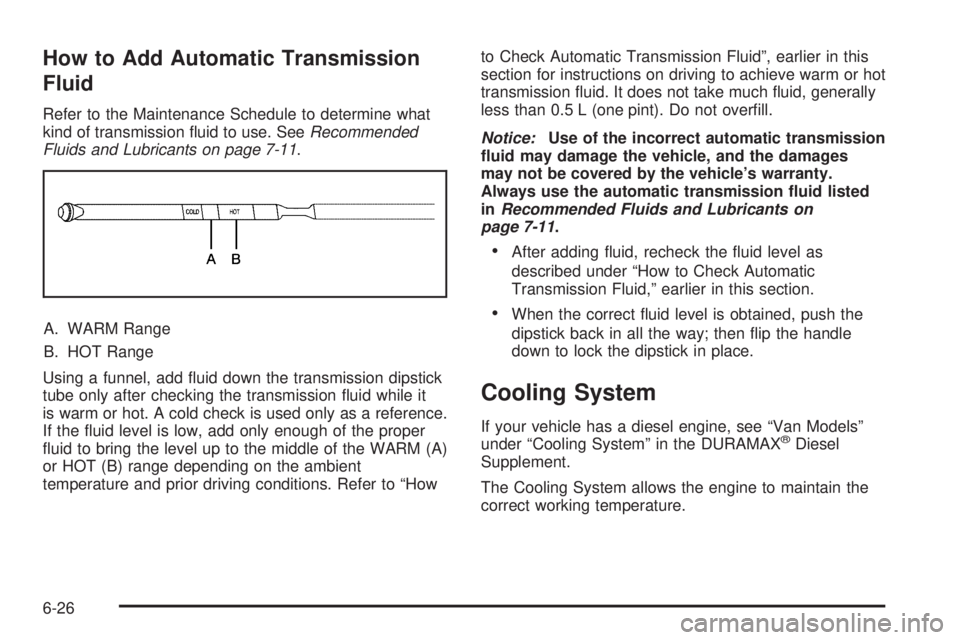
A. WARM Range
B. HOT Range
Using a funnel, add fluid down the transmission dipstick
tube only after checking the transmission fluid while it
is warm or hot. A cold check is used only as a reference.
If the fluid level is low, add only enough of the proper
fluid to bring the level up to the middle of the WARM (A)
or HOT (B) range depending on the ambient
temperature and prior driving conditions. Refer to “Howto Check Automatic Transmission Fluid”, earlier in this
section for instructions on driving to achieve warm or hot
transmission fluid. It does not take much fluid, generally
less than 0.5 L (one pint). Do not overfill.
Notice:Use of the incorrect automatic transmission
uid may damage the vehicle, and the damages
may not be covered by the vehicle’s warranty.
Always use the automatic transmission uid listed
inRecommended Fluids and Lubricants on
page 7-11.
•After adding fluid, recheck the fluid level as
described under “How to Check Automatic
Transmission Fluid,” earlier in this section.
•When the correct fluid level is obtained, push the
dipstick back in all the way; then flip the handle
down to lock the dipstick in place.
Cooling System
If your vehicle has a diesel engine, see “Van Models”
under “Cooling System” in the DURAMAX®Diesel
Supplement.
The Cooling System allows the engine to maintain the
correct working temperature.
6-26
Page 293 of 424
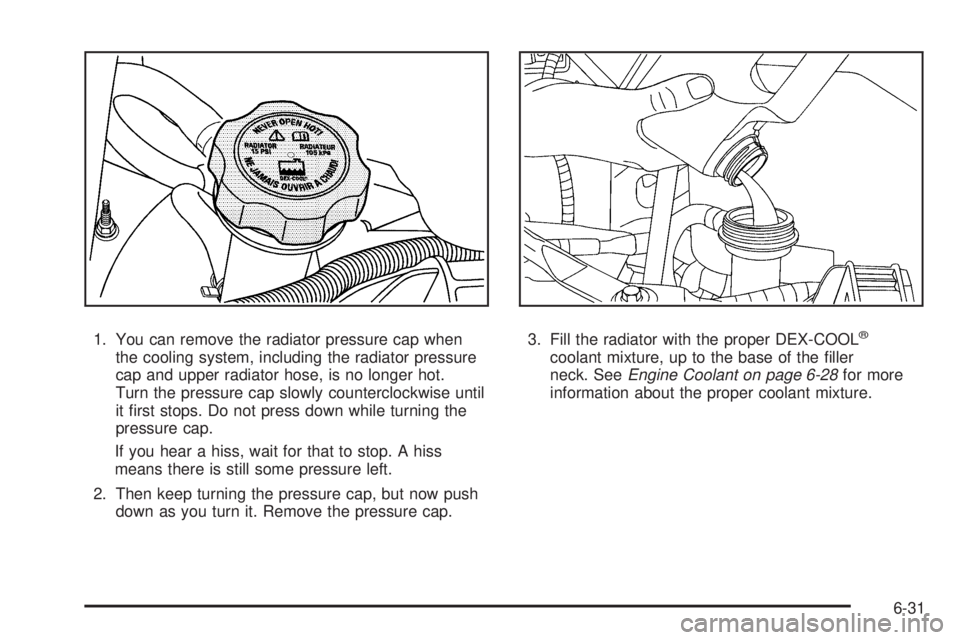
1. You can remove the radiator pressure cap when
the cooling system, including the radiator pressure
cap and upper radiator hose, is no longer hot.
Turn the pressure cap slowly counterclockwise until
it first stops. Do not press down while turning the
pressure cap.
If you hear a hiss, wait for that to stop. A hiss
means there is still some pressure left.
2. Then keep turning the pressure cap, but now push
down as you turn it. Remove the pressure cap.3. Fill the radiator with the proper DEX-COOL®
coolant mixture, up to the base of the filler
neck. SeeEngine Coolant on page 6-28for more
information about the proper coolant mixture.
6-31
Page 311 of 424
Halogen Bulbs
{WARNING:
Halogen bulbs have pressurized gas inside and
can burst if you drop or scratch the bulb. You or
others could be injured. Be sure to read and follow
the instructions on the bulb package.
Headlamps
To remove the headlamp assembly from the vehicle and
access the bulbs:
1. Open the hood. SeeHood Release on page 6-13
for more information.
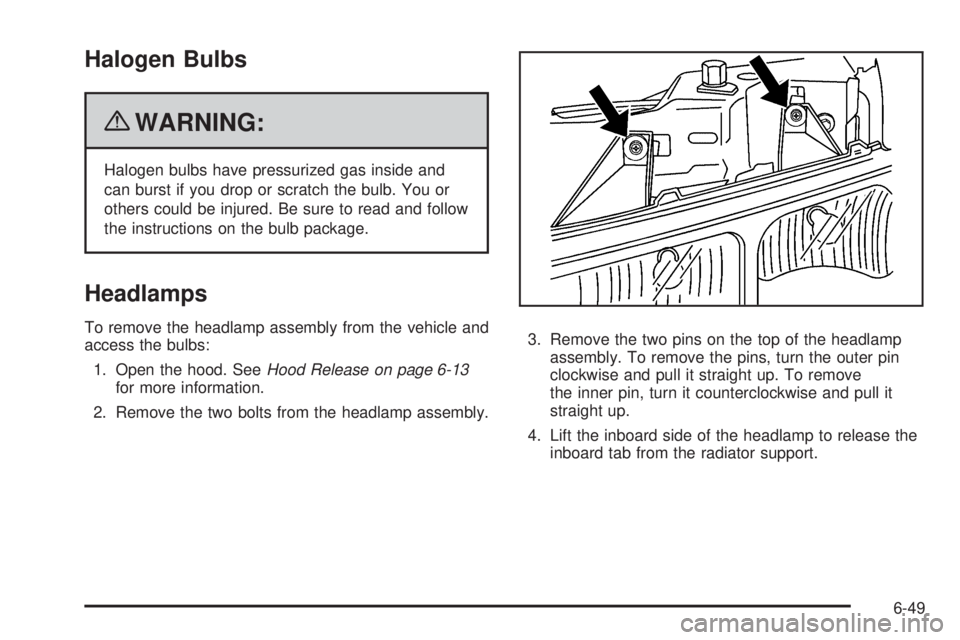
2. Remove the two bolts from the headlamp assembly.3. Remove the two pins on the top of the headlamp
assembly. To remove the pins, turn the outer pin
clockwise and pull it straight up. To remove
the inner pin, turn it counterclockwise and pull it
straight up.
4. Lift the inboard side of the headlamp to release the
inboard tab from the radiator support.
6-49
Page 312 of 424
5. Lift the outboard side of the headlamp to release
the outboard tab from the radiator support.
6. Lower the headlamp to allow the vertical adjustor to
clear the tie bar.
7. Turn the headlamp forward and upward to remove
it from the grille.
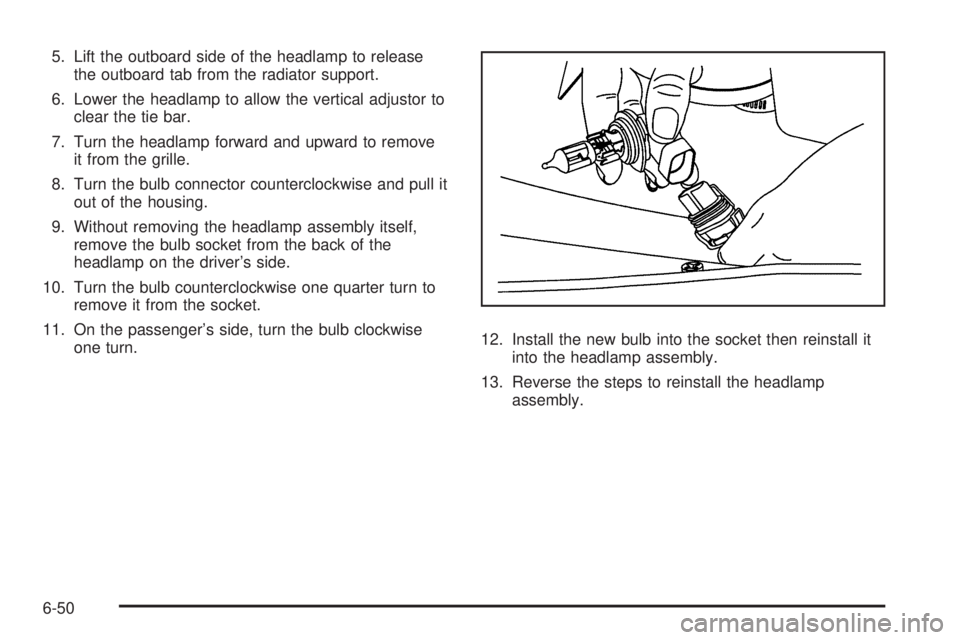
8. Turn the bulb connector counterclockwise and pull it
out of the housing.
9. Without removing the headlamp assembly itself,
remove the bulb socket from the back of the
headlamp on the driver’s side.
10. Turn the bulb counterclockwise one quarter turn to
remove it from the socket.
11. On the passenger’s side, turn the bulb clockwise
one turn.12. Install the new bulb into the socket then reinstall it
into the headlamp assembly.
13. Reverse the steps to reinstall the headlamp
assembly.
6-50
Page 313 of 424
Front Turn Signal, Sidemarker and
Parking Lamps
To replace the front turn signal, sidemarker and/or
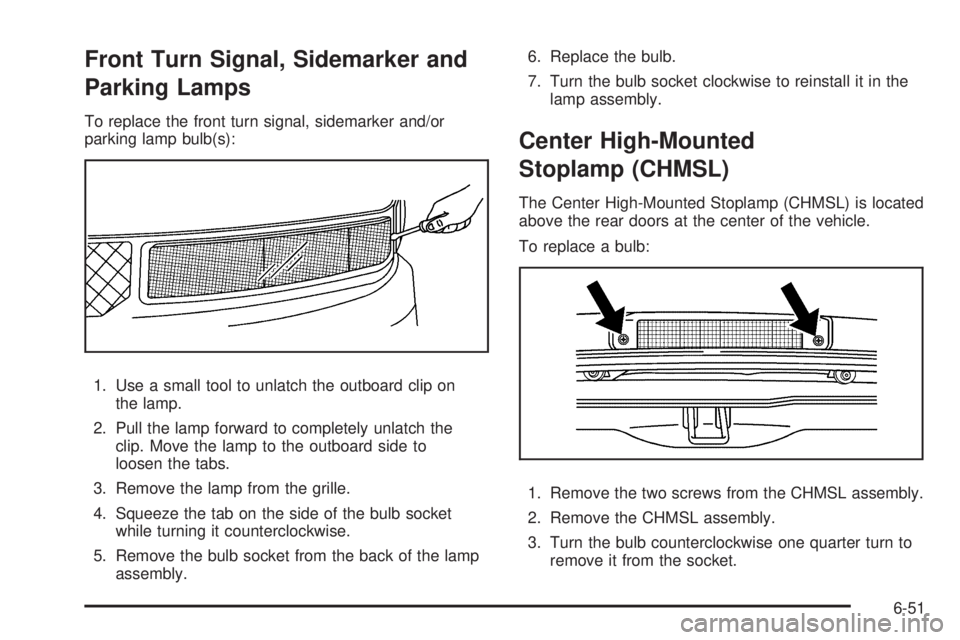
parking lamp bulb(s):
1. Use a small tool to unlatch the outboard clip on
the lamp.
2. Pull the lamp forward to completely unlatch the
clip. Move the lamp to the outboard side to
loosen the tabs.
3. Remove the lamp from the grille.
4. Squeeze the tab on the side of the bulb socket
while turning it counterclockwise.
5. Remove the bulb socket from the back of the lamp
assembly.6. Replace the bulb.
7. Turn the bulb socket clockwise to reinstall it in the
lamp assembly.
Center High-Mounted
Stoplamp (CHMSL)
The Center High-Mounted Stoplamp (CHMSL) is located
above the rear doors at the center of the vehicle.
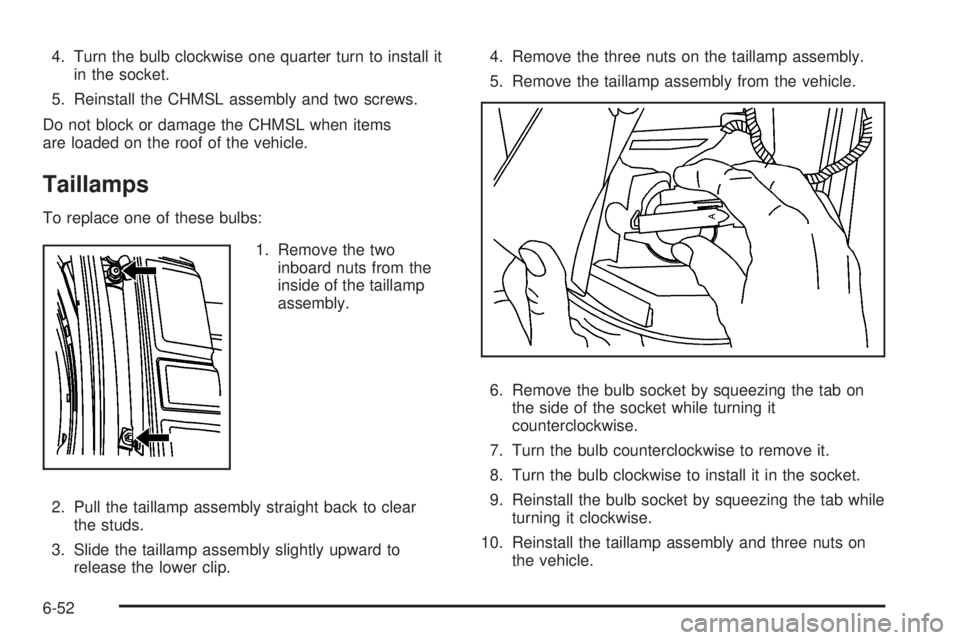
To replace a bulb:
1. Remove the two screws from the CHMSL assembly.
2. Remove the CHMSL assembly.
3. Turn the bulb counterclockwise one quarter turn to
remove it from the socket.
6-51
Page 314 of 424
4. Turn the bulb clockwise one quarter turn to install it
in the socket.
5. Reinstall the CHMSL assembly and two screws.
Do not block or damage the CHMSL when items
are loaded on the roof of the vehicle.
Taillamps
To replace one of these bulbs:
1. Remove the two
inboard nuts from the
inside of the taillamp
assembly.
2. Pull the taillamp assembly straight back to clear
the studs.
3. Slide the taillamp assembly slightly upward to
release the lower clip.4. Remove the three nuts on the taillamp assembly.
5. Remove the taillamp assembly from the vehicle.
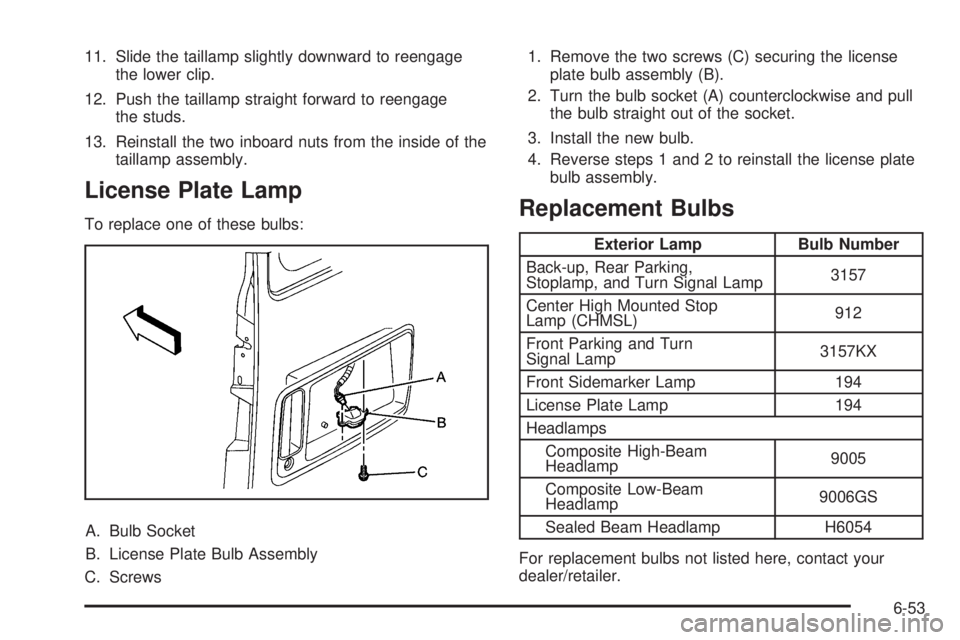
6. Remove the bulb socket by squeezing the tab on
the side of the socket while turning it
counterclockwise.
7. Turn the bulb counterclockwise to remove it.
8. Turn the bulb clockwise to install it in the socket.
9. Reinstall the bulb socket by squeezing the tab while
turning it clockwise.
10. Reinstall the taillamp assembly and three nuts on
the vehicle.
6-52
Page 315 of 424
11. Slide the taillamp slightly downward to reengage
the lower clip.
12. Push the taillamp straight forward to reengage
the studs.
13. Reinstall the two inboard nuts from the inside of the
taillamp assembly.
License Plate Lamp
To replace one of these bulbs:
A. Bulb Socket
B. License Plate Bulb Assembly
C. Screws1. Remove the two screws (C) securing the license
plate bulb assembly (B).
2. Turn the bulb socket (A) counterclockwise and pull
the bulb straight out of the socket.
3. Install the new bulb.
4. Reverse steps 1 and 2 to reinstall the license plate
bulb assembly.Replacement Bulbs
Exterior Lamp Bulb Number
Back-up, Rear Parking,
Stoplamp, and Turn Signal Lamp3157
Center High Mounted Stop
Lamp (CHMSL)912
Front Parking and Turn
Signal Lamp3157KX
Front Sidemarker Lamp 194
License Plate Lamp 194
Headlamps
Composite High-Beam
Headlamp9005
Composite Low-Beam
Headlamp9006GS
Sealed Beam Headlamp H6054
For replacement bulbs not listed here, contact your
dealer/retailer.
6-53
Page 316 of 424
Windshield Wiper Blade
Replacement
Windshield wiper blades should be inspected for wear
and cracking. SeeScheduled Maintenance on page 7-3
for more information on wiper blade inspection.
Replacement blades come in different types and are
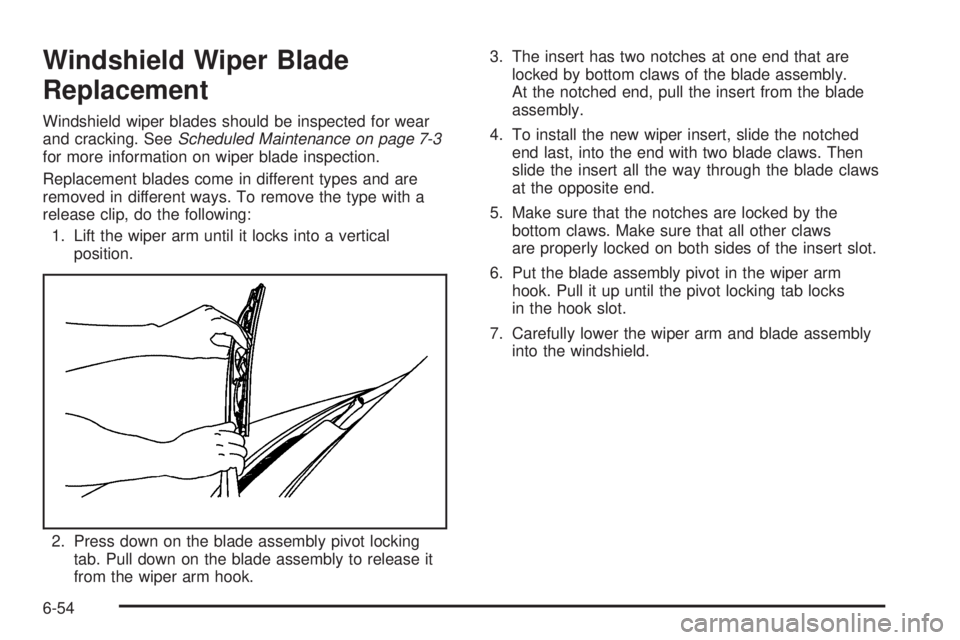
removed in different ways. To remove the type with a
release clip, do the following:
1. Lift the wiper arm until it locks into a vertical
position.
2. Press down on the blade assembly pivot locking
tab. Pull down on the blade assembly to release it
from the wiper arm hook.3. The insert has two notches at one end that are
locked by bottom claws of the blade assembly.
At the notched end, pull the insert from the blade
assembly.
4. To install the new wiper insert, slide the notched
end last, into the end with two blade claws. Then
slide the insert all the way through the blade claws
at the opposite end.
5. Make sure that the notches are locked by the
bottom claws. Make sure that all other claws
are properly locked on both sides of the insert slot.
6. Put the blade assembly pivot in the wiper arm
hook. Pull it up until the pivot locking tab locks
in the hook slot.
7. Carefully lower the wiper arm and blade assembly
into the windshield.
6-54
Page 330 of 424
TPMS Sensor Matching Process
Each TPMS sensor has a unique identification code.
Any time you rotate your vehicle’s tires or replace one or
more of the TPMS sensors, the identification codes
will need to be matched to the new tire/wheel position.
The sensors are matched to the tire/wheel positions
in the following order: driver side front tire, passenger
side front tire, passenger side rear tire, and driver
side rear tire using a TPMS diagnostic tool. See your
dealer/retailer for service.
The TPMS sensors can also be matched to each
tire/wheel position by increasing or decreasing the tire’s
air pressure. If increasing the tire’s air pressure, do
not exceed the maximum inflation pressure indicated on
the tire’s sidewall.
To decrease air-pressure out of a tire you can use the
pointed end of the valve cap, a pencil-style air pressure
gage, or a key.
You have two minutes to match the first tire/wheel
position, and five minutes overall to match all four tire/
wheel positions. If it takes longer than two minutes,
to match the first tire and wheel, or more than
five minutes to match all four tire and wheel positions
the matching process stops and you need to start over.The TPMS sensor matching process is outlined below:
1. Set the parking brake.
2. Turn the ignition switch to ON/RUN with the
engine off.
3. Press the Remote Keyless Entry (RKE) transmitter’s
LOCK and UNLOCK buttons at the same time for
approximately five seconds. The horn sounds twice
to signal the receiver is in relearn mode and
TIRE LEARNING ACTIVE message displays on the
DIC screen.
If your vehicle does not have RKE, press the Driver
Information Center (DIC) vehicle information
button until the PRESS
VTO RELEARN TIRE
POSITIONS message displays. The horn sounds
twice to signal the receiver is in relearn mode
and TIRE LEARNING ACTIVE message displays on
the DIC screen.
If your vehicle does not have RKE or DIC buttons,
press the trip odometer reset stem located on
the instrument panel cluster until the PRESS
VTO
RELEARN TIRE POSITIONS message displays.
The horn sounds twice to signal the receiver
is in relearn mode and TIRE LEARNING ACTIVE
message displays on the DIC screen.
4. Start with the driver side front tire.
6-68