AUX GMC SAVANA 2010 User Guide
[x] Cancel search | Manufacturer: GMC, Model Year: 2010, Model line: SAVANA, Model: GMC SAVANA 2010Pages: 424, PDF Size: 2.4 MB
Page 218 of 424
BAND:Press to listen to the radio while a portable
audio device is playing. The portable audio device
continues playing, so you might want to stop it or
turn it off.
CD/AUX (CD/Auxiliary):Press to play a CD while a
portable audio device is playing. Press again and the
system begins playing audio from the connected portable
audio player. If a portable audio player is not connected,
the message No Aux Input Device displays.
Using an MP3
MP3 CD-R or CD-RW Disc
The radio plays MP3 files that were recorded on a
CD-R or CD-RW disc. The files can be recorded with
the following fixed bit rates: 32 kbps, 40 kbps, 56 kbps,
64 kbps, 80 kbps, 96 kbps, 112 kbps, 128 kbps,
160 kbps, 192 kbps, 224 kbps, 256 kbps, and 320 kbps
or a variable bit rate. Song title, artist name, and
album are available for display by the radio when
recorded using ID3 tags version 1 and 2.
Compressed Audio
The radio also plays discs that contain both
uncompressed CD audio (.CDA files) and MP3 files.
By default the radio shows the MP3 label on the left side
of the screen but plays both file formats in the order
in which they were recorded to the disc.
MP3 Format
If you burn your own MP3 disc on a personal computer:
•Make sure the MP3 files are recorded on a CD-R
or CD-RW disc.
•Do not mix standard audio and MP3 files on
one disc.
•The CD player is able to read and play a maximum
of 50 folders, 15 playlists, and 512 folders and files.
•Create a folder structure that makes it easy to find
songs while driving. Organize songs by albums
using one folder for each album. Each folder
or album should contain 18 songs or less.
•Avoid subfolders. The system can support up to
eight subfolders deep, however, keep the total
number of folders to a minimum in order to reduce
the complexity and confusion in trying to locate
a particular folder during playback.
•Make sure playlists have a .mp3 or .wpl extension
(other file extensions might not work).
4-72
Page 222 of 424
Once the disc has scanned, the player defaults to playing
MP3 files in order by artist. The current artist playing is
shown on the second line of the display between the
arrows. Once all songs by that artist are played, the
player moves to the next artist in alphabetical order on
the CD-R/CD-RW and begins playing MP3 files by that
artist. If you want to listen to MP3 files by another artist,
press the pushbutton located below either arrow button.
You will go to the next or previous artist in alphabetical
order. Continue pressing either button until the desired
artist is displayed.
To change from playback by artist to playback by album,
press the pushbutton located below the Sort By label.
From the sort screen, push one of the buttons below the
album button. Press the pushbutton below the back label
to return to the main music navigator screen. Now the
album name is displayed on the second line between the
arrows and songs from the current album begins to play.
Once all songs from that album are played, the player
moves to the next album in alphabetical order on the
CD-R/CD-RW and begins playing MP3 files from that
album.
To exit music navigator mode, press the pushbutton
below the Back label to return to normal MP3 playback.
BAND:Press this button to listen to the radio when a
CD is playing. The inactive CD remains inside the radio
for future listening.CD/AUX (CD/Auxiliary):Press this button to play a CD
when listening to the radio. The CD icon and a
message showing disc and/or track number displays
when a CD is in the player. Press this button again and
the system automatically searches for an auxiliary
input device such as a portable audio player. If a
portable audio player is not connected, “No Input Device
Found” displays.
Theft-Deterrent Feature
Non-RDS Radios
THEFTLOCK®is designed to discourage theft of your
vehicle’s radio. The feature works automatically by
learning a portion of the Vehicle Identification Number
(VIN). If the radio is moved to a different vehicle, it does
not operate and LOC displays.
With THEFTLOCK
®activated, the radio does not
operate if stolen.
RDS Radios
THEFTLOCK®is designed to discourage theft of your
vehicle’s radio. The feature works automatically by
learning a portion of the Vehicle Identification Number
(VIN). If the radio is moved to a different vehicle, it does
not operate and LOCKED displays.
4-76
Page 223 of 424
When the radio and vehicle are turned off, the blinking
red light indicates that THEFTLOCK®is armed.
With THEFTLOCK
®activated, the radio does not
operate if stolen.
Audio Steering Wheel Controls
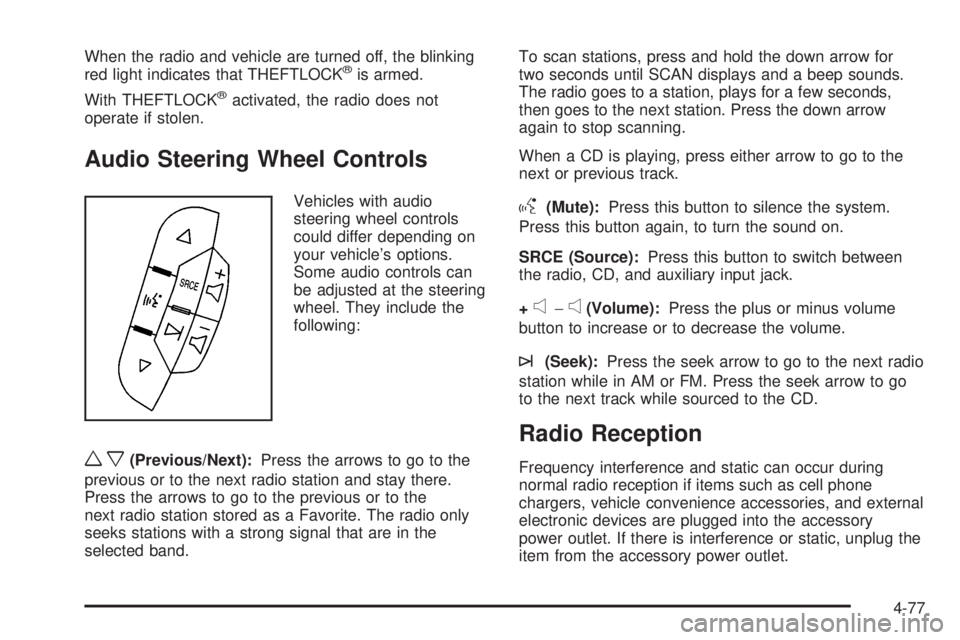
Vehicles with audio
steering wheel controls
could differ depending on
your vehicle’s options.
Some audio controls can
be adjusted at the steering
wheel. They include the
following:
wx(Previous/Next):Press the arrows to go to the
previous or to the next radio station and stay there.
Press the arrows to go to the previous or to the
next radio station stored as a Favorite. The radio only
seeks stations with a strong signal that are in the
selected band.To scan stations, press and hold the down arrow for
two seconds until SCAN displays and a beep sounds.
The radio goes to a station, plays for a few seconds,
then goes to the next station. Press the down arrow
again to stop scanning.
When a CD is playing, press either arrow to go to the
next or previous track.
g(Mute):Press this button to silence the system.
Press this button again, to turn the sound on.
SRCE (Source):Press this button to switch between
the radio, CD, and auxiliary input jack.
+
e−e(Volume):Press the plus or minus volume
button to increase or to decrease the volume.
¨(Seek):Press the seek arrow to go to the next radio
station while in AM or FM. Press the seek arrow to go
to the next track while sourced to the CD.
Radio Reception
Frequency interference and static can occur during
normal radio reception if items such as cell phone
chargers, vehicle convenience accessories, and external
electronic devices are plugged into the accessory
power outlet. If there is interference or static, unplug the
item from the accessory power outlet.
4-77
Page 367 of 424
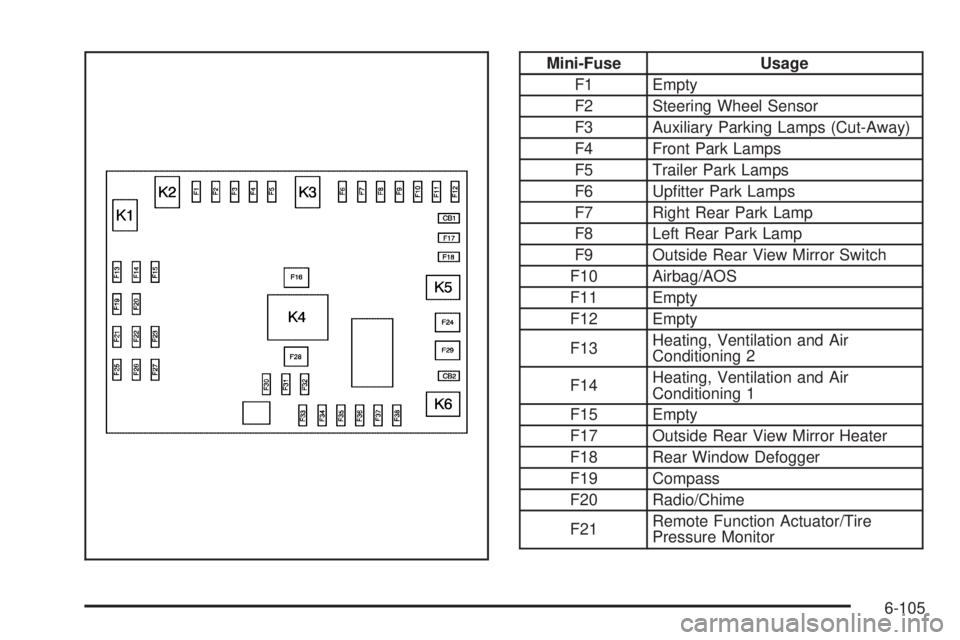
Mini-Fuse Usage
F1 Empty
F2 Steering Wheel Sensor
F3 Auxiliary Parking Lamps (Cut-Away)
F4 Front Park Lamps
F5 Trailer Park Lamps
F6 Upfitter Park Lamps
F7 Right Rear Park Lamp
F8 Left Rear Park Lamp
F9 Outside Rear View Mirror Switch
F10 Airbag/AOS
F11 Empty
F12 Empty
F13Heating, Ventilation and Air
Conditioning 2
F14Heating, Ventilation and Air
Conditioning 1
F15 Empty
F17 Outside Rear View Mirror Heater
F18 Rear Window Defogger
F19 Compass
F20 Radio/Chime
F21Remote Function Actuator/Tire
Pressure Monitor
6-105
Page 368 of 424
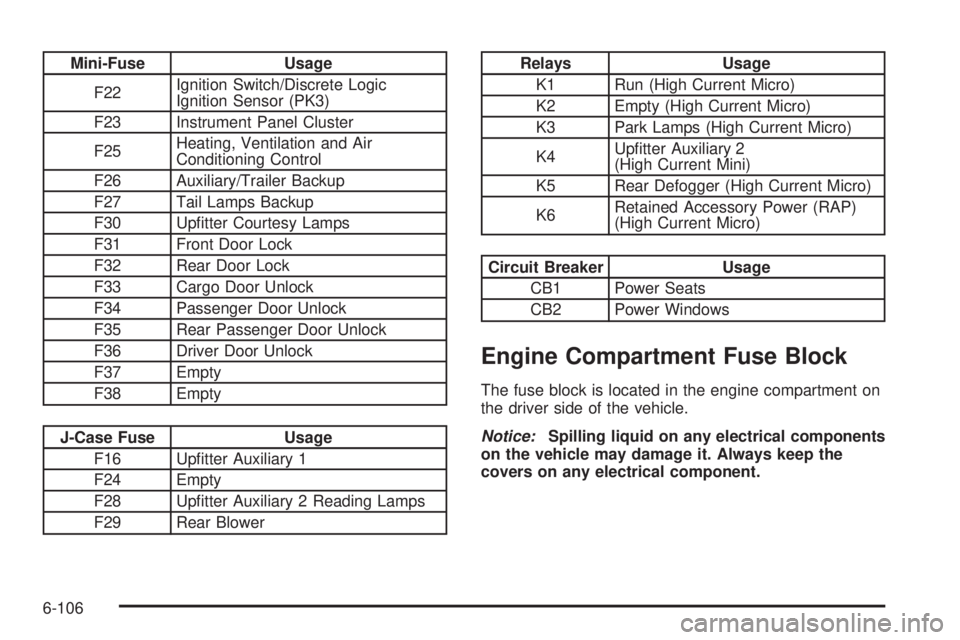
Mini-Fuse Usage
F22Ignition Switch/Discrete Logic
Ignition Sensor (PK3)
F23 Instrument Panel Cluster
F25Heating, Ventilation and Air
Conditioning Control
F26 Auxiliary/Trailer Backup
F27 Tail Lamps Backup
F30 Upfitter Courtesy Lamps
F31 Front Door Lock
F32 Rear Door Lock
F33 Cargo Door Unlock
F34 Passenger Door Unlock
F35 Rear Passenger Door Unlock
F36 Driver Door Unlock
F37 Empty
F38 Empty
J-Case Fuse Usage
F16 Upfitter Auxiliary 1
F24 Empty
F28 Upfitter Auxiliary 2 Reading Lamps
F29 Rear Blower
Relays Usage
K1 Run (High Current Micro)
K2 Empty (High Current Micro)
K3 Park Lamps (High Current Micro)
K4Upfitter Auxiliary 2
(High Current Mini)
K5 Rear Defogger (High Current Micro)
K6Retained Accessory Power (RAP)
(High Current Micro)
Circuit Breaker Usage
CB1 Power Seats
CB2 Power Windows
Engine Compartment Fuse Block
The fuse block is located in the engine compartment on
the driver side of the vehicle.
Notice:Spilling liquid on any electrical components
on the vehicle may damage it. Always keep the
covers on any electrical component.
6-106
Page 369 of 424
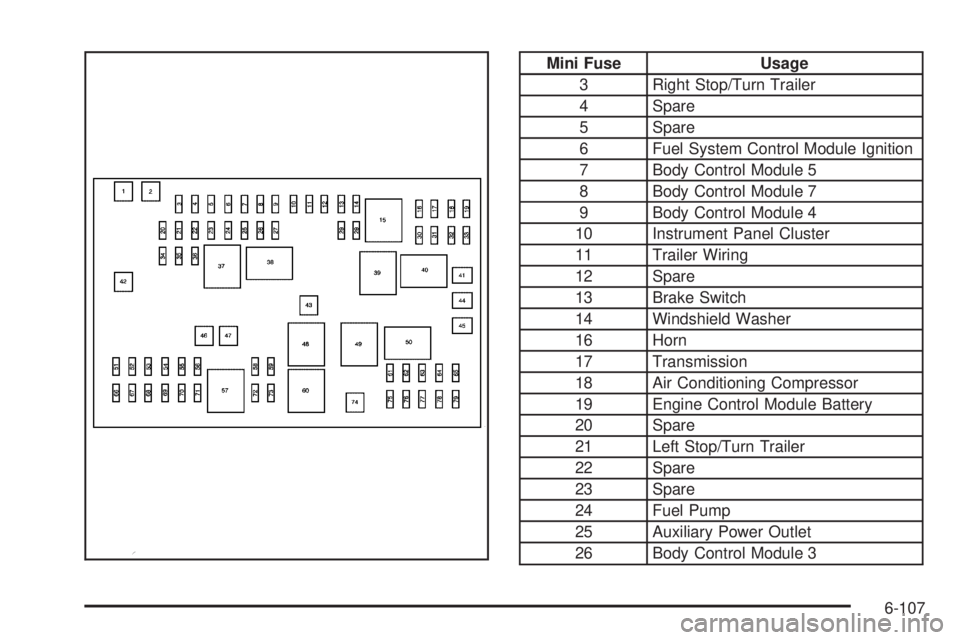
Mini Fuse Usage
3 Right Stop/Turn Trailer
4 Spare
5 Spare
6 Fuel System Control Module Ignition
7 Body Control Module 5
8 Body Control Module 7
9 Body Control Module 4
10 Instrument Panel Cluster
11 Trailer Wiring
12 Spare
13 Brake Switch
14 Windshield Washer
16 Horn
17 Transmission
18 Air Conditioning Compressor
19 Engine Control Module Battery
20 Spare
21 Left Stop/Turn Trailer
22 Spare
23 Spare
24 Fuel Pump
25 Auxiliary Power Outlet
26 Body Control Module 3
6-107
Page 370 of 424
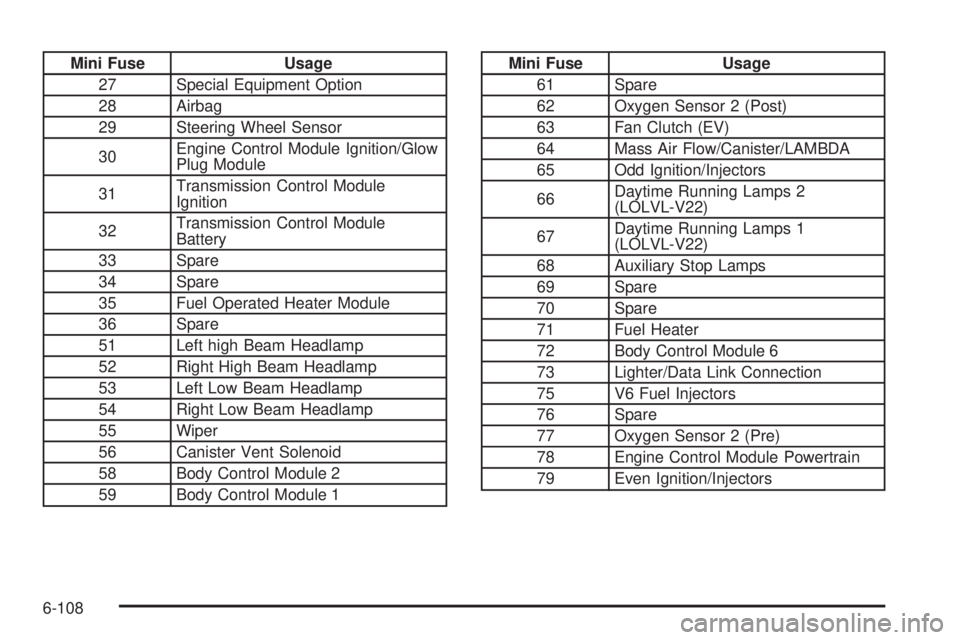
Mini Fuse Usage
27 Special Equipment Option
28 Airbag
29 Steering Wheel Sensor
30Engine Control Module Ignition/Glow
Plug Module
31Transmission Control Module
Ignition
32Transmission Control Module
Battery
33 Spare
34 Spare
35 Fuel Operated Heater Module
36 Spare
51 Left high Beam Headlamp
52 Right High Beam Headlamp
53 Left Low Beam Headlamp
54 Right Low Beam Headlamp
55 Wiper
56 Canister Vent Solenoid
58 Body Control Module 2
59 Body Control Module 1Mini Fuse Usage
61 Spare
62 Oxygen Sensor 2 (Post)
63 Fan Clutch (EV)
64 Mass Air Flow/Canister/LAMBDA
65 Odd Ignition/Injectors
66Daytime Running Lamps 2
(LOLVL-V22)
67Daytime Running Lamps 1
(LOLVL-V22)
68 Auxiliary Stop Lamps
69 Spare
70 Spare
71 Fuel Heater
72 Body Control Module 6
73 Lighter/Data Link Connection
75 V6 Fuel Injectors
76 Spare
77 Oxygen Sensor 2 (Pre)
78 Engine Control Module Powertrain
79 Even Ignition/Injectors
6-108