warning light GMC SAVANA 2010 User Guide
[x] Cancel search | Manufacturer: GMC, Model Year: 2010, Model line: SAVANA, Model: GMC SAVANA 2010Pages: 424, PDF Size: 2.4 MB
Page 98 of 424
The passenger sensing system is designed to turn on
(may inflate) the right front passenger frontal airbag
anytime the system senses that a person of adult size is
sitting properly in the right front passenger seat.
When the passenger sensing system has allowed the
airbag to be enabled, the on indicator will light and stay
lit to remind you that the airbag is active.
For some children, including those in child restraints, and
for very small adults, the passenger sensing system may
or may not turn off the right front passenger frontal airbag,
depending upon the person’s seating posture and body
build. Everyone in your vehicle who has outgrown child
restraints should wear a safety belt properly — whether
or not there is an airbag for that person.
{WARNING:
If the airbag readiness light in the instrument panel
cluster ever comes on and stays on, it means that
something may be wrong with the airbag system.
If this ever happens, have the vehicle serviced
promptly, because an adult-size person sitting in
the right front passenger’s seat may not have the
protection of the airbag(s). SeeAirbag Readiness
Light on page 4-23for more on this, including
important safety information.
2-74
Page 104 of 424
Replacing Restraint System Parts
After a Crash
{WARNING:
A crash can damage the restraint systems in your
vehicle. A damaged restraint system may not
properly protect the person using it, resulting in
serious injury or even death in a crash. To help
make sure your restraint systems are working
properly after a crash, have them inspected and
any necessary replacements made as soon as
possible.If the vehicle has been in a crash, do you need new
safety belts or LATCH system (if equipped) parts?
After a very minor crash, nothing may be necessary.
But the safety belt assemblies that were used during any
crash may have been stressed or damaged. See your
dealer/retailer to have the safety belt assemblies
inspected or replaced.
If the vehicle has the LATCH system and it was being
used during a crash, you may need new LATCH
system parts.
New parts and repairs may be necessary even if the
safety belt or LATCH system (if equipped), was
not being used at the time of the crash.
If an airbag inflates, you will need to replace airbag
system parts. See the part on the airbag system earlier
in this section.
Have the safety belt pretensioners checked if the
vehicle has been in a crash, if the airbag readiness light
stays on after the vehicle is started, or while you are
driving. SeeAirbag Readiness Light on page 4-23.
2-80
Page 111 of 424
There are other conditions which can affect the
performance of the transmitter, seeRemote Keyless
Entry (RKE) System on page 3-4for additional
information.
/(Remote Vehicle Start):This button will be on the
RKE transmitter if you have remote start.
To start the engine using the remote start feature:
1. Aim the RKE transmitter at the vehicle.
2. Press and release the transmitter’s lock button,
then immediately press and hold the remote
vehicle start button for four seconds or until the
vehicle’s turn signal lamps flash.
When the vehicle’s engine starts, the parking
lamps will turn on and remain on while the engine
is running. The vehicle’s doors will be locked.
The airbag readiness light will be on during a remote
start. It should turn off when the ignition is turned
to ON/RUN. SeeAirbag Readiness Light on
page 4-23for more information.
3. If it is the first remote start since the vehicle has
been driven, repeat these steps, while the engine
is still running, to extend the engine running time
by 10 minutes. Remote start can be extended
one time.
After entering the vehicle during a remote start, insert
and turn the key to ON/RUN to drive the vehicle.After a remote start, the engine will automatically shut
off after 10 minutes unless a time extension has
been done or the vehicle’s key is inserted into the
ignition switch and turned to ON/RUN.
The maximum number of remote starts between ignition
cycles with the key is two.
If the remote start procedure is used again before
the first 10 minute time frame has ended, the first
10 minutes will immediately expire and the second
10 minute time frame will start.
After your vehicle’s engine has been started two times
using the remote start button, the vehicle’s ignition
switch must be turned to ON/RUN and then back to
LOCK/OFF using the key before the remote start
procedure can be used again.
To manually shut off the engine after a remote start:
•Aim the RKE transmitter at the vehicle and
press the remote start button until the parking
lamps turn off.
•Turn on the hazard warning flashers. SeeHazard
Warning Flashers on page 4-3.
•Insert the vehicle’s key into the ignition switch and
turn the switch to ON/RUN and then back to
LOCK/OFF.
3-7
Page 127 of 424
B (ACC/ACCESSORY):This is the position in which
you can operate things like the radio and the windshield
wipers when the engine is off.
C (ON/RUN):This position can be used to operate the
electrical accessories and to display some instrument
panel cluster warning and indicator lights. The switch
stays in this position when the engine is running.
If you leave the key in the ACC/ACCESSORY or
ON/RUN position with the engine off, the battery could
be drained. You may not be able to start the vehicle if the
battery is allowed to drain for an extended period of time.
D (START):This is the position that starts the engine.
When the engine starts, release the key. The ignition
switch returns to ON/RUN for driving.
A warning tone will sound when the driver door is
opened, the ignition is in ACC/ACCESSORY or
LOCK/OFF and the key is in the ignition.Retained Accessory Power (RAP)
These vehicle accessories can be used for up to
10 minutes after the engine is turned off:
•Audio System
•Power Windows (if equipped)
These features will work when the ignition key is in
ON/RUN or ACC/ACCESSORY. Once the key is turned
from ON/RUN to LOCK/OFF, power to the radio will
continue to work 10 minutes or until the driver door is
opened. The power windows will continue to work for up
to 10 minutes or until any door is opened.
Starting the Engine
If the vehicle has the DURAMAX®Diesel engine, see
the DURAMAX®Diesel manual for more information.
To place the transmission in the proper gear:
Move the shift lever to P (Park) or N (Neutral). The
engine will not start in any other position. To restart
the engine when the vehicle is already moving,
use N (Neutral) only.
3-23
Page 139 of 424
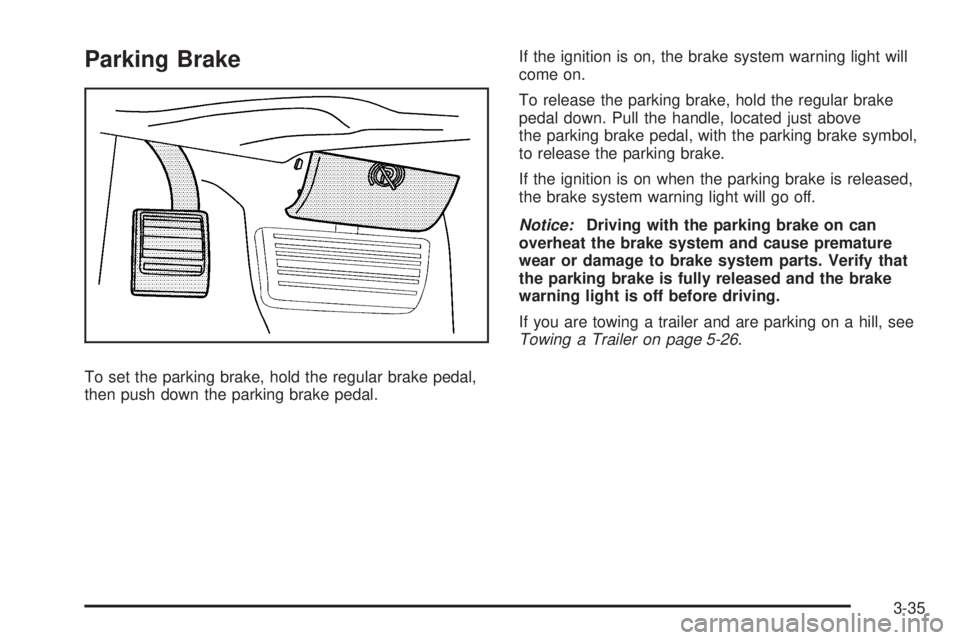
Parking Brake
To set the parking brake, hold the regular brake pedal,
then push down the parking brake pedal.If the ignition is on, the brake system warning light will
come on.
To release the parking brake, hold the regular brake
pedal down. Pull the handle, located just above
the parking brake pedal, with the parking brake symbol,
to release the parking brake.
If the ignition is on when the parking brake is released,
the brake system warning light will go off.
Notice:Driving with the parking brake on can
overheat the brake system and cause premature
wear or damage to brake system parts. Verify that
the parking brake is fully released and the brake
warning light is off before driving.
If you are towing a trailer and are parking on a hill, see
Towing a Trailer on page 5-26.
3-35
Page 147 of 424
Instrument Panel Overview...............................4-3
Hazard Warning Flashers................................4-3
Horn .............................................................4-3
Tilt Wheel.....................................................4-3
Turn Signal/Multifunction Lever.........................4-4
Turn and Lane-Change Signals........................4-4
Headlamp High/Low-Beam Changer..................4-5
Flash-to-Pass.................................................4-5
Windshield Wipers..........................................4-5
Windshield Washer.........................................4-6
Cruise Control................................................4-6
Exterior Lamps...............................................4-9
Headlamps on Reminder................................4-11
Daytime Running Lamps (DRL).......................4-11
Automatic Headlamp System..........................4-11
Instrument Panel Brightness...........................4-12
Dome Lamps ...............................................4-12
Dome Lamp Override....................................4-13
Entry/Exit Lighting.........................................4-13
Reading Lamps............................................4-13Electric Power Management...........................4-13
Battery Run-Down Protection..........................4-14
Accessory Power Outlet(s).............................4-14
Ashtray(s) and Cigarette Lighter......................4-15
Climate Controls............................................4-15
Climate Control System.................................4-15
Outlet Adjustment.........................................4-17
Rear Heating System....................................4-18
Rear Air Conditioning and Heating System.......4-19
Warning Lights, Gages, and Indicators............4-20
Instrument Panel Cluster................................4-21
Speedometer and Odometer...........................4-22
Trip Odometer..............................................4-22
Safety Belt Reminders...................................4-23
Airbag Readiness Light
..................................4-23
Airbag Off Light............................................4-24
Passenger Airbag Status Indicator...................4-26
Charging System Light..................................4-27
Voltmeter Gage............................................4-27
Section 4 Instrument Panel
4-1
Page 148 of 424
Brake System Warning Light..........................4-28
Antilock Brake System (ABS) Warning Light.....4-29
StabiliTrak
®Indicator Light.............................4-29
Engine Coolant Temperature Gage..................4-30
Tire Pressure Light.......................................4-30
Malfunction Indicator Lamp.............................4-31
Oil Pressure Gage........................................4-34
Oil Pressure Light.........................................4-35
Security Light...............................................4-35
Cruise Control Light......................................4-36
Highbeam On Light.......................................4-36
Tow/Haul Mode Light....................................4-36
Fuel Gage...................................................4-36Driver Information Center (DIC).......................4-37
DIC Operation and Displays...........................4-38
DIC Compass..............................................4-43
DIC Warnings and Messages.........................4-44
DIC Vehicle Customization.............................4-52
Audio System(s).............................................4-59
Setting the Clock..........................................4-60
Radio(s)......................................................4-62
Using an MP3..............................................4-72
Theft-Deterrent Feature..................................4-76
Audio Steering Wheel Controls.......................4-77
Radio Reception...........................................4-77
Fixed Mast Antenna......................................4-78
Section 4 Instrument Panel
4-2
Page 153 of 424
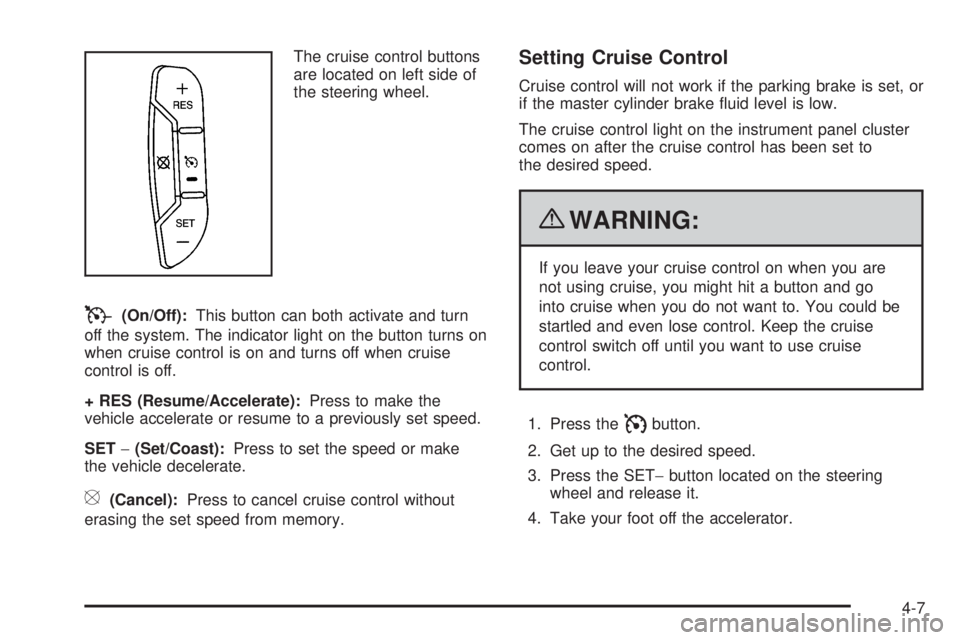
The cruise control buttons
are located on left side of
the steering wheel.
T(On/Off):This button can both activate and turn
off the system. The indicator light on the button turns on
when cruise control is on and turns off when cruise
control is off.
+ RES (Resume/Accelerate):Press to make the
vehicle accelerate or resume to a previously set speed.
SET−(Set/Coast):Press to set the speed or make
the vehicle decelerate.
[(Cancel):Press to cancel cruise control without
erasing the set speed from memory.
Setting Cruise Control
Cruise control will not work if the parking brake is set, or
if the master cylinder brake fluid level is low.
The cruise control light on the instrument panel cluster
comes on after the cruise control has been set to
the desired speed.
{WARNING:
If you leave your cruise control on when you are
not using cruise, you might hit a button and go
into cruise when you do not want to. You could be
startled and even lose control. Keep the cruise
control switch off until you want to use cruise
control.
1. Press the
Ibutton.
2. Get up to the desired speed.
3. Press the SET−button located on the steering
wheel and release it.
4. Take your foot off the accelerator.
4-7
Page 156 of 424
The exterior lamps control has four positions:
O(Off):Briefly turn the control to this position to turn
the automatic headlamps and daytime running lamps
(DRL) off or back on.
For vehicles first sold in Canada, the off position only
works for vehicles that are shifted into the P (Park)
position.
AUTO (Automatic):Turns on the headlamps
automatically at normal brightness, together with the
following:
•Parking Lamps
•Instrument Panel Lights
•Taillamps
•License Plate Lamps
;(Parking Lamps):Turns on the parking lamps
together with the following:
•Instrument Panel Lights
•Taillamps
•License Plate Lamps
2(Headlamps):Turns on the headlamps together
with the following lamps listed below.
•Parking Lamps
•Instrument Panel Lights
•Taillamps
•License Plate Lamps
If the headlamps are turned on while the vehicle is on,
the headlamps turn off automatically 10 minutes
after the ignition is turned off. If the headlamps are
turned on while the vehicle is off, the headlamps will
continue to stay on. To prevent the battery from
being drained, turn the control to the
9position.
A warning chime sounds if the driver door is opened
while the ignition switch is off and the headlamps are on.
To change the headlamps from low beam to high
beam, push the turn signal/multifunction lever toward
the instrument panel.
4-10
Page 166 of 424
9(Fan Control):Turn clockwise or counterclockwise
to increase or decrease the fan speed in the
rear-seating area.
Temperature Control:Turn clockwise or
counterclockwise to increase or decrease the
temperature in the rear-seating area.
The air-conditioning system on the main climate control
panel must be turned on to direct cooled air to the
rear of the vehicle. If it is not on, then the temperature
in the rear of the vehicle remains at cabin temperature.
Air Delivery Mode Control:Turn clockwise or
counterclockwise to change the direction of the airflow
in the rear seating area.
To change the current mode, select one of the following:
H(Vent):Air is directed to the upper outlets, with
some directed to the floor outlets.
2(Floor):Air is directed to the floor outlets.
Be sure to keep the area under the front seats clear of
any objects so that the air inside of the vehicle can
circulate effectively.
For information on how to use the main climate control
system, seeClimate Control System on page 4-15.
For information on ventilation, seeOutlet Adjustment on
page 4-17.
Warning Lights, Gages, and
Indicators
Warning lights and gages can signal that something is
wrong before it becomes serious enough to cause
an expensive repair or replacement. Paying attention to
the warning lights and gages could prevent injury.
Warning lights come on when there might be or there is
a problem with one of the vehicle’s functions. Some
warning lights come on briefly when the engine is started
to indicate they are working.
Gages can indicate when there might be or there is a
problem with one of the vehicle’s functions. Often gages
and warning lights work together to indicate a problem
with the vehicle.
When one of the warning lights comes on and stays on
while driving, or when one of the gages shows there
could be a problem, check the section that explains what
to do. Follow this manual’s advice. Waiting to do
repairs can be costly and even dangerous.
4-20