brakes GMC SAVANA 2011 User Guide
[x] Cancel search | Manufacturer: GMC, Model Year: 2011, Model line: SAVANA, Model: GMC SAVANA 2011Pages: 414, PDF Size: 5.27 MB
Page 230 of 414
Black plate (18,1)GMC Savana Owner Manual - 2011
9-18 Driving and Operating
.Avoid making hard stops for
the first 322 km (200 miles) or
so. During this time the new
brake linings are not yet
broken in. Hard stops with
new linings can mean
premature wear and earlier
replacement. Follow this
breaking-in guideline every
time you get new brake
linings.
.Do not tow a trailer during
break-in. SeeTrailer Towing
on page 9‑52 for the trailer
towing capabilities of the
vehicle and more
information.
Following break‐in, engine speed
and load can be gradually
increased.
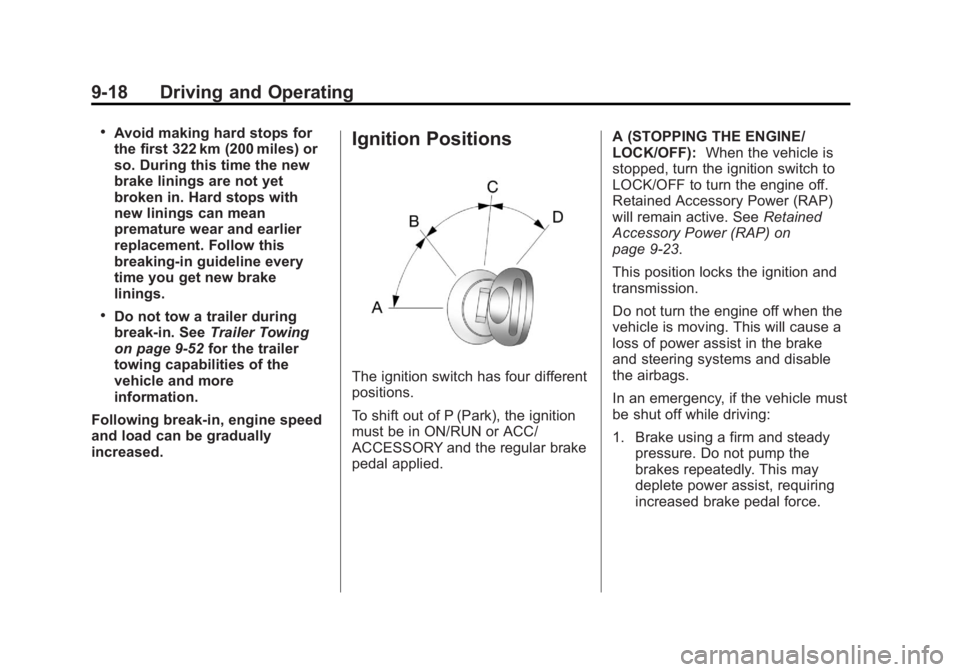
Ignition Positions
The ignition switch has four different
positions.
To shift out of P (Park), the ignition
must be in ON/RUN or ACC/
ACCESSORY and the regular brake
pedal applied. A (STOPPING THE ENGINE/
LOCK/OFF):
When the vehicle is
stopped, turn the ignition switch to
LOCK/OFF to turn the engine off.
Retained Accessory Power (RAP)
will remain active. See Retained
Accessory Power (RAP) on
page 9‑23.
This position locks the ignition and
transmission.
Do not turn the engine off when the
vehicle is moving. This will cause a
loss of power assist in the brake
and steering systems and disable
the airbags.
In an emergency, if the vehicle must
be shut off while driving:
1. Brake using a firm and steady pressure. Do not pump the
brakes repeatedly. This may
deplete power assist, requiring
increased brake pedal force.
Page 231 of 414
Black plate (19,1)GMC Savana Owner Manual - 2011
Driving and Operating 9-19
2. Shift the vehicle to N (Neutral).This can be done while the
vehicle is moving. After shifting
to N (Neutral), firmly apply the
brakes and steer the vehicle to a
safe location.
3. Come to a complete stop, shift to P (Park), and turn the ignition
to LOCK/OFF. On vehicles with
an automatic transmission, the
shift lever must be in P (Park) to
turn the ignition switch to the
LOCK/OFF position.
4. Set the parking brake. See Parking Brake on page 9‑36.
{WARNING
Turning off the vehicle while
moving may cause loss of power
assist in the brake and steering
systems and disable the airbags.
While driving, only shut the
vehicle off in an emergency. 5. If the vehicle must be shut off
while driving, turn the ignition to
ACC/ACCESSORY.
Notice: Using a tool to force the
key to turn in the ignition could
cause damage to the switch or
break the key. Use the correct
key, make sure it is all the way in,
and turn it only with your hand.
If the key cannot be turned by
hand, see your dealer.
B (ACC/ACCESSORY): This is the
position in which you can operate
things like the radio and the
windshield wipers when the engine
is off.
C (ON/RUN): This position can be
used to operate the electrical
accessories and to display some
instrument panel cluster warning
and indicator lights. The switch
stays in this position when the
engine is running. If you leave the key in the ACC/
ACCESSORY or ON/RUN position
with the engine off, the battery could
be drained. You may not be able to
start the vehicle if the battery is
allowed to drain for an extended
period of time.
D (START):
This is the position that
starts the engine. When the engine
starts, release the key. The ignition
switch returns to ON/RUN for
driving.
A warning tone will sound when the
driver door is opened, the ignition is
in ACC/ACCESSORY or LOCK/OFF
and the key is in the ignition.
Page 237 of 414
Black plate (25,1)GMC Savana Owner Manual - 2011
Driving and Operating 9-25
Shifting out of Park
The vehicle has an automatic
transmission shift lock control
system. You have to fully apply the
brakes before you can shift from
P (Park) when the ignition is in ON/
RUN or ACC/ACCESSORY. See
Automatic Transmission (Six Speed)
on page 9‑27orAutomatic
Transmission (Four Speed) on
page 9‑31.
The shift lock control system is
designed to do the following:
.Prevent the ignition key from
being removed unless the shift
lever is in P (Park).
.Prevent movement of the shift
lever out of P (Park), unless the
ignition is in ON/RUN or ACC/
ACCESSORY and the regular
brake pedal is applied.
The shift lock control system is
always functional except in the case
of a dead battery or low voltage
(less than 9 V) battery. If the vehicle has an uncharged
battery or a battery with low voltage,
try charging or jump starting the
battery. See
Jump Starting on
page 10‑84 for more information.
To shift out of P (Park) use the
following:
1. Apply the brake pedal.
2. Turn the ignition to ACC/ ACCESSORY or ON/RUN.
3. Move the shift lever to the desired position.
If you still are unable to shift out of
P (Park):
1. Ease the pressure on the shift lever.
2. While holding down the brake pedal, push the shift lever all the
way into P (Park).
3. Move the shift lever to the desired position.
If you are still having a problem
shifting, have the vehicle serviced.
Parking over Things
That Burn
{WARNING
Things that can burn could touch
hot exhaust parts under the
vehicle and ignite. Do not park
over papers, leaves, dry grass,
or other things that can burn.
Page 242 of 414
Black plate (30,1)GMC Savana Owner Manual - 2011
9-30 Driving and Operating
When temperatures are very cold,
the transmission's gear shifting
could be delayed providing more
stable shifts until the engine warms
up. Shifts could be more noticeable
with a cold transmission. This
difference in shifting is normal.
M (Manual Mode):This position
lets drivers select the range of gears
appropriate for current driving
conditions. If the vehicle has this
feature, see “Range Selection
Mode” underManual Mode on
page 9‑33.
3 (Third): This position is also used
for normal driving. It reduces vehicle
speed more than D (Drive) without
using the brakes. You might choose
3 (Third) instead of D (Drive) when
driving on hilly, winding roads, when
towing a trailer, so there is less
shifting between gears and when
going down a steep hill. See “Range
Selection Mode” underManual
Mode on page 9‑33. 2 (Second):
This position reduces
vehicle speed even more than
3 (Third) without using the brakes.
You can use 2 (Second) on hills.
It can help control vehicle speed as
you go down steep mountain roads,
but then you would also want to use
the brakes off and on. See “Range
Selection Mode” underManual
Mode on page 9‑33.
If you manually select 2 (Second)
in an automatic transmission,
the transmission will start in
second gear. You can use this
feature for reducing the speed of the
rear wheels when you are trying to
start the vehicle from a stop on
slippery road surfaces. 1 (First):
This position reduces
vehicle speed without using the
brakes. You can use it for major/
severe downgrades where the
vehicle would otherwise accelerate
due to steepness of grade. When
you shift to 1 (First) it provides the
lowest gear appropriate to current
road speed and continues to
downshift as the vehicle slows,
eventually downshifting to 1 (First)
gear. The transmission can be held
in 1 (First) gear using Range
Selection Mode or the shift lever.
See “Range Selection Mode” under
Manual Mode on page 9‑33.
Notice: Spinning the tires or
holding the vehicle in one place
on a hill using only the
accelerator pedal may damage
the transmission. The repair will
not be covered by the vehicle
warranty. If you are stuck, do not
spin the tires. When stopping on
a hill, use the brakes to hold the
vehicle in place.
Page 244 of 414
Black plate (32,1)GMC Savana Owner Manual - 2011
9-32 Driving and Operating
To rock the vehicle back and forth to
get out of snow, ice or sand without
damaging the transmission, seeIf
the Vehicle Is Stuck on page 9‑11.
N (Neutral): In this position, the
engine does not connect with the
wheels. To restart the engine when
the vehicle is already moving, use
N (Neutral) only. Also, use
N (Neutral) when the vehicle is
being towed.
{WARNING
Shifting into a drive gear while the
engine is running at high speed is
dangerous. Unless your foot is
firmly on the brake pedal, the
vehicle could move very rapidly.
You could lose control and hit
people or objects. Do not shift
into a drive gear while the engine
is running at high speed. Notice:
Shifting out of P (Park) or
N (Neutral) with the engine
running at high speed may
damage the transmission. The
repairs would not be covered by
the vehicle warranty. Be sure the
engine is not running at high
speed when shifting the vehicle.
D (Drive): This position is for
normal driving. It provides the best
fuel economy. If you need more
power for passing, and you are:
.Going less than about 55 km/h
(35 mph), push the accelerator
pedal about halfway down.
.Going about 55 km/h (35 mph) or
more, push the accelerator all
the way down.
You will shift down to the next
gear and have more power. Downshifting the transmission in
slippery road conditions could result
in skidding. See
“Skidding”under
Loss of Control on page 9‑6.
3 (Third): This position is also used
for normal driving. However it
reduces vehicle speed more than
D (Drive) without using the brakes.
You might choose 3 (Third) instead
of D (Drive) when driving on hilly,
winding roads, when towing a trailer,
so there is less shifting between
gears and when going down a
steep hill.
You should use 3 (Third) (or a lower
gear as needed) when towing a
trailer to minimize heat build-up and
extend the life of the transmission.
Page 245 of 414
Black plate (33,1)GMC Savana Owner Manual - 2011
Driving and Operating 9-33
2 (Second):This position reduces
vehicle speed even more than
3 (Third) without using the brakes.
You can use 2 (Second) on hills.
It can help control vehicle speed as
you go down steep mountain roads,
but then you would also want to use
the brakes off and on.
You may use this feature for
reducing torque to the rear wheels
when you are trying to start the
vehicle from a stop on slippery road
surfaces.
1 (First): This position reduces
vehicle speed even more than
2 (Second) without using the brakes.
You can use it on very steep hills,
or in deep snow or mud. If the shift
lever is put in 1 (First) while the
vehicle is moving forward, the
transmission will not shift into first
gear until the vehicle is going slowly
enough. Notice:
Spinning the tires or
holding the vehicle in one
place on a hill using only the
accelerator pedal may damage
the transmission. The repair will
not be covered by the vehicle
warranty. If you are stuck, do not
spin the tires. When stopping on
a hill, use the brakes to hold the
vehicle in place.
Manual Mode
Range Selection Mode
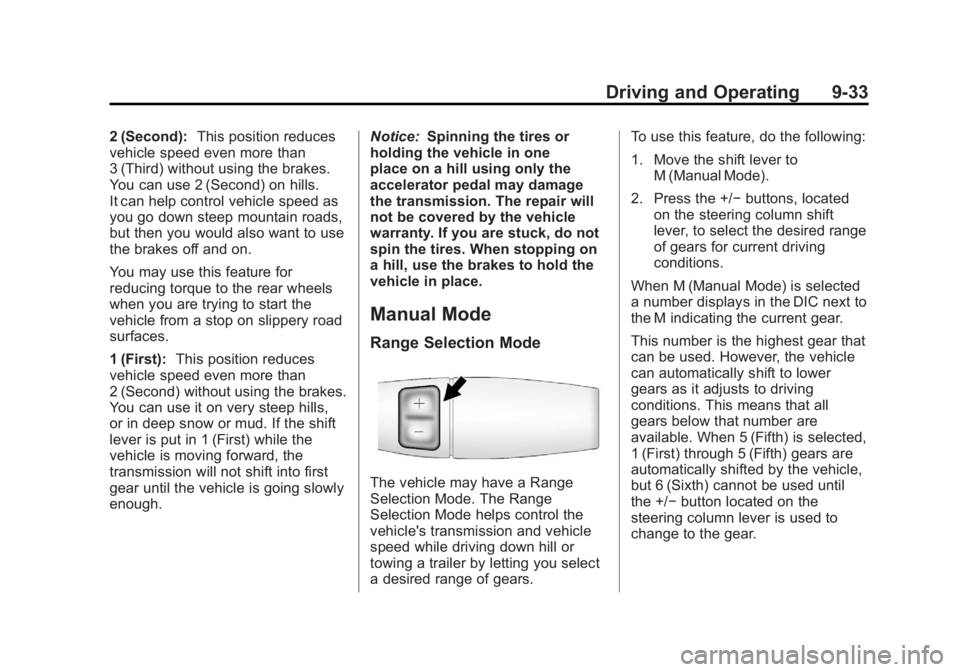
The vehicle may have a Range
Selection Mode. The Range
Selection Mode helps control the
vehicle's transmission and vehicle
speed while driving down hill or
towing a trailer by letting you select
a desired range of gears. To use this feature, do the following:
1. Move the shift lever to
M (Manual Mode).
2. Press the +/− buttons, located
on the steering column shift
lever, to select the desired range
of gears for current driving
conditions.
When M (Manual Mode) is selected
a number displays in the DIC next to
the M indicating the current gear.
This number is the highest gear that
can be used. However, the vehicle
can automatically shift to lower
gears as it adjusts to driving
conditions. This means that all
gears below that number are
available. When 5 (Fifth) is selected,
1 (First) through 5 (Fifth) gears are
automatically shifted by the vehicle,
but 6 (Sixth) cannot be used until
the +/− button located on the
steering column lever is used to
change to the gear.
Page 246 of 414
Black plate (34,1)GMC Savana Owner Manual - 2011
9-34 Driving and Operating
Grade Braking is not available when
Range Selection Mode is active.
SeeTow/Haul Mode on page 9‑34.
While using Range Selection Mode,
Cruise Control and the Tow/Haul
Mode can be used.
Notice: Spinning the tires or
holding the vehicle in one place
on a hill using only the
accelerator pedal may damage
the transmission. The repair will
not be covered by the vehicle
warranty. If you are stuck, do not
spin the tires. When stopping on
a hill, use the brakes to hold the
vehicle in place.
Low Traction Mode
Low Traction Mode can assist in
vehicle acceleration when road
conditions are slippery. While the
vehicle is at a stop, select the
second gear range using Range
Selection Mode. This will limit
torque to the wheels after it detects
wheel slip, preventing the tires from
spinning.
Tow/Haul Mode
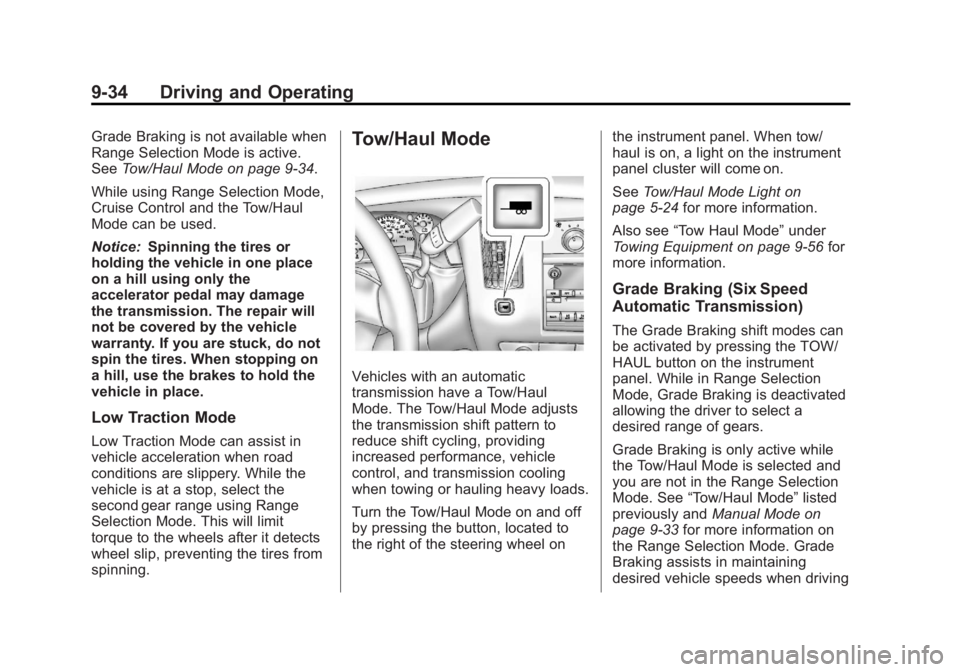
Vehicles with an automatic
transmission have a Tow/Haul
Mode. The Tow/Haul Mode adjusts
the transmission shift pattern to
reduce shift cycling, providing
increased performance, vehicle
control, and transmission cooling
when towing or hauling heavy loads.
Turn the Tow/Haul Mode on and off
by pressing the button, located to
the right of the steering wheel on the instrument panel. When tow/
haul is on, a light on the instrument
panel cluster will come on.
See
Tow/Haul Mode Light on
page 5‑24 for more information.
Also see “Tow Haul Mode” under
Towing Equipment on page 9‑56 for
more information.
Grade Braking (Six Speed
Automatic Transmission)
The Grade Braking shift modes can
be activated by pressing the TOW/
HAUL button on the instrument
panel. While in Range Selection
Mode, Grade Braking is deactivated
allowing the driver to select a
desired range of gears.
Grade Braking is only active while
the Tow/Haul Mode is selected and
you are not in the Range Selection
Mode. See “Tow/Haul Mode” listed
previously and Manual Mode on
page 9‑33 for more information on
the Range Selection Mode. Grade
Braking assists in maintaining
desired vehicle speeds when driving
Page 247 of 414
Black plate (35,1)GMC Savana Owner Manual - 2011
Driving and Operating 9-35
on downhill grades by automatically
shifting to lower gears when the
driver desires to slow the vehicle by
applying the brake. This reduces
wear on the braking system and
increases control of the vehicle.
Also seeTrailer Towing on
page 9‑52 for more information.
Cruise Grade Braking
(Six Speed Automatic
Transmission)
Cruise Grade Braking operates only
while Cruise Control is engaged in
Tow/Haul Mode. Cruise Grade
Braking assists in maintaining
desired vehicle speeds when driving
on downhill grades in cruise control
by automatically shifting to lower
gears when the cruise set speed is
exceeded.
While in the Range Selection Mode,
Cruise Grade Braking is not
available.
SeeManual Mode on page 9‑33.
Drive Systems
All-Wheel Drive
If the vehicle has this feature,
engine power is sent to all four
wheels when extra traction is
needed. This is like four-wheel
drive, but there is no separate lever
or switch to engage or disengage
the front axle. It is fully automatic,
and adjusts itself as needed for road
conditions.
Brakes
Antilock Brake
System (ABS)
This vehicle has the Antilock Brake
System (ABS), an advanced
electronic braking system that helps
prevent a braking skid.
When the engine is started and the
vehicle begins to drive away, ABS
checks itself. A momentary motor or
clicking noise might be heard while
this test is going on, and it might
even be noticed that the brake
pedal moves a little. This is normal.
If there is a problem with ABS, this
warning light stays on. See Antilock
Brake System (ABS) Warning Light
on page 5‑24.
Page 248 of 414
Black plate (36,1)GMC Savana Owner Manual - 2011
9-36 Driving and Operating
If driving safely on a wet road and it
becomes necessary to slam on the
brakes and continue braking to
avoid a sudden obstacle, a
computer senses that the wheels
are slowing down. If one of the
wheels is about to stop rolling, the
computer will separately work the
brakes at each wheel.
ABS can change the brake pressure
to each wheel, as required, faster
than any driver could. This can help
the driver steer around the obstacle
while braking hard.
As the brakes are applied, the
computer keeps receiving updates
on wheel speed and controls
braking pressure accordingly.
Remember: ABS does not change
the time needed to get a foot up to
the brake pedal or always decrease
stopping distance. If you get too
close to the vehicle in front of you,
there will not be enough time to
apply the brakes if that vehiclesuddenly slows or stops. Always
leave enough room up ahead to
stop, even with ABS.
Using ABS
Do not pump the brakes. Just hold
the brake pedal down firmly and let
ABS work. You might hear the ABS
pump or motor operating and feel
the brake pedal pulsate, but this is
normal.
Braking in Emergencies
ABS allows the driver to steer and
brake at the same time. In many
emergencies, steering can help
more than even the very best
braking.
Parking Brake
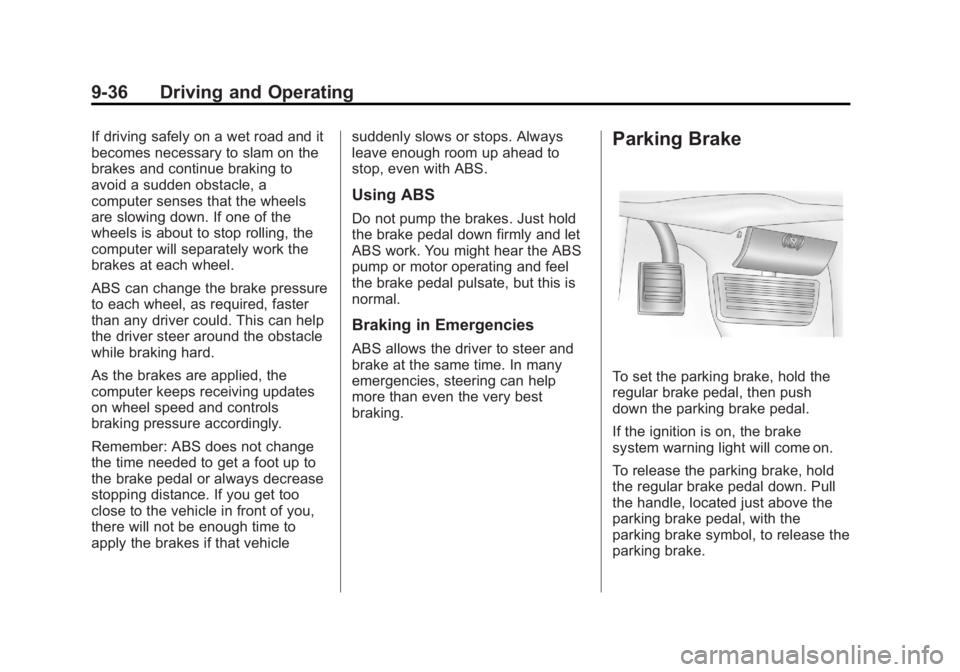
To set the parking brake, hold the
regular brake pedal, then push
down the parking brake pedal.
If the ignition is on, the brake
system warning light will come on.
To release the parking brake, hold
the regular brake pedal down. Pull
the handle, located just above the
parking brake pedal, with the
parking brake symbol, to release the
parking brake.
Page 249 of 414
Black plate (37,1)GMC Savana Owner Manual - 2011
Driving and Operating 9-37
If the ignition is on when the parking
brake is released, the brake system
warning light will go off.
Notice:Driving with the parking
brake on can overheat the brake
system and cause premature
wear or damage to brake system
parts. Verify that the parking
brake is fully released and the
brake warning light is off before
driving.
If you are towing a trailer and are
parking on a hill, see Driving
Characteristics and Towing Tips on
page 9‑48.Ride Control Systems
StabiliTrak®System
The vehicle may have a vehicle
stability enhancement system called
StabiliTrak. It is an advanced
computer controlled system that
assists the driver with directional
control of the vehicle in difficult
driving conditions.
StabiliTrak activates when the
computer senses a discrepancy
between the intended path and the
direction the vehicle is actually
traveling. StabiliTrak selectively
applies braking pressure at any one
of the vehicle's brakes to assist the
driver with keeping the vehicle on
the intended path.
When the vehicle is started and
begins to move, the system
performs several diagnostic checks
to insure there are no problems. The system may be heard or felt
while it is working. This is normal
and does not mean there is a
problem with the vehicle. The
system should initialize before the
vehicle reaches 32 km/h (20 mph).
In some cases, it may take
approximately 3.2 km (2 mi) of
driving before the system initializes.
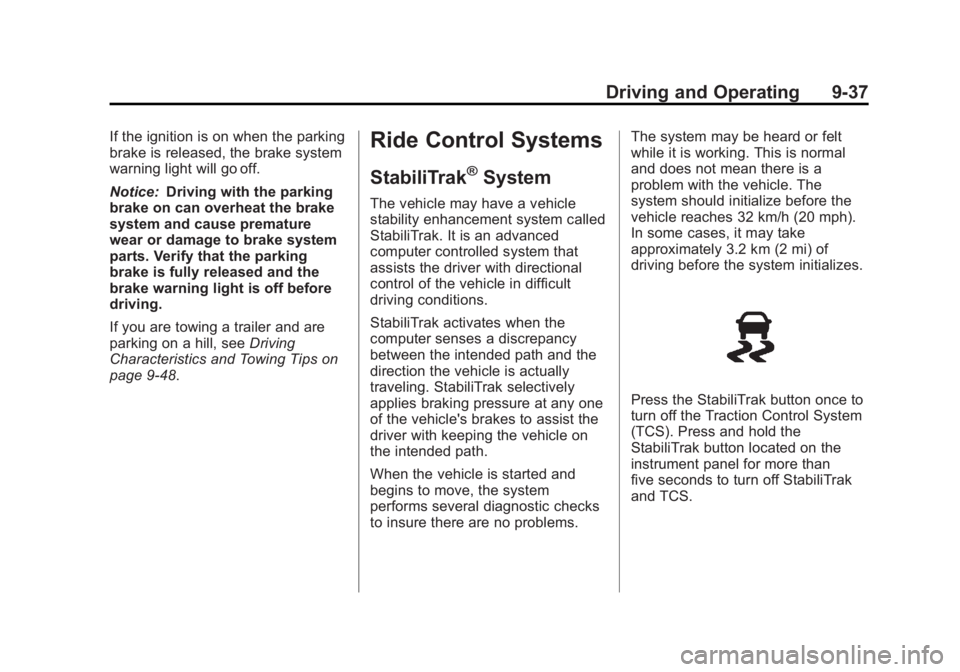
Press the StabiliTrak button once to
turn off the Traction Control System
(TCS). Press and hold the
StabiliTrak button located on the
instrument panel for more than
five seconds to turn off StabiliTrak
and TCS.