lock GMC SAVANA 2011 Service Manual
[x] Cancel search | Manufacturer: GMC, Model Year: 2011, Model line: SAVANA, Model: GMC SAVANA 2011Pages: 414, PDF Size: 5.27 MB
Page 111 of 414
Black plate (61,1)GMC Savana Owner Manual - 2011
Seats and Restraints 3-61
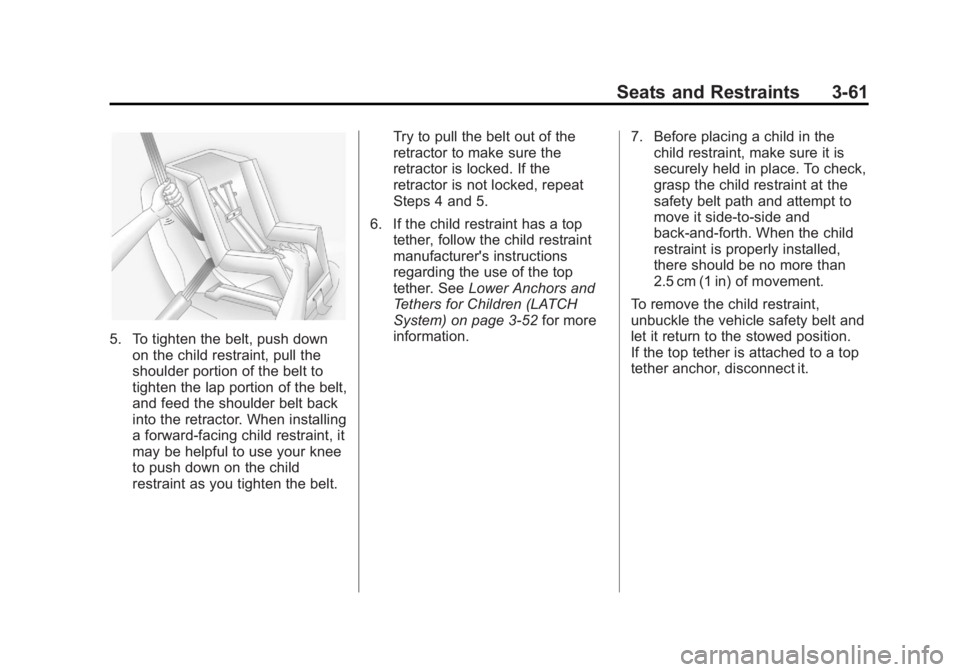
5. To tighten the belt, push downon the child restraint, pull the
shoulder portion of the belt to
tighten the lap portion of the belt,
and feed the shoulder belt back
into the retractor. When installing
a forward-facing child restraint, it
may be helpful to use your knee
to push down on the child
restraint as you tighten the belt. Try to pull the belt out of the
retractor to make sure the
retractor is locked. If the
retractor is not locked, repeat
Steps 4 and 5.
6. If the child restraint has a top tether, follow the child restraint
manufacturer's instructions
regarding the use of the top
tether. See Lower Anchors and
Tethers for Children (LATCH
System) on page 3‑52 for more
information. 7. Before placing a child in the
child restraint, make sure it is
securely held in place. To check,
grasp the child restraint at the
safety belt path and attempt to
move it side‐to‐side and
back‐and‐forth. When the child
restraint is properly installed,
there should be no more than
2.5 cm (1 in) of movement.
To remove the child restraint,
unbuckle the vehicle safety belt and
let it return to the stowed position.
If the top tether is attached to a top
tether anchor, disconnect it.
Page 114 of 414
Black plate (64,1)GMC Savana Owner Manual - 2011
3-64 Seats and Restraints
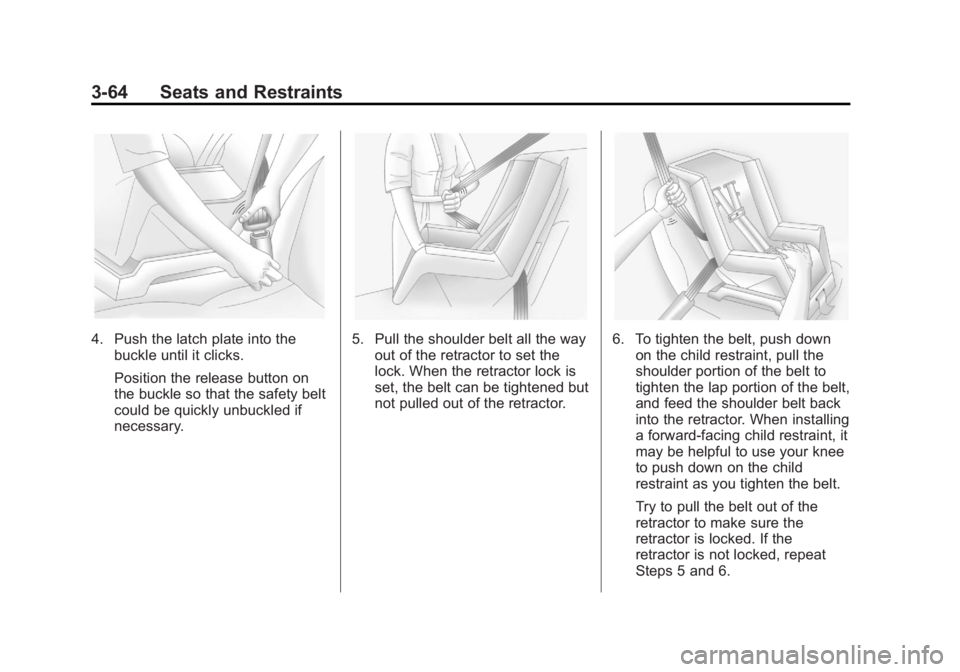
4. Push the latch plate into thebuckle until it clicks.
Position the release button on
the buckle so that the safety belt
could be quickly unbuckled if
necessary.5. Pull the shoulder belt all the wayout of the retractor to set the
lock. When the retractor lock is
set, the belt can be tightened but
not pulled out of the retractor.6. To tighten the belt, push downon the child restraint, pull the
shoulder portion of the belt to
tighten the lap portion of the belt,
and feed the shoulder belt back
into the retractor. When installing
a forward-facing child restraint, it
may be helpful to use your knee
to push down on the child
restraint as you tighten the belt.
Try to pull the belt out of the
retractor to make sure the
retractor is locked. If the
retractor is not locked, repeat
Steps 5 and 6.
Page 118 of 414
Black plate (68,1)GMC Savana Owner Manual - 2011
3-68 Seats and Restraints
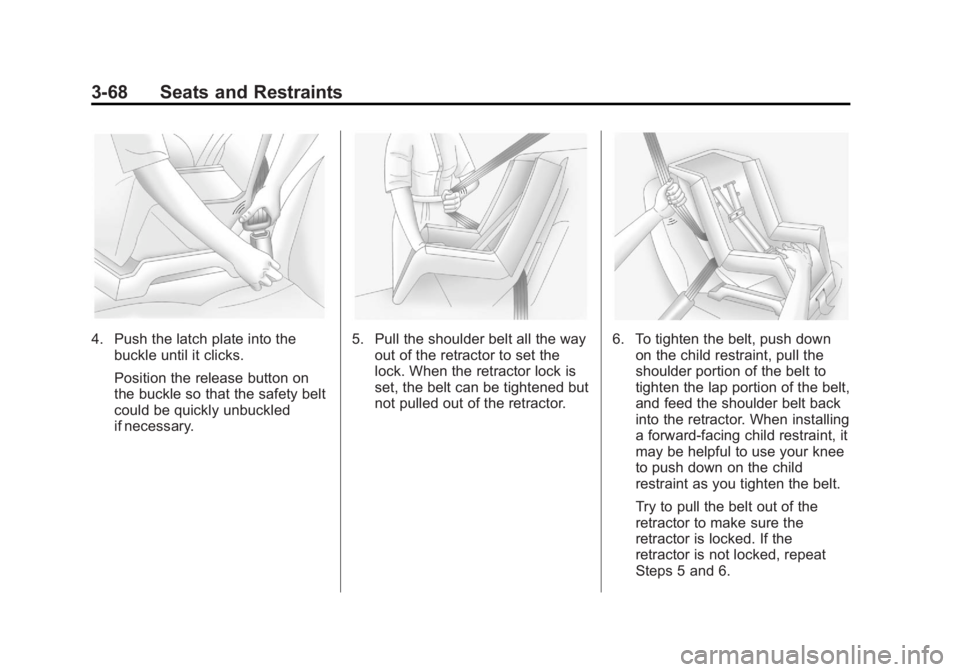
4. Push the latch plate into thebuckle until it clicks.
Position the release button on
the buckle so that the safety belt
could be quickly unbuckled
if necessary.5. Pull the shoulder belt all the wayout of the retractor to set the
lock. When the retractor lock is
set, the belt can be tightened but
not pulled out of the retractor.6. To tighten the belt, push downon the child restraint, pull the
shoulder portion of the belt to
tighten the lap portion of the belt,
and feed the shoulder belt back
into the retractor. When installing
a forward-facing child restraint, it
may be helpful to use your knee
to push down on the child
restraint as you tighten the belt.
Try to pull the belt out of the
retractor to make sure the
retractor is locked. If the
retractor is not locked, repeat
Steps 5 and 6.
Page 123 of 414
Black plate (1,1)GMC Savana Owner Manual - 2011
Instruments and Controls 5-1
Instruments and
Controls
Controls
Steering Wheel Adjustment . . . 5-2
Steering Wheel Controls . . . . . . 5-2
Horn . . . . . . . . . . . . . . . . . . . . . . . . . . 5-4
Windshield Wiper/Washer . . . . . 5-4
Compass . . . . . . . . . . . . . . . . . . . . . 5-5
Clock . . . . . . . . . . . . . . . . . . . . . . . . . 5-7
Power Outlets . . . . . . . . . . . . . . . . . 5-9
Cigarette Lighter . . . . . . . . . . . . . . 5-9
Ashtrays . . . . . . . . . . . . . . . . . . . . . 5-10
Warning Lights, Gauges, and
Indicators
Warning Lights, Gauges, andIndicators . . . . . . . . . . . . . . . . . . 5-10
Instrument Cluster . . . . . . . . . . . 5-11
Speedometer . . . . . . . . . . . . . . . . 5-12
Odometer . . . . . . . . . . . . . . . . . . . . 5-12
Trip Odometer . . . . . . . . . . . . . . . 5-12
Fuel Gauge . . . . . . . . . . . . . . . . . . 5-12 Engine Oil Pressure
Gauge . . . . . . . . . . . . . . . . . . . . . . 5-13
Engine Coolant Temperature Gauge . . . . . . . . . . . . . . . . . . . . . . 5-14
Voltmeter Gauge . . . . . . . . . . . . . 5-15
Safety Belt Reminders . . . . . . . 5-16
Airbag Readiness Light . . . . . . 5-16
Airbag On-Off Light . . . . . . . . . . 5-17
Passenger Airbag Status
Indicator . . . . . . . . . . . . . . . . . . . . 5-19
Charging System Light . . . . . . 5-20
Malfunction Indicator Lamp . . . . . . . . . . . . . 5-20
Brake System Warning Light . . . . . . . . . . . . . . . . . . . . . . . 5-23
Antilock Brake System (ABS) Warning Light . . . . . . . . . . . . . . 5-24
Tow/Haul Mode Light . . . . . . . . 5-24
StabiliTrak®Indicator Light . . . 5-24
Tire Pressure Light . . . . . . . . . . 5-25
Engine Oil Pressure Light . . . . 5-25
Security Light . . . . . . . . . . . . . . . . 5-26
High-Beam On Light . . . . . . . . . 5-26
Cruise Control Light . . . . . . . . . 5-26
Information Displays
Driver Information Center (DIC) . . . . . . . . . . . . . . . 5-27
Vehicle Messages
Vehicle Messages . . . . . . . . . . . 5-32
Battery Voltage and ChargingMessages . . . . . . . . . . . . . . . . . . 5-32
Brake System Messages . . . . 5-32
Compass Messages . . . . . . . . . 5-32
Door Ajar Messages . . . . . . . . . 5-33
Engine Cooling System Messages . . . . . . . . . . . . . . . . . . 5-33
Engine Oil Messages . . . . . . . . 5-34
Engine Power Messages . . . . 5-35
Fuel System Messages . . . . . . 5-35
Key and Lock Messages . . . . . 5-36
Lamp Messages . . . . . . . . . . . . . 5-36
Ride Control System Messages . . . . . . . . . . . . . . . . . . 5-36
Airbag System Messages . . . . 5-37
Anti-theft Alarm System Messages . . . . . . . . . . . . . . . . . . 5-38
Service Vehicle Messages . . . 5-38
Tire Messages . . . . . . . . . . . . . . . 5-38
Transmission Messages . . . . . 5-39
Vehicle Reminder Messages . . . . . . . . . . . . . . . . . . 5-40
Vehicle Personalization
Vehicle Personalization . . . . . . 5-40
Page 124 of 414
Black plate (2,1)GMC Savana Owner Manual - 2011
5-2 Instruments and Controls
Controls
Steering Wheel
Adjustment
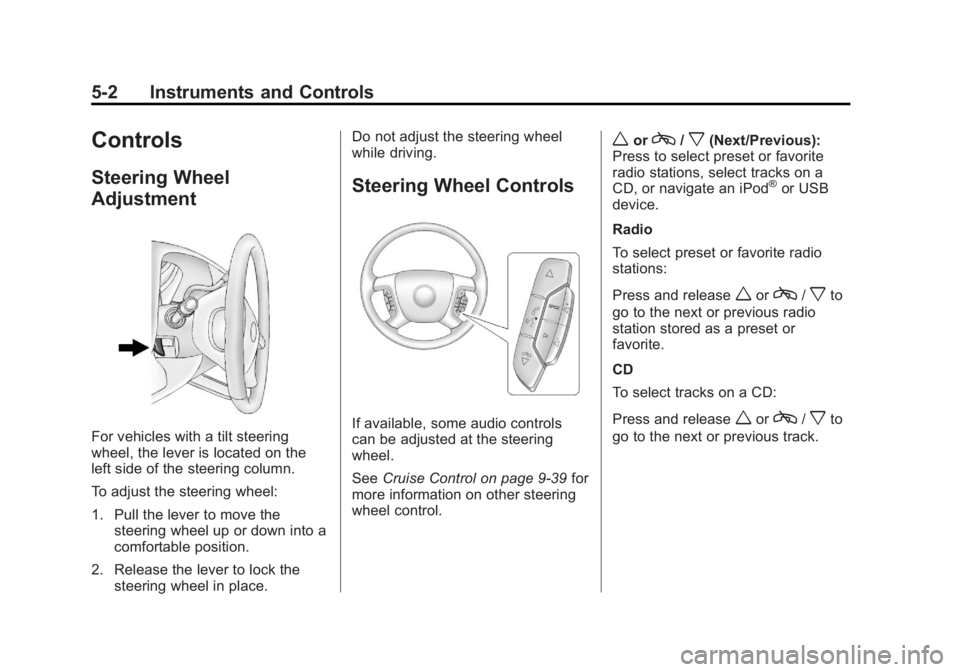
For vehicles with a tilt steering
wheel, the lever is located on the
left side of the steering column.
To adjust the steering wheel:
1. Pull the lever to move thesteering wheel up or down into a
comfortable position.
2. Release the lever to lock the steering wheel in place. Do not adjust the steering wheel
while driving.
Steering Wheel Controls
If available, some audio controls
can be adjusted at the steering
wheel.
See
Cruise Control on page 9‑39 for
more information on other steering
wheel control.
worc/x(Next/Previous):
Press to select preset or favorite
radio stations, select tracks on a
CD, or navigate an iPod
®or USB
device.
Radio
To select preset or favorite radio
stations:
Press and release
worc/xto
go to the next or previous radio
station stored as a preset or
favorite.
CD
To select tracks on a CD:
Press and release
worc/xto
go to the next or previous track.
Page 126 of 414
Black plate (4,1)GMC Savana Owner Manual - 2011
5-4 Instruments and Controls
Horn
Press the horn symbol in the middle
of the steering wheel to sound
the horn.
Windshield Wiper/Washer
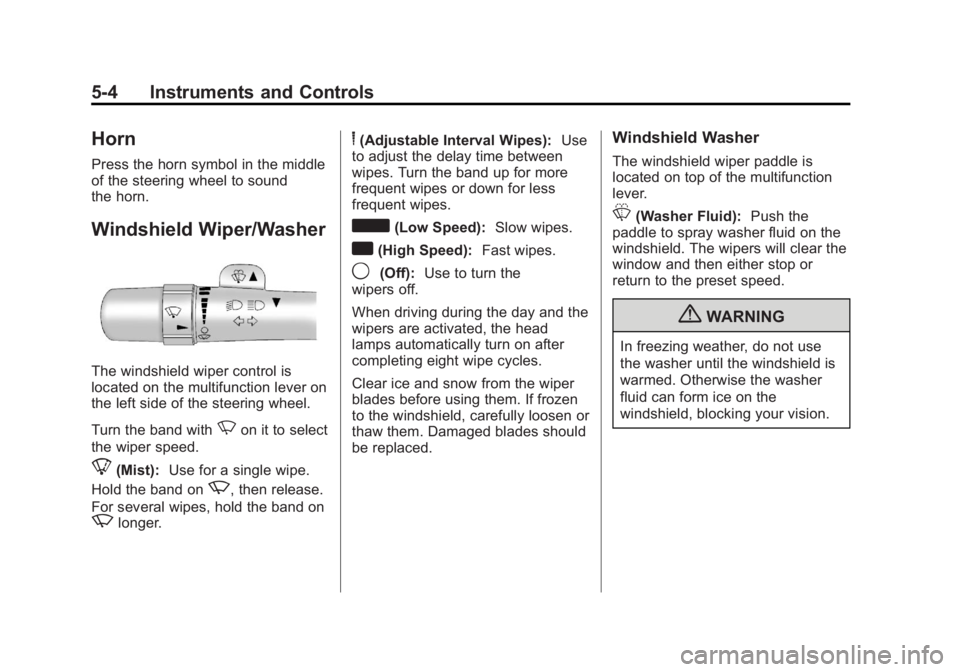
The windshield wiper control is
located on the multifunction lever on
the left side of the steering wheel.
Turn the band with
Non it to select
the wiper speed.
8(Mist): Use for a single wipe.
Hold the band on
z, then release.
For several wipes, hold the band on
zlonger.
6(Adjustable Interval Wipes): Use
to adjust the delay time between
wipes. Turn the band up for more
frequent wipes or down for less
frequent wipes.
d(Low Speed): Slow wipes.
a(High Speed): Fast wipes.
9(Off):Use to turn the
wipers off.
When driving during the day and the
wipers are activated, the head
lamps automatically turn on after
completing eight wipe cycles.
Clear ice and snow from the wiper
blades before using them. If frozen
to the windshield, carefully loosen or
thaw them. Damaged blades should
be replaced.
Windshield Washer
The windshield wiper paddle is
located on top of the multifunction
lever.
L(Washer Fluid): Push the
paddle to spray washer fluid on the
windshield. The wipers will clear the
window and then either stop or
return to the preset speed.
{WARNING
In freezing weather, do not use
the washer until the windshield is
warmed. Otherwise the washer
fluid can form ice on the
windshield, blocking your vision.
Page 129 of 414
Black plate (7,1)GMC Savana Owner Manual - 2011
Instruments and Controls 5-7
Clock
AM/FM Radio with Optional CD
Player
If the vehicle has an AM/FM radio
with an optional CD player, it has a
Hbutton for setting the time. With
these types of radios, the clock can
be set with either the radio turned
on or off.
Set the time by following these
steps:
1. Press
Huntil the hour begins
flashing on display. Press this
button a second time and the
minutes begin flashing on
display.
Press
Ha third time and the
12HR or 24HR time format
begins flashing. 2. While either the hour or the
minutes are flashing, turn the
fknob, located on the upper
right side of the radio, clockwise
or counterclockwise to increase
or decrease the time. While the
12HR or 24HR time format is
flashing, turn the
fknob
clockwise or counterclockwise to
select the default time settings.
3. Press
Hagain until the clock
display stops flashing to set the
currently displayed time;
otherwise, the flashing stops
after five seconds and the
current time displayed is
automatically set.
MP3 Radio with a Single CD
Player
If the vehicle has a radio with a
single CD (MP3) player, the radio
has a
Hbutton for setting the time
and date. To set the time and date, follow the
instructions:
1. Press
Hand the HR, MIN, MM,
DD, YYYY (hour, minute, month,
day, and year) displays.
2. Press the softkey located under any one of the tabs that you
want to change. Every time the
softkey is pressed again, the
time or the date if selected,
increases by one.
Another way to increase the time
or date, is to press
¨SEEK or
\FWD (forward).
3. To decrease, press
©SEEK or
sREV. You can also turn thefknob, located on the upper
right side of the radio, to adjust
the selected setting.
Page 146 of 414
Black plate (24,1)GMC Savana Owner Manual - 2011
5-24 Instruments and Controls
Antilock Brake System
(ABS) Warning Light
For vehicles with the Antilock Brake
System (ABS), this light comes on
briefly when the engine is started.
If it does not, have the vehicle
serviced by your dealer. If the
system is working normally the
indicator light then goes off.
If the ABS light stays on, turn the
ignition off. If the light comes on
while driving, stop as soon as it is
safely possible and turn the ignition
off. Then start the engine again to
reset the system. If the ABS light
stays on, or comes on again while
driving, the vehicle needs service.
If the regular brake system warning
light is not on, the vehicle still has
brakes, but not antilock brakes.If the regular brake system warning
light is also on, the vehicle does not
have antilock brakes and there is a
problem with the regular brakes.
See
Brake System Warning Light on
page 5‑23.
Tow/Haul Mode Light
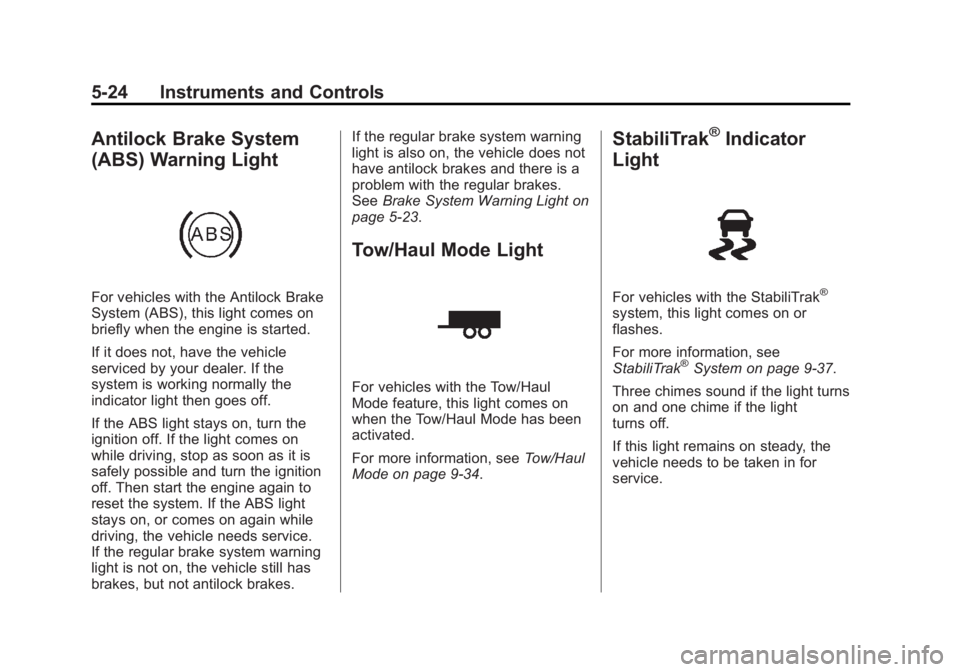
For vehicles with the Tow/Haul
Mode feature, this light comes on
when the Tow/Haul Mode has been
activated.
For more information, see Tow/Haul
Mode on page 9‑34.
StabiliTrak®Indicator
Light
For vehicles with the StabiliTrak®
system, this light comes on or
flashes.
For more information, see
StabiliTrak
®System on page 9‑37.
Three chimes sound if the light turns
on and one chime if the light
turns off.
If this light remains on steady, the
vehicle needs to be taken in for
service.
Page 158 of 414
Black plate (36,1)GMC Savana Owner Manual - 2011
5-36 Instruments and Controls
Key and Lock Messages
REPLACE BATTERY IN
REMOTE KEY
This message displays if a Remote
Keyless Entry (RKE) transmitter
battery is low. The battery needs to
be replaced in the transmitter. See
“Battery Replacement”under
Remote Keyless Entry (RKE)
System Operation on page 2‑3.
Lamp Messages
AUTOMATIC LIGHT
CONTROL OFF
This message displays when the
automatic headlamps are turned off.
See Exterior Lamp Controls on
page 6‑1 for more information.
AUTOMATIC LIGHT
CONTROL ON
This message displays when the
automatic headlamps are turned on.
SeeExterior Lamp Controls on
page 6‑1 for more information.
TURN SIGNAL ON
This message displays and a chime
sounds if a turn signal is left on for
1.2 km (3/4 of a mile). Move the turn
signal/multifunction lever to the off
position.
Ride Control System
Messages
SERVICE STABILITRAK
If the vehicle has StabiliTrak®and
this message displays, it means
there may be a problem with the
StabiliTrak system. If you see this
message, try to reset the system.
Stop; turn off the engine for at least
15 seconds; then start the engine
again. If this message still comes
on, it means there is a problem. You
should see your dealer for service.
The vehicle is safe to drive,
however, you do not have the
benefit of StabiliTrak, so reduce
your speed and drive accordingly.
SERVICE TRACTION
CONTROL
If the vehicle has StabiliTrak, this
message displays when there is a
problem with the Traction Control
System (TCS). When this message
displays, the system will not limit
wheel spin. Adjust your driving
accordingly. See your dealer for
service. See StabiliTrak
®System on
page 9‑37 for more information.
STABILITRAK NOT READY
If the vehicle has StabiliTrak, this
message may display and the
StabiliTrak indicator light on the
instrument panel cluster may be on
after first driving the vehicle and
exceeding 32 km/h (20 mph) for
30 seconds. The StabiliTrak system
is not functional until the light has
turned off. See StabiliTrak
®System
on page 9‑37 for more information.
Page 163 of 414
Black plate (41,1)GMC Savana Owner Manual - 2011
Instruments and Controls 5-41
Feature Settings Menu Items
The following are customization
features that allow you to program
settings to the vehicle:
DISPLAY IN ENGLISH
This feature will only display if a
language other than English has
been set. This feature allows you to
change the language in which the
DIC messages appear to English.
Press
Uuntil the PRESSVTO
DISPLAY IN ENGLISH screen
appears on the DIC display. Press
the set/reset button once to display
all DIC messages in English.
LANGUAGE
This feature allows you to select the
language in which the DIC
messages will appear. Press
Uuntil the LANGUAGE
screen appears on the DIC display.
Press
Vonce to access the settings
for this feature. Then press
Uto
scroll through the following settings:
ENGLISH (default): All messages
will appear in English.
FRANCAIS: All messages will
appear in French.
ESPANOL: All messages will
appear in Spanish.
ARABIC: All messages will appear
in Arabic.
NO CHANGE: No change will be
made to this feature. The current
setting will remain.
To select a setting, press
Vwhile
the desired setting is displayed on
the DIC. A beep will sound once a
language has been selected. AUTO DOOR LOCK
This feature allows you to select
when the doors will
automatically lock.
Press
Uuntil AUTO DOOR LOCK
appears on the DIC display. Press
Vonce to access the settings for
this feature. Then press
Uto scroll
through the following settings:
SHIFT OUT OF PARK (default):
The doors will automatically lock
when the vehicle is shifted out of
P (Park).
AT VEHICLE SPEED: The doors
will automatically lock when the
vehicle speed is above 13 km/h
(8 mph) for three seconds.
NO CHANGE: No change will be
made to this feature. The current
setting will remain.
To select a setting, press
Vwhile
the desired setting is displayed on
the DIC.