key GMC SAVANA 2011 Owner's Manual
[x] Cancel search | Manufacturer: GMC, Model Year: 2011, Model line: SAVANA, Model: GMC SAVANA 2011Pages: 414, PDF Size: 5.27 MB
Page 1 of 414
Black plate (1,1)GMC Savana Owner Manual - 2011
2011 GMC Savana Owner ManualM
In Brief. . . . . . . . . . . . . . . . . . . . . . . . 1-1
Instrument Panel . . . . . . . . . . . . . . 1-2
Initial Drive Information . . . . . . . . 1-4
Vehicle Features . . . . . . . . . . . . . 1-15
Performance and Maintenance . . . . . . . . . . . . . . . . 1-19
Keys, Doors and Windows . . . 2-1
Keys and Locks . . . . . . . . . . . . . . . 2-2
Doors . . . . . . . . . . . . . . . . . . . . . . . . . . 2-9
Vehicle Security . . . . . . . . . . . . . . 2-12
Exterior Mirrors . . . . . . . . . . . . . . . 2-14
Interior Mirrors . . . . . . . . . . . . . . . . 2-15
Windows . . . . . . . . . . . . . . . . . . . . . 2-16
Seats and Restraints . . . . . . . . . 3-1
Head Restraints . . . . . . . . . . . . . . . 3-2
Front Seats . . . . . . . . . . . . . . . . . . . . 3-2
Rear Seats . . . . . . . . . . . . . . . . . . . . 3-5
Safety Belts . . . . . . . . . . . . . . . . . . . . 3-9
Airbag System . . . . . . . . . . . . . . . . 3-25
Child Restraints . . . . . . . . . . . . . . 3-44
Storage . . . . . . . . . . . . . . . . . . . . . . . 4-1
Storage Compartments . . . . . . . . 4-1 Instruments and Controls
. . . . 5-1
Controls . . . . . . . . . . . . . . . . . . . . . . . 5-2
Warning Lights, Gauges, and Indicators . . . . . . . . . . . . . . . . . . . 5-10
Information Displays . . . . . . . . . . 5-27
Vehicle Messages . . . . . . . . . . . . 5-32
Vehicle Personalization . . . . . . . 5-40
Lighting . . . . . . . . . . . . . . . . . . . . . . . 6-1
Exterior Lighting . . . . . . . . . . . . . . . 6-1
Interior Lighting . . . . . . . . . . . . . . . . 6-5
Lighting Features . . . . . . . . . . . . . . 6-7
Infotainment System . . . . . . . . . 7-1
Introduction . . . . . . . . . . . . . . . . . . . . 7-1
Radio . . . . . . . . . . . . . . . . . . . . . . . . . . 7-7
Audio Players . . . . . . . . . . . . . . . . 7-12
Phone . . . . . . . . . . . . . . . . . . . . . . . . 7-23
Climate Controls . . . . . . . . . . . . . 8-1
Climate Control Systems . . . . . . 8-1
Air Vents . . . . . . . . . . . . . . . . . . . . . . . 8-6
Driving and Operating . . . . . . . . 9-1
Driving Information . . . . . . . . . . . . . 9-2
Starting and Operating . . . . . . . 9-17
Engine Exhaust . . . . . . . . . . . . . . 9-26 Automatic Transmission . . . . . . 9-27
Drive Systems . . . . . . . . . . . . . . . . 9-35
Brakes . . . . . . . . . . . . . . . . . . . . . . . 9-35
Ride Control Systems . . . . . . . . 9-37
Cruise Control . . . . . . . . . . . . . . . . 9-39
Fuel . . . . . . . . . . . . . . . . . . . . . . . . . . 9-42
Towing . . . . . . . . . . . . . . . . . . . . . . . 9-48
Conversions and Add-Ons . . . 9-59
Vehicle Care . . . . . . . . . . . . . . . . . 10-1
General Information . . . . . . . . . . 10-2
Vehicle Checks . . . . . . . . . . . . . . . 10-4
Bulb Replacement . . . . . . . . . . 10-38
Electrical System . . . . . . . . . . . . 10-43
Wheels and Tires . . . . . . . . . . . 10-50
Jump Starting . . . . . . . . . . . . . . . 10-84
Towing . . . . . . . . . . . . . . . . . . . . . . 10-88
Appearance Care . . . . . . . . . . . 10-91
Service and Maintenance . . . 11-1
General Information . . . . . . . . . . 11-1
Scheduled Maintenance . . . . . . 11-3
Recommended Fluids, Lubricants, and Parts . . . . . . . 11-7
Maintenance Records . . . . . . . 11-10
Page 7 of 414
Black plate (1,1)GMC Savana Owner Manual - 2011
In Brief 1-1
In Brief
Instrument Panel
Instrument Panel . . . . . . . . . . . . . . 1-2
Initial Drive Information
Initial Drive Information . . . . . . . . 1-4
Remote Keyless Entry (RKE)System . . . . . . . . . . . . . . . . . . . . . . 1-4
Remote Vehicle Start . . . . . . . . . 1-4
Door Locks . . . . . . . . . . . . . . . . . . . 1-5
Windows . . . . . . . . . . . . . . . . . . . . . . 1-5
Seat Adjustment . . . . . . . . . . . . . . 1-6
Safety Belts . . . . . . . . . . . . . . . . . . . 1-8
Airbag On-Off Switch . . . . . . . . . 1-8
Sensing System for Passenger Airbag . . . . . . . . . . . . . . . . . . . . . . . 1-9
Mirror Adjustment . . . . . . . . . . . . . 1-9
Steering Wheel Adjustment . . . . . . . . . . . . . . . . . 1-10
Interior Lighting . . . . . . . . . . . . . . 1-11
Exterior Lighting . . . . . . . . . . . . . 1-11
Windshield Wiper/Washer . . . . 1-12
Climate Controls . . . . . . . . . . . . . 1-13
Transmission . . . . . . . . . . . . . . . . 1-14
Vehicle Features
Radio(s) . . . . . . . . . . . . . . . . . . . . . 1-15
Satellite Radio . . . . . . . . . . . . . . . 1-17
Portable Audio Devices . . . . . . 1-17
Bluetooth
®. . . . . . . . . . . . . . . . . . . 1-17
Steering Wheel Controls . . . . . 1-18
Cruise Control . . . . . . . . . . . . . . . 1-18
Power Outlets . . . . . . . . . . . . . . . 1-19
Performance and Maintenance
StabiliTrak®System . . . . . . . . . 1-19
Tire Pressure Monitor . . . . . . . . 1-19
Engine Oil Life System . . . . . . 1-20
Fuel E85 (85% Ethanol) . . . . . 1-20
Driving for Better Fuel Economy . . . . . . . . . . . . . . . . . . . 1-20
Roadside Assistance Program . . . . . . . . . . . . . . . . . . . . 1-21
OnStar
®. . . . . . . . . . . . . . . . . . . . . 1-21
Page 10 of 414
Black plate (4,1)GMC Savana Owner Manual - 2011
1-4 In Brief
Initial Drive
Information
This section provides a brief
overview about some of the
important features that may or may
not be on your specific vehicle.
For more detailed information, refer
to each of the features which can be
found later in this owner manual.
Remote Keyless Entry
(RKE) System
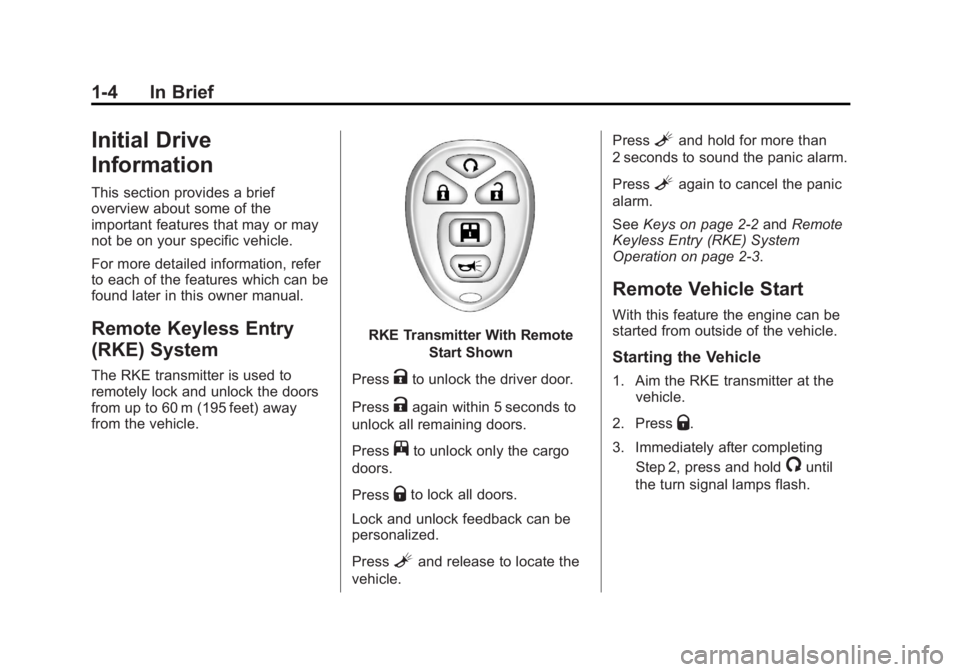
The RKE transmitter is used to
remotely lock and unlock the doors
from up to 60 m (195 feet) away
from the vehicle.
RKE Transmitter With RemoteStart Shown
Press
Kto unlock the driver door.
Press
Kagain within 5 seconds to
unlock all remaining doors.
Press
jto unlock only the cargo
doors.
Press
Qto lock all doors.
Lock and unlock feedback can be
personalized.
Press
Land release to locate the
vehicle. Press
Land hold for more than
2 seconds to sound the panic alarm.
Press
Lagain to cancel the panic
alarm.
See Keys on page 2‑2 andRemote
Keyless Entry (RKE) System
Operation on page 2‑3.
Remote Vehicle Start
With this feature the engine can be
started from outside of the vehicle.
Starting the Vehicle
1. Aim the RKE transmitter at the vehicle.
2. Press
Q.
3. Immediately after completing Step 2, press and hold
/until
the turn signal lamps flash.
Page 11 of 414
Black plate (5,1)GMC Savana Owner Manual - 2011
In Brief 1-5
When the vehicle starts, the parking
lamps will turn on and remain on as
long as the engine is running. The
doors will be locked and the climate
control system may come on.
The engine will continue to run for
10 minutes. Repeat the steps for a
10-minute time extension. Remote
start can be extended only once.
Canceling a Remote Start
To cancel a remote start:
.Aim the RKE transmitter at the
vehicle and press and hold
/
until the parking lamps turn off.
.Turn on the hazard warning
flashers.
.Turn the ignition on and then
back off.
See Remote Vehicle Start on
page 2‑5.
Door Locks
Manual Door Locks
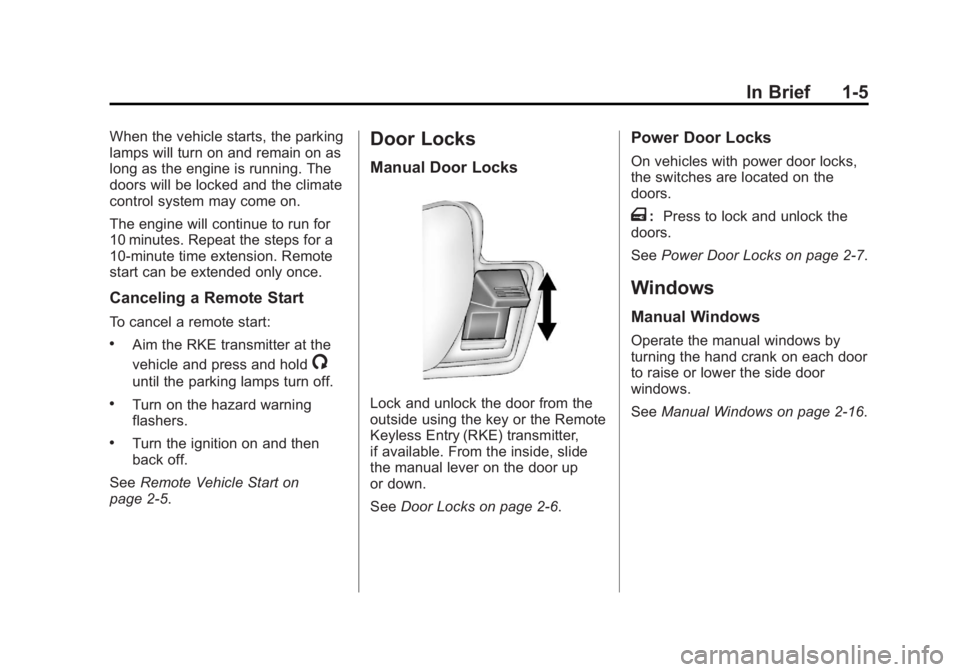
Lock and unlock the door from the
outside using the key or the Remote
Keyless Entry (RKE) transmitter,
if available. From the inside, slide
the manual lever on the door up
or down.
See Door Locks on page 2‑6.
Power Door Locks
On vehicles with power door locks,
the switches are located on the
doors.
T:Press to lock and unlock the
doors.
See Power Door Locks on page 2‑7.
Windows
Manual Windows
Operate the manual windows by
turning the hand crank on each door
to raise or lower the side door
windows.
SeeManual Windows on page 2‑16.
Page 14 of 414
Black plate (8,1)GMC Savana Owner Manual - 2011
1-8 In Brief
Safety Belts
Refer to the following sections for
important information on how to use
safety belts properly.
.Safety Belts on page 3‑9.
.How to Wear Safety Belts
Properly on page 3‑12.
.Lap-Shoulder Belt on page 3‑18.
.Lower Anchors and Tethers for
Children (LATCH System) on
page 3‑52.
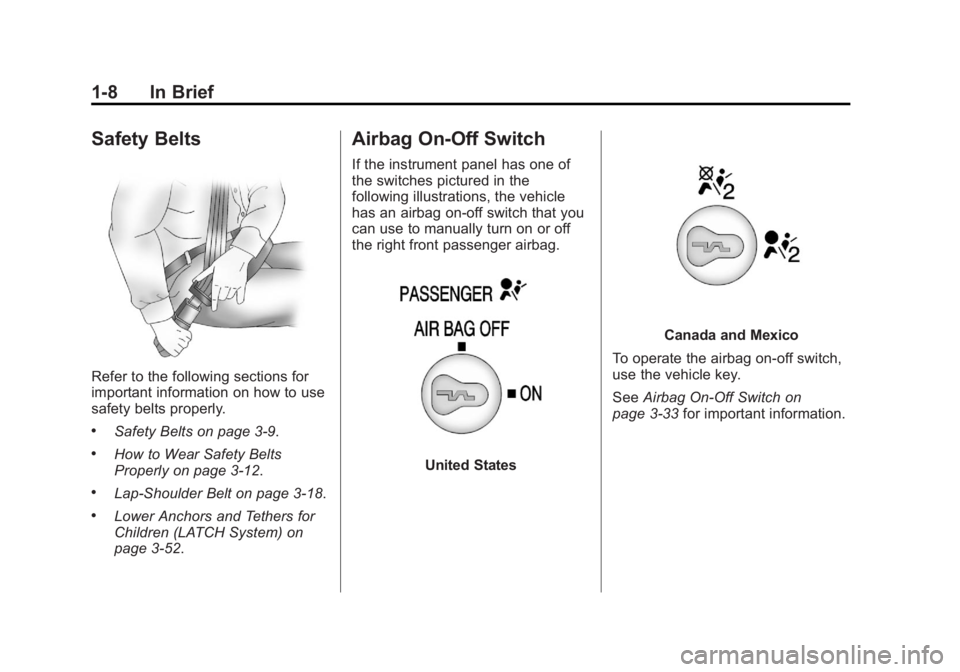
Airbag On-Off Switch
If the instrument panel has one of
the switches pictured in the
following illustrations, the vehicle
has an airbag on-off switch that you
can use to manually turn on or off
the right front passenger airbag.
United States
Canada and Mexico
To operate the airbag on‐off switch,
use the vehicle key.
See Airbag On-Off Switch on
page 3‑33 for important information.
Page 22 of 414
Black plate (16,1)GMC Savana Owner Manual - 2011
1-16 In Brief
4:Press to switch the display
between the radio station frequency
and the time. While the ignition is
off, press this button to display the
time. Press to display additional text
information related to the current
FM-RDS station or MP3 song.
A choice of additional information
such as: Channel, Song, Artist, and
CAT (category) can display.
Continue pressing to highlight the
desired tab, or press the softkey
located under any one of the tabs
and the information about that tab
displays.
For more information about these
and other radio features, see
Infotainment on page 7‑1.Storing a Favorite Station
Depending on which radio the
vehicle has, radio stations are
stored as either favorites or presets.
For vehicles with a FAV button, a
maximum of 36 stations can be
stored as favorites using the six
softkeys located below the radio
station frequency tabs and by using
the radio FAV button. Press FAV to
go through up to six pages of
favorites, each having six favorite
stations available per page. Each
page of favorites can contain any
combination of AM and FM stations.
If the radio does not have a FAV
button, up to 18 stations (six FM1,
six FM2, and six AM), can be
programmed on the six numbered
buttons.
For more information on storing a
favorite station, see Operation on
page 7‑3.
Setting the Clock
To set the time and date for the
Radio with CD (MP3):
1. Press
Hand the HR, MIN, MM,
DD, YYYY (hour, minute, month,
day, and year) displays.
2. Press the softkey located below any one of the tabs that you
want to change.
3. Increase or decrease the time or date, depending on the radio, by
pressing the
©SEEK¨arrows,
s/\REV/FWD buttons or by
turning
fclockwise or
counterclockwise.
For detailed instructions on setting
the clock for your specific audio
system, see Clock on page 5‑7.
Page 26 of 414
Black plate (20,1)GMC Savana Owner Manual - 2011
1-20 In Brief
During cooler conditions, the low tire
pressure warning light may appear
when the vehicle is first started and
then turn off. This may be an early
indicator that the tire pressures are
getting low and the tires need to be
inflated to the proper pressure.
The TPMS does not replace normal
monthly tire maintenance. It is the
driver’s responsibility to maintain
correct tire pressures.
See Tire Pressure Monitor System
on page 10‑58.
Engine Oil Life System
The engine oil life system calculates
engine oil life based on vehicle use
and displays a DIC message when
it is necessary to change the engine
oil and filter. The oil life system
should be reset to 100% only
following an oil change. Resetting the Oil Life System
1. Turn the ignition to ON/RUN,
with the engine off.
2. Fully press and release the accelerator pedal three times
within five seconds.
3. Turn the key to LOCK/OFF.
See Engine Oil Life System on
page 10‑11.
Fuel E85 (85% Ethanol)
Vehicles that have a FlexFuel badge
and a yellow fuel cap can use either
unleaded gasoline or ethanol fuel
containing up to 85% ethanol (E85).
See Fuel E85 (85% Ethanol) on
page 9‑44. For all other vehicles,
use only the unleaded gasoline
described under Recommended
Fuel on page 9‑42.
Driving for Better Fuel
Economy
Driving habits can affect fuel
mileage. Here are some driving tips
to get the best fuel economy
possible.
.Avoid fast starts and accelerate
smoothly.
.Brake gradually and avoid
abrupt stops.
.Avoid idling the engine for long
periods of time.
.When road and weather
conditions are appropriate, use
cruise control.
.Always follow posted speed
limits or drive more slowly when
conditions require.
.Keep vehicle tires properly
inflated.
.Combine several trips into a
single trip.
Page 31 of 414
Black plate (1,1)GMC Savana Owner Manual - 2011
Keys, Doors and Windows 2-1
Keys, Doors and
Windows
Keys and Locks
Keys . . . . . . . . . . . . . . . . . . . . . . . . . . 2-2
Remote Keyless Entry (RKE)System . . . . . . . . . . . . . . . . . . . . . . 2-2
Remote Keyless Entry (RKE) System Operation . . . . . . . . . . . 2-3
Remote Vehicle Start . . . . . . . . . 2-5
Door Locks . . . . . . . . . . . . . . . . . . . 2-6
Power Door Locks . . . . . . . . . . . . 2-7
Cargo Door Relocking . . . . . . . . 2-7
Delayed Locking . . . . . . . . . . . . . . 2-8
Automatic Door Locks . . . . . . . . . 2-8
Lockout Protection . . . . . . . . . . . . 2-8
Safety Locks . . . . . . . . . . . . . . . . . . 2-8
Doors
Side Door (60/40 Swing-Out) . . . . . . . . . . . . . . . . . . 2-9
Sliding Door . . . . . . . . . . . . . . . . . 2-10
Rear Doors . . . . . . . . . . . . . . . . . . 2-11
Vehicle Security
Vehicle Security . . . . . . . . . . . . . . 2-12
Immobilizer . . . . . . . . . . . . . . . . . . 2-12
Immobilizer Operation . . . . . . . 2-12
Exterior Mirrors
Convex Mirrors . . . . . . . . . . . . . . 2-14
Manual Mirrors . . . . . . . . . . . . . . . 2-14
Trailer-Tow Mirrors . . . . . . . . . . . 2-14
Power Mirrors . . . . . . . . . . . . . . . . 2-15
Heated Mirrors . . . . . . . . . . . . . . . 2-15
Interior Mirrors
Manual Rearview Mirror . . . . . . 2-15
Windows
Windows . . . . . . . . . . . . . . . . . . . . . 2-16
Manual Windows . . . . . . . . . . . . 2-16
Power Windows . . . . . . . . . . . . . 2-16
Swing-Out Windows . . . . . . . . . 2-17
Enhanced Technology Glass . . . . . . . . . . . . . . . . . . . . . . . 2-18
Sun Visors . . . . . . . . . . . . . . . . . . . 2-19
Page 32 of 414
Black plate (2,1)GMC Savana Owner Manual - 2011
2-2 Keys, Doors and Windows
Keys and Locks
Keys
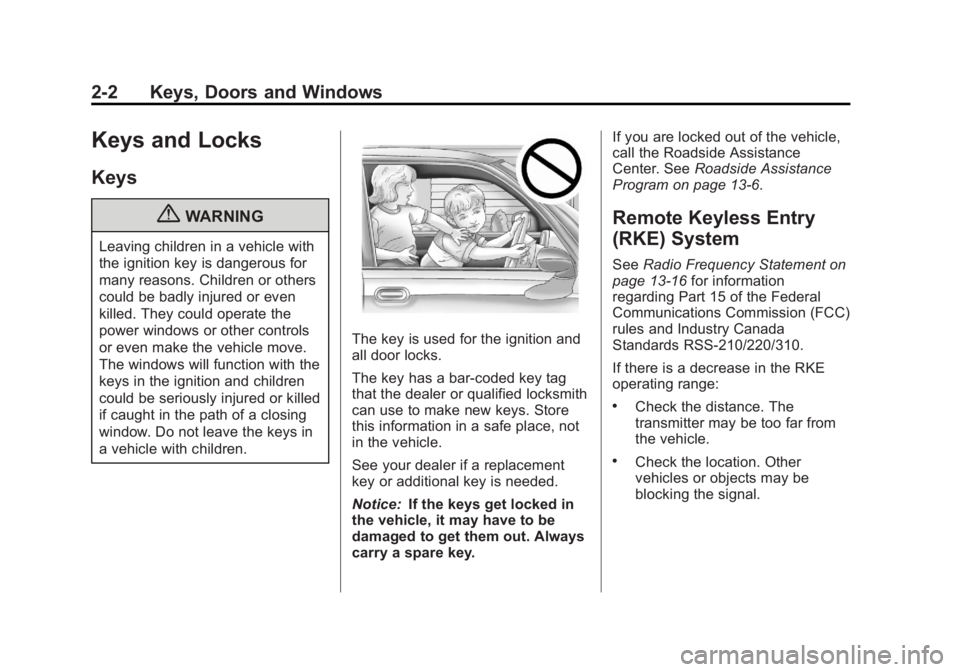
{WARNING
Leaving children in a vehicle with
the ignition key is dangerous for
many reasons. Children or others
could be badly injured or even
killed. They could operate the
power windows or other controls
or even make the vehicle move.
The windows will function with the
keys in the ignition and children
could be seriously injured or killed
if caught in the path of a closing
window. Do not leave the keys in
a vehicle with children.
The key is used for the ignition and
all door locks.
The key has a bar-coded key tag
that the dealer or qualified locksmith
can use to make new keys. Store
this information in a safe place, not
in the vehicle.
See your dealer if a replacement
key or additional key is needed.
Notice:If the keys get locked in
the vehicle, it may have to be
damaged to get them out. Always
carry a spare key. If you are locked out of the vehicle,
call the Roadside Assistance
Center. See
Roadside Assistance
Program on page 13‑6.
Remote Keyless Entry
(RKE) System
See Radio Frequency Statement on
page 13‑16 for information
regarding Part 15 of the Federal
Communications Commission (FCC)
rules and Industry Canada
Standards RSS-210/220/310.
If there is a decrease in the RKE
operating range:
.Check the distance. The
transmitter may be too far from
the vehicle.
.Check the location. Other
vehicles or objects may be
blocking the signal.
Page 33 of 414
Black plate (3,1)GMC Savana Owner Manual - 2011
Keys, Doors and Windows 2-3
.Check the transmitter's battery.
See“Battery Replacement” later
in this section.
.If the transmitter is still not
working correctly, see your
dealer or a qualified technician
for service.
Remote Keyless Entry
(RKE) System Operation
The Remote Keyless Entry (RKE)
transmitter functions work up to
60 m (195 feet) away from the
vehicle.
There are other conditions which
can affect the performance of the
transmitter. See Remote Keyless
Entry (RKE) System on page 2‑2.
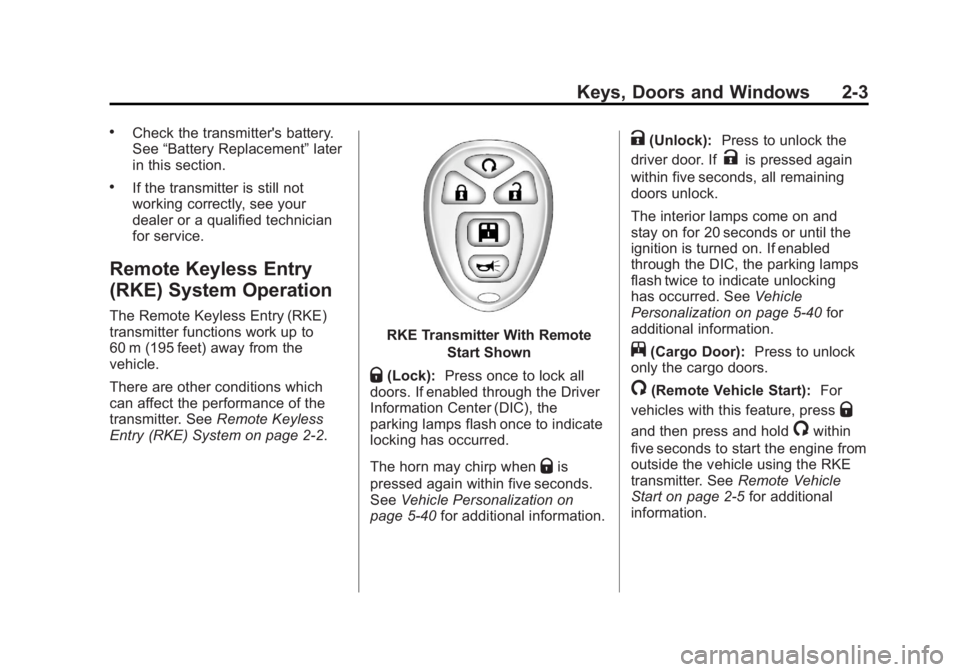
RKE Transmitter With Remote
Start Shown
Q(Lock):Press once to lock all
doors. If enabled through the Driver
Information Center (DIC), the
parking lamps flash once to indicate
locking has occurred.
The horn may chirp when
Qis
pressed again within five seconds.
See Vehicle Personalization on
page 5‑40 for additional information.
K(Unlock): Press to unlock the
driver door. If
Kis pressed again
within five seconds, all remaining
doors unlock.
The interior lamps come on and
stay on for 20 seconds or until the
ignition is turned on. If enabled
through the DIC, the parking lamps
flash twice to indicate unlocking
has occurred. See Vehicle
Personalization on page 5‑40 for
additional information.
j(Cargo Door): Press to unlock
only the cargo doors.
/(Remote Vehicle Start): For
vehicles with this feature, press
Q
and then press and hold/within
five seconds to start the engine from
outside the vehicle using the RKE
transmitter. See Remote Vehicle
Start on page 2‑5 for additional
information.