headlamp GMC SAVANA 2012 Owner's Manual
[x] Cancel search | Manufacturer: GMC, Model Year: 2012, Model line: SAVANA, Model: GMC SAVANA 2012Pages: 424, PDF Size: 5.15 MB
Page 5 of 424
Black plate (5,1)GMC Savana Owner Manual - 2012 - 2nd - 11/11/11
Introduction v
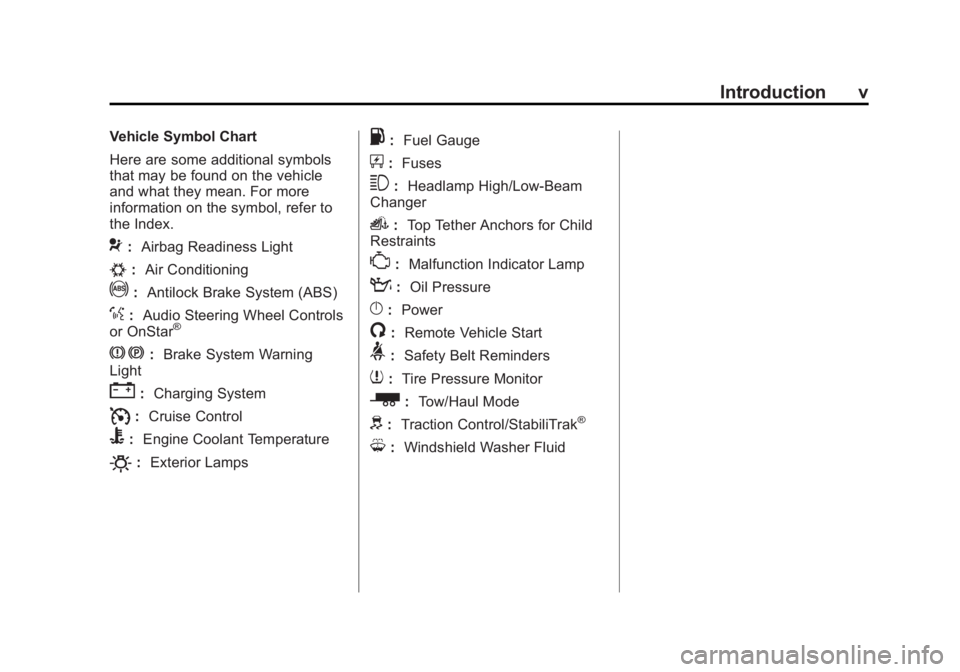
Vehicle Symbol Chart
Here are some additional symbols
that may be found on the vehicle
and what they mean. For more
information on the symbol, refer to
the Index.
9:Airbag Readiness Light
#:Air Conditioning
!:Antilock Brake System (ABS)
%:Audio Steering Wheel Controls
or OnStar®
J: Brake System Warning
Light
": Charging System
I:Cruise Control
B: Engine Coolant Temperature
O:Exterior Lamps
.:Fuel Gauge
+:Fuses
3: Headlamp High/Low-Beam
Changer
i: Top Tether Anchors for Child
Restraints
*: Malfunction Indicator Lamp
::Oil Pressure
}:Power
/:Remote Vehicle Start
>:Safety Belt Reminders
7:Tire Pressure Monitor
_: Tow/Haul Mode
d:Traction Control/StabiliTrak®
M:Windshield Washer Fluid
Page 16 of 424
Black plate (10,1)GMC Savana Owner Manual - 2012 - 2nd - 11/11/11
1-10 In Brief
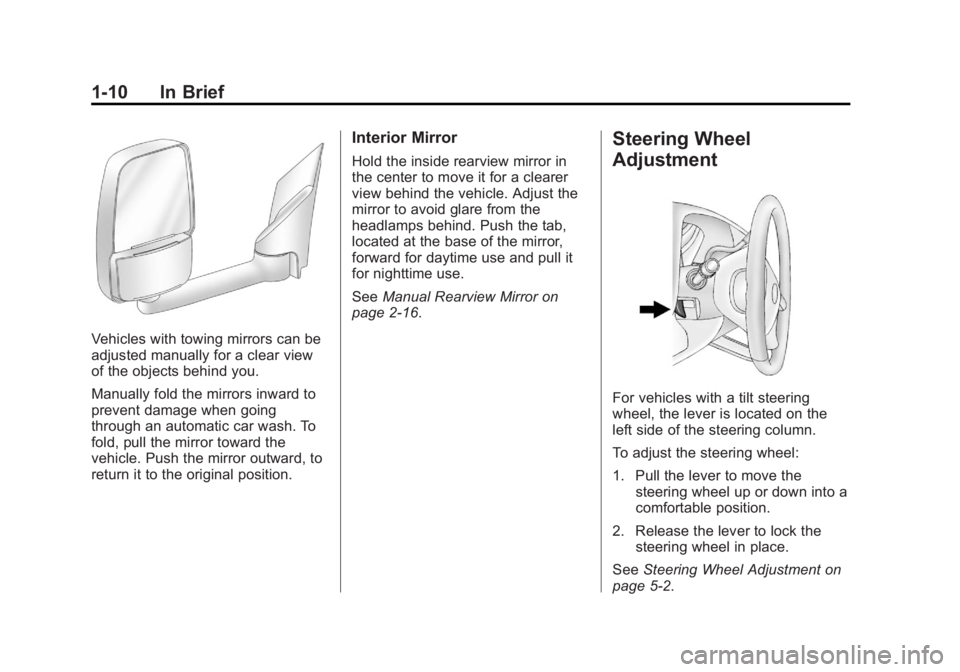
Vehicles with towing mirrors can be
adjusted manually for a clear view
of the objects behind you.
Manually fold the mirrors inward to
prevent damage when going
through an automatic car wash. To
fold, pull the mirror toward the
vehicle. Push the mirror outward, to
return it to the original position.
Interior Mirror
Hold the inside rearview mirror in
the center to move it for a clearer
view behind the vehicle. Adjust the
mirror to avoid glare from the
headlamps behind. Push the tab,
located at the base of the mirror,
forward for daytime use and pull it
for nighttime use.
SeeManual Rearview Mirror on
page 2‑16.
Steering Wheel
Adjustment
For vehicles with a tilt steering
wheel, the lever is located on the
left side of the steering column.
To adjust the steering wheel:
1. Pull the lever to move the
steering wheel up or down into a
comfortable position.
2. Release the lever to lock the steering wheel in place.
See Steering Wheel Adjustment on
page 5‑2.
Page 17 of 424
Black plate (11,1)GMC Savana Owner Manual - 2012 - 2nd - 11/11/11
In Brief 1-11
Interior Lighting
Dome Lamp
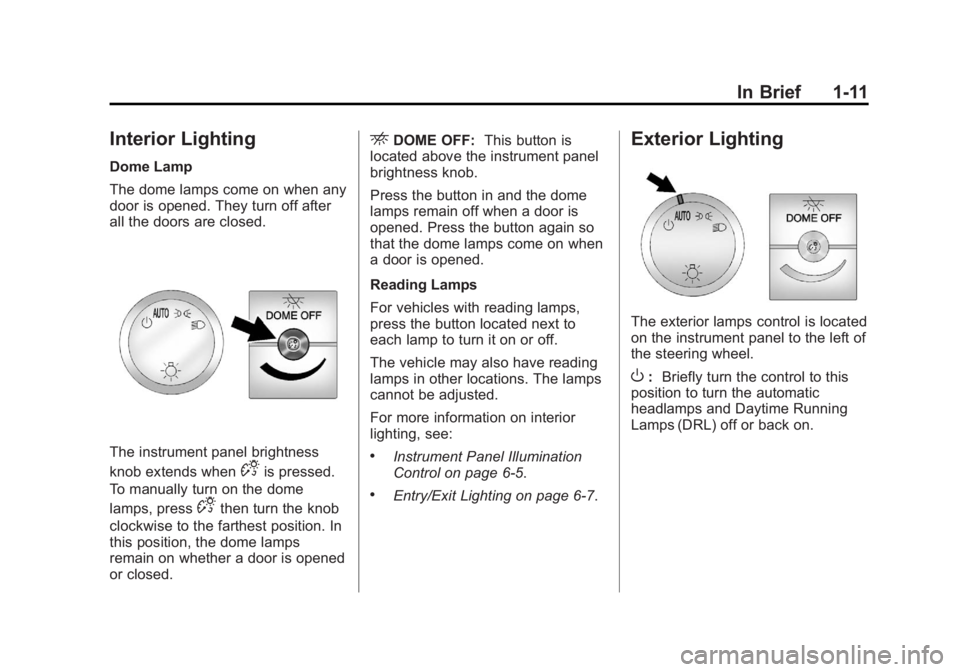
The dome lamps come on when any
door is opened. They turn off after
all the doors are closed.
The instrument panel brightness
knob extends when
Dis pressed.
To manually turn on the dome
lamps, press
Dthen turn the knob
clockwise to the farthest position. In
this position, the dome lamps
remain on whether a door is opened
or closed.
EDOME OFF: This button is
located above the instrument panel
brightness knob.
Press the button in and the dome
lamps remain off when a door is
opened. Press the button again so
that the dome lamps come on when
a door is opened.
Reading Lamps
For vehicles with reading lamps,
press the button located next to
each lamp to turn it on or off.
The vehicle may also have reading
lamps in other locations. The lamps
cannot be adjusted.
For more information on interior
lighting, see:
.Instrument Panel Illumination
Control on page 6‑5.
.Entry/Exit Lighting on page 6‑7.
Exterior Lighting
The exterior lamps control is located
on the instrument panel to the left of
the steering wheel.
O: Briefly turn the control to this
position to turn the automatic
headlamps and Daytime Running
Lamps (DRL) off or back on.
Page 18 of 424
Black plate (12,1)GMC Savana Owner Manual - 2012 - 2nd - 11/11/11
1-12 In Brief
For vehicles first sold in Canada,
the off position only works for
vehicles that are shifted into the
P (Park) position.
AUTO:Automatically turns on the
headlamps, parking lamps,
taillamps, instrument panel lights,
and license plate lamps.
;: Turns on the parking lamps,
taillamps, instrument panel lights,
and license plate lamps.
2: Turns on the headlamps,
parking lamps, taillamps, instrument
panel lights, and license plate
lamps. For more information, see:
.Exterior Lamp Controls on
page 6‑1.
.Exterior Lamps Off Reminder on
page 6‑2.
.Daytime Running Lamps (DRL)
on page 6‑3.
.Automatic Headlamp System on
page 6‑3.
Windshield Wiper/Washer
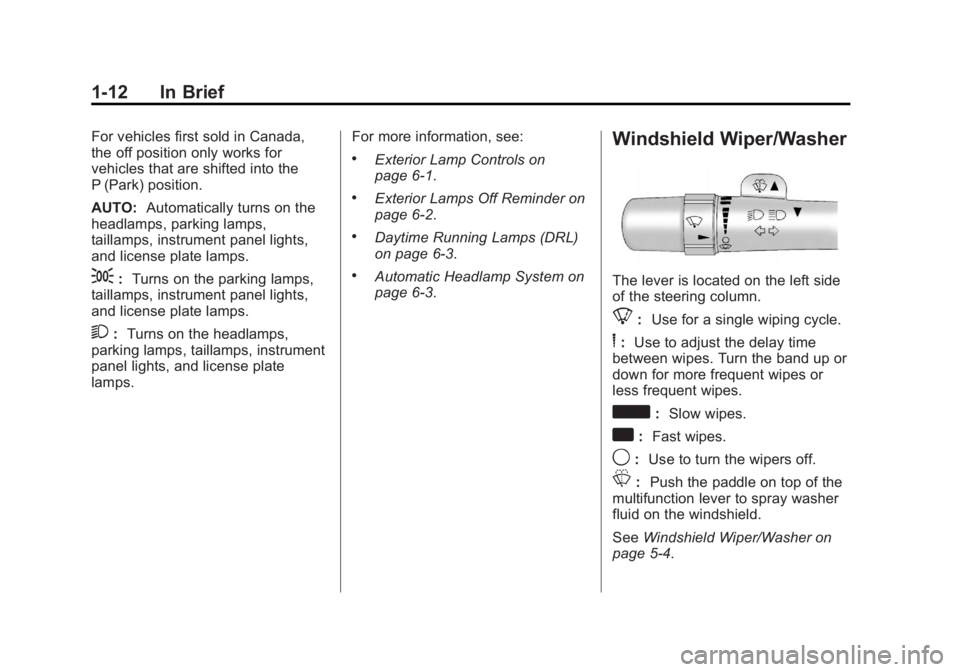
The lever is located on the left side
of the steering column.
8:
Use for a single wiping cycle.
6:Use to adjust the delay time
between wipes. Turn the band up or
down for more frequent wipes or
less frequent wipes.
d: Slow wipes.
a:Fast wipes.
9:Use to turn the wipers off.
L: Push the paddle on top of the
multifunction lever to spray washer
fluid on the windshield.
See Windshield Wiper/Washer on
page 5‑4.
Page 44 of 424

Black plate (16,1)GMC Savana Owner Manual - 2012 - 2nd - 11/11/11
2-16 Keys, Doors, and Windows
Heated Mirrors
For vehicles with heated mirrors:
1(Rear Defogger):Press to heat
the mirrors.
An indicator light in the button lights
when the outside heated mirrors are
activated.
See “Rear Window Defogger” under
Climate Control Systems on
page 8‑1 for more information.
Interior Mirrors
Manual Rearview Mirror
Hold the inside rearview mirror in
the center to move it for a clearer
view behind the vehicle. Adjust the
mirror to avoid glare from the
headlamps behind. Push the tab
forward for daytime use and pull it
for nighttime use.
If you have a cargo van without the
rear door glass, the vehicle may not
have an inside rearview mirror.
Windows
{WARNING
Leaving children, helpless adults,
or pets in a vehicle with the
windows closed is dangerous.
They can be overcome by the
extreme heat and suffer
permanent injuries or even death
from heat stroke. Never leave a
child, a helpless adult, or a pet
alone in a vehicle, especially with
the windows closed in warm or
hot weather.
Page 141 of 424
Black plate (27,1)GMC Savana Owner Manual - 2012 - 2nd - 11/11/11
Instruments and Controls 5-27
Low Fuel Warning Light
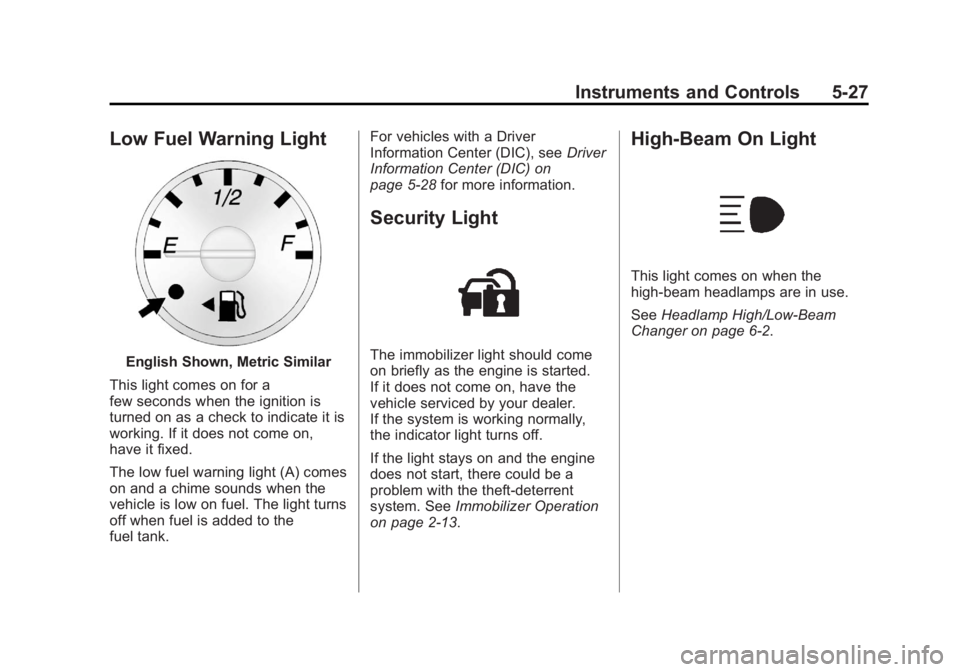
English Shown, Metric Similar
This light comes on for a
few seconds when the ignition is
turned on as a check to indicate it is
working. If it does not come on,
have it fixed.
The low fuel warning light (A) comes
on and a chime sounds when the
vehicle is low on fuel. The light turns
off when fuel is added to the
fuel tank. For vehicles with a Driver
Information Center (DIC), see
Driver
Information Center (DIC) on
page 5‑28 for more information.
Security Light
The immobilizer light should come
on briefly as the engine is started.
If it does not come on, have the
vehicle serviced by your dealer.
If the system is working normally,
the indicator light turns off.
If the light stays on and the engine
does not start, there could be a
problem with the theft-deterrent
system. See Immobilizer Operation
on page 2‑13.
High-Beam On Light
This light comes on when the
high-beam headlamps are in use.
See Headlamp High/Low-Beam
Changer on page 6‑2.
Page 151 of 424
Black plate (37,1)GMC Savana Owner Manual - 2012 - 2nd - 11/11/11
Instruments and Controls 5-37
Engine Power Messages
ENGINE POWER IS REDUCED
This message displays and a chime
sounds when the cooling system
temperature gets too hot and the
engine further enters the engine
coolant protection mode. See
Engine Overheating on page 10‑23
for further information.
This message also displays when
the engine power is reduced.
Reduced engine power can affect
the vehicle's ability to accelerate.
If this message is on, but there is
no reduction in performance,
proceed to your destination. The
performance may be reduced the
next time the vehicle is driven. The
vehicle may be driven at a reduced
speed while this message is on, but
acceleration and speed may be
reduced. Anytime this message
stays on, the vehicle should be
taken to your dealer for service as
soon as possible.
Fuel System Messages
FUEL LEVEL LOW
This message displays and a chime
sounds if the fuel level is low. Refuel
as soon as possible. SeeFuel
Gauge on page 5‑12 andFuel on
page 9‑40 for more information.
TIGHTEN GAS CAP
This message may display along
with the check engine light on the
instrument panel cluster if the fuel
cap is not tightened properly. See
Malfunction Indicator Lamp on
page 5‑20. Reinstall the fuel cap
fully. SeeFilling the Tank on
page 9‑43. The diagnostic system
can determine if the fuel cap has
been left off or improperly installed.
A loose or missing fuel cap allows
fuel to evaporate into the
atmosphere. A few driving trips with
the cap properly installed should
turn this light and message off.
Key and Lock Messages
REPLACE BATTERY IN
REMOTE KEY
This message displays if a Remote
Keyless Entry (RKE) transmitter
battery is low. The battery needs to
be replaced in the transmitter. See
“Battery Replacement” under
Remote Keyless Entry (RKE)
System Operation on page 2‑3.
Lamp Messages
AUTOMATIC LIGHT
CONTROL OFF
This message displays when the
automatic headlamps are turned off.
See Exterior Lamp Controls on
page 6‑1 for more information.
AUTOMATIC LIGHT
CONTROL ON
This message displays when the
automatic headlamps are turned on.
SeeExterior Lamp Controls on
page 6‑1 for more information.
Page 156 of 424
Black plate (42,1)GMC Savana Owner Manual - 2012 - 2nd - 11/11/11
5-42 Instruments and Controls
Vehicle
Personalization
This vehicle may have
customization capabilities that allow
you to program certain features to
one preferred setting. Customization
features can only be programmed to
one setting on the vehicle and
cannot be programmed to a
preferred setting for two different
drivers.
All of the customization options may
not be available on your vehicle.
Only the options available will be
displayed on the DIC.
The default settings for the
customization features were set
when the vehicle left the factory, but
may have been changed from their
default state since then.
The customization preferences are
automatically recalled.
To change customization
preferences, use the following
procedure.
Entering the Feature
Settings Menu
1. Turn the ignition on and placethe vehicle in P (Park).
To avoid excessive drain on the
battery, it is recommended that
the headlamps are turned off.
2. Press
Uto enter the feature
settings menu.
If the menu is not available,
FEATURE SETTINGS
AVAILABLE IN PARK will
display. Before entering the
menu, make sure the vehicle is
in P (Park).
Feature Settings Menu Items
The following are customization
features that allow you to program
settings to the vehicle:
DISPLAY IN ENGLISH
This feature will only display if a
language other than English has
been set. This feature allows you to
change the language in which the
DIC messages appear to English.
Press
Uuntil the PRESSVTO
DISPLAY IN ENGLISH screen
appears on the DIC display. Press
the set/reset button once to display
all DIC messages in English.
Page 163 of 424

Black plate (1,1)GMC Savana Owner Manual - 2012 - 2nd - 11/11/11
Lighting 6-1
Lighting
Exterior Lighting
Exterior Lamp Controls . . . . . . . . 6-1
Exterior Lamps OffReminder . . . . . . . . . . . . . . . . . . . . 6-2
Headlamp High/Low-Beam Changer . . . . . . . . . . . . . . . . . . . . . 6-2
Flash-to-Pass . . . . . . . . . . . . . . . . . 6-3
Daytime Running Lamps (DRL) . . . . . . . . . . . . . . . . 6-3
Automatic Headlamp System . . . . . . . . . . . . . . . . . . . . . . 6-3
Hazard Warning Flashers . . . . . 6-4
Turn and Lane-Change Signals . . . . . . . . . . . . . . . . . . . . . . 6-5
Interior Lighting
Instrument Panel IlluminationControl . . . . . . . . . . . . . . . . . . . . . . 6-5
Dome Lamps . . . . . . . . . . . . . . . . . 6-6
Reading Lamps . . . . . . . . . . . . . . . 6-6
Lighting Features
Entry/Exit Lighting . . . . . . . . . . . . . 6-7
Battery Load Management . . . . 6-7
Battery Power Protection . . . . . . 6-7
Exterior Lighting
Exterior Lamp Controls
The exterior lamp control is located
on the instrument panel to the left of
the steering wheel.
It controls the following systems:
.Headlamps
.Taillamps
.Parking Lamps
.License Plate Lamps
.Instrument Panel Lights The exterior lamp control has four
positions:
O(Off):
Briefly turn the control to
this position to turn the automatic
headlamps and Daytime Running
Lamps (DRL) off or back on.
For vehicles first sold in Canada,
the off position only works for
vehicles that are shifted into the
P (Park) position.
AUTO (Automatic): Turns on the
headlamps automatically at normal
brightness, together with the
following:
.Parking Lamps
.Instrument Panel Lights
.Taillamps
.License Plate Lamps
Page 164 of 424
Black plate (2,1)GMC Savana Owner Manual - 2012 - 2nd - 11/11/11
6-2 Lighting
;(Parking Lamps):Turns on the
parking lamps together with the
following:
.Instrument Panel Lights
.Taillamps
.License Plate Lamps
2(Headlamps): Turns on the
headlamps together with the
following:
.Parking Lamps
.Instrument Panel Lights
.Taillamps
.License Plate Lamps
If the headlamps are turned on
while the vehicle is on, the
headlamps turn off automatically
10 minutes after the ignition is
turned off. If the headlamps are
turned on while the vehicle is off,
the headlamps will continue to stay
on. To prevent the battery from
being drained, turn the control to the
Oposition. A warning chime sounds if the driver
door is opened while the ignition
switch is off and the headlamps
are on.
To change the headlamps from low
beam to high beam, pull the turn
signal/multifunction lever all the way
toward you. Then release it.
Exterior Lamps Off
Reminder
If a door is open, a reminder chime
sounds when the headlamps or
parking lamps are manually turned
on and the key is out of the ignition.
To turn off the chime, turn the
headlamp switch to
Oor AUTO and
then back on, or close and re‐open
the door. In the auto mode, the
headlamps turn off once the ignition
is in LOCK/OFF or may remain on
until the headlamp delay ends,
if enabled in the Driver Information
Center (DIC). See “Exit Lighting”
under Vehicle Personalization on
page 5‑42.
Headlamp High/
Low-Beam Changer
2 3
(Headlamp High/Low‐Beam
Changer): Pull the turn signal lever
all the way toward you to change
the headlamps from low to high
beam. Then release it.
This instrument panel cluster light
comes on when the high‐beam
headlamps are on.