audio GMC SAVANA 2013 Owner's Guide
[x] Cancel search | Manufacturer: GMC, Model Year: 2013, Model line: SAVANA, Model: GMC SAVANA 2013Pages: 398, PDF Size: 5.25 MB
Page 181 of 398
Black plate (27,1)GMC Savana Owner Manual - 2013 - 2nd Edition - 9/25/12
Infotainment System 7-27
Transferring Audio from the
Bluetooth System to a Cell Phone
During a call with the audio in the
vehicle:
1. Press
b/g.
2. Say “Transfer Call.”
Transferring Audio to the
Bluetooth System from a Cell
Phone
During a call with the audio on the
cell phone, press
b/g. The audio
transfers to the vehicle. If the audio
does not transfer to the vehicle, use
the audio transfer feature on the cell
phone. See your cell phone
manufacturer's user guide for more
information.
Voice Pass-Thru
Voice pass-thru allows access to the
voice recognition commands on the
cell phone. See your cell phone
manufacturer's user guide to see if
the cell phone supports this feature. To access contacts stored in the cell
phone:
1. Press and hold
b/gfor
two seconds.
2. Say “Bluetooth.” This command
can be skipped.
3. Say “Voice.” The system
responds “OK, accessing
The cell phone's normal prompt
messages will go through their cycle
according to the phone's operating
instructions.
Dual Tone Multi-Frequency
(DTMF) Tones
The Bluetooth system can send
numbers and the numbers stored as
name tags during a call. You can
use this feature when calling a
menu-driven phone system.
Account numbers can also be
stored for use. Sending a Number or Name Tag
During a Call
1. Press
b/g. The system
responds “Ready,”followed by
a tone.
2. Say “Dial.”
3. Say the number or name tag to send.
Clearing the System
Unless information is deleted out of
the in-vehicle Bluetooth system, it
will be retained indefinitely. This
includes all saved name tags in the
phone book and phone pairing
information. For information on how
to delete this information, see the
previous section “Deleting a Paired
Phone” and the previous sections
on deleting name tags.
Page 186 of 398
Black plate (4,1)GMC Savana Owner Manual - 2013 - 2nd Edition - 9/25/12
8-4 Climate Controls
Rear Heating System
For vehicles with a rear heating
system, it lets you adjust the
amount of air flowing into the rear of
the vehicle, from the front-seating
area. This feature works with the
main climate-control system in the
vehicle.
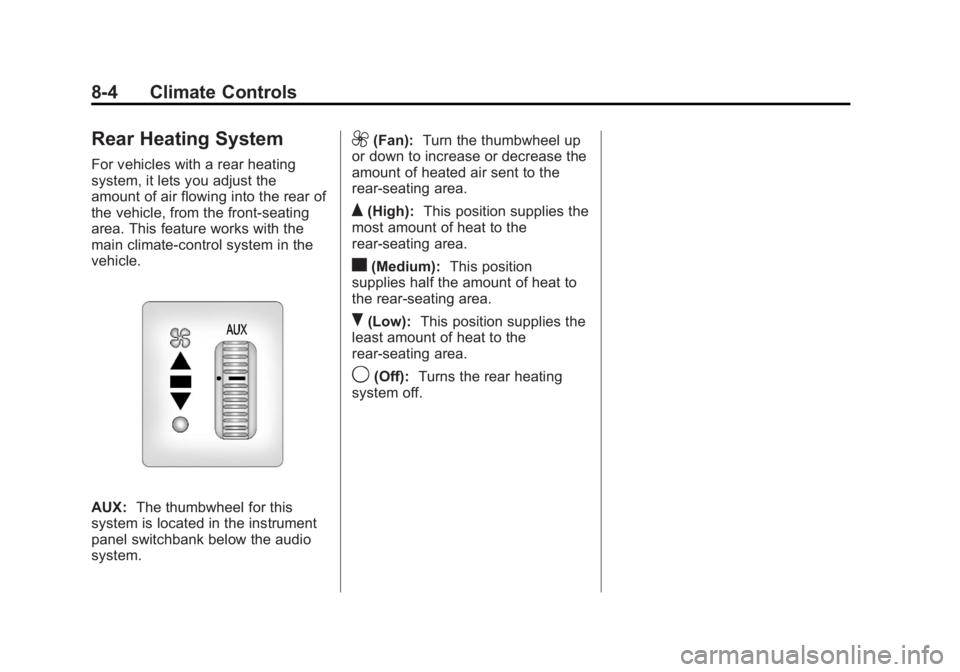
AUX:The thumbwheel for this
system is located in the instrument
panel switchbank below the audio
system.
9(Fan): Turn the thumbwheel up
or down to increase or decrease the
amount of heated air sent to the
rear-seating area.
Q(High): This position supplies the
most amount of heat to the
rear-seating area.
c(Medium): This position
supplies half the amount of heat to
the rear‐seating area.
R(Low): This position supplies the
least amount of heat to the
rear-seating area.
9(Off): Turns the rear heating
system off.
Page 209 of 398
Black plate (19,1)GMC Savana Owner Manual - 2013 - 2nd Edition - 9/25/12
Driving and Operating 9-19
2. Open the hood and unwrap theelectrical cord.
The cord for the engine coolant
heater is located on the driver
side of the engine compartment
and is attached to the hose for
the power steering reservoir.
3. Plug it into a normal, grounded 110-volt AC outlet.
{WARNING
Plugging the cord into an
ungrounded outlet could cause an
electrical shock. Also, the wrong
kind of extension cord could
overheat and cause a fire. You
could be seriously injured. Plug
the cord into a properly grounded
three-prong 110-volt AC outlet.
If the cord will not reach, use a
heavy-duty three-prong extension
cord rated for at least 15 amps. 4. Before starting the engine, be
sure to unplug and store the
cord as it was before to keep it
away from moving engine parts
and prevent damage.
The length of time the heater should
remain plugged in depends on
several factors. Ask a dealer in the
area where you will be parking the
vehicle for the best advice on this.
Retained Accessory
Power (RAP)
These vehicle accessories can be
used for up to 10 minutes after the
engine is turned off:
.Audio System
.Power Windows (if equipped)
These features will work when the
ignition key is in ON/RUN or ACC/
ACCESSORY. Once the key is
turned from ON/RUN to LOCK/OFF,
power to the radio and power
windows will continue to work
10 minutes or until the driver door is
opened.
Shifting Into Park
1. Hold the brake pedal down, then set the parking brake.
2. Move the shift lever into the P (Park) position by pulling the
shift lever toward you and
moving it up as far as it will go.
3. Turn the ignition key to LOCK/OFF.
4. Remove the key and take it with you. If you can leave the vehicle
with the ignition key in your
hand, the vehicle is in P (Park).
Leaving the Vehicle with the
Engine Running
{WARNING
It can be dangerous to leave the
vehicle with the engine running.
It could overheat and catch fire.
(Continued)
Page 387 of 398
Black plate (1,1)GMC Savana Owner Manual - 2013 - 2nd Edition - 9/25/12
INDEX i-1
A
Accessories andModifications . . . . . . . . . . . . . . . . . 10-3
Accessory Power . . . . . . . . . . . . . . 9-19
Add-On Electrical Equipment . . . . . . . . . . . . . . . . . . . 9-57
Additional Information
OnStar
®. . . . . . . . . . . . . . . . . . . . . . 14-5
Air Cleaner/Filter, Engine . . . . . 10-14
Air Vents . . . . . . . . . . . . . . . . . . . . . . . 8-7
Airbag System Check . . . . . . . . . . . . . . . . . . . . . . . . 3-32
How Does an AirbagRestrain? . . . . . . . . . . . . . . . . . . . 3-21
Passenger Sensing System . . . . . . . . . . . . . . . . . . . . . . 3-26
What Makes an Airbag Inflate? . . . . . . . . . . . . . . . . . . . . . . 3-21
What Will You See after an Airbag Inflates? . . . . . . . . . . . . . 3-22
When Should an Airbag Inflate? . . . . . . . . . . . . . . . . . . . . . . 3-19
Where Are the Airbags? . . . . . . 3-18 Airbags
Adding Equipment to the
Vehicle . . . . . . . . . . . . . . . . . . . . . . 3-31
Light On-Off . . . . . . . . . . . . . . . . . . 5-15
On-Off Light . . . . . . . . . . . . . . . . . . 5-15
On-Off Switch . . . . . . . . . . . . . . . . 3-23
Passenger Status Indicator . . . 5-16
Readiness Light . . . . . . . . . . . . . . 5-14
Servicing Airbag-Equipped Vehicles . . . . . . . . . . . . . . . . . . . . . 3-30
System Check . . . . . . . . . . . . . . . . 3-16
All-Wheel Drive . . . . . . . . . 10-26, 9-30
AM-FM Radio . . . . . . . . . . . . . . . . . . . 7-7
Antilock Brake System (ABS) . . . . . . . . . . . . . . . . 9-30
Warning Light . . . . . . . . . . . . . . . . . 5-21
Appearance Care Exterior . . . . . . . . . . . . . . . . . . . . . 10-83
Interior . . . . . . . . . . . . . . . . . . . . . . 10-86
Ashtrays . . . . . . . . . . . . . . . . . . . . . . . . 5-8
Assistance Program, Roadside . . . . . . . . . . . . . . . . . . . . . 13-5
Audio Players . . . . . . . . . . . . . . . . . 7-11 CD . . . . . . . . . . . . . . . . . . . . . . . . . . . 7-11 Audio System
Fixed Mast Antenna . . . . . . . . . . 7-11
Radio Reception . . . . . . . . . . . . . . 7-10
Theft-Deterrent Feature . . . . . . . . 7-2
Automatic Door Locks . . . . . . . . . . . . . . . . . . . . 2-7
Headlamp System . . . . . . . . . . . . . 6-3
Transmission . . . . . . . . . . . 9-22, 9-26
Transmission Fluid . . . . 10-9, 10-11
Automatic Transmission Manual Mode . . . . . . . . . . . . . . . . . 9-28
Shift Lock Control
Function Check . . . . . . . . . . . 10-29
Auxiliary Devices . . . . . . . . . . . . . . . . . . . . . . . 7-16
Axle, Front . . . . . . . . . . . . . . . . . . . . 10-27
Axle, Rear . . . . . . . . . . . . . . . . . . . . 10-27