remote control GMC SAVANA 2014 User Guide
[x] Cancel search | Manufacturer: GMC, Model Year: 2014, Model line: SAVANA, Model: GMC SAVANA 2014Pages: 408, PDF Size: 4.19 MB
Page 147 of 408
Black plate (43,1)GMC Savana Owner Manual (GMNA-Localizing-U.S./Canada-6014682) -
2014 - CRC 2nd Edition - 8/26/13
Instruments and Controls 5-43
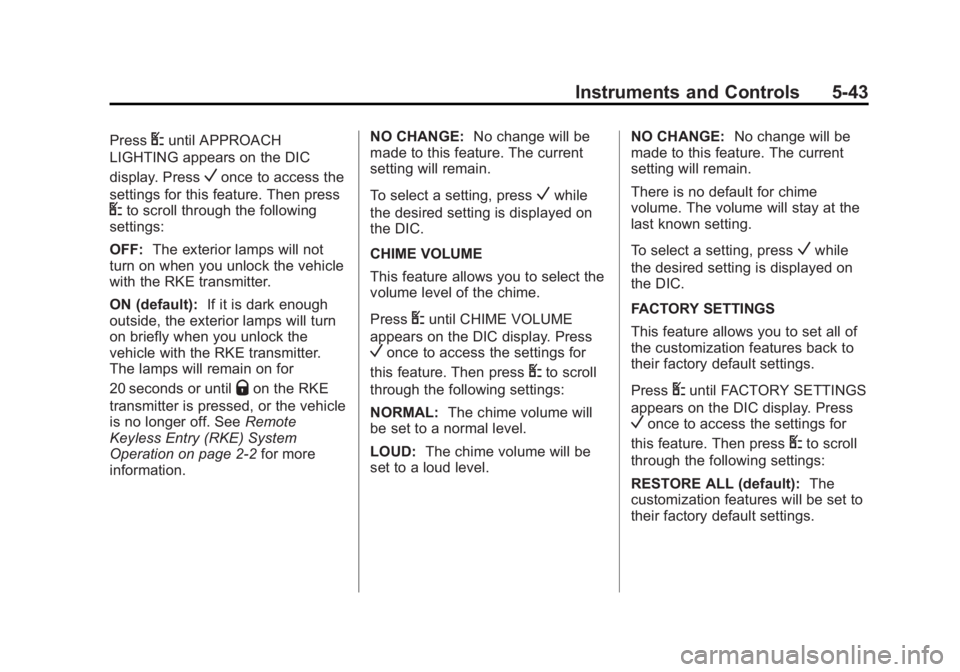
PressUuntil APPROACH
LIGHTING appears on the DIC
display. Press
Vonce to access the
settings for this feature. Then press
Uto scroll through the following
settings:
OFF: The exterior lamps will not
turn on when you unlock the vehicle
with the RKE transmitter.
ON (default): If it is dark enough
outside, the exterior lamps will turn
on briefly when you unlock the
vehicle with the RKE transmitter.
The lamps will remain on for
20 seconds or until
Qon the RKE
transmitter is pressed, or the vehicle
is no longer off. See Remote
Keyless Entry (RKE) System
Operation on page 2-2 for more
information. NO CHANGE:
No change will be
made to this feature. The current
setting will remain.
To select a setting, press
Vwhile
the desired setting is displayed on
the DIC.
CHIME VOLUME
This feature allows you to select the
volume level of the chime.
Press
Uuntil CHIME VOLUME
appears on the DIC display. Press
Vonce to access the settings for
this feature. Then press
Uto scroll
through the following settings:
NORMAL: The chime volume will
be set to a normal level.
LOUD: The chime volume will be
set to a loud level. NO CHANGE:
No change will be
made to this feature. The current
setting will remain.
There is no default for chime
volume. The volume will stay at the
last known setting.
To select a setting, press
Vwhile
the desired setting is displayed on
the DIC.
FACTORY SETTINGS
This feature allows you to set all of
the customization features back to
their factory default settings.
Press
Uuntil FACTORY SETTINGS
appears on the DIC display. Press
Vonce to access the settings for
this feature. Then press
Uto scroll
through the following settings:
RESTORE ALL (default): The
customization features will be set to
their factory default settings.
Page 255 of 408
Black plate (3,1)GMC Savana Owner Manual (GMNA-Localizing-U.S./Canada-6014682) -
2014 - CRC 2nd Edition - 8/26/13
Vehicle Care 10-3
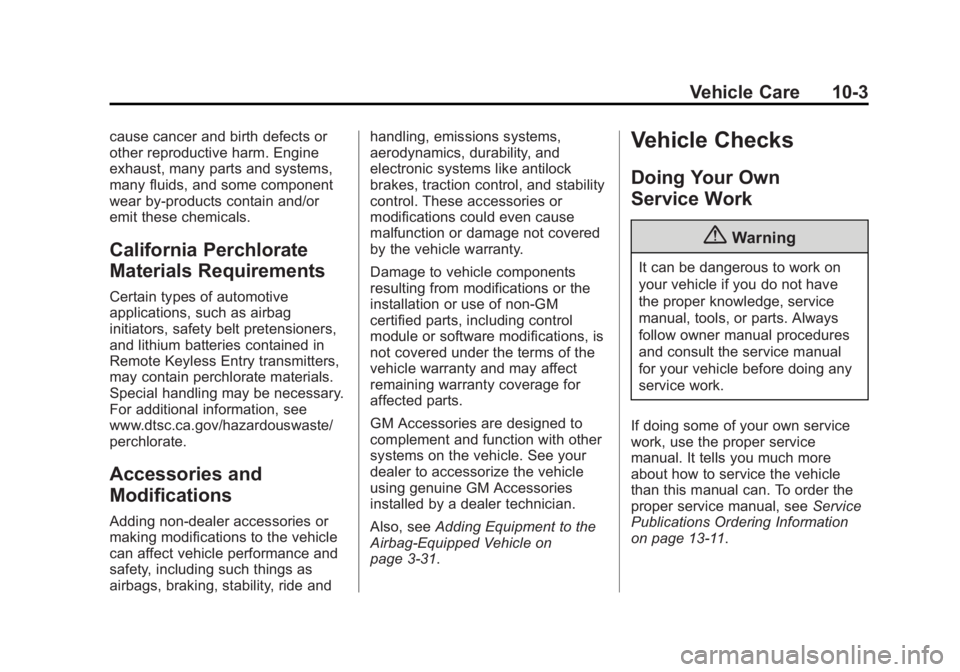
cause cancer and birth defects or
other reproductive harm. Engine
exhaust, many parts and systems,
many fluids, and some component
wear by-products contain and/or
emit these chemicals.
California Perchlorate
Materials Requirements
Certain types of automotive
applications, such as airbag
initiators, safety belt pretensioners,
and lithium batteries contained in
Remote Keyless Entry transmitters,
may contain perchlorate materials.
Special handling may be necessary.
For additional information, see
www.dtsc.ca.gov/hazardouswaste/
perchlorate.
Accessories and
Modifications
Adding non‐dealer accessories or
making modifications to the vehicle
can affect vehicle performance and
safety, including such things as
airbags, braking, stability, ride andhandling, emissions systems,
aerodynamics, durability, and
electronic systems like antilock
brakes, traction control, and stability
control. These accessories or
modifications could even cause
malfunction or damage not covered
by the vehicle warranty.
Damage to vehicle components
resulting from modifications or the
installation or use of non‐GM
certified parts, including control
module or software modifications, is
not covered under the terms of the
vehicle warranty and may affect
remaining warranty coverage for
affected parts.
GM Accessories are designed to
complement and function with other
systems on the vehicle. See your
dealer to accessorize the vehicle
using genuine GM Accessories
installed by a dealer technician.
Also, see
Adding Equipment to the
Airbag-Equipped Vehicle on
page 3-31.
Vehicle Checks
Doing Your Own
Service Work
{Warning
It can be dangerous to work on
your vehicle if you do not have
the proper knowledge, service
manual, tools, or parts. Always
follow owner manual procedures
and consult the service manual
for your vehicle before doing any
service work.
If doing some of your own service
work, use the proper service
manual. It tells you much more
about how to service the vehicle
than this manual can. To order the
proper service manual, see Service
Publications Ordering Information
on page 13-11.
Page 297 of 408
Black plate (45,1)GMC Savana Owner Manual (GMNA-Localizing-U.S./Canada-6014682) -
2014 - CRC 2nd Edition - 8/26/13
Vehicle Care 10-45
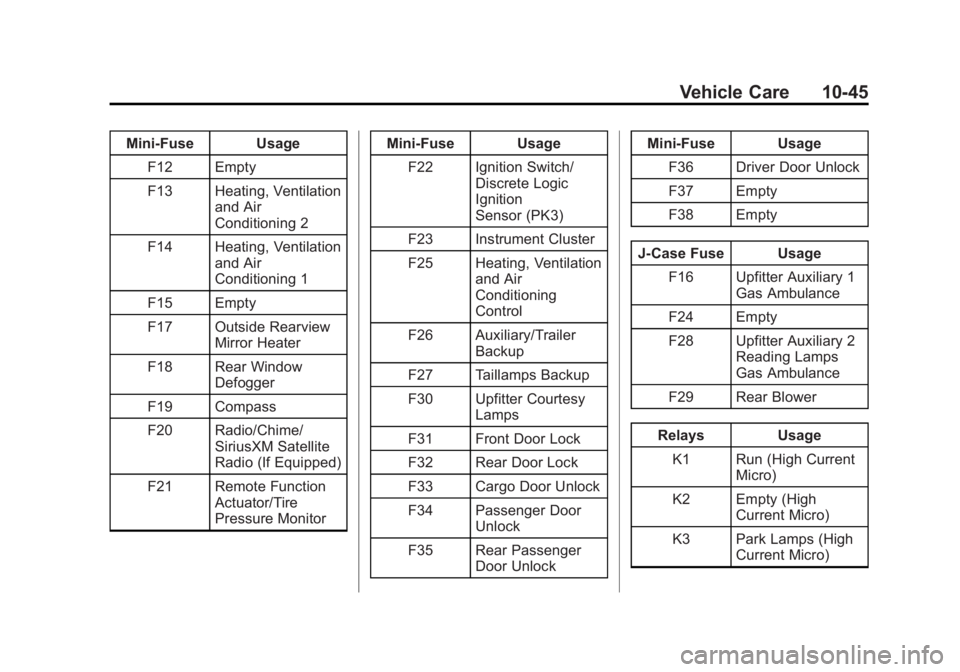
Mini-Fuse UsageF12 Empty
F13 Heating, Ventilation and Air
Conditioning 2
F14 Heating, Ventilation and Air
Conditioning 1
F15 Empty
F17 Outside Rearview Mirror Heater
F18 Rear Window Defogger
F19 Compass
F20 Radio/Chime/ SiriusXM Satellite
Radio (If Equipped)
F21 Remote Function Actuator/Tire
Pressure Monitor Mini-Fuse Usage
F22 Ignition Switch/ Discrete Logic
Ignition
Sensor (PK3)
F23 Instrument Cluster
F25 Heating, Ventilation and Air
Conditioning
Control
F26 Auxiliary/Trailer Backup
F27 Taillamps Backup
F30 Upfitter Courtesy Lamps
F31 Front Door Lock
F32 Rear Door Lock
F33 Cargo Door Unlock
F34 Passenger Door Unlock
F35 Rear Passenger Door Unlock Mini-Fuse Usage
F36 Driver Door Unlock
F37 Empty
F38 Empty
J-Case Fuse Usage F16 Upfitter Auxiliary 1 Gas Ambulance
F24 Empty
F28 Upfitter Auxiliary 2 Reading Lamps
Gas Ambulance
F29 Rear Blower
Relays Usage K1 Run (High Current Micro)
K2 Empty (High Current Micro)
K3 Park Lamps (High Current Micro)
Page 389 of 408
Black plate (3,1)GMC Savana Owner Manual (GMNA-Localizing-U.S./Canada-6014682) -
2014 - CRC 2nd Edition - 8/26/13
OnStar 14-3
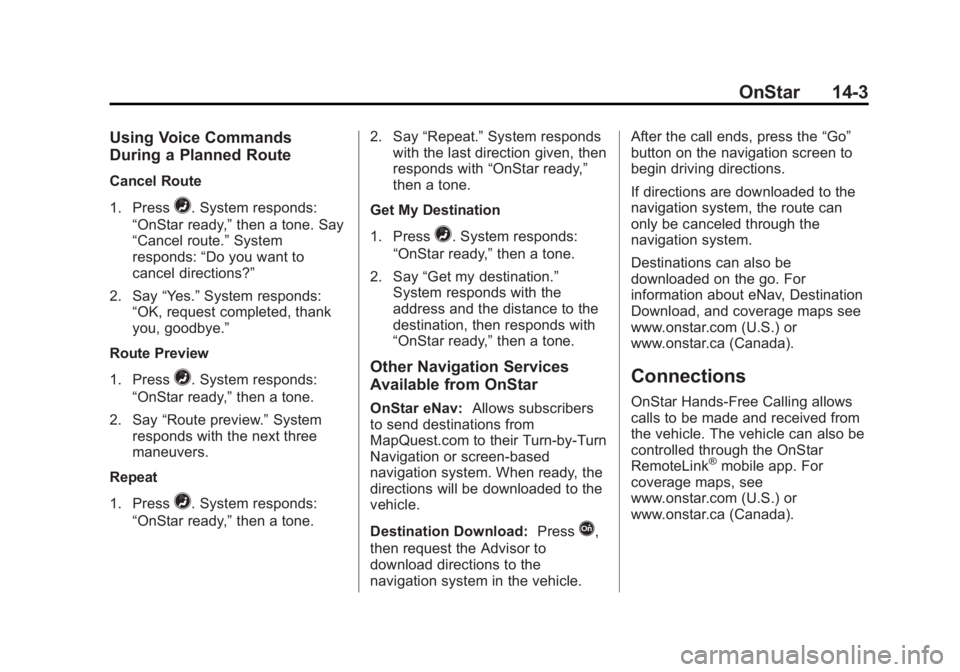
Using Voice Commands
During a Planned Route
Cancel Route
1. Press
=. System responds:
“OnStar ready,” then a tone. Say
“Cancel route.” System
responds: “Do you want to
cancel directions?”
2. Say “Yes.”System responds:
“OK, request completed, thank
you, goodbye.”
Route Preview
1. Press
=. System responds:
“OnStar ready,” then a tone.
2. Say “Route preview.” System
responds with the next three
maneuvers.
Repeat
1. Press
=. System responds:
“OnStar ready,” then a tone. 2. Say
“Repeat.” System responds
with the last direction given, then
responds with “OnStar ready,”
then a tone.
Get My Destination
1. Press
=. System responds:
“OnStar ready,” then a tone.
2. Say “Get my destination.”
System responds with the
address and the distance to the
destination, then responds with
“OnStar ready,” then a tone.
Other Navigation Services
Available from OnStar
OnStar eNav:Allows subscribers
to send destinations from
MapQuest.com to their Turn-by-Turn
Navigation or screen-based
navigation system. When ready, the
directions will be downloaded to the
vehicle.
Destination Download: Press
Q,
then request the Advisor to
download directions to the
navigation system in the vehicle. After the call ends, press the
“Go”
button on the navigation screen to
begin driving directions.
If directions are downloaded to the
navigation system, the route can
only be canceled through the
navigation system.
Destinations can also be
downloaded on the go. For
information about eNav, Destination
Download, and coverage maps see
www.onstar.com (U.S.) or
www.onstar.ca (Canada).
Connections
OnStar Hands-Free Calling allows
calls to be made and received from
the vehicle. The vehicle can also be
controlled through the OnStar
RemoteLink
®mobile app. For
coverage maps, see
www.onstar.com (U.S.) or
www.onstar.ca (Canada).
Page 392 of 408
Black plate (6,1)GMC Savana Owner Manual (GMNA-Localizing-U.S./Canada-6014682) -
2014 - CRC 2nd Edition - 8/26/13
14-6 OnStar
to function properly. These systems
may not operate if the battery is
discharged or disconnected.
OnStar service cannot work unless
your vehicle is in a place where
OnStar has an agreement with a
wireless service provider for service
in that area, and the wireless
service provider has coverage,
network capacity, reception, and
technology compatible with OnStar
service. Service involving location
information about the vehicle cannot
work unless GPS signals are
available, unobstructed, and
compatible with the OnStar
hardware. OnStar service may not
work if the OnStar equipment is not
properly installed or it has not been
properly maintained. If equipment or
software is added, connected,
or modified, OnStar service may not
work. Other problems beyond the
control of OnStar may prevent
service such as hills, tall buildings,
tunnels, weather, electrical system
design and architecture of thevehicle, damage to the vehicle in a
crash, or wireless phone network
congestion or jamming.
See
Radio Frequency Statement on
page 13-15.
Services for People with
Disabilities
Advisors provide services to help
subscribers with physical disabilities
and medical conditions.
Press
Qfor help with:
.Locating a gas station with an
attendant to pump gas.
.Finding a hotel, restaurant, etc.,
that meets accessibility needs.
.Providing directions to the
closest hospital or pharmacy in
urgent situations.
TTY Users
OnStar has the ability to
communicate to the deaf,
hard-of-hearing, or speech-impaired
customers while in the vehicle. The
available dealer-installed TTY system can provide in-vehicle
access to all of the OnStar services,
except Virtual Advisor and OnStar
Turn-by-Turn Navigation.
OnStar.com (U.S.) or OnStar.ca
(Canada)
The website provides access to
account information, allows
management of the OnStar
subscription, and viewing of videos
of each service. Get subscription
plan pricing and sign up for OnStar
Vehicle Diagnostics. Click on the
“My Account”
tab on the home
page. The website navigation and
services provided may vary by
country.
OnStar Personal Identification
Number (PIN)
A PIN is needed to access some of
the OnStar services, like Remote
Door Unlock and Stolen Vehicle
Assistance. You will be prompted to
change the PIN the first time when
speaking with an Advisor. To
Page 402 of 408
Black plate (6,1)GMC Savana Owner Manual (GMNA-Localizing-U.S./Canada-6014682) -
2014 - CRC 2nd Edition - 8/26/13
i-6 INDEX
I
Idle SystemFast . . . . . . . . . . . . . . . . . . . . . . . . . . 9-18
Ignition Positions . . . . . . . . . . . . . . 9-15
Ignition Transmission Lock Check . . . . . . . . . . . . . . . . . . . . . . . 10-32
Immobilizer . . . . . . . . . . . . . . . . . . . . 2-11
Infants and Young Children,
Restraints . . . . . . . . . . . . . . . . . . . . 3-35
Infotainment . . . . . . . . . . . . . . . . . . . . 7-1
Instrument Cluster . . . . . . . . . . . . . 5-10
Interior Rearview Mirrors . . . . . . . 2-14
Introduction . . . . . . . . . . . . . . . . . . . . . . . iii
J
Jump Starting . . . . . . . . . . . . . . . . . 10-79
K
Key and Lock Messages . . . . . . . 5-34
Keyless Entry Remote (RKE) System . . . . . . . . 2-2
Keys . . . . . . . . . . . . . . . . . . . . . . . . . . . . 2-1
L
Labeling, Tire Sidewall . . . . . . . . 10-48
Lamps Daytime Running (DRL) . . . . . . . 6-2
Dome . . . . . . . . . . . . . . . . . . . . . . . . . . 6-5
Exterior Controls . . . . . . . . . . . . . . . 6-1
Exterior Lamps OffReminder . . . . . . . . . . . . . . . . . . . . 6-2
License Plate . . . . . . . . . . . . . . . 10-38
Malfunction Indicator . . . . . . . . . 5-18
Messages . . . . . . . . . . . . . . . . . . . . 5-34
Reading . . . . . . . . . . . . . . . . . . . . . . . 6-6
Taillamps . . . . . . . . . . . . . . . . . . . 10-36
Lamps, Bulb Replacement . . . . 10-36
Lap-Shoulder Belt . . . . . . . . . . . . . 3-10
LATCH System Replacing Parts after aCrash . . . . . . . . . . . . . . . . . . . . . . . 3-47
LATCH, Lower Anchors and Tethers for Children . . . . . . . . . . 3-41
Lighter, Cigarette . . . . . . . . . . . . . . . 5-8
Lighting Entry/Exit . . . . . . . . . . . . . . . . . . . . . . 6-6
Illumination Control . . . . . . . . . . . . 6-5 Lights
Airbag On-Off . . . . . . . . . . . . . . . . . 5-16
Airbag Readiness . . . . . . . . . . . . . 5-15
Antilock Brake System
(ABS) Warning . . . . . . . . . . . . . . 5-22
Brake System Warning . . . . . . . 5-21
Charging System . . . . . . . . . . . . . 5-18
Cruise Control . . . . . . . . . . . . . . . . 5-25
Engine Oil Pressure . . . . . . . . . . 5-24
Flash-to-Pass . . . . . . . . . . . . . . . . . . 6-2
High-Beam On . . . . . . . . . . . . . . . . 5-25
High/Low Beam Changer . . . . . . 6-2
Low Fuel Warning . . . . . . . . . . . . 5-24
Safety Belt Reminders . . . . . . . . 5-15
Security . . . . . . . . . . . . . . . . . . . . . . 5-25
StabiliTrak
®OFF . . . . . . . . . . . . . 5-22
Tire Pressure . . . . . . . . . . . . . . . . . 5-23
Tow/Haul Mode . . . . . . . . . . . . . . . 5-22
Traction Control System (TCS)/StabiliTrak
®. . . . . . . . . . 5-23
Locking Rear Axle . . . . . . . . . . . . . 9-34
Locks
Automatic Door . . . . . . . . . . . . . . . . 2-7
Cargo Door Relocking . . . . . . . . . 2-7
Delayed Locking . . . . . . . . . . . . . . . 2-7
Door . . . . . . . . . . . . . . . . . . . . . . . . . . . 2-6
Page 405 of 408
Black plate (9,1)GMC Savana Owner Manual (GMNA-Localizing-U.S./Canada-6014682) -
2014 - CRC 2nd Edition - 8/26/13
INDEX i-9
RadiosAM-FM Radio . . . . . . . . . . . . . . . . . . 7-8
Reception . . . . . . . . . . . . . . . . . . . . 7-11
Satellite . . . . . . . . . . . . . . . . . . . . . . . . 7-9
Reading Lamps . . . . . . . . . . . . . . . . . 6-6
Rear Axle . . . . . . . . . . . . . . . . . . . . . 10-30 Locking . . . . . . . . . . . . . . . . . . . . . . . 9-34
Rear Climate Control System . . . 8-4
Rear Doors . . . . . . . . . . . . . . . . . . . . 2-10
Rear Heating System . . . . . . . . . . . 8-4
Rear Seats . . . . . . . . . . . . . . . . . . . . . 3-5
Rear Vision Camera (RVC) . . . . 9-38
Rearview Mirrors . . . . . . . . . . . . . . 2-14
Reclining Seatbacks . . . . . . . . . . . . 3-3
Recommended Fuel . . . . . . . . . . . . . . . . . . . . . . . . . . 9-42
Recommended Fluids and Lubricants . . . . . . . . . . . . . . . . . . . 11-11
Recording Vehicle Data . . . . . . . . . . . . . . . . 13-14 Records
Maintenance . . . . . . . . . . . . . . . . .11-14
Recreational Vehicle Towing . . . . . . . . . . . . . . . . . . . . . . 10-83
Reimbursement Program, GM Mobility . . . . . . . . . . . . . . . . . . 13-5
Remote Keyless Entry (RKE)
System . . . . . . . . . . . . . . . . . . . . . . . . 2-2
Remote Vehicle Start . . . . . . . . . . . 2-4
Replacement Bulbs . . . . . . . . . . . 10-38
Replacement Parts Airbags . . . . . . . . . . . . . . . . . . . . . . . 3-32
Maintenance . . . . . . . . . . . . . . . . .11-13
Replacing Airbag System . . . . . . 3-32
Replacing LATCH System Parts after a Crash . . . . . . . . . . . 3-47
Replacing Safety Belt System Parts after a Crash . . . 3-15
Reporting Safety Defects Canadian Government . . . . . . 13-13
General Motors . . . . . . . . . . . . . 13-13
U.S. Government . . . . . . . . . . . 13-12
Restraints Where to Put . . . . . . . . . . . . . . . . . 3-39
Retained Accessory
Power (RAP) . . . . . . . . . . . . . . . . . 9-19 Ride Control Systems
Messages . . . . . . . . . . . . . . . . . . . . 5-34
Roads Driving, Wet . . . . . . . . . . . . . . . . . . . 9-6
Roadside Assistance Program . . . . . . . . . . . . . . . . . . . . . . 13-5
Rotation, Tires . . . . . . . . . . . . . . . . 10-61
Routing, Engine Drive Belt . . . . . 12-5
Running the Vehicle While
Parked . . . . . . . . . . . . . . . . . . . . . . . 9-22
S
Safety Belts . . . . . . . . . . . . . . . . . . . . 3-8Care . . . . . . . . . . . . . . . . . . . . . . . . . . 3-15
Extender . . . . . . . . . . . . . . . . . . . . . . 3-15
How to Wear Safety BeltsProperly . . . . . . . . . . . . . . . . . . . . . . 3-9
Lap-Shoulder Belt . . . . . . . . . . . . 3-10
Reminders . . . . . . . . . . . . . . . . . . . . 5-15
Replacing after a Crash . . . . . . 3-15
Use During Pregnancy . . . . . . . . 3-14
Page 406 of 408
Black plate (10,1)GMC Savana Owner Manual (GMNA-Localizing-U.S./Canada-6014682) -
2014 - CRC 2nd Edition - 8/26/13
i-10 INDEX
Safety Defects ReportingCanadian Government . . . . . . 13-13
General Motors . . . . . . . . . . . . . 13-13
U.S. Government . . . . . . . . . . . 13-12
Safety Locks . . . . . . . . . . . . . . . . . . . . 2-8
Safety System Check . . . . . . . . . . 3-15
Satellite Radio . . . . . . . . . . . . . . . . . . 7-9
Scheduling Appointments . . . . . . 13-7
Seats Adjustment, Front . . . . . . . . . . . . . . 3-2
Head Restraints . . . . . . . . . . . . . . . 3-2
Power Adjustment, Front . . . . . . 3-3
Rear . . . . . . . . . . . . . . . . . . . . . . . . . . . 3-5
Reclining Seatbacks . . . . . . . . . . . 3-3
Securing Child Restraints . . . . . . . . 3-47, 3-49, 3-52
Security Light . . . . . . . . . . . . . . . . . . . . . . . . . . 5-25
Messages . . . . . . . . . . . . . . . . . . . . 5-36
OnStar
®. . . . . . . . . . . . . . . . . . . . . . 14-2
Vehicle . . . . . . . . . . . . . . . . . . . . . . . 2-11
Service Accessories andModifications . . . . . . . . . . . . . . . . 10-3
Doing Your Own Work . . . . . . . . 10-3
Engine Soon Light . . . . . . . . . . . . 5-18 Maintenance Records . . . . . . .11-14
Maintenance, General
Information . . . . . . . . . . . . . . . . . . 11-1
Parts Identification Label . . . . . 12-1
Publications Ordering Information . . . . . . . . . . . . . . . . .13-11
Scheduling Appointments . . . . . 13-7
Vehicle Messages . . . . . . . . . . . . 5-36
Servicing the Airbag . . . . . . . . . . . 3-30
Shift Lock Control Function Check, Automatic
Transmission . . . . . . . . . . . . . . . . 10-32
Shifting Into Park . . . . . . . . . . . . . . . . . . . . . . 9-19
Out of Park . . . . . . . . . . . . . . . . . . . 9-20
Side Door . . . . . . . . . . . . . . . . . . . . . . 2-8
Sidemarker
Bulb Replacement . . . . . . . . . . 10-36
Signals, Turn and Lane-Change . . . . . . . . . . . . . . . . . 6-4
Sliding Door . . . . . . . . . . . . . . . . . . . . 2-9
Specifications and
Capacities . . . . . . . . . . . . . . . . . . . . 12-2
Speedometer . . . . . . . . . . . . . . . . . . 5-11 StabiliTrak
OFF Light . . . . . . . . . . . . . . . . . . . . . 5-22
Start Vehicle, Remote . . . . . . . . . . 2-4
Starter Switch Check . . . . . . . . . 10-31
Starting the Engine . . . . . . . . . . . . 9-16
Steering . . . . . . . . . . . . . . . . . . . . . . . . 9-4 Fluid, Power . . . . . . . . . . . . . . . . 10-24
Wheel Adjustment . . . . . . . . . . . . . 5-2
Wheel Controls . . . . . . . . . . . . . . . . 5-2
Storage Areas Front . . . . . . . . . . . . . . . . . . . . . . . . . . 4-1
Storage Compartments . . . . . . . . . 4-1
Stuck Vehicle . . . . . . . . . . . . . . . . . . . 9-9
Sun Visors . . . . . . . . . . . . . . . . . . . . . 2-17
Swing-out Windows . . . . . . . . . . . . 2-15
Switches Airbag On-Off . . . . . . . . . . . . . . . . . 3-23
Symbols . . . . . . . . . . . . . . . . . . . . . . . . . . iv
System Infotainment . . . . . . . . . . . . . . . . . . . 7-1
Noise Control . . . . . . . . . . . . . . . 10-30
Page 408 of 408
Black plate (12,1)GMC Savana Owner Manual (GMNA-Localizing-U.S./Canada-6014682) -
2014 - CRC 2nd Edition - 8/26/13
i-12 INDEX
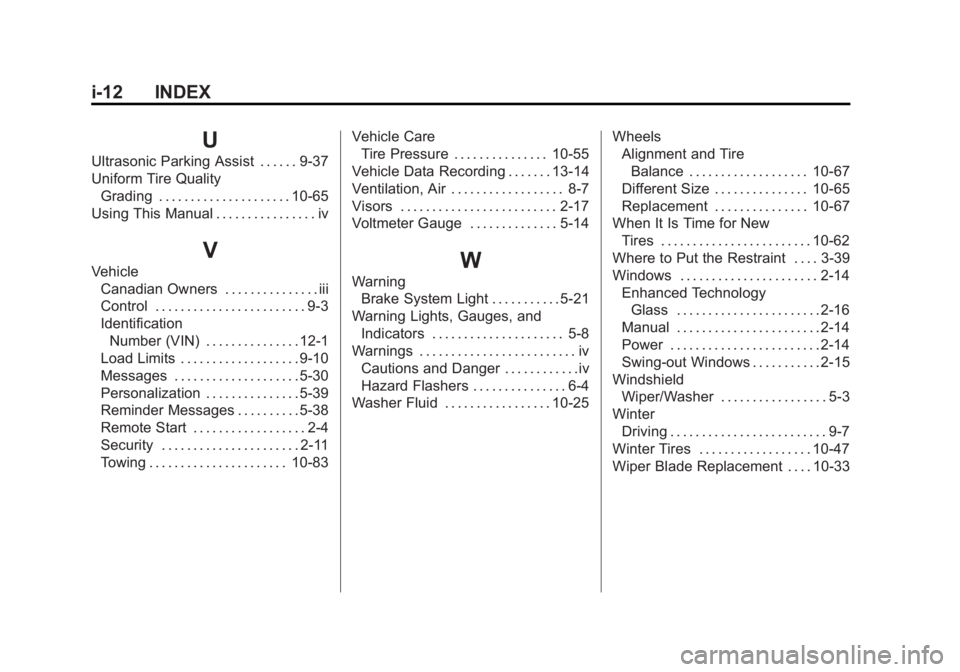
U
Ultrasonic Parking Assist . . . . . . 9-37
Uniform Tire QualityGrading . . . . . . . . . . . . . . . . . . . . . 10-65
Using This Manual . . . . . . . . . . . . . . . . iv
V
Vehicle Canadian Owners . . . . . . . . . . . . . . . iii
Control . . . . . . . . . . . . . . . . . . . . . . . . 9-3
Identification
Number (VIN) . . . . . . . . . . . . . . . 12-1
Load Limits . . . . . . . . . . . . . . . . . . . 9-10
Messages . . . . . . . . . . . . . . . . . . . . 5-30
Personalization . . . . . . . . . . . . . . . 5-39
Reminder Messages . . . . . . . . . . 5-38
Remote Start . . . . . . . . . . . . . . . . . . 2-4
Security . . . . . . . . . . . . . . . . . . . . . . 2-11
Towing . . . . . . . . . . . . . . . . . . . . . . 10-83 Vehicle Care
Tire Pressure . . . . . . . . . . . . . . . 10-55
Vehicle Data Recording . . . . . . . 13-14
Ventilation, Air . . . . . . . . . . . . . . . . . . 8-7
Visors . . . . . . . . . . . . . . . . . . . . . . . . . 2-17
Voltmeter Gauge . . . . . . . . . . . . . . 5-14W
Warning Brake System Light . . . . . . . . . . . 5-21
Warning Lights, Gauges, and Indicators . . . . . . . . . . . . . . . . . . . . . 5-8
Warnings . . . . . . . . . . . . . . . . . . . . . . . . . iv
Cautions and Danger . . . . . . . . . . . .iv
Hazard Flashers . . . . . . . . . . . . . . . 6-4
Washer Fluid . . . . . . . . . . . . . . . . . 10-25 Wheels
Alignment and Tire
Balance . . . . . . . . . . . . . . . . . . . 10-67
Different Size . . . . . . . . . . . . . . . 10-65
Replacement . . . . . . . . . . . . . . . 10-67
When It Is Time for New Tires . . . . . . . . . . . . . . . . . . . . . . . . 10-62
Where to Put the Restraint . . . . 3-39
Windows . . . . . . . . . . . . . . . . . . . . . . 2-14 Enhanced TechnologyGlass . . . . . . . . . . . . . . . . . . . . . . . 2-16
Manual . . . . . . . . . . . . . . . . . . . . . . . 2-14
Power . . . . . . . . . . . . . . . . . . . . . . . . 2-14
Swing-out Windows . . . . . . . . . . . 2-15
Windshield Wiper/Washer . . . . . . . . . . . . . . . . . 5-3
Winter Driving . . . . . . . . . . . . . . . . . . . . . . . . . 9-7
Winter Tires . . . . . . . . . . . . . . . . . . 10-47
Wiper Blade Replacement . . . . 10-33