set clock GMC SAVANA 2015 User Guide
[x] Cancel search | Manufacturer: GMC, Model Year: 2015, Model line: SAVANA, Model: GMC SAVANA 2015Pages: 379, PDF Size: 4.1 MB
Page 175 of 379
Black plate (2,1)GMC Savana Owner Manual (GMNA-Localizing-U.S./Canada-7707482) -
2015 - crc - 1/20/15
8-2 Climate Controls
Air Delivery Mode Control:Turn
the knob clockwise or
counterclockwise to change the
current airflow mode.
H(Vent): Air is directed to the
instrument panel outlets.
)(Bi-Level): Air is divided
between the instrument panel and
floor outlets, with some air directed
toward the windshield.
6(Floor): Air is directed to the
floor outlets with some air directed
to the windshield and side windows.
-(Defog): This mode clears the
windows of fog or moisture. Outside
air is directed to the floor and
defroster outlets. Adjust the
temperature knob for warmer or
cooler air. The air conditioning
compressor might turn on in this
setting to dehumidify the air.
1(Defrost): This mode clears the
windshield of fog or frost more
quickly. Air is directed to the
windshield, with some to the floor
outlets and front side windows. The
air conditioning compressor might
turn on in this setting to dehumidify
the air.
Do not drive the vehicle until all the
windows are clear.
Page 179 of 379
Black plate (6,1)GMC Savana Owner Manual (GMNA-Localizing-U.S./Canada-7707482) -
2015 - crc - 1/20/15
8-6 Climate Controls
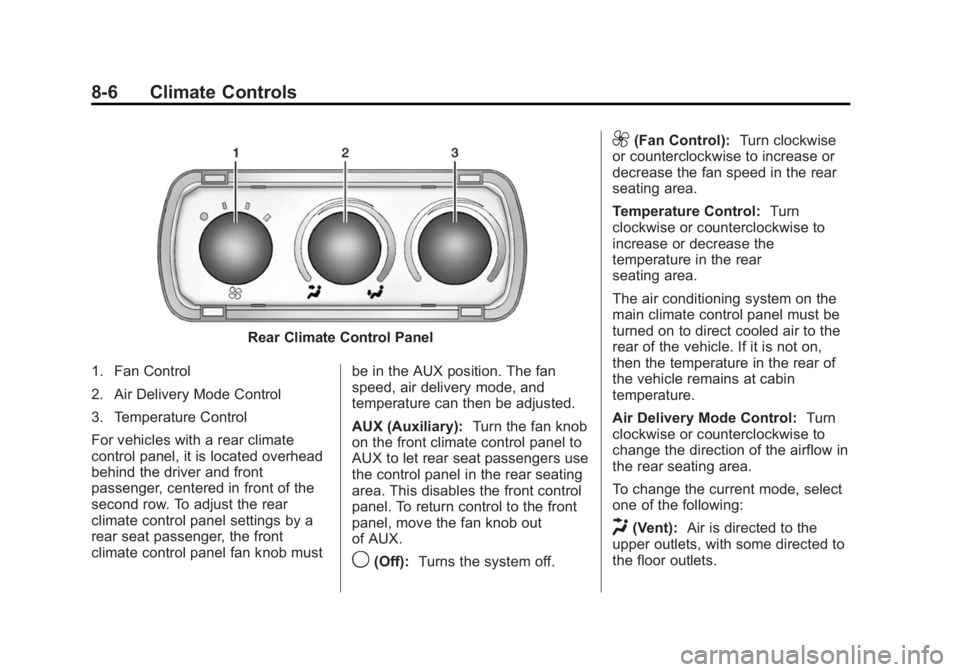
Rear Climate Control Panel
1. Fan Control
2. Air Delivery Mode Control
3. Temperature Control
For vehicles with a rear climate
control panel, it is located overhead
behind the driver and front
passenger, centered in front of the
second row. To adjust the rear
climate control panel settings by a
rear seat passenger, the front
climate control panel fan knob must be in the AUX position. The fan
speed, air delivery mode, and
temperature can then be adjusted.
AUX (Auxiliary):
Turn the fan knob
on the front climate control panel to
AUX to let rear seat passengers use
the control panel in the rear seating
area. This disables the front control
panel. To return control to the front
panel, move the fan knob out
of AUX.
9(Off): Turns the system off.
9(Fan Control): Turn clockwise
or counterclockwise to increase or
decrease the fan speed in the rear
seating area.
Temperature Control: Turn
clockwise or counterclockwise to
increase or decrease the
temperature in the rear
seating area.
The air conditioning system on the
main climate control panel must be
turned on to direct cooled air to the
rear of the vehicle. If it is not on,
then the temperature in the rear of
the vehicle remains at cabin
temperature.
Air Delivery Mode Control: Turn
clockwise or counterclockwise to
change the direction of the airflow in
the rear seating area.
To change the current mode, select
one of the following:
H(Vent): Air is directed to the
upper outlets, with some directed to
the floor outlets.
Page 267 of 379
Black plate (32,1)GMC Savana Owner Manual (GMNA-Localizing-U.S./Canada-7707482) -
2015 - crc - 1/20/15
10-32 Vehicle Care
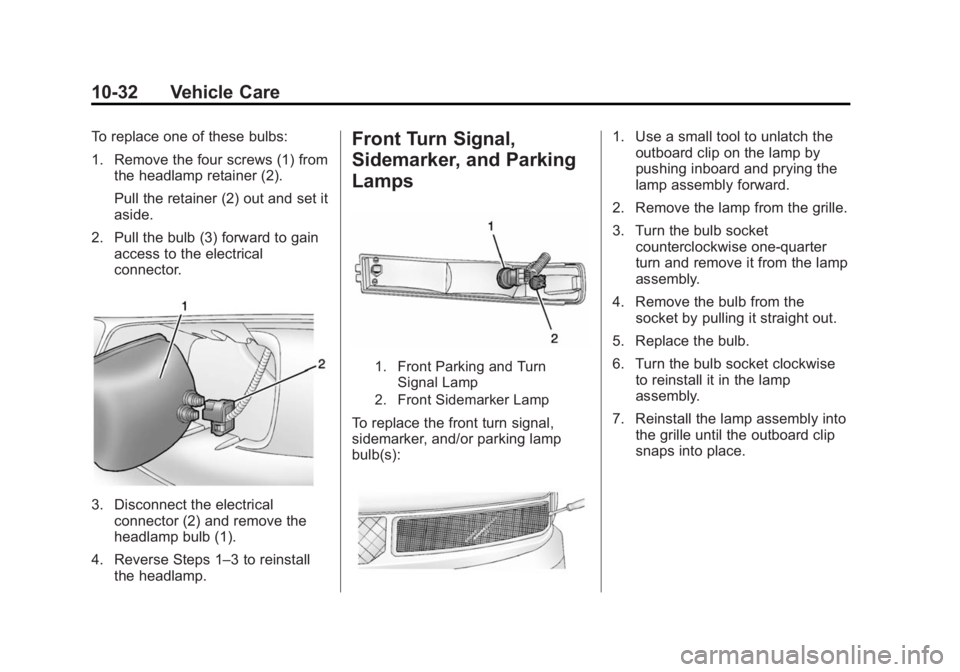
To replace one of these bulbs:
1. Remove the four screws (1) fromthe headlamp retainer (2).
Pull the retainer (2) out and set it
aside.
2. Pull the bulb (3) forward to gain access to the electrical
connector.
3. Disconnect the electricalconnector (2) and remove the
headlamp bulb (1).
4. Reverse Steps 1–3 to reinstall the headlamp.
Front Turn Signal,
Sidemarker, and Parking
Lamps
1. Front Parking and Turn
Signal Lamp
2. Front Sidemarker Lamp
To replace the front turn signal,
sidemarker, and/or parking lamp
bulb(s):
1. Use a small tool to unlatch the outboard clip on the lamp by
pushing inboard and prying the
lamp assembly forward.
2. Remove the lamp from the grille.
3. Turn the bulb socket counterclockwise one-quarter
turn and remove it from the lamp
assembly.
4. Remove the bulb from the socket by pulling it straight out.
5. Replace the bulb.
6. Turn the bulb socket clockwise to reinstall it in the lamp
assembly.
7. Reinstall the lamp assembly into the grille until the outboard clip
snaps into place.