display GMC SAVANA 2015 Workshop Manual
[x] Cancel search | Manufacturer: GMC, Model Year: 2015, Model line: SAVANA, Model: GMC SAVANA 2015Pages: 379, PDF Size: 4.1 MB
Page 161 of 379
Black plate (16,1)GMC Savana Owner Manual (GMNA-Localizing-U.S./Canada-7707482) -
2015 - crc - 1/20/15
7-16 Infotainment System
.The air is very humid. If so, wait
about an hour and try again.
.There was a problem while
burning the CD.
.The label is caught in the CD
player.
If the CD is not playing correctly, for
any other reason, try a known
good CD.
If any error occurs repeatedly or if
an error cannot be corrected,
contact your dealer. If the radio
displays an error message, write it
down and provide it to your dealer
when reporting the problem.
Auxiliary Devices
Using the Auxiliary Input Jack
Radios with an auxiliary input jack
on the lower right side of the
faceplate can connect to an external
audio device such as an iPod
®,
MP3 player, or CD player, for use as
another source for audio listening. This input jack is not an audio
output; do not plug headphones into
the front auxiliary input jack.
Drivers are encouraged to set up
any auxiliary device while the
vehicle is in P (Park).
See
Defensive Driving on page 9-2
for more information on driver
distraction.
To use a portable audio player,
connect a 3.5 mm (1/8 in) cable to
the radio's front auxiliary input jack.
When a device is connected, press
the radio CD/AUX button to begin
playing audio from the device over
the vehicle speakers.
For optimal sound quality, increase
the portable audio device's volume
to the loudest level.
It is always best to power the
portable audio device through its
own battery while playing.O(Power/Volume): Turn clockwise
or counterclockwise to increase or
decrease the volume of the portable
player. Additional volume adjustments might have to be made
from the portable device if the
volume is not loud or soft enough.
BAND:
If equipped, press to listen
to the radio when a portable audio
device is playing. The portable
audio device continues playing.
CD/AUX (CD/Auxiliary):
If equipped, press to play a CD
when a portable audio device is
playing. Press again and the system
begins playing audio from the
connected portable audio player. If a
portable audio player is not
connected, “No Input Device Found”
displays.
SRCE (Source): If equipped, press
to listen to the radio when a portable
audio device is playing. The
portable audio device continues
playing.
Press to play a CD when a portable
audio device is playing. Press again
and the system begins playing
audio from the connected portable
Page 162 of 379
Black plate (17,1)GMC Savana Owner Manual (GMNA-Localizing-U.S./Canada-7707482) -
2015 - crc - 1/20/15
Infotainment System 7-17
audio player. If a portable audio
player is not connected,“No Input
Device Found” displays.
Using the USB Port
Radios with a USB port can control
a USB storage device or an iPod®
using the radio buttons and knobs.
See“Playing an MP3” inCD Player
on page 7-11 for information about
how to connect and control a USB
storage device or an iPod.
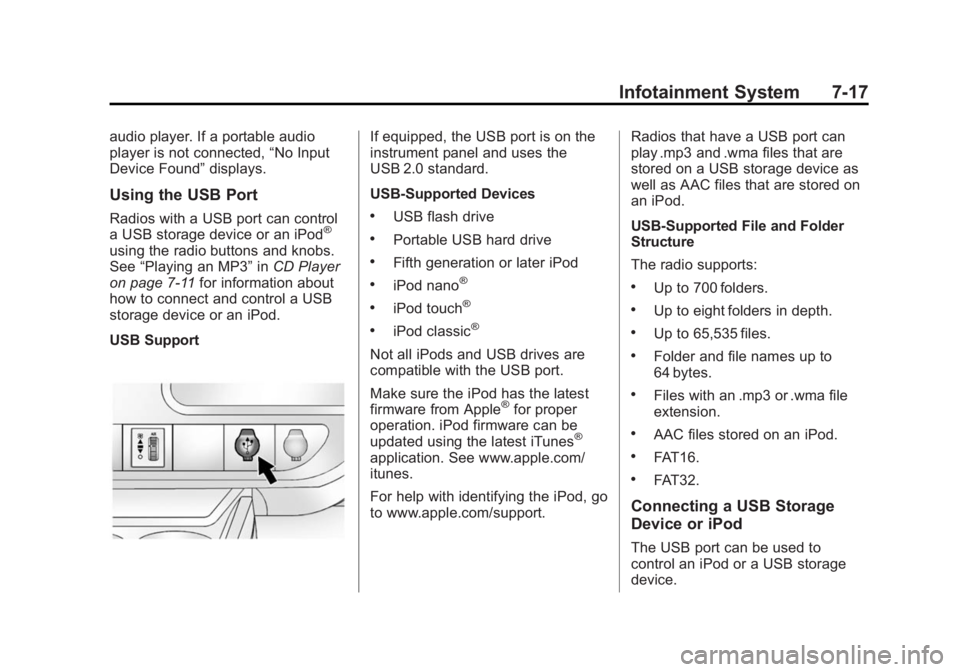
USB Support
If equipped, the USB port is on the
instrument panel and uses the
USB 2.0 standard.
USB-Supported Devices
.USB flash drive
.Portable USB hard drive
.Fifth generation or later iPod
.iPod nano®
.iPod touch®
.iPod classic®
Not all iPods and USB drives are
compatible with the USB port.
Make sure the iPod has the latest
firmware from Apple
®for proper
operation. iPod firmware can be
updated using the latest iTunes
®
application. See www.apple.com/
itunes.
For help with identifying the iPod, go
to www.apple.com/support. Radios that have a USB port can
play .mp3 and .wma files that are
stored on a USB storage device as
well as AAC files that are stored on
an iPod.
USB-Supported File and Folder
Structure
The radio supports:
.Up to 700 folders.
.Up to eight folders in depth.
.Up to 65,535 files.
.Folder and file names up to
64 bytes.
.Files with an .mp3 or .wma file
extension.
.AAC files stored on an iPod.
.FAT16.
.FAT32.
Connecting a USB Storage
Device or iPod
The USB port can be used to
control an iPod or a USB storage
device.
Page 163 of 379
Black plate (18,1)GMC Savana Owner Manual (GMNA-Localizing-U.S./Canada-7707482) -
2015 - crc - 1/20/15
7-18 Infotainment System
To connect a USB storage device,
connect the device to the USB port
on the instrument panel.
To connect an iPod, connect one
end of the USB cable that came
with the iPod to the iPod’s dock
connector and connect the other
end to the USB port on the
instrument panel. If the vehicle is on
and the USB connection works,“OK
to disconnect” and a GM logo may
appear on the iPod, and iPod
appears on the radio display. The
iPod music appears on the radio
display and begins playing.
The iPod charges while it is
connected to the vehicle if the
vehicle is in the ACC/ACCESSORY
or ON/RUN position. When the
vehicle is turned off, the iPod
automatically powers off and will not
charge or draw power from the
vehicle's battery.
If you have an older iPod model that
is not supported, it can still be used
by connecting it to the auxiliary
input jack using a standard 3.5 mm (1/8 in) stereo cable. See
“Using the
Auxiliary Input Jack” previously in
this section.
Using the Radio to Control a
USB Storage Device or iPod
The radio can control a USB
storage device or an iPod using the
radio buttons and knobs, and
display song information on the
radio display.
f(Tune): Turn to select files.
©SEEK:Press to go to the start of
the track, if more than 10 seconds
have played. Press and hold or
press multiple times to continue
moving backward through tracks.
¨SEEK: Press to go to the next
track. Press and hold or press
multiple times to continue moving
forward through tracks.
sREV (Reverse): Press and hold
to reverse playback quickly. Sound
is heard at a reduced volume. Release
sREV to resume playing.
The elapsed time of the file
displays.
\FWD (Fast Forward): Press
and hold to advance playback
quickly. Sound is heard at a reduced
volume. Release
\FWD to
resume playing. The elapsed time of
the file displays.
4(Information): Press to display
additional information about the
selected track.
Using Softkeys to Control a
USB Storage Device or iPod
The five softkeys below the radio
display are used to control the
functions listed below.
To use the softkeys:
1. Press the first or fifth softkey
below the radio display to
display the functions listed
below, or press the softkey
below the function if it is
currently displayed.
Page 164 of 379
Black plate (19,1)GMC Savana Owner Manual (GMNA-Localizing-U.S./Canada-7707482) -
2015 - crc - 1/20/15
Infotainment System 7-19
2. Press the softkey below the tabwith the function on it to use that
function.
j(Pause): Press the softkey belowjto pause the track. The tab
appears raised when pause is being
used. Press the softkey below
j
again to resume playback.
Back: Press the softkey below the
Back tab to go back to the main
display screen on an iPod, or the
root directory on a USB storage
device.
c(Folder View): Press the
softkey below
cto view the
contents of the current folder on the
USB drive. To browse and select
files:
1. Press the softkey below
c.
2. Turn
fto scroll through the list
of folders.
3. Press
fto select the desired
folder. If there is more then one
folder, repeat Steps 1 and 2 until
the desired folder is reached. 4. Turn
fto scroll through the files
in the selected folder.
5. Press
fto select the desired file
to be played.
To skip through large lists, the five
softkeys can be used to navigate in
the following order:
.First softkey, first item in the list.
.Second softkey, 1% through the
list each time the softkey is
pressed.
.Third softkey, 5% through the list
each time the softkey is pressed.
.Fourth softkey, 10% through the
list each time the softkey is
pressed.
.Fifth softkey, end of the list.
h(Music Navigator): Press the
softkey below
hto view and
select a file on an iPod, using the
iPod's menu system. Files are
sorted by:
.Playlists
.Artists
.Albums
.Genres
.Songs
.Composers
To select files:
1. Press the softkey below
h.
2. Turn
fto scroll through the list
of menus.
3. Press
fto select the
desired menu.
4. Turn
fto scroll through the
folders or files in the
selected menu.
5. Press
fto select the desired file
to be played.
To skip through large lists, the five
softkeys can be used to navigate in
the following order:
.First softkey, first item in the list.
Page 196 of 379
Black plate (15,1)GMC Savana Owner Manual (GMNA-Localizing-U.S./Canada-7707482) -
2015 - crc - 1/20/15
Driving and Operating 9-15
This position locks the ignition and
transmission.
Do not turn the engine off when the
vehicle is moving. This will cause a
loss of power assist in the brake
and steering systems and disable
the airbags.
If the vehicle must be shut off in an
emergency:
1. Brake using a firm and steadypressure. Do not pump the
brakes repeatedly. This may
deplete power assist, requiring
increased brake pedal force.
2. Shift the vehicle to N (Neutral). This can be done while the
vehicle is moving. After shifting
to N (Neutral), firmly apply the
brakes and steer the vehicle to a
safe location.
3. Come to a complete stop, shift to P (Park), and turn the ignition
to LOCK/OFF. On vehicles with
an automatic transmission, the shift lever must be in P (Park) to
turn the ignition switch to the
LOCK/OFF position.
4. Set the parking brake. See Parking Brake on page 9-29.
{Warning
Turning off the vehicle while
moving may cause loss of power
assist in the brake and steering
systems and disable the airbags.
While driving, only shut the
vehicle off in an emergency.
If the vehicle cannot be pulled over,
and must be shut off while driving,
turn the ignition to ACC/
ACCESSORY.
{Caution
Using a tool to force the key to
turn in the ignition could cause
damage to the switch or break the (Continued)
Caution (Continued)
key. Use the correct key, make
sure it is all the way in, and turn it
only with your hand. If the key
cannot be turned by hand, see
your dealer.
2 (ACC/ACCESSORY): This is the
position in which you can operate
things like the radio and the
windshield wipers when the engine
is off.
3 (ON/RUN): This position can be
used to operate the electrical
accessories and to display some
instrument cluster warning and
indicator lights. This position can
also be used for service and
diagnostics, and to verify the proper
operation of the malfunction
indicator lamp as may be required
for emission inspection purposes.
The switch stays in this position
when the engine is running.
Page 197 of 379
Black plate (16,1)GMC Savana Owner Manual (GMNA-Localizing-U.S./Canada-7707482) -
2015 - crc - 1/20/15
9-16 Driving and Operating
If you leave the key in the ACC/
ACCESSORY or ON/RUN position
with the engine off, the battery could
be drained. You may not be able to
start the vehicle if the battery is
allowed to drain for an extended
period of time.
4 (START):This is the position that
starts the engine. When the engine
starts, release the key. The ignition
switch returns to ON/RUN for
driving.
A warning tone will sound when the
driver door is opened, the ignition is
in ACC/ACCESSORY or LOCK/OFF
and the key is in the ignition.
Starting the Engine
If the vehicle has a diesel engine,
see the Duramax diesel
supplement. To place the transmission in the
proper gear:
Move the shift lever to P (Park) or
N (Neutral). The engine will not start
in any other position. To restart the
engine when the vehicle is already
moving, use N (Neutral) only.
{Caution
If you add electrical parts or
accessories, you could change
the way the engine operates. Any
resulting damage would not be
covered by the vehicle warranty.
See
Add-On Electrical Equipment
on page 9-54.
{Caution
Do not try to shift to P (Park) if the
vehicle is moving. If you do, you
could damage the transmission.
Shift to P (Park) only when the
vehicle is stopped.
{Caution
If the steering wheel is turned
until it reaches the end of its
travel, and is held in that position
while starting the vehicle, damage
may occur to the hydraulic power
steering system and there may be
loss of power steering assist.
Starting Procedure
1. With your foot off the accelerator pedal, turn the ignition key to
START. When the engine starts,
let go of the key. The idle speed
will go down as your engine gets
warm. Do not race the engine
immediately after starting it.
Operate the engine and
transmission gently to allow the
oil to warm up and lubricate all
moving parts.
When the Low Fuel warning
lamp is on and the FUEL LEVEL
LOW message is displayed in
the Driver Information Center
Page 198 of 379
Black plate (17,1)GMC Savana Owner Manual (GMNA-Localizing-U.S./Canada-7707482) -
2015 - crc - 1/20/15
Driving and Operating 9-17
(DIC), the Computer-Controlled
Cranking System is disabled to
prevent possible vehicle
component damage. When this
happens, hold the ignition switch
in the START position to
continue engine cranking.
{Caution
Cranking the engine for long
periods of time, by returning the
ignition to the START position
immediately after cranking has
ended, can overheat and damage
the cranking motor, and drain the
battery. Wait at least 15 seconds
between each try, to let the
cranking motor cool down.
2. If the engine does not start after 5-10 seconds, especially in very
cold weather (below −18°C or 0°
F), it could be flooded with too
much gasoline. Try pushing the
accelerator pedal all the way to
the floor and holding it there as
you hold the key in START for up to 15 seconds. Wait at least
15 seconds between each try, to
allow the cranking motor to cool
down. When the engine starts,
let go of the key and accelerator.
If the vehicle starts briefly but
then stops again, do the same
thing. This clears the extra
gasoline from the engine. Do not
race the engine immediately
after starting it. Operate the
engine and transmission gently
until the oil warms up and
lubricates all moving parts.
Fast Idle System
If equipped, this feature is available
only with cruise control. The manual
fast idle switch is operated using the
cruise control buttons on the left
side of the steering wheel.
This system can be used to
increase engine idle speed
whenever the following conditions
are met:
.The parking brake is set.
.The brake pedal is not pressed.
.The vehicle must not be moving
and the accelerator must not be
pressed.
To control the fast idle:
.To enable the Fast Idle System,
press and release the cruise
control on/off button and ensure
that the switch indicator light
is lit.
.Press and release the cruise
control SET- button. Engine
speed will be held at
approximately 1200 rpm.
When the fast idle is active, the
Driver Information Center (DIC) will
display FAST IDLE ON.
One of the following actions will turn
off the fast idle:
.Pressing the brake.
.Selecting the cruise control
cancel button.
.Releasing the parking brake.
.Moving the transmission shift
lever out of P (Park) or
N (Neutral).
Page 206 of 379
Black plate (25,1)GMC Savana Owner Manual (GMNA-Localizing-U.S./Canada-7707482) -
2015 - crc - 1/20/15
Driving and Operating 9-25
3 (Third):This position is also used
for normal driving. It reduces vehicle
speed more than D (Drive) without
using the brakes. You might choose
3 (Third) instead of D (Drive) when
driving on hilly, winding roads; when
towing a trailer, so there is less
shifting between gears; and when
going down a steep hill. See “Range
Selection Mode” underManual
Mode on page 9-26.
2 (Second): This position reduces
vehicle speed even more than
3 (Third) without using the brakes.
You can use 2 (Second) on hills.
It can help control vehicle speed as
you go down steep mountain roads,
but then you would also want to use
the brakes off and on. See “Range
Selection Mode” underManual
Mode on page 9-26.
If you manually select 2 (Second) in
an automatic transmission, the
transmission will start in
second gear. You can use this
feature for reducing the speed of the rear wheels when trying to start the
vehicle from a stop on slippery road
surfaces.
1 (First):
This position reduces
vehicle speed without using the
brakes. You can use it for major/
severe downgrades where the
vehicle would otherwise accelerate
due to steepness of grade. When
you shift to 1 (First) it provides the
lowest gear appropriate to current
road speed and continues to
downshift as the vehicle slows,
eventually downshifting to 1 (First)
gear. The transmission can be held
in 1 (First) gear using Range
Selection Mode or the shift lever.
See “Range Selection Mode” under
Manual Mode on page 9-26.
{Caution
Spinning the tires or holding the
vehicle in one place on a hill
using only the accelerator pedal
may damage the transmission.
(Continued)
Caution (Continued)
The repair will not be covered by
the vehicle warranty. If you are
stuck, do not spin the tires. When
stopping on a hill, use the brakes
to hold the vehicle in place.
Normal Mode Grade Braking
This mode is enabled when the
vehicle is started, but is not enabled
in Range Selection Mode. It assists
in maintaining desired vehicle
speeds when driving on downhill
grades by using the engine and
transmission to slow the vehicle.
The first time the system activates
for each ignition key cycle, a DIC
message will be displayed. See
Transmission Messages on
page 5-36.
To disable or enable Normal Mode
Grade Braking within the current
ignition key cycle, press and hold
the Tow/Haul button for
Page 207 of 379
Black plate (26,1)GMC Savana Owner Manual (GMNA-Localizing-U.S./Canada-7707482) -
2015 - crc - 1/20/15
9-26 Driving and Operating
three seconds. A DIC message
displays. SeeTransmission
Messages on page 5-36.
For other forms of grade braking,
see Tow/Haul Mode on page 9-27
and Cruise Control on page 9-32.
Manual Mode
Range Selection Mode
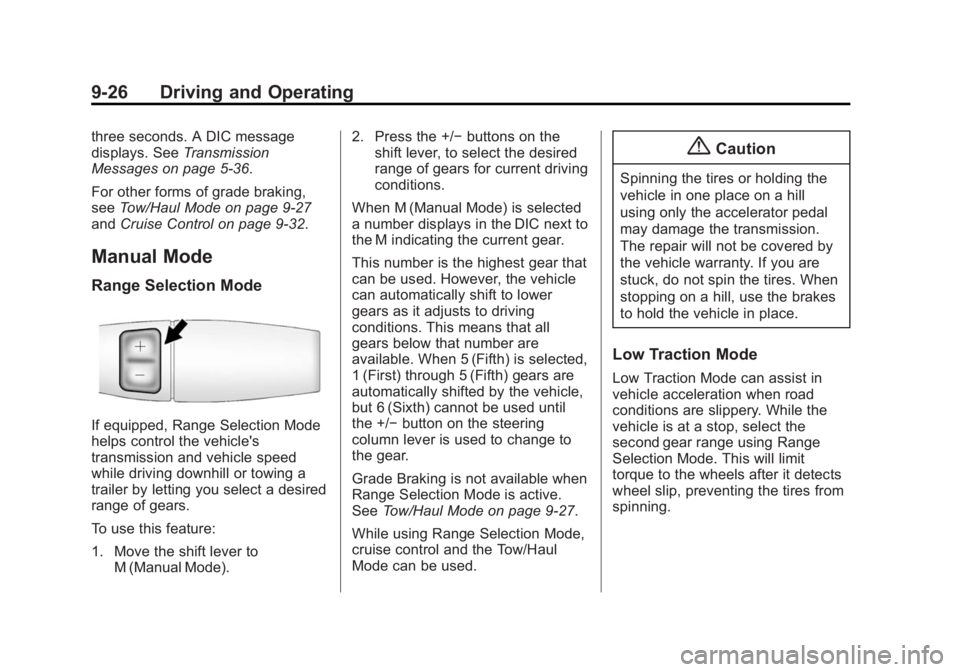
If equipped, Range Selection Mode
helps control the vehicle's
transmission and vehicle speed
while driving downhill or towing a
trailer by letting you select a desired
range of gears.
To use this feature:
1. Move the shift lever to
M (Manual Mode). 2. Press the +/−
buttons on the
shift lever, to select the desired
range of gears for current driving
conditions.
When M (Manual Mode) is selected
a number displays in the DIC next to
the M indicating the current gear.
This number is the highest gear that
can be used. However, the vehicle
can automatically shift to lower
gears as it adjusts to driving
conditions. This means that all
gears below that number are
available. When 5 (Fifth) is selected,
1 (First) through 5 (Fifth) gears are
automatically shifted by the vehicle,
but 6 (Sixth) cannot be used until
the +/− button on the steering
column lever is used to change to
the gear.
Grade Braking is not available when
Range Selection Mode is active.
See Tow/Haul Mode on page 9-27.
While using Range Selection Mode,
cruise control and the Tow/Haul
Mode can be used.
{Caution
Spinning the tires or holding the
vehicle in one place on a hill
using only the accelerator pedal
may damage the transmission.
The repair will not be covered by
the vehicle warranty. If you are
stuck, do not spin the tires. When
stopping on a hill, use the brakes
to hold the vehicle in place.
Low Traction Mode
Low Traction Mode can assist in
vehicle acceleration when road
conditions are slippery. While the
vehicle is at a stop, select the
second gear range using Range
Selection Mode. This will limit
torque to the wheels after it detects
wheel slip, preventing the tires from
spinning.
Page 208 of 379
Black plate (27,1)GMC Savana Owner Manual (GMNA-Localizing-U.S./Canada-7707482) -
2015 - crc - 1/20/15
Driving and Operating 9-27
Tow/Haul Mode
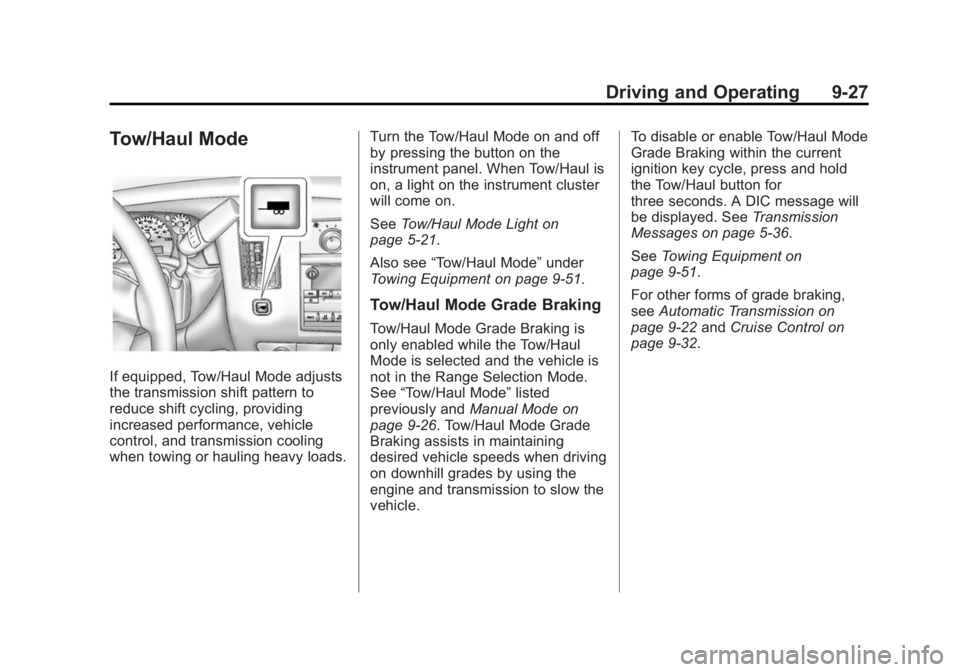
If equipped, Tow/Haul Mode adjusts
the transmission shift pattern to
reduce shift cycling, providing
increased performance, vehicle
control, and transmission cooling
when towing or hauling heavy loads.Turn the Tow/Haul Mode on and off
by pressing the button on the
instrument panel. When Tow/Haul is
on, a light on the instrument cluster
will come on.
See
Tow/Haul Mode Light on
page 5-21.
Also see “Tow/Haul Mode” under
Towing Equipment on page 9-51.
Tow/Haul Mode Grade Braking
Tow/Haul Mode Grade Braking is
only enabled while the Tow/Haul
Mode is selected and the vehicle is
not in the Range Selection Mode.
See “Tow/Haul Mode” listed
previously and Manual Mode on
page 9-26. Tow/Haul Mode Grade
Braking assists in maintaining
desired vehicle speeds when driving
on downhill grades by using the
engine and transmission to slow the
vehicle. To disable or enable Tow/Haul Mode
Grade Braking within the current
ignition key cycle, press and hold
the Tow/Haul button for
three seconds. A DIC message will
be displayed. See
Transmission
Messages on page 5-36.
See Towing Equipment on
page 9-51.
For other forms of grade braking,
see Automatic Transmission on
page 9-22 andCruise Control on
page 9-32.