instrument cluster GMC SAVANA 2015 Owner's Manual
[x] Cancel search | Manufacturer: GMC, Model Year: 2015, Model line: SAVANA, Model: GMC SAVANA 2015Pages: 379, PDF Size: 4.1 MB
Page 10 of 379
Black plate (3,1)GMC Savana Owner Manual (GMNA-Localizing-U.S./Canada-7707482) -
2015 - crc - 1/20/15
In Brief 1-3
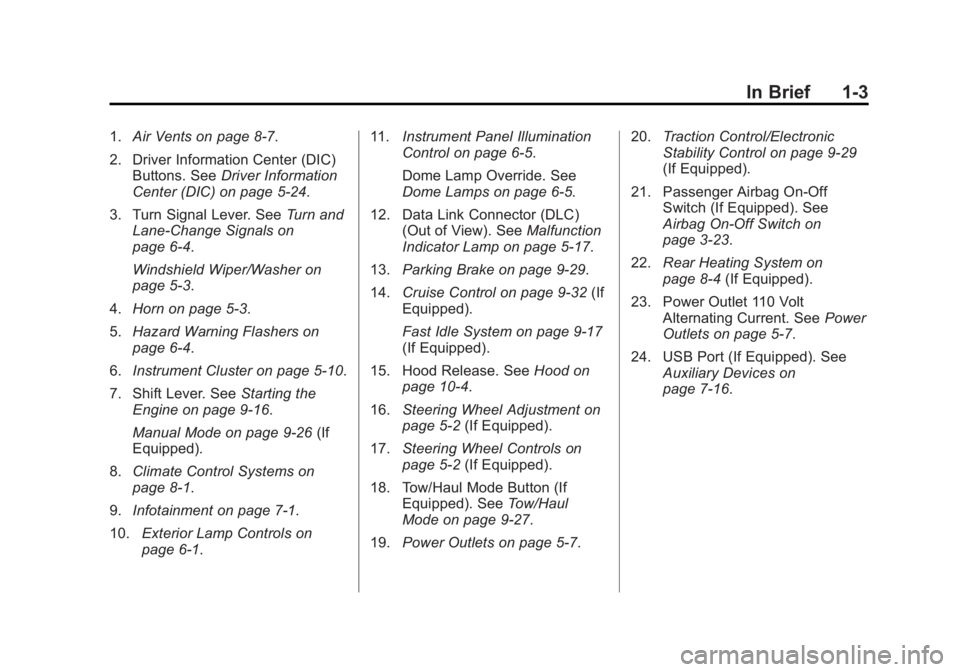
1.Air Vents on page 8-7.
2. Driver Information Center (DIC) Buttons. See Driver Information
Center (DIC) on page 5-24.
3. Turn Signal Lever. See Turn and
Lane-Change Signals on
page 6-4.
Windshield Wiper/Washer on
page 5-3.
4. Horn on page 5-3.
5. Hazard Warning Flashers on
page 6-4.
6. Instrument Cluster on page 5-10.
7. Shift Lever. See Starting the
Engine on page 9-16.
Manual Mode on page 9-26 (If
Equipped).
8. Climate Control Systems on
page 8-1.
9. Infotainment on page 7-1.
10. Exterior Lamp Controls on
page 6-1. 11.
Instrument Panel Illumination
Control on page 6-5.
Dome Lamp Override. See
Dome Lamps on page 6-5.
12. Data Link Connector (DLC) (Out of View). See Malfunction
Indicator Lamp on page 5-17.
13. Parking Brake on page 9-29.
14. Cruise Control on page 9-32 (If
Equipped).
Fast Idle System on page 9-17
(If Equipped).
15. Hood Release. See Hood on
page 10-4.
16. Steering Wheel Adjustment on
page 5-2 (If Equipped).
17. Steering Wheel Controls on
page 5-2 (If Equipped).
18. Tow/Haul Mode Button (If Equipped). See Tow/Haul
Mode on page 9-27.
19. Power Outlets on page 5-7. 20.
Traction Control/Electronic
Stability Control on page 9-29
(If Equipped).
21. Passenger Airbag On-Off Switch (If Equipped). See
Airbag On-Off Switch on
page 3-23.
22. Rear Heating System on
page 8-4 (If Equipped).
23. Power Outlet 110 Volt Alternating Current. See Power
Outlets on page 5-7.
24. USB Port (If Equipped). See Auxiliary Devices on
page 7-16.
Page 24 of 379
Black plate (17,1)GMC Savana Owner Manual (GMNA-Localizing-U.S./Canada-7707482) -
2015 - crc - 1/20/15
In Brief 1-17
¨:Press to seek the next radio
station, the next track while sourced
to the CD, or to select tracks and
folders on an iPod
®or USB device.
For more information, see Steering
Wheel Controls on page 5-2.
Cruise Control
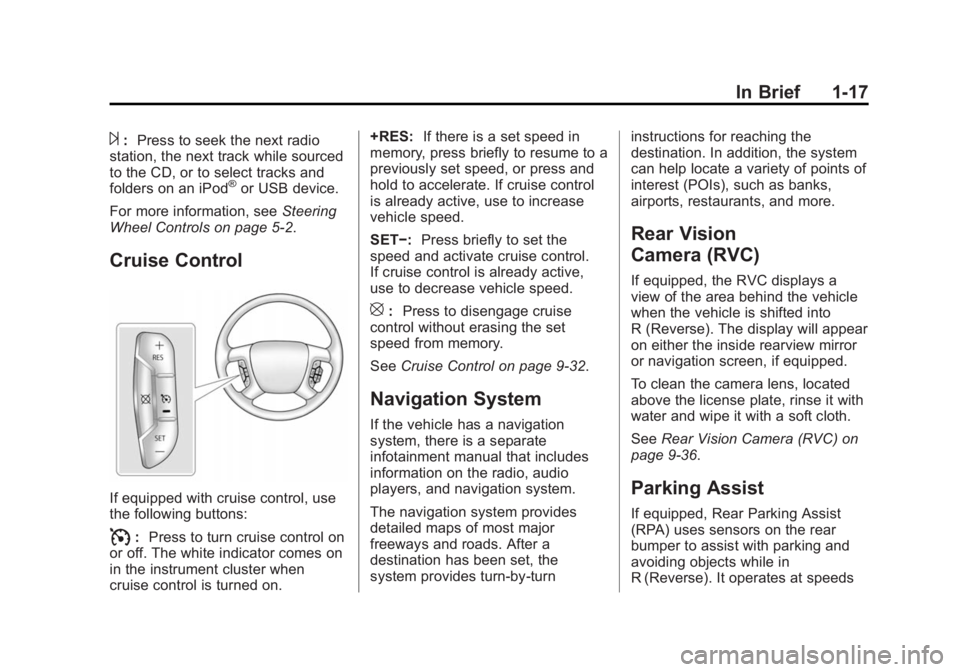
If equipped with cruise control, use
the following buttons:
I: Press to turn cruise control on
or off. The white indicator comes on
in the instrument cluster when
cruise control is turned on. +RES:
If there is a set speed in
memory, press briefly to resume to a
previously set speed, or press and
hold to accelerate. If cruise control
is already active, use to increase
vehicle speed.
SET−: Press briefly to set the
speed and activate cruise control.
If cruise control is already active,
use to decrease vehicle speed.
[: Press to disengage cruise
control without erasing the set
speed from memory.
See Cruise Control on page 9-32.
Navigation System
If the vehicle has a navigation
system, there is a separate
infotainment manual that includes
information on the radio, audio
players, and navigation system.
The navigation system provides
detailed maps of most major
freeways and roads. After a
destination has been set, the
system provides turn-by-turn instructions for reaching the
destination. In addition, the system
can help locate a variety of points of
interest (POIs), such as banks,
airports, restaurants, and more.
Rear Vision
Camera (RVC)
If equipped, the RVC displays a
view of the area behind the vehicle
when the vehicle is shifted into
R (Reverse). The display will appear
on either the inside rearview mirror
or navigation screen, if equipped.
To clean the camera lens, located
above the license plate, rinse it with
water and wipe it with a soft cloth.
See
Rear Vision Camera (RVC) on
page 9-36.
Parking Assist
If equipped, Rear Parking Assist
(RPA) uses sensors on the rear
bumper to assist with parking and
avoiding objects while in
R (Reverse). It operates at speeds
Page 96 of 379
Black plate (1,1)GMC Savana Owner Manual (GMNA-Localizing-U.S./Canada-7707482) -
2015 - crc - 1/20/15
Instruments and Controls 5-1
Instruments and
Controls
Controls
Steering Wheel Adjustment . . . 5-2
Steering Wheel Controls . . . . . . 5-2
Horn . . . . . . . . . . . . . . . . . . . . . . . . . . 5-3
Windshield Wiper/Washer . . . . . 5-3
Compass . . . . . . . . . . . . . . . . . . . . . 5-4
Clock . . . . . . . . . . . . . . . . . . . . . . . . . 5-6
Power Outlets . . . . . . . . . . . . . . . . . 5-7
Cigarette Lighter . . . . . . . . . . . . . . 5-8
Ashtrays . . . . . . . . . . . . . . . . . . . . . . 5-8
Warning Lights, Gauges, and
Indicators
Warning Lights, Gauges, andIndicators . . . . . . . . . . . . . . . . . . . . 5-9
Instrument Cluster . . . . . . . . . . . 5-10
Speedometer . . . . . . . . . . . . . . . . 5-11
Odometer . . . . . . . . . . . . . . . . . . . . 5-11
Trip Odometer . . . . . . . . . . . . . . . 5-11
Fuel Gauge . . . . . . . . . . . . . . . . . . 5-11
Engine Oil Pressure Gauge . . . . . . . . . . . . . . . . . . . . . . 5-12
Engine Coolant Temperature Gauge . . . . . . . . . . . . . . . . . . . . . . 5-13 Voltmeter Gauge . . . . . . . . . . . . . 5-14
Safety Belt Reminders . . . . . . . 5-14
Airbag Readiness Light . . . . . . 5-15
Airbag On-Off Light . . . . . . . . . . 5-15
Charging System Light . . . . . . 5-17
Malfunction
Indicator Lamp . . . . . . . . . . . . . 5-17
Brake System Warning Light . . . . . . . . . . . . . . . . . . . . . . . 5-20
Antilock Brake System (ABS) Warning Light . . . . . . . . . . . . . . 5-20
Tow/Haul Mode Light . . . . . . . . 5-21
StabiliTrak
®OFF Light . . . . . . . 5-21
Traction Control System (TCS)/StabiliTrak
®Light . . . . 5-21
Tire Pressure Light . . . . . . . . . . 5-22
Engine Oil Pressure Light . . . . 5-22
Low Fuel Warning Light . . . . . . 5-23
Security Light . . . . . . . . . . . . . . . . 5-23
High-Beam On Light . . . . . . . . . 5-23
Cruise Control Light . . . . . . . . . 5-23
Information Displays
Driver Information Center (DIC) . . . . . . . . . . . . . . . 5-24
Vehicle Messages
Vehicle Messages . . . . . . . . . . . 5-29
Battery Voltage and ChargingMessages . . . . . . . . . . . . . . . . . . 5-29
Brake System Messages . . . . 5-29
Compass Messages . . . . . . . . . 5-29
Door Ajar Messages . . . . . . . . . 5-30
Engine Cooling System Messages . . . . . . . . . . . . . . . . . . 5-30
Engine Oil Messages . . . . . . . . 5-31
Engine Power Messages . . . . 5-31
Fuel System Messages . . . . . . 5-32
Key and Lock Messages . . . . . 5-32
Lamp Messages . . . . . . . . . . . . . 5-32
Object Detection System Messages . . . . . . . . . . . . . . . . . . 5-32
Ride Control System Messages . . . . . . . . . . . . . . . . . . 5-33
Airbag System Messages . . . . 5-34
Security Messages . . . . . . . . . . 5-34
Service Vehicle Messages . . . 5-34
Tire Messages . . . . . . . . . . . . . . . 5-35
Transmission Messages . . . . . 5-36
Vehicle Reminder Messages . . . . . . . . . . . . . . . . . . 5-36
Vehicle Personalization
Vehicle Personalization . . . . . . 5-37
Page 105 of 379
Black plate (10,1)GMC Savana Owner Manual (GMNA-Localizing-U.S./Canada-7707482) -
2015 - crc - 1/20/15
5-10 Instruments and Controls
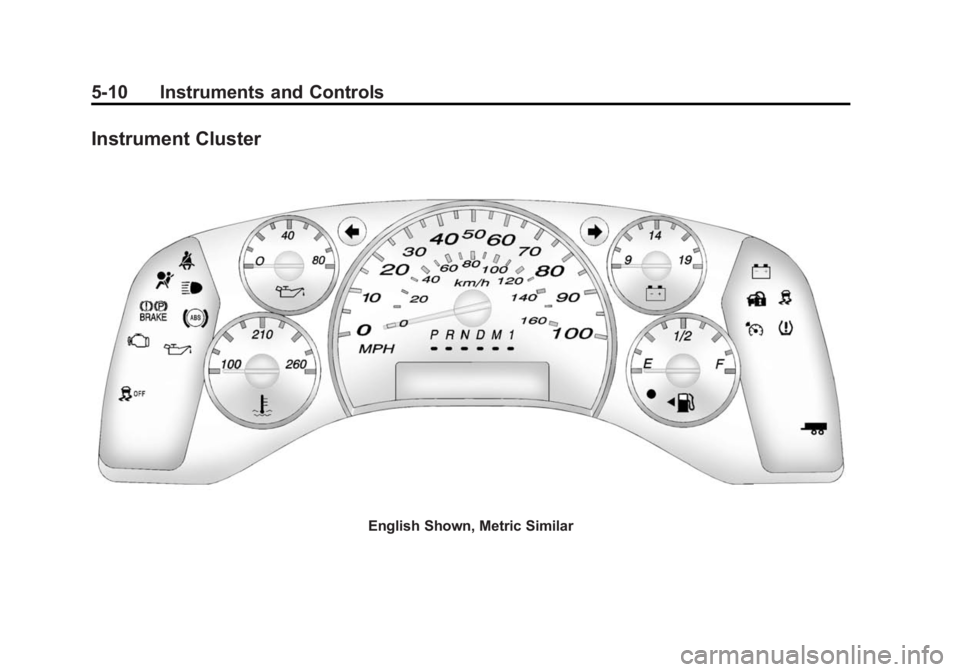
Instrument Cluster
English Shown, Metric Similar
Page 109 of 379
Black plate (14,1)GMC Savana Owner Manual (GMNA-Localizing-U.S./Canada-7707482) -
2015 - crc - 1/20/15
5-14 Instruments and Controls
SeeEngine Overheating on
page 10-19.
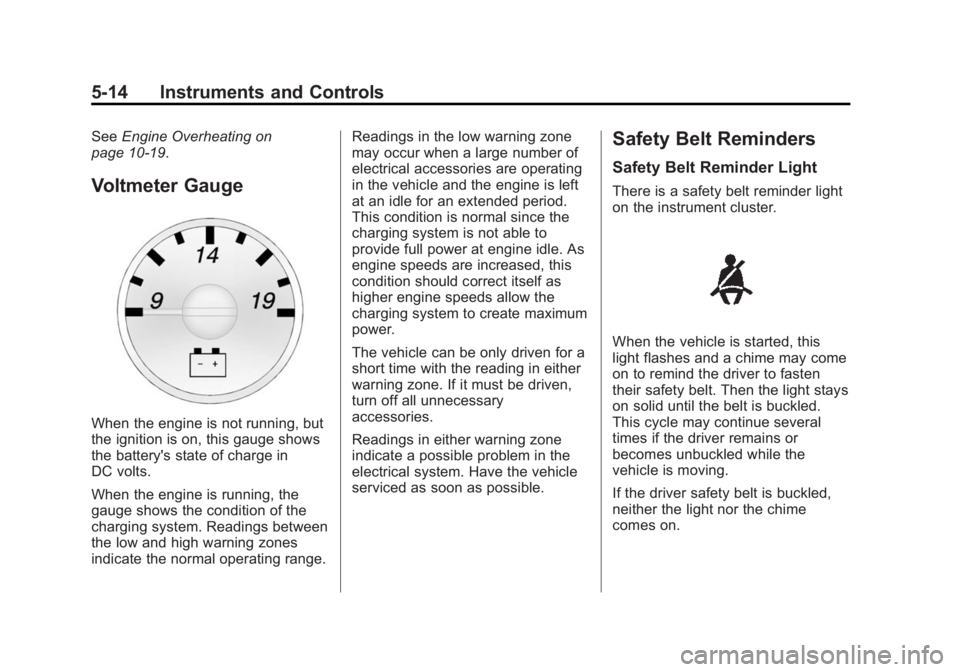
Voltmeter Gauge
When the engine is not running, but
the ignition is on, this gauge shows
the battery's state of charge in
DC volts.
When the engine is running, the
gauge shows the condition of the
charging system. Readings between
the low and high warning zones
indicate the normal operating range. Readings in the low warning zone
may occur when a large number of
electrical accessories are operating
in the vehicle and the engine is left
at an idle for an extended period.
This condition is normal since the
charging system is not able to
provide full power at engine idle. As
engine speeds are increased, this
condition should correct itself as
higher engine speeds allow the
charging system to create maximum
power.
The vehicle can be only driven for a
short time with the reading in either
warning zone. If it must be driven,
turn off all unnecessary
accessories.
Readings in either warning zone
indicate a possible problem in the
electrical system. Have the vehicle
serviced as soon as possible.
Safety Belt Reminders
Safety Belt Reminder Light
There is a safety belt reminder light
on the instrument cluster.
When the vehicle is started, this
light flashes and a chime may come
on to remind the driver to fasten
their safety belt. Then the light stays
on solid until the belt is buckled.
This cycle may continue several
times if the driver remains or
becomes unbuckled while the
vehicle is moving.
If the driver safety belt is buckled,
neither the light nor the chime
comes on.
Page 119 of 379
Black plate (24,1)GMC Savana Owner Manual (GMNA-Localizing-U.S./Canada-7707482) -
2015 - crc - 1/20/15
5-24 Instruments and Controls
Information Displays
Driver Information
Center (DIC)
This vehicle has a DIC.
All messages will appear in the DIC
display at the bottom of the
instrument cluster.
The DIC comes on when the ignition
is on. After a short delay, the DIC
will display the information that was
last displayed before the engine
was turned off.
The DIC displays trip, fuel, and
vehicle system information, and
warning messages if a system
problem is detected.
If the vehicle has these features, the
DIC also displays the compass
direction and the outside air
temperature when viewing the trip
and fuel information. The compass
direction appears on the top right
corner of the DIC display. The
outside air temperatureautomatically appears in the bottom
right corner of the DIC display.
If there is a problem with the system
that controls the temperature
display, the numbers will be
replaced with dashes. If this occurs,
have the vehicle serviced by your
dealer.
If the vehicle has a diesel engine,
see the Duramax diesel
supplement.
DIC Operation and Displays
The DIC has different displays
which can be accessed by pressing
the DIC buttons on the instrument
panel, next to the instrument cluster.
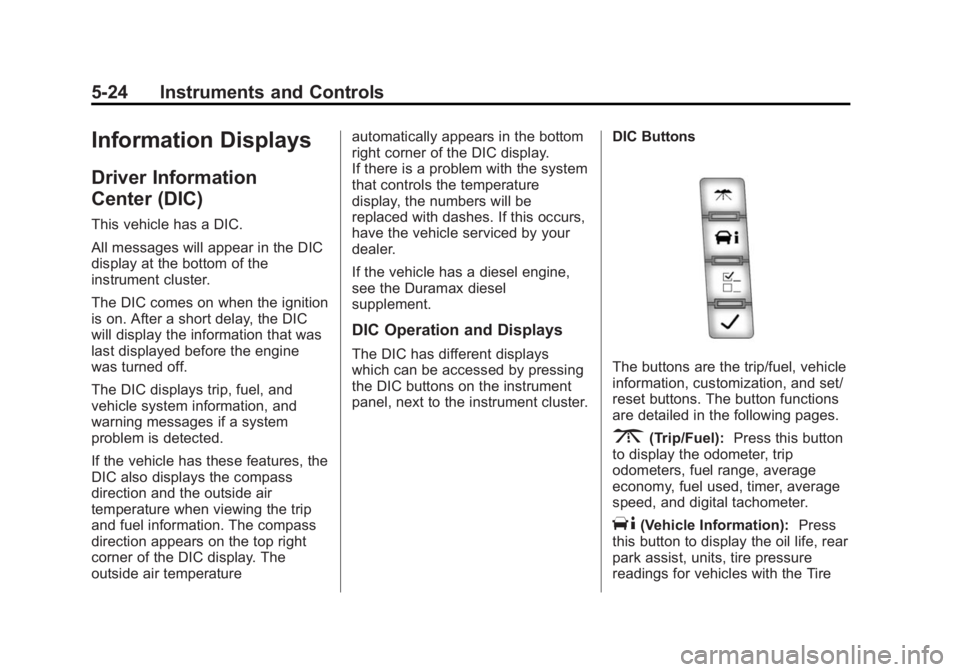
DIC ButtonsThe buttons are the trip/fuel, vehicle
information, customization, and set/
reset buttons. The button functions
are detailed in the following pages.
3(Trip/Fuel):
Press this button
to display the odometer, trip
odometers, fuel range, average
economy, fuel used, timer, average
speed, and digital tachometer.
T(Vehicle Information): Press
this button to display the oil life, rear
park assist, units, tire pressure
readings for vehicles with the Tire
Page 124 of 379
Black plate (29,1)GMC Savana Owner Manual (GMNA-Localizing-U.S./Canada-7707482) -
2015 - crc - 1/20/15
Instruments and Controls 5-29
Vehicle Messages
Messages displayed on the DIC
indicate the status of the vehicle or
some action may be needed to
correct a condition. Multiple
messages may appear one after
another.
The messages that do not require
immediate action can be
acknowledged and cleared by
pressing
V(Set/Reset).
The messages that require
immediate action cannot be cleared
until that action is performed.
All messages should be taken
seriously and clearing the message
does not correct the problem.
The following are the possible
messages and some information
about them.
If the vehicle has a diesel engine,
see the Duramax diesel
supplement.
Battery Voltage and
Charging Messages
SERVICE BATTERY
CHARGING SYSTEM
On some vehicles, this message
displays if there is a problem with
the battery charging system. Under
certain conditions, the charging
system light may also turn on in the
instrument cluster. See Charging
System Light on page 5-17. Driving
with this problem could drain the
battery. Turn off all unnecessary
accessories. Have the electrical
system checked as soon as
possible. See your dealer.
Brake System Messages
SERVICE BRAKE SYSTEM
This message displays along with
the brake system warning light if
there is a problem with the brake
system. See Brake System Warning
Light on page 5-20. If this message
appears, stop as soon as possible and turn off the vehicle. Restart the
vehicle and check for the message
on the DIC display. If the message
is still displayed or appears again
when you begin driving, the brake
system needs service as soon as
possible. See your dealer.
Compass Messages
CALIBRATING: DRIVE IN
CIRCLES
This message displays when
calibrating the compass. Drive the
vehicle in circles at less than 8 km/h
(5 mph) to complete the calibration.
See
Compass on page 5-4 for more
information.
CALIBRATION COMPLETE
This message displays when the
compass calibration is complete.
See Compass on page 5-4 for more
information.
Page 127 of 379
Black plate (32,1)GMC Savana Owner Manual (GMNA-Localizing-U.S./Canada-7707482) -
2015 - crc - 1/20/15
5-32 Instruments and Controls
Fuel System Messages
FUEL LEVEL LOW
This message displays and a chime
sounds if the fuel level is low. Refuel
as soon as possible. SeeFuel
Gauge on page 5-11 andFuel on
page 9-39 for more information.
TIGHTEN GAS CAP
This message may display along
with the check engine light on the
instrument cluster if the fuel cap is
not tightened properly. See
Malfunction Indicator Lamp on
page 5-17. Reinstall the fuel cap
fully. SeeFilling the Tank on
page 9-41. The diagnostic system
can determine if the fuel cap has
been left off or improperly installed.
A loose or missing fuel cap allows
fuel to evaporate into the
atmosphere. A few driving trips with
the cap properly installed should
turn this light and message off.
Key and Lock Messages
REPLACE BATTERY IN
REMOTE KEY
This message displays if a Remote
Keyless Entry (RKE) transmitter
battery is low. The battery needs to
be replaced in the transmitter. See
“Battery Replacement” under
Remote Keyless Entry (RKE)
System Operation on page 2-2.
Lamp Messages
AUTOMATIC LIGHT
CONTROL OFF
This message displays when the
automatic headlamps are turned off.
See Exterior Lamp Controls on
page 6-1.
AUTOMATIC LIGHT
CONTROL ON
This message displays when the
automatic headlamps are turned on.
See Exterior Lamp Controls on
page 6-1.
TURN SIGNAL ON
This message displays and a chime
sounds if a turn signal is left on for
1.2 km (0.75 mi). Move the turn
signal lever to the off position.
Object Detection System
Messages
PARK ASST BLOCKED SEE
OWNERS MANUAL
This message displays if there is
something interfering with the Rear
Parking Assist (RPA) system. See
Parking Assist on page 9-35.
PARK ASSIST OFF
After the vehicle has been started,
this message displays to remind the
driver that the Rear Parking Assist
(RPA) system has been turned off.
Press the set/reset button or the trip
odometer reset stem to
acknowledge this message and
clear it from the DIC display. To turn
the RPA system back on, see
Parking Assist on page 9-35.
Page 139 of 379
Black plate (2,1)GMC Savana Owner Manual (GMNA-Localizing-U.S./Canada-7707482) -
2015 - crc - 1/20/15
6-2 Lighting
To change the headlamps from low
beam to high beam, pull the turn
signal lever all the way toward you.
Then release it.
Exterior Lamps Off
Reminder
If a door is open, a reminder chime
sounds when the headlamps or
parking lamps are manually turned
on and the key is out of the ignition.
To turn off the chime, turn the
headlamp switch to
Oor AUTO and
then back on, or close and re‐open
the door. In the auto mode, the
headlamps turn off once the ignition
is in LOCK/OFF or may remain on
until the headlamp delay ends,
if enabled in the Driver Information
Center (DIC). See “Exit Lighting”
under Vehicle Personalization on
page 5-37.
Headlamp High/
Low-Beam Changer
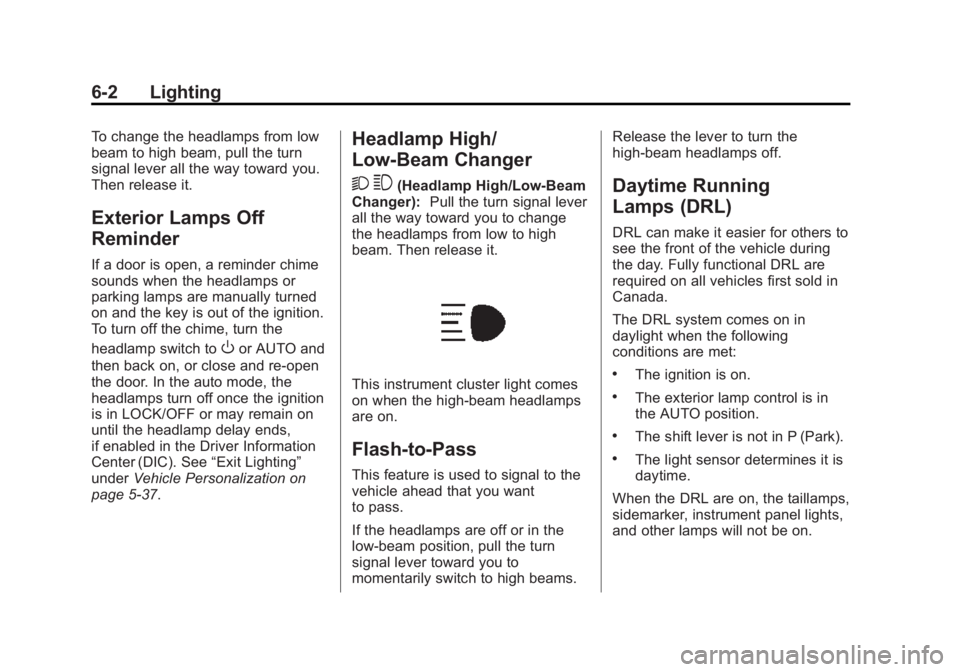
2 3
(Headlamp High/Low-Beam
Changer): Pull the turn signal lever
all the way toward you to change
the headlamps from low to high
beam. Then release it.
This instrument cluster light comes
on when the high-beam headlamps
are on.
Flash-to-Pass
This feature is used to signal to the
vehicle ahead that you want
to pass.
If the headlamps are off or in the
low‐beam position, pull the turn
signal lever toward you to
momentarily switch to high beams. Release the lever to turn the
high-beam headlamps off.
Daytime Running
Lamps (DRL)
DRL can make it easier for others to
see the front of the vehicle during
the day. Fully functional DRL are
required on all vehicles first sold in
Canada.
The DRL system comes on in
daylight when the following
conditions are met:
.The ignition is on.
.The exterior lamp control is in
the AUTO position.
.The shift lever is not in P (Park).
.The light sensor determines it is
daytime.
When the DRL are on, the taillamps,
sidemarker, instrument panel lights,
and other lamps will not be on.
Page 140 of 379
Black plate (3,1)GMC Savana Owner Manual (GMNA-Localizing-U.S./Canada-7707482) -
2015 - crc - 1/20/15
Lighting 6-3
The automatic headlamp system
automatically switches from DRL to
the headlamps depending on the
darkness of the surroundings.
To turn off the DRL, turn the exterior
lamp control to
Oand then release
it. For vehicles first sold in Canada,
the transmission must be in the
P (Park) position, before the DRL
can be turned off.
Automatic Headlamp
System
When it is dark enough outside and
the headlamp switch is in AUTO,
the automatic headlamp system
turns on the headlamps, along with
the taillamps, sidemarker lamps,
parking lamps, and the instrument
panel lights. The radio lights will
also be dim.
To turn off the automatic headlamp
system, turn the exterior lamp
control to the off position and then
release. For vehicles first sold in
Canada, the transmission must be in the P (Park) position, before the
automatic headlamp system can be
turned off.
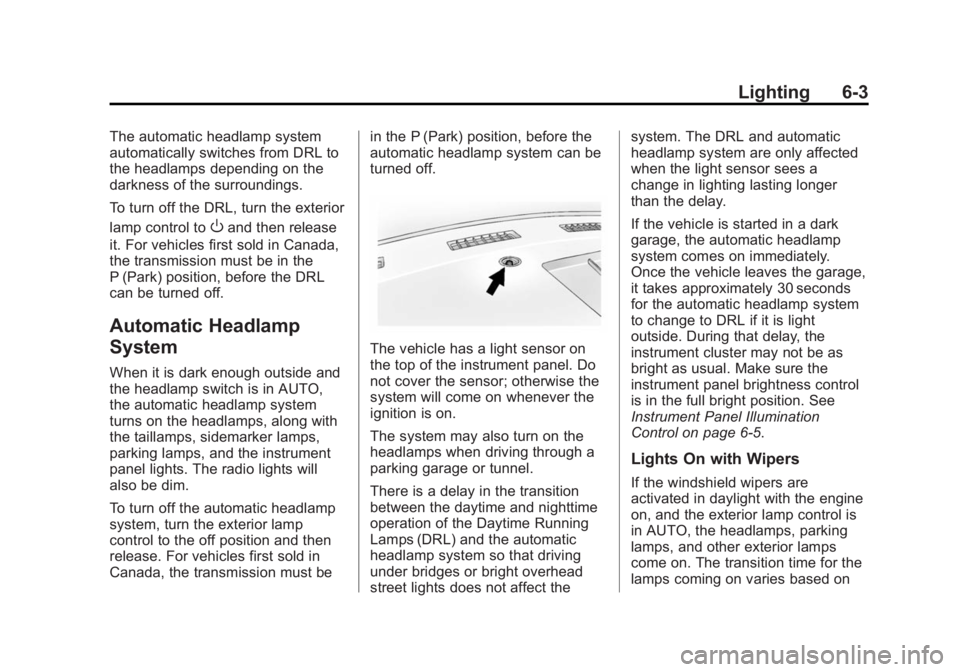
The vehicle has a light sensor on
the top of the instrument panel. Do
not cover the sensor; otherwise the
system will come on whenever the
ignition is on.
The system may also turn on the
headlamps when driving through a
parking garage or tunnel.
There is a delay in the transition
between the daytime and nighttime
operation of the Daytime Running
Lamps (DRL) and the automatic
headlamp system so that driving
under bridges or bright overhead
street lights does not affect thesystem. The DRL and automatic
headlamp system are only affected
when the light sensor sees a
change in lighting lasting longer
than the delay.
If the vehicle is started in a dark
garage, the automatic headlamp
system comes on immediately.
Once the vehicle leaves the garage,
it takes approximately 30 seconds
for the automatic headlamp system
to change to DRL if it is light
outside. During that delay, the
instrument cluster may not be as
bright as usual. Make sure the
instrument panel brightness control
is in the full bright position. See
Instrument Panel Illumination
Control on page 6-5.
Lights On with Wipers
If the windshield wipers are
activated in daylight with the engine
on, and the exterior lamp control is
in AUTO, the headlamps, parking
lamps, and other exterior lamps
come on. The transition time for the
lamps coming on varies based on