lock GMC SAVANA 2017 Workshop Manual
[x] Cancel search | Manufacturer: GMC, Model Year: 2017, Model line: SAVANA, Model: GMC SAVANA 2017Pages: 350, PDF Size: 4.84 MB
Page 131 of 350
GMC Savana Owner Manual (GMNA-Localizing-U.S./Canada-9967828) -
2017 - crc - 6/29/17
130 Lighting
Interior Lighting
Instrument Panel
Illumination Control
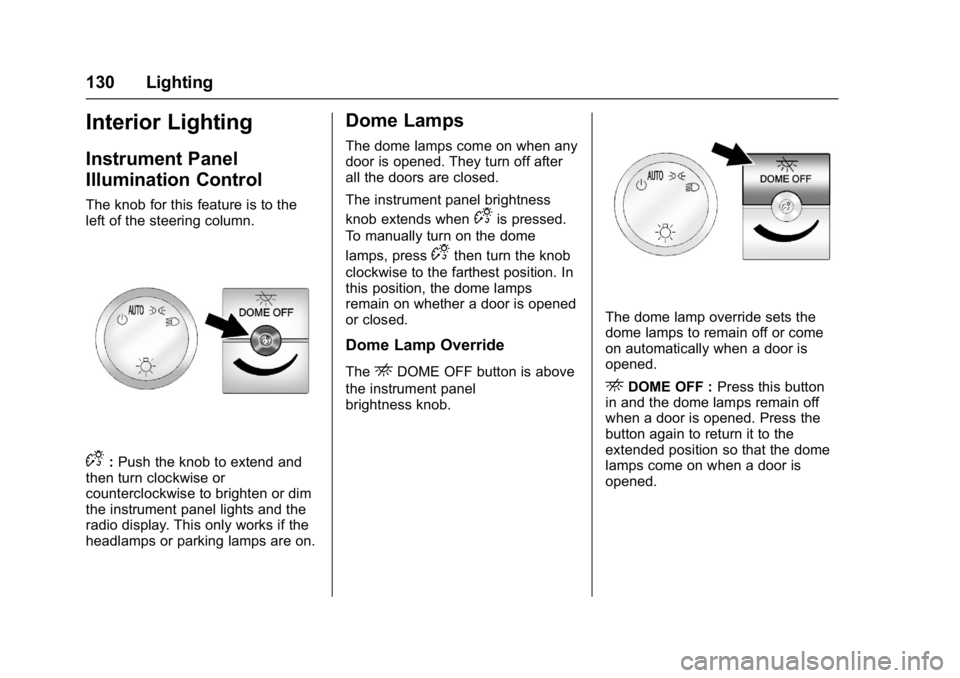
The knob for this feature is to the
left of the steering column.
D:Push the knob to extend and
then turn clockwise or
counterclockwise to brighten or dim
the instrument panel lights and the
radio display. This only works if the
headlamps or parking lamps are on.
Dome Lamps
The dome lamps come on when any
door is opened. They turn off after
all the doors are closed.
The instrument panel brightness
knob extends when
Dis pressed.
To manually turn on the dome
lamps, press
Dthen turn the knob
clockwise to the farthest position. In
this position, the dome lamps
remain on whether a door is opened
or closed.
Dome Lamp Override
TheEDOME OFF button is above
the instrument panel
brightness knob.
The dome lamp override sets the
dome lamps to remain off or come
on automatically when a door is
opened.
EDOME OFF : Press this button
in and the dome lamps remain off
when a door is opened. Press the
button again to return it to the
extended position so that the dome
lamps come on when a door is
opened.
Page 133 of 350
GMC Savana Owner Manual (GMNA-Localizing-U.S./Canada-9967828) -
2017 - crc - 6/29/17
132 Lighting
Normally, these actions occur in
steps or levels, without being
noticeable. In rare cases at the
highest levels of corrective action,
this action may be noticeable to the
driver. If so, a Driver Information
Center (DIC) message might be
displayed, such as SERVICE
BATTERY CHARGING SYSTEM.
If this messages displays, it is
recommended that the driver reduce
the electrical loads as much as
possible. SeeBattery Voltage and
Charging Messages 0113.
Battery Power Protection
This feature shuts off the dome
lamps if they are left on for more
than 10 minutes when the ignition is
in LOCK/OFF. This helps to prevent
the battery from running down.
Page 136 of 350

GMC Savana Owner Manual (GMNA-Localizing-U.S./Canada-9967828) -
2017 - crc - 6/29/17
Infotainment System 135
4. Buttons 1 - 6.Press to save and select
favorite stations.
5. EQ .Press to adjust the
equalizer.
6.
f
. Press to set the bass,
midrange, treble, fade, and
balance.
. Turn to manually select
radio stations.
7. CAT .Press to display a list of
SXM categories,
if equipped. 8. Auxiliary Input Jack
(If Equipped)
.Use to connect external
audio devices.
9. SRCE .Press to scroll through
auxiliary devices, AM, FM,
or SXM if equipped.
10.\FWD
. Press and hold to fast
forward through a track.
11.
sREV
. Press and hold to go
backward fast through a
track. 12.
P
.
Press to turn the
infotainment system on
or off.
. Turn to adjust the volume.
13.
¨SEEK
. Seeks or scans to the next
station.
14.
©SEEK
. Seeks or scans to the
previous station.
15.
H
. Press to set the clock
and date.
Page 138 of 350
GMC Savana Owner Manual (GMNA-Localizing-U.S./Canada-9967828) -
2017 - crc - 6/29/17
Infotainment System 137
10. CD/AUX.Press to scroll through
selecting the CD or an
auxiliary device.
11.
\FWD
. Press and hold to fast
forward through a track.
12.
sREV
. Press and hold to go
backward fast through a
track.
13.
P
. Press to turn the
infotainment system on
or off.
. Turn to adjust the volume.
14.
¨SEEK
. Seeks or scans to the next
station.
15.
©SEEK
. Seeks or scans to the
previous station. 16. BAND
.Press to scroll through the
available bands FM1, FM2,
AM, or SXM if equipped.
17.
H
. Press to set the clock
and date.
Operation
Using the Radio
O:Press to turn the system on
and off.
Turn clockwise or counterclockwise
to increase or decrease the volume.
4: Press to switch the display
between the radio station frequency
and the time. While the ignition is
off, press this button to display the
time. Press to display additional text
information related to the current
FM-RDS station or MP3 song.
A choice of additional information
such as Channel, Song, Artist, and
CAT (category) can display.
Continue pressing to highlight the
desired tab, or press the softkey located under any one of the tabs
and the information about that tab
displays.
Speed Compensated Volume
(SCV) :
Radios with SCV
automatically adjust the radio
volume to compensate for road and
wind noise as the vehicle speed
changes while driving, so that the
volume level stays consistent.
To activate SCV:
1. Set the radio volume to the desired level.
2. Press the MENU button to display the radio setup menu.
3. Press the softkey under the AUTO VOLUM (automatic
volume) tab on the radio
display.
4. Press the softkey under the desired Speed Compensated
Volume setting (OFF, Low,
Med, or High) to select the
level of radio volume
compensation. The display
times out after approximately
10 seconds. Each higher
Page 139 of 350
GMC Savana Owner Manual (GMNA-Localizing-U.S./Canada-9967828) -
2017 - crc - 6/29/17
138 Infotainment System
setting allows for more radio
volume compensation at faster
vehicle speeds.
Setting the Tone (Bass/Treble)
To adjust the bass or treble:1. Press the
fknob until Bass or
Treble displays.
2. To adjust the setting, do one of the following:
.Turn the
fknob.
. Press either
¨SEEK,
or
©SEEK.
EQ : Press this button to choose
bass and treble equalization
settings designed for different types
of music. Selecting MANUAL,
or changing bass or treble, returns
the EQ to the manual bass and
treble settings.
Unique EQ settings can be saved
for each source.
Adjusting the Speakers
(Balance/Fade)
BAL/FADE : To adjust the balance
or fade:
1. Press the
fknob until the
speaker control tabs display.
2. Highlight the desired speaker control tab by doing one of the
following:
.Press the
fknob.
. Press the softkey under the
desired tab.
3. Adjust the setting by doing one of the following:
.Turn the
fknob clockwise
or counterclockwise.
. Press
¨SEEK or©SEEK.
. Press
\FWD orsREV.
To quickly adjust all speaker and
tone controls to the middle position,
press the
fknob for more than
two seconds. If the Rear Seat Audio (RSA) is
turned on, the radio disables FADE
and mutes the rear speakers.
Radio Messages
Calibration Error :
The audio
system has been calibrated for the
vehicle from the factory.
If Calibration Error displays, it
means that the radio has not been
configured properly for the vehicle
and it must be returned to your
dealer for service.
VIN or NO VIN : One of these
messages will display when the
TheftLock system has locked up the
radio. Take the vehicle to your
dealer for service.
If any error occurs repeatedly or if
an error cannot be corrected,
contact your dealer.
Page 140 of 350
GMC Savana Owner Manual (GMNA-Localizing-U.S./Canada-9967828) -
2017 - crc - 6/29/17
Infotainment System 139
Radio
AM-FM Radio
Radio Data System (RDS)
The radio may have an RDS. The
RDS feature is available for use
only on FM stations that broadcast
RDS information. This system relies
upon receiving specific information
from these stations and only works
when the information is available.
While the radio is tuned to an
FM-RDS station, the station name
or call letters display. In rare cases,
a radio station could broadcast
incorrect information that causes the
radio features to work improperly.
If this happens, contact the radio
station.
Finding a Station
BAND or SRCE :Press to switch
between FM1, FM2, AM, and SXM.
The selection displays.
f: Turn clockwise or
counterclockwise to increase or
decrease the station frequency.
©SEEK or¨SEEK : Press©
SEEK to go to the previous or¨
SEEK to go to the next station and
stay there.
To scan stations, press and hold
either button for two seconds until a
beep sounds. The radio goes to a
station, plays for a few seconds,
then goes to the next station. For
AM-FM Radio and Radio with CD,
the station frequency flashes while
the radio is in the scan mode. Press
either button again to stop scanning.
The radio seeks and scans stations
only with a strong signal that are in
the selected band.
Scan presets within the current
selected band by pressing and
holding either SEEK button for
four seconds until a double beep
sounds. The radio goes to a stored
preset, plays for a few seconds if a
strong signal is present, then goes
to the next stored preset. The
station frequency flashes while the
radio is in the scan mode.
Storing a Radio Station as a
Favorite
You are encouraged to set up radio
station favorites while the vehicle is
parked. Tune to favorite stations
using the presets, favorites button,
and steering wheel controls,
if equipped. See Defensive Driving
0 167.
FAV : If the vehicle has a FAV
button, a maximum of 36 stations
can be programmed as favorites
using the six softkeys below the
radio station frequency tabs and by
using the radio favorites page
button (FAV button). Press FAV to
go through up to six pages of
favorites, each having six favorite
stations available per page. Each
page of favorites can contain any
combination of AM and FM stations.
The balance/fade and tone settings
that were previously adjusted, are
stored with the favorite stations.
To store a station as a favorite:
1. Tune to the desired radio station.
Page 141 of 350
GMC Savana Owner Manual (GMNA-Localizing-U.S./Canada-9967828) -
2017 - crc - 6/29/17
140 Infotainment System
2. Press FAV to display the pagewhere the station is to be
stored.
3. Press and hold one of the six softkeys until a beep
sounds. When that softkey is
pressed and released, the
station that was set, returns.
4. Repeat the steps for each softkey radio station to be
stored as a favorite.
The number of favorites pages can
be set up using the MENU button.
To set up the number of favorites
pages: 1. Press MENU to display the radio setup menu.
2. Press the softkey below the FAV 1-6 tab.
3. Select the desired number of favorites pages by pressing the
softkey below the displayed
page numbers.
4. Press FAV, or let the menu time out, to return to the original
main radio screen showing the
radio station frequency tabs
and to begin the process of programming favorites for the
chosen number of numbered
pages.
Satellite Radio
SiriusXM®, if equipped, is a satellite
radio service based in the United
States and Canada only.
Finding a Category (CAT)
Station
CAT : The CAT button is used to
find SXM channels (if equipped)
while the radio is in the SXM mode.
Finding a Channel
BAND or SRCE : Press to switch
between FM1, FM2, AM, and SXM if
equipped. The selection displays.
f: Turn clockwise or
counterclockwise to increase or
decrease the station frequency.
©SEEK or¨SEEK : Press©
SEEK to go to the previous or¨
SEEK to go to the next station and
stay there. To scan stations, press and hold
either button for two seconds until a
beep sounds. The radio goes to a
station, plays for a few seconds,
then goes to the next station. The
station frequency flashes while the
radio is in the scan mode. Press
either button again to stop scanning.
The radio seeks and scans stations
only with a strong signal that are in
the selected band.
To scan presets within the current
selected band by pressing and
holding either SEEK button for
four seconds until a double beep
sounds. The radio goes to a stored
preset, plays for a few seconds if a
strong signal is present, then goes
to the next stored preset. The
station frequency flashes while the
radio is in the scan mode.
Storing a Radio Station as a
Favorite
Drivers are encouraged to set up
radio station favorites while the
vehicle is parked. Tune to favorite
stations using the presets, favorites
Page 149 of 350
GMC Savana Owner Manual (GMNA-Localizing-U.S./Canada-9967828) -
2017 - crc - 6/29/17
148 Infotainment System
For optimal sound quality, increase
the portable audio device's volume
to the loudest level.
It is always best to power the
portable audio device through its
own battery while playing.
O:Turn clockwise or
counterclockwise to increase or
decrease the volume of the portable
player. Additional volume
adjustments might have to be made
from the portable device if the
volume is not loud or soft enough.
BAND : If equipped, press to listen
to the radio when a portable audio
device is playing. The portable
audio device continues playing.
CD/AUX : If equipped, press to play
a CD when a portable audio device
is playing. Press again and the
system begins playing audio from
the connected portable audio player.
If a portable audio player is not
connected, “No Input Device Found”
displays. SRCE :
If equipped, press to listen
to the radio when a portable audio
device is playing. The portable
audio device continues playing.
Press to play a CD when a portable
audio device is playing. Press again
and the system begins playing
audio from the connected portable
audio player. If a portable audio
player is not connected, “No Input
Device Found” displays.
Using the USB Port
Radios with a USB port can control
a USB storage device or an iPod®
using the radio buttons and knobs.
See“Playing an MP3” inCD Player
0 142 for information about how to
connect and control a USB storage
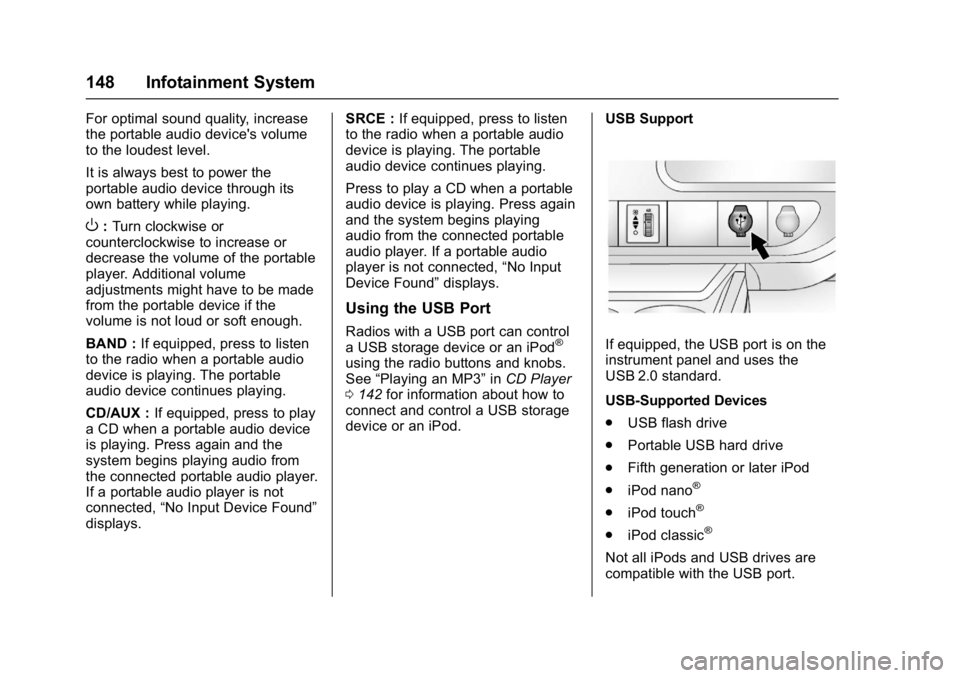
device or an iPod. USB Support
If equipped, the USB port is on the
instrument panel and uses the
USB 2.0 standard.
USB-Supported Devices
.
USB flash drive
. Portable USB hard drive
. Fifth generation or later iPod
. iPod nano
®
.iPod touch®
.iPod classic®
Not all iPods and USB drives are
compatible with the USB port.
Page 161 of 350
GMC Savana Owner Manual (GMNA-Localizing-U.S./Canada-9967828) -
2017 - crc - 6/29/17
160 Climate Controls
Climate Controls
Climate Control Systems
Climate Control Systems . . . . . 160
Rear Heating System . . . . . . . . . 162
Rear Climate ControlSystem . . . . . . . . . . . . . . . . . . . . . . 162
Air Vents
Air Vents . . . . . . . . . . . . . . . . . . . . . 165
Maintenance
Service . . . . . . . . . . . . . . . . . . . . . . . 165
Climate Control Systems
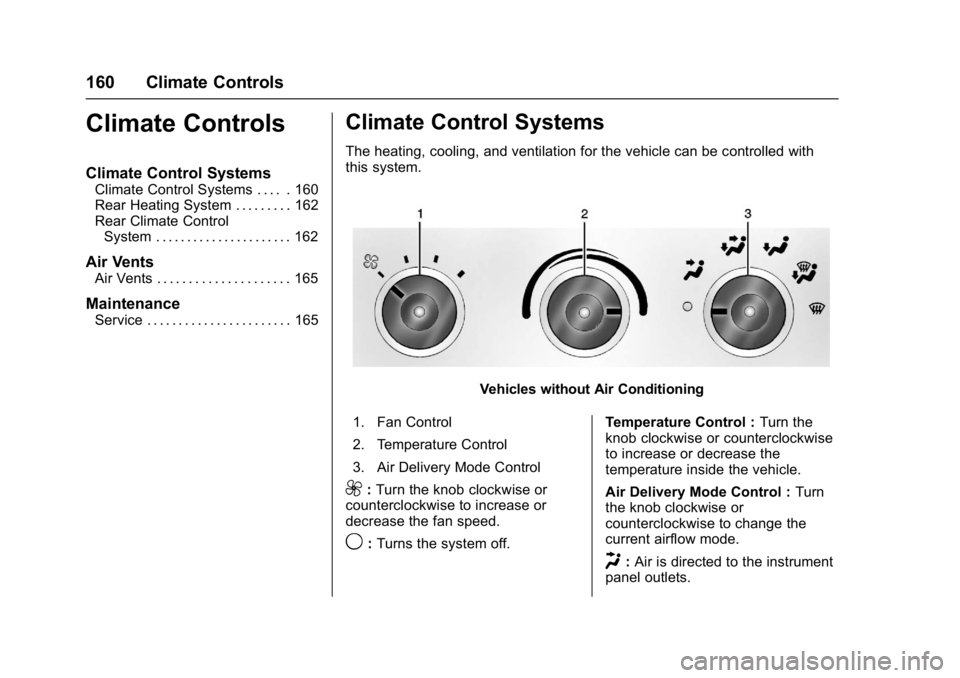
The heating, cooling, and ventilation for the vehicle can be controlled with
this system.
Vehicles without Air Conditioning
1. Fan Control
2. Temperature Control
3. Air Delivery Mode Control
9: Turn the knob clockwise or
counterclockwise to increase or
decrease the fan speed.
9: Turns the system off. Temperature Control :
Turn the
knob clockwise or counterclockwise
to increase or decrease the
temperature inside the vehicle.
Air Delivery Mode Control : Turn
the knob clockwise or
counterclockwise to change the
current airflow mode.
H: Air is directed to the instrument
panel outlets.
Page 163 of 350
GMC Savana Owner Manual (GMNA-Localizing-U.S./Canada-9967828) -
2017 - crc - 6/29/17
162 Climate Controls
The defogger only works when the
ignition is in ON/RUN. The defogger
turns off if the ignition is in the ACC/
ACCESSORY or LOCK/OFF
position.
Do not drive the vehicle until all the
windows are clear.
Caution
Do not use a razor blade or sharp
object to clear the inside rear
window. Do not adhere anything
to the defogger grid lines in the
rear glass. These actions may
damage the rear defogger.
Repairs would not be covered by
the vehicle warranty.
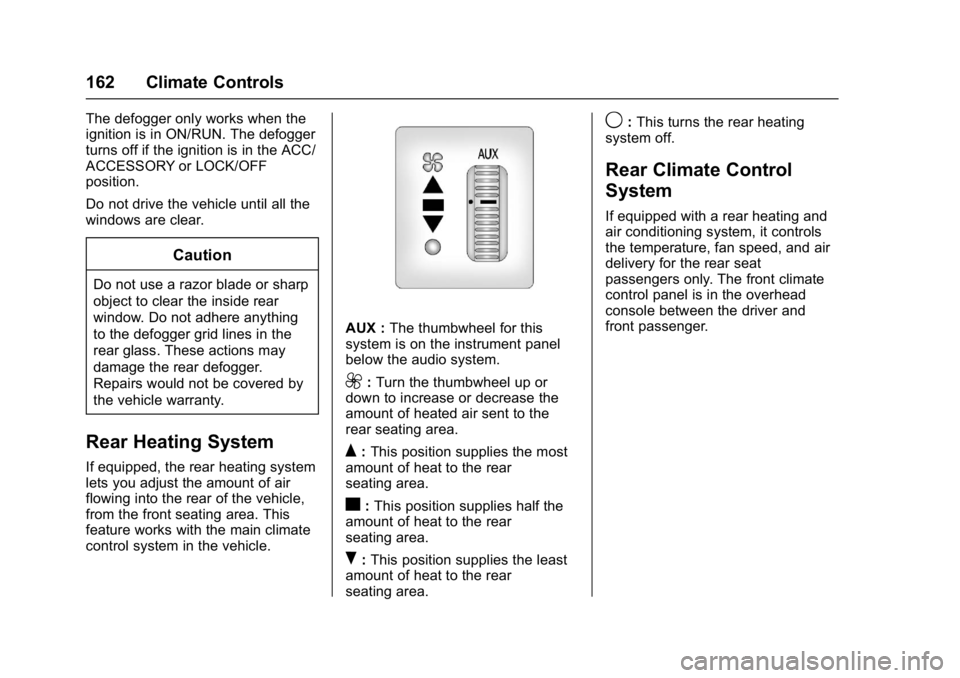
Rear Heating System
If equipped, the rear heating system
lets you adjust the amount of air
flowing into the rear of the vehicle,
from the front seating area. This
feature works with the main climate
control system in the vehicle.
AUX :The thumbwheel for this
system is on the instrument panel
below the audio system.
9: Turn the thumbwheel up or
down to increase or decrease the
amount of heated air sent to the
rear seating area.
Q: This position supplies the most
amount of heat to the rear
seating area.
c: This position supplies half the
amount of heat to the rear
seating area.
R: This position supplies the least
amount of heat to the rear
seating area.
9: This turns the rear heating
system off.
Rear Climate Control
System
If equipped with a rear heating and
air conditioning system, it controls
the temperature, fan speed, and air
delivery for the rear seat
passengers only. The front climate
control panel is in the overhead
console between the driver and
front passenger.