brakes GMC SAVANA 2019 User Guide
[x] Cancel search | Manufacturer: GMC, Model Year: 2019, Model line: SAVANA, Model: GMC SAVANA 2019Pages: 373, PDF Size: 5.58 MB
Page 190 of 373
GMC Savana Owner Manual (GMNA-Localizing-U.S./Canada-12146167) -
2019 - CRC - 11/26/18
Driving and Operating 189
Manual Mode
Range Selection Mode
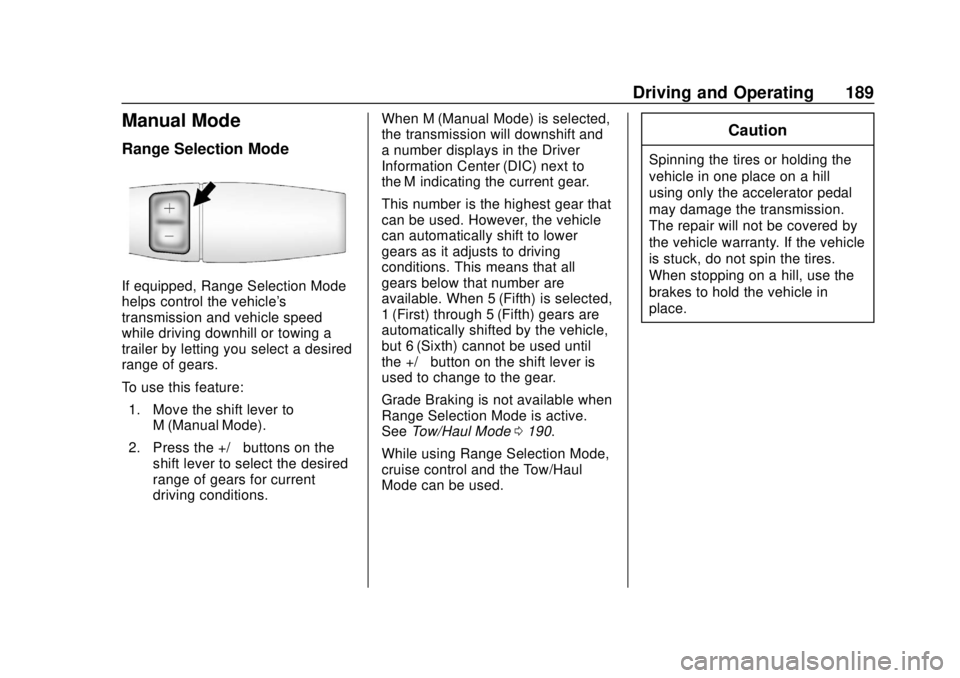
If equipped, Range Selection Mode
helps control the vehicle's
transmission and vehicle speed
while driving downhill or towing a
trailer by letting you select a desired
range of gears.
To use this feature:1. Move the shift lever to M (Manual Mode).
2. Press the +/− buttons on the
shift lever to select the desired
range of gears for current
driving conditions. When M (Manual Mode) is selected,
the transmission will downshift and
a number displays in the Driver
Information Center (DIC) next to
the M indicating the current gear.
This number is the highest gear that
can be used. However, the vehicle
can automatically shift to lower
gears as it adjusts to driving
conditions. This means that all
gears below that number are
available. When 5 (Fifth) is selected,
1 (First) through 5 (Fifth) gears are
automatically shifted by the vehicle,
but 6 (Sixth) cannot be used until
the +/−
button on the shift lever is
used to change to the gear.
Grade Braking is not available when
Range Selection Mode is active.
See Tow/Haul Mode 0190.
While using Range Selection Mode,
cruise control and the Tow/Haul
Mode can be used.
Caution
Spinning the tires or holding the
vehicle in one place on a hill
using only the accelerator pedal
may damage the transmission.
The repair will not be covered by
the vehicle warranty. If the vehicle
is stuck, do not spin the tires.
When stopping on a hill, use the
brakes to hold the vehicle in
place.
Page 191 of 373
GMC Savana Owner Manual (GMNA-Localizing-U.S./Canada-12146167) -
2019 - CRC - 11/26/18
190 Driving and Operating
Tow/Haul Mode
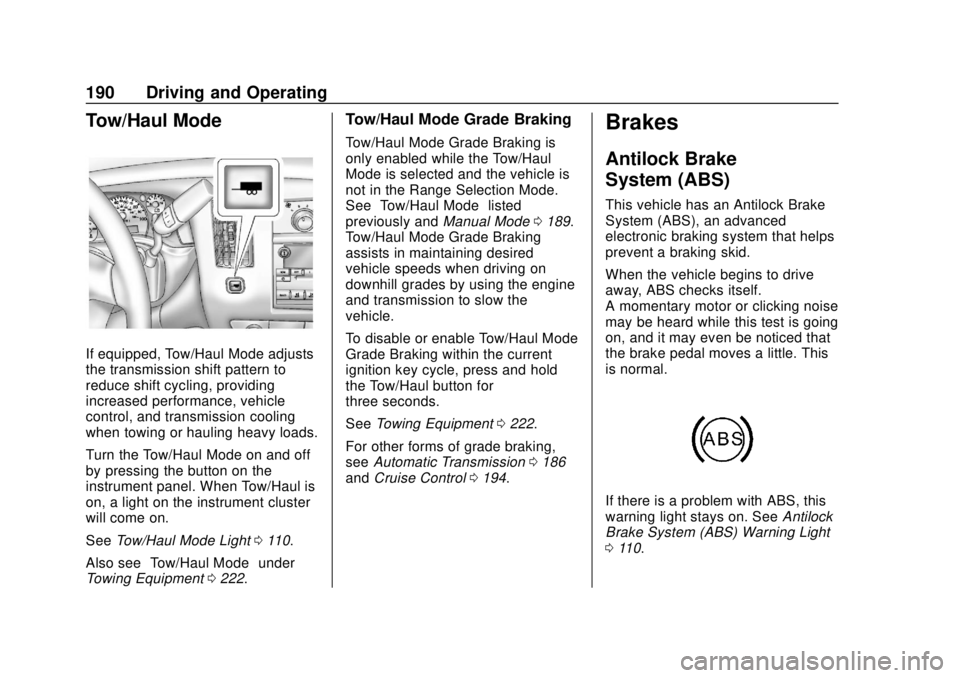
If equipped, Tow/Haul Mode adjusts
the transmission shift pattern to
reduce shift cycling, providing
increased performance, vehicle
control, and transmission cooling
when towing or hauling heavy loads.
Turn the Tow/Haul Mode on and off
by pressing the button on the
instrument panel. When Tow/Haul is
on, a light on the instrument cluster
will come on.
SeeTow/Haul Mode Light 0110.
Also see “Tow/Haul Mode” under
Towing Equipment 0222.
Tow/Haul Mode Grade Braking
Tow/Haul Mode Grade Braking is
only enabled while the Tow/Haul
Mode is selected and the vehicle is
not in the Range Selection Mode.
See “Tow/Haul Mode” listed
previously and Manual Mode0189.
Tow/Haul Mode Grade Braking
assists in maintaining desired
vehicle speeds when driving on
downhill grades by using the engine
and transmission to slow the
vehicle.
To disable or enable Tow/Haul Mode
Grade Braking within the current
ignition key cycle, press and hold
the Tow/Haul button for
three seconds.
See Towing Equipment 0222.
For other forms of grade braking,
see Automatic Transmission 0186
and Cruise Control 0194.
Brakes
Antilock Brake
System (ABS)
This vehicle has an Antilock Brake
System (ABS), an advanced
electronic braking system that helps
prevent a braking skid.
When the vehicle begins to drive
away, ABS checks itself.
A momentary motor or clicking noise
may be heard while this test is going
on, and it may even be noticed that
the brake pedal moves a little. This
is normal.
If there is a problem with ABS, this
warning light stays on. See Antilock
Brake System (ABS) Warning Light
0 110.
Page 192 of 373
GMC Savana Owner Manual (GMNA-Localizing-U.S./Canada-12146167) -
2019 - CRC - 11/26/18
Driving and Operating 191
If driving safely on a wet road and it
becomes necessary to slam on the
brakes and continue braking to
avoid a sudden obstacle, a
computer senses the wheels are
slowing down. If one of the wheels
is about to stop rolling, the computer
will separately work the brakes at
each wheel.
ABS can change the brake pressure
to each wheel, as required, faster
than any driver could. This can help
you steer around the obstacle while
braking hard.
As the brakes are applied, the
computer keeps receiving updates
on wheel speed and controls
braking pressure accordingly.
Remember: ABS does not change
the time needed to get a foot up to
the brake pedal or always decrease
stopping distance. If you get too
close to the vehicle in front of you,
there will not be enough time to
apply the brakes if that vehicle
suddenly slows or stops. Always
leave enough room up ahead to
stop, even with ABS.Using ABS
Do not pump the brakes. Just hold
the brake pedal down firmly and let
ABS work. You may hear the ABS
pump or motor operating and feel
the brake pedal pulsate. This is
normal.
Braking in Emergencies
ABS allows you to steer and brake
at the same time. In many
emergencies, steering can help
more than even the very best
braking.
Parking Brake
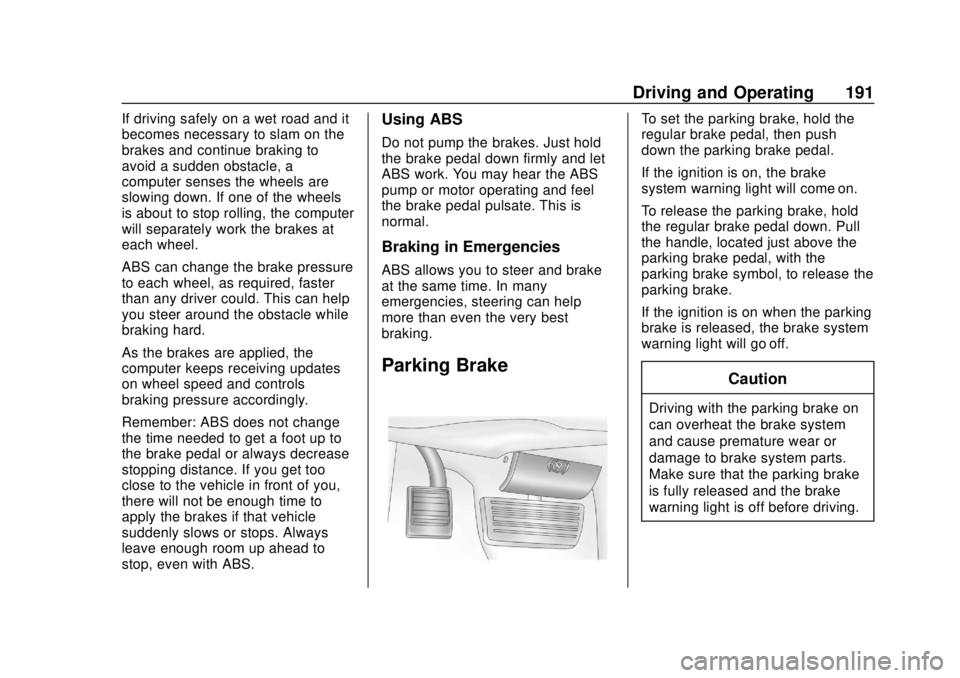
To set the parking brake, hold the
regular brake pedal, then push
down the parking brake pedal.
If the ignition is on, the brake
system warning light will come on.
To release the parking brake, hold
the regular brake pedal down. Pull
the handle, located just above the
parking brake pedal, with the
parking brake symbol, to release the
parking brake.
If the ignition is on when the parking
brake is released, the brake system
warning light will go off.
Caution
Driving with the parking brake on
can overheat the brake system
and cause premature wear or
damage to brake system parts.
Make sure that the parking brake
is fully released and the brake
warning light is off before driving.
Page 193 of 373
GMC Savana Owner Manual (GMNA-Localizing-U.S./Canada-12146167) -
2019 - CRC - 11/26/18
192 Driving and Operating
If you are towing a trailer and are
parking on a hill, seeDriving
Characteristics and Towing Tips
0 210.
Brake Assist
The Brake Assist feature is
designed to assist the driver in
stopping or decreasing vehicle
speed in emergency driving
conditions. This feature uses the
stability system hydraulic brake
control module to supplement the
power brake system under
conditions where the driver has
quickly and forcefully applied the
brake pedal in an attempt to quickly
stop or slow down the vehicle. The
stability system hydraulic brake
control module increases brake
pressure at each corner of the
vehicle until the ABS activates.
Minor brake pedal pulsation or
pedal movement during this time is
normal and the driver should
continue to apply the brake pedal as
the driving situation dictates. The
Brake Assist feature will
automatically disengage when the brake pedal is released or brake
pedal pressure is quickly
decreased.
Hill Start Assist (HSA)
If equipped, this feature will prevent
the vehicle from rolling when it
attempts to move on a moderate to
steep hill. During the transition when
the brake pedal is released and the
accelerator pedal is pressed, HSA
uses braking pressure to hold the
vehicle stationary for a few seconds
depending on the steepness of the
hill. After this transition or after the
accelerator pedal is pressed, the
brake will automatically release.
HSA only activates when the driver
door is closed. HSA will not activate
in a forward drive gear when facing
downhill, or in R (Reverse) when
facing uphill. If the brake pedal is
released and then reapplied while
HSA is activated, the brake pedal
may feel firmer with less pedal
travel.
Ride Control Systems
Traction Control/
Electronic Stability
Control
System Operation
The vehicle has a Traction Control
System (TCS) and StabiliTrak/
Electronic Stability Control (ESC),
an electronic stability control
system. These systems help limit
wheel spin and assist the driver in
maintaining control, especially on
slippery road conditions.
TCS activates if it senses any of the
drive wheels are spinning or
beginning to lose traction. When this
happens, TCS applies the brakes to
the spinning wheels and reduces
engine power to limit wheel spin.
StabiliTrak/ESC activates when the
vehicle senses a difference between
the intended path and the direction
the vehicle is actually traveling.
StabiliTrak/ESC selectively applies
braking pressure to any one of the
vehicle wheel brakes to assist the
Page 196 of 373
GMC Savana Owner Manual (GMNA-Localizing-U.S./Canada-12146167) -
2019 - CRC - 11/26/18
Driving and Operating 195
automatically disengages. See
Traction Control/Electronic Stability
Control0192. When road
conditions allow you to safely use it
again, cruise control can be turned
back on.
If the brakes are applied, cruise
control disengages.
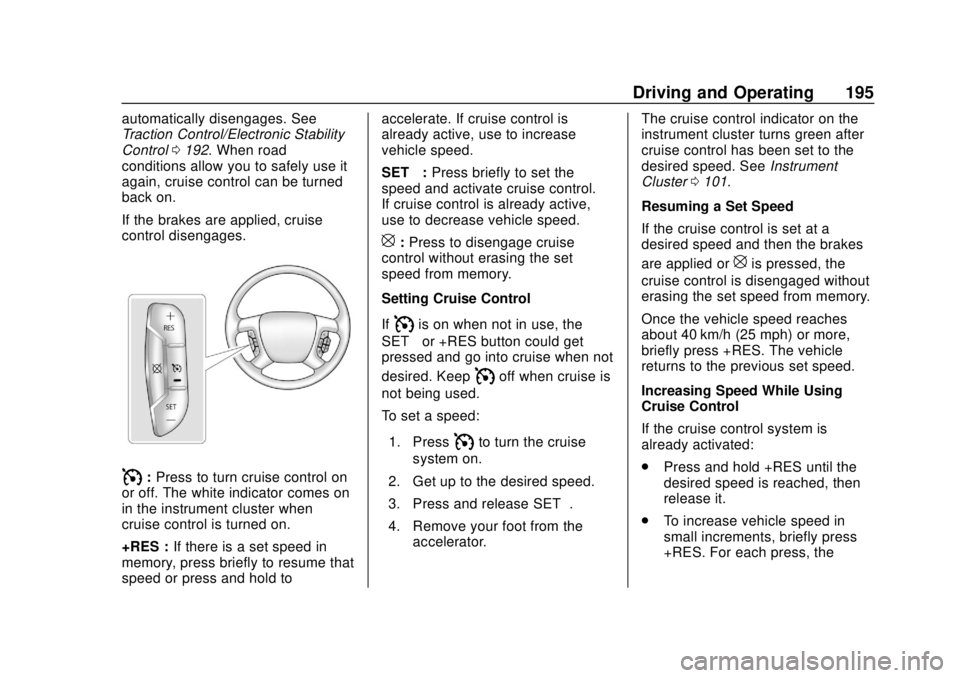
I: Press to turn cruise control on
or off. The white indicator comes on
in the instrument cluster when
cruise control is turned on.
+RES : If there is a set speed in
memory, press briefly to resume that
speed or press and hold to accelerate. If cruise control is
already active, use to increase
vehicle speed.
SET−
:Press briefly to set the
speed and activate cruise control.
If cruise control is already active,
use to decrease vehicle speed.
[: Press to disengage cruise
control without erasing the set
speed from memory.
Setting Cruise Control
If
Iis on when not in use, the
SET− or +RES button could get
pressed and go into cruise when not
desired. Keep
Ioff when cruise is
not being used.
To set a speed:
1. Press
Ito turn the cruise
system on.
2. Get up to the desired speed.
3. Press and release SET−.
4. Remove your foot from the accelerator. The cruise control indicator on the
instrument cluster turns green after
cruise control has been set to the
desired speed. See
Instrument
Cluster 0101.
Resuming a Set Speed
If the cruise control is set at a
desired speed and then the brakes
are applied or
[is pressed, the
cruise control is disengaged without
erasing the set speed from memory.
Once the vehicle speed reaches
about 40 km/h (25 mph) or more,
briefly press +RES. The vehicle
returns to the previous set speed.
Increasing Speed While Using
Cruise Control
If the cruise control system is
already activated:
. Press and hold +RES until the
desired speed is reached, then
release it.
. To increase vehicle speed in
small increments, briefly press
+RES. For each press, the
Page 198 of 373
GMC Savana Owner Manual (GMNA-Localizing-U.S./Canada-12146167) -
2019 - CRC - 11/26/18
Driving and Operating 197
Driver Assistance
Systems
This vehicle may have features that
work together to help avoid crashes
or reduce crash damage while
driving, backing, and parking. Read
this entire section before using
these systems.
{Warning
Do not rely on the Driver
Assistance Systems. These
systems do not replace the need
for paying attention and driving
safely. You may not hear or see
alerts or warnings provided by
these systems. Failure to use
proper care when driving may
result in injury, death, or vehicle
damage. SeeDefensive Driving
0 166.
(Continued)
Warning (Continued)
Under many conditions, these
systems will not:
. Detect children,
pedestrians, bicyclists,
or animals.
. Detect vehicles or objects
outside the area monitored
by the system.
. Work at all driving speeds.
. Warn you or provide you
with enough time to avoid a
crash.
. Work under poor visibility or
bad weather conditions.
. Work if the detection sensor
is not cleaned or is covered
by ice, snow, mud, or dirt.
. Work if the detection sensor
is covered up, such as with
a sticker, magnet, or metal
plate.
(Continued)
Warning (Continued)
.Work if the area surrounding
the detection sensor is
damaged or not properly
repaired.
Complete attention is always
required while driving, and you
should be ready to take action
and apply the brakes and/or steer
the vehicle to avoid crashes.
Audible Alert
Some driver assistance features
alert the driver of obstacles by
beeping. To change the volume of
the warning chime, see Vehicle
Personalization 0119.
Cleaning
Depending on vehicle options, keep
these areas of the vehicle clean to
ensure the best driver assistance
feature performance. Driver
Information Center (DIC) messages
may display when the systems are
unavailable or blocked.
Page 202 of 373
GMC Savana Owner Manual (GMNA-Localizing-U.S./Canada-12146167) -
2019 - CRC - 11/26/18
Driving and Operating 201
Other conditions may affect system
performance, such as vibrations
from a jackhammer or the
compression of air brakes on a very
large truck.
Forward Collision Alert
(FCA) System
If equipped, the FCA system may
help to avoid or reduce the harm
caused by front-end crashes. When
approaching a vehicle ahead too
quickly, FCA provides a red flashing
alert on the windshield and rapidly
beeps. FCA also lights an amber
visual alert if following another
vehicle much too closely.
FCA detects vehicles within a
distance of approximately 60 m
(197 ft) and operates at speeds
above 40 km/h (25 mph).
{Warning
FCA is a warning system and
does not apply the brakes. When
approaching a slower-moving or(Continued)
Warning (Continued)
stopped vehicle ahead too rapidly,
or when following a vehicle too
closely, FCA may not provide a
warning with enough time to help
avoid a crash. It also may not
provide any warning at all. FCA
does not warn of pedestrians,
animals, signs, guardrails,
bridges, construction barrels,
or other objects. Be ready to take
action and apply the brakes. See
Defensive Driving0166.
FCA can be disabled with the
[
button on the center stack.
Detecting the Vehicle Ahead
FCA warnings will not occur unless
the FCA system detects a vehicle
ahead. When a vehicle is detected,
the vehicle ahead indicator will
display green. Vehicles may not be
detected on curves, highway exit
ramps, or hills, due to poor visibility;
or if a vehicle ahead is partially
blocked by pedestrians or other
objects. FCA will not detect another
vehicle ahead until it is completely
in the driving lane.
{Warning
FCA does not provide a warning
to help avoid a crash, unless it
detects a vehicle. FCA may not
detect a vehicle ahead if the FCA
sensor is blocked by dirt, snow,
or ice, or if the windshield is
damaged. It may also not detect a
vehicle on winding or hilly roads,
or in conditions that can limit
visibility such as fog, rain,
or snow, or if the headlamps or
windshield are not cleaned or in (Continued)
Page 211 of 373
GMC Savana Owner Manual (GMNA-Localizing-U.S./Canada-12146167) -
2019 - CRC - 11/26/18
210 Driving and Operating
Warning (Continued)
.Dispense fuel only into
approved containers.
. Do not fill a container while
it is inside a vehicle, in a
vehicle's trunk, pickup bed,
or on any surface other than
the ground.
. Bring the fill nozzle in
contact with the inside of
the fill opening before
operating the nozzle.
Contact should be
maintained until the filling is
complete.
. Do not smoke while
pumping fuel.
. Avoid using electronic
devices.
Trailer Towing
General Towing
Information
Only use towing equipment that has
been designed for the vehicle.
Contact your dealer or trailering
dealer for assistance with preparing
the vehicle to tow a trailer. Read the
entire section before towing a trailer.
To tow a disabled vehicle, see
Towing the Vehicle 0305. To tow
the vehicle behind another vehicle
such as a motor home, see
Recreational Vehicle Towing 0305.
Driving Characteristics
and Towing Tips
{Warning
You can lose control when towing
a trailer if the correct equipment is
not used or the vehicle is not
driven properly. For example,
if the trailer is too heavy or the
(Continued)
Warning (Continued)
trailer brakes are inadequate for
the load, the vehicle may not stop
as expected. You and others
could be seriously injured. The
vehicle may also be damaged,
and the repairs would not be
covered by the vehicle warranty.
Pull a trailer only if all the steps in
this section have been followed.
Ask your dealer for advice and
information about towing a trailer
with the vehicle.
Driving with a Trailer
Trailering is different than just
driving the vehicle by itself.
Trailering means changes in
handling, acceleration, braking,
durability, and fuel economy.
Successful, safe trailering takes
correct equipment, and it has to be
used properly.
The following information has many
time-tested, important trailering tips
and safety rules. Many of these are
Page 213 of 373
GMC Savana Owner Manual (GMNA-Localizing-U.S./Canada-12146167) -
2019 - CRC - 11/26/18
212 Driving and Operating
Warning (Continued)
.Fully open the air outlets on
or under the instrument
panel.
. Adjust the climate control
system to a setting that
brings in only outside air.
See “Climate Control
Systems” in the Index.
For more information about
carbon monoxide, see Engine
Exhaust 0185.
Towing a trailer requires experience.
The combination of the vehicle and
trailer is longer and not as
responsive as the vehicle itself. Get
used to the handling and braking of
the combination by driving on a
level road surface before driving on
public roads.
The trailer structure, the tires, and
the brakes must be all be rated to
carry the intended cargo.
Inadequate trailer equipment can
cause the combination to operate in an unexpected or unsafe manner.
Before driving, inspect all trailer
hitch parts and attachments, safety
chains, electrical connectors, lamps,
tires, and mirrors. See
Towing
Equipment 0222. If the trailer has
electric brakes, start the
combination moving and then
manually apply the trailer brake
controller to check the trailer brakes
work. During the trip, occasionally
check that the cargo and trailer are
secure and that the lamps and any
trailer brakes are working.
Towing with a Stability Control
System
When towing, the stability control
system might be heard. The system
reacts to vehicle movement caused
by the trailer, which mainly occurs
during cornering. This is normal
when towing heavier trailers.
Following Distance
Stay at least twice as far behind the
vehicle ahead as you would when
driving without a trailer. This can
help to avoid heavy braking and
sudden turns.
Passing
More passing distance is needed
when towing a trailer. The
combination of the vehicle and
trailer will not accelerate as quickly
and is much longer than the vehicle
alone. It is necessary to go much
farther beyond the passed vehicle
before returning to the lane. Pass
on level roadways. Avoid passing
on hills if possible.
Backing Up
Hold the bottom of the steering
wheel with one hand. To move the
trailer to the left, move that hand to
the left. To move the trailer to the
right, move that hand to the right.
Always back up slowly and,
if possible, have someone
guide you.
Page 214 of 373
GMC Savana Owner Manual (GMNA-Localizing-U.S./Canada-12146167) -
2019 - CRC - 11/26/18
Driving and Operating 213
Making TurnsCaution
Turn more slowly and make wider
arcs when towing a trailer to
prevent damage to your vehicle.
Making very sharp turns could
cause the trailer to contact the
vehicle.
Make wider turns than normal when
towing, so trailer will not go over soft
shoulders, over curbs, or strike road
signs, trees, or other objects.
Always signal turns well in advance.
Do not steer or brake suddenly.
Driving on Grades
Reduce speed and shift to a lower
gear before starting down a long or
steep downhill grade. If the
transmission is not shifted down, the
brakes may overheat and result in
reduced braking efficiency. The vehicle can tow in D (Drive).
Shift the transmission to a lower
gear if the transmission shifts too
often under heavy loads and/or hilly
conditions.
When towing at higher altitudes,
engine coolant will boil at a lower
temperature than at lower altitudes.
If the engine is turned off
immediately after towing at high
altitude on steep uphill grades, the
vehicle could show signs similar to
engine overheating. To avoid this,
let the engine run, preferably on
level ground, with the transmission
in P (Park) for a few minutes before
turning the engine off. If the
overheat warning comes on, see
Engine Overheating
0248.Parking on Hills
{Warning
To prevent serious injury or death,
always park your vehicle and
trailer on a level surface when
possible. When parking your vehicle and your
trailer on a hill:
1. Press the brake pedal, but do not shift into P (Park) yet. Turn
the wheels into the curb if
facing downhill or into traffic if
facing uphill.
2. Have someone place chocks under the trailer wheels.
3. When the wheel chocks are in place, gradually release the
brake pedal to allow the chocks
to absorb the load of the trailer.
4. Reapply the brake pedal. Then apply the parking brake and
shift into P (Park).
5. Release the brake pedal.
Leaving After Parking on a Hill
1. Apply and hold the brake pedal.
.Start the engine.
. Shift into a gear.
. Release the parking brake.
2. Let up on the brake pedal.