lock GMC SAVANA 2019 Workshop Manual
[x] Cancel search | Manufacturer: GMC, Model Year: 2019, Model line: SAVANA, Model: GMC SAVANA 2019Pages: 373, PDF Size: 5.58 MB
Page 138 of 373
GMC Savana Owner Manual (GMNA-Localizing-U.S./Canada-12146167) -
2019 - CRC - 11/26/18
Infotainment System 137
compensation. The display
times out after approximately
10 seconds. Each higher
setting allows for more radio
volume compensation at faster
vehicle speeds.
Setting the Tone (Bass/Treble)
To adjust the bass or treble:1. Press the
fknob until Bass or
Treble displays.
2. To adjust the setting, do one of the following:
.Turn the
fknob.
. Press
¨SEEK, or©SEEK.
EQ : Press this button to choose
bass and treble equalization
settings designed for different types
of music. Selecting MANUAL,
or changing bass or treble, returns
the EQ to the manual bass and
treble settings.
Unique EQ settings can be saved
for each source.
Adjusting the Speakers
(Balance/Fade)
BAL/FADE : To adjust the balance
or fade:
1. Press the
fknob until the
speaker control tabs display.
2. Highlight the desired speaker control tab by doing one of the
following:
.Press the
fknob.
. Press the softkey under the
desired tab.
3. Adjust the setting by doing one of the following:
.Turn the
fknob clockwise
or counterclockwise.
. Press
¨SEEK or©SEEK.
. Press
\FWD orsREV.
To quickly adjust all speaker and
tone controls to the middle position,
press the
fknob for more than
two seconds. If the Rear Seat Audio (RSA) is
turned on, the radio disables FADE
and mutes the rear speakers.
Radio Messages
Calibration Error :
The audio
system has been calibrated for the
vehicle from the factory.
If Calibration Error displays, it
means that the radio has not been
configured properly for the vehicle
and it must be returned to your
dealer for service.
VIN or NO VIN : One of these
messages will display when the
TheftLock system has locked up the
radio. Take the vehicle to your
dealer for service.
If any error occurs repeatedly or if
an error cannot be corrected,
contact your dealer.
Page 139 of 373
GMC Savana Owner Manual (GMNA-Localizing-U.S./Canada-12146167) -
2019 - CRC - 11/26/18
138 Infotainment System
Radio
AM-FM Radio
Radio Data System (RDS)
The radio may have an RDS. The
RDS feature is available for use
only on FM stations that broadcast
RDS information. This system relies
upon receiving specific information
from these stations and only works
when the information is available.
While the radio is tuned to an
FM-RDS station, the station name
or call letters display. In rare cases,
a radio station could broadcast
incorrect information that causes the
radio features to work improperly.
If this happens, contact the radio
station.
Finding a Station
BAND or SRCE :Press to switch
between FM1, FM2, AM, and SXM.
The selection displays.
f: Turn clockwise or
counterclockwise to increase or
decrease the station frequency.
©SEEK or¨SEEK : Press©SEEK to go to the previous
or
¨SEEK to go to the next station
and stay there.
To scan stations, press and hold
either button for two seconds until a
beep sounds. The radio goes to a
station, plays for a few seconds,
then goes to the next station. For
AM-FM Radio and Radio with CD,
the station frequency flashes while
the radio is in the scan mode. Press
either button again to stop scanning.
The radio seeks and scans stations
only with a strong signal that are in
the selected band.
Scan presets within the current
selected band by pressing and
holding either SEEK button for
four seconds until a double beep
sounds. The radio goes to a stored
preset, plays for a few seconds if a
strong signal is present, then goes
to the next stored preset. The
station frequency flashes while the
radio is in the scan mode.
Storing a Radio Station as a
Favorite
You are encouraged to set up radio
station favorites while the vehicle is
parked. Tune to favorite stations
using the presets, favorites button,
and steering wheel controls,
if equipped. See Defensive Driving
0 166.
FAV : If equipped with a FAV button,
a maximum of 36 stations can be
programmed as favorites by using
the six softkeys below the radio
station frequency tabs and by using
the radio favorites page button (FAV
button). Press FAV to go through up
to six pages of favorites, each
having six favorite stations available
per page. Each page of favorites
can contain any combination of AM
and FM stations.
The balance/fade and tone settings
that were previously adjusted, are
stored with the favorite stations.
To store a station as a favorite:
1. Tune to the desired radio station.
Page 140 of 373
GMC Savana Owner Manual (GMNA-Localizing-U.S./Canada-12146167) -
2019 - CRC - 11/26/18
Infotainment System 139
2. Press FAV to display the pagewhere the station is to be
stored.
3. Press and hold one of the six softkeys until a beep
sounds. When that softkey is
pressed and released, the
station that was set, returns.
4. Repeat the steps for each softkey radio station to be
stored as a favorite.
The number of favorites pages can
be set up using the MENU button.
To set up the number of favorites
pages: 1. Press MENU to display the radio setup menu.
2. Press the softkey below the FAV 1-6 tab.
3. Select the desired number of favorites pages by pressing the
softkey below the displayed
page numbers.
4. Press FAV, or let the menu time out, to return to the original
main radio screen showing the
radio station frequency tabs and to begin the process of
programming favorites for the
chosen number of numbered
pages.
Satellite Radio
SiriusXM, if equipped, is a satellite
radio service based in the United
States and Canada only.
Finding a Category (CAT)
Station
CAT :
The CAT button is used to
find SXM channels (if equipped)
while the radio is in the SXM mode.
Finding a Channel
BAND or SRCE : Press to switch
between FM1, FM2, AM, and SXM if
equipped. The selection displays.
f: Turn clockwise or
counterclockwise to increase or
decrease the station frequency.
©SEEK or¨SEEK : Press©SEEK to go to the previous
or
¨SEEK to go to the next station
and stay there. To scan stations, press and hold
either button for two seconds until a
beep sounds. The radio goes to a
station, plays for a few seconds,
then goes to the next station. The
station frequency flashes while the
radio is in the scan mode. Press
either button again to stop scanning.
The radio seeks and scans stations
only with a strong signal that are in
the selected band.
To scan presets within the current
selected band, press and hold either
SEEK button for four seconds until a
double beep sounds. The radio
goes to a stored preset, plays for a
few seconds if a strong signal is
present, then goes to the next
stored preset. The station frequency
flashes while the radio is in the
scan mode.
Storing a Radio Station as a
Favorite
You are encouraged to set up radio
station favorites while the vehicle is
parked. Tune to favorite stations
using the presets, favorites button,
Page 148 of 373
GMC Savana Owner Manual (GMNA-Localizing-U.S./Canada-12146167) -
2019 - CRC - 11/26/18
Infotainment System 147
To use a portable audio player,
connect a 3.5 mm (1/8 in) cable to
the radio's front auxiliary input jack.
When a device is connected, press
the radio CD/AUX button to begin
playing audio from the device over
the vehicle speakers.
For optimal sound quality, increase
the portable audio device's volume
to the loudest level.
It is always best to power the
portable audio device through its
own battery while playing.
O:Turn clockwise or
counterclockwise to increase or
decrease the volume of the portable
player. Additional volume
adjustments might have to be made
from the portable device if the
volume is not loud or soft enough.
BAND : If equipped, press to listen
to the radio when a portable audio
device is playing. The portable
audio device continues playing.
CD/AUX : If equipped, press to play
a CD when a portable audio device
is playing. Press again and the
system begins playing audio from the connected portable audio player.
If a portable audio player is not
connected,
“No Input Device Found”
displays.
SRCE : If equipped, press to listen
to the radio when a portable audio
device is playing. The portable
audio device continues playing.
Press to play a CD when a portable
audio device is playing. Press again
and the system begins playing
audio from the connected portable
audio player. If a portable audio
player is not connected, “No Input
Device Found” displays.
Using the USB Port
Radios with a USB port can control
a USB storage device or an iPod
using the radio buttons and knobs.
See“Playing an MP3” inCD Player
0 141 for information about how to
connect and control a USB storage
device or an iPod. USB Support
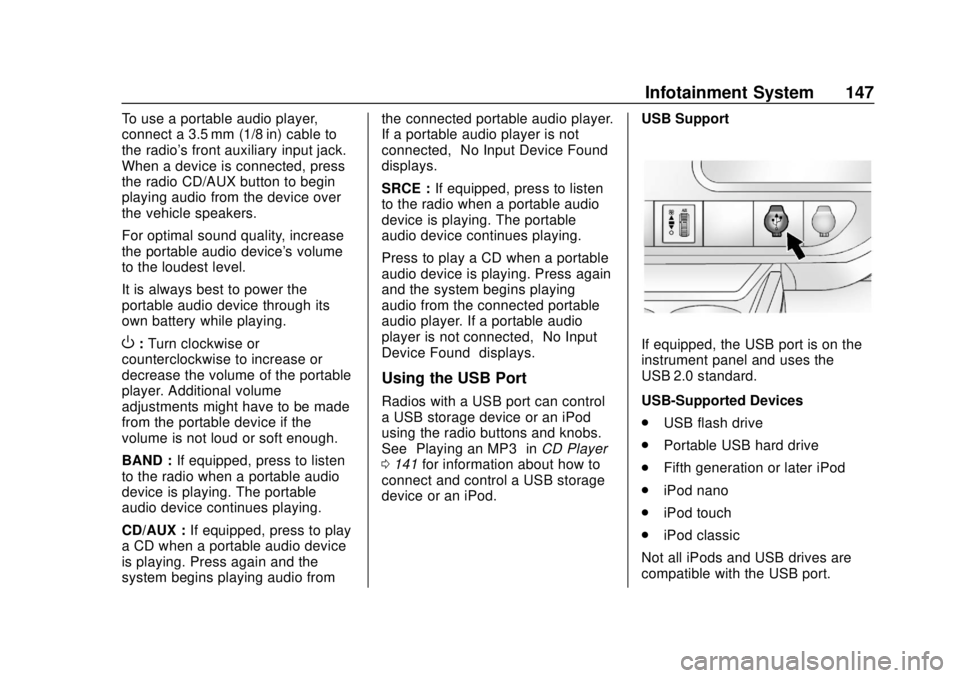
If equipped, the USB port is on the
instrument panel and uses the
USB 2.0 standard.
USB-Supported Devices
.
USB flash drive
. Portable USB hard drive
. Fifth generation or later iPod
. iPod nano
. iPod touch
. iPod classic
Not all iPods and USB drives are
compatible with the USB port.
Page 160 of 373
GMC Savana Owner Manual (GMNA-Localizing-U.S./Canada-12146167) -
2019 - CRC - 11/26/18
Climate Controls 159
Climate Controls
Climate Control Systems
Climate Control Systems . . . . . 159
Rear Heating System . . . . . . . . . 161
Rear Climate ControlSystem . . . . . . . . . . . . . . . . . . . . . . 162
Air Vents
Air Vents . . . . . . . . . . . . . . . . . . . . . 164
Maintenance
Service . . . . . . . . . . . . . . . . . . . . . . . 164
Climate Control Systems
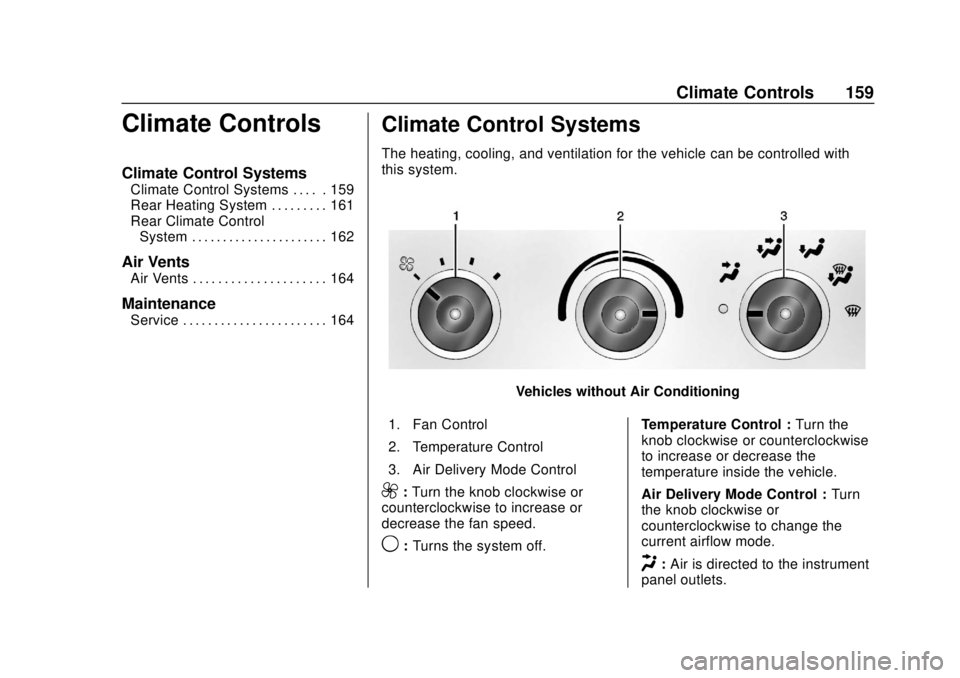
The heating, cooling, and ventilation for the vehicle can be controlled with
this system.
Vehicles without Air Conditioning
1. Fan Control
2. Temperature Control
3. Air Delivery Mode Control
9: Turn the knob clockwise or
counterclockwise to increase or
decrease the fan speed.
9: Turns the system off. Temperature Control :
Turn the
knob clockwise or counterclockwise
to increase or decrease the
temperature inside the vehicle.
Air Delivery Mode Control : Turn
the knob clockwise or
counterclockwise to change the
current airflow mode.
H: Air is directed to the instrument
panel outlets.
Page 164 of 373
GMC Savana Owner Manual (GMNA-Localizing-U.S./Canada-12146167) -
2019 - CRC - 11/26/18
Climate Controls 163
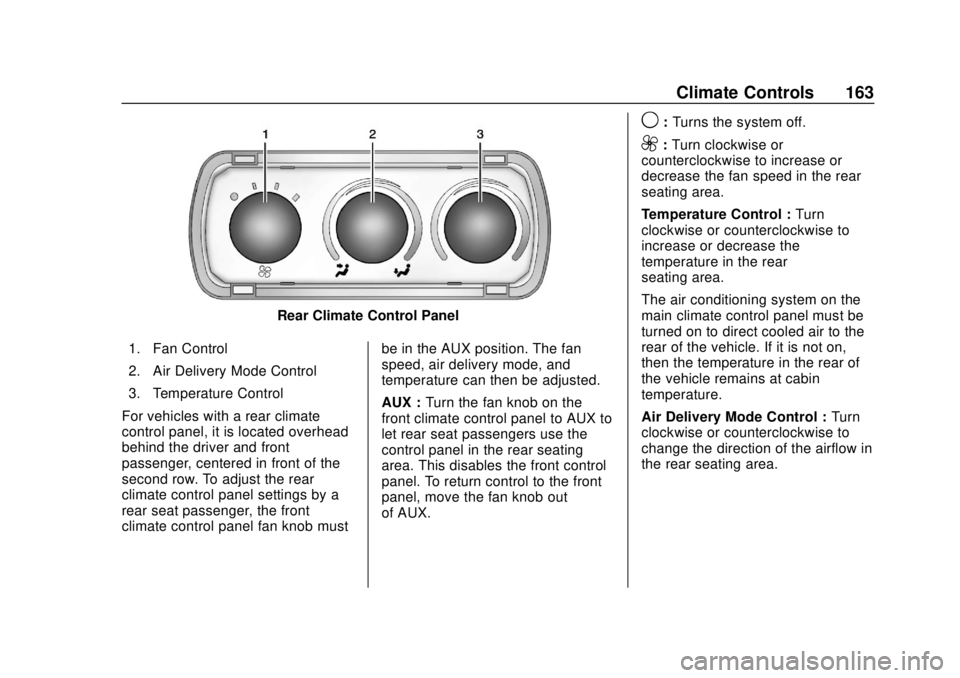
Rear Climate Control Panel
1. Fan Control
2. Air Delivery Mode Control
3. Temperature Control
For vehicles with a rear climate
control panel, it is located overhead
behind the driver and front
passenger, centered in front of the
second row. To adjust the rear
climate control panel settings by a
rear seat passenger, the front
climate control panel fan knob must be in the AUX position. The fan
speed, air delivery mode, and
temperature can then be adjusted.
AUX :
Turn the fan knob on the
front climate control panel to AUX to
let rear seat passengers use the
control panel in the rear seating
area. This disables the front control
panel. To return control to the front
panel, move the fan knob out
of AUX.
9: Turns the system off.
9:Turn clockwise or
counterclockwise to increase or
decrease the fan speed in the rear
seating area.
Temperature Control : Turn
clockwise or counterclockwise to
increase or decrease the
temperature in the rear
seating area.
The air conditioning system on the
main climate control panel must be
turned on to direct cooled air to the
rear of the vehicle. If it is not on,
then the temperature in the rear of
the vehicle remains at cabin
temperature.
Air Delivery Mode Control : Turn
clockwise or counterclockwise to
change the direction of the airflow in
the rear seating area.
Page 165 of 373
GMC Savana Owner Manual (GMNA-Localizing-U.S./Canada-12146167) -
2019 - CRC - 11/26/18
164 Climate Controls
To change the current mode, select
one of the following:
H:Air is directed to the upper
outlets, with some directed to the
floor outlets.
2: Air is directed to the floor
outlets.
Be sure to keep the area under the
front seats clear of any objects so
that the air inside of the vehicle can
circulate effectively.
For information on how to use the
main climate control system, see
Climate Control Systems 0159. For
information on ventilation, see Air
Vents 0164.
Air Vents
Use the outlets located near the
center and on the sides of the
instrument panel to change the
direction of airflow.
Operation Tips
.
Clear away any ice, snow or
leaves from the air inlets at the
base of the windshield that may
block the flow of air into the
vehicle.
. Use of non-GM approved hood
deflectors may adversely affect
the performance of the system.
. Clear snow off the hood to
improve visibility and help
decrease moisture drawn into
the vehicle.
. Keep the path under the front
seats clear of objects to help
circulate the air inside of the
vehicle more effectively.
Maintenance
Service
All vehicles have a label underhood
that identifies the refrigerant used in
the vehicle. The refrigerant system
should only be serviced by trained
and certified technicians. The air
conditioning evaporator should
never be repaired or replaced by
one from a salvage vehicle.
It should only be replaced by a new
evaporator to ensure proper and
safe operation.
During service, all refrigerants
should be reclaimed with proper
equipment. Venting refrigerants
directly to the atmosphere is harmful
to the environment and may also
create unsafe conditions based on
inhalation, combustion, frostbite,
or other health-based concerns.
The air conditioning system requires
periodic maintenance. See
Maintenance Schedule 0319.
Page 166 of 373
GMC Savana Owner Manual (GMNA-Localizing-U.S./Canada-12146167) -
2019 - CRC - 11/26/18
Driving and Operating 165
Driving and
Operating
Driving Information
Distracted Driving . . . . . . . . . . . . 166
Defensive Driving . . . . . . . . . . . . . 166
Drunk Driving . . . . . . . . . . . . . . . . . 167
Control of a Vehicle . . . . . . . . . . . 167
Braking . . . . . . . . . . . . . . . . . . . . . . . 167
Steering . . . . . . . . . . . . . . . . . . . . . . 167
Off-Road Recovery . . . . . . . . . . . 168
Loss of Control . . . . . . . . . . . . . . . 168
Driving on Wet Roads . . . . . . . . 169
Hill and Mountain Roads . . . . . 170
Winter Driving . . . . . . . . . . . . . . . . 170
If the Vehicle Is Stuck . . . . . . . . 172
Vehicle Load Limits . . . . . . . . . . . 172
Starting and Operating
New Vehicle Break-In . . . . . . . . . 176
Ignition Positions . . . . . . . . . . . . . 177
Starting the Engine . . . . . . . . . . . 179
Fast Idle System . . . . . . . . . . . . . 180
Retained AccessoryPower (RAP) . . . . . . . . . . . . . . . . 181
Engine Coolant Heater . . . . . . . 181
Shifting Into Park . . . . . . . . . . . . . 183
Shifting out of Park . . . . . . . . . . . 184 Parking over Things
That Burn . . . . . . . . . . . . . . . . . . . 184
Engine Exhaust
Engine Exhaust . . . . . . . . . . . . . . 185
Running the Vehicle WhileParked . . . . . . . . . . . . . . . . . . . . . . 185
Automatic Transmission
Automatic Transmission . . . . . . 186
Manual Mode . . . . . . . . . . . . . . . . . 189
Tow/Haul Mode . . . . . . . . . . . . . . . 190
Brakes
Antilock BrakeSystem (ABS) . . . . . . . . . . . . . . . 190
Parking Brake . . . . . . . . . . . . . . . . 191
Brake Assist . . . . . . . . . . . . . . . . . . 192
Hill Start Assist (HSA) . . . . . . . . 192
Ride Control Systems
Traction Control/Electronic Stability Control . . . . . . . . . . . . . 192
Locking Rear Axle . . . . . . . . . . . . 194
Cruise Control
Cruise Control . . . . . . . . . . . . . . . . 194
Driver Assistance Systems
Driver Assistance Systems . . . 197
Rear Vision Camera (RVC) . . . 198
Park Assist . . . . . . . . . . . . . . . . . . . 199 Forward Collision Alert (FCA)
System . . . . . . . . . . . . . . . . . . . . . . 201
Side Blind Zone Alert (SBZA) . . . . . . . . . . . . . . . . 202
Lane Departure
Warning (LDW) . . . . . . . . . . . . . 204
Fuel
Top Tier Fuel . . . . . . . . . . . . . . . . . 206
Recommended Fuel . . . . . . . . . . 206
Prohibited Fuels . . . . . . . . . . . . . . 206
Fuels in Foreign Countries . . . 207
Fuel Additives . . . . . . . . . . . . . . . . 207
E85 or FlexFuel . . . . . . . . . . . . . . 207
Filling the Tank . . . . . . . . . . . . . . . 208
Filling a Portable FuelContainer . . . . . . . . . . . . . . . . . . . 209
Trailer Towing
General Towing
Information . . . . . . . . . . . . . . . . . . 210
Driving Characteristics and Towing Tips . . . . . . . . . . . . . . . . . 210
Trailer Towing . . . . . . . . . . . . . . . . 215
Towing Equipment . . . . . . . . . . . . 222
Trailer Sway Control (TSC) . . . 226
Conversions and Add-Ons
Add-On Electrical Equipment . . . . . . . . . . . . . . . . . . 227
Page 169 of 373
GMC Savana Owner Manual (GMNA-Localizing-U.S./Canada-12146167) -
2019 - CRC - 11/26/18
168 Driving and Operating
Curve Tips
.Take curves at a reasonable
speed.
. Reduce speed before entering a
curve.
. Maintain a reasonable steady
speed through the curve.
. Wait until the vehicle is out of
the curve before accelerating
gently into the straightaway.
Steering in Emergencies
.There are some situations when
steering around a problem may
be more effective than braking.
. Holding both sides of the
steering wheel allows you to turn
180 degrees without removing
a hand.
. Antilock Brake System (ABS)
allows steering while braking.
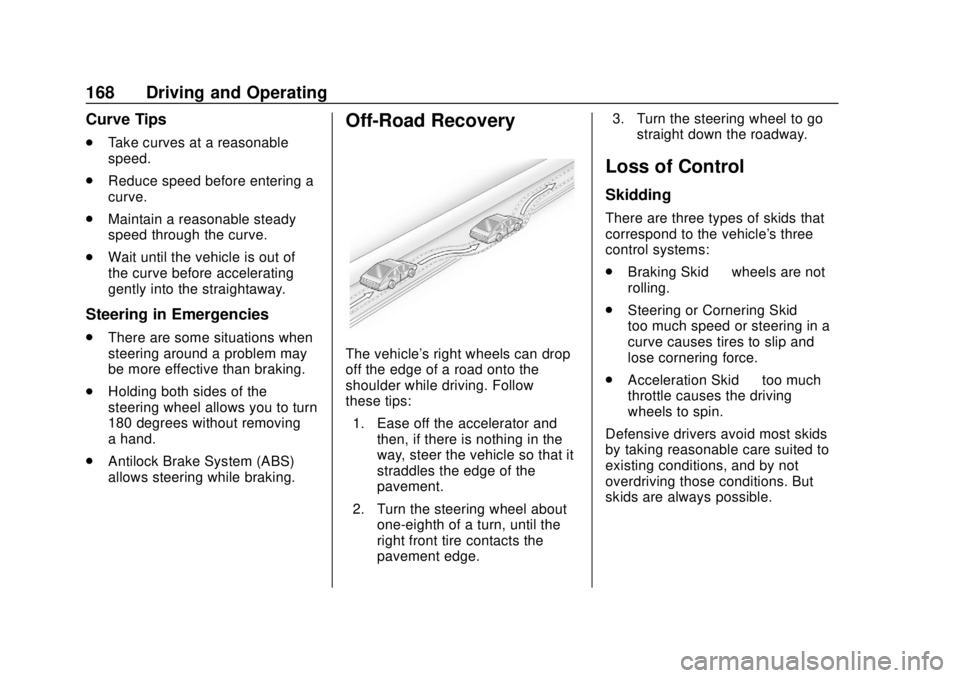
Off-Road Recovery
The vehicle's right wheels can drop
off the edge of a road onto the
shoulder while driving. Follow
these tips:
1. Ease off the accelerator and then, if there is nothing in the
way, steer the vehicle so that it
straddles the edge of the
pavement.
2. Turn the steering wheel about one-eighth of a turn, until the
right front tire contacts the
pavement edge. 3. Turn the steering wheel to go
straight down the roadway.
Loss of Control
Skidding
There are three types of skids that
correspond to the vehicle's three
control systems:
.Braking Skid —wheels are not
rolling.
. Steering or Cornering Skid —
too much speed or steering in a
curve causes tires to slip and
lose cornering force.
. Acceleration Skid —too much
throttle causes the driving
wheels to spin.
Defensive drivers avoid most skids
by taking reasonable care suited to
existing conditions, and by not
overdriving those conditions. But
skids are always possible.
Page 170 of 373
GMC Savana Owner Manual (GMNA-Localizing-U.S./Canada-12146167) -
2019 - CRC - 11/26/18
Driving and Operating 169
If the vehicle starts to slide, follow
these suggestions:
.Ease your foot off the
accelerator pedal and steer the
way you want the vehicle to go.
The vehicle may straighten out.
Be ready for a second skid if it
occurs.
. Slow down and adjust your
driving according to weather
conditions. Stopping distance
can be longer and vehicle
control can be affected when
traction is reduced by water,
snow, ice, gravel, or other
material on the road. Learn to
recognize warning clues —such
as enough water, ice, or packed
snow on the road to make a
mirrored surface —and slow
down when you have any doubt.
. Try to avoid sudden steering,
acceleration, or braking,
including reducing vehicle speed
by shifting to a lower gear. Any
sudden changes could cause
the tires to slide. Remember: Antilock brakes help
avoid only the braking skid.
Driving on Wet Roads
Rain and wet roads can reduce
vehicle traction and affect your
ability to stop and accelerate.
Always drive slower in these types
of driving conditions and avoid
driving through large puddles and
deep-standing or flowing water.
{Warning
Wet brakes can cause crashes.
They might not work as well in a
quick stop and could cause
pulling to one side. You could
lose control of the vehicle.
After driving through a large
puddle of water or a car/vehicle
wash, lightly apply the brake
pedal until the brakes work
normally.
(Continued)
Warning (Continued)
Flowing or rushing water creates
strong forces. Driving through
flowing water could cause the
vehicle to be carried away. If this
happens, you and other vehicle
occupants could drown. Do not
ignore police warnings and be
very cautious about trying to drive
through flowing water.
Hydroplaning
Hydroplaning is dangerous. Water
can build up under the vehicle's
tires so they actually ride on the
water. This can happen if the road is
wet enough and you are going fast
enough. When the vehicle is
hydroplaning, it has little or no
contact with the road.
There is no hard and fast rule about
hydroplaning. The best advice is to
slow down when the road is wet.