light GMC SAVANA 2020 Owner's Guide
[x] Cancel search | Manufacturer: GMC, Model Year: 2020, Model line: SAVANA, Model: GMC SAVANA 2020Pages: 355, PDF Size: 5.72 MB
Page 95 of 355
GMC Savana Owner Manual (GMNA-Localizing-U.S./Canada-13882574) -
2020 - CRC - 11/1/19
94 Instruments and Controls
Emissions Inspection and
Maintenance Programs
If the vehicle requires an Emissions
Inspection/Maintenance test, the
test equipment will likely connect to
the vehicle's Data Link
Connector (DLC).
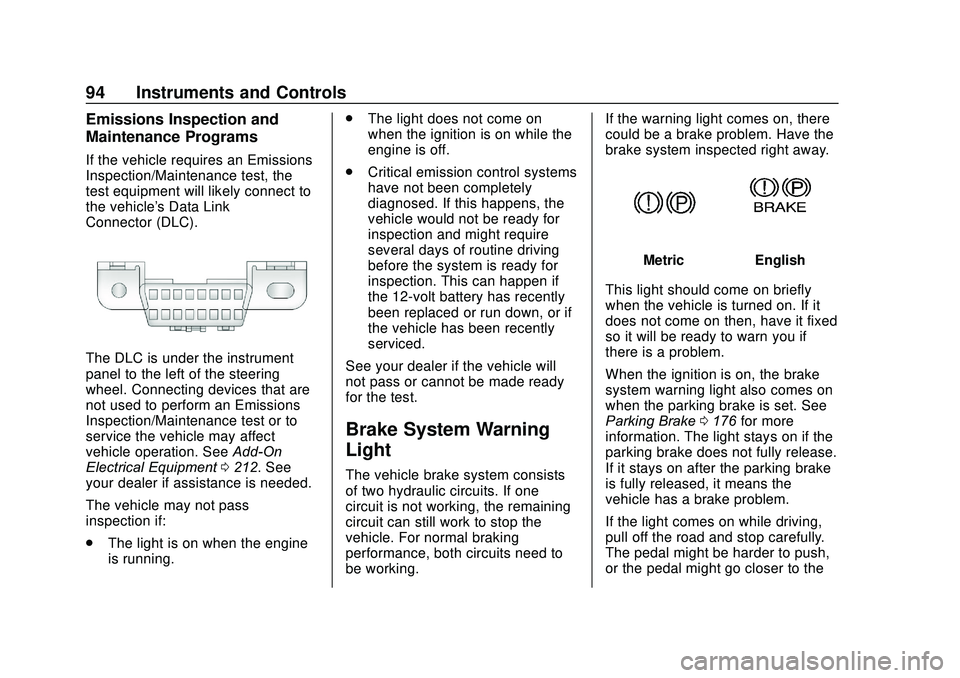
The DLC is under the instrument
panel to the left of the steering
wheel. Connecting devices that are
not used to perform an Emissions
Inspection/Maintenance test or to
service the vehicle may affect
vehicle operation. SeeAdd-On
Electrical Equipment 0212. See
your dealer if assistance is needed.
The vehicle may not pass
inspection if:
. The light is on when the engine
is running. .
The light does not come on
when the ignition is on while the
engine is off.
. Critical emission control systems
have not been completely
diagnosed. If this happens, the
vehicle would not be ready for
inspection and might require
several days of routine driving
before the system is ready for
inspection. This can happen if
the 12-volt battery has recently
been replaced or run down, or if
the vehicle has been recently
serviced.
See your dealer if the vehicle will
not pass or cannot be made ready
for the test.
Brake System Warning
Light
The vehicle brake system consists
of two hydraulic circuits. If one
circuit is not working, the remaining
circuit can still work to stop the
vehicle. For normal braking
performance, both circuits need to
be working. If the warning light comes on, there
could be a brake problem. Have the
brake system inspected right away.
MetricEnglish
This light should come on briefly
when the vehicle is turned on. If it
does not come on then, have it fixed
so it will be ready to warn you if
there is a problem.
When the ignition is on, the brake
system warning light also comes on
when the parking brake is set. See
Parking Brake 0176 for more
information. The light stays on if the
parking brake does not fully release.
If it stays on after the parking brake
is fully released, it means the
vehicle has a brake problem.
If the light comes on while driving,
pull off the road and stop carefully.
The pedal might be harder to push,
or the pedal might go closer to the
Page 96 of 355
GMC Savana Owner Manual (GMNA-Localizing-U.S./Canada-13882574) -
2020 - CRC - 11/1/19
Instruments and Controls 95
floor. It could take longer to stop.
If the light is still on, have the
vehicle towed for service. See
Towing the Vehicle0290.
{Warning
The brake system might not be
working properly if the brake
system warning light is on.
Driving with the brake system
warning light on can lead to a
crash. If the light is still on after
the vehicle has been pulled off
the road and carefully stopped,
have the vehicle towed for
service.
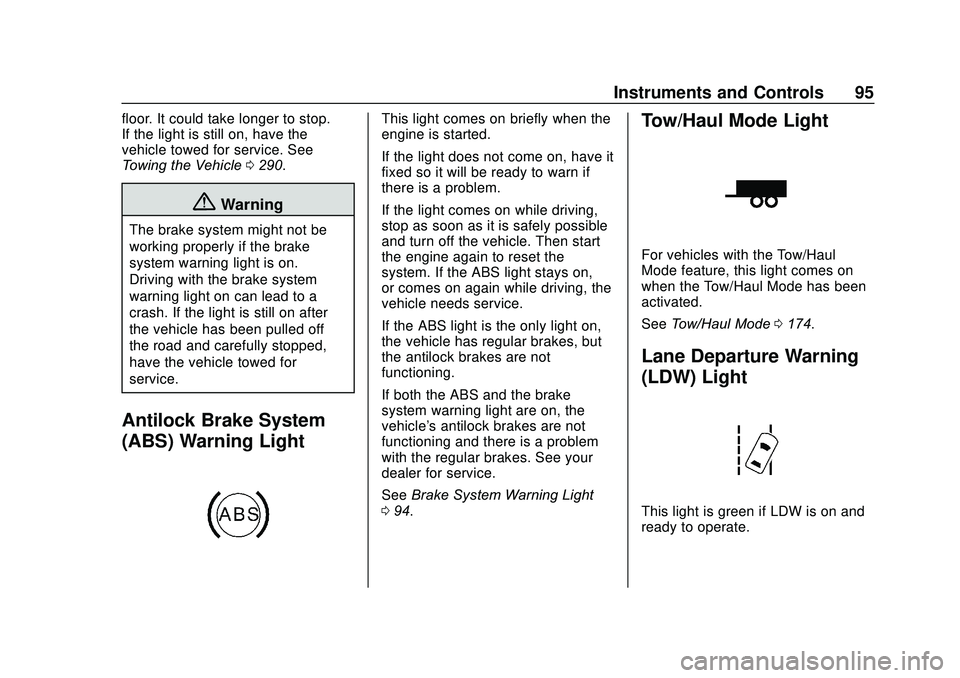
Antilock Brake System
(ABS) Warning Light
This light comes on briefly when the
engine is started.
If the light does not come on, have it
fixed so it will be ready to warn if
there is a problem.
If the light comes on while driving,
stop as soon as it is safely possible
and turn off the vehicle. Then start
the engine again to reset the
system. If the ABS light stays on,
or comes on again while driving, the
vehicle needs service.
If the ABS light is the only light on,
the vehicle has regular brakes, but
the antilock brakes are not
functioning.
If both the ABS and the brake
system warning light are on, the
vehicle's antilock brakes are not
functioning and there is a problem
with the regular brakes. See your
dealer for service.
See Brake System Warning Light
0 94.Tow/Haul Mode Light
For vehicles with the Tow/Haul
Mode feature, this light comes on
when the Tow/Haul Mode has been
activated.
See Tow/Haul Mode 0174.
Lane Departure Warning
(LDW) Light
This light is green if LDW is on and
ready to operate.
Page 97 of 355

GMC Savana Owner Manual (GMNA-Localizing-U.S./Canada-13882574) -
2020 - CRC - 11/1/19
96 Instruments and Controls
This light changes to amber and
flashes to indicate that the lane
marking has been crossed without
using a turn signal in that direction.
SeeLane Departure Warning (LDW)
0 189.
Vehicle Ahead Indicator
If equipped, this indicator will
display green when a vehicle is
detected ahead and amber when
you are following a vehicle ahead
much too closely.
See Forward Collision Alert (FCA)
System 0185.
StabiliTrak OFF Light
This light comes on briefly while
starting the engine. If it does not,
have the vehicle serviced by your
dealer.
This light comes on when the
StabiliTrak/Electronic Stability
Control (ESC) system is turned off.
If StabiliTrak/ESC is off, the Traction
Control System (TCS) is also off.
If the StabiliTrak/ESC and TCS are
off, the system does not assist in
controlling the vehicle. Turn on the
TCS and the StabiliTrak/ESC
systems and the warning light
turns off.
See Traction Control/Electronic
Stability Control 0177.
Traction Control System
(TCS)/StabiliTrak Light
This light comes on briefly when the
engine is started.
If the light does not come on, have
the vehicle serviced by your dealer.
If the system is working normally,
the indicator light turns off.
If the light is on and not flashing, the
TCS and potentially the StabiliTrak/
ESC system have been disabled.
A Driver Information Center (DIC)
message may display. Check the
DIC messages to determine which
feature(s) is no longer functioning
and whether the vehicle requires
service.
If the light is on and flashing, the
TCS and/or the StabiliTrak/ESC
system is actively working.
Page 98 of 355
GMC Savana Owner Manual (GMNA-Localizing-U.S./Canada-13882574) -
2020 - CRC - 11/1/19
Instruments and Controls 97
SeeTraction Control/Electronic
Stability Control 0177.
Tire Pressure Light
For vehicles with the Tire Pressure
Monitor System (TPMS), this light
comes on briefly when the engine is
started. It provides information
about tire pressures and the TPMS.
When the Light Is On Steady
This indicates that one or more of
the tires are significantly
underinflated.
A Driver Information Center (DIC)
tire pressure message may also
display. Stop as soon as possible,
and inflate the tires to the pressure
value shown on the Tire and
Loading Information label. See Tire
Pressure 0262. When the Light Flashes First and
Then Is On Steady
If the light flashes for about a minute
and then stays on, there may be a
problem with the TPMS. If the
problem is not corrected, the light
will come on at every ignition cycle.
See
Tire Pressure Monitor
Operation 0264.
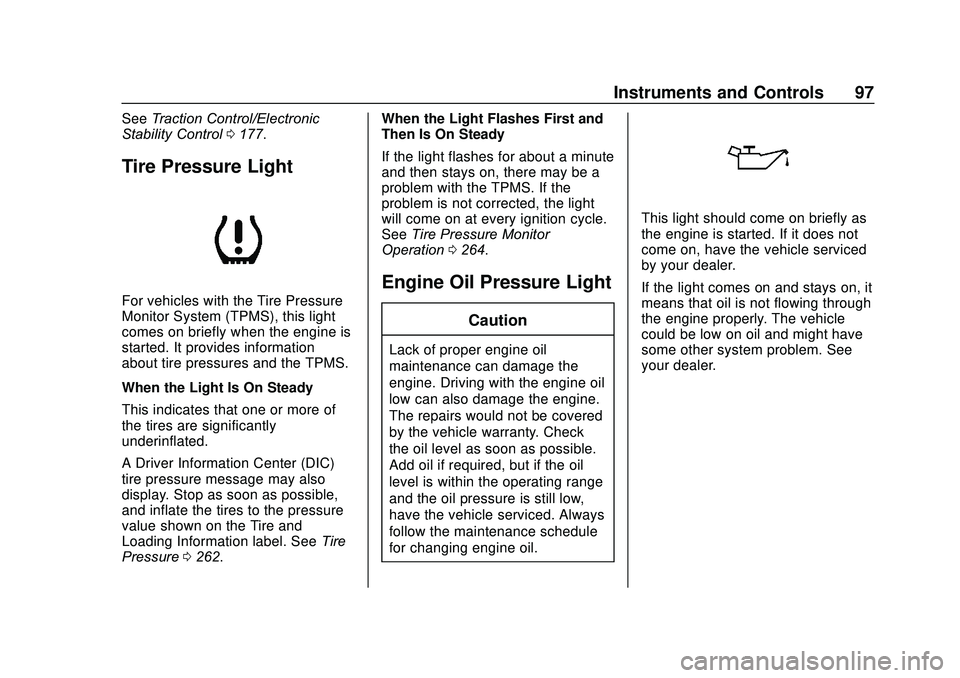
Engine Oil Pressure Light
Caution
Lack of proper engine oil
maintenance can damage the
engine. Driving with the engine oil
low can also damage the engine.
The repairs would not be covered
by the vehicle warranty. Check
the oil level as soon as possible.
Add oil if required, but if the oil
level is within the operating range
and the oil pressure is still low,
have the vehicle serviced. Always
follow the maintenance schedule
for changing engine oil.
This light should come on briefly as
the engine is started. If it does not
come on, have the vehicle serviced
by your dealer.
If the light comes on and stays on, it
means that oil is not flowing through
the engine properly. The vehicle
could be low on oil and might have
some other system problem. See
your dealer.
Page 99 of 355

GMC Savana Owner Manual (GMNA-Localizing-U.S./Canada-13882574) -
2020 - CRC - 11/1/19
98 Instruments and Controls
Low Fuel Warning Light
English Shown, Metric Similar
This light comes on for a few
seconds when the ignition is turned
on as a check to indicate it is
working. If it does not come on,
have it fixed.
The low fuel warning light comes on
and a chime sounds when the
vehicle is low on fuel. The light turns
off when fuel is added to the
fuel tank.
See Driver Information Center (DIC)
0 99.
Security Light
The security light should come on
briefly as the engine is started. If it
does not come on, have the vehicle
serviced by your dealer. If the
system is working normally, the
indicator light turns off.
If the light stays on and the engine
does not start, there could be a
problem with the theft-deterrent
system. See Immobilizer Operation
0 20.
High-Beam On Light
This light comes on when the
high-beam headlamps are in use.
See Headlamp High/Low-Beam
Changer 0110.
Cruise Control Light
This light comes on when the cruise
control is set.
This light goes out when the cruise
control is canceled. See Cruise
Control 0179.
Page 105 of 355
GMC Savana Owner Manual (GMNA-Localizing-U.S./Canada-13882574) -
2020 - CRC - 11/1/19
104 Instruments and Controls
.Brakes
. Steering
. Ride Control Systems
. Driver Assistance Systems
. Cruise Control
. Lighting and Bulb Replacement
. Wiper/Washer Systems
. Doors and Windows
. Seat Belts
. Airbag Systems
. Engine and Transmission
. Tire Pressure
. Battery
Engine Power Messages
ENGINE POWER IS REDUCED
This message displays when the
vehicle’s propulsion power is
reduced. A reduction in propulsion
power can affect the vehicle's ability
to accelerate. If this message is on,
but there is no observed reduction
in performance, proceed to your
destination. The performance may be reduced the next time the vehicle
is driven. The vehicle may be driven
while this message is on, but
maximum acceleration and speed
may be reduced. Anytime this
message stays on, or displays
repeatedly, the vehicle should be
taken to your dealer for service as
soon as possible.
Under certain operating conditions
propulsion will be disabled. Try
restarting after the vehicle has been
off for 30 seconds.
Vehicle Speed Messages
SPEED LIMITED TO XXX
KM/H (MPH)
This message shows that the
vehicle speed has been limited to
the speed displayed. The limited
speed is a protection for various
propulsion and vehicle systems,
such as lubrication, thermal,
suspension, or tires.
Vehicle
Personalization
This vehicle may have
customization capabilities that allow
you to program certain features to
one preferred setting. Customization
features can only be programmed to
one setting on the vehicle and
cannot be programmed to a
preferred setting for two different
drivers.
All of the customization options may
not be available on your vehicle.
Only the options available will be
displayed on the DIC.
The default settings for the
customization features were set
when the vehicle left the factory, but
may have been changed from their
default state since then.
The customization preferences are
automatically recalled.
To change customization
preferences, use the following
procedure.
Page 107 of 355
GMC Savana Owner Manual (GMNA-Localizing-U.S./Canada-13882574) -
2020 - CRC - 11/1/19
106 Instruments and Controls
To select a setting, pressVwhile
the desired setting is displayed on
the DIC.
AUTO DOOR UNLOCK
This feature allows you to select
whether or not to turn off the
automatic door unlocking feature.
It also allows you to select which
doors and when the doors will
automatically unlock.
Press
Uuntil AUTO DOOR
UNLOCK appears on the DIC
display. Press
Vonce to access the
settings for this feature. Then press
Uto scroll through the following
settings:
OFF : None of the doors will
automatically unlock.
DRIVER AT KEY OUT : Only the
driver door will unlock when the key
is taken out of the ignition.
DRIVER IN PARK : Only the driver
door will unlock when the vehicle is
shifted into P (Park). ALL AT KEY OUT :
All of the doors
will unlock when the key is taken
out of the ignition.
ALL IN PARK (default) : All of the
doors will unlock when the vehicle is
shifted into P (Park).
NO CHANGE : No change will be
made to this feature. The current
setting will remain.
To select a setting, press
Vwhile
the desired setting is displayed on
the DIC.
REMOTE DOOR LOCK
This feature allows you to select the
type of feedback you will receive
when locking the vehicle with the
Remote Keyless Entry (RKE)
transmitter. You will not receive
feedback when locking the vehicle
with the RKE transmitter if the doors
are open. See Remote Keyless
Entry (RKE) System Operation 09.
Press
Uuntil REMOTE DOOR
LOCK appears on the DIC display.
Press
Vonce to access the settings
for this feature. Then press
Uto
scroll through the following settings: OFF :
There will be no feedback
when you press
Qon the RKE
transmitter.
LIGHTS ONLY : The exterior lamps
will flash when you press
Qon the
RKE transmitter.
HORN ONLY : The horn will sound
on the second press of
Qon the
RKE transmitter.
HORN & LIGHTS (default) : The
exterior lamps will flash when you
press
Qon the RKE transmitter, and
the horn will sound when
Qis
pressed again within five seconds of
the previous command.
NO CHANGE : No change will be
made to this feature. The current
setting will remain.
To select a setting, press
Vwhile
the desired setting is displayed on
the DIC.
REMOTE DOOR UNLOCK
This feature allows you to select the
type of feedback you will receive
when unlocking the vehicle with the
Remote Keyless Entry (RKE)
Page 108 of 355
GMC Savana Owner Manual (GMNA-Localizing-U.S./Canada-13882574) -
2020 - CRC - 11/1/19
Instruments and Controls 107
transmitter. You will not receive
feedback when unlocking the
vehicle with the RKE transmitter if
the doors are open. SeeRemote
Keyless Entry (RKE) System
Operation 09.
Press
Uuntil REMOTE DOOR
UNLOCK appears on the DIC
display. Press
Vonce to access the
settings for this feature. Then press
Uto scroll through the following
settings:
LIGHTS OFF : The exterior lamps
will not flash when you press
Kon
the RKE transmitter.
LIGHTS ON (default) : The exterior
lamps will flash when you press
K
on the RKE transmitter.
NO CHANGE : No change will be
made to this feature. The current
setting will remain.
To select a setting, press
Vwhile
the desired setting is displayed on
the DIC. DELAY DOOR LOCK
This feature allows you to select
whether or not the locking of the
doors will be delayed. When locking
the doors with the power door lock
switch and a door is open, this
feature will delay locking the doors
until five seconds after the last door
is closed. You will hear three chimes
to signal that the delayed locking
feature is in use. The key must be
out of the ignition for this feature to
work. You can temporarily override
delayed locking by pressing the
power door lock switch twice or
Q
on the RKE transmitter twice. See
Delayed Locking
014.
Press
Uuntil DELAY DOOR LOCK
appears on the DIC display. Press
Vonce to access the settings for
this feature. Then press
Uto scroll
through the following settings:
OFF : There will be no delayed
locking of the vehicle's doors.
ON (default) : The doors will not
lock until five seconds after the last
door is closed. NO CHANGE :
No change will be
made to this feature. The current
setting will remain.
To select a setting, press
Vwhile
the desired setting is displayed on
the DIC.
EXIT LIGHTING
This feature allows you to select the
amount of time you want the
exterior lamps to remain on when it
is dark enough outside. This
happens after the key is turned from
on to off.
Press
Uuntil EXIT LIGHTING
appears on the DIC display. Press
Vonce to access the settings for
this feature. Then press
Uto scroll
through the following settings:
OFF : The exterior lamps will not
turn on.
10 SECONDS (default) : The
exterior lamps will stay on for
10 seconds.
1 MINUTE : The exterior lamps will
stay on for one minute.
Page 110 of 355
GMC Savana Owner Manual (GMNA-Localizing-U.S./Canada-13882574) -
2020 - CRC - 11/1/19
Lighting 109
Lighting
Exterior Lighting
Exterior Lamp Controls . . . . . . . 109
Exterior Lamps OffReminder . . . . . . . . . . . . . . . . . . . . 110
Headlamp High/Low-Beam Changer . . . . . . . . . . . . . . . . . . . . . 110
Flash-to-Pass . . . . . . . . . . . . . . . . . 110
Daytime Running Lamps (DRL) . . . . . . . . . . . . . . . . 110
Automatic Headlamp System . . . . . . . . . . . . . . . . . . . . . . 111
Hazard Warning Flashers . . . . . 112
Turn and Lane-Change Signals . . . . . . . . . . . . . . . . . . . . . . 112
Interior Lighting
Instrument Panel IlluminationControl . . . . . . . . . . . . . . . . . . . . . . 113
Dome Lamps . . . . . . . . . . . . . . . . . 113
Reading Lamps . . . . . . . . . . . . . . . 114
Lighting Features
Entry Lighting . . . . . . . . . . . . . . . . . 114
Entry/Exit Lighting . . . . . . . . . . . . 114
Exit Lighting . . . . . . . . . . . . . . . . . . 114
Battery Load Management . . . . 114
Battery Power Protection . . . . . 115
Exterior Lighting Battery Saver . . . . . . . . . . . . . . . . . . . . . . . 115Exterior Lighting
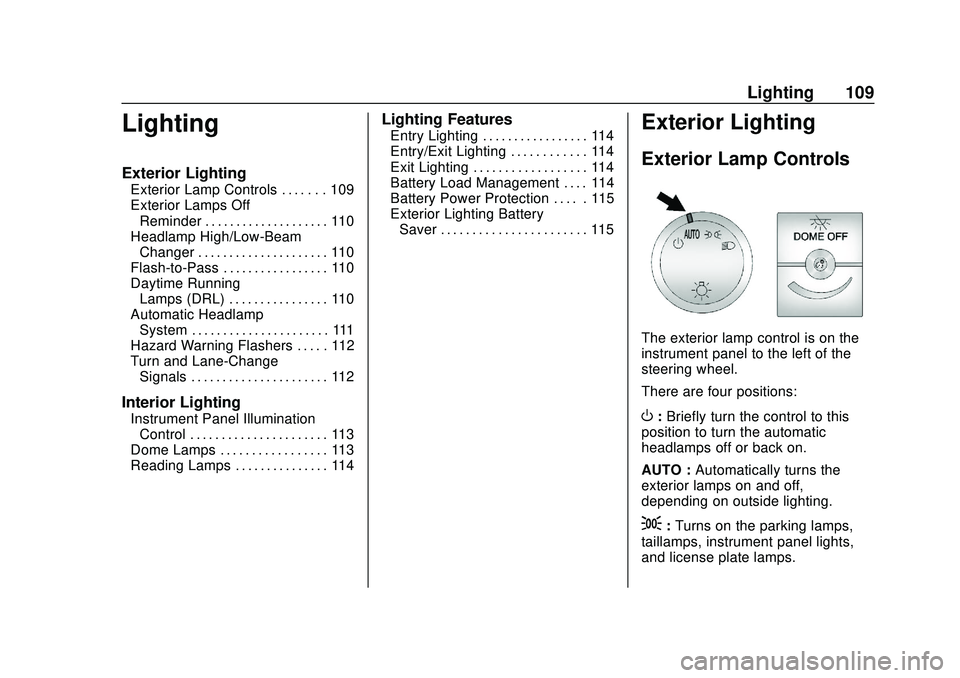
Exterior Lamp Controls
The exterior lamp control is on the
instrument panel to the left of the
steering wheel.
There are four positions:
O: Briefly turn the control to this
position to turn the automatic
headlamps off or back on.
AUTO : Automatically turns the
exterior lamps on and off,
depending on outside lighting.
;: Turns on the parking lamps,
taillamps, instrument panel lights,
and license plate lamps.
Page 111 of 355
GMC Savana Owner Manual (GMNA-Localizing-U.S./Canada-13882574) -
2020 - CRC - 11/1/19
110 Lighting
2:Turns on the headlamps,
parking lamps, taillamps, instrument
panel lights, and license plate
lamps.
If the headlamps are turned on
while the vehicle is on, the
headlamps turn off automatically
10 minutes after the ignition is
turned off. If the headlamps are
turned on while the vehicle is off,
the headlamps will continue to stay
on. To prevent the battery from
being drained, turn the control to the
Oposition.
A warning chime sounds if the driver
door is opened while the ignition
switch is off and the headlamps
are on.
To change the headlamps from low
beam to high beam, pull the turn
signal lever all the way toward you.
Then release it.
Exterior Lamps Off
Reminder
If a door is open, a reminder chime
sounds when the headlamps or
parking lamps are manually turned on and the key is out of the ignition.
To turn off the chime, turn the
headlamp switch to
Oor AUTO and
then back on, or close and re-open
the door. In the auto mode, the
headlamps turn off once the ignition
is off or may remain on until the
headlamp delay ends, if enabled in
the Driver Information Center (DIC).
See “Exit Lighting” underVehicle
Personalization 0104.
Headlamp High/
Low-Beam Changer
2 3:Pull the turn signal lever all
the way toward you to change the
headlamps from low to high beam.
Then release it.
Pull the turn signal lever all the way
toward you again and release it to
change the headlamps back to
low beam.
This instrument cluster light comes
on when the high-beam headlamps
are on.
Flash-to-Pass
This feature is used to signal to the
vehicle ahead that you want
to pass.
If the headlamps are off or in the
low‐beam position, pull the turn
signal lever toward you to
momentarily switch to high beams.
Release the lever to turn the
high-beam headlamps off.
Daytime Running
Lamps (DRL)
DRL can make it easier for others to
see the front of the vehicle during
the day.