seats GMC SAVANA PASSENGER 2009 User Guide
[x] Cancel search | Manufacturer: GMC, Model Year: 2009, Model line: SAVANA PASSENGER, Model: GMC SAVANA PASSENGER 2009Pages: 406, PDF Size: 2.34 MB
Page 34 of 406
Safety Belt Use During Pregnancy
Safety belts work for everyone, including pregnant
women. Like all occupants, they are more likely to be
seriously injured if they do not wear safety belts.
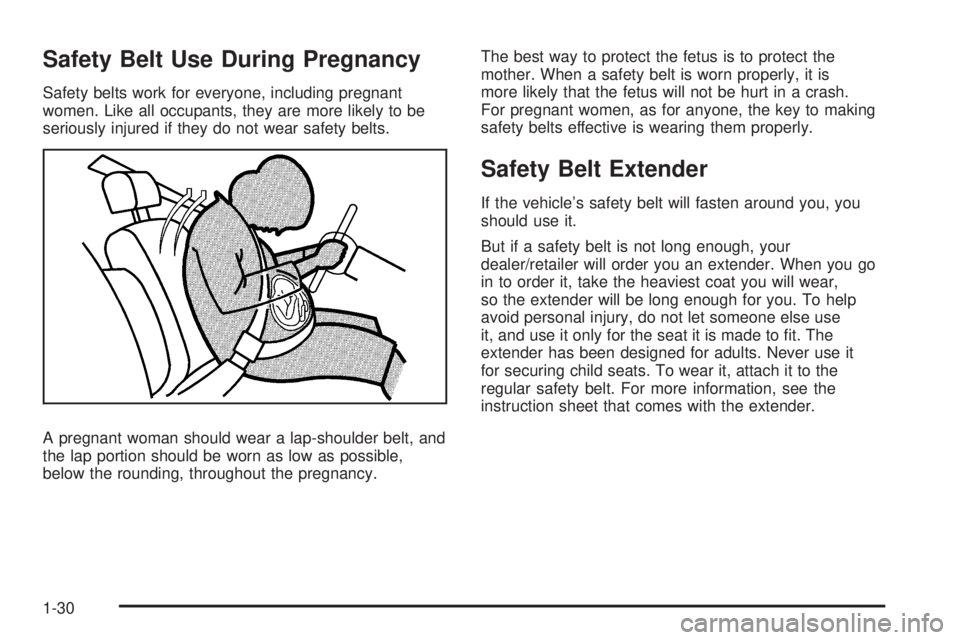
A pregnant woman should wear a lap-shoulder belt, and
the lap portion should be worn as low as possible,
below the rounding, throughout the pregnancy.The best way to protect the fetus is to protect the
mother. When a safety belt is worn properly, it is
more likely that the fetus will not be hurt in a crash.
For pregnant women, as for anyone, the key to making
safety belts effective is wearing them properly.
Safety Belt Extender
If the vehicle’s safety belt will fasten around you, you
should use it.
But if a safety belt is not long enough, your
dealer/retailer will order you an extender. When you go
in to order it, take the heaviest coat you will wear,
so the extender will be long enough for you. To help
avoid personal injury, do not let someone else use
it, and use it only for the seat it is made to fit. The
extender has been designed for adults. Never use it
for securing child seats. To wear it, attach it to the
regular safety belt. For more information, see the
instruction sheet that comes with the extender.
1-30
Page 35 of 406
Child Restraints
Older Children
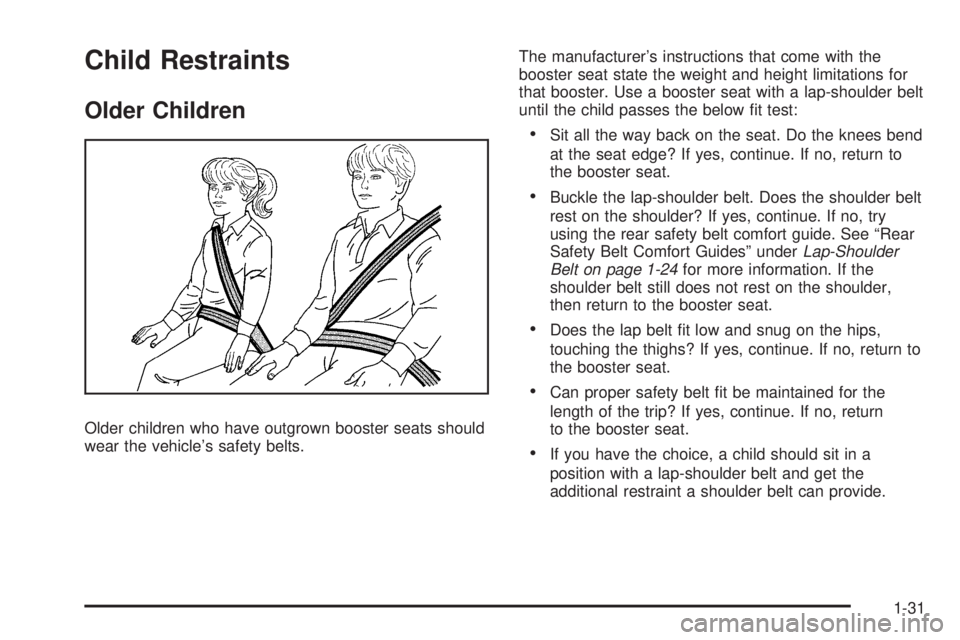
Older children who have outgrown booster seats should
wear the vehicle’s safety belts.The manufacturer’s instructions that come with the
booster seat state the weight and height limitations for
that booster. Use a booster seat with a lap-shoulder belt
until the child passes the below fit test:
•Sit all the way back on the seat. Do the knees bend
at the seat edge? If yes, continue. If no, return to
the booster seat.
•Buckle the lap-shoulder belt. Does the shoulder belt
rest on the shoulder? If yes, continue. If no, try
using the rear safety belt comfort guide. See “Rear
Safety Belt Comfort Guides” underLap-Shoulder
Belt on page 1-24for more information. If the
shoulder belt still does not rest on the shoulder,
then return to the booster seat.
•Does the lap belt fit low and snug on the hips,
touching the thighs? If yes, continue. If no, return to
the booster seat.
•Can proper safety belt fit be maintained for the
length of the trip? If yes, continue. If no, return
to the booster seat.
•If you have the choice, a child should sit in a
position with a lap-shoulder belt and get the
additional restraint a shoulder belt can provide.
1-31
Page 42 of 406
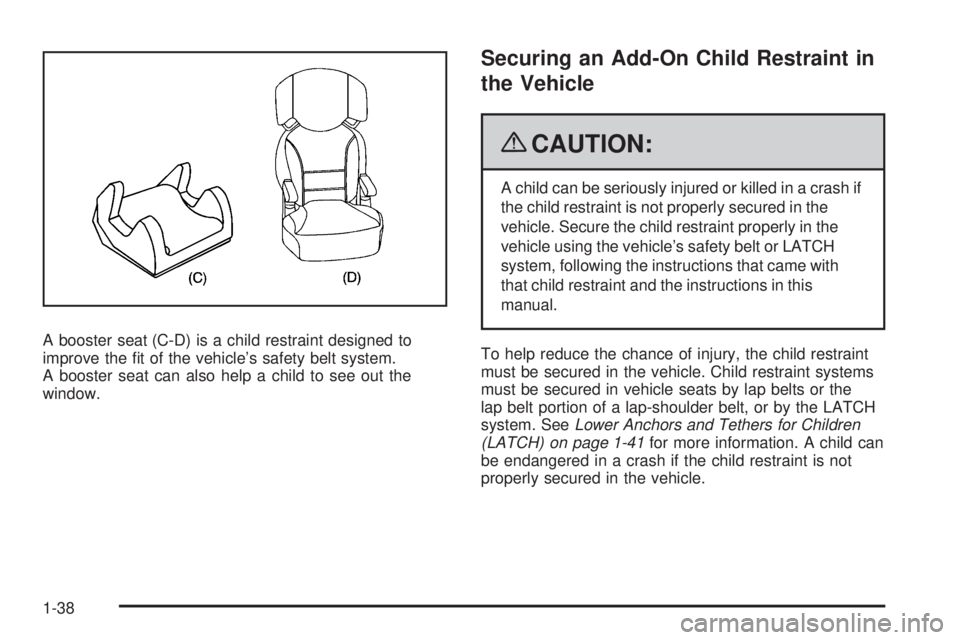
A booster seat (C-D) is a child restraint designed to
improve the fit of the vehicle’s safety belt system.
A booster seat can also help a child to see out the
window.
Securing an Add-On Child Restraint in
the Vehicle
{CAUTION:
A child can be seriously injured or killed in a crash if
the child restraint is not properly secured in the
vehicle. Secure the child restraint properly in the
vehicle using the vehicle’s safety belt or LATCH
system, following the instructions that came with
that child restraint and the instructions in this
manual.
To help reduce the chance of injury, the child restraint
must be secured in the vehicle. Child restraint systems
must be secured in vehicle seats by lap belts or the
lap belt portion of a lap-shoulder belt, or by the LATCH
system. SeeLower Anchors and Tethers for Children
(LATCH) on page 1-41for more information. A child can
be endangered in a crash if the child restraint is not
properly secured in the vehicle.
1-38
Page 47 of 406
See the information following for installing a child
restraint with a top tether in the second, third and
fourth row center positions.
Do not install three child restraints in the same row at
the same time and never install two top tethers using the
same top tether anchor.
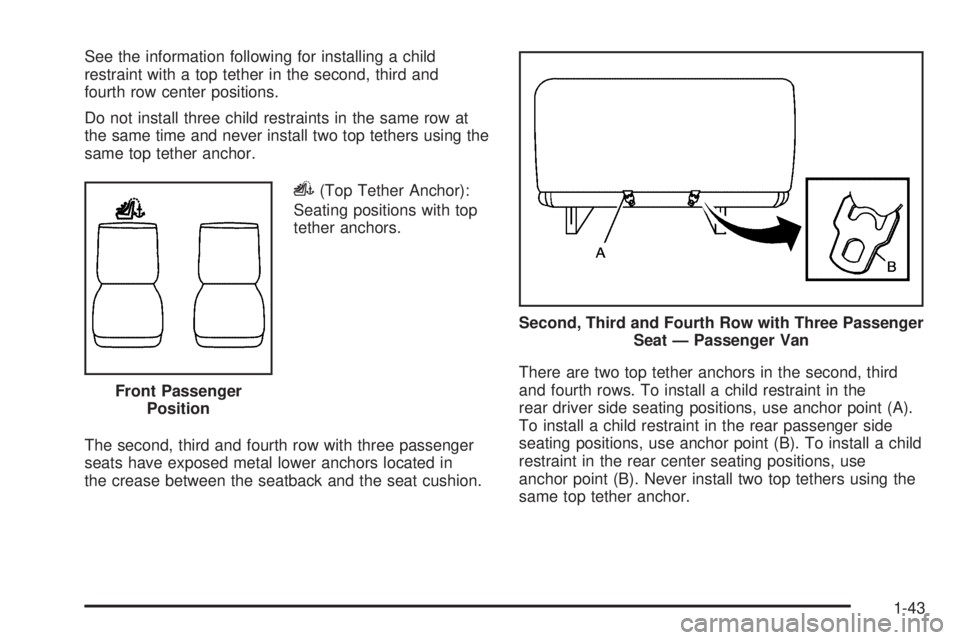
i(Top Tether Anchor):
Seating positions with top
tether anchors.
The second, third and fourth row with three passenger
seats have exposed metal lower anchors located in
the crease between the seatback and the seat cushion.There are two top tether anchors in the second, third
and fourth rows. To install a child restraint in the
rear driver side seating positions, use anchor point (A).
To install a child restraint in the rear passenger side
seating positions, use anchor point (B). To install a child
restraint in the rear center seating positions, use
anchor point (B). Never install two top tethers using the
same top tether anchor. Front Passenger
Position
Second, Third and Fourth Row with Three Passenger
Seat — Passenger Van
1-43
Page 50 of 406
2. If the child restraint manufacturer recommends that
the top tether be attached, attach and tighten the
top tether to the top tether anchor, if equipped.
Refer to the child restraint instructions and
the following steps:
2.1. Find the top tether anchor.
2.2. For the second, third and fourth row with
three passenger seats only, in the rear driver
side seating positions, use anchor point (A).
For the rear passenger side seating positions,
use anchor point (B). For the center seating
positions, use anchor point (B). Never install
two top tethers using the same top tether
anchor.
2.3. Route and tighten the top tether according to
your child restraint instructions and the
following instructions:
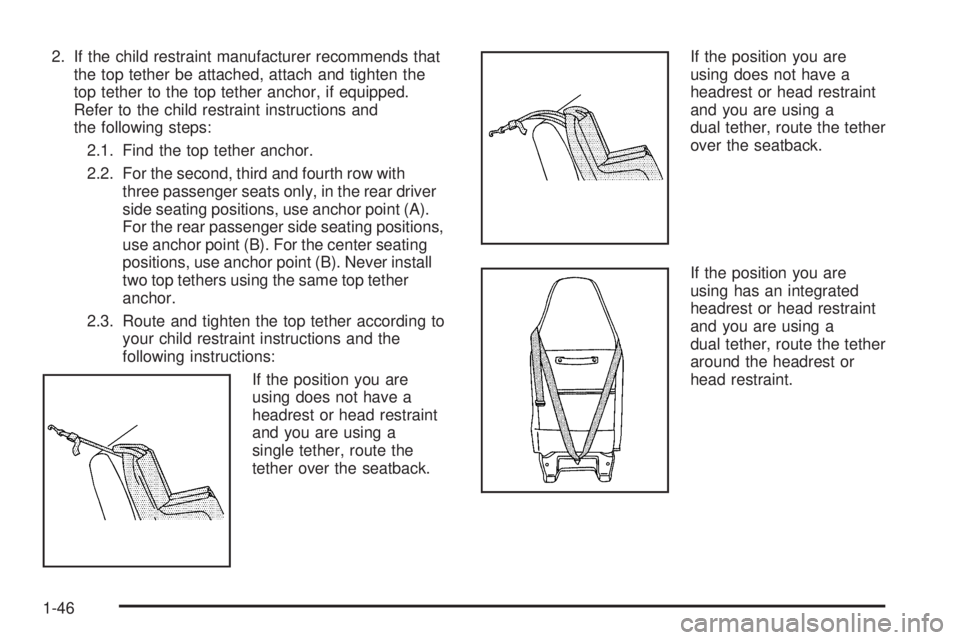
If the position you are
using does not have a
headrest or head restraint
and you are using a
single tether, route the
tether over the seatback.If the position you are
using does not have a
headrest or head restraint
and you are using a
dual tether, route the tether
over the seatback.
If the position you are
using has an integrated
headrest or head restraint
and you are using a
dual tether, route the tether
around the headrest or
head restraint.
1-46
Page 82 of 406
Adding Equipment to Your
Airbag-Equipped Vehicle
Q:Is there anything I might add to or change
about the vehicle that could keep the airbags
from working properly?
A:Yes. If you add things that change the vehicle’s
frame, bumper system, height, front end or side
sheet metal, they may keep the airbag system from
working properly. Changing or moving any parts
of the front seats, safety belts, the airbag sensing
and diagnostic module, steering wheel, instrument
panel, roof-rail airbag modules, ceiling headliner
or pillar garnish trim, front sensors, or airbag wiring
can affect the operation of the airbag system.
In addition, the vehicle may have a passenger
sensing system for the right front passenger
position, which includes sensors that are part of the
passenger seat. The passenger sensing system
may not operate properly if the original seat trim is
replaced with non-GM covers, upholstery or
trim, or with GM covers, upholstery or trim designed
for a different vehicle. Any object, such as an
aftermarket seat heater or a comfort enhancing pad
or device, installed under or on top of the seat
fabric, could also interfere with the operation of the
passenger sensing system. This could eitherprevent proper deployment of the passenger
airbag(s) or prevent the passenger sensing system
from properly turning off the passenger airbag(s).
SeePassenger Sensing System on page 1-71.
If you have any questions about this, you should
contact Customer Assistance before you modify the
vehicle. The phone numbers and addresses for
Customer Assistance are in Step Two of the
Customer Satisfaction Procedure in this manual.
SeeCustomer Satisfaction Procedure on page 7-2.
If the vehicle has rollover roof-rail airbags, see
Different Size Tires and Wheels on page 5-75for
additional important information.
Q:Because I have a disability, I have to get my
vehicle modied. How can I nd out whether
this will affect my airbag system?
A:If you have questions, call Customer Assistance.
The phone numbers and addresses for Customer
Assistance are in Step Two of the Customer
Satisfaction Procedure in this manual. See
Customer Satisfaction Procedure on page 7-2.
In addition, your dealer/retailer and the service manual
have information about the location of the airbag
sensors, sensing and diagnostic module and airbag
wiring.
1-78
Page 134 of 406
Entry/Exit Lighting
The vehicle has an illuminated entry/exit feature.
The dome lamps come on if the dome override button is
in the out position, when a door is opened or the key
is removed from the ignition.
Reading Lamps
For vehicles with reading lamps, press the button
located next to each lamp to turn it on or off.
The vehicle may also have reading lamps in other
locations. The lamps cannot be adjusted.
Electric Power Management
The vehicle has Electric Power Management (EPM) that
estimates the battery’s temperature and state of
charge. It then adjusts the voltage for best performance
and extended life of the battery.
When the battery’s state of charge is low, the voltage is
raised slightly to quickly bring the charge back up.
When the state of charge is high, the voltage is lowered
slightly to prevent overcharging. If the vehicle has a
voltmeter gage or a voltage display on the Driver
Information Center (DIC), you may see the voltage move
up or down. This is normal. If there is a problem, an
alert will be displayed.The battery can be discharged at idle if the electrical
loads are very high. This is true for all vehicles. This is
because the generator (alternator) may not be
spinning fast enough at idle to produce all the power
that is needed for very high electrical loads.
A high electrical load occurs when several of the
following are on, such as: headlamps, high beams, fog
lamps, rear window defogger, climate control fan at
high speed, heated seats, engine cooling fans, trailer
loads, and loads plugged into accessory power outlets.
EPM works to prevent excessive discharge of the
battery. It does this by balancing the generator’s output
and the vehicle’s electrical needs. It can increase
engine idle speed to generate more power, whenever
needed. It can temporarily reduce the power demands of
some accessories.
Normally, these actions occur in steps or levels, without
being noticeable. In rare cases at the highest levels of
corrective action, this action may be noticeable to the
driver. If so, a Driver Information Center (DIC) message
might be displayed, such as BATTERY SAVER ACTIVE,
BATTERY VOLTAGE LOW, or LOW BATTERY. If this
message is displayed, it is recommended that the driver
reduce the electrical loads as much as possible. SeeDIC
Warnings and Messages on page 3-48.
3-16
Page 138 of 406
Rear Window Defogger
For vehicles with a rear window defogger, a warming
grid is used to remove fog or frost from the rear window.
It only works when the ignition is in ON/RUN.
<(Rear Window Defogger):Press to turn the rear
window defogger on or off.
The rear window defogger turns off several minutes
after the button is pressed. If turned on again, the
defogger will run for several more minutes before turning
off. The defogger can also be turned off by turning off
the engine.
Do not drive the vehicle until all the windows are clear.
Notice:Do not use a razor blade or sharp object
to clear the inside rear window. Do not adhere
anything to the defogger grid lines in the rear glass.
These actions may damage the rear defogger.
Repairs would not be covered by your warranty.
Outlet Adjustment
Use the outlets located near the center and on the sides
of the instrument panel to change the direction of
airflow.
Operation Tips
•Clear away any ice, snow or leaves from the air
inlets at the base of the windshield that may
block the flow of air into your vehicle.
•Use of non-GM approved hood deflectors may
adversely affect the performance of the system.
•Keep the path under the front seats clear of objects
to help circulate the air inside of your vehicle more
effectively.
3-20
Page 141 of 406
Temperature Control:Turn clockwise or
counterclockwise to increase or decrease the
temperature in the rear-seating area.
The air-conditioning system on the main climate control
panel must be turned on to direct cooled air to the
rear of the vehicle. If it is not on, then the temperature
in the rear of the vehicle remains at cabin temperature.
Air Delivery Mode Control:Turn clockwise or
counterclockwise to change the direction of the airflow
in the rear seating area.
To change the current mode, select one of the following:
H(Vent):Air is directed to the upper outlets, with
some directed to the floor outlets.
2(Floor):Air is directed to the floor outlets.
Be sure to keep the area under the front seats clear of
any objects so that the air inside of the vehicle can
circulate effectively.
For information on how to use the main climate control
system, seeClimate Control System on page 3-18.
For information on ventilation, seeOutlet Adjustment on
page 3-20.
Warning Lights, Gages, and
Indicators
Warning lights and gages can signal that something is
wrong before it becomes serious enough to cause
an expensive repair or replacement. Paying attention to
the warning lights and gages could prevent injury.
Warning lights come on when there may be or is a
problem with one of the vehicle’s functions. Some
warning lights come on briefly when the engine is started
to indicate they are working.
Gages can indicate when there may be or is a problem
with one of the vehicle’s functions. Often gages and
warning lights work together to indicate a problem with
the vehicle.
When one of the warning lights comes on and stays on
while driving, or when one of the gages shows there
may be a problem, check the section that explains what
to do. Follow this manual’s advice. Waiting to do
repairs can be costly and even dangerous.
3-23
Page 166 of 406
To calibrate the compass, use the following procedure:
Compass Calibration Procedure
1. Before calibrating the compass, make sure the
compass zone is set to the variance zone in
which the vehicle is located. See “Compass
Variance (Zone) Procedure” earlier in this section.
Do not operate any switches such as window,
sunroof, climate controls, seats, etc. during
the calibration procedure.
2. Press the vehicle information button until
PRESS
VTO CALIBRATE COMPASS displays.
3. Press the set/reset button to start the compass
calibration.
4. The DIC will display CALIBRATING: DRIVE IN
CIRCLES. Drive the vehicle in tight circles at
less than 5 mph (8 km/h) to complete the calibration.
The DIC will display CALIBRATION COMPLETE
for a few seconds when the calibration is complete.
The DIC display will then return to PRESS
VTO
CALIBRATE COMPASS.
DIC Warnings and Messages
Messages are displayed on the DIC to notify the driver
that the status of the vehicle has changed and that
some action may be needed by the driver to correct the
condition. Multiple messages may appear one after
another.
Some messages may not require immediate action, but
you can press any of the DIC buttons on the instrument
panel to acknowledge that you received the messages
and to clear them from the display.
Some messages cannot be cleared from the DIC
display because they are more urgent. These messages
require action before they can be cleared. You should
take any messages that appear on the display seriously
and remember that clearing the messages will only
make the messages disappear, not correct the problem.
The following are the possible messages that can be
displayed and some information about them.
If your vehicle has the DURAMAX
®Diesel engine, see
the DURAMAX®Diesel manual for more information.
3-48