seats GMC SAVANA PASSENGER 2010 Owner's Manual
[x] Cancel search | Manufacturer: GMC, Model Year: 2010, Model line: SAVANA PASSENGER, Model: GMC SAVANA PASSENGER 2010Pages: 424, PDF Size: 2.38 MB
Page 166 of 424
9(Fan Control):Turn clockwise or counterclockwise
to increase or decrease the fan speed in the
rear-seating area.
Temperature Control:Turn clockwise or
counterclockwise to increase or decrease the
temperature in the rear-seating area.
The air-conditioning system on the main climate control
panel must be turned on to direct cooled air to the
rear of the vehicle. If it is not on, then the temperature
in the rear of the vehicle remains at cabin temperature.
Air Delivery Mode Control:Turn clockwise or
counterclockwise to change the direction of the airflow
in the rear seating area.
To change the current mode, select one of the following:
H(Vent):Air is directed to the upper outlets, with
some directed to the floor outlets.
2(Floor):Air is directed to the floor outlets.
Be sure to keep the area under the front seats clear of
any objects so that the air inside of the vehicle can
circulate effectively.
For information on how to use the main climate control
system, seeClimate Control System on page 4-15.
For information on ventilation, seeOutlet Adjustment on
page 4-17.
Warning Lights, Gages, and
Indicators
Warning lights and gages can signal that something is
wrong before it becomes serious enough to cause
an expensive repair or replacement. Paying attention to
the warning lights and gages could prevent injury.
Warning lights come on when there might be or there is
a problem with one of the vehicle’s functions. Some
warning lights come on briefly when the engine is started
to indicate they are working.
Gages can indicate when there might be or there is a
problem with one of the vehicle’s functions. Often gages
and warning lights work together to indicate a problem
with the vehicle.
When one of the warning lights comes on and stays on
while driving, or when one of the gages shows there
could be a problem, check the section that explains what
to do. Follow this manual’s advice. Waiting to do
repairs can be costly and even dangerous.
4-20
Page 190 of 424
Compass Calibration
The compass can be manually calibrated. Only calibrate
the compass in a magnetically clean and safe location,
such as an open parking lot, where driving the vehicle in
circles is not a danger. It is suggested to calibrate
away from tall buildings, utility wires, manhole covers, or
other industrial structures, if possible.
If CAL should ever appear in the DIC display, the
compass should be calibrated.
If the DIC display does not show a heading, for example,
N for North, or the heading does not change after
making turns, there may be a strong magnetic field
interfering with the compass. Such interference may be
caused by a magnetic CB or cell phone antenna
mount, a magnetic emergency light, magnetic note pad
holder, or any other magnetic item. Turn off the
vehicle, move the magnetic item, then turn on the
vehicle and calibrate the compass.
To calibrate the compass, use the following procedure:
Compass Calibration Procedure
1. Before calibrating the compass, make sure the
compass zone is set to the variance zone in
which the vehicle is located. See “Compass
Variance (Zone) Procedure” earlier in this section.
Do not operate any switches such as window,
sunroof, climate controls, seats, etc. during
the calibration procedure.2. Press the vehicle information button until PRESS
V
TO CALIBRATE COMPASS displays.
3. Press the set/reset button to start the compass
calibration.
4. The DIC will display CALIBRATING: DRIVE IN
CIRCLES. Drive the vehicle in tight circles at
less than 5 mph (8 km/h) to complete the calibration.
The DIC will display CALIBRATION COMPLETE
for a few seconds when the calibration is complete.
The DIC display will then return to PRESS
VTO
CALIBRATE COMPASS.
DIC Warnings and Messages
Messages are displayed on the DIC to notify the driver
that the status of the vehicle has changed and that
some action may be needed by the driver to correct the
condition. Multiple messages may appear one after
another.
Some messages may not require immediate action, but
you can press any of the DIC buttons on the instrument
panel to acknowledge that you received the messages
and to clear them from the display.
4-44
Page 245 of 424
This is called Gross Vehicle Weight Rating
(GVWR). The GVWR includes the weight of the
vehicle, all occupants, fuel, and cargo.
The Certification/Tire label also tells you the
maximum weights for the front and rear axles,
called Gross Axle Weight Rating (GAWR). To find
out the actual loads on your front and rear
axles, you need to go to a weigh station and
weigh your vehicle. Your dealer can help you with
this. Be sure to spread out your load equally on
both sides of the centerline.
Never exceed the GVWR for your vehicle, or the
GAWR for either the front or rear axle.
If there is a heavy load, it should be spread out.
{WARNING:
Do not load the vehicle any heavier than the
Gross Vehicle Weight Rating (GVWR), or
either the maximum front or rear Gross Axle
Weight Rating (GAWR). If you do, parts on the
vehicle can break, and it can change the way
your vehicle handles. These could cause you
to lose control and crash. Also, overloading
can shorten the life of the vehicle.
{WARNING:
Things you put inside your vehicle can strike
and injure people in a sudden stop or turn, or
in a crash.
•Put things in the cargo area of your
vehicle. Try to spread the weight evenly.
•Never stack heavier things, like
suitcases, inside the vehicle so that some
of them are above the tops of the seats.
•Do not leave an unsecured child restraint
in your vehicle.
•When you carry something inside the
vehicle, secure it whenever you can.
•Do not leave a seat folded down unless
you need to.
Add-On Equipment
When you carry removable items, you may need
to put a limit on how many people you carry
inside your vehicle. Be sure to weigh your vehicle
before you buy and install the new equipment.
5-21
Page 322 of 424
Tire Terminology and Denitions
Air Pressure:The amount of air inside the
tire pressing outward on each square inch of the
tire. Air pressure is expressed in pounds per
square inch (psi) or kilopascal (kPa).
Accessory Weight
:This means the combined
weight of optional accessories. Some examples of
optional accessories are, automatic transmission,
power steering, power brakes, power windows,
power seats, and air conditioning.
Aspect Ratio
:The relationship of a tire’s height
to its width.
Belt
:A rubber coated layer of cords that is
located between the plies and the tread. Cords
may be made from steel or other reinforcing
materials.
Bead
:The tire bead contains steel wires wrapped
by steel cords that hold the tire onto the rim.
Bias Ply Tire
:A pneumatic tire in which the plies
are laid at alternate angles less than 90 degrees
to the centerline of the tread.Cold Tire Pressure
:The amount of air pressure
in a tire, measured in pounds per square
inch (psi) or kilopascals (kPa) before a tire has
built up heat from driving. SeeInation - Tire
Pressure on page 6-63.
Curb Weight
:The weight of a motor vehicle with
standard and optional equipment including the
maximum capacity of fuel, oil, and coolant,
but without passengers and cargo.
DOT Markings
:A code molded into the sidewall
of a tire signifying that the tire is in compliance
with the U.S. Department of Transportation (DOT)
motor vehicle safety standards. The DOT code
includes the Tire Identification Number (TIN),
an alphanumeric designator which can also identify
the tire manufacturer, production plant, brand,
and date of production.
GVWR
:Gross Vehicle Weight Rating. See
Loading the Vehicle on page 5-17.
GAWR FRT
:Gross Axle Weight Rating for the
front axle. SeeLoading the Vehicle on page 5-17.
GAWR RR
:Gross Axle Weight Rating for the
rear axle. SeeLoading the Vehicle on page 5-17.
6-60
Page 368 of 424
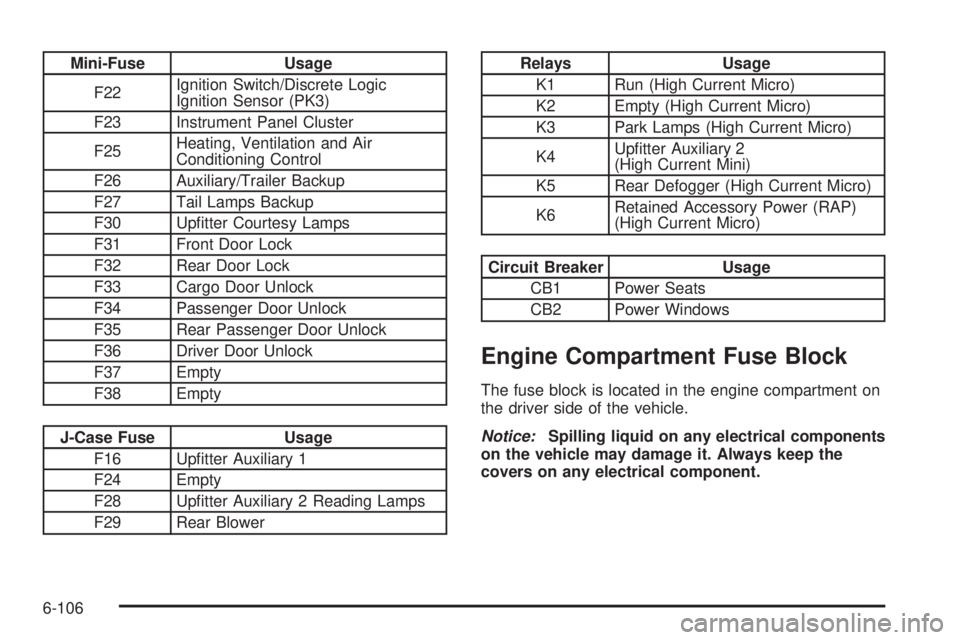
Mini-Fuse Usage
F22Ignition Switch/Discrete Logic
Ignition Sensor (PK3)
F23 Instrument Panel Cluster
F25Heating, Ventilation and Air
Conditioning Control
F26 Auxiliary/Trailer Backup
F27 Tail Lamps Backup
F30 Upfitter Courtesy Lamps
F31 Front Door Lock
F32 Rear Door Lock
F33 Cargo Door Unlock
F34 Passenger Door Unlock
F35 Rear Passenger Door Unlock
F36 Driver Door Unlock
F37 Empty
F38 Empty
J-Case Fuse Usage
F16 Upfitter Auxiliary 1
F24 Empty
F28 Upfitter Auxiliary 2 Reading Lamps
F29 Rear Blower
Relays Usage
K1 Run (High Current Micro)
K2 Empty (High Current Micro)
K3 Park Lamps (High Current Micro)
K4Upfitter Auxiliary 2
(High Current Mini)
K5 Rear Defogger (High Current Micro)
K6Retained Accessory Power (RAP)
(High Current Micro)
Circuit Breaker Usage
CB1 Power Seats
CB2 Power Windows
Engine Compartment Fuse Block
The fuse block is located in the engine compartment on
the driver side of the vehicle.
Notice:Spilling liquid on any electrical components
on the vehicle may damage it. Always keep the
covers on any electrical component.
6-106
Page 418 of 424
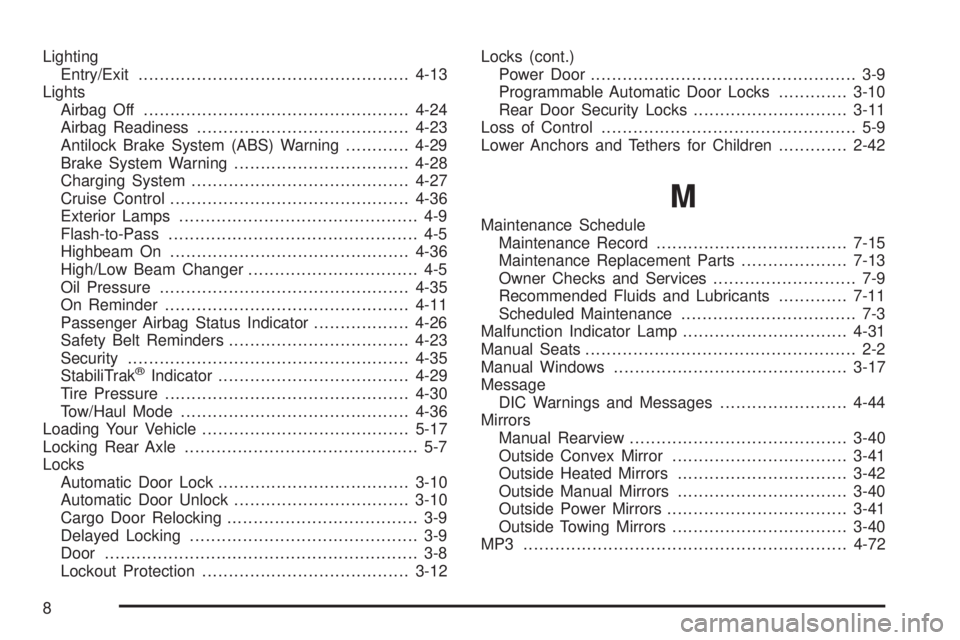
Lighting
Entry/Exit...................................................4-13
Lights
Airbag Off..................................................4-24
Airbag Readiness........................................4-23
Antilock Brake System (ABS) Warning............4-29
Brake System Warning.................................4-28
Charging System.........................................4-27
Cruise Control.............................................4-36
Exterior Lamps............................................. 4-9
Flash-to-Pass............................................... 4-5
Highbeam On.............................................4-36
High/Low Beam Changer................................ 4-5
Oil Pressure...............................................4-35
On Reminder..............................................4-11
Passenger Airbag Status Indicator..................4-26
Safety Belt Reminders..................................4-23
Security.....................................................4-35
StabiliTrak
®Indicator....................................4-29
Tire Pressure..............................................4-30
Tow/Haul Mode ...........................................4-36
Loading Your Vehicle.......................................5-17
Locking Rear Axle............................................ 5-7
Locks
Automatic Door Lock....................................3-10
Automatic Door Unlock.................................3-10
Cargo Door Relocking.................................... 3-9
Delayed Locking........................................... 3-9
Door ........................................................... 3-8
Lockout Protection.......................................3-12Locks (cont.)
Power Door.................................................. 3-9
Programmable Automatic Door Locks.............3-10
Rear Door Security Locks.............................3-11
Loss of Control................................................ 5-9
Lower Anchors and Tethers for Children.............2-42
M
Maintenance Schedule
Maintenance Record....................................7-15
Maintenance Replacement Parts....................7-13
Owner Checks and Services........................... 7-9
Recommended Fluids and Lubricants.............7-11
Scheduled Maintenance................................. 7-3
Malfunction Indicator Lamp...............................4-31
Manual Seats................................................... 2-2
Manual Windows............................................3-17
Message
DIC Warnings and Messages........................4-44
Mirrors
Manual Rearview.........................................3-40
Outside Convex Mirror.................................3-41
Outside Heated Mirrors................................3-42
Outside Manual Mirrors................................3-40
Outside Power Mirrors..................................3-41
Outside Towing Mirrors.................................3-40
MP3 .............................................................4-72
8
Page 421 of 424
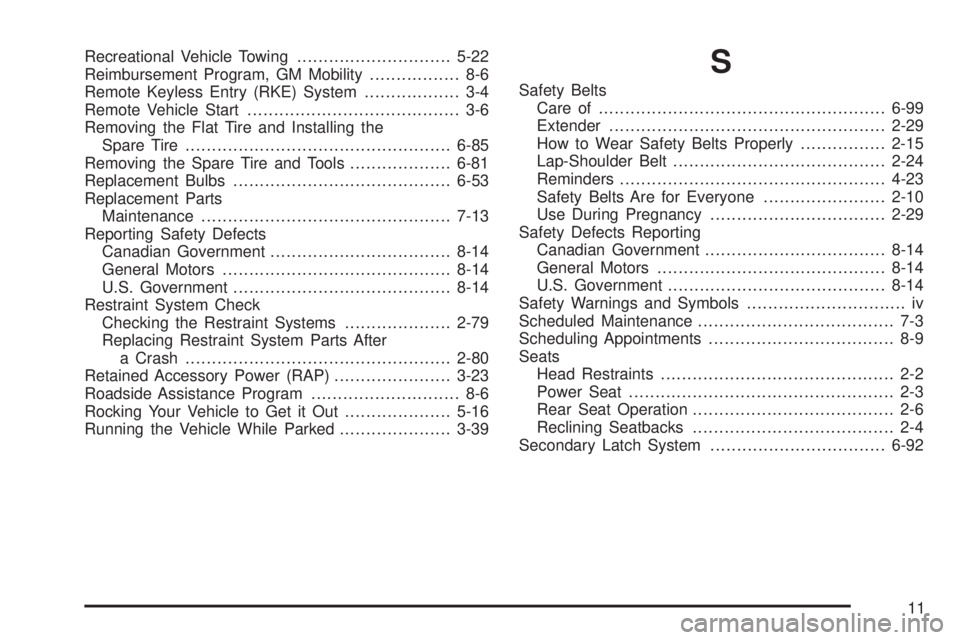
Recreational Vehicle Towing.............................5-22
Reimbursement Program, GM Mobility................. 8-6
Remote Keyless Entry (RKE) System.................. 3-4
Remote Vehicle Start........................................ 3-6
Removing the Flat Tire and Installing the
Spare Tire..................................................6-85
Removing the Spare Tire and Tools...................6-81
Replacement Bulbs.........................................6-53
Replacement Parts
Maintenance...............................................7-13
Reporting Safety Defects
Canadian Government..................................8-14
General Motors...........................................8-14
U.S. Government.........................................8-14
Restraint System Check
Checking the Restraint Systems....................2-79
Replacing Restraint System Parts After
a Crash..................................................2-80
Retained Accessory Power (RAP)......................3-23
Roadside Assistance Program............................ 8-6
Rocking Your Vehicle to Get it Out....................5-16
Running the Vehicle While Parked.....................3-39S
Safety Belts
Care of ......................................................6-99
Extender....................................................2-29
How to Wear Safety Belts Properly................2-15
Lap-Shoulder Belt........................................2-24
Reminders..................................................4-23
Safety Belts Are for Everyone.......................2-10
Use During Pregnancy.................................2-29
Safety Defects Reporting
Canadian Government..................................8-14
General Motors...........................................8-14
U.S. Government.........................................8-14
Safety Warnings and Symbols.............................. iv
Scheduled Maintenance..................................... 7-3
Scheduling Appointments................................... 8-9
Seats
Head Restraints............................................ 2-2
Power Seat.................................................. 2-3
Rear Seat Operation...................................... 2-6
Reclining Seatbacks...................................... 2-4
Secondary Latch System.................................6-92
11