air condition GMC SAVANA PASSENGER 2014 User Guide
[x] Cancel search | Manufacturer: GMC, Model Year: 2014, Model line: SAVANA PASSENGER, Model: GMC SAVANA PASSENGER 2014Pages: 408, PDF Size: 5.34 MB
Page 122 of 408
Black plate (18,1)GMC Savana Owner Manual (GMNA-Localizing-U.S./Canada-6014682) -
2014 - CRC 2nd Edition - 8/26/13
5-18 Instruments and Controls
as a system check. Then, after
several more seconds, the status
indicator will light either ON or OFF,
or either the on or off symbol to let
you know the status of the right front
passenger frontal airbag.
If the word ON or the on symbol is
lit on the passenger airbag status
indicator, it means that the right
front passenger frontal airbag is
enabled, and may inflate.
If the word OFF or the off symbol is
lit on the airbag status indicator, it
means that the passenger sensing
system has turned off the right front
passenger frontal airbag.
If, after several seconds, both status
indicator lights remain on, or if there
are no lights at all, there may be a
problem with the lights or the
passenger sensing system. See
your dealer for service.{Warning
If the airbag readiness light ever
comes on and stays on, it means
that something may be wrong
with the airbag system. To help
avoid injury to yourself or others,
have the vehicle serviced right
away. SeeAirbag Readiness
Light on page 5-15 for more
information, including important
safety information.
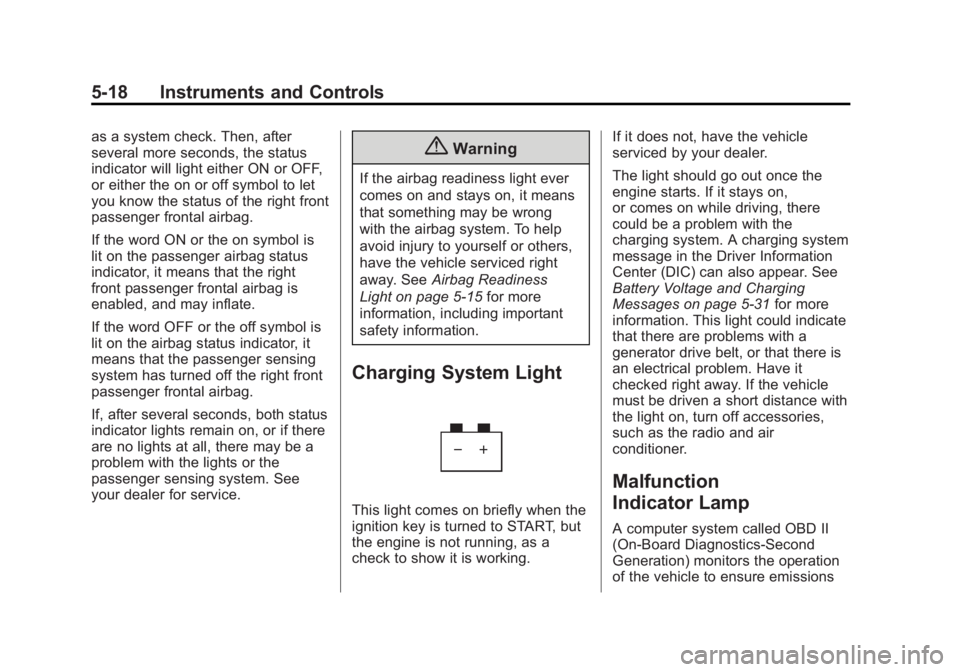
Charging System Light
This light comes on briefly when the
ignition key is turned to START, but
the engine is not running, as a
check to show it is working. If it does not, have the vehicle
serviced by your dealer.
The light should go out once the
engine starts. If it stays on,
or comes on while driving, there
could be a problem with the
charging system. A charging system
message in the Driver Information
Center (DIC) can also appear. See
Battery Voltage and Charging
Messages on page 5-31
for more
information. This light could indicate
that there are problems with a
generator drive belt, or that there is
an electrical problem. Have it
checked right away. If the vehicle
must be driven a short distance with
the light on, turn off accessories,
such as the radio and air
conditioner.
Malfunction
Indicator Lamp
A computer system called OBD II
(On-Board Diagnostics-Second
Generation) monitors the operation
of the vehicle to ensure emissions
Page 123 of 408
Black plate (19,1)GMC Savana Owner Manual (GMNA-Localizing-U.S./Canada-6014682) -
2014 - CRC 2nd Edition - 8/26/13
Instruments and Controls 5-19
are at acceptable levels, helping to
maintain a clean environment. The
malfunction indicator lamp comes
on when the vehicle is placed in
ON/RUN, as a check to show it is
working. If it does not, have the
vehicle serviced by your dealer. See
Ignition Positions on page 9-15.
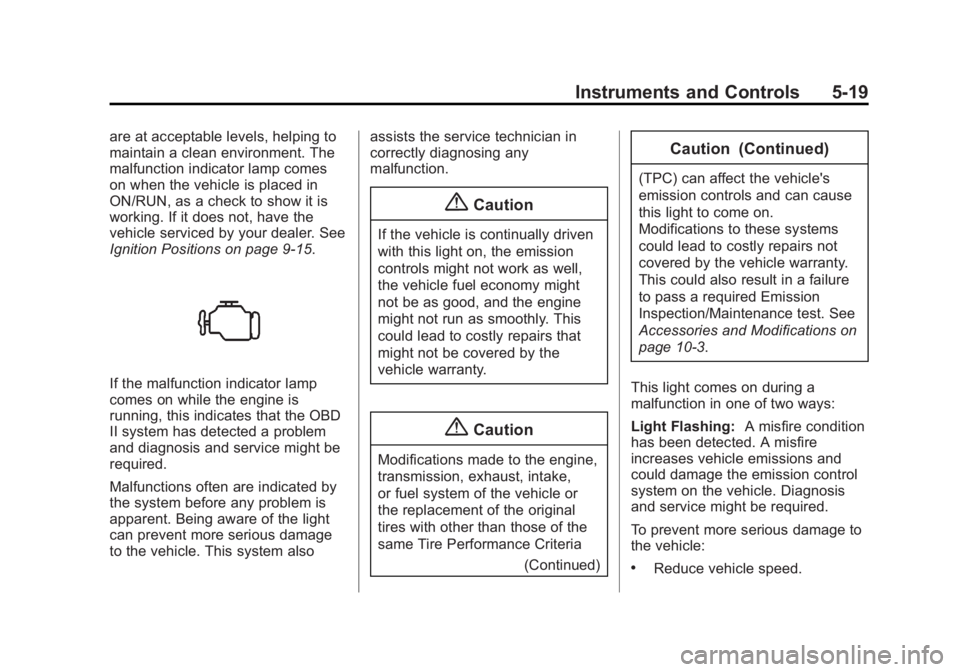
If the malfunction indicator lamp
comes on while the engine is
running, this indicates that the OBD
II system has detected a problem
and diagnosis and service might be
required.
Malfunctions often are indicated by
the system before any problem is
apparent. Being aware of the light
can prevent more serious damage
to the vehicle. This system alsoassists the service technician in
correctly diagnosing any
malfunction.
{Caution
If the vehicle is continually driven
with this light on, the emission
controls might not work as well,
the vehicle fuel economy might
not be as good, and the engine
might not run as smoothly. This
could lead to costly repairs that
might not be covered by the
vehicle warranty.
{Caution
Modifications made to the engine,
transmission, exhaust, intake,
or fuel system of the vehicle or
the replacement of the original
tires with other than those of the
same Tire Performance Criteria
(Continued)
Caution (Continued)
(TPC) can affect the vehicle's
emission controls and can cause
this light to come on.
Modifications to these systems
could lead to costly repairs not
covered by the vehicle warranty.
This could also result in a failure
to pass a required Emission
Inspection/Maintenance test. See
Accessories and Modifications on
page 10-3.
This light comes on during a
malfunction in one of two ways:
Light Flashing: A misfire condition
has been detected. A misfire
increases vehicle emissions and
could damage the emission control
system on the vehicle. Diagnosis
and service might be required.
To prevent more serious damage to
the vehicle:
.Reduce vehicle speed.
Page 136 of 408
Black plate (32,1)GMC Savana Owner Manual (GMNA-Localizing-U.S./Canada-6014682) -
2014 - CRC 2nd Edition - 8/26/13
5-32 Instruments and Controls
close the door again. Check to see
if the message still appears on
the DIC.
PASSENGER DOOR OPEN
This message displays and a chime
sounds if the passenger door is not
fully closed and the vehicle is in a
drive gear. Stop and turn off the
vehicle, check the door for
obstructions, and close the door
again. Check to see if the message
still appears on the DIC.
RIGHT REAR DOOR OPEN
On some vehicles, this message
displays and a chime sounds if the
passenger side rear door is not fully
closed and the vehicle is in a drive
gear. Stop and turn off the vehicle,
check the door for obstructions, and
close the door again. Check to see
if the message still appears on
the DIC.
Engine Cooling System
Messages
ENGINE HOT A/C (Air
Conditioning) OFF
This message displays when the
engine coolant becomes hotter than
the normal operating temperature.
SeeEngine Coolant Temperature
Gauge on page 5-13. To avoid
added strain on a hot engine, the air
conditioning compressor
automatically turns off. When the
coolant temperature returns to
normal, the air conditioning
compressor turns back on. You can
continue to drive the vehicle.
If this message continues to appear,
have the system repaired by your
dealer as soon as possible to avoid
damage to the engine.
ENGINE OVERHEATED IDLE
ENGINE
This message displays when the
engine coolant temperature is too
hot. Stop and allow the vehicle to
idle until it cools down. See Engine
Coolant Temperature Gauge on
page 5-13.
ENGINE OVERHEATED STOP
ENGINE
This message displays and a chime
sounds if the engine cooling system
reaches unsafe temperatures for
operation. Stop and turn off the
vehicle as soon as it is safe to do so
to avoid severe damage. This
message clears when the engine
has cooled to a safe operating
temperature.
Engine Oil Messages
CHANGE ENGINE OIL SOON
This message displays when the
engine oil needs to be changed.
When you change the engine oil, be
Page 140 of 408
Black plate (36,1)GMC Savana Owner Manual (GMNA-Localizing-U.S./Canada-6014682) -
2014 - CRC 2nd Edition - 8/26/13
5-36 Instruments and Controls
The message turns off as soon as
the conditions that caused the
message to be displayed are no
longer present.
Airbag System Messages
SERVICE AIR BAG
This message displays if there is a
problem with the airbag system.
Have your dealer inspect the
system for problems. SeeAirbag
Readiness Light on page 5-15 and
Airbag System on page 3-16 for
more information.
Security Messages
SERVICE THEFT DETERRENT
SYSTEM
This message displays when there
is a problem with the theft-deterrent
system. The vehicle may or may not
restart so you may want to take the
vehicle to your dealer before turning
off the engine. See Immobilizer
Operation on page 2-11 for more
information.
WAIT TO START
This message displays briefly when
the theft-deterrent system has
initially found incorrect conditions
within the vehicle and is making a
double check. If your vehicle does
not start soon after, try to start it
again. If it still does not start, have
your vehicle serviced by your
dealer.
Service Vehicle Messages
SERVICE A/C SYSTEM
This message displays when the
electronic sensors that control the
air conditioning and heating
systems are no longer working.
Have the climate control system
serviced by your dealer if you notice
a drop in heating and air
conditioning efficiency.
SERVICE VEHICLE SOON
This message displays when a
non-emissions related malfunction
occurs. Have the vehicle serviced
by your dealer as soon as possible.
STARTING DISABLED
SERVICE THROTTLE
This message displays if the starting
of the engine is disabled due to the
electronic throttle control system.
Have the vehicle serviced by your
dealer immediately.
This message only appears while
the ignition is in ON/RUN, and will
not disappear until the problem is
resolved.
This message cannot be
acknowledged.
Tire Messages
CHECK TIRE PRESSURE or
TIRE LOW ADD AIR TO TIRE
If the vehicle has the Tire Pressure
Monitor System (TPMS), this
message displays when the
pressure in one or more of the tires
is low. The low tire pressure warning
light will also come on. See Tire
Pressure Light on page 5-23. This
message will also indicate which tire
needs to be checked. You can
Page 142 of 408
Black plate (38,1)GMC Savana Owner Manual (GMNA-Localizing-U.S./Canada-6014682) -
2014 - CRC 2nd Edition - 8/26/13
5-38 Instruments and Controls
GRADE BRAKING ON
This message displays when the
grade braking has been activated
while driving on downhill grades.
This message will only appear the
first time the feature is activated in
an ignition cycle. SeeTow/Haul
Mode on page 9-29, Automatic
Transmission (Six Speed) on
page 9-22 orAutomatic
Transmission (Four Speed) on
page 9-26, and Cruise Control on
page 9-34.
SERVICE TRANSMISSION
This message displays when there
is a problem with the transmission.
See your dealer for service.
TRANSMISSION HOT IDLE
ENGINE
{Caution
Do not drive the vehicle while the
transmission fluid is overheating,
or the transmission can be
damaged. This could lead to
costly repairs that would not be
covered by the warranty.
This message displays along with a
chime if the transmission fluid in the
vehicle gets hot. Driving with the
transmission fluid temperature high
can cause damage to the vehicle.
Stop the vehicle and let it idle to
allow the transmission to cool. This
message clears and the chime
stops when the fluid temperature
reaches a safe level.
Vehicle Reminder
Messages
ICE POSSIBLE DRIVE
WITH CARE
This message displays when the
outside air temperature is cold
enough to create icy road
conditions. Adjust your driving
accordingly.
Page 187 of 408
Black plate (1,1)GMC Savana Owner Manual (GMNA-Localizing-U.S./Canada-6014682) -
2014 - CRC 2nd Edition - 8/26/13
Climate Controls 8-1
Climate Controls
Climate Control Systems
Climate Control Systems . . . . . . 8-1
Rear Heating System . . . . . . . . . 8-4
Rear Climate ControlSystem . . . . . . . . . . . . . . . . . . . . . . 8-4
Air Vents
Air Vents . . . . . . . . . . . . . . . . . . . . . . 8-7
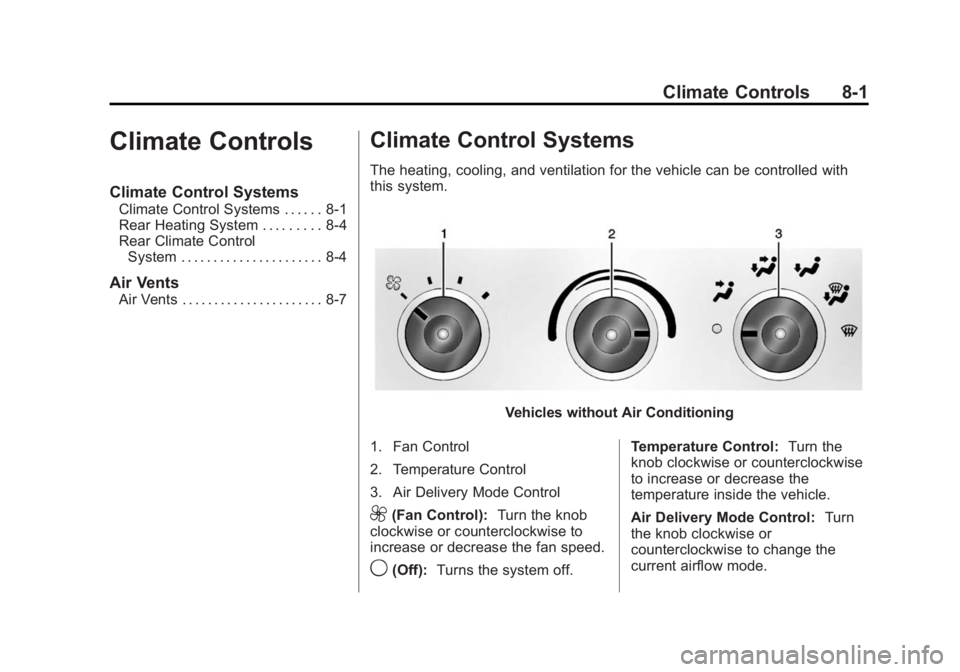
Climate Control Systems
The heating, cooling, and ventilation for the vehicle can be controlled with
this system.
Vehicles without Air Conditioning
1. Fan Control
2. Temperature Control
3. Air Delivery Mode Control
9(Fan Control): Turn the knob
clockwise or counterclockwise to
increase or decrease the fan speed.
9(Off): Turns the system off. Temperature Control:
Turn the
knob clockwise or counterclockwise
to increase or decrease the
temperature inside the vehicle.
Air Delivery Mode Control: Turn
the knob clockwise or
counterclockwise to change the
current airflow mode.
Page 188 of 408
Black plate (2,1)GMC Savana Owner Manual (GMNA-Localizing-U.S./Canada-6014682) -
2014 - CRC 2nd Edition - 8/26/13
8-2 Climate Controls
H(Vent):Air is directed to the
instrument panel outlets.
)(Bi-Level): Air is divided
between the instrument panel and
floor outlets, with some air directed
toward the windshield.
6(Floor): Air is directed to the
floor outlets with some air directed
to the windshield and side windows.
-(Defog): This mode clears the
windows of fog or moisture. Outside
air is directed to the floor and
defroster outlets. Adjust the
temperature knob for warmer or
cooler air. The air conditioning
compressor might turn on in this
setting to dehumidify the air.1(Defrost): This mode clears the
windshield of fog or frost more
quickly. Air is directed to the
windshield, with some to the floor
outlets and front side windows. The
air conditioning compressor might
turn on in this setting to dehumidify
the air.
Do not drive the vehicle until all the
windows are clear.
Page 189 of 408
Black plate (3,1)GMC Savana Owner Manual (GMNA-Localizing-U.S./Canada-6014682) -
2014 - CRC 2nd Edition - 8/26/13
Climate Controls 8-3
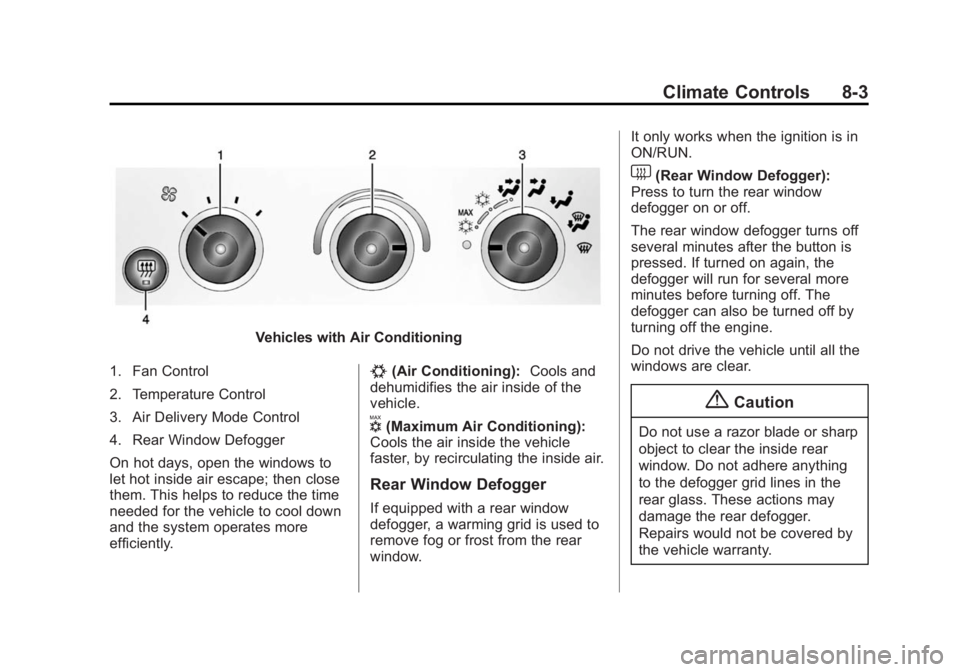
Vehicles with Air Conditioning
1. Fan Control
2. Temperature Control
3. Air Delivery Mode Control
4. Rear Window Defogger
On hot days, open the windows to
let hot inside air escape; then close
them. This helps to reduce the time
needed for the vehicle to cool down
and the system operates more
efficiently.
#(Air Conditioning): Cools and
dehumidifies the air inside of the
vehicle.
V(Maximum Air Conditioning):
Cools the air inside the vehicle
faster, by recirculating the inside air.
Rear Window Defogger
If equipped with a rear window
defogger, a warming grid is used to
remove fog or frost from the rear
window. It only works when the ignition is in
ON/RUN.
1(Rear Window Defogger):
Press to turn the rear window
defogger on or off.
The rear window defogger turns off
several minutes after the button is
pressed. If turned on again, the
defogger will run for several more
minutes before turning off. The
defogger can also be turned off by
turning off the engine.
Do not drive the vehicle until all the
windows are clear.
{Caution
Do not use a razor blade or sharp
object to clear the inside rear
window. Do not adhere anything
to the defogger grid lines in the
rear glass. These actions may
damage the rear defogger.
Repairs would not be covered by
the vehicle warranty.
Page 190 of 408
Black plate (4,1)GMC Savana Owner Manual (GMNA-Localizing-U.S./Canada-6014682) -
2014 - CRC 2nd Edition - 8/26/13
8-4 Climate Controls
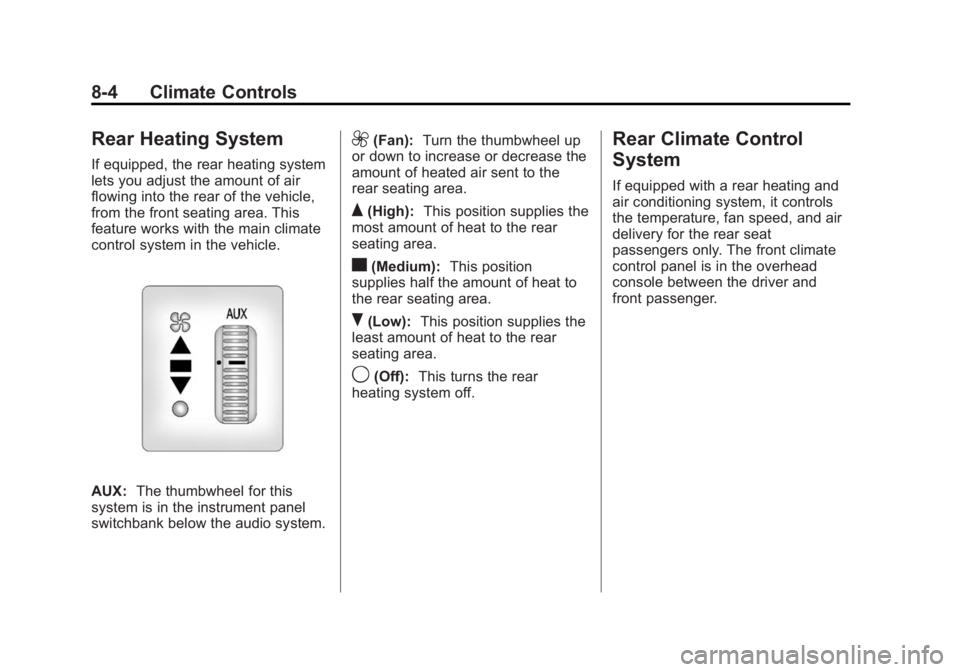
Rear Heating System
If equipped, the rear heating system
lets you adjust the amount of air
flowing into the rear of the vehicle,
from the front seating area. This
feature works with the main climate
control system in the vehicle.
AUX:The thumbwheel for this
system is in the instrument panel
switchbank below the audio system.
9(Fan): Turn the thumbwheel up
or down to increase or decrease the
amount of heated air sent to the
rear seating area.
Q(High): This position supplies the
most amount of heat to the rear
seating area.
c(Medium): This position
supplies half the amount of heat to
the rear seating area.
R(Low): This position supplies the
least amount of heat to the rear
seating area.
9(Off): This turns the rear
heating system off.
Rear Climate Control
System
If equipped with a rear heating and
air conditioning system, it controls
the temperature, fan speed, and air
delivery for the rear seat
passengers only. The front climate
control panel is in the overhead
console between the driver and
front passenger.
Page 192 of 408
Black plate (6,1)GMC Savana Owner Manual (GMNA-Localizing-U.S./Canada-6014682) -
2014 - CRC 2nd Edition - 8/26/13
8-6 Climate Controls
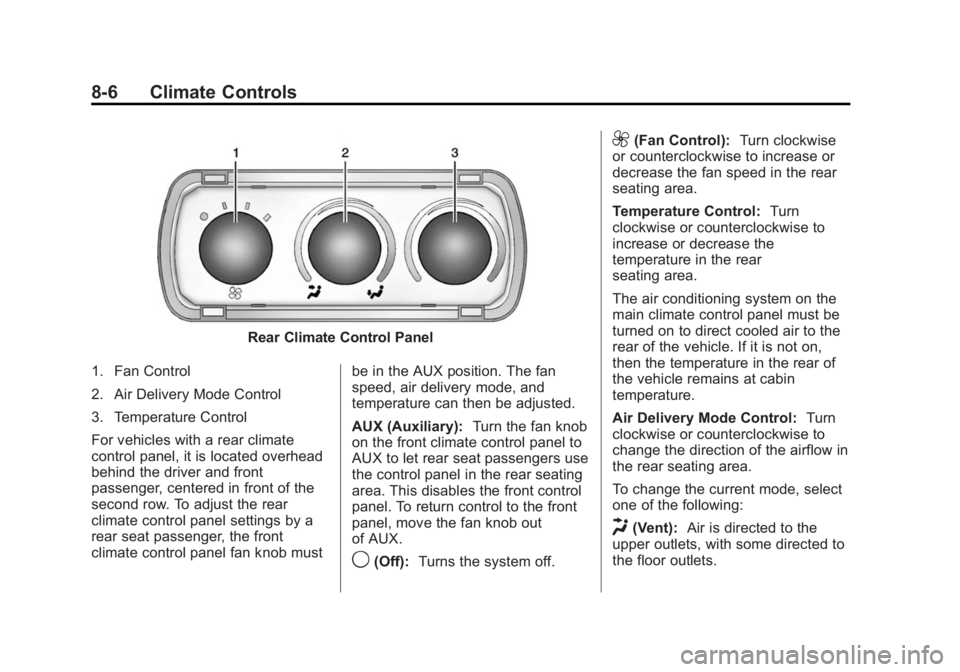
Rear Climate Control Panel
1. Fan Control
2. Air Delivery Mode Control
3. Temperature Control
For vehicles with a rear climate
control panel, it is located overhead
behind the driver and front
passenger, centered in front of the
second row. To adjust the rear
climate control panel settings by a
rear seat passenger, the front
climate control panel fan knob must be in the AUX position. The fan
speed, air delivery mode, and
temperature can then be adjusted.
AUX (Auxiliary):
Turn the fan knob
on the front climate control panel to
AUX to let rear seat passengers use
the control panel in the rear seating
area. This disables the front control
panel. To return control to the front
panel, move the fan knob out
of AUX.
9(Off): Turns the system off.
9(Fan Control): Turn clockwise
or counterclockwise to increase or
decrease the fan speed in the rear
seating area.
Temperature Control: Turn
clockwise or counterclockwise to
increase or decrease the
temperature in the rear
seating area.
The air conditioning system on the
main climate control panel must be
turned on to direct cooled air to the
rear of the vehicle. If it is not on,
then the temperature in the rear of
the vehicle remains at cabin
temperature.
Air Delivery Mode Control: Turn
clockwise or counterclockwise to
change the direction of the airflow in
the rear seating area.
To change the current mode, select
one of the following:
H(Vent): Air is directed to the
upper outlets, with some directed to
the floor outlets.