mirror GMC SAVANA PASSENGER 2015 User Guide
[x] Cancel search | Manufacturer: GMC, Model Year: 2015, Model line: SAVANA PASSENGER, Model: GMC SAVANA PASSENGER 2015Pages: 377, PDF Size: 5.11 MB
Page 184 of 377
Black plate (5,1)GMC Savana Owner Manual (GMNA-Localizing-U.S./Canada-7707482) -
2015 - crc - 6/3/14
Driving and Operating 9-5
.Steering or Cornering Skid—
too much speed or steering in a
curve causes tires to slip and
lose cornering force.
.Acceleration Skid —too much
throttle causes the driving
wheels to spin.
Defensive drivers avoid most skids
by taking reasonable care suited to
existing conditions, and by not
overdriving those conditions. But
skids are always possible.
If the vehicle starts to slide, follow
these suggestions:
.Ease your foot off the
accelerator pedal and steer the
way you want the vehicle to go.
The vehicle may straighten out.
Be ready for a second skid if it
occurs.
.Slow down and adjust your
driving according to weather
conditions. Stopping distance
can be longer and vehicle
control can be affected when
traction is reduced by water,
snow, ice, gravel, or other material on the road. Learn to
recognize warning clues
—such
as enough water, ice, or packed
snow on the road to make a
mirrored surface —and slow
down when you have any doubt.
.Try to avoid sudden steering,
acceleration, or braking,
including reducing vehicle speed
by shifting to a lower gear. Any
sudden changes could cause
the tires to slide.
Remember: Antilock brakes help
avoid only the braking skid.
Driving on Wet Roads
Rain and wet roads can reduce
vehicle traction and affect your
ability to stop and accelerate.
Always drive slower in these types
of driving conditions and avoid
driving through large puddles and
deep‐standing or flowing water.
{Warning
Wet brakes can cause crashes.
They might not work as well in a
quick stop and could cause
pulling to one side. You could
lose control of the vehicle.
After driving through a large
puddle of water or a car/vehicle
wash, lightly apply the brake
pedal until the brakes work
normally.
Flowing or rushing water creates
strong forces. Driving through
flowing water could cause the
vehicle to be carried away. If this
happens, you and other vehicle
occupants could drown. Do not
ignore police warnings and be
very cautious about trying to drive
through flowing water.
Page 186 of 377
Black plate (7,1)GMC Savana Owner Manual (GMNA-Localizing-U.S./Canada-7707482) -
2015 - crc - 6/3/14
Driving and Operating 9-7
Winter Driving
Driving on Snow or Ice
Drive carefully when there is snow
or ice between the tires and the
road, creating less traction or grip.
Wet ice can occur at about 0°C (32°
F) when freezing rain begins to fall,
resulting in even less traction. Avoid
driving on wet ice or in freezing rain
until roads can be treated with salt
or sand.
Drive with caution, whatever the
condition. Accelerate gently so
traction is not lost. Accelerating too
quickly causes the wheels to spin
and makes the surface under the
tires slick, so there is even less
traction.
If equipped, Traction Control should
be turned on. SeeTraction Control/
Electronic Stability Control on
page 9-29 The
Antilock Brake System (ABS)
on page 9-28 improves vehicle
stability during hard stops on a
slippery roads, but apply the brakes
sooner than when on dry pavement.
Allow greater following distance on
any slippery road and watch for
slippery spots. Icy patches can
occur on otherwise clear roads in
shaded areas. The surface of a
curve or an overpass can remain icy
when the surrounding roads are
clear. Avoid sudden steering
maneuvers and braking while
on ice.
Turn off cruise control, if equipped,
on slippery surfaces.
Blizzard Conditions
Being stuck in snow can be a
serious situation. Stay with the
vehicle unless there is help nearby.
If possible, use the Roadside
Assistance Program on page 13-5.
To get help and keep everyone in
the vehicle safe:
.Turn on the hazard warning
flashers.
.Tie a red cloth to an outside
mirror.
{Warning
Snow can trap engine exhaust
under the vehicle. This may
cause exhaust gases to get
inside. Engine exhaust contains
carbon monoxide (CO) which
cannot be seen or smelled. It can
cause unconsciousness and even
death.
(Continued)
Page 214 of 377
Black plate (35,1)GMC Savana Owner Manual (GMNA-Localizing-U.S./Canada-7707482) -
2015 - crc - 6/3/14
Driving and Operating 9-35
Driver Assistance
Systems
Parking Assist
If available, the Rear Parking Assist
(RPA) system uses sensors on the
rear bumper to assist with parking
and avoiding objects while in
R (Reverse).
{Warning
The parking assist system does
not detect children, pedestrians,
bicyclists, animals, or objects
below the bumper or that are too
close or too far from the vehicle.
It is not available at speeds
greater than 8 km/h (5 mph). To
prevent injury, death, or vehicle
damage, even with parking assist,
always check the area around the
vehicle and check all mirrors
before backing.
How the System Works
RPA comes on automatically when
the shift lever is moved into
R (Reverse). A single beep sounds
to indicate the system is working.
RPA operates only at speeds less
than 8 km/h (5 mph).
An obstacle detection is indicated
by beeps. The time between beeps
gets shorter as the vehicle
approaches the obstacle. Repeated
beeps are heard when the distance
is less than 30 cm (12 in).
To be detected, objects must be at
least 25 cm (10 in) off the ground
and below rear door level. Objects
must also be within 2.5 m (8 ft) from
the rear bumper. This distance may
be less during warmer or humid
weather.
Turning the System On and Off
The system can be disabled through
the Driver Information Center (DIC).
See“Park Assist” underDriver
Information Center (DIC) on
page 5-23. RPA defaults to the on setting each
time the vehicle is started.
Turn RPA off when towing a trailer.
When the System Does Not
Seem to Work Properly
The following messages may be
displayed on the DIC:
SERVICE PARK ASSIST:
If this
message occurs, take the vehicle to
your dealer for repair.
PARK ASSIST OFF: This message
occurs if the driver disables the
system or if the vehicle is driven
above 8 km/h (5 mph) in
R (Reverse).
PARK ASST BLOCKED SEE
OWNERS MANUAL: This
message can occur under the
following conditions:
.The sensors are not clean. Keep
the rear bumper free of mud,
dirt, snow, ice, slush, and frost.
The message may not clear until
frost or ice has melted all around
and inside the sensor.
Page 215 of 377
Black plate (36,1)GMC Savana Owner Manual (GMNA-Localizing-U.S./Canada-7707482) -
2015 - crc - 6/3/14
9-36 Driving and Operating
.A trailer is attached to the
vehicle, or a bicycle or an object
hanging out of the rear door
during the current or last drive
cycle. RPA will return to normal
operation after it is determined
the object is removed. This
could take a few drive cycles.
.A tow bar is attached to the
vehicle.
Other conditions may affect system
performance, such as vibrations
from a jackhammer or the
compression of air brakes on a very
large truck.
Rear Vision
Camera (RVC)
If available, the RVC system is
designed to help the driver when
backing up by displaying a view of
the area behind the vehicle.
{Warning
The RVC system does not display
children, pedestrians, bicyclists,
crossing traffic, animals, or any
other object located outside the
camera's field of view, below the
bumper, or under the vehicle.
Perceived distances may be
different from actual distances.
Do not back the vehicle using
only the RVC screen. Failure to
use proper care before backing
may result in injury, death,
or vehicle damage. Always check
behind and around the vehicle
before backing.
Vehicles without Navigation
System
When the vehicle is on and shifted
into R (Reverse), the video image
appears on the inside rearview
mirror. The video image disappears
after the vehicle is shifted out of
R (Reverse).
Vehicles with Navigation
System
When the vehicle is shifted into
R (Reverse), the video image
appears on the navigation screen.
After a delay, the navigation screen
displays the previous screen after
the vehicle is shifted out of
R (Reverse).
The delay that is received after
shifting out of R (Reverse) is
approximately 10 seconds. Return to
the previous screen sooner by
performing one of the following:
.Press a hard key on the
navigation system.
.Shift into P (Park).
.Reach a vehicle speed of
8 km/h (5 mph).
Symbols and Guidelines
The navigation system may have a
feature that allows for viewing
parking assist symbols and/or
guidelines on the navigation screen
while using the RVC. The Rear Park
Page 217 of 377

Black plate (38,1)GMC Savana Owner Manual (GMNA-Localizing-U.S./Canada-7707482) -
2015 - crc - 6/3/14
9-38 Driving and Operating
Displayed images may be further or
closer than they appear. The area
displayed is limited and objects that
are close to either corner of the
bumper or under the bumper do not
display.
When the System Does Not
Seem To Work Properly
The RVC system might not work
properly or display a clear image if:
.It is dark.
.The sun or the beam of
headlamps is shining directly
into the camera lens.
.Ice, snow, mud, or anything else
builds up on the camera lens.
Clean the lens, rinse it with
water, and wipe it with a soft
cloth.
.The back of the vehicle is in an
accident. The position and
mounting angle of the camera
can change or the camera can
be affected. Be sure to have the
camera and its position and
mounting angle checked at your
dealer.
The RVC system display in the
rearview mirror may turn off or not
appear as expected due to one of
the following conditions. If this
occurs, the left indicator light on the
mirror will flash.
.A slow flash may indicate a loss
of video signal, or no video
signal present during the reverse
cycle.
.A fast flash may indicate that the
display has been on for the
maximum allowable time during
a reverse cycle, or the display
has reached an Over
Temperature limit.
The fast flash conditions are
used to protect the video device
from high temperature
conditions. Once conditions
return to normal, the device will
reset and the indicator will stop
flashing.
During any of these fault conditions,
the display will be blank and the
indicator will flash while the vehicle
is in R (Reverse) or until the
conditions return to normal.
Page 224 of 377
Black plate (45,1)GMC Savana Owner Manual (GMNA-Localizing-U.S./Canada-7707482) -
2015 - crc - 6/3/14
Driving and Operating 9-45
Before starting, check all trailer hitch
parts and attachments, safety
chains, electrical connectors, lamps,
tires, and mirrors. If the trailer has
electric brakes, start the
combination moving and then apply
the trailer brake controller by hand
to be sure the brakes work.
During the trip, check occasionally
to be sure that the load is secure
and the lamps and any trailer
brakes still work.
Following Distance
Stay at least twice as far behind the
vehicle ahead as you would when
driving the vehicle without a trailer.
This can help to avoid heavy
braking and sudden turns.
Passing
More passing distance is needed
when towing a trailer. The
combination will not accelerate as
quickly and is longer so it is
necessary to go much farther
beyond the passed vehicle before
returning to the lane.
Backing Up
Hold the bottom of the steering
wheel with one hand. To move the
trailer to the left, move that hand to
the left. To move the trailer to the
right, move your hand to the right.
Always back up slowly and,
if possible, have someone
guide you.
Making Turns
{Caution
Making very sharp turns while
trailering could cause the trailer to
come in contact with the vehicle.
The vehicle could be damaged.
Avoid making very sharp turns
while trailering.
When turning with a trailer, make
wider turns than normal. Do this so
the trailer will not strike soft
shoulders, curbs, road signs, trees,
or other objects. Avoid jerky or
sudden maneuvers. Signal well in
advance. If the trailer turn signal bulbs burn
out, the arrows on the instrument
cluster will still flash for turns. It is
important to check occasionally to
be sure the trailer bulbs are still
working.
Driving on Grades
Reduce speed and shift to a lower
gear
before starting down a long or
steep downgrade. If the
transmission is not shifted down, the
brakes might get hot and no longer
work well.
Vehicles can tow in D (Drive). Shift
the transmission to a lower gear if
the transmission shifts too often
under heavy loads and/or hilly
conditions.
The Tow/Haul Mode may be used if
the transmission shifts too often.
See Tow/Haul Mode on page 9-27.
When towing at high altitude on
steep uphill grades, consider the
following: Engine coolant will boil at
a lower temperature than at normal
altitudes. If the engine is turned off
Page 272 of 377
Black plate (39,1)GMC Savana Owner Manual (GMNA-Localizing-U.S./Canada-7707482) -
2015 - crc - 6/3/14
Vehicle Care 10-39
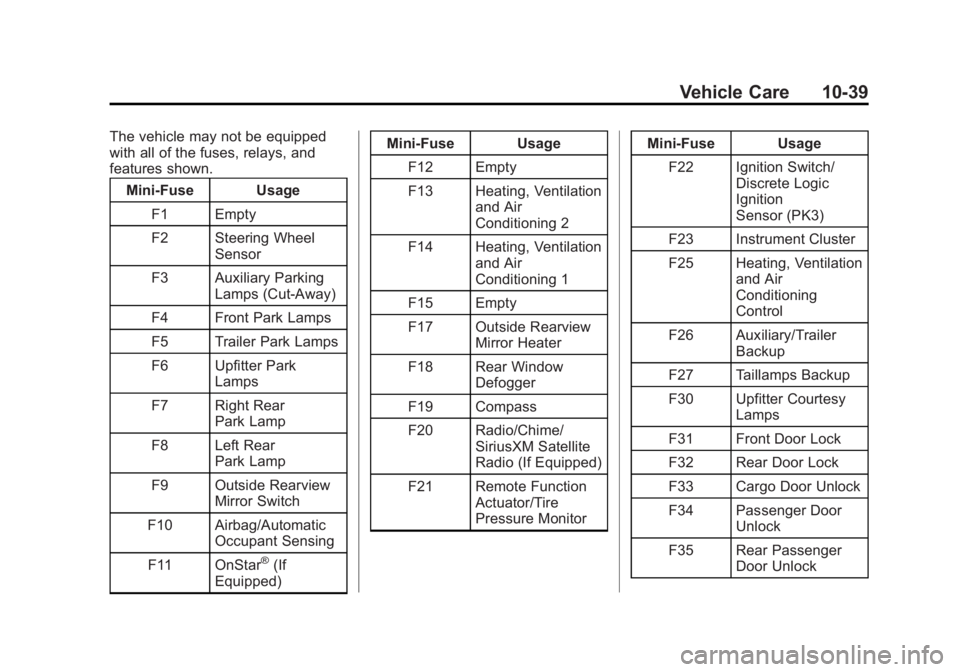
The vehicle may not be equipped
with all of the fuses, relays, and
features shown.Mini-Fuse Usage
F1 Empty
F2 Steering Wheel Sensor
F3 Auxiliary Parking Lamps (Cut-Away)
F4 Front Park Lamps
F5 Trailer Park Lamps
F6 Upfitter Park Lamps
F7 Right Rear Park Lamp
F8 Left Rear Park Lamp
F9 Outside Rearview Mirror Switch
F10 Airbag/Automatic Occupant Sensing
F11 OnStar
®(If
Equipped) Mini-Fuse Usage
F12 Empty
F13 Heating, Ventilation and Air
Conditioning 2
F14 Heating, Ventilation and Air
Conditioning 1
F15 Empty
F17 Outside Rearview Mirror Heater
F18 Rear Window Defogger
F19 Compass
F20 Radio/Chime/ SiriusXM Satellite
Radio (If Equipped)
F21 Remote Function Actuator/Tire
Pressure Monitor Mini-Fuse Usage
F22 Ignition Switch/ Discrete Logic
Ignition
Sensor (PK3)
F23 Instrument Cluster
F25 Heating, Ventilation and Air
Conditioning
Control
F26 Auxiliary/Trailer Backup
F27 Taillamps Backup
F30 Upfitter Courtesy Lamps
F31 Front Door Lock
F32 Rear Door Lock
F33 Cargo Door Unlock
F34 Passenger Door Unlock
F35 Rear Passenger Door Unlock
Page 368 of 377
Black plate (3,1)GMC Savana Owner Manual (GMNA-Localizing-U.S./Canada-7707482) -
2015 - crc - 6/3/14
INDEX i-3
CompartmentsStorage . . . . . . . . . . . . . . . . . . . . . . . . 4-1
Compass . . . . . . . . . . . . . . . . . . . . . . . 5-4 Messages . . . . . . . . . . . . . . . . . . . . 5-29
Connections OnStar
®. . . . . . . . . . . . . . . . . . . . . . 14-4
Control
Traction and ElectronicStability . . . . . . . . . . . . . . . . . . . . . 9-29
Control of a Vehicle . . . . . . . . . . . . . 9-3
Convex Mirrors . . . . . . . . . . . . . . . . 2-12
Coolant Engine . . . . . . . . . . . . . . . . . . . . . . 10-14
Engine TemperatureGauge . . . . . . . . . . . . . . . . . . . . . . 5-13
Cooling System . . . . . . . . . . . . . . . 10-13
Engine Messages . . . . . . . . . . . . 5-30
Courtesy Transportation Program . . . . . . . . . . . . . . . . . . . . . . 13-8
Cruise Control . . . . . . . . . . . . . . . . . 9-32 Light . . . . . . . . . . . . . . . . . . . . . . . . . . 5-23
Customer Assistance . . . . . . . . . . 13-4 Offices . . . . . . . . . . . . . . . . . . . . . . . . 13-3
Text Telephone (TTY)Users . . . . . . . . . . . . . . . . . . . . . . . 13-4 Customer Information
Service Publications
Ordering Information . . . . . . .13-11
Customer Satisfaction Procedure . . . . . . . . . . . . . . . . . . . . 13-1
D
Damage Repair, Collision . . . . . . 13-9
Danger, Warnings, andCautions . . . . . . . . . . . . . . . . . . . . . . . . iv
Daytime Running Lamps (DRL) . . . . . . . . . . . . . . . . . . 6-2
Defensive Driving . . . . . . . . . . . . . . . 9-2
Delayed Locking . . . . . . . . . . . . . . . . 2-7
Devices
Auxiliary . . . . . . . . . . . . . . . . . . . . . . 7-16
Distracted Driving . . . . . . . . . . . . . . . 9-2
Dome Lamps . . . . . . . . . . . . . . . . . . . 6-5
Door Ajar Messages . . . . . . . . . . . . . . . 5-29
Cargo Door Relocking . . . . . . . . . 2-7
Delayed Locking . . . . . . . . . . . . . . . 2-7
Locks . . . . . . . . . . . . . . . . . . . . . . . . . . 2-6
Power Locks . . . . . . . . . . . . . . . . . . . 2-7 Door (cont'd)
Rear Doors . . . . . . . . . . . . . . . . . . . 2-10
Side . . . . . . . . . . . . . . . . . . . . . . . . . . . 2-8
Sliding . . . . . . . . . . . . . . . . . . . . . . . . . 2-9
Drive Belt Routing, Engine . . . . . 12-4
Driver Information Center (DIC) . . . . . . . . . . . . . . . . . 5-23
Driving Characteristics and
Towing Tips . . . . . . . . . . . . . . . . . 9-44
Defensive . . . . . . . . . . . . . . . . . . . . . . 9-2
Drunk . . . . . . . . . . . . . . . . . . . . . . . . . . 9-3
For Better Fuel Economy . . . . . 1-19
Hill and Mountain Roads . . . . . . . 9-6
If the Vehicle is Stuck . . . . . . . . . . 9-8
Loss of Control . . . . . . . . . . . . . . . . 9-4
Off-Road Recovery . . . . . . . . . . . . 9-4
Vehicle Load Limits . . . . . . . . . . . . 9-9
Wet Roads . . . . . . . . . . . . . . . . . . . . 9-5
Winter . . . . . . . . . . . . . . . . . . . . . . . . . 9-7
Dual Tire Rotation . . . . . . . . . . . . . . . . . . . . 10-56
Page 370 of 377
Black plate (5,1)GMC Savana Owner Manual (GMNA-Localizing-U.S./Canada-7707482) -
2015 - crc - 6/3/14
INDEX i-5
Fuel (cont'd)Low Fuel Warning Light . . . . . . . 5-22
Requirements, California . . . . . 9-40
System Messages . . . . . . . . . . . . 5-31
Full-Size Spare Tire . . . . . . . . . . 10-73
Fuses Engine CompartmentFuse Block . . . . . . . . . . . . . . . . 10-34
Floor Console Fuse Block . . 10-38
Fuses and Circuit
Breakers . . . . . . . . . . . . . . . . . . 10-34
G
GaugesEngine CoolantTemperature . . . . . . . . . . . . . . . . 5-13
Engine Oil Pressure . . . . . . . . . . 5-12
Fuel . . . . . . . . . . . . . . . . . . . . . . . . . . 5-11
Odometer . . . . . . . . . . . . . . . . . . . . . 5-11
Speedometer . . . . . . . . . . . . . . . . . 5-11
Trip Odometer . . . . . . . . . . . . . . . . 5-11
Voltmeter . . . . . . . . . . . . . . . . . . . . . 5-13
Warning Lights and Indicators . . . . . . . . . . . . . . . . . . . . 5-9 General Information
Service and Maintenance . . . . . 11-1
Towing . . . . . . . . . . . . . . . . . . . . . . . . 9-44
Vehicle Care . . . . . . . . . . . . . . . . . . 10-2
Glass, Enhanced Technology . . . . . . . . . . . . . . . . . . . 2-16
GM Mobility Reimbursement
Program . . . . . . . . . . . . . . . . . . . . . . 13-5
H
Halogen Bulbs . . . . . . . . . . . . . . . . 10-28
Hazard Warning Flashers . . . . . . . 6-4
Head Restraints . . . . . . . . . . . . . . . . 3-2
Headlamps . . . . . . . . . . . . . . . . . . . 10-29Aiming . . . . . . . . . . . . . . . . . . . . . . 10-28
Automatic . . . . . . . . . . . . . . . . . . . . . . 6-3
Bulb Replacement . . . . . . . . . . 10-28
Daytime RunningLamps (DRL) . . . . . . . . . . . . . . . . . 6-2
Flash-to-Pass . . . . . . . . . . . . . . . . . . 6-2
High-Beam On Light . . . . . . . . . . 5-23
High/Low Beam Changer . . . . . . 6-2
Heated Mirrors . . . . . . . . . . . . . . . . . 2-13
Heater
Engine . . . . . . . . . . . . . . . . . . . . . . . . 9-18 Heating and Air Conditioning . . . 8-1
High-Beam On Light . . . . . . . . . . . 5-23
Hill and Mountain Roads . . . . . . . . 9-6
Hood . . . . . . . . . . . . . . . . . . . . . . . . . . 10-4
Horn . . . . . . . . . . . . . . . . . . . . . . . . . . . . 5-3
How to Wear Safety Belts
Properly . . . . . . . . . . . . . . . . . . . . . . . 3-9
I
Idle System
Fast . . . . . . . . . . . . . . . . . . . . . . . . . . 9-17
Ignition Positions . . . . . . . . . . . . . . 9-14
Ignition Transmission Lock Check . . . . . . . . . . . . . . . . . . . . . . . 10-27
Immobilizer . . . . . . . . . . . . . . . . . . . . 2-11
Infants and Young Children, Restraints . . . . . . . . . . . . . . . . . . . . 3-29
Infotainment . . . . . . . . . . . . . . . . . . . . 7-1
Instrument Cluster . . . . . . . . . . . . . 5-10
Interior Rearview Mirrors . . . . . . . 2-14
Introduction . . . . . . . . . . . . . . . . . . . . . . . iii
Page 372 of 377
Black plate (7,1)GMC Savana Owner Manual (GMNA-Localizing-U.S./Canada-7707482) -
2015 - crc - 6/3/14
INDEX i-7
Maintenance and CareAdditional . . . . . . . . . . . . . . . . . . . . . 11-7
Maintenance Schedule . . . . . . . . 11-3 Recommended Fluidsand Lubricants . . . . . . . . . . . . .11-10
Malfunction Indicator Lamp . . . . 5-16
Manual Mirrors . . . . . . . . . . . . . . . . 2-12
Manual Mode . . . . . . . . . . . . . . . . . . 9-26
Manual Windows . . . . . . . . . . . . . . 2-14
Messages Airbag System . . . . . . . . . . . . . . . . 5-34
Battery Voltage and
Charging . . . . . . . . . . . . . . . . . . . . 5-29
Brake System . . . . . . . . . . . . . . . . 5-29
Compass . . . . . . . . . . . . . . . . . . . . . 5-29
Door Ajar . . . . . . . . . . . . . . . . . . . . . 5-29
Engine Cooling System . . . . . . . 5-30
Engine Oil . . . . . . . . . . . . . . . . . . . . 5-30
Engine Power . . . . . . . . . . . . . . . . 5-31
Fuel System . . . . . . . . . . . . . . . . . . 5-31
Key and Lock . . . . . . . . . . . . . . . . . 5-32
Lamp . . . . . . . . . . . . . . . . . . . . . . . . . 5-32
Object Detection System . . . . . 5-32
Ride Control System . . . . . . . . . . 5-32
Security . . . . . . . . . . . . . . . . . . . . . . 5-34
Service Vehicle . . . . . . . . . . . . . . . 5-34 Messages (cont'd)
Tire . . . . . . . . . . . . . . . . . . . . . . . . . . . 5-35
Transmission . . . . . . . . . . . . . . . . . 5-35
Vehicle . . . . . . . . . . . . . . . . . . . . . . . 5-28
Vehicle Reminder . . . . . . . . . . . . . 5-36
Mirrors Convex . . . . . . . . . . . . . . . . . . . . . . . 2-12
Heated . . . . . . . . . . . . . . . . . . . . . . . 2-13
Manual . . . . . . . . . . . . . . . . . . . . . . . 2-12
Manual Rearview . . . . . . . . . . . . . 2-14
Power . . . . . . . . . . . . . . . . . . . . . . . . 2-13
Trailer Tow . . . . . . . . . . . . . . . . . . . . 2-13
Mirrors, Interior Rearview . . . . . . 2-14
Monitor System, Tire Pressure . . . . . . . . . . . . . . . . . . . . 10-50
N
NavigationOnStar®. . . . . . . . . . . . . . . . . . . . . . 14-3
Vehicle Data Recording
and Privacy . . . . . . . . . . . . . . . 13-15
New Vehicle Break-In . . . . . . . . . . 9-14
Noise Control System . . . . . . . . 10-25
O
Object Detection System Messages . . . . . . . . . . . . . . . . . . . . 5-32
Odometer . . . . . . . . . . . . . . . . . . . . . . 5-11 Trip . . . . . . . . . . . . . . . . . . . . . . . . . . . 5-11
Off-Road Recovery . . . . . . . . . . . . . . . . . . . . . . 9-4
Oil Engine . . . . . . . . . . . . . . . . . . . . . . . . 10-6
Engine Oil Life System . . . . . . . 10-8
Engine Oil PressureGauge . . . . . . . . . . . . . . . . . . . . . . 5-12
Messages . . . . . . . . . . . . . . . . . . . . 5-30
Pressure Light . . . . . . . . . . . . . . . . 5-22
Older Children, Restraints . . . . . 3-27
Online Owner Center . . . . . . . . . . 13-4
OnStar . . . . . . . . . . . . . . . . . . . . . . . 13-15
OnStar
®
System, In Brief . . . . . . . . . . . . . . 1-20
OnStar®Additional
Information . . . . . . . . . . . . . . . . . . . 14-6
OnStar
®Connections . . . . . . . . . . 14-4
OnStar®Emergency . . . . . . . . . . . 14-2
OnStar®Navigation . . . . . . . . . . . . 14-3
OnStar®Overview . . . . . . . . . . . . . 14-1
OnStar®Security . . . . . . . . . . . . . . 14-3