park assist GMC SAVANA PASSENGER 2015 Owners Manual
[x] Cancel search | Manufacturer: GMC, Model Year: 2015, Model line: SAVANA PASSENGER, Model: GMC SAVANA PASSENGER 2015Pages: 377, PDF Size: 5.11 MB
Page 8 of 377
Black plate (1,1)GMC Savana Owner Manual (GMNA-Localizing-U.S./Canada-7707482) -
2015 - crc - 6/3/14
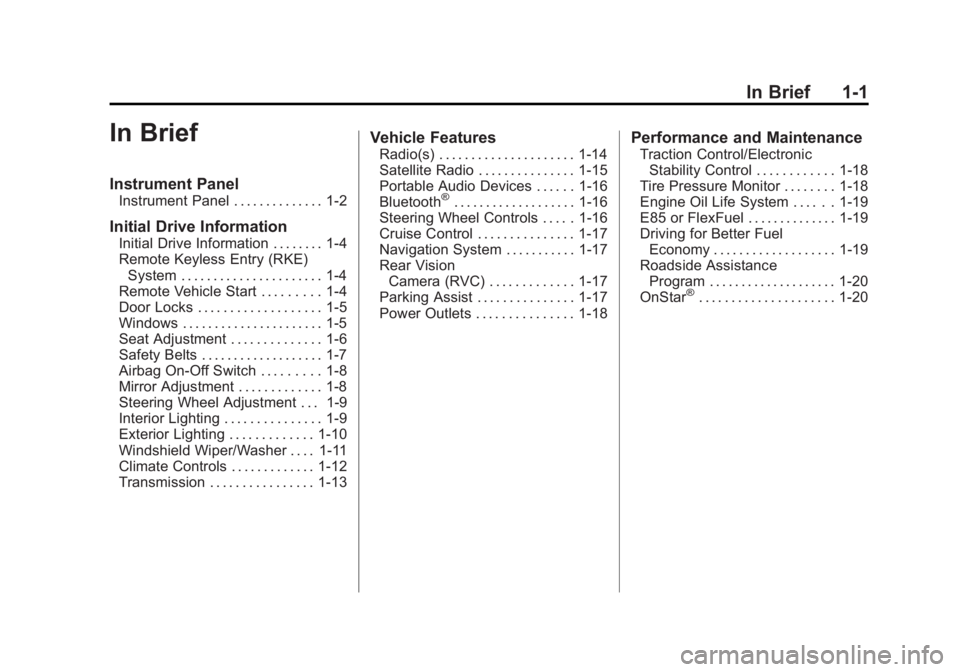
In Brief 1-1
In Brief
Instrument Panel
Instrument Panel . . . . . . . . . . . . . . 1-2
Initial Drive Information
Initial Drive Information . . . . . . . . 1-4
Remote Keyless Entry (RKE)System . . . . . . . . . . . . . . . . . . . . . . 1-4
Remote Vehicle Start . . . . . . . . . 1-4
Door Locks . . . . . . . . . . . . . . . . . . . 1-5
Windows . . . . . . . . . . . . . . . . . . . . . . 1-5
Seat Adjustment . . . . . . . . . . . . . . 1-6
Safety Belts . . . . . . . . . . . . . . . . . . . 1-7
Airbag On-Off Switch . . . . . . . . . 1-8
Mirror Adjustment . . . . . . . . . . . . . 1-8
Steering Wheel Adjustment . . . 1-9
Interior Lighting . . . . . . . . . . . . . . . 1-9
Exterior Lighting . . . . . . . . . . . . . 1-10
Windshield Wiper/Washer . . . . 1-11
Climate Controls . . . . . . . . . . . . . 1-12
Transmission . . . . . . . . . . . . . . . . 1-13
Vehicle Features
Radio(s) . . . . . . . . . . . . . . . . . . . . . 1-14
Satellite Radio . . . . . . . . . . . . . . . 1-15
Portable Audio Devices . . . . . . 1-16
Bluetooth
®. . . . . . . . . . . . . . . . . . . 1-16
Steering Wheel Controls . . . . . 1-16
Cruise Control . . . . . . . . . . . . . . . 1-17
Navigation System . . . . . . . . . . . 1-17
Rear Vision
Camera (RVC) . . . . . . . . . . . . . 1-17
Parking Assist . . . . . . . . . . . . . . . 1-17
Power Outlets . . . . . . . . . . . . . . . 1-18
Performance and Maintenance
Traction Control/Electronic Stability Control . . . . . . . . . . . . 1-18
Tire Pressure Monitor . . . . . . . . 1-18
Engine Oil Life System . . . . . . 1-19
E85 or FlexFuel . . . . . . . . . . . . . . 1-19
Driving for Better Fuel Economy . . . . . . . . . . . . . . . . . . . 1-19
Roadside Assistance Program . . . . . . . . . . . . . . . . . . . . 1-20
OnStar
®. . . . . . . . . . . . . . . . . . . . . 1-20
Page 24 of 377
Black plate (17,1)GMC Savana Owner Manual (GMNA-Localizing-U.S./Canada-7707482) -
2015 - crc - 6/3/14
In Brief 1-17
¨:Press to seek the next radio
station, the next track while sourced
to the CD, or to select tracks and
folders on an iPod
®or USB device.
For more information, see Steering
Wheel Controls on page 5-2.
Cruise Control
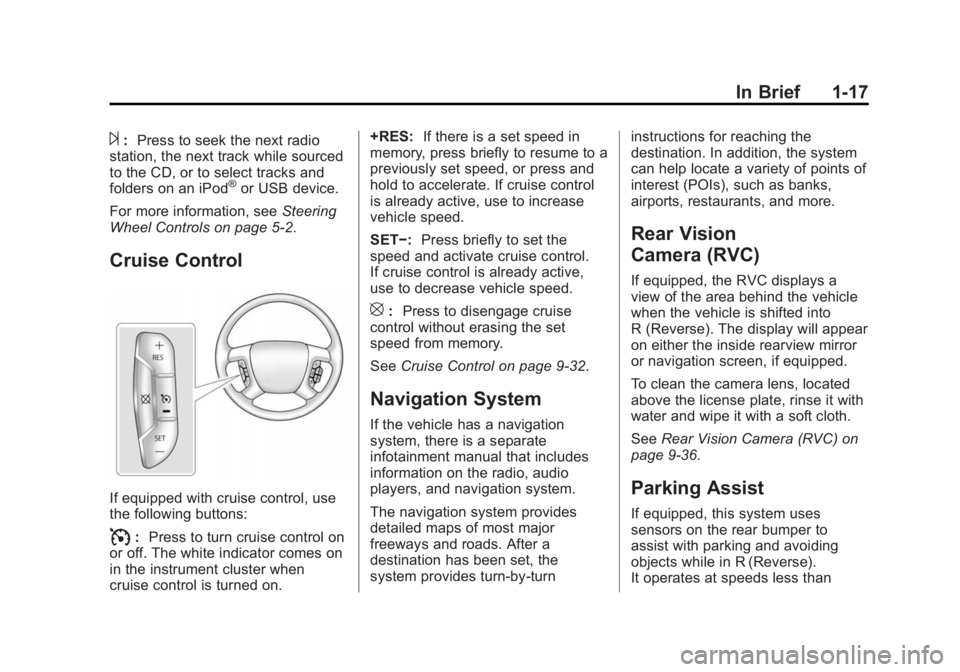
If equipped with cruise control, use
the following buttons:
I: Press to turn cruise control on
or off. The white indicator comes on
in the instrument cluster when
cruise control is turned on. +RES:
If there is a set speed in
memory, press briefly to resume to a
previously set speed, or press and
hold to accelerate. If cruise control
is already active, use to increase
vehicle speed.
SET−: Press briefly to set the
speed and activate cruise control.
If cruise control is already active,
use to decrease vehicle speed.
[: Press to disengage cruise
control without erasing the set
speed from memory.
See Cruise Control on page 9-32.
Navigation System
If the vehicle has a navigation
system, there is a separate
infotainment manual that includes
information on the radio, audio
players, and navigation system.
The navigation system provides
detailed maps of most major
freeways and roads. After a
destination has been set, the
system provides turn-by-turn instructions for reaching the
destination. In addition, the system
can help locate a variety of points of
interest (POIs), such as banks,
airports, restaurants, and more.
Rear Vision
Camera (RVC)
If equipped, the RVC displays a
view of the area behind the vehicle
when the vehicle is shifted into
R (Reverse). The display will appear
on either the inside rearview mirror
or navigation screen, if equipped.
To clean the camera lens, located
above the license plate, rinse it with
water and wipe it with a soft cloth.
See
Rear Vision Camera (RVC) on
page 9-36.
Parking Assist
If equipped, this system uses
sensors on the rear bumper to
assist with parking and avoiding
objects while in R (Reverse).
It operates at speeds less than
Page 25 of 377
Black plate (18,1)GMC Savana Owner Manual (GMNA-Localizing-U.S./Canada-7707482) -
2015 - crc - 6/3/14
1-18 In Brief
8 km/h (5 mph). Rear Parking Assist
(RPA) uses audible beeps to
provide distance and system
information.
Keep the sensors on the vehicle's
rear bumper clean to ensure proper
operation.
SeeParking Assist on page 9-35.
Power Outlets
The accessory power outlets can be
used to plug in electrical equipment,
such as a cell phone or an MP3
player.
The vehicle may have two
accessory power outlets on the
instrument panel.
Remove the cover to access and
replace when not in use.
SeePower Outlets on page 5-7.
Performance and
Maintenance
Traction Control/
Electronic Stability
Control
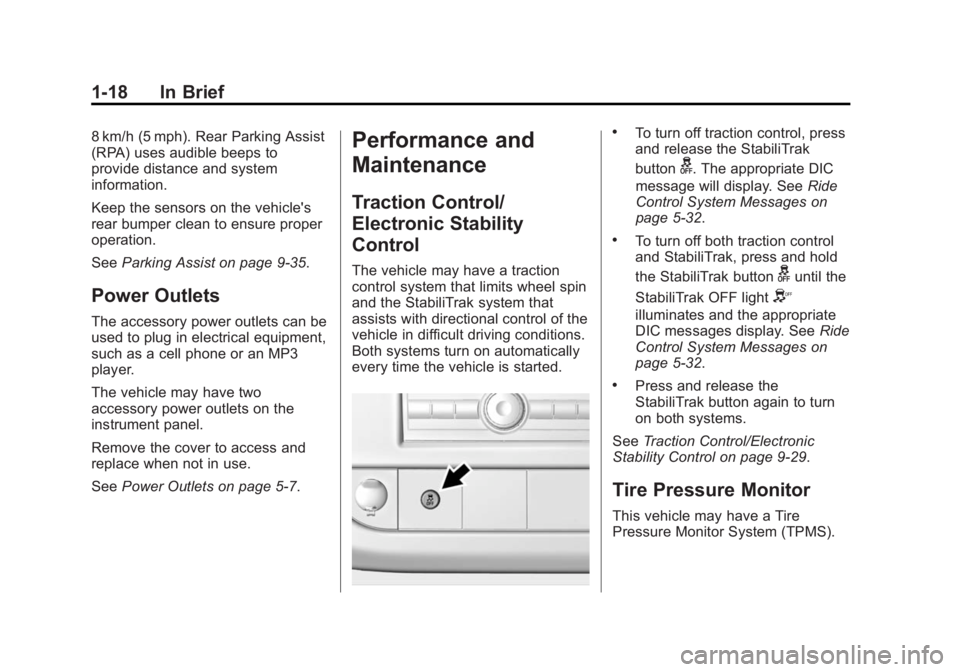
The vehicle may have a traction
control system that limits wheel spin
and the StabiliTrak system that
assists with directional control of the
vehicle in difficult driving conditions.
Both systems turn on automatically
every time the vehicle is started.
.To turn off traction control, press
and release the StabiliTrak
button
g. The appropriate DIC
message will display. See Ride
Control System Messages on
page 5-32.
.To turn off both traction control
and StabiliTrak, press and hold
the StabiliTrak button
guntil the
StabiliTrak OFF light
Y
illuminates and the appropriate
DIC messages display. See Ride
Control System Messages on
page 5-32.
.Press and release the
StabiliTrak button again to turn
on both systems.
See Traction Control/Electronic
Stability Control on page 9-29.
Tire Pressure Monitor
This vehicle may have a Tire
Pressure Monitor System (TPMS).
Page 113 of 377

Black plate (18,1)GMC Savana Owner Manual (GMNA-Localizing-U.S./Canada-7707482) -
2015 - crc - 6/3/14
5-18 Instruments and Controls
.Avoid hard accelerations.
.Avoid steep uphill grades.
.If towing a trailer, reduce the
amount of cargo being hauled as
soon as it is possible.
If the light continues to flash, find a
safe place to stop and park the
vehicle. Turn the vehicle off, wait at
least 10 seconds, and restart the
engine. If the light is still flashing,
follow the previous steps and see
your dealer for service as soon as
possible.
Light On Steady: An emission
control system malfunction has
been detected on the vehicle.
Diagnosis and service might be
required.
The following may correct an
emission control system
malfunction:
.Check that the fuel cap is fully
installed. See Filling the Tank on
page 9-41. The diagnostic
system may be able to
determine if the fuel cap has been left off or improperly
installed. A loose or missing fuel
cap could allow fuel to evaporate
into the atmosphere. A few
driving trips with the cap
properly installed may turn the
light off.
.Check that good quality fuel is
used. Poor fuel quality causes
the engine not to run as
efficiently as designed and may
cause stalling after start-up,
stalling when the vehicle is
changed into gear, misfiring,
hesitation on acceleration,
or stumbling on acceleration.
These conditions might go away
once the engine is warmed up.
If this occurs, change the fuel
brand used. It may require at
least one full tank of the proper
fuel to turn the light off.
See Fuel on page 9-39.
If the light remains on, your dealer
can check the vehicle. The dealer
has the proper test equipment and diagnostic tools to fix any
mechanical or electrical problems
that might have developed.
Emissions Inspection and
Maintenance Programs
Depending on where you live, your
vehicle may be required to
participate in an emission control
system inspection and maintenance
program. For the inspection, the
emission system test equipment will
likely connect to the vehicle's Data
Link Connector (DLC).
The DLC is under the instrument
panel to the left of the steering
wheel. See your dealer if assistance
is needed.
Page 114 of 377
Black plate (19,1)GMC Savana Owner Manual (GMNA-Localizing-U.S./Canada-7707482) -
2015 - crc - 6/3/14
Instruments and Controls 5-19
The vehicle may not pass
inspection if:
.The malfunction indicator lamp is
on with the engine running, or if
the light does not come on when
the ignition is turned to ON/RUN
while the engine is off. See your
dealer for assistance in verifying
proper operation of the
malfunction indicator lamp.
.The OBD II (On-Board
Diagnostics) system determines
that critical emission control
systems have not been
completely diagnosed. The
vehicle would be considered not
ready for inspection. This can
happen if the 12-volt battery has
recently been replaced or
run down.
The diagnostic system is designed
to evaluate critical emission control
systems during normal driving. This
can take several days of routine
driving. If this has been done and
the vehicle still does not pass the inspection for lack of OBD II system
readiness, your dealer can prepare
the vehicle for inspection.
Brake System Warning
Light
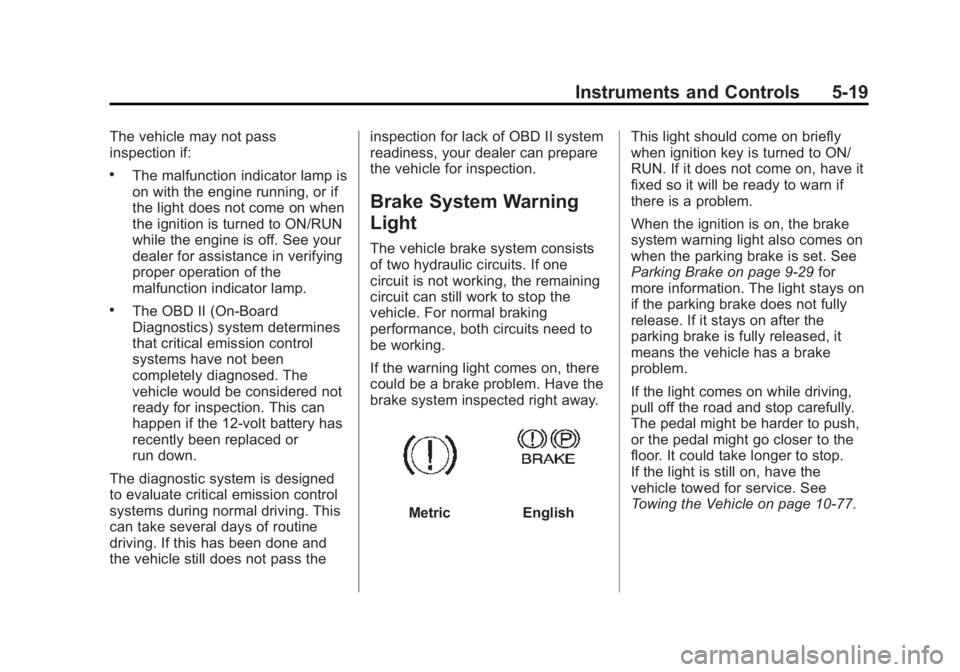
The vehicle brake system consists
of two hydraulic circuits. If one
circuit is not working, the remaining
circuit can still work to stop the
vehicle. For normal braking
performance, both circuits need to
be working.
If the warning light comes on, there
could be a brake problem. Have the
brake system inspected right away.
MetricEnglish
This light should come on briefly
when ignition key is turned to ON/
RUN. If it does not come on, have it
fixed so it will be ready to warn if
there is a problem.
When the ignition is on, the brake
system warning light also comes on
when the parking brake is set. See
Parking Brake on page 9-29
for
more information. The light stays on
if the parking brake does not fully
release. If it stays on after the
parking brake is fully released, it
means the vehicle has a brake
problem.
If the light comes on while driving,
pull off the road and stop carefully.
The pedal might be harder to push,
or the pedal might go closer to the
floor. It could take longer to stop.
If the light is still on, have the
vehicle towed for service. See
Towing the Vehicle on page 10-77.
Page 119 of 377
Black plate (24,1)GMC Savana Owner Manual (GMNA-Localizing-U.S./Canada-7707482) -
2015 - crc - 6/3/14
5-24 Instruments and Controls
automatically appears in the bottom
right corner of the DIC display.
If there is a problem with the system
that controls the temperature
display, the numbers will be
replaced with dashes. If this occurs,
have the vehicle serviced by your
dealer.
If the vehicle has a diesel engine,
see the Duramax diesel
supplement.
DIC Operation and Displays
The DIC has different displays
which can be accessed by pressing
the DIC buttons on the instrument
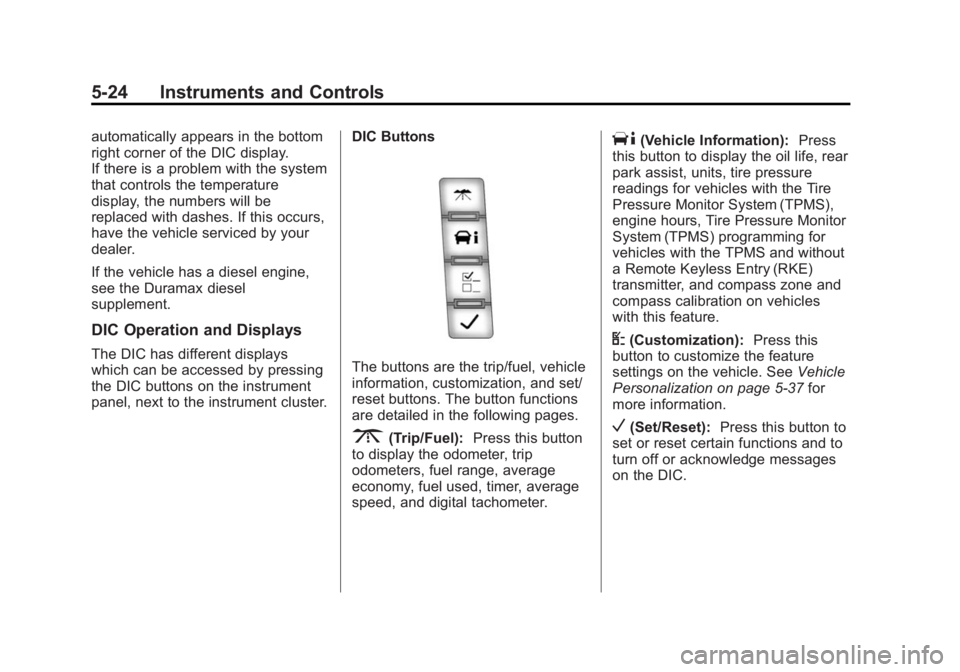
panel, next to the instrument cluster.DIC ButtonsThe buttons are the trip/fuel, vehicle
information, customization, and set/
reset buttons. The button functions
are detailed in the following pages.
3(Trip/Fuel):
Press this button
to display the odometer, trip
odometers, fuel range, average
economy, fuel used, timer, average
speed, and digital tachometer.
T(Vehicle Information): Press
this button to display the oil life, rear
park assist, units, tire pressure
readings for vehicles with the Tire
Pressure Monitor System (TPMS),
engine hours, Tire Pressure Monitor
System (TPMS) programming for
vehicles with the TPMS and without
a Remote Keyless Entry (RKE)
transmitter, and compass zone and
compass calibration on vehicles
with this feature.
U(Customization): Press this
button to customize the feature
settings on the vehicle. See Vehicle
Personalization on page 5-37 for
more information.
V(Set/Reset): Press this button to
set or reset certain functions and to
turn off or acknowledge messages
on the DIC.
Page 122 of 377
Black plate (27,1)GMC Savana Owner Manual (GMNA-Localizing-U.S./Canada-7707482) -
2015 - crc - 6/3/14
Instruments and Controls 5-27
Vehicle Information Menu
Items
T(Vehicle Information):Press
this button to scroll through the
following menu items:
Oil Life
Press
Tuntil OIL LIFE
REMAINING displays. This display
shows an estimate of the oil's
remaining useful life. If you see
99% OIL LIFE REMAINING on the
display, that means 99% of the
current oil life remains. The engine
oil life system will alert you to
change the oil on a schedule
consistent with your driving
conditions.
When the remaining oil life is low,
the CHANGE ENGINE OIL SOON
message will appear on the display.
See Engine Oil Messages on
page 5-30. You should change the
oil as soon as possible. See Engine
Oil on page 10-6. In addition to the
engine oil life system monitoring the
oil life, additional maintenance is recommended in the Maintenance
Schedule in this manual. See
Maintenance Schedule on
page 11-3.
Remember, you must reset the OIL
LIFE yourself after each oil change.
It will not reset itself. Also, be
careful not to reset the OIL LIFE
accidentally at any time other than
when the oil has just been changed.
It cannot be reset accurately until
the next oil change. To reset the
engine oil life system, see
Engine
Oil Life System on page 10-8.
Park Assist
If the vehicle has the Rear Parking
Assist (RPA) system, press
Tuntil
PARK ASSIST displays. This
display allows the system to be
turned on or off. Once in this
display, press to select between ON
or OFF. The RPA system
automatically turns back on after
each vehicle start. When the RPA
system is turned off and the vehicle
is shifted out of P (Park), the DIC
will display the PARK ASSIST OFF message as a reminder that the
system has been turned off. See
Object Detection System Messages
on page 5-32
andParking Assist on
page 9-35.
Units
Press
Tuntil UNITS displays. This
display allows you to select between
metric or English units of
measurement. Once in this display,
press
Vto select between METRIC
or ENGLISH units.
Tire Pressure
If the vehicle has the Tire Pressure
Monitor System (TPMS), the
pressure for each tire can be viewed
in the DIC. The tire pressure will be
shown in either kilopascals (kPa) or
pounds per square inch (psi). Press
Tuntil the DIC displays FRONT
TIRES PSI (kPa) LEFT ##
RIGHT ##. Press
Tagain until the
DIC displays REAR TIRES
PSI (kPa) LEFT ## RIGHT ##.
Page 127 of 377
Black plate (32,1)GMC Savana Owner Manual (GMNA-Localizing-U.S./Canada-7707482) -
2015 - crc - 6/3/14
5-32 Instruments and Controls
Key and Lock Messages
REPLACE BATTERY IN
REMOTE KEY
This message displays if a Remote
Keyless Entry (RKE) transmitter
battery is low. The battery needs to
be replaced in the transmitter. See
“Battery Replacement”under
Remote Keyless Entry (RKE)
System Operation on page 2-2.
Lamp Messages
AUTOMATIC LIGHT
CONTROL OFF
This message displays when the
automatic headlamps are turned off.
See Exterior Lamp Controls on
page 6-1.
AUTOMATIC LIGHT
CONTROL ON
This message displays when the
automatic headlamps are turned on.
See Exterior Lamp Controls on
page 6-1.
TURN SIGNAL ON
This message displays and a chime
sounds if a turn signal is left on for
1.2 km (0.75 mi). Move the turn
signal lever to the off position.
Object Detection System
Messages
PARK ASST BLOCKED SEE
OWNERS MANUAL
This message displays if there is
something interfering with the Rear
Parking Assist (RPA) system. See
Parking Assist on page 9-35.
PARK ASSIST OFF
After the vehicle has been started,
this message displays to remind the
driver that the Rear Parking Assist
(RPA) system has been turned off.
Press the set/reset button or the trip
odometer reset stem to
acknowledge this message and
clear it from the DIC display. To turn
the RPA system back on, see
Parking Assist on page 9-35.
SERVICE PARK ASSIST
This message displays if there is a
problem with the Rear Parking
Assist (RPA) system. Do not use
this system to help you park. See
Parking Assist on page 9-35. See
your dealer for service.
Ride Control System
Messages
SERVICE STABILITRAK
If the vehicle has StabiliTrak®and
this message displays, it means
there may be a problem with the
StabiliTrak system. If you see this
message, try to reset the system.
Stop; turn off the engine for at least
15 seconds; then start the engine
again. If this message still comes
on, it means there is a problem. You
should see your dealer for service.
The vehicle is safe to drive,
however, you do not have the
benefit of StabiliTrak, so reduce
your speed and drive accordingly.
Page 180 of 377
Black plate (1,1)GMC Savana Owner Manual (GMNA-Localizing-U.S./Canada-7707482) -
2015 - crc - 6/3/14
Driving and Operating 9-1
Driving and
Operating
Driving Information
Distracted Driving . . . . . . . . . . . . . 9-2
Defensive Driving . . . . . . . . . . . . . 9-2
Drunk Driving . . . . . . . . . . . . . . . . . 9-3
Control of a Vehicle . . . . . . . . . . . 9-3
Braking . . . . . . . . . . . . . . . . . . . . . . . 9-3
Steering . . . . . . . . . . . . . . . . . . . . . . . 9-3
Off-Road Recovery . . . . . . . . . . . . 9-4
Loss of Control . . . . . . . . . . . . . . . . 9-4
Driving on Wet Roads . . . . . . . . . 9-5
Hill and Mountain Roads . . . . . . 9-6
Winter Driving . . . . . . . . . . . . . . . . . 9-7
If the Vehicle Is Stuck . . . . . . . . . 9-8
Vehicle Load Limits . . . . . . . . . . . 9-9
Starting and Operating
New Vehicle Break-In . . . . . . . . 9-14
Ignition Positions . . . . . . . . . . . . 9-14
Starting the Engine . . . . . . . . . . 9-16
Fast Idle System . . . . . . . . . . . . . 9-17
Engine Heater . . . . . . . . . . . . . . . 9-18
Retained AccessoryPower (RAP) . . . . . . . . . . . . . . . 9-19 Shifting Into Park . . . . . . . . . . . . 9-19
Shifting out of Park . . . . . . . . . . 9-20
Parking over Things
That Burn . . . . . . . . . . . . . . . . . . 9-21
Engine Exhaust
Engine Exhaust . . . . . . . . . . . . . . 9-21
Running the Vehicle WhileParked . . . . . . . . . . . . . . . . . . . . . 9-22
Automatic Transmission
Automatic Transmission . . . . . 9-22
Manual Mode . . . . . . . . . . . . . . . . 9-26
Tow/Haul Mode . . . . . . . . . . . . . . 9-27
Brakes
Antilock BrakeSystem (ABS) . . . . . . . . . . . . . . 9-28
Parking Brake . . . . . . . . . . . . . . . 9-29
Ride Control Systems
Traction Control/Electronic Stability Control . . . . . . . . . . . . 9-29
Locking Rear Axle . . . . . . . . . . . 9-31
Cruise Control
Cruise Control . . . . . . . . . . . . . . . 9-32
Driver Assistance Systems
Parking Assist . . . . . . . . . . . . . . . 9-35
Rear Vision Camera (RVC) . . . . . . . . . . . . . 9-36
Fuel
Fuel . . . . . . . . . . . . . . . . . . . . . . . . . 9-39
California FuelRequirements . . . . . . . . . . . . . . 9-40
Fuels in Foreign Countries . . . 9-40
Fuel Additives . . . . . . . . . . . . . . . 9-40
E85 or FlexFuel . . . . . . . . . . . . . . 9-40
Filling the Tank . . . . . . . . . . . . . . 9-41
Filling a Portable Fuel Container . . . . . . . . . . . . . . . . . . . 9-43
Trailer Towing
General TowingInformation . . . . . . . . . . . . . . . . . 9-44
Driving Characteristics and Towing Tips . . . . . . . . . . . . . . . . 9-44
Trailer Towing . . . . . . . . . . . . . . . . 9-46
Towing Equipment . . . . . . . . . . . 9-50
Conversions and Add-Ons
Add-On Electrical Equipment . . . . . . . . . . . . . . . . . 9-53
Page 194 of 377
Black plate (15,1)GMC Savana Owner Manual (GMNA-Localizing-U.S./Canada-7707482) -
2015 - crc - 6/3/14
Driving and Operating 9-15
This position locks the ignition and
transmission.
Do not turn the engine off when the
vehicle is moving. This will cause a
loss of power assist in the brake
and steering systems and disable
the airbags.
If the vehicle must be shut off in an
emergency:
1. Brake using a firm and steadypressure. Do not pump the
brakes repeatedly. This may
deplete power assist, requiring
increased brake pedal force.
2. Shift the vehicle to N (Neutral). This can be done while the
vehicle is moving. After shifting
to N (Neutral), firmly apply the
brakes and steer the vehicle to a
safe location.
3. Come to a complete stop, shift to P (Park), and turn the ignition
to LOCK/OFF. On vehicles with
an automatic transmission, the shift lever must be in P (Park) to
turn the ignition switch to the
LOCK/OFF position.
4. Set the parking brake. See Parking Brake on page 9-29.
{Warning
Turning off the vehicle while
moving may cause loss of power
assist in the brake and steering
systems and disable the airbags.
While driving, only shut the
vehicle off in an emergency.
If the vehicle cannot be pulled over,
and must be shut off while driving,
turn the ignition to ACC/
ACCESSORY.
{Caution
Using a tool to force the key to
turn in the ignition could cause
damage to the switch or break the (Continued)
Caution (Continued)
key. Use the correct key, make
sure it is all the way in, and turn it
only with your hand. If the key
cannot be turned by hand, see
your dealer.
2 (ACC/ACCESSORY): This is the
position in which you can operate
things like the radio and the
windshield wipers when the engine
is off.
3 (ON/RUN): This position can be
used to operate the electrical
accessories and to display some
instrument cluster warning and
indicator lights. This position can
also be used for service and
diagnostics, and to verify the proper
operation of the malfunction
indicator lamp as may be required
for emission inspection purposes.
The switch stays in this position
when the engine is running.