cruise control GMC SAVANA PASSENGER 2017 User Guide
[x] Cancel search | Manufacturer: GMC, Model Year: 2017, Model line: SAVANA PASSENGER, Model: GMC SAVANA PASSENGER 2017Pages: 348, PDF Size: 5.92 MB
Page 120 of 348
GMC Savana Owner Manual (GMNA-Localizing-U.S./Canada-9967828) -
2017 - crc - 5/2/16
Instruments and Controls 119
GRADE BRAKING ON
This message displays when the
grade braking has been activated
while driving on downhill grades.
This message will only appear the
first time the feature is activated in
an ignition cycle. SeeTow/Haul
Mode 0188, Automatic
Transmission 0184, and Cruise
Control 0192.
SERVICE TRANSMISSION
This message displays when there
is a problem with the transmission.
See your dealer for service.
TRANSMISSION HOT IDLE
ENGINE
Caution
Do not drive the vehicle while the
transmission fluid is overheating,
or the transmission can be
damaged. This could lead to
costly repairs that would not be
covered by the warranty. This message displays along with a
chime if the transmission fluid in the
vehicle gets hot. Driving with the
transmission fluid temperature high
can cause damage to the vehicle.
Stop the vehicle and let it idle to
allow the transmission to cool. This
message clears and the chime
stops when the fluid temperature
reaches a safe level.
Vehicle Reminder
Messages
ICE POSSIBLE DRIVE
WITH CARE
This message displays when the
outside air temperature is cold
enough to create icy road
conditions. Adjust your driving
accordingly.
Vehicle
Personalization
This vehicle may have
customization capabilities that allow
you to program certain features to
one preferred setting. Customization
features can only be programmed to
one setting on the vehicle and
cannot be programmed to a
preferred setting for two different
drivers.
All of the customization options may
not be available on your vehicle.
Only the options available will be
displayed on the DIC.
The default settings for the
customization features were set
when the vehicle left the factory, but
may have been changed from their
default state since then.
The customization preferences are
automatically recalled.
To change customization
preferences, use the following
procedure.
Page 166 of 348
GMC Savana Owner Manual (GMNA-Localizing-U.S./Canada-9967828) -
2017 - crc - 5/6/16
Driving and Operating 165
Driving and
Operating
Driving Information
Distracted Driving . . . . . . . . . . . . 166
Defensive Driving . . . . . . . . . . . . . 166
Drunk Driving . . . . . . . . . . . . . . . . . 167
Control of a Vehicle . . . . . . . . . . . 167
Braking . . . . . . . . . . . . . . . . . . . . . . . 167
Steering . . . . . . . . . . . . . . . . . . . . . . 167
Off-Road Recovery . . . . . . . . . . . 168
Loss of Control . . . . . . . . . . . . . . . 168
Driving on Wet Roads . . . . . . . . 169
Hill and Mountain Roads . . . . . 170
Winter Driving . . . . . . . . . . . . . . . . 170
If the Vehicle Is Stuck . . . . . . . . 172
Vehicle Load Limits . . . . . . . . . . . 172
Starting and Operating
New Vehicle Break-In . . . . . . . . . 176
Ignition Positions . . . . . . . . . . . . . 176
Starting the Engine . . . . . . . . . . . 178
Fast Idle System . . . . . . . . . . . . . 179
Engine Heater . . . . . . . . . . . . . . . . 180
Retained AccessoryPower (RAP) . . . . . . . . . . . . . . . . 181
Shifting Into Park . . . . . . . . . . . . . 181
Shifting out of Park . . . . . . . . . . . 182 Parking over Things
That Burn . . . . . . . . . . . . . . . . . . . 183
Engine Exhaust
Engine Exhaust . . . . . . . . . . . . . . 183
Running the Vehicle WhileParked . . . . . . . . . . . . . . . . . . . . . . 184
Automatic Transmission
Automatic Transmission . . . . . . 184
Manual Mode . . . . . . . . . . . . . . . . . 187
Tow/Haul Mode . . . . . . . . . . . . . . . 188
Brakes
Antilock BrakeSystem (ABS) . . . . . . . . . . . . . . . 189
Parking Brake . . . . . . . . . . . . . . . . 190
Ride Control Systems
Traction Control/Electronic Stability Control . . . . . . . . . . . . . 190
Locking Rear Axle . . . . . . . . . . . . 192
Cruise Control
Cruise Control . . . . . . . . . . . . . . . . 192
Driver Assistance Systems
Rear Vision Camera (RVC) . . . 195
Parking Assist . . . . . . . . . . . . . . . . 197
Fuel
Fuel . . . . . . . . . . . . . . . . . . . . . . . . . . 199 California Fuel
Requirements . . . . . . . . . . . . . . . 199
Fuels in Foreign Countries . . . 200
Fuel Additives . . . . . . . . . . . . . . . . 200
E85 or FlexFuel . . . . . . . . . . . . . . 200
Filling the Tank . . . . . . . . . . . . . . . 201
Filling a Portable Fuel Container . . . . . . . . . . . . . . . . . . . 202
Trailer Towing
General TowingInformation . . . . . . . . . . . . . . . . . . 203
Driving Characteristics and Towing Tips . . . . . . . . . . . . . . . . . 203
Trailer Towing . . . . . . . . . . . . . . . . 206
Towing Equipment . . . . . . . . . . . . 211
Conversions and Add-Ons
Add-On Electrical Equipment . . . . . . . . . . . . . . . . . . 213
Page 171 of 348
GMC Savana Owner Manual (GMNA-Localizing-U.S./Canada-9967828) -
2017 - crc - 5/6/16
170 Driving and Operating
.Keep the windshield washer fluid
reservoir filled.
. Have good tires with proper
tread depth. See Tires0253.
. Turn off cruise control.
Hill and Mountain Roads
Driving on steep hills or through
mountains is different than driving
on flat or rolling terrain. Tips include:
.Keep the vehicle serviced and in
good shape.
. Check all fluid levels and brakes,
tires, cooling system, and
transmission.
. Shift to a lower gear when going
down steep or long hills.
{Warning
Using the brakes to slow the
vehicle on a long downhill slope
can cause brake overheating, can
reduce brake performance, and
could result in a loss of braking.
(Continued)
Warning (Continued)
Shift the transmission to a lower
gear to let the engine assist the
brakes on a steep downhill slope.
{Warning
Coasting downhill in N (Neutral)
or with the ignition off is
dangerous. This can cause
overheating of the brakes and
loss of steering. Always have the
engine running and the vehicle
in gear.
. Drive at speeds that keep the
vehicle in its own lane. Do not
swing wide or cross the
center line.
. Be alert on top of hills;
something could be in your lane
(e.g., stalled car, accident). .
Pay attention to special road
signs (e.g., falling rocks area,
winding roads, long grades,
passing or no-passing zones)
and take appropriate action.
Winter Driving
Driving on Snow or Ice
Snow or ice between the tires and
the road creates less traction or
grip, so drive carefully. Wet ice can
occur at about 0 °C (32 °F) when
freezing rain begins to fall. Avoid
driving on wet ice or in freezing rain
until roads can be treated.
For slippery road driving:
.Accelerate gently. Accelerating
too quickly causes the wheels to
spin and makes the surface
under the tires slick.
. Turn on Traction Control. See
Traction Control/Electronic
Stability Control 0190.
. Antilock Brake System (ABS)
improves vehicle stability during
hard stops, but the brakes
should be applied sooner than
Page 172 of 348
GMC Savana Owner Manual (GMNA-Localizing-U.S./Canada-9967828) -
2017 - crc - 5/6/16
Driving and Operating 171
when on dry pavement. See
Antilock Brake System
(ABS)0189.
. Allow greater following distance
and watch for slippery spots. Icy
patches can occur on otherwise
clear roads in shaded areas.
The surface of a curve or an
overpass can remain icy when
the surrounding roads are clear.
Avoid sudden steering
maneuvers and braking while
on ice.
. Turn off cruise control.
Blizzard Conditions
Stop the vehicle in a safe place and
signal for help. Stay with the vehicle
unless there is help nearby.
If possible, use Roadside
Assistance. See Roadside
Assistance Program 0318. To get
help and keep everyone in the
vehicle safe:
. Turn on the hazard warning
flashers.
. Tie a red cloth to an outside
mirror.
{Warning
Snow can trap engine exhaust
under the vehicle. This may
cause exhaust gases to get
inside. Engine exhaust contains
carbon monoxide (CO), which
cannot be seen or smelled. It can
cause unconsciousness and even
death.
If the vehicle is stuck in snow:
. Clear snow from the base of
the vehicle, especially any
blocking the exhaust pipe.
. Open a window about 5 cm
(2 in) on the vehicle side
that is away from the wind,
to bring in fresh air.
. Fully open the air outlets on
or under the instrument
panel.
. Adjust the climate control
system to circulate the air
inside the vehicle and set
(Continued)
Warning (Continued)
the fan speed to the highest
setting. See“Climate
Control Systems.”
For more information about CO,
see Engine Exhaust 0183.
To save fuel, run the engine for
short periods to warm the vehicle
and then shut the engine off and
partially close the window. Moving
about to keep warm also helps.
If it takes time for help to arrive,
when running the engine, push the
accelerator pedal slightly so the
engine runs faster than the idle
speed. This keeps the battery
charged to restart the vehicle and to
signal for help with the headlamps.
Do this as little as possible, to
save fuel.
Page 180 of 348
GMC Savana Owner Manual (GMNA-Localizing-U.S./Canada-9967828) -
2017 - crc - 5/6/16
Driving and Operating 179
2. If the engine does not startafter 5-10 seconds, especially
in very cold weather (below
−18 °C or 0 °F), it could be
flooded with too much
gasoline. Try pushing the
accelerator pedal all the way to
the floor and holding it there as
you hold the key in START for
up to 15 seconds. Wait at least
15 seconds between each try,
to allow the cranking motor to
cool down. When the engine
starts, let go of the key and
accelerator. If the vehicle starts
briefly but then stops again, do
the same thing. This clears the
extra gasoline from the engine.
Do not race the engine
immediately after starting it.
Operate the engine and
transmission gently until the oil
warms up and lubricates all
moving parts.Fast Idle System
If equipped, this feature is available
only with cruise control. The manual
fast idle switch is operated using the
cruise control buttons on the left
side of the steering wheel.
This system can be used to
increase engine idle speed
whenever the following conditions
are met:
.The parking brake is set.
. The brake pedal is not pressed.
. The vehicle must not be moving
and the accelerator must not be
pressed.
To control the fast idle:
. To enable the Fast Idle System,
press and release the cruise
control on/off button and ensure
that the switch indicator light
is lit.
. Press and release the cruise
control SET- button. Engine
speed will be held at
approximately 1200 rpm. When the fast idle is active, the
Driver Information Center (DIC) will
display FAST IDLE ON.
One of the following actions will turn
off the fast idle:
.
Pressing the brake.
. Selecting the cruise control
cancel button.
. Releasing the parking brake.
. Moving the transmission shift
lever out of P (Park) or
N (Neutral).
. Selecting the cruise control on/
off button when it was
previously on.
. Pressing the cruise control SET-
button a second time.
. Pressing the accelerator more
than one-quarter of the
way down.
. Turning the ignition switch to the
LOCK/OFF position.
Page 188 of 348
GMC Savana Owner Manual (GMNA-Localizing-U.S./Canada-9967828) -
2017 - crc - 5/6/16
Driving and Operating 187
Caution
Spinning the tires or holding the
vehicle in one place on a hill
using only the accelerator pedal
may damage the transmission.
The repair will not be covered by
the vehicle warranty. If you are
stuck, do not spin the tires. When
stopping on a hill, use the brakes
to hold the vehicle in place.
Normal Mode Grade Braking
This mode is enabled when the
vehicle is started, but is not enabled
in Range Selection Mode. It assists
in maintaining desired vehicle
speeds when driving on downhill
grades by using the engine and
transmission to slow the vehicle.
The first time the system activates
for each ignition key cycle, a DIC
message will be displayed. See
Transmission Messages0118.
To disable or enable Normal Mode
Grade Braking within the current
ignition key cycle, press and hold
the Tow/Haul button for three seconds. A DIC message
displays. See
Transmission
Messages 0118.
For other forms of grade braking,
see Tow/Haul Mode 0188 and
Cruise Control 0192.
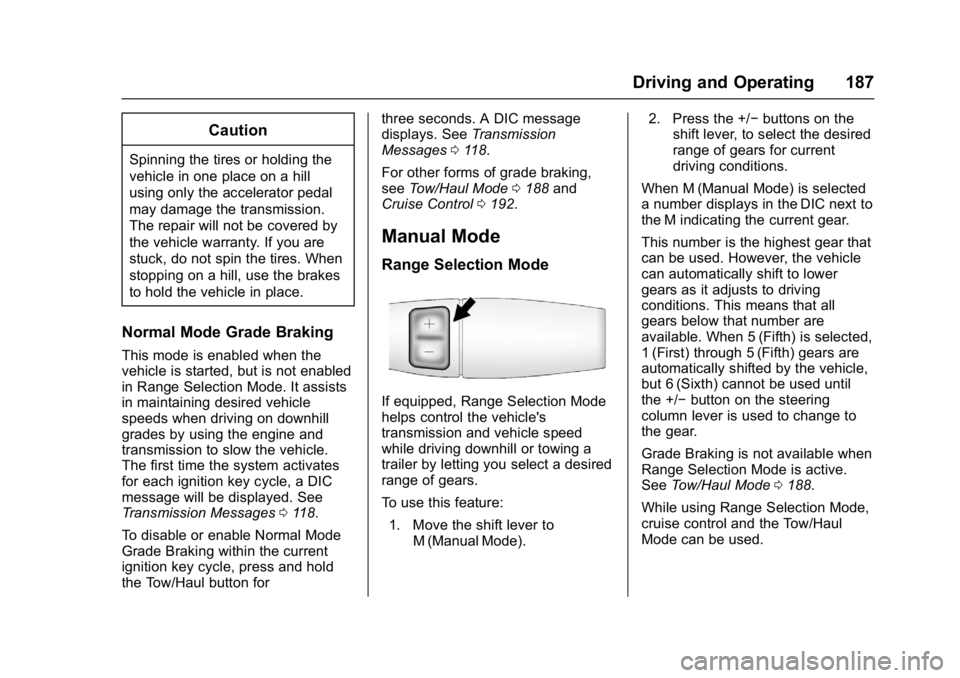
Manual Mode
Range Selection Mode
If equipped, Range Selection Mode
helps control the vehicle's
transmission and vehicle speed
while driving downhill or towing a
trailer by letting you select a desired
range of gears.
To use this feature:
1. Move the shift lever to M (Manual Mode). 2. Press the +/−
buttons on the
shift lever, to select the desired
range of gears for current
driving conditions.
When M (Manual Mode) is selected
a number displays in the DIC next to
the M indicating the current gear.
This number is the highest gear that
can be used. However, the vehicle
can automatically shift to lower
gears as it adjusts to driving
conditions. This means that all
gears below that number are
available. When 5 (Fifth) is selected,
1 (First) through 5 (Fifth) gears are
automatically shifted by the vehicle,
but 6 (Sixth) cannot be used until
the +/− button on the steering
column lever is used to change to
the gear.
Grade Braking is not available when
Range Selection Mode is active.
See Tow/Haul Mode 0188.
While using Range Selection Mode,
cruise control and the Tow/Haul
Mode can be used.
Page 189 of 348
GMC Savana Owner Manual (GMNA-Localizing-U.S./Canada-9967828) -
2017 - crc - 5/6/16
188 Driving and Operating
Caution
Spinning the tires or holding the
vehicle in one place on a hill
using only the accelerator pedal
may damage the transmission.
The repair will not be covered by
the vehicle warranty. If you are
stuck, do not spin the tires. When
stopping on a hill, use the brakes
to hold the vehicle in place.
Low Traction Mode
Low Traction Mode can assist in
vehicle acceleration when road
conditions are slippery. While the
vehicle is at a stop, select the
second gear range using Range
Selection Mode. This will limit
torque to the wheels after it detects
wheel slip, preventing the tires from
spinning.
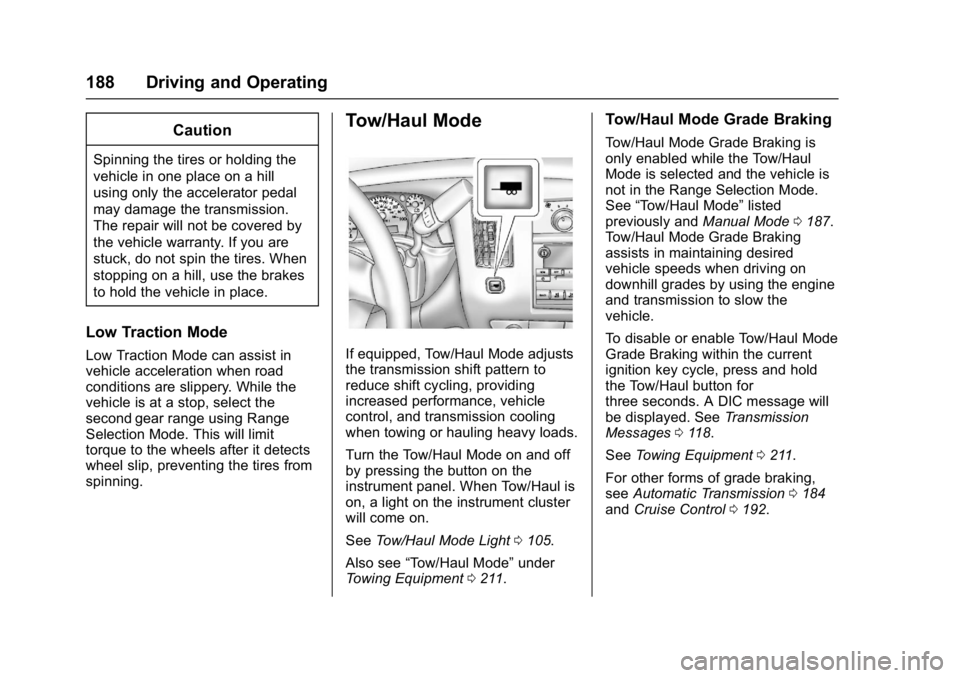
Tow/Haul Mode
If equipped, Tow/Haul Mode adjusts
the transmission shift pattern to
reduce shift cycling, providing
increased performance, vehicle
control, and transmission cooling
when towing or hauling heavy loads.
Turn the Tow/Haul Mode on and off
by pressing the button on the
instrument panel. When Tow/Haul is
on, a light on the instrument cluster
will come on.
SeeTow/Haul Mode Light 0105.
Also see “Tow/Haul Mode” under
Towing Equipment 0211.
Tow/Haul Mode Grade Braking
Tow/Haul Mode Grade Braking is
only enabled while the Tow/Haul
Mode is selected and the vehicle is
not in the Range Selection Mode.
See “Tow/Haul Mode” listed
previously and Manual Mode0187.
Tow/Haul Mode Grade Braking
assists in maintaining desired
vehicle speeds when driving on
downhill grades by using the engine
and transmission to slow the
vehicle.
To disable or enable Tow/Haul Mode
Grade Braking within the current
ignition key cycle, press and hold
the Tow/Haul button for
three seconds. A DIC message will
be displayed. See Transmission
Messages 0118.
See Towing Equipment 0211.
For other forms of grade braking,
see Automatic Transmission 0184
and Cruise Control 0192.
Page 193 of 348
GMC Savana Owner Manual (GMNA-Localizing-U.S./Canada-9967828) -
2017 - crc - 5/6/16
192 Driving and Operating
control in most driving conditions.
When activated, the StabiliTrak
system may reduce engine power to
the wheels and apply braking to
individual wheels as necessary to
assist the driver with vehicle
directional control. If cruise control
is being used when StabiliTrak
activates, the cruise control
automatically disengages. The
cruise control can be re-engaged
when road conditions allow. See
Cruise Control0192.
The StabiliTrak system may also
turn off automatically if it determines
that a problem exists with the
system. If the problem does not
clear itself after restarting the
vehicle, see your dealer for service.
Traction Control Operation
TCS is part of the StabiliTrak
system. TCS limits wheel spin by
reducing engine power to the
wheels and by applying brakes to
each individual wheel as necessary.
If the brake-traction control system
activates constantly or if the brakes
have heated up due to high speed
braking, the brake-traction control will be automatically disabled. The
system will come back on after the
brakes have cooled. This can take
up to two minutes or longer
depending on brake usage.
TCS may activate on dry or rough
roads or under conditions such as
heavy acceleration while turning or
abrupt upshifts/downshifts of the
transmission. When this reduction in
acceleration occurs, it may be
noticed, or a noise or vibration may
be heard. This is normal.
Adding non-dealer accessories can
affect the vehicle's performance.
See
Accessories and
Modifications 0217.
Locking Rear Axle
Vehicles with a locking rear axle can
give more traction on snow, mud,
ice, sand, or gravel. It works like a
standard axle most of the time, but
when traction is low, this feature will
allow the rear wheel with the most
traction to move the vehicle.
Cruise Control
{Warning
Cruise control can be dangerous
where you cannot drive safely at
a steady speed. Do not use
cruise control on winding roads or
in heavy traffic.
Cruise control can be dangerous
on slippery roads. On such roads,
fast changes in tire traction can
cause excessive wheel slip, and
you could lose control. Do not use
cruise control on slippery roads.
If equipped with cruise control, a
speed of about 40 km/h (25 mph) or
more can be maintained without
keeping your foot on the
accelerator. Cruise control does not
work at speeds below about 40 km/h
(25 mph).
If the vehicle has StabiliTrak and the
system begins to limit wheel spin,
cruise control will automatically
disengage. See Traction Control/
Electronic Stability Control 0190.
Page 194 of 348
GMC Savana Owner Manual (GMNA-Localizing-U.S./Canada-9967828) -
2017 - crc - 5/6/16
Driving and Operating 193
When road conditions allow cruise
control to be safely used again,
cruise control can be turned
back on.
If the brakes are applied, cruise
control disengages.
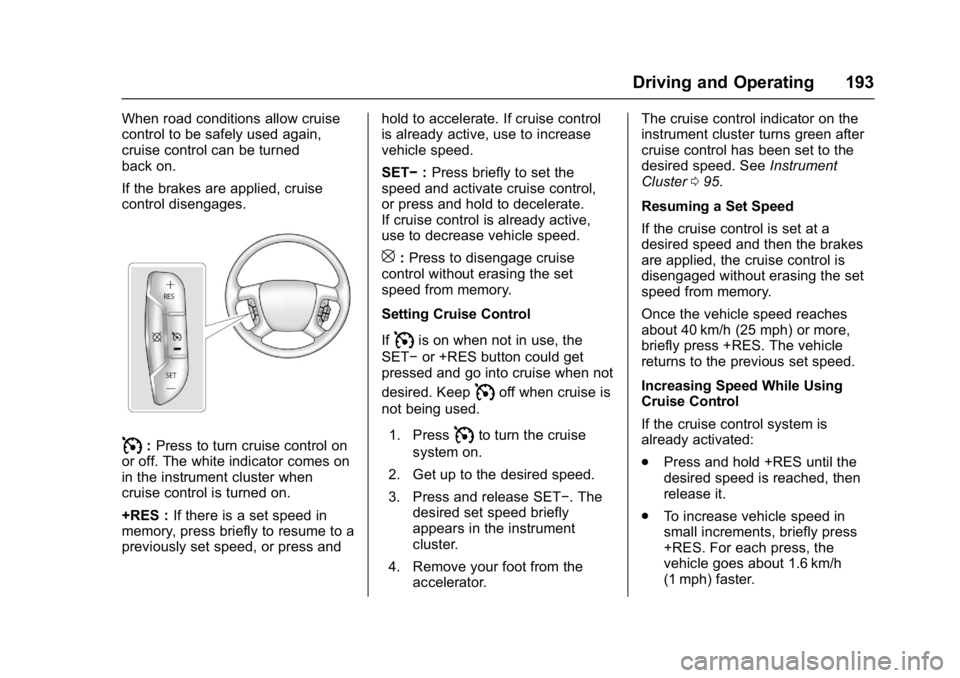
I:Press to turn cruise control on
or off. The white indicator comes on
in the instrument cluster when
cruise control is turned on.
+RES : If there is a set speed in
memory, press briefly to resume to a
previously set speed, or press and hold to accelerate. If cruise control
is already active, use to increase
vehicle speed.
SET−
:Press briefly to set the
speed and activate cruise control,
or press and hold to decelerate.
If cruise control is already active,
use to decrease vehicle speed.
[: Press to disengage cruise
control without erasing the set
speed from memory.
Setting Cruise Control
If
Iis on when not in use, the
SET− or +RES button could get
pressed and go into cruise when not
desired. Keep
Ioff when cruise is
not being used.
1. Press
Ito turn the cruise
system on.
2. Get up to the desired speed.
3. Press and release SET−. The desired set speed briefly
appears in the instrument
cluster.
4. Remove your foot from the accelerator. The cruise control indicator on the
instrument cluster turns green after
cruise control has been set to the
desired speed. See
Instrument
Cluster 095.
Resuming a Set Speed
If the cruise control is set at a
desired speed and then the brakes
are applied, the cruise control is
disengaged without erasing the set
speed from memory.
Once the vehicle speed reaches
about 40 km/h (25 mph) or more,
briefly press +RES. The vehicle
returns to the previous set speed.
Increasing Speed While Using
Cruise Control
If the cruise control system is
already activated:
. Press and hold +RES until the
desired speed is reached, then
release it.
. To increase vehicle speed in
small increments, briefly press
+RES. For each press, the
vehicle goes about 1.6 km/h
(1 mph) faster.
Page 195 of 348
GMC Savana Owner Manual (GMNA-Localizing-U.S./Canada-9967828) -
2017 - crc - 5/6/16
194 Driving and Operating
The speedometer reading can be
displayed in either English or metric
units. SeeDriver Information Center
(DIC) 0108. The increment value
used depends on the units
displayed.
Reducing Speed While Using
Cruise Control
If the cruise control system is
already activated:
. Press and hold SET– until the
desired lower speed is reached,
then release it.
. To decrease the vehicle speed in
small increments, briefly press
SET–. For each press, the
vehicle goes about 1.6 km/h
(1 mph) slower.
The speedometer reading can be
displayed in either English or metric
units. See Driver Information Center
(DIC) 0108. The increment value
used depends on the units
displayed. Passing Another Vehicle While
Using Cruise Control
Use the accelerator pedal to
increase the vehicle speed. When
you take your foot off the pedal, the
vehicle will slow down to the
previous set cruise speed. While
pressing the accelerator pedal or
shortly following the release to
override cruise control, briefly
pressing SET–
will result in cruise
set to the current vehicle speed.
Using Cruise Control on Hills
How well cruise control works on
hills depends on the vehicle speed,
load, and the steepness of the hills.
When going up steep hills, you
might have to step on the
accelerator pedal to maintain your
speed.
While going downhill:
. Vehicles with a 4-speed
automatic transmission may
need to have the brakes applied
or the transmission shifted to a
lower gear to help maintain
driver selected speed. .
Vehicles with a 6-speed
automatic transmission have
Cruise Grade Braking to help
maintain driver selected speed.
Cruise Grade Braking is enabled
when the vehicle is started and
cruise control is active. It is not
enabled in Range Selection Mode.
It assists in maintaining driver
selected speed when driving on
downhill grades by using the engine
and transmission to slow the
vehicle.
To disable and enable Cruise Grade
Braking for the current ignition key
cycle, press and hold the Tow/Haul
button for three seconds. A DIC
message displays. See
Transmission Messages 0118.
When the brakes are applied the
cruise control is disengaged.